
MIDL MCP Server
Official<div align="center">
<img src="https://raw.githubusercontent.com/midl-ai/assets/master/midl-ai-wordmark.svg" alt="MIDL.AI Logo" width="200"/>
# MIDL MCP Server
**Model Context Protocol server for MIDL Protocol — Bitcoin L1 + EVM L2 hybrid blockchain.**
*Bring AI-powered blockchain interaction to Claude Desktop, Cursor, and any MCP client.*
[](https://opensource.org/licenses/MIT)
[](https://www.typescriptlang.org/)
[](https://modelcontextprotocol.io)
[Documentation](https://midl-ai.xyz/docs/mcp-server) • [Main Website](https://midl-ai.xyz) • [GitHub](https://github.com/midl-ai/mcp-server)
</div>
---
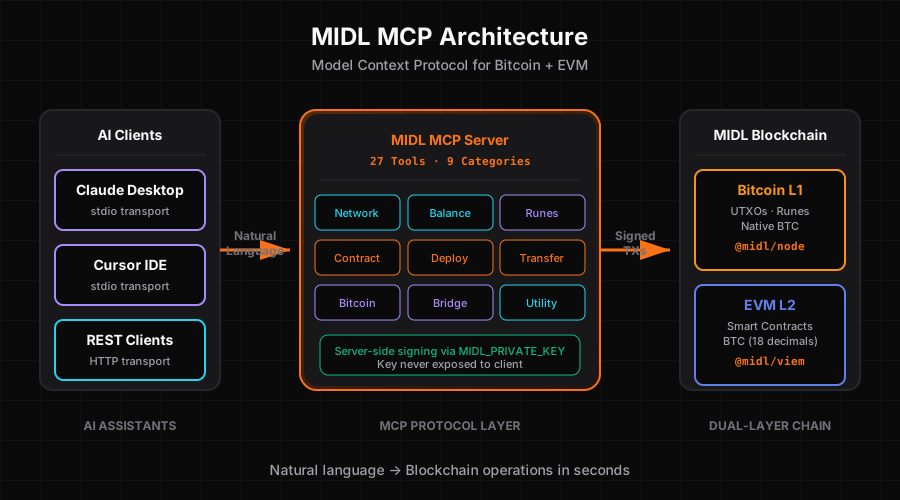
## What is This?
The MIDL MCP Server brings full MIDL Protocol capabilities to your AI assistant. Install once, and Claude (or any MCP client) can:
- Deploy smart contracts with Solidity templates
- Check balances on both Bitcoin L1 and EVM L2
- Bridge BTC between L1 and L2
- Manage Bitcoin Runes (etch, transfer, bridge to ERC20)
- Transfer tokens and native assets
- Read contract state and event logs
- Query network info and system contracts
- And 20+ more operations
All through natural conversation in Claude Desktop or Cursor.
## Features
### 27 Tools Across 9 Categories
| Category | Tools | Description |
|----------|-------|-------------|
| **Network** | 3 tools | Get network info, system contracts, block data |
| **Balance** | 3 tools | Query EVM balance, BTC balance, token balance |
| **Transfer** | 3 tools | Transfer EVM, transfer tokens, send raw transactions |
| **Deploy** | 1 tool | Compile and deploy Solidity contracts with templates |
| **Contract** | 3 tools | Read contracts, verify contracts, get event logs |
| **Bridge** | 2 tools | Bridge BTC↔EVM (deposit and withdrawal) |
| **Runes** | 4 tools | Rune balance, transfer, bridge to/from ERC20 |
| **Bitcoin** | 4 tools | UTXO queries, transaction tracking, fee rates |
| **Utility** | 3 tools | Convert units, lookup addresses, estimate gas |
### Dual Transport Architecture
- **stdio**: For Claude Desktop and Cursor (local development)
- **HTTP**: For remote clients and web integrations — live at `https://mcp.midl-ai.xyz/mcp`
### Plugin-Based Design
Each category is a self-contained plugin with its own tools. Easy to extend, easy to maintain.
### MCP UI Cards
Rich visual feedback with formatted HTML cards showing:
- Transaction details with syntax highlighting
- Status indicators (pending/confirmed/failed)
- Explorer links for transparency
- Formatted addresses and amounts
### Server-Side Signing
Secure transaction signing using `MIDL_PRIVATE_KEY` environment variable. No private keys exposed to the client.
## Installation
### Prerequisites
- Node.js 18+
- pnpm (recommended) or npm
- MIDL Protocol RPC access
- Private key for transaction signing
### Quick Start
```bash
# Clone repository
git clone https://github.com/midl-ai/mcp-server
cd midl-mcp-server
# Install dependencies
pnpm install
# Set up environment variables
cp .env.example .env
# Edit .env and add your MIDL_PRIVATE_KEY
# Build
pnpm build
# Test (optional)
pnpm test
```
## Configuration
### Environment Variables
Create a `.env` file:
```bash
# Required: Private key for signing transactions
MIDL_PRIVATE_KEY=0x...
# Optional: Custom RPC endpoint (defaults to staging)
MIDL_RPC_URL=https://rpc.staging.midl.xyz
# Optional: Network selection (mainnet or testnet)
MIDL_NETWORK=testnet
```
### Claude Desktop Setup
Add to your Claude Desktop config file:
**macOS**: `~/Library/Application Support/Claude/claude_desktop_config.json`
**Windows**: `%APPDATA%\Claude\claude_desktop_config.json`
**Linux**: `~/.config/Claude/claude_desktop_config.json`
```json
{
"mcpServers": {
"midl": {
"command": "node",
"args": [
"/absolute/path/to/midl-mcp-server/dist/index.js"
],
"env": {
"MIDL_PRIVATE_KEY": "your-private-key-here",
"MIDL_NETWORK": "testnet"
}
}
}
}
```
**Important**: Use absolute paths, not relative paths like `~/`.
### Cursor Setup
Add to `.cursor/config.json` in your project:
```json
{
"mcpServers": {
"midl": {
"command": "node",
"args": [
"/absolute/path/to/midl-mcp-server/dist/index.js"
],
"env": {
"MIDL_PRIVATE_KEY": "your-private-key-here"
}
}
}
}
```
Restart Claude Desktop or Cursor after configuration.
## Usage Examples
Once installed, you can use natural language in Claude:
### Deploy a Contract
```
User: Deploy an ERC20 token called MyToken with symbol MTK and 1 million initial supply
Claude: I'll deploy that contract for you...
[Uses midl_deploy_contract tool]
Contract deployed at 0xabc...
```
### Check Balances
```
User: What's my balance on MIDL?
Claude: Let me check both layers...
[Uses midl_get_btc_balance and midl_get_evm_balance]
Bitcoin L1: 1.5 BTC
EVM L2: 0.3 BTC
```
### Bridge Assets
```
User: Bridge 0.1 BTC from L1 to L2
Claude: I'll initiate the bridge transaction...
[Uses midl_bridge_btc_to_evm]
Bridge initiated. Transaction ID: 0x...
Waiting for confirmations...
Complete! Your L2 balance has been updated.
```
### Manage Runes
```
User: Transfer 50 UNCOMMON•GOODS rune to kaspa:qr...
Claude: Transferring rune...
[Uses midl_transfer_rune]
Rune transferred. TX: abc123...
```
### Read Contracts
```
User: Read the totalSupply from the ERC20 at 0x123...
Claude: Reading contract...
[Uses midl_read_contract]
Total Supply: 1,000,000 tokens
```
## Project Structure
```
midl-mcp-server/
├── src/
│ ├── plugins/ # All 9 plugin categories
│ │ ├── base/ # Base classes (PluginBase, ToolBase)
│ │ ├── network/ # 3 network tools
│ │ ├── balance/ # 3 balance tools
│ │ ├── transfer/ # 3 transfer tools
│ │ ├── deploy/ # 1 deploy tool + templates
│ │ ├── contract/ # 3 contract tools
│ │ ├── bridge/ # 2 bridge tools
│ │ ├── runes/ # 4 runes tools
│ │ ├── bitcoin/ # 4 bitcoin tools
│ │ └── utility/ # 3 utility tools
│ ├── ui/ # MCP UI card generators
│ │ ├── index.ts # Base card creators
│ │ ├── tx-cards.ts # Transaction cards
│ │ └── card-generators.ts # Maps tools to UI
│ ├── wallet.ts # EVM wallet client (viem)
│ ├── btc-wallet.ts # Bitcoin wallet client (@midl/node)
│ ├── config.ts # Constants and configuration
│ ├── types.ts # Shared TypeScript types
│ └── server.ts # MCP server entry point
├── dist/ # Built artifacts (generated)
├── tests/ # Unit tests
├── .env.example # Environment template
├── package.json # Dependencies
├── tsconfig.json # TypeScript config
└── vitest.config.ts # Test configuration
```
## Development
### Build
```bash
# Type check
pnpm typecheck
# Build for production
pnpm build
# Watch mode (rebuilds on changes)
pnpm build:watch
```
### Testing
```bash
# Run all tests
pnpm test
# Watch mode
pnpm test:watch
# Coverage report
pnpm test:coverage
```
### Linting
```bash
# Check for issues
pnpm lint
# Auto-fix
pnpm lint:fix
```
## Tool Reference
### Network Tools
- `midl_get_network_info` - Get chain ID, block height, RPC endpoints
- `midl_get_system_contracts` - Query system contract addresses
- `midl_get_block` - Fetch block data by number or hash
### Balance Tools
- `midl_get_evm_balance` - Query EVM native balance
- `midl_get_btc_balance` - Query Bitcoin UTXO balance
- `midl_get_token_balance` - Query ERC20 token balance
### Transfer Tools
- `midl_transfer_evm` - Send native BTC on EVM L2
- `midl_transfer_token` - Send ERC20 tokens
- `midl_send_raw_transaction` - Submit pre-signed transaction
### Deploy Tools
- `midl_deploy_contract` - Compile and deploy Solidity contracts
**Templates:**
- `erc20` - Standard fungible token
- `counter` - Simple counter contract
- `storage` - Key-value storage
### Contract Tools
- `midl_read_contract` - Call read-only contract methods
- `midl_get_logs` - Query contract event logs
- `midl_verify_contract` - Verify contract on explorer
### Bridge Tools
- `midl_bridge_btc_to_evm` - Deposit BTC from L1 to L2
- `midl_bridge_evm_to_btc` - Withdraw BTC from L2 to L1
### Runes Tools
- `midl_get_runes` - List all runes
- `midl_get_rune_balance` - Check rune balance
- `midl_transfer_rune` - Transfer runes
- `midl_bridge_rune_to_erc20` - Bridge rune to ERC20 token
### Bitcoin Tools
- `midl_get_utxos` - Query UTXOs for address
- `midl_get_transaction` - Get transaction details
- `midl_get_transaction_receipt` - Get transaction receipt
- `midl_get_fee_rate` - Get current fee rate
### Utility Tools
- `midl_convert_btc_to_evm` - Convert BTC units to wei
- `midl_get_rune_erc20_address` - Lookup rune's ERC20 address
- `midl_estimate_gas` - Estimate gas for transaction
## Architecture Details
### Plugin System
Each plugin extends `PluginBase` and uses the `@Tool` decorator:
```typescript
export class NetworkPlugin extends PluginBase {
@Tool({
name: 'midl_get_network_info',
description: 'Get MIDL network information',
inputSchema: networkInfoSchema,
readOnlyHint: true,
destructiveHint: false
})
async getNetworkInfo(): Promise<ToolResponse<NetworkInfo>> {
// Implementation
}
}
```
### Wallet Clients
**EVM Wallet** (`src/wallet.ts`):
- Uses viem for EVM operations
- Custom MIDL chain configuration
- Transaction signing with private key
**Bitcoin Wallet** (`src/btc-wallet.ts`):
- Uses @midl/node for Bitcoin operations
- UTXO selection and transaction building
- KeyPair connector for signing
### Error Handling
All tools return standardized responses:
```typescript
type ToolResponse<T> = {
success: true;
data: T;
} | {
success: false;
error: string;
code?: ErrorCode;
};
```
### Type Safety
Full TypeScript strict mode. No `any` types. All inputs validated with Zod schemas.
## Security
### Private Key Management
- **Never commit** `.env` to version control
- Use environment variables for production
- Consider hardware wallets for mainnet
- Rotate keys regularly
### RPC Security
- Use secure HTTPS endpoints only
- Consider rate limiting for production
- Monitor for unusual activity
### Input Validation
All tool inputs are validated using Zod schemas before execution.
## Troubleshooting
### Server Not Starting
**Issue**: Claude Desktop can't connect to the MCP server
**Solutions**:
1. Check absolute paths in config (no `~/`)
2. Verify Node.js is in PATH
3. Check `dist/index.js` exists (run `pnpm build`)
4. Review Claude Desktop logs
### Private Key Issues
**Issue**: "Invalid private key" error
**Solutions**:
1. Ensure key starts with `0x`
2. Check key length (64 hex characters + `0x`)
3. Verify key has testnet funds
4. Test key with a simple transaction
### Network Connection
**Issue**: "Failed to connect to RPC" error
**Solutions**:
1. Check `MIDL_RPC_URL` is correct
2. Verify network connectivity
3. Test RPC with curl: `curl https://rpc.staging.midl.xyz`
4. Check firewall settings
### Tool Execution Failures
**Issue**: Tools return errors
**Solutions**:
1. Check transaction has sufficient gas
2. Verify address formats are correct
3. Ensure wallet has sufficient balance
4. Review error message for specifics
## Contributing
We welcome contributions! Here's how:
1. Fork the repository
2. Create a feature branch (`git checkout -b feature/amazing-tool`)
3. Add your tool or fix
4. Write tests
5. Submit a pull request
### Adding a New Tool
1. Create tool file in appropriate plugin directory
2. Extend `ToolBase` and use `@Tool` decorator
3. Add Zod schema for input validation
4. Implement `execute()` method
5. Add unit tests
6. Update plugin's `index.ts`
## Related Projects
- **[MIDL Frontend](https://github.com/midl-ai/frontend)** - AI chat interface
- **[MIDL Protocol](https://midl.xyz)** - Bitcoin+EVM hybrid chain
- **[@midl-js](https://github.com/midl-js)** - Official MIDL SDK
## Resources
- [Documentation](https://midl-ai.xyz/docs)
- [MCP Protocol Spec](https://modelcontextprotocol.io)
- [MIDL Protocol Docs](https://docs.midl.xyz)
- [Claude Desktop](https://claude.ai/download)
- [Cursor IDE](https://cursor.sh)
## License
MIT License - 100% open source.
## Acknowledgments
Built for **MIDL VibeHack 2026** hackathon (Feb 9-28, 2026).
Special thanks to:
- **MIDL Protocol Team** - For the hybrid chain architecture
- **@midl-js** - For the comprehensive SDK
- **Anthropic** - For Claude and MCP specification
- **Community** - For feedback and testing
---
<div align="center">


[Website](https://midl-ai.xyz) • [Documentation](https://midl-ai.xyz/docs/mcp-server) • [GitHub](https://github.com/midl-ai/mcp-server)
**MIDL MCP Server: Bring AI to Your Blockchain**
</div>
TDQS
Scored across 29 tools
Each tool targets a distinct operation (e.g., bridging, querying balances, deploying contracts, transferring tokens) with clear direction or resource. No two tools appear to do the same thing.
All tools follow the pattern midl_verb_noun in snake_case, e.g., midl_get_btc_balance, midl_transfer_rune. The prefix 'midl_' is consistent, and verbs like get, transfer, bridge, deploy are used appropriately.
29 tools is on the higher end but justified by the broad scope of the server (bridging, EVM, token operations, network queries). Each tool serves a specific function, and the set is well-scoped for a cross-chain hub.
The tool surface covers bridging, contract lifecycle (deploy, read, write, verify, logs, gas estimation), transfers, balance queries, and network info. Minor gaps like token approval or transaction cancellation exist but do not severely hinder core workflows.