
brainMD
by mi4uu
README.md
<div align="center">
<img src="web/public/brainmdlogo.png" alt="brain.md" width="120" />
# brain.md
**A local-first second brain for you — and for your AI agents.**
[](LICENSE)
[](https://bun.com)
[](docs/mcp.md)
[](#-semantic-search-rag)
[](https://glama.ai/mcp/servers/mi4uu/brain.md)
[](https://smithery.ai/server/mi4uu/brain-md)
</div>

<div align="center">
### What you get
</div>
| | |
|---|---|
| 📝 **Obsidian-compatible markdown** | Wikilinks, embeds, callouts, math, mermaid, tasks, frontmatter, aliases. Open your existing Obsidian vault — it just works. |
| ⚡ **Live editor + preview** | CodeMirror 6 with cursor-anchored scroll sync, autosave, instant tooltips, command palette, quick switcher. |
| 🔍 **Semantic search built in** | Per-vault embedded vector store (pure JS, no external DB). Notes are chunked, embedded and indexed on every save. |
| 🤖 **Pluggable embedders** | Default: `bge-small-en-v1.5` running locally via **bundled WASM ONNX** — works in the prebuilt single binary, zero native deps. Or point at **Ollama**, **LM Studio**, **OpenAI** — anything with `/v1/embeddings`. |
| 🛰️ **MCP server (streamable HTTP)** | 17 tools + 2 resources mounted on the same port. Claude Desktop, Claude Code, Cursor and any MCP-compliant agent can read, search, query and write your notes. |
| 🔒 **Per-folder agent permissions** | Right-click a folder → set `{read, write}` for the MCP surface. Keep `Journal/Private/` out of agent reach without locking down the vault. |
| 🔑 **Optional password auth** | argon2id, bearer tokens, 24-hour TTL — gates both HTTP API and MCP. Off by default, on with one click. |
| 📜 **Git autocommit** | Every save lands in git. Full history, diff, restore, manual checkpoints. The vault is a real git repo on disk. |
| 🌍 **No vendor lock-in** | Your vault is a folder of `.md` files. Open it in VSCode, Obsidian, `cat`, anything. brain.md is just one more way to view and query it. |
| 💸 **Zero API keys required** | Out of the box it runs fully offline. Cloud embedders are an opt-in, not a default. |
---
## Why brain.md
LLMs are only as smart as the context you give them. **brain.md** turns
your notes into that context — without dragging them into someone
else's cloud, without locking them inside a proprietary format, and
without asking you to plumb a vector database yourself.
You write markdown. brain.md gives you:
- a polished **editor + live preview** with the full
Obsidian-flavor dialect (wikilinks, embeds, callouts, math, mermaid,
highlights, tasks, frontmatter, aliases),
- a per-vault embedded vector store (pure JS, ships in the single
binary) with a local `bge-small-en-v1.5` embedder by default
running via bundled WASM ONNX — switch to **Ollama**,
**LM Studio**, **OpenAI**, or anything else with a `/v1/embeddings`
endpoint with one toggle,
- an **MCP server** (streamable HTTP) mounted on the same port, so
Claude Desktop (or any MCP client) can read, search and write your
notes safely — with **per-folder read/write permissions** for the
agent surface,
- optional **password auth** and **git autocommit / restore** for the
whole vault.
Everything runs on your machine. The vault is a plain folder of `.md`
files you can open in any editor at any time.
### How it compares
| | Obsidian | Logseq | Notion | **brain.md** |
|-----------------------------------------|-------------------------|-----------------|--------------------|------------------------|
| License | Proprietary | AGPL-3.0 | Proprietary | **AGPL-3.0** |
| Local-first vault on disk | ✓ | ✓ | ✗ (cloud) | **✓** |
| Plain `.md` files (no proprietary db) | ✓ | ✓ (block model) | ✗ | **✓** |
| Built-in MCP server | ✗ (3rd-party plugin) | ✗ | ✗ | **✓ — 17 tools** |
| Vector RAG built-in | ✗ (paid plugin) | ✗ | ✓ (cloud only) | **✓ — embedded, local** |
| Per-folder agent permissions | n/a | n/a | n/a | **✓** |
| Single binary, no Electron | ✗ (Electron) | ✗ (Electron) | n/a | **✓ — `bun --compile`** |
| Works fully offline (incl. embeddings) | ✓ (no AI) | ✓ (no AI) | ✗ | **✓ — bundled WASM ONNX** |
brain.md is *not* trying to replace Obsidian's plugin ecosystem or
Notion's databases. It's narrower on purpose: a markdown vault
designed from day one as a memory layer for AI agents over the
Model Context Protocol.
---
## Table of contents
- [Quick start](#-quick-start)
- [Install](#-install)
- [The interface](#-the-interface)
- [Editor + preview](#editor--preview)
- [Markdown that actually does things](#markdown-that-actually-does-things)
- [Command palette + quick switcher](#command-palette--quick-switcher)
- [Tasks across the vault](#tasks-across-the-vault)
- [AI for agents](#-ai-for-agents)
- [Semantic search (RAG)](#-semantic-search-rag)
- [MCP server](#-mcp-server)
- [Per-folder permissions](#-per-folder-permissions)
- [Optional password auth](#-optional-password-auth)
- [CLI](#-cli)
- [Defaults & paths](#-defaults--paths)
- [Architecture](#-architecture)
- [Roadmap](#-roadmap)
- [Contributing](#-contributing)
- [License](#-license)
---
## ⚡ Quick start
One line. No clone, no Bun, no Node — the installer detects your OS +
arch, downloads the matching prebuilt binary from the latest GitHub
release, drops it in `~/.local/bin` (or `%USERPROFILE%\.brain.md\bin`
on Windows), and verifies it runs.
### macOS / Linux
```sh
curl -fsSL https://raw.githubusercontent.com/mi4uu/brain.md/main/install.sh | bash
```
### Windows (PowerShell)
```powershell
powershell -c "irm https://raw.githubusercontent.com/mi4uu/brain.md/main/install.ps1 | iex"
```
Then:
```sh
brainmd # serve on :3000, vault at $HOME/.local/share/brain.md/vault
open http://localhost:3000
```
Open <http://localhost:3000>. First run creates your vault at the
XDG default (`$HOME/.local/share/brain.md/vault` on macOS / Linux,
the equivalent on Windows).
To enable semantic search and the MCP `similar_notes` tool, open
**Settings → AI / RAG** and flip the switch. Default embedder is
`bge-small-en-v1.5` running locally via bundled WASM ONNX (one-time
~34 MB quantized model download, then fully offline — no Ollama, no
Python, no native deps).
> **Want a tour?** Point brain.md at the demo vault that ships with
> the repo:
> ```sh
> brainmd --vault-dir ./example/vault
> ```
> Every screenshot below was taken against [`example/vault/`](example/).
---
## 📦 Install
### Option A — install script *(recommended, see [Quick start](#-quick-start))*
```sh
# macOS / Linux
curl -fsSL https://raw.githubusercontent.com/mi4uu/brain.md/main/install.sh | bash
# Windows
powershell -c "irm https://raw.githubusercontent.com/mi4uu/brain.md/main/install.ps1 | iex"
```
The script picks the right asset for your OS and CPU, writes it to
`~/.local/bin/brain` (or `%USERPROFILE%\.brain.md\bin\brain.exe`),
chmod's it, and verifies it boots. Pin a version with
`BRAIN_VERSION=v0.1.0`, change the install dir with `BRAIN_INSTALL=…`.
### Option B — download the binary manually
Every release ships a **single-file executable** per platform with
the web UI embedded inside it. No Bun runtime, no Node.js, no
`git clone`, no `bun install` — just download, mark executable, run.
Grab the file for your machine from the latest release:
👉 **[github.com/mi4uu/brain.md/releases/latest](https://github.com/mi4uu/brain.md/releases/latest)**
| Platform | Architecture | Asset |
|-----------------------------------|--------------|----------------------------------------------------------------------------------------------------------------|
| 🍎 macOS — Apple Silicon | `arm64` | [`brain-md-darwin-arm64`](https://github.com/mi4uu/brain.md/releases/latest/download/brain-md-darwin-arm64) |
| 🍎 macOS — Intel | `x64` | [`brain-md-darwin-x64`](https://github.com/mi4uu/brain.md/releases/latest/download/brain-md-darwin-x64) |
| 🐧 Linux | `x64` | [`brain-md-linux-x64`](https://github.com/mi4uu/brain.md/releases/latest/download/brain-md-linux-x64) |
| 🐧 Linux | `arm64` | [`brain-md-linux-arm64`](https://github.com/mi4uu/brain.md/releases/latest/download/brain-md-linux-arm64) |
| 🪟 Windows | `x64` | [`brain-md-windows-x64.exe`](https://github.com/mi4uu/brain.md/releases/latest/download/brain-md-windows-x64.exe) |
#### One-liner — macOS / Linux
```sh
# macOS Apple Silicon — swap the URL suffix for your platform from the table above
curl -L -o brainmd \
https://github.com/mi4uu/brain.md/releases/latest/download/brain-md-darwin-arm64
chmod +x brainmd
./brainmd # → serves on http://localhost:3000
```
```sh
# Optional: drop it on your $PATH so you can run `brainmd` anywhere
sudo mv brainmd /usr/local/bin/brainmd
brainmd --help # see all flags
brainmd --port 4000 # custom port
brainmd --vault-dir ~/notes/my-vault # custom vault location
```
#### One-liner — Windows (PowerShell)
```powershell
iwr https://github.com/mi4uu/brain.md/releases/latest/download/brain-md-windows-x64.exe `
-OutFile brainmd.exe
.\brainmd.exe # → serves on http://localhost:3000
.\brainmd.exe --help # all flags
```
> **First run:** brain.md creates an empty vault at the XDG default
> (`$HOME/.local/share/brain.md/vault` on macOS/Linux, the equivalent
> on Windows) and serves the editor at <http://localhost:3000>.
> Want to try the demo vault first? Download
> [`example/vault/`](example/) and pass it with
> `brain --vault-dir ./vault`.
> Untagged commits also produce binaries — they live as build
> artifacts on the [Actions page](https://github.com/mi4uu/brain.md/actions)
> with 30-day retention.
### Option C — from source
```sh
git clone https://github.com/mi4uu/brain.md.git
cd brain.md
bun install
bun run start # runs the production server on :3000
```
For development:
```sh
bun run dev:server # backend on :3000
bun run dev:web # vite on :5173 (with /api proxy)
```
If you run `bun run start` from a fresh source checkout (no compiled
binary, no `web/dist`), the server downloads the matching web bundle
from the GitHub release into
`$XDG_CACHE_HOME/brain.md/web/<version>/` on first request and serves
from there. To always work offline, run `bun --cwd web run build`
once.
> Requires [Bun ≥ 1.3](https://bun.com). brain.md uses `Bun.password`
> (built-in argon2id) so you don't need a native crypto build.
---
## 🖥️ The interface
### Editor + preview
Two synchronised panes powered by **CodeMirror 6** and a
**unified / remark / rehype** rendering pipeline. The active block
in the preview stays anchored to the cursor in the editor; a thin SVG
connector marks the link between them.

The right rail collects **Bookmarks · Vault · Tags · Outline ·
Backlinks · Related**. Each section is collapsible and remembers its
state per device (`localStorage`). The **Tags** panel splits into
*In this note* and *Other tags* the moment you open a note. The
**Related** panel powers itself from the RAG index — same engine the
agents use — and after every save brain.md quietly suggests up to three
tags borrowed from your closest semantic neighbours.
### Markdown that actually does things
#### Callouts

#### Math (KaTeX)

#### Mermaid diagrams

#### Syntax-highlighted code

### Command palette + quick switcher
- **⌘P / Ctrl+P** — search across titles and bodies
- **⌘O / Ctrl+O** — fuzzy quick switcher
Both are powered by [cmdk](https://cmdk.paco.me) inside a Radix Dialog.

### Tasks across the vault
Every `- [ ]` and `- [x]` in your notes is collected into a single
view, with filters for open / done / all and a click-through to the
source line.

### 📜 Auto versioning & history
Every save is auto-committed to git in the background (debounced,
~15 s). Open any note's **History** panel to see every prior
revision, side-by-side unified diffs, and a one-click **Restore
this version**. Filter by the current note or by the whole vault.
No "save as", no daily snapshots cron — the vault is a real git
repo on disk, so `git log`, `git blame`, `git diff` all work from
the terminal too.

### 📱 Mobile
brain.md is not a desktop-only tool. The same vault, the same
self-hosted instance, the same editor — usable from your phone over
LAN, Tailscale, or a **Cloudflare Tunnel** (Zero Trust, no public
port, no DDNS). The server itself is tiny — a single Bun binary
that runs comfortably on the free tier of **Oracle Cloud** or
**AWS** (ARM micro instances, ≤1 vCPU / ≤1 GB RAM). Drop the binary
on a $0/month VPS, route a hostname to it through Cloudflare, and
you have a private second brain reachable from any device, anywhere.
The mobile layout adapts: editor and preview swap in place via a
bottom tab, the topbar scrolls horizontally with a sticky brand +
hamburger, the sidebar slides in as a drawer.
<p align="center">
<img src="docs/img/mobile1.jpeg" alt="brain.md mobile — preview" width="30%" />
<img src="docs/img/mobile2.jpeg" alt="brain.md mobile — editor" width="30%" />
<img src="docs/img/mobile3.jpeg" alt="brain.md mobile — sidebar drawer" width="30%" />
</p>
Real phone, not a Chrome DevTools emulator. Captures notes on the
move; the same RAG, tags, backlinks, and tasks you have on desktop.
---
## 🤖 AI for agents
This is what makes brain.md more than another markdown editor.
### 🔍 Semantic search (RAG)
When a note is saved, brain.md chunks it (≤ 512 tokens, ~64-token
overlap, paragraph-aligned, frontmatter excluded), embeds each chunk,
and upserts the vectors into a per-vault embedded store at
`<VAULT>/.brain/vectors.json` (pure JS, brute-force cosine — well
under 10ms for typical vaults).
| Provider | Model | dim | Local? | API key |
|-------------------------|---------------------------------------------|------:|:------:|:-------:|
| Local *(default)* | `bge-small-en-v1.5` (WASM) | 384 | ✓ | — |
| Ollama | e.g. `nomic-embed-text` | 768 | ✓ | — |
| LM Studio | any served GGUF embedder | varies| ✓ | — |
| OpenRouter *(free tier)*| `nvidia/llama-nemotron-embed-vl-1b-v2:free` | 2048 | — | ✓ |
| OpenAI | `text-embedding-3-small` | 1536 | — | ✓ |
> **Out of the box, in the prebuilt binary.** The local embedder ships
> as bundled WASM ONNX with a hand-rolled BERT tokenizer — no
> `onnxruntime-node`, no `sharp`, no platform-specific `.node`
> bindings. Toggle **Enable RAG** in Settings → AI / RAG, brain.md
> fetches the ~34 MB quantized model once and works fully offline
> after that, on macOS / Linux / Windows alike. Want to keep your
> existing Ollama or hosted endpoint? Switch to *OpenAI-compatible*
> in the same panel.
#### OpenRouter — free embeddings, zero local deps
If the WASM model doesn't fit your machine (constrained RAM / no
disk space for the cache) and you don't want to run Ollama either,
**OpenRouter** ships a free OpenAI-compatible embeddings endpoint
that requires no local model, no GPU, no setup beyond an API key.
In **Settings → AI / RAG**:
| Field | Value |
|------------|---------------------------------------------|
| Provider | OpenAI-compatible |
| Base URL | `https://openrouter.ai/api/v1/` |
| Model | `nvidia/llama-nemotron-embed-vl-1b-v2:free` |
| DIM | `2048` |
| API Key | from [openrouter.ai/keys](https://openrouter.ai/keys) — no credit card required for `:free` models |
Click **Test connection**, then **Reindex vault**. Indexes the whole
vault in seconds, multilingual, multimodal-aware (works on notes
mixing languages). Trade-offs: data leaves your machine on every
embed call; free tier has rate limits; works only when online.
> **Heads-up — same applies to Ollama / OpenAI / any HTTP embedder.**
> Switching `Base URL`, `API Key`, or `DIM` while staying on the same
> provider+model takes effect immediately as of v0.3.1 / v0.4.0
> ([B17](https://github.com/mi4uu/brain.md/commit/511cc69)). Older
> binaries needed a server restart for those fields to apply.

REST surface:
| Method | Path | What |
|--------|-------------------------------|--------------------------------------------------------|
| GET | `/api/similar?q=…&k=…` | Top-k semantic hits with snippet + line range |
| GET | `/api/related/*path?k=…` | Notes semantically close to a given path |
| POST | `/api/context` | Pack top chunks into a token-budgeted markdown block |
| GET | `/api/orphans?limit=…` | Notes with no backlinks AND low semantic neighbours |
| GET | `/api/digest?since=7d` | Topic clusters across recently modified notes |
| GET | `/api/rag/status` | Provider, model, dim, chunks, `needsReindex` |
| POST | `/api/rag/reindex` | Walks the vault and rebuilds the index |
| POST | `/api/rag/test` | Dry-run an embedder config without saving |
#### Related notes, in the sidebar
The same engine the agents use also powers a **Related** panel in the
sidebar. Open any note → the panel lists semantically close neighbours
with score, line range and a snippet preview. Click jumps you there.

#### Tag suggestions on save
After every save, brain.md quietly looks at the closest neighbours'
frontmatter `tags` and suggests up to three you haven't used yet.
One click drops the tag into your frontmatter.

### 🛰️ MCP server
brain.md mounts a **Model Context Protocol** server on the same Elysia
app at `POST /mcp`. Transport is the **2024-11-05 streamable HTTP**
variant in **stateless JSON-response mode** — one POST returns the
full JSON-RPC response in a single round trip, no SSE stream, a fresh
`McpServer` + transport per request. Sounds wasteful, but it's the
only mode that survives clients that open and close a transport per
tool call (Claude Desktop and LM Studio both do this).

Tools (16):
| Tool | Folder perm | What it does |
|-----------------------|-------------|--------------------------------------------------------------------|
| `search_notes` | none | Full-text vault search |
| `similar_notes` | none | Semantic RAG (top-k chunks) |
| `read_note` | `read` | Note body + mtime |
| `list_notes` | `read` | Filtered vault tree |
| `get_backlinks` | `read` | Inbound wikilinks |
| `list_tags` | none | Tag → count map |
| `get_tasks` | none | Aggregate tasks (filter: open/done/all) |
| `write_note` | `write` | Create or overwrite a note |
| `append_note` | `write` | Append a paragraph (blank-line separator) |
| `find_related` | `read` | Notes semantically close to a given path (excludes self) |
| `find_similar_tasks` | `read` | Semantic search across task lines (filter: open/done/all) |
| `semantic_outline` | `read` | Cluster a note's chunks into topical groups (cosine ≥ threshold) |
| `context_for_query` | `read` | Pack top-relevant chunks into a markdown context block (token cap) |
| `find_orphans` | `read` | Notes with 0 backlinks AND low semantic neighbour density |
| `weekly_digest` | `read` | Topic clusters across notes modified in a recent window (e.g. 7d) |
| `compare_notes` | `read` | Cosine sim + unified diff + shared headings between two notes |
Resources (2):
- `vault://tree` — JSON `{folders, notes}` filtered by read perms
- `vault://note/<path>` — markdown body
Drop this into the MCP config of any client that speaks **streamable
HTTP natively** — Claude Code, Cursor, Continue, Cline, Zed, the
official `@modelcontextprotocol/inspector`, etc.:
```json
{
"mcpServers": {
"brain.md": {
"type": "streamable-http",
"url": "http://localhost:3000/mcp"
}
}
}
```
Restart the client; the tools appear.
#### Claude Desktop — stdio bridge required
The Claude Desktop app (macOS / Windows) only speaks **stdio** —
streamable HTTP and SSE are not supported as of writing. Bridge it
through [`mcp-remote`](https://github.com/geelen/mcp-remote), which
runs as a stdio child of Claude Desktop and forwards every JSON-RPC
call over HTTP to your brain.md server:
```json
{
"mcpServers": {
"brain.md": {
"command": "npx",
"args": [
"mcp-remote",
"http://localhost:3000/mcp"
]
}
}
}
```
Drop that into `~/Library/Application Support/Claude/claude_desktop_config.json`
(macOS) or the equivalent on your OS, then restart Claude Desktop.
> **Note**: `mcp-remote` upstream warns that Cursor and Claude Desktop
> (Windows) have a bug where spaces inside `args` aren't escaped. Keep
> URL and header values quote-clean, no embedded spaces.
Full reference: [docs/mcp.md](docs/mcp.md).
### 🔒 Per-folder permissions
Right-click any folder → **MCP permissions…** to set explicit
`{read, write}` flags. Resolution walks the parent chain to root;
nearest explicit override wins; default is read + write.

This is how you keep `Journal/Private/` out of agent reach without
locking down the whole vault.
### 🔑 Optional password auth
Default: no auth. Set a password in **Settings → Security** to switch
on bearer-token authentication for *both* the HTTP API and the MCP
endpoints. Password is hashed with **argon2id** (Bun's built-in
`Bun.password`, no native crypto build needed); tokens live in memory
with a 24-hour TTL.

#### MCP config when auth is enabled
The plain-text MCP example earlier in the README assumes no auth.
When you turn auth on, every request to `/mcp` needs an
`Authorization: Bearer <token>` header. Most MCP clients have a
field for it:
**Claude Code / Cursor / Continue / any streamable-HTTP client**:
```json
{
"mcpServers": {
"brain.md": {
"type": "streamable-http",
"url": "https://brainmd.example.com/mcp",
"headers": {
"Authorization": "Bearer YOUR_TOKEN_HERE"
}
}
}
}
```
**Claude Desktop (stdio-only — needs `mcp-remote` bridge)**:
```json
{
"mcpServers": {
"brain.md": {
"command": "npx",
"args": [
"mcp-remote",
"https://brainmd.example.com/mcp",
"--header",
"Authorization: Bearer YOUR_TOKEN_HERE"
]
}
}
}
```
**How to get a token.** brain.md issues tokens through
`POST /api/auth/login`. You can do it from anywhere — most useful
is a quick `curl`:
```sh
curl -X POST https://brainmd.example.com/api/auth/login \
-H 'content-type: application/json' \
-d '{"password":"YOUR_PASSWORD"}' | jq -r .token
```
Paste the returned token into the `headers.Authorization` field
above, restart the MCP client, done.
> **Heads-up.** Tokens have a 24-hour TTL and are stored in memory only
> — a server restart invalidates every token. If your agent suddenly
> starts seeing `401 Unauthorized`, get a fresh token. Long-term: pin
> the token on the client and let your agent re-login on 401 (most
> MCP clients don't do this yet — patches welcome).
If you're embedding the URL itself anywhere persistent, prefer a
secret-manager / `.env` over hard-coding the bearer string.
#### OAuth 2.1 for Claude.ai web Custom Connectors (v0.4+)
Static bearer tokens are rejected by Claude.ai's Custom Connector
spec (MCP authorization spec 2025-11-25 forbids `?token=` in the URL
and Claude.ai's UI has no field for a static `Authorization` header).
You need full OAuth 2.1 with PKCE and Dynamic Client Registration.
brain.md ships all of it as of **v0.4.0**. Set a vault password in
Settings → Security (this is what gates the consent screen), then
in the Claude.ai Custom Connector dialog:
| Field | Value |
|---|---|
| Name | `brain.md` (or anything you like) |
| Remote MCP server URL | `https://your-brainmd.example.com/mcp` |
| OAuth Client ID | leave empty — DCR will mint one |
| OAuth Client Secret | leave empty — we use PKCE-only public clients |
Claude.ai will:
1. Hit `GET /.well-known/oauth-protected-resource` and discover the
embedded authorization server.
2. POST `/oauth/register` to obtain a `client_id` (no human input).
3. Redirect you to `GET /oauth/authorize?...` where brain.md renders
the consent page. **Type your vault password and click Allow.**
4. Redirect back with `?code=...`, exchange at `/oauth/token` with
PKCE verifier, get an access token + refresh token.
5. Use the access token for `/mcp` calls. Tokens are audience-bound
(RFC 8707) — a token issued for brain.md cannot be used elsewhere.
Scopes advertised: `vault:read`, `vault:write`. Per-folder permissions
(set in the web UI) still apply on top — scope grants the surface,
folder-perms grant the path. The narrower of the two always wins.
Same flow works with any spec-compliant MCP client: Cursor, ChatGPT
Apps, future Anthropic clients, etc. Claude Code / Claude Desktop
have shipped before the spec stabilised so they still want a static
bearer or the `mcp-remote` stdio bridge — both documented above.
---
## ⌨️ CLI
```sh
brainmd [options] # or: bun run start
brainmd --help # -h
brainmd --version
brainmd --vault-dir <path> # -v <path>
brainmd --port <n> # -p <n>
brainmd --mcp-disabled # skip mounting MCP at /mcp/*
```
Precedence: **CLI flag > env var > XDG default**. Unknown flag →
stderr error + exit 2.
---
## 🗂️ Defaults & paths
| Purpose | Env var | Default |
|----------|--------------------|---------------------------------------------|
| Vault | `XDG_DATA_HOME` | `$HOME/.local/share/brain.md/vault` |
| Settings | `XDG_CONFIG_HOME` | `$HOME/.config/brain.md/` |
Same logic on macOS, Linux, Windows — no OS branching. The vault dir
is `mkdir -p`-ed on first run.
Per-vault state lives under `<VAULT>/.brain/`:
```
<VAULT>/
├── Welcome.md
├── Folder/
│ ├── Note.md
│ └── .media/
│ └── img.png
└── .brain/
├── index.json # mtime-based search index
├── settings.json # bookmarks, dailyDir, git autocommit, rag config
├── folder-meta.json # icons, colors, per-folder MCP perms
├── auth.json # argon2id hash — absent when auth is off
├── vectors.json # embedded RAG store (vectors + metadata), git-ignored
└── trash/<ts>/... # recoverable deletes
```
Every env knob:
| Var | Default | Notes |
|--------------------------------|---------|-------------------------------------------|
| `VAULT_DIR` | XDG | Overridden by `--vault-dir`. |
| `PORT` | `3000` | Overridden by `--port`. |
| `XDG_DATA_HOME` | — | Base for default vault location. |
| `XDG_CONFIG_HOME` | — | Base for default settings location. |
| `GIT_AUTOCOMMIT` | `1` | `1` / `0`. Bootstrap default only. |
| `GIT_AUTOCOMMIT_DEBOUNCE_MS` | `15000` | Bootstrap default only. |
---
## 🏗️ Architecture
```
+----------------+ /api/* +-------------------+
| React + CM6 | <------------------> | |
| web client | | |
+----------------+ | Elysia (Bun) | +-------------+
| | | Vault FS |
+----------------+ /mcp HTTP+SSE | - Vault | | .brain/ |
| Claude Desktop | <------------------> | - VaultIndex |--| index |
| (or any MCP | | - GitRepo | | trash |
| client) | | - SettingsStore | | vectors |
+----------------+ | - AuthStore | | auth.json |
| - MCP server | +-------------+
| - RAG pipeline |
+-------------------+
|
v
+---------------------+
| Embedded RAG store |
| (pure-JS, JSON) |
| WASM ONNX / OAI emb.|
+---------------------+
```
- **Runtime**: Bun
- **Backend**: Elysia + native FS + GitRepo (libgit-free shell wrapper
with an async write mutex)
- **Frontend**: React 18 + CodeMirror 6 + unified/remark/rehype +
highlight.js + KaTeX + mermaid (lazy) + Radix UI primitives +
Tailwind tokens (CSS vars under the hood)
- **Vector store**: embedded pure-JS store (JSON-on-disk, brute-force
cosine) — no native binding, ships in the single binary
- **Embedder**: bundled `onnxruntime-web` (WASM) + hand-rolled BERT
WordPiece tokenizer — no `onnxruntime-node`, no `sharp`, no Python
- **MCP transport**: `@modelcontextprotocol/sdk`
`WebStandardStreamableHTTPServerTransport`
- **Auth**: `Bun.password` (argon2id, no native build)
Per-component documentation lives next to the code; see [docs/](docs/)
for the MCP reference.
---
## 🛣️ Roadmap
- Daily-note templates with variable interpolation
- Snippet expansion in the editor (`/` trigger)
- Hybrid search (BM25 + dense), fused via RRF
- Multi-vault support behind a single server
- Encrypted vaults (age key per vault)
- Docker image (multi-arch, < 200 MB compressed)
- Notarised macOS `.app` wrapping the binary
- Hosted read-only demo
Want to nudge one of these up the list? Open an issue or PR.
---
## 💖 Sponsor
brain.md is a solo open-source effort. If it's useful to you and you
can chip in, sponsorship pays for the time that goes into new features,
docs and review.
<p align="center">
<a href="https://github.com/sponsors/mi4uu">
<img
src="https://img.shields.io/badge/Sponsor-mi4uu-ec4899?logo=github-sponsors&logoColor=white&style=for-the-badge"
alt="Sponsor mi4uu on GitHub"
/>
</a>
</p>
> The `Sponsor ❤` button at the top of this repo and the small heart
> in the brain.md topbar (next to **About**) both lead here.
---
## 🤝 Contributing
Contributions welcome.
1. Open an issue first for anything non-trivial — a quick design
sketch saves a long PR rewrite.
2. Write the test before the implementation. Server tests run with
`bun test`; the suite is currently **187 green**.
3. Open a PR. CI runs typecheck (server + web) + `bun test`.
---
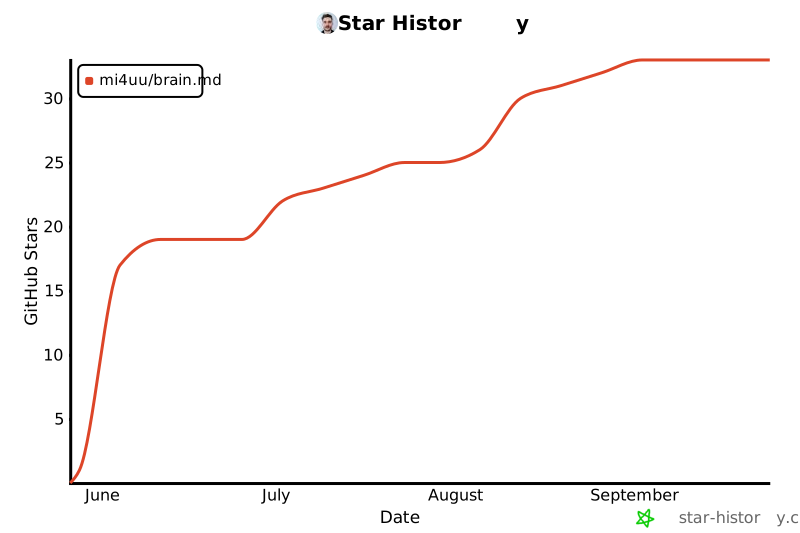
## ⭐ Star history
[](https://star-history.com/#mi4uu/brain.md&Date)
Found brain.md useful? A ⭐ helps other people running local-first
agent workflows discover it. No newsletter, no tracking, no
follow-up email — just a signal that this exists.
---
## 📄 License
**GNU Affero General Public License v3.0 or later** — see
[LICENSE](LICENSE).
brain.md is, and will stay, free / libre / open-source. The AGPL was
picked over weaker permissive licenses for two specific reasons:
1. **It closes the SaaS loophole.** If you modify brain.md and run
it as a network service for others — hosted, multi-tenant,
rebranded, whatever — you must publish your modified source under
the same AGPL. Strong copyleft for a server-side tool means the
community always gets the improvements back.
2. **It can't be relicensed under a permissive license downstream.**
Forks stay open forever. Nobody can scoop the project, slap a new
logo on it, and ship a proprietary "Pro" cut.
You're free to:
- run brain.md, personally or commercially, without limits;
- fork, modify, redistribute, even rebrand — provided your fork stays
under the AGPL and you publish the source you're running.
You're **not** free to:
- ship a closed-source product based on brain.md;
- host a modified brain.md as a public service without publishing
your modifications under the AGPL.
### Trademarks
The name **brain.md** and the brain.md logo are *not* covered by the
AGPL. If you fork the project, you're welcome to do almost anything
with the code — but please use your own name and your own mark for
your fork so users aren't confused about which project they're
running.
---
<div align="center">
**brain.md** — your notes, your machine, your agents.
Built by **[Michał Lipiński](https://lipinski.work/)**
· [github.com/mi4uu/brain.md](https://github.com/mi4uu/brain.md)
· [report a bug](https://github.com/mi4uu/brain.md/issues/new)
</div>
This server cannot be deployed
Maintenance
ActivityStale
ResponsivenessUnresponsive