
askdb
by mgorabbani
README.md
<p align="center">
<img src="docs/site/assets/logo.png" alt="AskDB" height="48" align="middle" /><strong>AskDB</strong> — Give AI agents safe access to your database.
</p>
<p align="center">
Your database, sandboxed. Your fields, controlled. One MCP endpoint for every AI tool.
</p>
<p align="center">
<img src="docs/site/assets/cover-github.png" alt="AskDB — self-hosted bridge between your database and any MCP-speaking AI agent" width="50%" />
</p>
<p align="center">
https://github.com/user-attachments/assets/baa53f34-b0b4-41ee-89b3-60d133e8004d
</p>
<p align="center">
<a href="https://github.com/mgorabbani/askdb/blob/main/LICENSE"><img src="https://img.shields.io/badge/License-MIT-blue.svg" alt="MIT License" /></a>
<a href="https://github.com/mgorabbani/askdb/stargazers"><img src="https://img.shields.io/github/stars/mgorabbani/askdb?style=flat" alt="Stars" /></a>
<a href="#try-it-locally-with-docker"><img src="https://img.shields.io/badge/docker--compose-ready-2496ED.svg?logo=docker&logoColor=white" alt="Docker Compose" /></a>
<a href="https://modelcontextprotocol.io"><img src="https://img.shields.io/badge/MCP-Streamable_HTTP-8A2BE2.svg" alt="MCP Streamable HTTP" /></a>
</p>
<p align="center">
<a href="#install-on-a-vps-one-command"><strong>Install</strong></a> ·
<a href="#try-it-locally-with-docker"><strong>Try Locally</strong></a> ·
<a href="#connecting-your-ai-agent"><strong>Connect AI</strong></a> ·
<a href="#security"><strong>Security</strong></a> ·
<a href="docs/faq.md"><strong>FAQ</strong></a>
</p>
---
## About AskDB
**AskDB** is a self-hosted bridge between your MongoDB or PostgreSQL database and any AI agent that speaks [MCP](https://modelcontextprotocol.io). It clones your production data into an isolated sandbox, lets you control exactly which fields the AI can see, and exposes a single `/mcp` endpoint that plugs into Claude, ChatGPT, Cursor, and anything else.
No data masking. No fake data. Hidden fields are simply omitted from every response — the AI never knows they exist. Every query is audited.
### Get started in 3 steps
| | Step | What happens |
| ------ | ----------- | ------------------------------------------------------------- |
| **01** | Connect | Paste your MongoDB or PostgreSQL connection string in the dashboard |
| **02** | Configure | Browse real sample data, toggle which fields the AI can see |
| **03** | Query | Give your AI agent `https://<your-domain>/mcp` — done |
<div align="center">
**Works with** · Claude Desktop · Claude Code · ChatGPT · Cursor · any MCP client
</div>
<br/>
## Features
- **Sandbox isolation.** Production data cloned into a Docker container. AI reads the copy, never the original.
- **Field-level control.** Toggle any field or collection visible/hidden — changes take effect immediately, no re-sync.
- **PII auto-detection.** Fields like `email`, `password`, `ssn`, `phone` are detected and pre-hidden automatically.
- **MongoDB + PostgreSQL.** One MCP tool surface across engines. `list-databases`, `collection-schema`, `find`, `aggregate`, `count`, `distinct`, `sample-documents`, [`execute-typescript`](docs/code-mode.md), `save-insight`.
- **Query validation.** Allowlist-only reads. Write operations and dangerous pipeline stages rejected.
- **Audit trail.** Every MCP query logged with timestamp, execution time, target, and row count.
- **OAuth + API keys.** Remote clients (Claude, Cursor) use OAuth. Local configs use bearer tokens (SHA-256 hashed, shown once).
- **Multi-database.** Connect every database you own — Mongo and Postgres side by side. Each tool accepts a `connectionId`.
- **Interactive result viewer.** `find` / `aggregate` / `sample-documents` results render as a sortable table in [MCP Apps](https://modelcontextprotocol.io/extensions/apps)–capable hosts (Claude Desktop, Claude on web, VS Code Copilot). Non-Apps clients get plain JSON.
- **Code Mode.** An `execute-typescript` tool lets the AI run a sandboxed TypeScript program that composes multiple queries in one round trip. [Details →](docs/code-mode.md)
<br/>
## How It Works
```
┌─────────────────────────────────────────────────┐
│ Your Server │
│ │
│ ┌──────────────┐ ┌───────────────┐ │
│ │ Dashboard │──────>│ SQLite │ │
│ │ + API + MCP │ │ (config only) │ │
│ │ :3100 │ └───────────────┘ │
│ └──────────────┘ │
│ ┌───────────────┐ │
│ │ Sandbox │<── clone from prod
│ │ Mongo / PG │ │
│ └───────────────┘ │
└─────────────────────────────────────────────────┘
^
| MCP (Streamable HTTP)
Claude / ChatGPT / Cursor
```
1. **Connect** — paste your MongoDB or PostgreSQL connection string
2. **Clone** — AskDB runs the per-engine dump/restore (`mongodump`/`mongorestore` for Mongo, `pg_dump`/`pg_restore` for Postgres) into an isolated Docker container
3. **Configure** — browse your schema with real sample data, toggle fields visible or hidden
4. **Query** — give your AI agent the MCP URL — hidden fields are stripped from every response
The AI never knows hidden fields exist.
<br/>
## Install on a VPS (one command)
On a fresh Ubuntu 22.04+ or Debian 12+ VPS:
curl -fsSL https://github.com/mgorabbani/askdb/releases/latest/download/install.sh | sudo bash
The installer will install Docker if missing, prompt for your domain and Let's Encrypt email, generate all secrets, and bring up the stack behind Caddy with auto-provisioned HTTPS. Total time on a fresh VPS is 2–3 minutes.
> **Don't have a VPS yet?** [exe.dev](https://exe.dev/) spins up a ready-to-go Ubuntu/Debian VPS in a couple of clicks — a quick way to get to the one-liner above.
### Set up your domain
1. In your DNS provider, add an A record pointing to your VPS IP:
name: askdb (or any subdomain)
value: <VPS public IP>
proxy: **OFF** — Cloudflare users: grey cloud, not orange.
The orange proxy blocks Let's Encrypt HTTP-01.
2. Verify DNS has propagated: `dig +short askdb.example.com`
3. Open ports 80 and 443 on your VPS firewall.
4. Run the installer above.
### Create your admin account
The first time you open `https://<your-domain>`, the dashboard redirects you to `/setup` to create the admin account. Do this before connecting Claude or Cursor — you'll use the same account for the OAuth prompt. After the first signup, further registrations are rejected.
### Alternative install modes
- **Caddy (default):** auto-provisioned HTTPS. Requires a domain with A record.
- **Proxyless:** you run your own reverse proxy (Coolify, Traefik, nginx). AskDB binds `127.0.0.1:3100`.
- **Quick test (nip.io):** zero setup — the installer detects your VPS public IP and issues a real Let's Encrypt cert for `<ip>.nip.io`. No DNS, no domain. Ideal for trial runs. Ports 80/443 still required.
- **Cloudflare Tunnel:** no open ports, no public IP needed. See below.
#### Cloudflare Tunnel in 90 seconds
If you already have a domain on Cloudflare (free plan works):
1. Open [Cloudflare dashboard](https://dash.cloudflare.com) → click the **Ask AI** button in the top bar.
2. Prompt it: *"Create a new Cloudflare Tunnel named askdb, route the hostname `askdb.example.com` to `http://askdb:3100`, and give me the connector token."* Replace `askdb.example.com` with the subdomain you want.
3. Copy the token it returns (long `eyJ...` string).
4. Run the installer, pick option **3) Cloudflare Tunnel**, paste the token, enter the same subdomain. The VPS handles Docker, routing, and certs — Cloudflare handles TLS and DNS automatically.
No firewall changes. No A records. The subdomain starts serving over HTTPS within a minute.
### Upgrade
sudo bash <(curl -fsSL https://github.com/mgorabbani/askdb/releases/latest/download/install.sh)
The installer is idempotent — re-running it pulls the latest images and restarts. Secrets, data, and your `.env` are preserved.
### Uninstall
# stop containers, keep data
sudo bash <(curl -fsSL https://github.com/mgorabbani/askdb/releases/latest/download/uninstall.sh)
# stop containers AND delete the askdb-data volume + /opt/askdb
sudo bash <(curl -fsSL https://github.com/mgorabbani/askdb/releases/latest/download/uninstall.sh) --purge
### Backups
Your data lives in the `askdb-data` Docker volume. Back it up with:
docker run --rm -v askdb-data:/data alpine tar czf - /data > askdb-backup.tgz
<br/>
## Try it locally with Docker
Want to kick the tires before pointing a domain at a VPS? This runs AskDB on your own machine in a few minutes — no installer, no DNS, no HTTPS.
Requires [Docker Desktop](https://docs.docker.com/desktop/) (macOS / Windows) or Docker Engine + Compose plugin (Linux).
```bash
git clone https://github.com/mgorabbani/askdb.git
cd askdb
cat > .env <<EOF
COMPOSE_PROFILES=proxyless
DOMAIN=localhost
BETTER_AUTH_URL=http://localhost:3100
TRUSTED_ORIGINS=http://localhost:3100,http://127.0.0.1:3100
EOF
docker compose up --build -d
# wait ~45s for first build + healthcheck
open http://localhost:3100
```
Create an admin account in the dashboard, add a database connection, and try the MCP URL at `http://127.0.0.1:3100/mcp`. Local MCP clients (Claude Code / Cursor with a fixed bearer token) work; remote OAuth flows need HTTPS, so use the VPS install for Claude Desktop / Cursor remote.
Stop with `docker compose down` (keeps data) or `docker compose down -v` (wipes volumes).
<br/>
## Connecting Your AI Agent
Claude, Cursor, and any other remote-MCP client connect to `https://<your-domain>/mcp`. Paste that URL as a custom connector and complete the OAuth approval in your browser. No port, no path rewriting, no API key.
For clients that expect a fixed bearer token (Claude Code, Cursor local configs), create an API key in the dashboard and add it to your config:
```json
{
"askdb": {
"type": "streamable-http",
"url": "https://YOUR_SERVER/mcp",
"headers": {
"Authorization": "Bearer ask_sk_YOUR_KEY"
}
}
}
```
<br/>
## Security
These invariants always hold:
1. **Production databases are never written to** — read-only connections only
2. **Hidden fields never appear in MCP responses** — stripped at query time
3. **Hidden collections are never listed or queryable**
4. **All queries are validated** — only `find`, `aggregate`, `count`, `distinct` allowed
5. **Dangerous aggregation stages are blocked** — `$merge`, `$out`, `$collStats`, `$currentOp`, `$listSessions`
6. **`$lookup` on hidden collections is rejected**
7. **Connection strings are encrypted at rest** (AES-256-GCM), never logged
8. **API keys are hashed** (SHA-256), shown once, never stored in plaintext
9. **Every MCP query is logged** to the audit trail
> **Docker socket hardening:** the compose file includes a `tecnativa/docker-socket-proxy` sidecar so AskDB never has direct access to `/var/run/docker.sock` — only the API endpoints it needs are exposed.
<br/>
## Roadmap
- [x] MongoDB + PostgreSQL adapters with sandbox isolation
- [x] Field-level visibility, PII auto-detection, query validation, audit trail
- [x] MCP server (9 tools) + Code Mode + MCP Apps result viewer
- [x] Multi-database (plain-language descriptions, per-tool `connectionId`)
- [x] One-command installer (Caddy / proxyless / Cloudflare Tunnel)
- [ ] MySQL adapter
- [ ] Multi-user / team management
- [ ] Sync schedules (6h / 12h / daily / weekly)
- [ ] Cloud hosted version
- [ ] Row-level filtering
- [ ] SSO / SAML
<br/>
## Community & Contributing
- [GitHub Issues](https://github.com/mgorabbani/askdb/issues) — bugs and feature requests
- [GitHub Discussions](https://github.com/mgorabbani/askdb/discussions) — ideas and RFCs
- [Contributing guide](CONTRIBUTING.md) — dev setup, project layout, tech stack, tests
- [FAQ](docs/faq.md) · [Security policy](SECURITY.md) · [Code of conduct](CODE_OF_CONDUCT.md) · [Changelog](CHANGELOG.md)
<br/>
## License
AskDB is licensed under the [MIT License](LICENSE).
The MIT License means you can self-host, fork, modify, and use AskDB freely — including in commercial and proprietary projects — provided you keep the copyright and license notice.
## Star History
[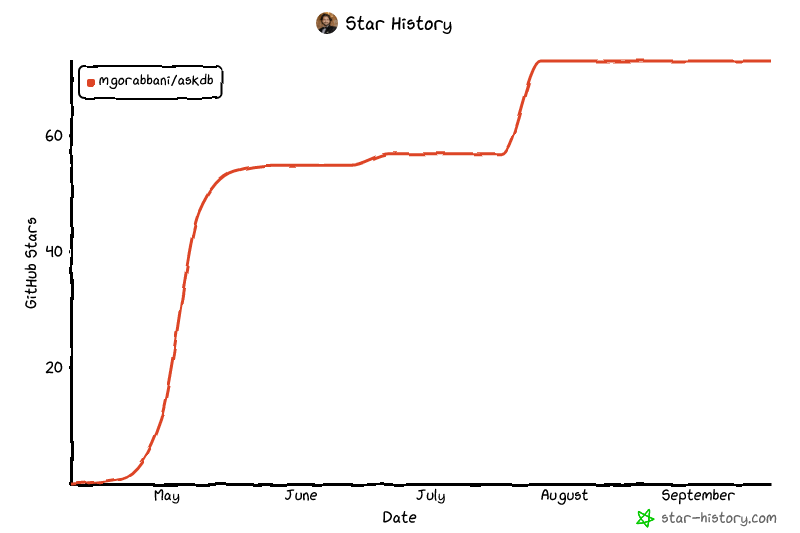](https://www.star-history.com/?repos=mgorabbani%2Faskdb&type=date&legend=top-left)
<br/>
---
<p align="center">
<sub>Open source under the MIT License. Built for people who want AI to understand their data, not own it.</sub>
</p>
This server cannot be deployed
Maintenance
ActivityInactive
ResponsivenessWithin a week