Integration App MCP Server
OfficialServidor MCP de la aplicación de integración
Descripción general
Esta es una implementación del servidor de Protocolo de contexto de modelo (MCP) que expone herramientas impulsadas por Integration App .
Related MCP server: MCP REST API Server
Administrar herramientas
Este servidor utiliza como herramientas las acciones definidas en el espacio de trabajo de una aplicación de integración. Para comprender cómo funciona y cómo administrar eficazmente las herramientas de cada aplicación, consulte la guía "Uso de herramientas" .
Ejecutando el servidor
Instalar node.js
Configurar algunas acciones en el espacio de trabajo de su aplicación de integración
Obtén el token de la aplicación de integración desde la página de configuración de tu espacio de trabajo o generélo usando tu clave y secreto del espacio de trabajo ( Guía de autenticación ).
Debe proporcionar dos variables de entorno al servidor:
INTEGRATION_APP_TOKEN: token para acceder a la API de la aplicación de integraciónINTEGRATION_KEY- clave de la integración para la que desea utilizar herramientas
Este servidor expone las herramientas de una sola integración a la vez. Si desea exponer herramientas de varias integraciones, puede crear varios servidores o modificar el código para iterar sobre varias integraciones.
Aquí hay un ejemplo del archivo claude_desktop_config.json con el servidor configurado:
{
"mcpServers": {
"integration-app-hubspot": {
"command": "npx",
"args": ["-y", "@integration-app/mcp-server"],
"env": {
"INTEGRATION_APP_TOKEN": "<your-integration-app-token>",
"INTEGRATION_KEY": "hubspot"
}
}
}
}Pruebas
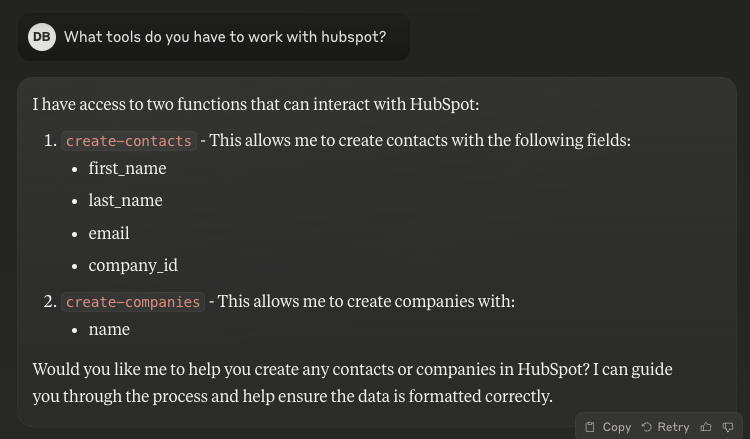
Para saber si todo funciona como se espera, puedes preguntarle a Claude qué herramientas están disponibles:
This server cannot be deployed
Maintenance
Related MCP Connectors
MCP server for your apps' tools and custom tools, plus hosted AI agents and approval-gated workflows
The Mercado Pago MCP Server implements the Model Context Protocol to provide AI agents and LLMs with access to Mercado Pago's APIs and tools within compatible development environments. It acts as an intermediary that translates Mercado Pago resources into executable functions (tools) that AI applications can invoke to perform actions and automate flows. The server simplifies integration, enables using documentation to implement or improve code, and optimizes operations through natural language interactions without manual implementations.
Model Context Protocol server for the Apideck Unified API. Connect any MCP-compatible agent framework to 100+ accounting systems, HRIS platforms, file storage providers, and more through one integration. More information https://www.apideck.com/mcp-server
MCP server for progressive tool usage at any scale (see https://klavis.ai)
Related MCP Servers
- AlicenseNot gradedqualityDmaintenanceA Model Context Protocol server that provides access to ACI.dev functions (tools) through either direct app-specific tools or a unified interface with dynamic tool discovery and execution based on user intent.252MIT
- FlicenseNot gradedqualityDmaintenanceA server implementation of the Model Context Protocol (MCP) that provides REST API endpoints for managing and interacting with MCP resources.-
- FlicenseNot gradedqualityDmaintenanceA Model Context Protocol server that allows integration with Claude Desktop by creating and managing custom tools that can be executed through the MCP framework.33 npm-
- AlicenseNot gradedqualityDmaintenanceThis repository contains an implementation of an Miro Universal MCP (Model Context Protocol) server. It provides a standardized interface for interacting with Miro's tools and services through a unified API.1MIT