A
licenseA
qualityA
maintenanceMCP Server for local knowledge management. Semantic + keywords + tags
8
168 PyPI
24
MIT

The UI Annotator MCP server acts as a reverse proxy that injects interactive annotations onto web pages, creating a shared visual vocabulary between users and AI assistants for discussing UI elements — no browser extensions or code changes required.
Capabilities:
annotate(url) — Generate a proxy URL for any web page that overlays interactive labels on every element, letting users hover to see element names, CSS selectors, dimensions, and content previews.
get_elements() — Retrieve a structured list of all detected UI elements (names, CSS selectors, positions, sizes) so the AI understands exactly which element a user is referencing.
highlight_element(name) — Flash-highlight a specific element on the live page by name or selector, visually confirming "is this the element you mean?"
rescan_elements() — Force a fresh DOM scan to capture new or changed elements after navigation, dynamic updates, or user interactions.
inspect_mode(enabled) — Toggle inspect mode so clicking any element copies its name to the clipboard, making it easy for users to reference exact element names.
Works across all major browsers (Chrome, Firefox, Safari, Edge) with zero configuration.
Identifies and exposes technical CSS selectors for UI elements on any web page, enabling AI assistants to precisely reference specific components for code changes and styling.
Provides a browser-agnostic proxy that enables interactive hover annotations and element inspection within the Firefox browser without requiring extensions.
Enables interactive UI element naming and visual annotations within the Safari browser through a lightweight reverse proxy setup.
English | 廣東話
Bridge the gap between what you see and what AI can reference — in any browser, zero extensions.
The only tool that puts visible labels on every web element. Hover any element, see its name. Tell your AI assistant "make the sidebar wider" — it knows exactly which element you mean. No screenshots, no CSS selectors, no miscommunication.
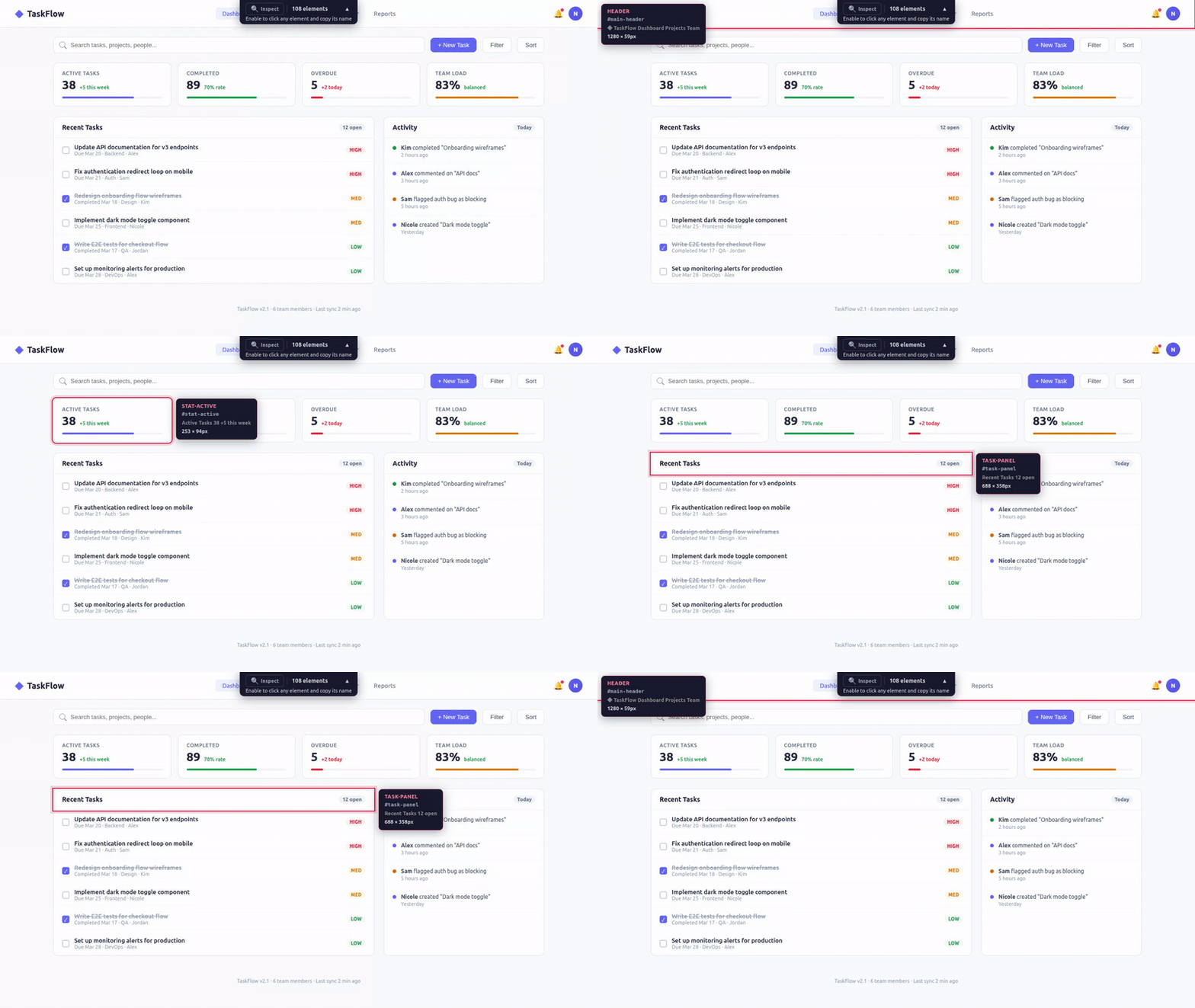
Dramatically improves AI-driven UI design and iteration. The pain: telling AI "move that button next to the search bar" never works because the AI can't see your page. UI Annotator fixes this — hover over any element and its component name appears as a label. Now you say "move SearchButton below NavBar" and Claude edits the right component instantly. No browser extensions, works with any framework. The workflow becomes: open page → hover to identify elements → describe changes using real component names → Claude edits → refresh and repeat. Turns a frustrating back-and-forth into a fluid design loop.
Related MCP server: Lens
When reviewing a web UI with an AI coding assistant, the hardest part isn't the code change — it's describing which element you want changed.
"That thing on the left... the second row... no, the one with the icon..."
You don't know what it's called. The AI doesn't know what you're pointing at. You waste time on miscommunication instead of shipping.
Open your page through the annotator proxy. Hover any element — instantly see its name, CSS selector, and dimensions. Now you both speak the same language.
# Start the MCP server
npx @mcpware/ui-annotator

# Open in ANY browser
http://localhost:7077/localhost:3847
That's it. No browser extensions. No code changes. No setup. Works in Chrome, Firefox, Safari, Edge — any browser.
Your app (localhost:3847)
        │
        ▼
┌─────────────────────┐
│  UI Annotator Proxy  │ ← Reverse proxy on port 7077
│  (MCP Server)        │
└─────────────────────┘
        │
        ▼
Proxied page with hover annotations injected
        │
        ├──► User sees: hover overlay + tooltip with element names
        └──► AI sees: structured element data via MCP tools
The proxy fetches your page, injects a lightweight annotation script, and serves it back. The script scans the DOM, identifies named elements, and reports them to the MCP server. Your AI assistant queries the server to understand what's on the page.
Hover any element to see:
Element name (pink) — the human-readable identifier
CSS selector (monospace) — the technical reference
Content preview — what text the element contains
Dimensions — width × height in pixels
Click the Inspect button in the toolbar (or let your AI toggle it). In inspect mode:
Click any element → copies its name to clipboard
All page interactions are paused (clicks don't trigger buttons/links)
Click Inspect again to return to normal mode
The toolbar sits at the top center of the page showing:
Inspect toggle button
Element count
Helpful subtitle explaining what to do
Collapse button (▲) to minimize when not needed
Tool | What it does |
| Returns proxy URL for user to open in any browser |
| Returns all detected UI elements with names, selectors, positions |
| Flash-highlights a specific element so user can confirm |
| Force DOM rescan after page changes |
| Toggle inspect mode remotely |
Browser DevTools | UI Annotator | |
Target user | Frontend developers who know the DOM | Anyone — QA, PM, designer, junior dev |
Learning curve | Need to understand DOM tree, CSS selectors, box model | Hover and read — zero learning |
Communication | "The | "The |
Language | CSS/HTML technical terms | Human-readable names |
Setup | Teach people to open DevTools + navigate the DOM | Open a URL |
AI integration | None — AI can't see what you're inspecting | MCP — AI sees the same element names you do |
DevTools is for debugging. UI Annotator is for communication — giving humans and AI a shared vocabulary for UI elements.
None of these do what UI Annotator does — live visual labels on every element via reverse proxy:
Tool | Approach | Why we're different |
browser-use (82K⭐) | AI automation framework | Automates browsers, doesn't label elements for humans. Different use case entirely. |
Chrome DevTools MCP (31K⭐) | DOM snapshot + element UIDs | AI can inspect, but humans don't see visual annotations. No shared vocabulary. |
Playwright MCP (29K⭐) | Accessibility tree snapshot | Returns structured text, no visual overlay. Truncates important context. |
OmniParser | Screenshot + CV detection | Screenshot-based, not live DOM. ~40% accuracy on hard benchmarks. |
MCP Pointer (526 users) | Chrome extension + MCP | Requires Chrome extension. Human clicks to select — no hover overlay. |
Agentation | npm embedded in your app | Requires code changes. React 18+ dependency. Not zero-config. |
Vibe Annotations | Chrome extension | Extension-based, developer-only annotation workflow. |
Feature | UI Annotator | MCP Pointer | Agentation | Cursor | Chrome DevTools MCP |
Visual hover annotation | Yes | No | Partial | Yes (IDE only) | No |
Shows element names | Yes | Yes | Yes | No (high-level) | Programmatic |
Shows dimensions | Yes | Yes | Yes (Detailed) | Yes | Programmatic |
MCP server | Yes | Yes | Yes | No | Yes |
Zero browser extensions | Yes | No | Yes | N/A | No |
Zero code changes | Yes | Yes | No | N/A | Yes |
Any browser | Yes | Chrome only | Desktop only | Cursor only | Chrome only |
Zero dependencies | Yes | Chrome ext | React 18+ | Cursor | Chrome |
Click to copy element name | Yes | No | No | No | No |
Reverse proxy: Node.js built-in http module
MCP server: @modelcontextprotocol/sdk (stdio transport)
Communication: HTTP POST (browser → server) + GET polling (server → browser)
No WebSocket, no Express, no browser extension
User requests localhost:7077/localhost:3847
Proxy fetches http://localhost:3847
For HTML responses:
Injects fetch() / XMLHttpRequest interceptor (rewrites API paths through proxy)
Rewrites href="/..." and src="/..." attributes to route through proxy
Injects annotation script before </body>
For non-HTML (CSS, JS, images): passes through directly
Strips Content-Security-Policy headers to allow injected script
Script scans DOM for elements with id, class, semantic roles, or interactive roles
On hover: positions overlay border (follows border-radius) + positions tooltip (always within viewport)
Reports all detected elements to server via POST /__annotator/elements
Polls GET /__annotator/commands every second for server instructions (highlight, rescan, inspect toggle)
MutationObserver auto-rescans when DOM changes
# Add as MCP server
claude mcp add ui-annotator -- npx @mcpware/ui-annotator

# Then in conversation:
# "Annotate my app at localhost:3847"
# → AI returns proxy URL, you open it, hover elements, discuss changes by namenpx @mcpware/ui-annotator
# Proxy starts on http://localhost:7077
# Open http://localhost:7077/localhost:YOUR_PORTVariable | Default | Description |
|
| Port for the proxy server |
Project | What it does | Install |
23 Instagram Graph API tools — posts, comments, DMs, stories, analytics |
| |
Visual dashboard for Claude Code memories, skills, MCP servers, hooks |
| |
Record browser sessions as GIF or video via MCP |
| |
AI logo design → SVG → full brand kit export |
|
MIT
Open a web page with hover annotations. Returns a proxy URL that adds interactive element labels to any page. User opens this URL in any browser to see annotations on hover.
| Name | Required | Description | Default |
|---|---|---|---|
| url | Yes | The target URL to annotate, e.g. "http://localhost:3847" or "localhost:3847" |
Does the description disclose side effects, auth requirements, rate limits, or destructive behavior?
Describes that it adds interactive element labels via proxy URL and user needs a browser. However, no details on permissions, reversibility, or what happens to the original page.
Agents need to know what a tool does to the world before calling it. Descriptions should go beyond structured annotations to explain consequences.
Is the description appropriately sized, front-loaded, and free of redundancy?
Two clear sentences, no extraneous words, efficiently conveys purpose and output.
Shorter descriptions cost fewer tokens and are easier for agents to parse. Every sentence should earn its place.
Given the tool's complexity, does the description cover enough for an agent to succeed on first attempt?
For a simple tool with one param and no output schema, description adequately explains what happens. Could add how to use the returned URL or nature of annotations, but overall sufficient.
Complex tools with many parameters or behaviors need more documentation. Simple tools need less. This dimension scales expectations accordingly.
Does the description clarify parameter syntax, constraints, interactions, or defaults beyond what the schema provides?
Schema has one param with description; description adds examples ('http://localhost:3847' or 'localhost:3847') clarifying format, adding value beyond schema.
Input schemas describe structure but not intent. Descriptions should explain non-obvious parameter relationships and valid value ranges.
Does the description clearly state what the tool does and how it differs from similar tools?
Clearly states the tool opens a web page with hover annotations and returns a proxy URL. Distinguishes from siblings by specifying interactive labels on hover, unlike get_elements or highlight_element.
Agents choose between tools based on descriptions. A clear purpose with a specific verb and resource helps agents select the right tool.
Does the description explain when to use this tool, when not to, or what alternatives exist?
No guidance on when to use this tool vs alternatives like inspect_mode or highlight_element. No mention of prerequisites or exclusions.
Agents often have multiple tools that could apply. Explicit usage guidance like "use X instead of Y when Z" prevents misuse.
Get all UI elements detected on the currently annotated page. Returns element names, CSS selectors, positions, and sizes. Use this to understand what the user is referring to when they describe a UI element.
| Name | Required | Description | Default |
|---|---|---|---|
No parameters | |||
Does the description disclose side effects, auth requirements, rate limits, or destructive behavior?
Without annotations, the description indicates a read-only operation, but it does not disclose dependencies (e.g., presence of an annotated page, permissions) or potential side effects. The disclosure is basic but sufficient for a simple getter.
Agents need to know what a tool does to the world before calling it. Descriptions should go beyond structured annotations to explain consequences.
Is the description appropriately sized, front-loaded, and free of redundancy?
Three concise sentences: action, return data, usage hint. No redundancy, front-loaded with core purpose. Every sentence adds value.
Shorter descriptions cost fewer tokens and are easier for agents to parse. Every sentence should earn its place.
Given the tool's complexity, does the description cover enough for an agent to succeed on first attempt?
The description lists return fields but omits format or structure details. It assumes understanding of 'annotated page' and does not clarify scope (e.g., only visible elements). Adequate but could be more complete.
Complex tools with many parameters or behaviors need more documentation. Simple tools need less. This dimension scales expectations accordingly.
Does the description clarify parameter syntax, constraints, interactions, or defaults beyond what the schema provides?
The tool has no parameters, and the input schema is fully described by its absence. The description adds no parameter details, but none are needed. Baseline score of 4 for zero-parameter tool with 100% schema coverage.
Input schemas describe structure but not intent. Descriptions should explain non-obvious parameter relationships and valid value ranges.
Does the description clearly state what the tool does and how it differs from similar tools?
The description clearly states the tool retrieves all UI elements from the annotated page and lists the returned data (names, selectors, positions, sizes). It distinguishes itself from siblings like 'annotate' or 'highlight_element' by focusing on reading existing elements.
Agents choose between tools based on descriptions. A clear purpose with a specific verb and resource helps agents select the right tool.
Does the description explain when to use this tool, when not to, or what alternatives exist?
The description explicitly advises using the tool to understand UI elements the user refers to, providing clear context. However, it does not mention when not to use it or suggest alternatives like 'inspect_mode'.
Agents often have multiple tools that could apply. Explicit usage guidance like "use X instead of Y when Z" prevents misuse.
Briefly flash-highlight a specific element on the page so the user can see which element you are referring to. Useful for confirming "do you mean this element?"
| Name | Required | Description | Default |
|---|---|---|---|
| name | Yes | The element name or CSS selector to highlight |
Does the description disclose side effects, auth requirements, rate limits, or destructive behavior?
No annotations are provided, so the description must convey behavior. It states 'briefly flash-highlight', indicating a temporary visual effect, but lacks details like duration, effect on page state, or whether it works on hidden elements. Adequate but not exhaustive.
Agents need to know what a tool does to the world before calling it. Descriptions should go beyond structured annotations to explain consequences.
Is the description appropriately sized, front-loaded, and free of redundancy?
Two sentences: first states action, second provides use case. No wasted words, front-loaded with key information.
Shorter descriptions cost fewer tokens and are easier for agents to parse. Every sentence should earn its place.
Given the tool's complexity, does the description cover enough for an agent to succeed on first attempt?
For a simple tool with one parameter and no output schema, the description covers purpose and usage adequately. Lacks information on return value, but likely void (highlight action). Minor gap but otherwise complete.
Complex tools with many parameters or behaviors need more documentation. Simple tools need less. This dimension scales expectations accordingly.
Does the description clarify parameter syntax, constraints, interactions, or defaults beyond what the schema provides?
Input schema has 100% description coverage for the single parameter 'name', so the schema already explains it. The description adds 'flash-highlight' context but does not enhance parameter meaning beyond the schema baseline.
Input schemas describe structure but not intent. Descriptions should explain non-obvious parameter relationships and valid value ranges.
Does the description clearly state what the tool does and how it differs from similar tools?
The description clearly states the tool flashes a highlight on an element, explicitly distinguishing its purpose from siblings like annotate or get_elements by emphasizing visual confirmation for disambiguation.
Agents choose between tools based on descriptions. A clear purpose with a specific verb and resource helps agents select the right tool.
Does the description explain when to use this tool, when not to, or what alternatives exist?
The description provides a specific use case ('confirming which element you refer to'), which implies when to use, but does not explicitly mention when not to use or suggest alternative tools.
Agents often have multiple tools that could apply. Explicit usage guidance like "use X instead of Y when Z" prevents misuse.
Toggle inspect mode on the annotated page. When ON, the user can click any element to copy its name. When OFF, the page behaves normally. Use this to help the user copy element names for communicating design changes.
| Name | Required | Description | Default |
|---|---|---|---|
| enabled | Yes | true to enable inspect mode, false to disable |
Does the description disclose side effects, auth requirements, rate limits, or destructive behavior?
No annotations are provided, so the description carries the full burden. It explains the tool's core behavior (enabling/disabling inspect mode and clicking to copy names) but does not disclose potential side effects, persistence, or permissions. For a simple toggle, this is adequate but not exceptional.
Agents need to know what a tool does to the world before calling it. Descriptions should go beyond structured annotations to explain consequences.
Is the description appropriately sized, front-loaded, and free of redundancy?
The description consists of three concise sentences that front-load the main action, explain the ON/OFF behaviors, and state the use case. Every sentence adds value with no redundancy.
Shorter descriptions cost fewer tokens and are easier for agents to parse. Every sentence should earn its place.
Given the tool's complexity, does the description cover enough for an agent to succeed on first attempt?
Given the simplicity of the tool (single boolean parameter, no output schema), the description covers the essential aspects: purpose, behavior, and usage scenario. It lacks details like whether the mode persists across page loads, but overall it is fairly complete for its complexity.
Complex tools with many parameters or behaviors need more documentation. Simple tools need less. This dimension scales expectations accordingly.
Does the description clarify parameter syntax, constraints, interactions, or defaults beyond what the schema provides?
Schema description coverage is 100%, so the baseline is 3. The description does not add additional meaning to the 'enabled' parameter beyond what the schema already provides (true/false). The purpose is conveyed but parameter semantics are not enriched.
Input schemas describe structure but not intent. Descriptions should explain non-obvious parameter relationships and valid value ranges.
Does the description clearly state what the tool does and how it differs from similar tools?
The description clearly states the tool toggles inspect mode and explains the behavior in both ON and OFF states. It is specific about the verb 'toggle' and the resource 'inspect mode', and the differentiation from sibling tools (annotate, get_elements, etc.) is implicit as they serve different functions.
Agents choose between tools based on descriptions. A clear purpose with a specific verb and resource helps agents select the right tool.
Does the description explain when to use this tool, when not to, or what alternatives exist?
The description advises to use this tool to help the user copy element names for design change communication. While it does not explicitly list exclusion criteria or alternatives, the context from sibling tools provides sufficient guidance on when to use this tool versus others.
Agents often have multiple tools that could apply. Explicit usage guidance like "use X instead of Y when Z" prevents misuse.
Force the annotated page to rescan all UI elements. Use this after the page content has changed (e.g. after navigation, DOM updates, or user interaction).
| Name | Required | Description | Default |
|---|---|---|---|
No parameters | |||
Does the description disclose side effects, auth requirements, rate limits, or destructive behavior?
No annotations are provided, so the description must carry full burden. It only states the action and usage, but does not disclose behavioral traits such as whether the operation is destructive, requires authentication, or any rate limits. 'Force' hints at mutability but is vague.
Agents need to know what a tool does to the world before calling it. Descriptions should go beyond structured annotations to explain consequences.
Is the description appropriately sized, front-loaded, and free of redundancy?
The description is two sentences long, with the first sentence stating the action and the second providing usage guidance. Every word is purposeful, and the structure is front-loaded.
Shorter descriptions cost fewer tokens and are easier for agents to parse. Every sentence should earn its place.
Given the tool's complexity, does the description cover enough for an agent to succeed on first attempt?
Given zero parameters and no output schema, the description covers purpose and usage adequately. However, it lacks behavioral transparency (e.g., side effects, idempotency) which reduces completeness for a tool with no annotations.
Complex tools with many parameters or behaviors need more documentation. Simple tools need less. This dimension scales expectations accordingly.
Does the description clarify parameter syntax, constraints, interactions, or defaults beyond what the schema provides?
The input schema has zero parameters, so schema coverage is 100%. The description does not need to add parameter meaning, and the baseline score of 4 is appropriate.
Input schemas describe structure but not intent. Descriptions should explain non-obvious parameter relationships and valid value ranges.
Does the description clearly state what the tool does and how it differs from similar tools?
The description clearly states the action 'force rescan all UI elements' and the resource 'annotated page'. It distinguishes itself from siblings like 'get_elements' (retrieval) and 'annotate' (adding metadata), but does not explicitly name alternatives.
Agents choose between tools based on descriptions. A clear purpose with a specific verb and resource helps agents select the right tool.
Does the description explain when to use this tool, when not to, or what alternatives exist?
The description explicitly tells when to use the tool: 'after page content has changed (e.g. after navigation, DOM updates, or user interaction)'. This provides clear context, though it lacks explicit statements on when not to use or named alternatives.
Agents often have multiple tools that could apply. Explicit usage guidance like "use X instead of Y when Z" prevents misuse.
Recent tool additions, removals, and schema changes observed during successful MCP inspections.
v0.1.0annotateget_elementshighlight_elementinspect_moderescan_elementsScored across 5 tools
Each tool has a clear, distinct purpose: generating annotations, retrieving elements, highlighting elements, toggling inspect mode, and rescanning after changes. No overlaps cause confusion.
All tool names follow a consistent verb_noun snake_case pattern (annotate, get_elements, highlight_element, inspect_mode, rescan_elements), making them predictable and clear.
With 5 tools, the set is well-scoped for the server's purpose of providing an annotation and inspection assistant. Each tool serves an essential step in the workflow.
The tools cover the full workflow: creating an annotated page, retrieving element details, highlighting specific elements, enabling inspection mode, and refreshing after DOM changes. No critical gaps for the stated purpose.
Personal knowledge base MCP server with semantic search, auto-categorization, metadata extraction
Turn any public website into an MCP server for agents to search, read and navigate.
MCP server for the Fail Modes taxonomy — a knowledge base of AI system failure modes
TermsBird: the site's own MCP server — dataset; every answer cites the site.