A
licenseA
qualityD
maintenanceAn MCP server implementation that integrates the Tavily Search API, providing optimized search capabilities for LLMs.
1
5
MIT

Utilizes .ENV for environment variable management, specifically for storing and accessing the Tavily API key needed for web search functionality.
Click on "Deploy Server".
Wait a few minutes for the server to deploy. Once ready, it will show a "Started" state.
In the chat, type @ followed by the MCP server name and your instructions, e.g., "@MCP2Tavily search for latest AI developments in 2024"
That's it! The server will respond to your query, and you can continue using it as needed.
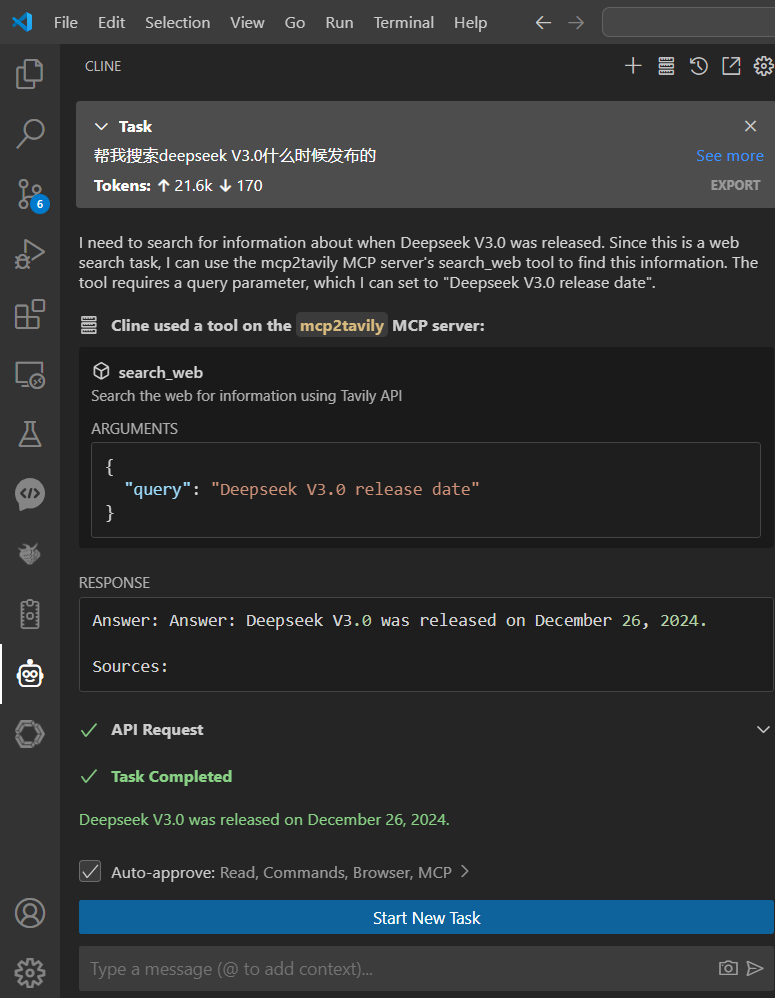
Here is a step-by-step guide with screenshots.
A MCP protocol server that implements web search functionality using the Tavily API.
Python 3.11+
UV package manager
Tavily API key
Related MCP server: All-Search MCP Server
Clone the repository
git clone <repository-url>
cd mcp2tavily
Create and edit the .env file
# Create .env file
touch .env
# Add your Tavily API key to .env
echo "TAVILY_API_KEY=your_api_key_here" > .env
Set up virtual environment with UV
# Create and activate virtual environment
uv venv
source .venv/bin/activate  # On Windows use: .venv\Scripts\activate
Install dependencies
uv syncfastmcp install mcp2tavily.pyTo test the functionality using MCP Inspector:
fastmcp dev mcp2tavily.pyOnce running, you can access the MCP Inspector at: http://localhost:5173
search_web(query: str): Search the web using Tavily API
search_web_info(query: str): Same as above, with Chinese description
TAVILY_API_KEY: Your Tavily API key (required)
Cline Continue Claude的MCP JSON FILE
"mcp2tavily": {
      "command": "uv",
      "args": [
        "run",
        "--with",
        "fastmcp",
        "--with",
        "python-dotenv",
        "--with",
        "tavily-python",
        "fastmcp",
        "run",
        "C:\\Users\\你的真实路径\\mcp2tavily.py"
      ],
      "env": {
        "TAVILY_API_KEY": "API密钥"
      }
    }


Get the content from a specific URL using Tavily API
Args:
    url (str): The URL to extract content from

Returns:
    str: The extracted content from the URL
| Name | Required | Description | Default |
|---|---|---|---|
| url | Yes |
Does the description disclose side effects, auth requirements, rate limits, or destructive behavior?
No annotations are provided, so the description carries the full burden of behavioral disclosure. It states the tool extracts content via Tavily API but lacks details on rate limits, authentication needs, error handling, or content limitations (e.g., text-only extraction, handling of dynamic pages). This leaves significant gaps for a tool that interacts with external APIs and web content.
Agents need to know what a tool does to the world before calling it. Descriptions should go beyond structured annotations to explain consequences.
Is the description appropriately sized, front-loaded, and free of redundancy?
The description is well-structured and concise, with zero wasted words. It front-loads the core purpose in the first sentence, followed by clear 'Args' and 'Returns' sections. Every sentence earns its place by directly contributing to understanding the tool's function and parameters.
Shorter descriptions cost fewer tokens and are easier for agents to parse. Every sentence should earn its place.
Given the tool's complexity, does the description cover enough for an agent to succeed on first attempt?
Given the complexity of web content extraction and the lack of annotations and output schema, the description is incomplete. It doesn't explain what 'extracted content' entails (e.g., full HTML, cleaned text, metadata), potential errors (e.g., invalid URLs, timeouts), or API-specific behaviors. For a tool with external dependencies and no structured output, more context is needed to ensure reliable use.
Complex tools with many parameters or behaviors need more documentation. Simple tools need less. This dimension scales expectations accordingly.
Does the description clarify parameter syntax, constraints, interactions, or defaults beyond what the schema provides?
The description adds minimal semantic value beyond the input schema. It documents the single parameter 'url' as 'The URL to extract content from,' which matches the schema's 'Url' title. With 0% schema description coverage, the description compensates slightly by confirming the parameter's purpose, but it doesn't provide additional context like URL format requirements or examples. The baseline is 3 due to the single parameter, but it doesn't fully address the coverage gap.
Input schemas describe structure but not intent. Descriptions should explain non-obvious parameter relationships and valid value ranges.
Does the description clearly state what the tool does and how it differs from similar tools?
The description clearly states the tool's purpose: 'Get the content from a specific URL using Tavily API.' It specifies the verb ('Get'), resource ('content from a specific URL'), and method ('using Tavily API'). However, it doesn't explicitly differentiate from sibling tools like 'get_url_content_info' or 'search_web', which likely have related but distinct functions.
Agents choose between tools based on descriptions. A clear purpose with a specific verb and resource helps agents select the right tool.
Does the description explain when to use this tool, when not to, or what alternatives exist?
The description provides no guidance on when to use this tool versus alternatives. It doesn't mention sibling tools such as 'get_url_content_info' (which might return metadata) or 'search_web' (which might perform broader searches), leaving the agent without context for tool selection. Usage is implied only by the tool's name and basic purpose.
Agents often have multiple tools that could apply. Explicit usage guidance like "use X instead of Y when Z" prevents misuse.
从指定URL获取网页内容
参数:
    url (str): 需要提取内容的网页地址

返回:
    str: 从URL提取的网页内容
| Name | Required | Description | Default |
|---|---|---|---|
| url | Yes |
Does the description disclose side effects, auth requirements, rate limits, or destructive behavior?
No annotations are provided, so the description carries the full burden of behavioral disclosure. It states the tool fetches content from a URL but doesn't mention critical behaviors like error handling (e.g., for invalid URLs), authentication needs, rate limits, or whether it performs web scraping or uses APIs. This leaves significant gaps in understanding how the tool operates.
Agents need to know what a tool does to the world before calling it. Descriptions should go beyond structured annotations to explain consequences.
Is the description appropriately sized, front-loaded, and free of redundancy?
The description is appropriately sized and front-loaded, with the purpose stated first, followed by parameter and return sections. It uses minimal sentences that directly convey information without waste, though the structure could be slightly improved by integrating usage context.
Shorter descriptions cost fewer tokens and are easier for agents to parse. Every sentence should earn its place.
Given the tool's complexity, does the description cover enough for an agent to succeed on first attempt?
Given the complexity of web content fetching (which involves network operations, potential errors, and format variations), the description is incomplete. No annotations or output schema exist to supplement it, and it lacks details on return value format (e.g., HTML text, structured data), error cases, or behavioral traits, making it inadequate for safe and effective use.
Complex tools with many parameters or behaviors need more documentation. Simple tools need less. This dimension scales expectations accordingly.
Does the description clarify parameter syntax, constraints, interactions, or defaults beyond what the schema provides?
Schema description coverage is 0%, so the description must compensate. It adds meaning by specifying that the 'url' parameter is a '网页地址' (webpage address) for content extraction, which clarifies its purpose beyond the schema's generic 'string' type. However, it doesn't detail format constraints (e.g., must be a valid HTTP/HTTPS URL) or examples, leaving some ambiguity.
Input schemas describe structure but not intent. Descriptions should explain non-obvious parameter relationships and valid value ranges.
Does the description clearly state what the tool does and how it differs from similar tools?
The description clearly states the tool's purpose: '从指定URL获取网页内容' (get webpage content from a specified URL). It specifies the verb ('获取' - get) and resource ('网页内容' - webpage content). However, it doesn't differentiate from sibling tools like 'get_url_content', 'search_web', or 'search_web_info', so it lacks sibling differentiation.
Agents choose between tools based on descriptions. A clear purpose with a specific verb and resource helps agents select the right tool.
Does the description explain when to use this tool, when not to, or what alternatives exist?
The description provides no guidance on when to use this tool versus its siblings. There's no mention of alternatives, exclusions, or specific contexts for use. The agent must infer usage from the purpose alone, which is insufficient for distinguishing between similar tools.
Agents often have multiple tools that could apply. Explicit usage guidance like "use X instead of Y when Z" prevents misuse.
Search the web for information using Tavily API
| Name | Required | Description | Default |
|---|---|---|---|
| query | Yes |
Does the description disclose side effects, auth requirements, rate limits, or destructive behavior?
With no annotations provided, the description carries full burden but offers minimal behavioral context. It mentions the Tavily API but doesn't disclose rate limits, authentication requirements, result formats, pagination behavior, or any limitations of the search. For a web search tool with zero annotation coverage, this leaves significant gaps.
Agents need to know what a tool does to the world before calling it. Descriptions should go beyond structured annotations to explain consequences.
Is the description appropriately sized, front-loaded, and free of redundancy?
The description is extremely concise - a single sentence with no wasted words. It's front-loaded with the core functionality and efficiently includes the API information. Every word serves a purpose.
Shorter descriptions cost fewer tokens and are easier for agents to parse. Every sentence should earn its place.
Given the tool's complexity, does the description cover enough for an agent to succeed on first attempt?
For a web search tool with no annotations, no output schema, and minimal parameter documentation, the description is inadequate. It doesn't explain what kind of results to expect, how they're formatted, any limitations of the Tavily API, or how this differs from the sibling 'search_web_info' tool.
Complex tools with many parameters or behaviors need more documentation. Simple tools need less. This dimension scales expectations accordingly.
Does the description clarify parameter syntax, constraints, interactions, or defaults beyond what the schema provides?
Schema description coverage is 0%, but there's only one parameter ('query'). The description adds minimal context by implying this is a search query parameter, but doesn't provide guidance on query formatting, length limits, or special syntax. With a single parameter, the baseline is higher, but the description doesn't fully compensate for the lack of schema documentation.
Input schemas describe structure but not intent. Descriptions should explain non-obvious parameter relationships and valid value ranges.
Does the description clearly state what the tool does and how it differs from similar tools?
The description clearly states the action ('Search the web') and resource ('for information'), specifying the method ('using Tavily API'). It distinguishes from sibling 'get_url_content' and 'get_url_content_info' by focusing on search rather than content retrieval, but doesn't explicitly differentiate from 'search_web_info'.
Agents choose between tools based on descriptions. A clear purpose with a specific verb and resource helps agents select the right tool.
Does the description explain when to use this tool, when not to, or what alternatives exist?
No guidance is provided on when to use this tool versus alternatives like 'search_web_info' or 'get_url_content'. The description mentions the Tavily API but doesn't explain when this search approach is preferred over other methods or what types of queries it handles best.
Agents often have multiple tools that could apply. Explicit usage guidance like "use X instead of Y when Z" prevents misuse.
从网络搜索用户查询的信息
| Name | Required | Description | Default |
|---|---|---|---|
| query | Yes |
Does the description disclose side effects, auth requirements, rate limits, or destructive behavior?
With no annotations, the description carries the full burden of behavioral disclosure. It mentions searching the web but doesn't describe how results are returned (e.g., format, pagination), potential rate limits, authentication needs, or whether it's read-only or has side effects. This leaves significant gaps for a tool interacting with external resources.
Agents need to know what a tool does to the world before calling it. Descriptions should go beyond structured annotations to explain consequences.
Is the description appropriately sized, front-loaded, and free of redundancy?
The description is a single, efficient sentence in Chinese with no wasted words. It's appropriately sized and front-loaded, though brevity contributes to gaps in other dimensions.
Shorter descriptions cost fewer tokens and are easier for agents to parse. Every sentence should earn its place.
Given the tool's complexity, does the description cover enough for an agent to succeed on first attempt?
Given no annotations, no output schema, and low schema coverage, the description is incomplete. It lacks details on behavior, parameters, and output, making it inadequate for a tool that likely involves complex web interactions and sibling alternatives.
Complex tools with many parameters or behaviors need more documentation. Simple tools need less. This dimension scales expectations accordingly.
Does the description clarify parameter syntax, constraints, interactions, or defaults beyond what the schema provides?
Schema description coverage is 0%, so the description must compensate. It implies a 'query' parameter but doesn't add meaning beyond the schema's basic type (string), such as examples, constraints, or how the query is processed (e.g., search engine used, language support).
Input schemas describe structure but not intent. Descriptions should explain non-obvious parameter relationships and valid value ranges.
Does the description clearly state what the tool does and how it differs from similar tools?
The description '从网络搜索用户查询的信息' (search information from the web for user queries) states a clear purpose with a verb ('search') and resource ('information from the web'), but it's vague about what type of information it returns and doesn't distinguish from sibling tools like 'search_web' or 'get_url_content'.
Agents choose between tools based on descriptions. A clear purpose with a specific verb and resource helps agents select the right tool.
Does the description explain when to use this tool, when not to, or what alternatives exist?
No guidance is provided on when to use this tool versus alternatives like 'search_web' or 'get_url_content'. The description implies a general web search but doesn't specify use cases, exclusions, or prerequisites.
Agents often have multiple tools that could apply. Explicit usage guidance like "use X instead of Y when Z" prevents misuse.
Recent tool additions, removals, and schema changes observed during successful MCP inspections.
get_url_contentget_url_content_infosearch_websearch_web_infoScored across 4 tools
The tool set has severe ambiguity issues, with two pairs of tools that appear to be exact duplicates in different languages. get_url_content and get_url_content_info seem to perform identical functions (extracting content from a URL), as do search_web and search_web_info (searching the web). An agent would have no reliable way to choose between these overlapping tools.
The naming follows a mixed convention with some consistency issues. While all tools use snake_case, the pattern is inconsistent: two tools use simple verb_noun format (get_url_content, search_web) while two others add '_info' suffix (get_url_content_info, search_web_info). This creates confusion about whether the '_info' tools are different operations or just translations.
With only 4 tools, this feels thin for a web search/content extraction server, but the real problem is that these represent only 2 distinct operations duplicated across languages. The effective tool count is just 2, which is insufficient for comprehensive web interaction capabilities that might include filtering, advanced search parameters, or content analysis.
For a web search/content extraction server, there are significant gaps in the surface. While basic URL content fetching and web search are covered, there's no support for filtering search results, specifying search parameters, handling different content types, or any advanced web interaction features. The duplication across languages doesn't add functional coverage, leaving the tool set incomplete for sophisticated web tasks.
Driflyte MCP server which lets AI assistants query topic-specific knowledge from web and GitHub.
MCP server for Firecrawl — web search, scraping, and biomedical/arXiv paper search.
Free web search for AI agents. No API key required. Hosted MCP in active development.
Turn any public website into an MCP server for agents to search, read and navigate.