


A
licenseNot graded
qualityD
maintenanceProvides read-only access to Trading 212 accounts, enabling AI assistants to retrieve portfolio positions, account summaries, instrument data, and transaction history.
25 npm
5
MIT

Provides read-only access to OKX trading accounts, enabling retrieval of portfolio information, trading positions, order history, account balances, and asset allocation data for analysis and reporting.
Click on "Deploy Server".
Wait a few minutes for the server to deploy. Once ready, it will show a "Started" state.
In the chat, type @ followed by the MCP server name and your instructions, e.g., "@OKX MCP Server show me my current portfolio balance and asset allocation"
That's it! The server will respond to your query, and you can continue using it as needed.
Here is a step-by-step guide with screenshots.





A Model Context Protocol (MCP) server that provides access to OKX trading and portfolio management functionality. This package allows AI assistants to interact with your OKX account to retrieve portfolio information, trading positions, order history, and more.
This MCP server is designed with security as a top priority. Here's what makes it safe to use:
Read-Only Access: The server only requires read permissions - it cannot place trades or withdraw funds
Local Processing: All data is processed locally on your machine and never stored or transmitted to third parties
No Data Persistence: Your trading data is never saved to disk or cached permanently
Direct API Communication: Connects directly to OKX APIs without intermediary servers
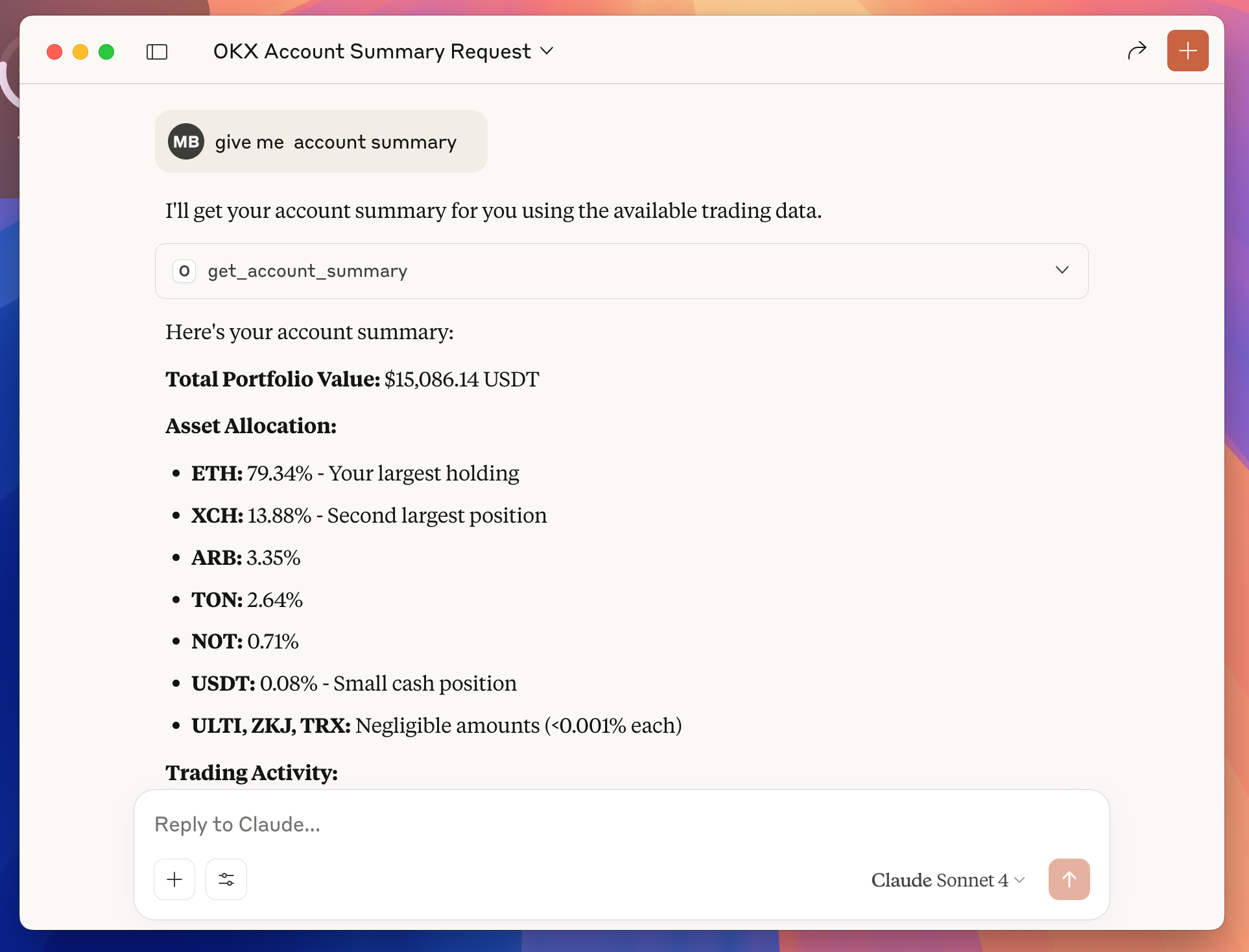
Example: Ask Claude "give me account summary" and instantly get your portfolio breakdown, asset allocation, and trading insights—all from your OKX account data.
Transform your trading experience with AI-powered portfolio insights. Once configured, you can ask Claude natural language questions about your OKX account:
"What's my current portfolio balance?"
"Show me my asset allocation"
"Which coins do I own and how much are they worth?"
"What's my biggest position by value?"
"Show me my open positions with P&L"
"What orders do I have pending?"
"Analyze my BTC trading history from last month"
"How did my ETH trades perform this week?"
"What's my total unrealized profit/loss?"
"Which assets have gained the most value?"
"Give me a summary of my trading activity"
"How is my portfolio performing today?"
"Create a detailed report of my portfolio"
"Show me all my completed trades for BTC-USDT"
"What's my trading volume for this month?"
"Break down my portfolio by percentage"
The AI can provide instant analysis, generate insights, and help you make informed trading decisions—all through simple conversation.
Related MCP server: saxo-mcp
Access Your OKX Account:
Open API Management:
Navigate directly to: https://www.okx.com/account/my-api
Create Your API Key:
Click "Create API Key"
Enter a descriptive name (e.g., "MCP Server")
Create and save a secure passphrase (you'll need this later)
Set Read-Only Permissions:
Read: ✅ Enable (required for portfolio access)
Trade: ❌ Disable (not needed for this MCP server)
Withdraw: ❌ Disable (not needed for this MCP server)
Generate and Copy Credentials:
Click "Submit All" to create the API key
Click "Show info" to reveal your credentials
Click "Copy API key info" to copy all details
Your credentials will look like this:
apikey = "12345678-abcd-1234-efgh-123456789abc"
secretkey = "ABCD1234EFGH5678IJKL9012MNOP3456"
IP = ""
API key name = "MCP Server"
Permissions = "Read"
Secure Your Credentials:
Save the API Key, Secret Key, and Passphrase in a secure location
⚠️ Critical: The Secret Key is only shown once - save it immediately!
These credentials will be used to configure Claude Desktop in the next step
Before configuring Claude Desktop, you need to install Node.js.
Option 1: Download from Official Website
Visit https://nodejs.org
Download the LTS (Long Term Support) version for your operating system
Run the installer and follow the setup wizard
Open Claude Desktop Settings:
Launch Claude Desktop application
Click on Settings (gear icon in the bottom-left corner)
Access Developer Section:
Scroll down to the bottom of the settings panel
Click on "Developer" section
Edit Configuration:
Click on "Edit Config" button
This will open the claude_desktop_config.json file in your default text editor
Add OKX MCP Server Configuration:
Replace the entire file content with this configuration:
{
  "mcpServers": {
    "okx-mcp": {
      "command": "okx-mcp",
      "env": {
        "OKX_API_KEY": "your_api_key_here",
        "OKX_API_SECRET": "your_secret_key_here",
        "OKX_API_PASSPHRASE": "your_passphrase_here"
      }
    }
  }
}
Update Your Credentials:
Replace your_api_key_here with your actual API Key from Step 1
Replace your_secret_key_here with your actual Secret Key from Step 1
Replace your_passphrase_here with your actual Passphrase from Step 1
Save the file and close the text editor
Restart Claude Desktop:
Close Claude Desktop completely
Reopen the application to load the new configuration
Test the Connection:
Start a new conversation in Claude Desktop
Try asking: "Show my portfolio" or "Get my account summary"
If successful, Claude will retrieve and display your OKX account data
This MCP server provides the following tools for AI assistants:
Tool: get_account_summary
Description: Get aggregated portfolio metrics including total value and asset allocation
Parameters: None
Tool: get_portfolio
Description: Get detailed information about all assets in your account
Parameters: None
Returns: List of currencies with balances, available amounts, and USDT values
Tool: get_positions
Description: Get all open derivative trading positions
Parameters: None
Returns: Position details including size, entry price, and unrealized P&L
Tool: get_open_orders
Description: Get all currently open trading orders
Parameters: None
Returns: Order details including symbol, type, price, and status
Tool: get_order_history
Description: Get historical filled orders for analysis
Parameters:
instId (required): Instrument ID (e.g., "BTC-USDT")
begin (optional): Start timestamp
end (optional): End timestamp
Returns: Historical order data with execution details
# Clone the repository
git clone https://github.com/maxbarinov/okx-mcp.git
cd okx-mcp

# Install dependencies
npm install

# Set up environment variables
cp .env.example .env
# Edit .env with your OKX API credentials

# Run in development mode
npm run devnpm run buildsrc/
├── services/
│ └── okxApiClient.ts # OKX API client wrapper
└── tools/ # MCP tool implementations
├── get_account_summary.ts
├── get_portfolio.ts
├── get_positions.ts
├── get_open_orders.ts
└── get_order_history.tsFork the repository
Create a feature branch
Make your changes
Add tests if applicable
Submit a pull request
MIT
If you encounter any issues or have questions:
Check the GitHub Issues
Create a new issue with detailed information about your problem
Include your environment details and error messages (without sensitive data)
Get aggregated portfolio metrics
| Name | Required | Description | Default |
|---|---|---|---|
No parameters | |||
Does the description disclose side effects, auth requirements, rate limits, or destructive behavior?
Annotations already declare readOnlyHint=true, idempotentHint=true, and destructiveHint=false, so the agent knows this is a safe, repeatable read operation. The description adds the concept of 'aggregated' metrics, which provides some behavioral context beyond annotations, but it doesn't detail what aggregation entails or other traits like rate limits or auth needs.
Agents need to know what a tool does to the world before calling it. Descriptions should go beyond structured annotations to explain consequences.
Is the description appropriately sized, front-loaded, and free of redundancy?
The description is a single, efficient sentence with no wasted words. It's front-loaded with the core purpose and appropriately sized for a tool with no parameters, making it highly concise and well-structured.
Shorter descriptions cost fewer tokens and are easier for agents to parse. Every sentence should earn its place.
Given the tool's complexity, does the description cover enough for an agent to succeed on first attempt?
Given the tool's complexity (simple read with no parameters), annotations cover safety and idempotency, but there's no output schema to explain return values. The description mentions 'aggregated portfolio metrics' but doesn't specify what metrics are included or the format, leaving gaps in completeness for agent usage.
Complex tools with many parameters or behaviors need more documentation. Simple tools need less. This dimension scales expectations accordingly.
Does the description clarify parameter syntax, constraints, interactions, or defaults beyond what the schema provides?
The input schema has 0 parameters with 100% description coverage, so no parameter documentation is needed. The description doesn't add parameter details, which is appropriate here, earning a baseline score of 4 for not introducing unnecessary information.
Input schemas describe structure but not intent. Descriptions should explain non-obvious parameter relationships and valid value ranges.
Does the description clearly state what the tool does and how it differs from similar tools?
The description states the tool 'Get aggregated portfolio metrics' which specifies the action (get) and resource (portfolio metrics), but it's vague about what 'aggregated' means and doesn't distinguish it from sibling tools like get_portfolio or get_positions. It provides a basic purpose but lacks specificity and differentiation.
Agents choose between tools based on descriptions. A clear purpose with a specific verb and resource helps agents select the right tool.
Does the description explain when to use this tool, when not to, or what alternatives exist?
No guidance is provided on when to use this tool versus alternatives such as get_portfolio or get_positions. The description implies usage for aggregated metrics but doesn't specify contexts, exclusions, or comparisons with siblings, leaving the agent without clear usage direction.
Agents often have multiple tools that could apply. Explicit usage guidance like "use X instead of Y when Z" prevents misuse.
Get all currently open orders
| Name | Required | Description | Default |
|---|---|---|---|
No parameters | |||
Does the description disclose side effects, auth requirements, rate limits, or destructive behavior?
Annotations already declare this as read-only, idempotent, and non-destructive, so the description adds minimal behavioral context beyond stating it retrieves data. It doesn't disclose additional traits like response format, pagination, rate limits, or authentication needs. With annotations covering safety, a baseline 3 is appropriate as the description adds little value.
Agents need to know what a tool does to the world before calling it. Descriptions should go beyond structured annotations to explain consequences.
Is the description appropriately sized, front-loaded, and free of redundancy?
The description is a single, efficient sentence with no wasted words. It's front-loaded with the core action and resource, making it easy to parse. Every word earns its place by specifying 'all currently open orders' to clarify scope.
Shorter descriptions cost fewer tokens and are easier for agents to parse. Every sentence should earn its place.
Given the tool's complexity, does the description cover enough for an agent to succeed on first attempt?
Given zero parameters, rich annotations (readOnlyHint, idempotentHint, destructiveHint), and no output schema, the description is adequate but minimal. It states what the tool does but doesn't explain return values or usage context. For a simple retrieval tool with good annotations, this is the minimum viable description.
Complex tools with many parameters or behaviors need more documentation. Simple tools need less. This dimension scales expectations accordingly.
Does the description clarify parameter syntax, constraints, interactions, or defaults beyond what the schema provides?
The tool has zero parameters, and schema description coverage is 100% (though empty). The description doesn't need to explain parameters, so it meets expectations. A score of 4 reflects that the description appropriately focuses on purpose rather than parameter details for a parameterless tool.
Input schemas describe structure but not intent. Descriptions should explain non-obvious parameter relationships and valid value ranges.
Does the description clearly state what the tool does and how it differs from similar tools?
The description clearly states the action ('Get') and resource ('open orders'), making the purpose immediately understandable. It distinguishes from siblings like 'get_order_history' by specifying 'currently open' rather than historical data. However, it doesn't explicitly contrast with other siblings like 'get_positions' or 'get_account_summary', preventing a perfect score.
Agents choose between tools based on descriptions. A clear purpose with a specific verb and resource helps agents select the right tool.
Does the description explain when to use this tool, when not to, or what alternatives exist?
The description provides no guidance on when to use this tool versus alternatives. It doesn't mention prerequisites, timing considerations, or compare it to sibling tools like 'get_positions' or 'get_order_history'. The agent must infer usage context solely from the tool name and description.
Agents often have multiple tools that could apply. Explicit usage guidance like "use X instead of Y when Z" prevents misuse.
Get a list of filled orders for a given date range and optional symbol filter
| Name | Required | Description | Default |
|---|---|---|---|
| begin | No | the beginning of the time range in timestamp format | |
| end | No | the end of the time range in timestamp format | |
| instId | Yes | Instrument ID (symbol), e.g. BTC-USDT |
Does the description disclose side effects, auth requirements, rate limits, or destructive behavior?
Annotations already declare readOnlyHint=true, idempotentHint=true, and destructiveHint=false, so the agent knows this is a safe, repeatable read operation. The description adds minimal behavioral context beyond this—it specifies that it retrieves 'filled orders' (implying historical data) and mentions filtering, but doesn't cover aspects like pagination, rate limits, or authentication needs. With annotations covering core safety, a baseline 3 is appropriate as the description adds some value but not rich behavioral details.
Agents need to know what a tool does to the world before calling it. Descriptions should go beyond structured annotations to explain consequences.
Is the description appropriately sized, front-loaded, and free of redundancy?
The description is a single, efficient sentence that directly states the tool's function and key parameters. It's front-loaded with the core purpose ('Get a list of filled orders') and includes essential filtering details without unnecessary elaboration. Every word earns its place, making it highly concise and well-structured.
Shorter descriptions cost fewer tokens and are easier for agents to parse. Every sentence should earn its place.
Given the tool's complexity, does the description cover enough for an agent to succeed on first attempt?
Given the tool's moderate complexity (3 parameters, no output schema), the description is adequate but has gaps. It covers the basic purpose and filtering, but lacks details on output format, error handling, or integration with sibling tools. Annotations provide safety context, but without an output schema, the description could better prepare the agent for what to expect from the response. It's minimally viable but not fully comprehensive.
Complex tools with many parameters or behaviors need more documentation. Simple tools need less. This dimension scales expectations accordingly.
Does the description clarify parameter syntax, constraints, interactions, or defaults beyond what the schema provides?
Schema description coverage is 100%, with clear documentation for each parameter (begin, end, instId). The description adds marginal semantic value by framing 'instId' as an 'optional symbol filter' (though the schema marks it as required) and specifying 'date range', but doesn't provide additional syntax, format details, or constraints beyond what the schema already states. Baseline 3 is correct when the schema does the heavy lifting.
Input schemas describe structure but not intent. Descriptions should explain non-obvious parameter relationships and valid value ranges.
Does the description clearly state what the tool does and how it differs from similar tools?
The description clearly states the tool's purpose: 'Get a list of filled orders' with filtering by 'date range and optional symbol filter'. It specifies the verb ('Get') and resource ('filled orders'), making the intent unambiguous. However, it doesn't explicitly differentiate from sibling tools like 'get_open_orders' (which likely shows unfilled orders), leaving some room for improvement.
Agents choose between tools based on descriptions. A clear purpose with a specific verb and resource helps agents select the right tool.
Does the description explain when to use this tool, when not to, or what alternatives exist?
The description provides no guidance on when to use this tool versus alternatives. It mentions filtering capabilities but doesn't clarify scenarios where it's preferred over other tools like 'get_open_orders' or 'get_account_summary'. There's no mention of prerequisites, exclusions, or comparative use cases, leaving the agent to infer usage context.
Agents often have multiple tools that could apply. Explicit usage guidance like "use X instead of Y when Z" prevents misuse.
Get a list of all assets in the account
| Name | Required | Description | Default |
|---|---|---|---|
No parameters | |||
Does the description disclose side effects, auth requirements, rate limits, or destructive behavior?
Annotations already declare readOnlyHint=true, idempotentHint=true, and destructiveHint=false, covering safety and idempotency. The description adds value by specifying the scope ('all assets') and that it returns a list, which isn't covered by annotations. No contradictions exist, and the description provides useful behavioral context beyond annotations.
Agents need to know what a tool does to the world before calling it. Descriptions should go beyond structured annotations to explain consequences.
Is the description appropriately sized, front-loaded, and free of redundancy?
The description is a single, efficient sentence that front-loads the core purpose with zero wasted words. It directly communicates the tool's function without unnecessary elaboration, making it easy to parse and understand immediately.
Shorter descriptions cost fewer tokens and are easier for agents to parse. Every sentence should earn its place.
Given the tool's complexity, does the description cover enough for an agent to succeed on first attempt?
Given the tool's simplicity (0 parameters, no output schema) and rich annotations, the description is adequate but has gaps. It doesn't explain the return format (e.g., structure of the asset list) or potential limitations (e.g., pagination, real-time data), which could be important for an agent despite the annotations covering safety aspects.
Complex tools with many parameters or behaviors need more documentation. Simple tools need less. This dimension scales expectations accordingly.
Does the description clarify parameter syntax, constraints, interactions, or defaults beyond what the schema provides?
With 0 parameters and 100% schema description coverage, the schema fully documents the lack of inputs. The description adds semantic meaning by clarifying what is retrieved ('all assets in the account'), which compensates for the absence of parameters. This goes beyond the schema's structural information.
Input schemas describe structure but not intent. Descriptions should explain non-obvious parameter relationships and valid value ranges.
Does the description clearly state what the tool does and how it differs from similar tools?
The description clearly states the action ('Get') and resource ('list of all assets in the account'), making the purpose immediately understandable. It doesn't explicitly differentiate from sibling tools like get_positions, but the scope ('all assets') provides some implicit distinction. This is clear but lacks explicit sibling differentiation.
Agents choose between tools based on descriptions. A clear purpose with a specific verb and resource helps agents select the right tool.
Does the description explain when to use this tool, when not to, or what alternatives exist?
The description provides no guidance on when to use this tool versus alternatives like get_positions or get_account_summary. It doesn't mention prerequisites, context, or exclusions. The agent must infer usage from the tool name and description alone, which is insufficient for optimal tool selection.
Agents often have multiple tools that could apply. Explicit usage guidance like "use X instead of Y when Z" prevents misuse.
Get all derivative positions
| Name | Required | Description | Default |
|---|---|---|---|
No parameters | |||
Does the description disclose side effects, auth requirements, rate limits, or destructive behavior?
Annotations already indicate read-only, idempotent, and non-destructive behavior, so the description doesn't need to repeat this. It adds no additional behavioral context (e.g., rate limits, auth needs, or return format), but doesn't contradict annotations, resulting in a baseline score for minimal added value.
Agents need to know what a tool does to the world before calling it. Descriptions should go beyond structured annotations to explain consequences.
Is the description appropriately sized, front-loaded, and free of redundancy?
The description is a single, efficient sentence that directly states the tool's function without any wasted words. It's appropriately sized and front-loaded, making it easy to parse quickly.
Shorter descriptions cost fewer tokens and are easier for agents to parse. Every sentence should earn its place.
Given the tool's complexity, does the description cover enough for an agent to succeed on first attempt?
Given the tool's simplicity (0 parameters, no output schema) and rich annotations, the description is adequate but minimal. It covers the basic purpose but lacks details on output format or when to use it, leaving some contextual gaps for the agent.
Complex tools with many parameters or behaviors need more documentation. Simple tools need less. This dimension scales expectations accordingly.
Does the description clarify parameter syntax, constraints, interactions, or defaults beyond what the schema provides?
With 0 parameters and 100% schema description coverage, the schema fully documents the lack of inputs. The description implies no filtering or arguments are needed ('all derivative positions'), which aligns with the schema, earning a high baseline score for consistency.
Input schemas describe structure but not intent. Descriptions should explain non-obvious parameter relationships and valid value ranges.
Does the description clearly state what the tool does and how it differs from similar tools?
The description clearly states the action ('Get') and resource ('all derivative positions'), making the purpose understandable. However, it doesn't differentiate from sibling tools like 'get_portfolio' or 'get_account_summary', which might also retrieve position-related data, so it doesn't fully distinguish its specific scope.
Agents choose between tools based on descriptions. A clear purpose with a specific verb and resource helps agents select the right tool.
Does the description explain when to use this tool, when not to, or what alternatives exist?
The description provides no guidance on when to use this tool versus alternatives. It doesn't mention context, prerequisites, or comparisons to sibling tools like 'get_portfolio', leaving the agent without usage direction.
Agents often have multiple tools that could apply. Explicit usage guidance like "use X instead of Y when Z" prevents misuse.
Recent tool additions, removals, and schema changes observed during successful MCP inspections.
v1.0.0get_account_summaryget_open_ordersget_order_historyget_portfolioget_positionsScored across 5 tools
The tools are mostly distinct, with each targeting a specific aspect of account or trading data (summary, open orders, order history, portfolio, positions). However, 'get_account_summary' and 'get_portfolio' could potentially overlap in providing aggregated asset information, which might cause slight confusion for an agent trying to choose between them for portfolio metrics.
All tool names follow a consistent verb_noun pattern with 'get_' prefix and snake_case (e.g., get_account_summary, get_open_orders). This predictable naming makes it easy for an agent to understand and navigate the tool set without ambiguity in style.
With 5 tools, the count is reasonable for a crypto exchange server focused on account and order management. It's slightly on the lower side but covers core functionalities well, though it might benefit from a few more tools for actions like placing or canceling orders to be fully scoped.
The tool set covers read-only operations for account data, orders, and positions, which is a good start. However, there are notable gaps in write operations, such as creating or canceling orders, and no tools for market data like ticker prices or order books, making the surface incomplete for full trading workflows.
Read-only access to your MetaTrader 4 and 5 accounts for AI agents: balances, open positions, trade history with win rate, live quotes, symbol specs and candles. It cannot place, modify or close orders.
Connect brokerage accounts to AI assistants: holdings, orders, asset lookup, and approved trading.
Read-only access to your own crypto portfolio across 11+ exchanges and 20+ chains: holdings, full history, FIFO cost basis and P&L, fees and income. Ask Claude or ChatGPT about your portfolio; the connector can never trade, move funds or act as a login.
Read-only access to your own bank, card and brokerage accounts for Claude, ChatGPT and other AI agents: balances, transactions, spending, subscriptions, cashflow and investment holdings. It can never move money.