
dev-error-explainers
# dev-error-explainers
[](https://www.npmjs.com/package/dev-error-explainers)
[](https://github.com/mahdibrr/dev-error-explainers/actions/workflows/test.yml)
[](https://github.com/mahdibrr/dev-error-explainers/blob/main/LICENSE)
[](https://aiagentslisting.com/mcp/dev-error-explainers)
[](https://mcprush.com/to/dev-error-explainers-mcp?ref=badge)
**Paste an error. Get a deterministic explanation.**
No LLM · no API · no network · no telemetry
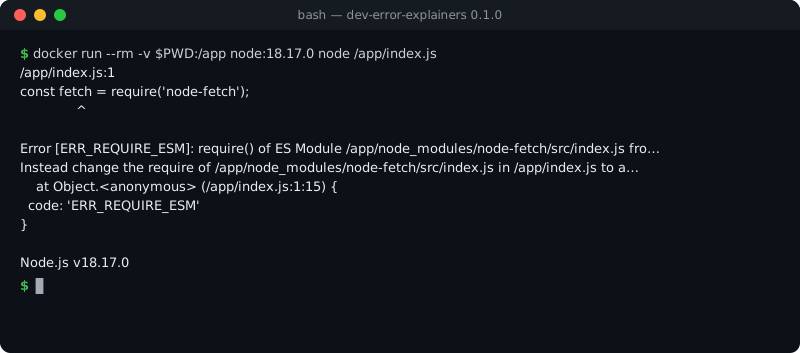
```bash
npm run build 2>&1 | npx dev-error-explainers
```
```bash
npm install dev-error-explainers
```
```js
import { detect, explainEsmCjs } from 'dev-error-explainers';
const error = 'Error [ERR_REQUIRE_ESM]: require() of ES Module /app/node_modules/node-fetch/src/index.js from /app/index.js not supported.';
console.log(detect(error));
const { findings } = explainEsmCjs({ error, nodeVersion: '20.10.0' });
console.log(findings[0].title, findings[0].fixes.map((f) => f.title));
```
Output:
```text
[ 'esm-cjs-explainer' ]
ERR_REQUIRE_ESM — require() of an ES module [
'Upgrade Node.js (you are on 20.10.0)',
'Use dynamic import() from CommonJS',
'Convert the calling file to ESM'
]
```
Seven small, **pure** JavaScript modules with zero dependencies. Each one recognises the
exact error text a developer pastes (from the browser console, `npm`, `next build`,
`curl -I`, a Node.js stack trace…), explains *why* it happens, and returns concrete fixes
with a link to the primary source where one exists (MDN, the Node.js docs, the npm docs,
the PostgreSQL docs, the Supabase docs…). The same engine runs as a library, a CLI, a
GitHub Action and an MCP server.
Secrets: the CLI, the Action and the MCP server pass the input through `redact()`
before it is analysed, with one exception: the DATABASE_URL doctor reads the raw
`postgres://` line (a password's exact characters decide the diagnosis), and never
prints that password. Used directly as a library, six of the seven
modules mask what looks like a secret before echoing it back; **the build-error decoder
does not** — it quotes the matching lines of your build output as they are. Redaction
has limits: see [what it does not catch](https://github.com/mahdibrr/dev-error-explainers/blob/main/docs/CONTRACT.md#redaction).
Six of them power the free tools on **[iloveblogs.blog/tools](https://www.iloveblogs.blog/tools)**,
where you can try each one in the browser.
| Module | Main export (`dev-error-explainers`) | What it explains | Try it live |
|---|---|---|---|
| `cors-error-explainer` | `diagnoseCors` | Chrome / Firefox / Safari "blocked by CORS policy" errors: missing or wrong `Access-Control-Allow-*` headers, preflight failures, credentials, mixed content — with a fix for your stack | [CORS Error Explainer](https://www.iloveblogs.blog/tools/cors-error-explainer) |
| `esm-cjs-explainer` | `explainEsmCjs` | `ERR_REQUIRE_ESM`, "Cannot use import statement outside a module", "exports is not defined in ES module scope", `ERR_UNKNOWN_FILE_EXTENSION ".ts"`, `ERR_MODULE_NOT_FOUND`, `ERR_PACKAGE_PATH_NOT_EXPORTED` — aware of your Node.js version | [ESM/CJS Error Explainer](https://www.iloveblogs.blog/tools/esm-cjs-error-explainer) |
| `npm-eresolve-explainer` | `analyseEresolveLog` | `npm ERR! ERESOLVE` peer-dependency conflicts: who asks for which range, what is installed, and why they do not intersect | [npm ERESOLVE Explainer](https://www.iloveblogs.blog/tools/npm-eresolve-explainer) |
| `chunk-cache-explainer` | `diagnoseChunkCache` | `ChunkLoadError` / "Loading chunk failed" after a deploy: reads your response headers and finds the stale HTML, the CDN cache hit or the SPA fallback | [ChunkLoadError Cache Checker](https://www.iloveblogs.blog/tools/chunkloaderror-cache-checker) |
| `database-url-doctor` | `diagnoseDatabaseUrl` | Postgres / Supabase connection strings: pooler vs direct, port 5432 vs 6543, `pgbouncer`, SSL, unencoded password characters — with a corrected URL for Prisma, Drizzle, `pg` or `psql` | [DATABASE_URL Doctor](https://www.iloveblogs.blog/tools/supabase-database-url-doctor) |
| `build-error-decoder` | `decodeBuildError` | Failing `next build` / `next dev` output: Suspense bailouts, dynamic server usage, `window is not defined`, hydration mismatches, module resolution, heap out of memory, `EADDRINUSE`… | [Next.js Build Error Decoder](https://www.iloveblogs.blog/tools/nextjs-build-error-decoder) |
| `database-connection-explainer` | `explainDatabaseConnection` | "Can't connect to the database" from Node.js apps on PostgreSQL: `ECONNREFUSED` (including `::1` localhost), `ETIMEDOUT`, `ENOTFOUND`, Prisma `P1000` / `P1001` / `P1017`, `password authentication failed`, `no pg_hba.conf entry`, `too many clients`, self-signed certificates. Generic network codes are only diagnosed next to a Postgres signal | No browser tool yet — [rules and sources](https://github.com/mahdibrr/dev-error-explainers/blob/main/docs/rules/database-connection.md) |
Evidence: most findings cite the primary source they were checked against. The
build-error decoder has no primary-source URL; its links point to articles on the
author's site, iloveblogs.blog.
Node.js 20 or later. ES modules only.
## Usage
Everything is available from the package root, and each module can also be imported on
its own:
```js
import { diagnose } from 'dev-error-explainers/cors-error-explainer';
const r = diagnose({
error: "Access to fetch at 'https://api.example.com/data' from origin 'http://localhost:3000' has been blocked by CORS policy: No 'Access-Control-Allow-Origin' header is present on the requested resource.",
});
r.isCorsProblem; // true
r.findings; // what is wrong, why, and the source
r.fix; // a fix for the detected (or guessed) stack
```
```js
import {
analyseEresolveLog, diagnoseDatabaseUrl, diagnoseChunkCache, decodeBuildError, explainDatabaseConnection,
} from 'dev-error-explainers';
analyseEresolveLog(npmOutput); // { detected, code, conflicts: [...] }
diagnoseDatabaseUrl(process.env.DATABASE_URL, { client: 'prisma' }); // { ok, kind, findings, corrected }
diagnoseChunkCache({ htmlHeaders, chunkHeaders }); // headers from `curl -I`
decodeBuildError(nextBuildOutput); // matched rules, most severe first
explainDatabaseConnection({ error: stackTrace }); // { recognised, findings, related }
```
### `detect(text)`
Returns the names of the modules that recognise `text`, in a fixed order, or `[]`.
Each module is asked through its own recogniser — `detect` adds no heuristics of its own.
Note that `chunk-cache-explainer` reads HTTP response headers (the output of `curl -I`),
not the `ChunkLoadError` message itself; the message alone is recognised by
`build-error-decoder`.
## JSON contract
Every module has its own result shape. `diagnose(text)` maps all of them onto **one**
shape with stable rule ids, after redacting the input — the shape the CLI prints with
`--json`, the GitHub Action renders and the MCP server returns:
```js
import { diagnose } from 'dev-error-explainers'; // or 'dev-error-explainers/contract'
diagnose('FATAL: password authentication failed for user "andym"');
// { version: '0.1', matched: true, redactions: 0,
// results: [{ rule: 'database-connection.password-auth-failed', family: 'database-connection',
// severity: 'critical', confidence: 'high', title, cause, fixes, evidence, module }] }
```
Unknown input gives `{ matched: false, results: [] }` — never a closest guess. The shape,
the full rule table, the confidence semantics and the redaction limits are in
[docs/CONTRACT.md](https://github.com/mahdibrr/dev-error-explainers/blob/main/docs/CONTRACT.md).
A public corpus of real pasted errors with their expected results lives in
[fixtures/](https://github.com/mahdibrr/dev-error-explainers/tree/main/fixtures), each case with its source.
`redact(text)` is exported too (`dev-error-explainers/redact`).
## CLI
Pipe a failing command into it, or pass a log file. Nothing is sent anywhere.
```bash
npm run build 2>&1 | npx dev-error-explainers
npx dev-error-explainers < error.log
npx dev-error-explainers --text "Error [ERR_REQUIRE_ESM]: require() of ES Module …" --node 18.17.0
npx dev-error-explainers --json < error.log # the contract result (docs/CONTRACT.md)
```
Flags: `--only cors|esm|eresolve|build|database-url|database-connection|chunk-cache`, `--json`,
`--node <version>`, `--client prisma|drizzle|pg|psql`, `--html-headers <file> --chunk-headers <file>`,
`--help`, `--version`. `npx dev-error-explainers mcp` starts the MCP server.
Exit codes: `0` an error was recognised, `2` nothing recognised (nothing is guessed), `64` usage error.
A connection string is always printed with its password masked.
## Use it in CI (GitHub Action)
When a step fails, the Action reads the log you saved from it and writes the cause and
the fix to the job summary, with annotations on the file and line when the log names a
file in your checkout. No network, no LLM, no token.
```yaml
- name: Build
id: build
continue-on-error: true # let the explain step run…
shell: bash
run: |
set -o pipefail
npm run build 2>&1 | tee build.log
- name: Explain the failure
if: steps.build.outcome == 'failure'
uses: mahdibrr/dev-error-explainers@v0
with:
log-file: build.log
- name: Fail the job if the build failed
if: steps.build.outcome == 'failure'
run: exit 1 # …then keep the job red
```
Inputs, outputs and why `pipefail` and `steps.build.outcome` matter:
[docs/ACTION.md](https://github.com/mahdibrr/dev-error-explainers/blob/main/docs/ACTION.md).
## Use it from your AI assistant (MCP)
An MCP server with one tool, `explain_error`, so an assistant can check a pasted error
against the documented cause before it guesses. Offline and deterministic; unrecognised
input is reported as such. Claude Code:
```bash
claude mcp add dev-error-explainers -- npx -y -p dev-error-explainers dev-error-explainers-mcp
```
Claude Desktop, Cursor, VS Code and the protocol details:
[docs/MCP.md](https://github.com/mahdibrr/dev-error-explainers/blob/main/docs/MCP.md).
## Use it in Claude Code (plugin: skill + MCP)
The repository is also a Claude Code plugin marketplace. The plugin bundles the MCP
server and a skill that tells Claude when to call it:
```text
/plugin marketplace add mahdibrr/dev-error-explainers
/plugin install dev-error-explainers@dev-error-explainers
```
## Principles
- **Deterministic.** The same input always gives the same answer; the rules are tested
against real error text (Stack Overflow questions, GitHub issues, framework output).
- **Offline.** Nothing is sent anywhere: the input never leaves the process.
- **Cited where possible.** Findings link to the documentation that states the rule, where
one exists — not every rule cites a source.
- **Honest about unknowns.** An error the module does not recognise is reported as not
recognised, never guessed.
## Tests
```bash
npm install
npm test
```
CI runs the suite on Node.js 20, 22 and 24.
## Contributing
**Unrecognised error? [Open an issue](https://github.com/mahdibrr/dev-error-explainers/issues/new/choose)
with the exact text.** Paste the error as printed, the command that produced it, and the
tool versions. A new rule needs a test built from a real error. A diagnosis that is wrong
is a bug too — there is a separate template for that.
## License
[MIT](https://github.com/mahdibrr/dev-error-explainers/blob/main/LICENSE)
## Maintainer and project context
Maintained by [Mahdi Ben Rhouma](https://mahdibr.online/about/).
- [Project notes and browser tools](https://mahdibr.online/open-source/dev-error-explainers/) - How the offline library connects to browser tools, the CLI and public examples.
TDQS
Scored across 1 tool
There is only one tool, so there is no possibility of overlap or misselection between tools. Its purpose (diagnose a concrete developer error message) is clearly stated and distinguishable from any generic reasoning the agent might do.
The single name explain_error follows a clean verb_noun convention and is self-descriptive. There are no other names to conflict with, so consistency is trivially satisfied.
One tool is borderline thin for a server surface, even though it is well-scoped to a single capability. A single-tool server offers no granularity if callers want, e.g., just the structured or just the lookup.
For its narrow stated purpose (explain a pasted error and return cause, fixes, and structured JSON) the surface is self-contained, including an explicit no-match fallback. Coverage is only as broad as its offline known-error database, but no lifecycle operations are obviously missing.