

F
licenseC
qualityD
maintenanceA Model Context Protocol server allowing Claude AI to interact with AWS resources through natural language, enabling users to query and manage AWS services without using the traditional AWS Console or CLI.
3
6
-

Provides a serverless implementation of the Model Context Protocol with AWS Lambda, including full deployment architecture with CloudFront and Cognito authentication
Integrates with GitHub repositories for configuration and source code management with OIDC-based authentication for secure deployments
Implements CI/CD pipelines using GitHub Actions for automated testing and deployment of the MCP server with OIDC authentication to AWS
Implements a fully serverless architecture for hosting MCP servers in the cloud with real-time streaming via Server-Sent Events
Click on "Deploy Server".
Wait a few minutes for the server to deploy. Once ready, it will show a "Started" state.
In the chat, type @ followed by the MCP server name and your instructions, e.g., "@Serverless MCP show me AWS costs for the last 30 days"
That's it! The server will respond to your query, and you can continue using it as needed.
Here is a step-by-step guide with screenshots.
A serverless implementation of the Model Context Protocol (MCP) using AWS Lambda, CloudFront, and Cognito authentication. This project provides a complete infrastructure for hosting MCP servers in the cloud with OAuth 2.0 authentication, real-time streaming via Server-Sent Events with JSON-RPC 2.0 messaging format, and scalable serverless architecture. The implementation includes RFC-compliant OAuth 2.0 support with OAuth 2.0 Authorization Server Metadata (RFC 8414), OAuth 2.0 Dynamic Client Registration Protocol (RFC 7591), and OAuth 2.0 Protected Resource Metadata (RFC 9728). Features a custom transport implementation compatible with the official Model Context Protocol TypeScript SDK.
MCP Protocol Implementation: Full support for Model Context Protocol with tools and resources
Serverless Architecture: AWS Lambda functions with CloudFront distribution
OAuth 2.0 Authentication: Secure authentication using AWS Cognito
Real-time Streaming: Server-Sent Events (SSE) support for live communication
Session Management: Stateful and stateless session handling
Custom Domain: SSL certificates and Route 53 DNS configuration
GitHub Actions Deployment: OIDC-based CI/CD pipeline
Related MCP server: CFM Tips - Cost Optimization MCP Server
The project consists of two main CDK stacks:
ServerlessMcpStack: Core infrastructure including Lambda functions, CloudFront distribution, Cognito user pool, and DynamoDB table
GitHubOidcStack: GitHub Actions OIDC provider for secure deployments
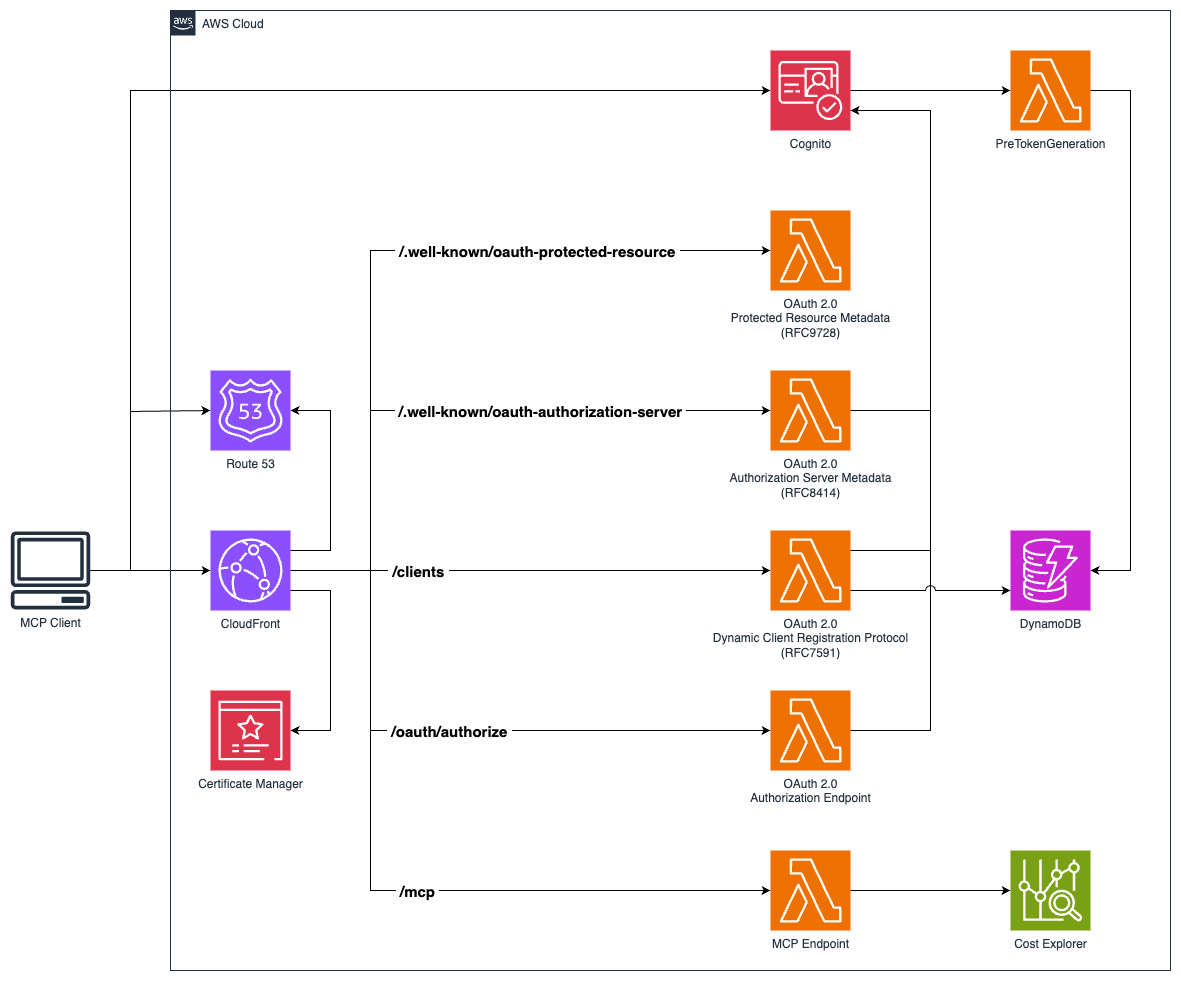
Node.js 22
pnpm >= 10.12
AWS CLI configured with appropriate permissions
A registered domain name with Route 53 hosted zone
Clone the repository:
git clone https://github.com/hteek/serverless-mcp.git
cd serverless-mcp
Install dependencies:
pnpm installConfigure your domain settings in config/default.ts:
export default {
  domainName: 'your-domain.com',
  github: {
    owner: 'your-github-username',
    repo: 'your-repo-name',
  },
  hostedZoneId: 'YOUR_ROUTE53_HOSTED_ZONE_ID',
  project: 'your-project-name',
};# Build the project
pnpm build
# Watch for changes during development
pnpm watch
# Run tests
pnpm test
# Run tests in watch mode
pnpm test:watch
# Run tests with UI
pnpm test:ui# Lint code
pnpm lint
# Fix linting issues
pnpm lint:fix
# Format code
pnpm format
# Check formatting
pnpm format:checkEnsure your AWS credentials are configured
Verify your domain is registered and the hosted zone ID is correct
Build the project: pnpm build
# Deploy both stacks
pnpm cdk deploy --all

# Deploy specific stack
pnpm cdk deploy serverless-mcp
pnpm cdk deploy serverless-mcp-github-oidc

# Preview changes
pnpm cdk diff

# Generate CloudFormation templates
pnpm cdk synthThis project includes three GitHub Actions workflows for automated deployment:
ci.yml)Trigger: Pushes to main branch and pull requests
Jobs:
CI Pipeline: Runs build, lint, and tests on all pushes and PRs
Automated Deployment: Deploys to AWS when changes are pushed to main
Environment: Uses development environment with AWS_ACCOUNT variable
manual-deploy.yml)Trigger: Manual workflow dispatch via GitHub UI
Usage: For ad-hoc deployments without code changes
deploy.yml)Purpose: Shared deployment logic used by other workflows
Features:
OIDC authentication with AWS
Installs dependencies and builds project
Deploys using CDK with no approval required
Deploy GitHub OIDC Stack (one-time setup):
pnpm cdk deploy serverless-mcp-github-oidcConfigure GitHub Environment:
Go to your GitHub repository → Settings → Environments
Create a development environment
Add environment variable: AWS_ACCOUNT with your AWS account ID
Verify Deployment:
The GitHub OIDC stack creates an IAM role: github-actions-role
This role has the necessary permissions for CDK deployment
No long-lived AWS credentials needed in GitHub secrets
Automatic Deployment:
Push changes to main branch
CI workflow runs: build → lint → test → deploy
Deployment uses OIDC to assume AWS role
CDK deploys the serverless-mcp stack
Manual Deployment:
Go to Actions tab in GitHub repository
Select "manual deploy" workflow
Click "Run workflow" on main branch
GitHub Actions: View workflow runs in the Actions tab
AWS CloudFormation: Check stack status in AWS console
CloudWatch: Monitor Lambda function logs and metrics
Once deployed, your MCP server will be available at:
Main endpoint: https://your-domain.com/mcp
Authentication: https://auth.your-domain.com
The server implements the following AWS Cost Explorer tools:
get_today_date: Get the current date to help with relative date queries
{
  "name": "get_today_date"
}get_dimension_values: Get available values for AWS Cost Explorer dimensions (SERVICE, REGION, etc.)
{
  "name": "get_dimension_values",
  "arguments": {
    "dimensionKey": "SERVICE",
    "startDate": "2024-01-01",
    "endDate": "2024-01-31"
  }
}get_tag_values: Get available values for a specific tag key
{
  "name": "get_tag_values",
  "arguments": {
    "tagKey": "Environment",
    "startDate": "2024-01-01",
    "endDate": "2024-01-31"
  }
}get_cost_and_usage: Retrieve AWS cost and usage data with filtering and grouping
{
  "name": "get_cost_and_usage",
  "arguments": {
    "startDate": "2024-01-01",
    "endDate": "2024-01-31",
    "granularity": "MONTHLY",
    "groupBy": [{"Type": "DIMENSION", "Key": "SERVICE"}]
  }
}get_cost_forecast: Generate cost forecasts based on historical usage patterns
{
  "name": "get_cost_forecast",
  "arguments": {
    "startDate": "2024-02-01",
    "endDate": "2024-02-29",
    "metric": "UNBLENDED_COST"
  }
}get_cost_and_usage_comparisons: Compare costs between two time periods
{
  "name": "get_cost_and_usage_comparisons",
  "arguments": {
    "baseStartDate": "2024-01-01",
    "baseEndDate": "2024-01-31",
    "comparisonStartDate": "2024-02-01",
    "comparisonEndDate": "2024-02-29"
  }
}get_cost_comparison_drivers: Analyze what drove cost changes between periods
{
  "name": "get_cost_comparison_drivers",
  "arguments": {
    "baseStartDate": "2024-01-01",
    "baseEndDate": "2024-01-31",
    "comparisonStartDate": "2024-02-01",
    "comparisonEndDate": "2024-02-29"
  }
}greeting: Dynamic greeting resource
Template: greeting://[name]
Example: greeting://world returns "Hello, world!"
Connect to your MCP server using any MCP-compatible client:
import { Client } from '@modelcontextprotocol/sdk/client/index.js';
import { StreamableHTTPTransport } from '@modelcontextprotocol/sdk/client/streamableHttp.js';

const transport = new StreamableHTTPTransport('https://your-domain.com/mcp');

const client = new Client(
  { name: 'my-client', version: '1.0.0' },
  { capabilities: {} }
);

await client.connect(transport);Create environment-specific configuration files in the config/ directory:
config/development.ts
config/production.ts
config/staging.ts
Modify cdk.json to adjust CDK feature flags and behavior.
CloudWatch Logs: Lambda function logs are automatically sent to CloudWatch
AWS X-Ray: Distributed tracing is enabled for performance monitoring
Metrics: Custom metrics are collected using AWS Lambda Powertools
Authentication: OAuth 2.0 with AWS Cognito
HTTPS: All traffic encrypted with SSL/TLS
IAM: Least privilege access policies
Session Management: Secure session handling with validation
Fork the repository
Create a feature branch: git checkout -b feature/new-feature
Make your changes and add tests
Run linting and tests: pnpm lint && pnpm test
Commit your changes: git commit
Push and create a pull request
This project is licensed under the MIT License - see the LICENSE file for details.
For issues and questions:
Check the documentation for development guidance
Open an issue on GitHub
Review CloudWatch logs for debugging information
pnpm build - Compile TypeScript to JavaScript
pnpm watch - Watch for changes and compile
pnpm test - Run Vitest unit tests
pnpm cdk deploy - Deploy infrastructure to AWS
pnpm cdk diff - Compare deployed stack with current state
pnpm cdk synth - Generate CloudFormation templates
pnpm cdk destroy - Remove all AWS resources
This server cannot be deployed
AWS Cost Explorer cost, forecast, and anomaly reporting through user-connected IAM credentials.
Hosted MCP server for AWS cloud spend: service breakdowns, anomalies, savings and forecasts.
Hosted MCP server for LLM cost estimation, model comparison, and budget-aware routing.
Ask about AWS, Azure, GCP, OpenAI, Anthropic and Snowflake costs, budgets, and anomalies.