
A
licenseB
qualityD
maintenanceAn MCP server that provides AI assistants with powerful tools to interact with YouTube, including video searching, transcript extraction, comment retrieval, and more.
8
19
Apache 2.0

Makes transcripts of YouTube videos from a playlist available, allowing access to video content in text form
Click on "Deploy Server".
Wait a few minutes for the server to deploy. Once ready, it will show a "Started" state.
In the chat, type @ followed by the MCP server name and your instructions, e.g., "@Playlist-MCP find videos discussing Kubernetes security best practices"
That's it! The server will respond to your query, and you can continue using it as needed.
Here is a step-by-step guide with screenshots.
This is an experimental MCP server, which makes the transcripts of a Youtube Playlist available.
It currently is preloaded with the KubeCon London 2025 transcripts. But you can change this by changing the URL.
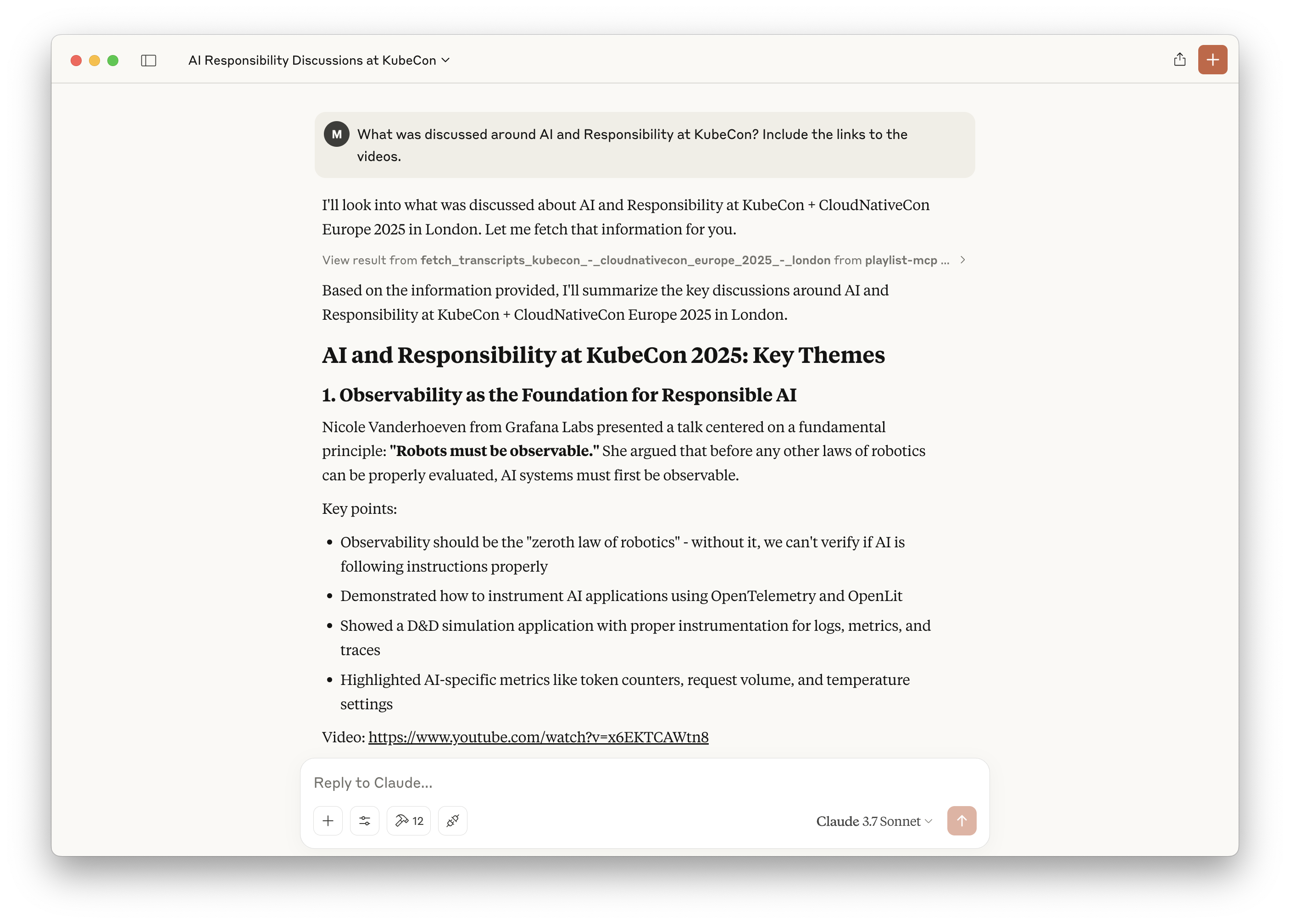
# Clone this repo
git clone git@github.com:luebken/playlist-mcp.git; cd playlist-mcp

# Install python dependencies
uv venv
source .venv/bin/activate
uv pip install -e .

# Fill the transcript cache and vector db.
uv run server.py https://www.youtube.com/playlist?list=PLj6h78yzYM2MP0QhYFK8HOb8UqgbIkLMc
Related MCP server: YouTube MCP Server
# Configure for Claude > Settings > Developer > Edit Config
# /Users/YOUR_USERNAME/Library/Application Support/Claude/claude_desktop_config.json
{
  "mcpServers": {
      "playlist-mcp": {
          "command": "uv",
          "args": [
              "--directory",
              "/PATH/TO/PARENT/playlist-mcp/",
              "run",
              "server.py",
              "https://www.youtube.com/playlist?list=PLj6h78yzYM2MP0QhYFK8HOb8UqgbIkLMc"
          ]
      }
  }
}Fetch transcripts for a specific topic of: KubeCon + CloudNativeCon Europe 2025 - London
| Name | Required | Description | Default |
|---|---|---|---|
| topic | Yes | The topic to search for |
Does the description disclose side effects, auth requirements, rate limits, or destructive behavior?
No annotations are provided, so the description carries the full burden of behavioral disclosure. It only states the fetch action and the topic parameter, without explaining output format, completeness of transcripts, pagination, or any constraints. This is minimal beyond the obvious and fails to specify practical behavioral details.
Agents need to know what a tool does to the world before calling it. Descriptions should go beyond structured annotations to explain consequences.
Is the description appropriately sized, front-loaded, and free of redundancy?
The description is a single, well-structured sentence that front-loads the action and resource. It contains no filler and conveys the essential purpose and parameter without unnecessary detail.
Shorter descriptions cost fewer tokens and are easier for agents to parse. Every sentence should earn its place.
Given the tool's complexity, does the description cover enough for an agent to succeed on first attempt?
The tool is simple with one parameter and no output schema, so the description's brevity is mostly acceptable. It clearly states the purpose and the required input. A slight gap exists in describing what the returned transcripts look like, but for a fetch-by-topic tool this is not severely hindering. The description is largely complete for its simplicity.
Complex tools with many parameters or behaviors need more documentation. Simple tools need less. This dimension scales expectations accordingly.
Does the description clarify parameter syntax, constraints, interactions, or defaults beyond what the schema provides?
The schema covers the 'topic' parameter with 'The topic to search for', and the description essentially mirrors that ('a specific topic'). Since schema coverage is 100%, the description adds no additional meaning beyond what the schema already provides, which aligns with the baseline score of 3.
Input schemas describe structure but not intent. Descriptions should explain non-obvious parameter relationships and valid value ranges.
Does the description clearly state what the tool does and how it differs from similar tools?
The description uses the specific verb 'Fetch' and clearly identifies the resource 'transcripts' for the named conference, scoped by 'a specific topic'. This is a precise and unambiguous statement of the tool's function, even without sibling tools to differentiate.
Agents choose between tools based on descriptions. A clear purpose with a specific verb and resource helps agents select the right tool.
Does the description explain when to use this tool, when not to, or what alternatives exist?
The description clearly implies when to use the tool: when you need transcripts from KubeCon + CloudNativeCon Europe 2025 - London filtered by topic. There are no sibling tools or alternatives to discuss, so the lack of explicit exclusions is acceptable. The context is obvious and sufficient.
Agents often have multiple tools that could apply. Explicit usage guidance like "use X instead of Y when Z" prevents misuse.
Recent tool additions, removals, and schema changes observed during successful MCP inspections.
v0.1.0fetch_transcripts_kubecon_-_cloudnativecon_europe_2025_-_londonScored across 1 tool
Only one tool exists, so there is no chance of confusion between tools. The tool's purpose is clear and distinct, even though it is highly specialized.
With a single tool, naming consistency is trivially maintained. The name follows a verb_noun pattern and is descriptive, though overly verbose.
The server has only one tool, which feels too few for the apparent scope. The server name 'Playlist-MCP' suggests a broader purpose, but the tool is narrowly focused on a specific conference, creating a mismatch.
The tool set is severely incomplete for any realistic workflow. There is no way to list available topics, search transcripts, or retrieve data for other events, leaving agents with a dead end beyond this single specialized action.
An MCP server that gives any LLM or agent clean YouTube transcripts on demand: a single video, a whole channel, or a playlist, plus AI cleanup of auto-generated captions. API-key auth, credit-based, same backend as the public v1 API. Get a free API key with 25 free credits at youtubetranscriptdownload.com/account.
MCP server for RiverScript, an AI transcription platform - fetches transcripts shared via a link.
YouTube transcripts, search, channel browsing, and playlists for AI agents via MCP.
Driflyte MCP server which lets AI assistants query topic-specific knowledge from web and GitHub.