

A
licenseB
qualityD
maintenanceEnables sending WhatsApp Business messages including text, media, interactive lists/buttons, and template management through the WhatsApp Business API via Nango integration.
11
MIT

This server provides a WhatsApp MCP interface for managing chats, contacts, messages, and media programmatically via MCP tools, a web admin UI, and REST APIs.
Authentication & Session Management
Get QR code for WhatsApp linking, check auth status, logout, and force resync for session recovery.
Contacts
Search, resolve, and get contact details by JID; retrieve profile pictures.
Chats
List, search, and get metadata for chats and groups; audit groups for overlaps, members without direct chats, or members not in contacts.
Messages
List, search, retrieve, and send text messages with optional idempotency support; get message context and last interaction.
Media
Send media (image/video/document/audio) from local files, URLs, or base64; stage files server-side for reuse; download media from messages.
Upload via REST endpoints (/api/upload for base64, /api/upload-multipart for large files); hosted at /media/<filename>.
Admin UI
Web interface at /admin for QR linking, status checks, runtime settings management, chat history viewing, and chat export (JSON + media).
APIs
GET /api/chats and GET /api/chats/:jid/messages for programmatic chat data access.
GET /api/export/chat/:jid for exporting chat history.
/healthz endpoint for health checks (Docker-compatible).
Persistence & Recovery
Chats and messages stored in SQLite (configurable via DB_PATH); session state persists across restarts.
Automatic reconnect, soft recovery via forceResync(), internal client restarts, and a disconnect watchdog.
Allows interaction with WhatsApp to manage contacts, search and list chats, send and receive text messages, and handle media uploads and downloads.
Click on "Deploy Server".
Wait a few minutes for the server to deploy. Once ready, it will show a "Started" state.
In the chat, type @ followed by the MCP server name and your instructions, e.g., "@WhatsApp MCP Stream send a message to John Smith saying I'm on my way"
That's it! The server will respond to your query, and you can continue using it as needed.
Here is a step-by-step guide with screenshots.

A WhatsApp MCP server built around Streamable HTTP transport, using Baileys for WhatsApp connectivity, with a web admin UI and bidirectional media flow (upload + download).
Key points:
Transport: Streamable HTTP at /mcp
Engine: Baileys
Admin UI: QR, status, logout, runtime settings, chat history viewer
Media: upload endpoints + /media hosting + MCP download tool
# build and run

docker compose build

docker compose up -d
The server will be available at:
Admin UI: http://localhost:3003/admin
MCP endpoint: http://localhost:3003/mcp
Media files: http://localhost:3003/media/<filename>
Related MCP server: whatsapp-mcp
--iptables=falseOn some NAS / hardened hosts (e.g. Synology with dockerd --iptables=false), Docker's embedded DNS proxy (127.0.0.11) has no iptables DNAT rules and refuses connections inside containers.
Fix: copy resolv.conf.example to resolv.conf and add a volume override:
cp resolv.conf.example resolv.confThen add to a local docker-compose.override.yml (not committed):
services:
  mcp-whatsapp:
    volumes:
      - ./resolv.conf:/etc/resolv.conf:ro
docker compose up picks up the override automatically.
Settings can be edited in the admin UI and are persisted to SETTINGS_PATH (defaults to MEDIA_DIR/settings.json).
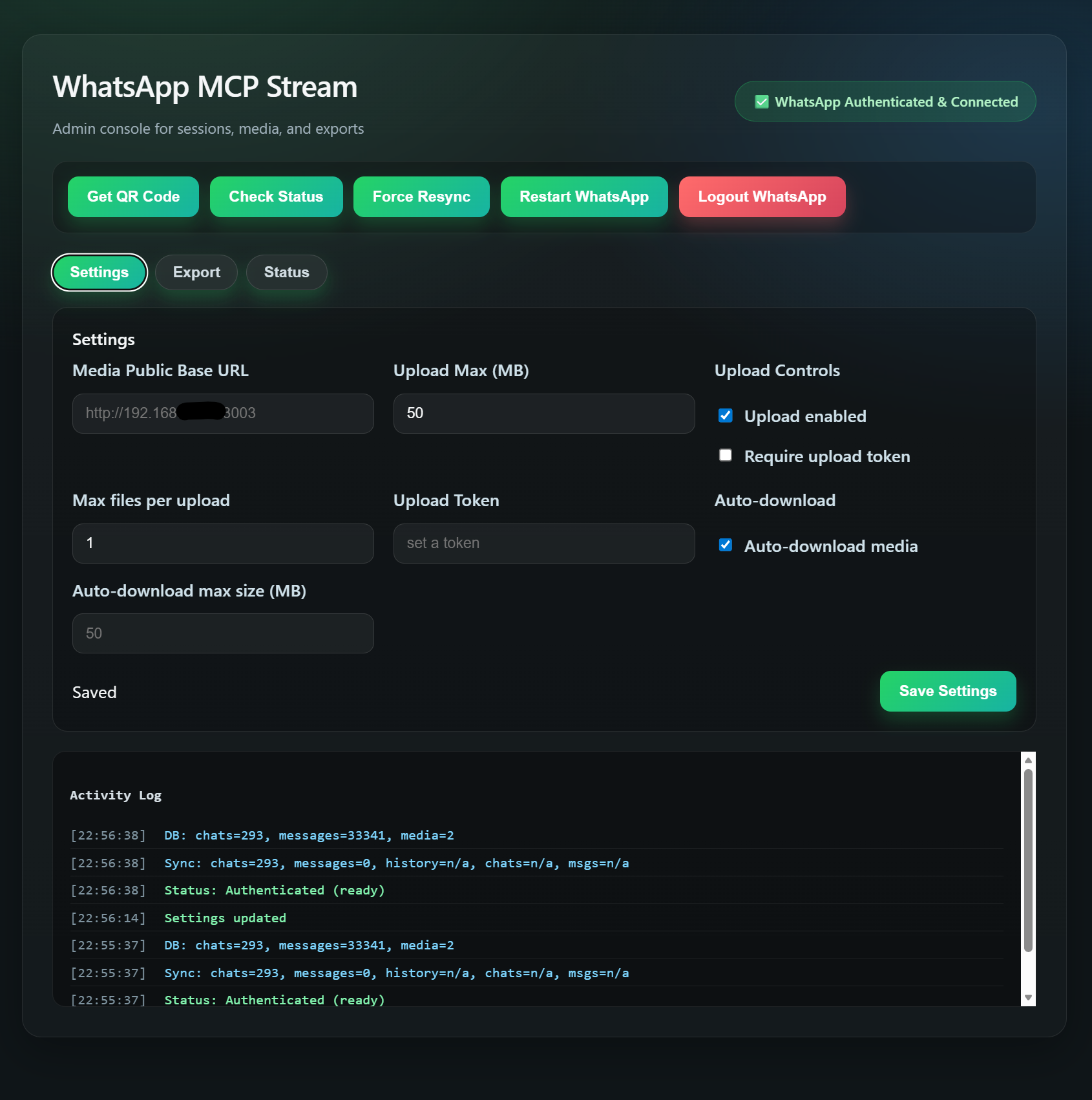 Admin console with runtime settings, QR linking, chat history viewer, export, and status.
Supported settings:
media_public_base_url
upload_max_mb
upload_enabled
max_files_per_upload
require_upload_token
upload_token
auto_download_media
auto_download_max_mb
Built-in authentication is not implemented yet. In production, use a gateway that enforces auth. This project works well behind authmcp-gateway:
https://github.com/loglux/authmcp-gatewayBase64 JSON:
curl -X POST http://localhost:3003/api/upload \
  -H "Content-Type: application/json" \
  -d {filename:photo.jpg,mime_type:image/jpeg,data:<base64>}
Multipart (recommended for large files):
curl -X POST http://localhost:3003/api/upload-multipart \
  -F "file=@/path/to/file.jpg"
Both return url and (if configured) publicUrl.
The ./files/ directory in the project root is bind-mounted into the container at /app/files. Drop any file there and reference it immediately — no container restart needed:
# On host:
cp report.pdf /path/to/whatsapp-mcp-stream/files/

# In send_media:
media_path: /app/files/report.pdf
For a URL source, pass media_url directly to send_media or stage_media — the server downloads the file itself without base64.
If require_upload_token=true, provide a token with either:
x-upload-token: <token>
Authorization: Bearer <token>
The server exposes Streamable HTTP at /mcp.
Typical flow:
POST /mcp with JSON-RPC initialize
Use the returned mcp-session-id header for subsequent requests
POST /mcp for tool calls
Note: clients must send Accept: application/json, text/event-stream on initialize.
Quick regression smoke for MCP tools:
npm run smoke:mcpOptional custom target:
MCP_BASE_URL=http://localhost:3003 npm run smoke:mcpTool | Description |
| Get the latest WhatsApp QR code as an image for authentication. |
| Check if the WhatsApp client is authenticated and ready. |
| Logout from WhatsApp and clear the current session. |
Tool | Description |
| Search contacts by name or phone number. |
| Resolve a contact by name or phone number (best matches). |
| Get contact details by JID. |
| Get profile picture URL for a JID. |
| Get group metadata and participants by group JID. |
Tool | Description |
| List chats with metadata and optional last message. |
| Get chat metadata by JID. |
| List group chats only. |
| Resolve a direct chat JID by phone number. |
| Resolve a contact by name or phone number and return chat metadata. |
| Find members that appear across multiple groups. |
| Find group members with no direct chat. |
| Find group members missing from contacts. |
| Run combined group audit as one routine operation. |
Tool | Description |
| Get messages from a specific chat. |
| Search messages by text (optionally scoped to a chat). |
| Get a specific message by ID ( |
| Get recent messages around a specific message. |
| Get the most recent message for a JID. |
| Send a text message to a person or group. Supports optional |
Tool | Description |
| Send media (image/video/document/audio). Accepts |
| Save a file to the server's media directory and return its local path. Use the returned |
| Download media from a message. |
Tool | Description |
| Health check tool. |
This service contains an intentional recovery workaround for Baileys/WhatsApp session-state corruption.
Why it exists:
In production we observed cases where the container stayed alive and MCP still answered, but the WhatsApp session was functionally broken.
The most common indicators were Baileys errors like failed to find key ... to decode mutation and failed to sync state from version.
In that state, a manual container restart often restored service.
Current behavior:
On app-state corruption signals, the service first tries a soft recovery with forceResync().
If the same class of failure repeats within a time window, it escalates to an internal WhatsApp client restart.
On disconnects such as Connection Terminated, the service schedules a disconnect watchdog and escalates to an internal restart if the socket does not return to open in time.
The reconnect lifecycle is guarded against nested lock deadlocks, so disconnect recovery can complete without requiring a manual container restart.
Recent production observations show repeated socket disconnects (428 Connection Terminated, 503 Stream Errored) being auto-recovered back to open.
A dedicated /healthz endpoint reports 503 only when the service is genuinely stuck outside the allowed recovery window.
Docker health checks use /healthz, so the container is restarted only after in-process recovery has had a chance to work.
These recovery mechanisms reduce operator intervention and improve resilience against common WhatsApp/Baileys session failures.
MIT
Chats and messages are persisted to a local SQLite database stored in the session volume.
Environment variables:
Variable | Default | Description |
|
| SQLite database path for chats/messages persistence. |
|
| Enable detailed WhatsApp event logs. |
|
| Write raw Baileys event stream to a file for deep debugging. |
|
| File path for the event stream log. |
|
| Enable reconnect safety net after force resync. |
|
| Delay before reconnect after force resync (ms). |
|
| Minimum delay between automatic app-state recoveries. |
|
| Time window used to count repeated app-state corruption failures. |
|
| Number of soft recoveries before escalating to an internal restart. |
|
| Grace period during recovery/disconnect before |
|
| How long to wait after a socket close before the disconnect watchdog forces reconnect/restart. |
|
| Comma-separated disconnect status codes that should escalate straight to an internal restart watchdog. |
|
| Suppress exact duplicate |
|
| How long completed |
|
| Max in-memory entries for message index ( |
|
| Max in-memory entries for message key index ( |
|
| Race the WhatsApp client initialise against this deadline; set to |
|
| Max parallel auto-downloads. Auto-download runs through an in-process bounded queue so a burst of inbound media cannot saturate the I/O. |
|
| Max queued auto-download jobs. Excess is dropped FIFO (oldest first) with a warning log; recent messages stay prioritised. |
|
| Use direct JSON responses for Streamable HTTP POST requests by default. Set to |
Additional transport diagnostics:
/mcp POST requests now log request lifecycle events in logs/mcp-whatsapp.log
this includes request entry, transport dispatch, transport.handleRequest completion, and HTTP finish / close
use these logs to determine whether latency happens before the response leaves whatsapp-mcp-stream or after that on the gateway/client side
Browse stored chats and messages via:
GET /api/chats?limit=50&offset=0&q=<search> — paginated chat list, optionally filtered by name.
GET /api/chats/:jid/messages?limit=50&offset=0 — paginated messages for a chat (newest first).
Both endpoints are used by the Chats tab in the admin UI.
Export a chat (JSON + optional downloaded media) via:
GET /api/export/chat/:jid?include_media=true
If include_media=true, the ZIP includes files already downloaded via download_media. It does not fetch missing media from WhatsApp.
Find members that appear across multiple groups and return overlap details.
| Name | Required | Description | Default |
|---|---|---|---|
| group_limit | No | How many groups to scan | |
| refresh_group_info | No | Fetch live group metadata before analysis | |
| min_shared_groups | No | Only include members present in at least this many groups |
Does the description disclose side effects, auth requirements, rate limits, or destructive behavior?
Annotations already indicate read-only, idempotent, and open-world behavior. The description does not contradict but adds no extra behavioral context (e.g., performance implications of scanning many groups).
Agents need to know what a tool does to the world before calling it. Descriptions should go beyond structured annotations to explain consequences.
Is the description appropriately sized, front-loaded, and free of redundancy?
Single sentence, front-loaded with key action, no wasted words. Efficient and easy to parse.
Shorter descriptions cost fewer tokens and are easier for agents to parse. Every sentence should earn its place.
Given the tool's complexity, does the description cover enough for an agent to succeed on first attempt?
No output schema is provided, and the description 'return overlap details' is vague. For a computation tool, the output format is critical and missing, leaving the agent uncertain about results.
Complex tools with many parameters or behaviors need more documentation. Simple tools need less. This dimension scales expectations accordingly.
Does the description clarify parameter syntax, constraints, interactions, or defaults beyond what the schema provides?
Schema coverage is 100% with descriptions for all parameters. The tool description adds no additional meaning beyond what the schema already provides.
Input schemas describe structure but not intent. Descriptions should explain non-obvious parameter relationships and valid value ranges.
Does the description clearly state what the tool does and how it differs from similar tools?
The description uses a specific verb 'Find' and identifies the resource 'members that appear across multiple groups', clearly distinguishing it from sibling tools like 'run_group_audit' which may have broader scope.
Agents choose between tools based on descriptions. A clear purpose with a specific verb and resource helps agents select the right tool.
Does the description explain when to use this tool, when not to, or what alternatives exist?
No guidance on when to use this tool versus alternatives (e.g., get_group_info for individual groups). The description does not mention when not to use it or provide context for selection.
Agents often have multiple tools that could apply. Explicit usage guidance like "use X instead of Y when Z" prevents misuse.
Check if the WhatsApp client is authenticated and ready
| Name | Required | Description | Default |
|---|---|---|---|
No parameters | |||
Does the description disclose side effects, auth requirements, rate limits, or destructive behavior?
Annotations already provide readOnly and idempotent hints. Description adds no extra behavioral context beyond what's obvious. Adequate but no surplus value.
Agents need to know what a tool does to the world before calling it. Descriptions should go beyond structured annotations to explain consequences.
Is the description appropriately sized, front-loaded, and free of redundancy?
Single sentence, directly conveys purpose. No superfluous words. Maximally concise.
Shorter descriptions cost fewer tokens and are easier for agents to parse. Every sentence should earn its place.
Given the tool's complexity, does the description cover enough for an agent to succeed on first attempt?
Tool is simple with zero parameters, annotations present, and no output schema. Description suffices for complete understanding.
Complex tools with many parameters or behaviors need more documentation. Simple tools need less. This dimension scales expectations accordingly.
Does the description clarify parameter syntax, constraints, interactions, or defaults beyond what the schema provides?
No parameters, schema coverage 100%. Baseline 4 is appropriate; description has no need to elaborate on params.
Input schemas describe structure but not intent. Descriptions should explain non-obvious parameter relationships and valid value ranges.
Does the description clearly state what the tool does and how it differs from similar tools?
Description clearly states the tool checks authentication and readiness. Verb 'Check' with resource 'auth status' is specific. No sibling tool duplicates this purpose.
Agents choose between tools based on descriptions. A clear purpose with a specific verb and resource helps agents select the right tool.
Does the description explain when to use this tool, when not to, or what alternatives exist?
No guidance on when to use vs alternatives (e.g., ping). Lacks context like 'use before sending messages to ensure readiness' or not-to-use scenarios.
Agents often have multiple tools that could apply. Explicit usage guidance like "use X instead of Y when Z" prevents misuse.
Download media from a WhatsApp message and return its content.
| Name | Required | Description | Default |
|---|---|---|---|
| message_id | Yes | The message ID in the format jid:id | |
| include_full_data | No | Whether to include the full base64 data in the response | |
| save_to_disk | No | Whether to save media to disk and return a local URL |
Does the description disclose side effects, auth requirements, rate limits, or destructive behavior?
Annotations already declare readOnlyHint=true and idempotentHint=true, indicating a safe, read-only operation. The description confirms downloading and returning content, which aligns with annotations. However, it adds no additional behavioral context (e.g., no mention of file size limits, or that media must exist).
Agents need to know what a tool does to the world before calling it. Descriptions should go beyond structured annotations to explain consequences.
Is the description appropriately sized, front-loaded, and free of redundancy?
The description is a single sentence of 9 words, with no redundancy or unnecessary information. It is front-loaded and efficiently communicates the core purpose.
Shorter descriptions cost fewer tokens and are easier for agents to parse. Every sentence should earn its place.
Given the tool's complexity, does the description cover enough for an agent to succeed on first attempt?
Given three parameters and no output schema, the description could do more to explain return value format or handling of large media. The schema details parameters adequately, but the overall completeness is average for a tool with this complexity.
Complex tools with many parameters or behaviors need more documentation. Simple tools need less. This dimension scales expectations accordingly.
Does the description clarify parameter syntax, constraints, interactions, or defaults beyond what the schema provides?
Schema description coverage is 100%, so the schema already explains each parameter. The tool description adds no extra meaning beyond what's in the schema (e.g., it doesn't clarify the trade-off between include_full_data and save_to_disk). Baseline 3 is appropriate.
Input schemas describe structure but not intent. Descriptions should explain non-obvious parameter relationships and valid value ranges.
Does the description clearly state what the tool does and how it differs from similar tools?
The description clearly states the action (download), the resource (media from a WhatsApp message), and the outcome (return its content). It effectively distinguishes from sibling tools like 'send_media' (which sends) and 'get_message_by_id' (which retrieves message metadata).
Agents choose between tools based on descriptions. A clear purpose with a specific verb and resource helps agents select the right tool.
Does the description explain when to use this tool, when not to, or what alternatives exist?
The description provides no guidance on when to use this tool versus alternatives, no prerequisites (e.g., message must contain media), and no context about when not to use it. Siblings like 'send_media' or 'get_message_by_id' are not mentioned for differentiation.
Agents often have multiple tools that could apply. Explicit usage guidance like "use X instead of Y when Z" prevents misuse.
Find group members that are not in your contacts.
| Name | Required | Description | Default |
|---|---|---|---|
| group_limit | No | How many groups to scan | |
| refresh_group_info | No | Fetch live group metadata before analysis | |
| min_shared_groups | No | Only include members present in at least this many groups |
Does the description disclose side effects, auth requirements, rate limits, or destructive behavior?
The description adds no behavioral context beyond the annotations. It does not mention that scanning multiple groups may be resource-intensive or what the tool returns.
Agents need to know what a tool does to the world before calling it. Descriptions should go beyond structured annotations to explain consequences.
Is the description appropriately sized, front-loaded, and free of redundancy?
The description is a single, focused sentence with no extraneous information; every word is necessary.
Shorter descriptions cost fewer tokens and are easier for agents to parse. Every sentence should earn its place.
Given the tool's complexity, does the description cover enough for an agent to succeed on first attempt?
Given the three parameters and lack of output schema, the description is insufficient. It does not explain the scanning behavior or the use of limiting parameters.
Complex tools with many parameters or behaviors need more documentation. Simple tools need less. This dimension scales expectations accordingly.
Does the description clarify parameter syntax, constraints, interactions, or defaults beyond what the schema provides?
Schema description coverage is 100%, so baseline is 3. The description does not add extra meaning to parameters beyond their schema definitions.
Input schemas describe structure but not intent. Descriptions should explain non-obvious parameter relationships and valid value ranges.
Does the description clearly state what the tool does and how it differs from similar tools?
The description clearly states the verb 'Find' and the resource 'group members that are not in your contacts', effectively differentiating from sibling tools like 'find_members_without_direct_chat'.
Agents choose between tools based on descriptions. A clear purpose with a specific verb and resource helps agents select the right tool.
Does the description explain when to use this tool, when not to, or what alternatives exist?
No guidance is provided on when to use this tool versus similar siblings (e.g., 'analyze_group_overlaps') or what prerequisites exist.
Agents often have multiple tools that could apply. Explicit usage guidance like "use X instead of Y when Z" prevents misuse.
Find group members that do not have a direct chat with you.
| Name | Required | Description | Default |
|---|---|---|---|
| group_limit | No | How many groups to scan | |
| refresh_group_info | No | Fetch live group metadata before analysis | |
| min_shared_groups | No | Only include members present in at least this many groups |
Does the description disclose side effects, auth requirements, rate limits, or destructive behavior?
Annotations already indicate readOnlyHint=true and idempotentHint=true, so the description doesn't need to reiterate those. However, it adds no additional behavioral context (e.g., what groups are scanned, how results are returned). It is consistent with annotations, so no contradiction.
Agents need to know what a tool does to the world before calling it. Descriptions should go beyond structured annotations to explain consequences.
Is the description appropriately sized, front-loaded, and free of redundancy?
The description is a single, clear sentence with no unnecessary words. It effectively communicates the tool's core function in a concise manner.
Shorter descriptions cost fewer tokens and are easier for agents to parse. Every sentence should earn its place.
Given the tool's complexity, does the description cover enough for an agent to succeed on first attempt?
The description is sufficient for basic understanding but lacks context about the output format and how the parameters affect behavior. Without an output schema, more description about return values would be helpful. The annotations cover safety, but the description does not fully compensate for missing output documentation.
Complex tools with many parameters or behaviors need more documentation. Simple tools need less. This dimension scales expectations accordingly.
Does the description clarify parameter syntax, constraints, interactions, or defaults beyond what the schema provides?
Schema description coverage is 100%, with each parameter having a description in the schema. The tool description does not mention parameters, so it adds no semantic value beyond the schema. Baseline score of 3 is appropriate.
Input schemas describe structure but not intent. Descriptions should explain non-obvious parameter relationships and valid value ranges.
Does the description clearly state what the tool does and how it differs from similar tools?
The description clearly states the tool's purpose: finding group members without a direct chat with the user, using specific verb and resource. It distinguishes itself from sibling tools like 'analyze_group_overlaps' and 'find_members_not_in_contacts' by targeting a specific condition.
Agents choose between tools based on descriptions. A clear purpose with a specific verb and resource helps agents select the right tool.
Does the description explain when to use this tool, when not to, or what alternatives exist?
The description provides no guidance on when to use this tool versus alternatives, nor does it mention prerequisites or context. It only states what it does without any when-to-use or when-not-to-use information.
Agents often have multiple tools that could apply. Explicit usage guidance like "use X instead of Y when Z" prevents misuse.
Force a full WhatsApp resync (clears app state and reconnects).
| Name | Required | Description | Default |
|---|---|---|---|
No parameters | |||
Does the description disclose side effects, auth requirements, rate limits, or destructive behavior?
Annotations flag destructiveHint: true; description adds that it clears app state and reconnects, explaining the destructive action. No contradictions. Provides useful context beyond annotations.
Agents need to know what a tool does to the world before calling it. Descriptions should go beyond structured annotations to explain consequences.
Is the description appropriately sized, front-loaded, and free of redundancy?
Single sentence, front-loaded with the key action, no unnecessary words. Every part contributes to understanding.
Shorter descriptions cost fewer tokens and are easier for agents to parse. Every sentence should earn its place.
Given the tool's complexity, does the description cover enough for an agent to succeed on first attempt?
Simple destructive tool with no output schema. Description covers the core action but does not explain what happens after (e.g., success response, side effects like temporary disconnection). Adequate but leaves minor gaps.
Complex tools with many parameters or behaviors need more documentation. Simple tools need less. This dimension scales expectations accordingly.
Does the description clarify parameter syntax, constraints, interactions, or defaults beyond what the schema provides?
No parameters, so schema coverage is 100%. Description adds no param info, but baseline score is 4 per instructions for zero-parameter tools.
Input schemas describe structure but not intent. Descriptions should explain non-obvious parameter relationships and valid value ranges.
Does the description clearly state what the tool does and how it differs from similar tools?
Description clearly states action (force resync), resource (WhatsApp), and what it does (clears app state and reconnects). No sibling tool performs resync, so it is distinct.
Agents choose between tools based on descriptions. A clear purpose with a specific verb and resource helps agents select the right tool.
Does the description explain when to use this tool, when not to, or what alternatives exist?
No guidance on when to use this tool versus alternatives like check_auth_status or logout. Context implies it is for resetting a stuck connection, but no explicit conditions or exclusions.
Agents often have multiple tools that could apply. Explicit usage guidance like "use X instead of Y when Z" prevents misuse.
Resolve a contact by name or phone number and return the chat metadata.
| Name | Required | Description | Default |
|---|---|---|---|
| query | Yes | Name or phone number to resolve | |
| max_candidates | No | Maximum number of matches to consider |
Does the description disclose side effects, auth requirements, rate limits, or destructive behavior?
Annotations already declare readOnlyHint and idempotentHint, indicating a safe read operation. The description does not add behavioral details beyond what annotations provide, such as rate limits or data freshness.
Agents need to know what a tool does to the world before calling it. Descriptions should go beyond structured annotations to explain consequences.
Is the description appropriately sized, front-loaded, and free of redundancy?
The description is a single, front-loaded sentence with no wasted words, efficiently conveying the tool's purpose.
Shorter descriptions cost fewer tokens and are easier for agents to parse. Every sentence should earn its place.
Given the tool's complexity, does the description cover enough for an agent to succeed on first attempt?
For a simple tool with two parameters and no output schema, the description is adequate. It could note that it returns chat metadata, but overall it is complete enough given annotations and schema.
Complex tools with many parameters or behaviors need more documentation. Simple tools need less. This dimension scales expectations accordingly.
Does the description clarify parameter syntax, constraints, interactions, or defaults beyond what the schema provides?
The input schema has 100% description coverage, so the schema already explains the parameters (query and max_candidates). The description does not add extra meaning or clarify parameter interactions beyond the schema.
Input schemas describe structure but not intent. Descriptions should explain non-obvious parameter relationships and valid value ranges.
Does the description clearly state what the tool does and how it differs from similar tools?
The description clearly states the action (resolve a contact) and the resource (chat metadata), and distinguishes from siblings like get_chat_by_id or get_direct_chat_by_contact_number by specifying resolution by name or phone number.
Agents choose between tools based on descriptions. A clear purpose with a specific verb and resource helps agents select the right tool.
Does the description explain when to use this tool, when not to, or what alternatives exist?
The description implies usage for resolving a contact by name/phone, but does not explicitly state when not to use it (e.g., when you have an ID, use get_chat_by_id) or provide alternatives among siblings.
Agents often have multiple tools that could apply. Explicit usage guidance like "use X instead of Y when Z" prevents misuse.
Get WhatsApp chat metadata by JID.
| Name | Required | Description | Default |
|---|---|---|---|
| jid | Yes | The JID of the chat to retrieve (e.g., 123456789@s.whatsapp.net or 123456789-12345678@g.us) |
Does the description disclose side effects, auth requirements, rate limits, or destructive behavior?
Annotations already declare readOnlyHint and idempotentHint, so the safety profile is clear. However, the description adds no additional behavioral context such as what specific metadata is returned, any potential errors, or output format. It merely restates the purpose.
Agents need to know what a tool does to the world before calling it. Descriptions should go beyond structured annotations to explain consequences.
Is the description appropriately sized, front-loaded, and free of redundancy?
The description is a single, efficient sentence with no wasted words. It conveys the essential purpose but could potentially include more detail without becoming verbose.
Shorter descriptions cost fewer tokens and are easier for agents to parse. Every sentence should earn its place.
Given the tool's complexity, does the description cover enough for an agent to succeed on first attempt?
Given the simplicity of the tool (one parameter, no output schema, read-only annotations), the description is minimally adequate. However, it does not explain what 'chat metadata' includes, and the lack of distinction from siblings leaves gaps for an agent to correctly select this tool.
Complex tools with many parameters or behaviors need more documentation. Simple tools need less. This dimension scales expectations accordingly.
Does the description clarify parameter syntax, constraints, interactions, or defaults beyond what the schema provides?
The input schema provides 100% coverage with a detailed description and example for the 'jid' parameter. The tool description adds no additional semantic value beyond what the schema already offers, so a baseline score of 3 is appropriate.
Input schemas describe structure but not intent. Descriptions should explain non-obvious parameter relationships and valid value ranges.
Does the description clearly state what the tool does and how it differs from similar tools?
The description clearly states the action ('Get') and resource ('WhatsApp chat metadata') with the identifier ('by JID'). It is specific and unambiguous. However, it does not explicitly distinguish this tool from similar siblings like get_chat_by_contact or get_direct_chat_by_contact_number, which might cause confusion.
Agents choose between tools based on descriptions. A clear purpose with a specific verb and resource helps agents select the right tool.
Does the description explain when to use this tool, when not to, or what alternatives exist?
There is no guidance on when to use this tool versus alternatives. The description lacks any context about prerequisites, exclusions, or comparison with siblings.
Agents often have multiple tools that could apply. Explicit usage guidance like "use X instead of Y when Z" prevents misuse.
Get contact details by JID.
| Name | Required | Description | Default |
|---|---|---|---|
| jid | Yes | The JID of the contact to retrieve (e.g., 123456789@s.whatsapp.net) |
Does the description disclose side effects, auth requirements, rate limits, or destructive behavior?
Annotations already declare readOnlyHint=true and idempotentHint=true. The description adds no extra behavioral context beyond what is obvious from the name and schema, such as required permissions or return format.
Agents need to know what a tool does to the world before calling it. Descriptions should go beyond structured annotations to explain consequences.
Is the description appropriately sized, front-loaded, and free of redundancy?
The description is extremely concise with two short, front-loaded sentences. Every word is necessary and there is no redundancy.
Shorter descriptions cost fewer tokens and are easier for agents to parse. Every sentence should earn its place.
Given the tool's complexity, does the description cover enough for an agent to succeed on first attempt?
For a simple retrieval tool with one parameter and no output schema, the description is adequate. However, it could briefly mention the type of details returned (e.g., name, phone) to aid agent expectation-setting.
Complex tools with many parameters or behaviors need more documentation. Simple tools need less. This dimension scales expectations accordingly.
Does the description clarify parameter syntax, constraints, interactions, or defaults beyond what the schema provides?
Schema coverage is 100% with a clear description of the jid parameter. The tool description does not add additional meaning beyond the schema's own description, so baseline score applies.
Input schemas describe structure but not intent. Descriptions should explain non-obvious parameter relationships and valid value ranges.
Does the description clearly state what the tool does and how it differs from similar tools?
The description 'Get contact details by JID' clearly states the action (get), resource (contact details), and identifier method (by JID). It effectively distinguishes from siblings like search_contacts or resolve_contact.
Agents choose between tools based on descriptions. A clear purpose with a specific verb and resource helps agents select the right tool.
Does the description explain when to use this tool, when not to, or what alternatives exist?
The description implies use when you have a JID, but provides no explicit guidance on when to use this tool versus alternatives or when not to use it.
Agents often have multiple tools that could apply. Explicit usage guidance like "use X instead of Y when Z" prevents misuse.
Get direct WhatsApp chat JID by contact phone number (less reliable, use get_chat_by_id if JID is known).
| Name | Required | Description | Default |
|---|---|---|---|
| phone_number | Yes | The phone number of the contact (e.g., 1234567890) |
Does the description disclose side effects, auth requirements, rate limits, or destructive behavior?
Annotations already declare readOnlyHint and idempotentHint. Description adds the behavioral trait 'less reliable' beyond annotations, which is useful context for the agent.
Agents need to know what a tool does to the world before calling it. Descriptions should go beyond structured annotations to explain consequences.
Is the description appropriately sized, front-loaded, and free of redundancy?
Two sentences with no wasted words. Front-loaded with main purpose and additional usage guidance fits efficiently.
Shorter descriptions cost fewer tokens and are easier for agents to parse. Every sentence should earn its place.
Given the tool's complexity, does the description cover enough for an agent to succeed on first attempt?
Given single parameter, no output schema, and low complexity, the description covers purpose, usage context, and reliability. No missing information.
Complex tools with many parameters or behaviors need more documentation. Simple tools need less. This dimension scales expectations accordingly.
Does the description clarify parameter syntax, constraints, interactions, or defaults beyond what the schema provides?
Schema coverage is 100% with a clear description of the phone_number parameter. Description does not add any additional meaning beyond what the schema provides, so baseline score of 3.
Input schemas describe structure but not intent. Descriptions should explain non-obvious parameter relationships and valid value ranges.
Does the description clearly state what the tool does and how it differs from similar tools?
Clearly states verb 'Get' and resource 'direct WhatsApp chat JID by contact phone number'. Distinguishes from sibling tool get_chat_by_id by noting it's less reliable and to use that if JID is known.
Agents choose between tools based on descriptions. A clear purpose with a specific verb and resource helps agents select the right tool.
Does the description explain when to use this tool, when not to, or what alternatives exist?
Explicitly tells when to use (when only phone number is available) and when not to (if JID known, use get_chat_by_id). Provides clear alternative.
Agents often have multiple tools that could apply. Explicit usage guidance like "use X instead of Y when Z" prevents misuse.
Get group metadata and participants by group JID.
| Name | Required | Description | Default |
|---|---|---|---|
| group_jid | Yes | The group JID (e.g., 123456789-12345@g.us) |
Does the description disclose side effects, auth requirements, rate limits, or destructive behavior?
Annotations already declare readOnlyHint and idempotentHint, so the description does not need to repeat those. However, it adds no further behavioral details like return format or error handling, which would be useful. No contradictions with annotations.
Agents need to know what a tool does to the world before calling it. Descriptions should go beyond structured annotations to explain consequences.
Is the description appropriately sized, front-loaded, and free of redundancy?
The description is a single, front-loaded sentence of only 8 words that efficiently conveys the tool's purpose. No wasted words.
Shorter descriptions cost fewer tokens and are easier for agents to parse. Every sentence should earn its place.
Given the tool's complexity, does the description cover enough for an agent to succeed on first attempt?
For a simple tool with one parameter and no output schema, the description is adequate but lacks details on what 'metadata and participants' includes, and does not mention preconditions like membership. It is minimally complete.
Complex tools with many parameters or behaviors need more documentation. Simple tools need less. This dimension scales expectations accordingly.
Does the description clarify parameter syntax, constraints, interactions, or defaults beyond what the schema provides?
The single parameter group_jid is well-documented in the schema with a description and example. The tool description adds no additional meaning beyond repeating 'by group JID', so baseline 3 is appropriate given 100% schema coverage.
Input schemas describe structure but not intent. Descriptions should explain non-obvious parameter relationships and valid value ranges.
Does the description clearly state what the tool does and how it differs from similar tools?
The description clearly states the action (Get), the resource (group metadata and participants), and the input (by group JID). It distinguishes this tool from siblings like list_groups or analyze_group_overlaps by focusing on a single group.
Agents choose between tools based on descriptions. A clear purpose with a specific verb and resource helps agents select the right tool.
Does the description explain when to use this tool, when not to, or what alternatives exist?
No explicit guidance on when to use this tool versus alternatives such as list_groups or analyze_group_overlaps. The description implies usage for a specific group JID, but does not exclude other contexts or provide prerequisites.
Agents often have multiple tools that could apply. Explicit usage guidance like "use X instead of Y when Z" prevents misuse.
Get the most recent message involving a specific contact or group JID.
| Name | Required | Description | Default |
|---|---|---|---|
| jid | Yes | The JID of the contact or group (e.g., 123456789@s.whatsapp.net or 123456789-12345678@g.us) |
Does the description disclose side effects, auth requirements, rate limits, or destructive behavior?
Annotations already declare readOnlyHint=true and idempotentHint=true, so the safety profile is clear. The description adds no additional behavioral context beyond 'most recent message', missing details on return format or edge cases.
Agents need to know what a tool does to the world before calling it. Descriptions should go beyond structured annotations to explain consequences.
Is the description appropriately sized, front-loaded, and free of redundancy?
Single sentence of 13 words, front-loaded with purpose. No redundancy or waste.
Shorter descriptions cost fewer tokens and are easier for agents to parse. Every sentence should earn its place.
Given the tool's complexity, does the description cover enough for an agent to succeed on first attempt?
For a simple read-only retrieval with one parameter, the description is adequate. Lacks output schema but the tool's behavior is straightforward given annotations and parameter schema.
Complex tools with many parameters or behaviors need more documentation. Simple tools need less. This dimension scales expectations accordingly.
Does the description clarify parameter syntax, constraints, interactions, or defaults beyond what the schema provides?
Schema has 100% coverage with description for jid. The tool description adds no extra meaning beyond what's in the schema, so baseline score of 3 applies.
Input schemas describe structure but not intent. Descriptions should explain non-obvious parameter relationships and valid value ranges.
Does the description clearly state what the tool does and how it differs from similar tools?
Description clearly states the tool retrieves the most recent message for a specific contact or group JID. This distinctively separates it from siblings like get_message_by_id or get_chat_by_contact.
Agents choose between tools based on descriptions. A clear purpose with a specific verb and resource helps agents select the right tool.
Does the description explain when to use this tool, when not to, or what alternatives exist?
The description implies when to use (fetch last message) but does not provide when-not-to-use or compare with alternatives like search_messages or get_chat_by_contact. Guidance is minimal.
Agents often have multiple tools that could apply. Explicit usage guidance like "use X instead of Y when Z" prevents misuse.
Get a specific WhatsApp message by its ID.
| Name | Required | Description | Default |
|---|---|---|---|
| message_id | Yes | The message ID in the format jid:id (e.g., 123456789@s.whatsapp.net:ABCDEF) |
Does the description disclose side effects, auth requirements, rate limits, or destructive behavior?
Annotations already mark the tool as readOnly and idempotent, which the description does not contradict. However, the description adds no behavioral context beyond what the schema provides, such as behavior on missing IDs or rate limits.
Agents need to know what a tool does to the world before calling it. Descriptions should go beyond structured annotations to explain consequences.
Is the description appropriately sized, front-loaded, and free of redundancy?
The description is a single, concise sentence that immediately conveys the tool's purpose with no extraneous words.
Shorter descriptions cost fewer tokens and are easier for agents to parse. Every sentence should earn its place.
Given the tool's complexity, does the description cover enough for an agent to succeed on first attempt?
Given the tool's simplicity (single parameter, no output schema, safe read annotation), the description is mostly complete. It could briefly mention expected return or error handling, but is sufficient for a straightforward get-by-id operation.
Complex tools with many parameters or behaviors need more documentation. Simple tools need less. This dimension scales expectations accordingly.
Does the description clarify parameter syntax, constraints, interactions, or defaults beyond what the schema provides?
The input schema provides 100% coverage with a clear description of the message_id parameter. The tool description adds no additional meaning beyond what the schema already offers.
Input schemas describe structure but not intent. Descriptions should explain non-obvious parameter relationships and valid value ranges.
Does the description clearly state what the tool does and how it differs from similar tools?
The description clearly states the verb 'Get' and the resource 'specific WhatsApp message by its ID'. It precisely distinguishes this tool from siblings like list_messages or get_message_context by specifying retrieval by ID.
Agents choose between tools based on descriptions. A clear purpose with a specific verb and resource helps agents select the right tool.
Does the description explain when to use this tool, when not to, or what alternatives exist?
The description implies use when you have a message ID, but does not provide explicit guidance on when to use this tool over alternatives (e.g., get_message_context for context, list_messages for batch listing) or when not to use it.
Agents often have multiple tools that could apply. Explicit usage guidance like "use X instead of Y when Z" prevents misuse.
Get recent messages around a specific message ID within its chat (context accuracy depends on fetch limit).
| Name | Required | Description | Default |
|---|---|---|---|
| message_id | Yes | The serialized ID of the target message | |
| limit | No | Number of recent messages to fetch for context |
Does the description disclose side effects, auth requirements, rate limits, or destructive behavior?
Annotations already indicate readOnlyHint and idempotentHint. The description adds a behavioral caveat about context accuracy depending on fetch limit, which is helpful beyond the annotations.
Agents need to know what a tool does to the world before calling it. Descriptions should go beyond structured annotations to explain consequences.
Is the description appropriately sized, front-loaded, and free of redundancy?
A single, well-structured sentence that front-loads the core action and includes a valuable parenthetical note. No wasted words.
Shorter descriptions cost fewer tokens and are easier for agents to parse. Every sentence should earn its place.
Given the tool's complexity, does the description cover enough for an agent to succeed on first attempt?
The tool has no output schema, but the description does not explain the return format or fields. It mentions 'recent messages' but omits structure. Adequate for a simple tool but not fully complete.
Complex tools with many parameters or behaviors need more documentation. Simple tools need less. This dimension scales expectations accordingly.
Does the description clarify parameter syntax, constraints, interactions, or defaults beyond what the schema provides?
Schema coverage is 100% with descriptions for both parameters. The description does not add significant meaning beyond the schema, so a baseline score of 3 is appropriate.
Input schemas describe structure but not intent. Descriptions should explain non-obvious parameter relationships and valid value ranges.
Does the description clearly state what the tool does and how it differs from similar tools?
The description clearly states the action ('get'), resource ('recent messages around a specific message ID within its chat'), and includes a contextual caveat. It effectively distinguishes from siblings like get_message_by_id and list_messages.
Agents choose between tools based on descriptions. A clear purpose with a specific verb and resource helps agents select the right tool.
Does the description explain when to use this tool, when not to, or what alternatives exist?
The description explains what the tool does but does not explicitly state when to use it over alternatives or when not to use it. Usage context is implied but not prescribed.
Agents often have multiple tools that could apply. Explicit usage guidance like "use X instead of Y when Z" prevents misuse.
Get profile picture URL for a contact or group JID.
| Name | Required | Description | Default |
|---|---|---|---|
| jid | Yes | The JID of the contact or group (e.g., 123456789@s.whatsapp.net or 123456789-12345678@g.us) |
Does the description disclose side effects, auth requirements, rate limits, or destructive behavior?
Annotations already indicate readOnlyHint, idempotentHint, openWorldHint. Description adds that it returns a URL, which is helpful but does not cover error cases or what happens if JID is invalid. Adequate but not extra.
Agents need to know what a tool does to the world before calling it. Descriptions should go beyond structured annotations to explain consequences.
Is the description appropriately sized, front-loaded, and free of redundancy?
Single sentence, no wasted words. Front-loaded with key information. Highly concise and structured effectively.
Shorter descriptions cost fewer tokens and are easier for agents to parse. Every sentence should earn its place.
Given the tool's complexity, does the description cover enough for an agent to succeed on first attempt?
Simple tool with one parameter and no output schema. Description adequately covers what it returns (URL) and required input. Complete for the context.
Complex tools with many parameters or behaviors need more documentation. Simple tools need less. This dimension scales expectations accordingly.
Does the description clarify parameter syntax, constraints, interactions, or defaults beyond what the schema provides?
Schema has 100% coverage with description for 'jid'. Description provides example formats (e.g., 123456789@s.whatsapp.net), adding value beyond schema by clarifying allowed formats.
Input schemas describe structure but not intent. Descriptions should explain non-obvious parameter relationships and valid value ranges.
Does the description clearly state what the tool does and how it differs from similar tools?
Description clearly states verb 'Get', resource 'profile picture URL', and target 'contact or group JID'. It distinguishes from sibling tools which focus on chats, contacts, messages, etc., providing a specific purpose.
Agents choose between tools based on descriptions. A clear purpose with a specific verb and resource helps agents select the right tool.
Does the description explain when to use this tool, when not to, or what alternatives exist?
Description provides no guidance on when to use this tool versus alternatives. No mention of when not to use or prerequisites. Sibling tools exist but no differentiation is made.
Agents often have multiple tools that could apply. Explicit usage guidance like "use X instead of Y when Z" prevents misuse.
Get the latest WhatsApp QR code as an image for authentication
| Name | Required | Description | Default |
|---|---|---|---|
No parameters | |||
Does the description disclose side effects, auth requirements, rate limits, or destructive behavior?
The description adds value beyond the annotations by specifying that the QR code is 'latest' and 'as an image'. Annotations already indicate read-only and idempotent behavior, and the description is consistent and non-contradictory.
Agents need to know what a tool does to the world before calling it. Descriptions should go beyond structured annotations to explain consequences.
Is the description appropriately sized, front-loaded, and free of redundancy?
The description is a single sentence of 11 words, immediately stating the verb and resource. Every word adds value, with no redundancy or extraneous information.
Shorter descriptions cost fewer tokens and are easier for agents to parse. Every sentence should earn its place.
Given the tool's complexity, does the description cover enough for an agent to succeed on first attempt?
Given the tool has no parameters and no output schema, the description fully covers the tool's purpose (get QR code), context (authentication), and output format (image). No additional information is needed.
Complex tools with many parameters or behaviors need more documentation. Simple tools need less. This dimension scales expectations accordingly.
Does the description clarify parameter syntax, constraints, interactions, or defaults beyond what the schema provides?
There are no parameters in the input schema, and the description does not need to explain them further. The baseline for zero parameters is 4, and this description meets that standard.
Input schemas describe structure but not intent. Descriptions should explain non-obvious parameter relationships and valid value ranges.
Does the description clearly state what the tool does and how it differs from similar tools?
The description clearly states the specific verb 'Get', the resource 'latest WhatsApp QR code', and the purpose 'for authentication'. This uniquely identifies the tool among siblings, as no other tool retrieves a QR code.
Agents choose between tools based on descriptions. A clear purpose with a specific verb and resource helps agents select the right tool.
Does the description explain when to use this tool, when not to, or what alternatives exist?
The description provides clear context that this tool is used for authentication via QR code, which implies when to use it. However, it does not explicitly mention when not to use it or suggest alternatives, though such exclusions are less critical for a simple read-only tool with no parameters.
Agents often have multiple tools that could apply. Explicit usage guidance like "use X instead of Y when Z" prevents misuse.
Get WhatsApp chats, optionally filtered and sorted.
| Name | Required | Description | Default |
|---|---|---|---|
| limit | No | Maximum number of chats to return | |
| include_last_message | No | Whether to include the last message details |
Does the description disclose side effects, auth requirements, rate limits, or destructive behavior?
Annotations already declare readOnlyHint=true and idempotentHint=true, so the agent knows it's a safe read. The description adds 'optionally filtered and sorted' which is not reflected in schema, but does not contradict annotations. No additional behavioral context (e.g., pagination, response format) is provided.
Agents need to know what a tool does to the world before calling it. Descriptions should go beyond structured annotations to explain consequences.
Is the description appropriately sized, front-loaded, and free of redundancy?
The description is a single short sentence, which is concise, but the ambiguous 'filtered and sorted' could be removed or clarified. It is front-loaded with the main action.
Shorter descriptions cost fewer tokens and are easier for agents to parse. Every sentence should earn its place.
Given the tool's complexity, does the description cover enough for an agent to succeed on first attempt?
Given the simple tool with 2 well-documented parameters and clear annotations, the description covers the basic purpose but omits response structure (no output schema) and does not clarify the mismatch between description and schema regarding filtering/sorting. Adequate but not complete.
Complex tools with many parameters or behaviors need more documentation. Simple tools need less. This dimension scales expectations accordingly.
Does the description clarify parameter syntax, constraints, interactions, or defaults beyond what the schema provides?
Schema coverage is 100% and both parameters have descriptions. The description's mention of 'filtered and sorted' does not correspond to actual parameters, and adds no semantic value beyond what the schema already provides.
Input schemas describe structure but not intent. Descriptions should explain non-obvious parameter relationships and valid value ranges.
Does the description clearly state what the tool does and how it differs from similar tools?
The description states 'Get WhatsApp chats' which is clear on verb and resource. However, it adds 'optionally filtered and sorted' but the schema only includes limit and include_last_message, with no filter or sort parameters. This mismatch can confuse an agent expecting filtering capabilities.
Agents choose between tools based on descriptions. A clear purpose with a specific verb and resource helps agents select the right tool.
Does the description explain when to use this tool, when not to, or what alternatives exist?
No guidance on when to use this tool versus siblings like get_chat_by_contact, list_groups, or list_system_chats. The description does not mention use cases, exclusions, or alternatives.
Agents often have multiple tools that could apply. Explicit usage guidance like "use X instead of Y when Z" prevents misuse.
List group chats only.
| Name | Required | Description | Default |
|---|---|---|---|
| limit | No | Maximum number of groups to return | |
| include_last_message | No | Whether to include the last message details |
Does the description disclose side effects, auth requirements, rate limits, or destructive behavior?
Annotations already declare readOnlyHint=true and idempotentHint=true, which cover safety and idempotency. The description adds no behavioral context beyond the tool name. Given the annotations, the description is adequate but doesn't provide extra value like pagination or rate limits.
Agents need to know what a tool does to the world before calling it. Descriptions should go beyond structured annotations to explain consequences.
Is the description appropriately sized, front-loaded, and free of redundancy?
Single sentence is concise and front-loads the verb and resource. It could be slightly more informative without becoming verbose, but it earns its place.
Shorter descriptions cost fewer tokens and are easier for agents to parse. Every sentence should earn its place.
Given the tool's complexity, does the description cover enough for an agent to succeed on first attempt?
For a simple read-only list tool with two optional parameters and no output schema, the description is minimally adequate. However, it lacks any hint about output format or relationship to sibling tools like list_chats. Completeness is acceptable but not thorough.
Complex tools with many parameters or behaviors need more documentation. Simple tools need less. This dimension scales expectations accordingly.
Does the description clarify parameter syntax, constraints, interactions, or defaults beyond what the schema provides?
Input schema has 100% description coverage for both parameters (limit, include_last_message). The description doesn't mention parameters, but the schema fully documents them. Baseline of 3 is appropriate since the description adds no extra meaning.
Input schemas describe structure but not intent. Descriptions should explain non-obvious parameter relationships and valid value ranges.
Does the description clearly state what the tool does and how it differs from similar tools?
The description 'List group chats only' is specific about the resource (group chats) and action (list). It distinguishes from sibling tools like list_chats which likely include all chat types. However, it doesn't explicitly exclude other chat types or define what constitutes a group chat.
Agents choose between tools based on descriptions. A clear purpose with a specific verb and resource helps agents select the right tool.
Does the description explain when to use this tool, when not to, or what alternatives exist?
No guidance on when to use this tool versus alternatives like list_chats, get_group_info, or analyze_group_overlaps. No mention of prerequisites, limitations, or exclusions. The description provides no context for selection.
Agents often have multiple tools that could apply. Explicit usage guidance like "use X instead of Y when Z" prevents misuse.
Get WhatsApp messages from a specific chat.
| Name | Required | Description | Default |
|---|---|---|---|
| chat_id | Yes | The JID of the chat to retrieve messages from (e.g., 123456789@s.whatsapp.net or 123456789-12345678@g.us) | |
| limit | No | Maximum number of messages to return | |
| include_media | No | Also fetch media payload/metadata for messages with media | |
| include_full_data | No | When include_media=true, include base64 media data in output | |
| media_limit | No | Max number of media messages to enrich per call |
Does the description disclose side effects, auth requirements, rate limits, or destructive behavior?
Annotations already declare readOnlyHint and idempotentHint, indicating safe, read-only behavior. The description adds no additional context about side effects, authentication, rate limits, or other behavioral traits beyond what annotations already convey.
Agents need to know what a tool does to the world before calling it. Descriptions should go beyond structured annotations to explain consequences.
Is the description appropriately sized, front-loaded, and free of redundancy?
The description is a single short sentence, making it concise but too minimalistic. It front-loads the core purpose but omits important details about parameters and usage, which is acceptable for a simple tool but not exemplary.
Shorter descriptions cost fewer tokens and are easier for agents to parse. Every sentence should earn its place.
Given the tool's complexity, does the description cover enough for an agent to succeed on first attempt?
Given the number of parameters (including booleans for media handling) and lack of output schema, the description should explain returned data format, ordering, pagination, or behavioral details. It does not, leaving gaps for effective tool selection.
Complex tools with many parameters or behaviors need more documentation. Simple tools need less. This dimension scales expectations accordingly.
Does the description clarify parameter syntax, constraints, interactions, or defaults beyond what the schema provides?
Schema coverage is 100%, so all parameters have descriptions. The tool description adds no extra meaning beyond the schema, meeting the baseline for high coverage. It does not clarify parameter relationships or usage nuances.
Input schemas describe structure but not intent. Descriptions should explain non-obvious parameter relationships and valid value ranges.
Does the description clearly state what the tool does and how it differs from similar tools?
The description clearly states 'Get WhatsApp messages from a specific chat', identifying the verb (Get), resource (WhatsApp messages), and scope (specific chat). This distinguishes it from sibling tools like search_messages, which likely operate across chats.
Agents choose between tools based on descriptions. A clear purpose with a specific verb and resource helps agents select the right tool.
Does the description explain when to use this tool, when not to, or what alternatives exist?
The description provides no guidance on when to use this tool versus alternatives like search_messages, nor does it specify any prerequisites or exclusions. It relies solely on the tool's name and minimal description.
Agents often have multiple tools that could apply. Explicit usage guidance like "use X instead of Y when Z" prevents misuse.
List system chats (status/protocol events).
| Name | Required | Description | Default |
|---|---|---|---|
| limit | No | Maximum number of chats to return |
Does the description disclose side effects, auth requirements, rate limits, or destructive behavior?
Description adds context that chats are status/protocol events, complementing annotations (readOnlyHint, idempotentHint) without contradiction.
Agents need to know what a tool does to the world before calling it. Descriptions should go beyond structured annotations to explain consequences.
Is the description appropriately sized, front-loaded, and free of redundancy?
Succinct single sentence immediately convey purpose; no wasted words.
Shorter descriptions cost fewer tokens and are easier for agents to parse. Every sentence should earn its place.
Given the tool's complexity, does the description cover enough for an agent to succeed on first attempt?
Adequate for a simple list tool with good annotations and one parameter, but lacks detail on return format or scope (e.g., whether pagination is supported).
Complex tools with many parameters or behaviors need more documentation. Simple tools need less. This dimension scales expectations accordingly.
Does the description clarify parameter syntax, constraints, interactions, or defaults beyond what the schema provides?
Schema coverage is 100% for the single parameter 'limit', which is already well-documented. Description adds no further parameter info.
Input schemas describe structure but not intent. Descriptions should explain non-obvious parameter relationships and valid value ranges.
Does the description clearly state what the tool does and how it differs from similar tools?
The description clearly states it lists system chats (status/protocol events), distinguishing it from sibling list_chats which likely list user chats.
Agents choose between tools based on descriptions. A clear purpose with a specific verb and resource helps agents select the right tool.
Does the description explain when to use this tool, when not to, or what alternatives exist?
No guidance on when to use or not use this tool versus alternatives; relies on the name and description to imply scope.
Agents often have multiple tools that could apply. Explicit usage guidance like "use X instead of Y when Z" prevents misuse.
Logout from WhatsApp and clear the current session
| Name | Required | Description | Default |
|---|---|---|---|
| idempotency_key | No | Optional idempotency key. Repeating the same logout request with the same key returns the original result instead of logging out again. |
Does the description disclose side effects, auth requirements, rate limits, or destructive behavior?
Annotations already indicate destructiveHint=true and idempotentHint=true. The description adds 'clear the current session' which aligns with destruction but does not disclose additional behavioral traits such as authentication requirements or rate limits. It is consistent but adds limited value beyond annotations.
Agents need to know what a tool does to the world before calling it. Descriptions should go beyond structured annotations to explain consequences.
Is the description appropriately sized, front-loaded, and free of redundancy?
The description is a single, front-loaded sentence with no wasted words. It efficiently communicates the purpose and effect.
Shorter descriptions cost fewer tokens and are easier for agents to parse. Every sentence should earn its place.
Given the tool's complexity, does the description cover enough for an agent to succeed on first attempt?
For a simple logout tool with annotations covering safety and idempotency, the description is adequate. It explains the core effect. However, it does not describe potential side effects (e.g., clearing caches, disconnecting) or output behavior, which would be needed for a perfect score.
Complex tools with many parameters or behaviors need more documentation. Simple tools need less. This dimension scales expectations accordingly.
Does the description clarify parameter syntax, constraints, interactions, or defaults beyond what the schema provides?
There is only one parameter (idempotency_key) with 100% schema coverage via its own description. The tool description does not mention or elaborate on the parameter, but the schema already provides sufficient meaning. Thus the description adds no extra parameter semantics, meeting the baseline for high coverage.
Input schemas describe structure but not intent. Descriptions should explain non-obvious parameter relationships and valid value ranges.
Does the description clearly state what the tool does and how it differs from similar tools?
The description clearly states the action ('Logout from WhatsApp') and the effect ('clear the current session'), using a specific verb and resource. It is distinct from all sibling tools, which focus on chats, contacts, and messaging, not session management.
Agents choose between tools based on descriptions. A clear purpose with a specific verb and resource helps agents select the right tool.
Does the description explain when to use this tool, when not to, or what alternatives exist?
No explicit guidance is provided on when to use this tool versus alternatives, nor any exclusions or prerequisites. The description assumes the agent knows when logout is appropriate, which is reasonable for this simple action but still lacks explicit direction.
Agents often have multiple tools that could apply. Explicit usage guidance like "use X instead of Y when Z" prevents misuse.
| Name | Required | Description | Default |
|---|---|---|---|
No parameters | |||
Does the description disclose side effects, auth requirements, rate limits, or destructive behavior?
Tool has no description.
Agents need to know what a tool does to the world before calling it. Descriptions should go beyond structured annotations to explain consequences.
Is the description appropriately sized, front-loaded, and free of redundancy?
Tool has no description.
Shorter descriptions cost fewer tokens and are easier for agents to parse. Every sentence should earn its place.
Given the tool's complexity, does the description cover enough for an agent to succeed on first attempt?
Tool has no description.
Complex tools with many parameters or behaviors need more documentation. Simple tools need less. This dimension scales expectations accordingly.
Does the description clarify parameter syntax, constraints, interactions, or defaults beyond what the schema provides?
Tool has no description.
Input schemas describe structure but not intent. Descriptions should explain non-obvious parameter relationships and valid value ranges.
Does the description clearly state what the tool does and how it differs from similar tools?
Tool has no description.
Agents choose between tools based on descriptions. A clear purpose with a specific verb and resource helps agents select the right tool.
Does the description explain when to use this tool, when not to, or what alternatives exist?
Tool has no description.
Agents often have multiple tools that could apply. Explicit usage guidance like "use X instead of Y when Z" prevents misuse.
Resolve a contact by name or phone number (returns best matches).
| Name | Required | Description | Default |
|---|---|---|---|
| query | Yes | Name or phone number to resolve | |
| limit | No | Maximum number of matches to return |
Does the description disclose side effects, auth requirements, rate limits, or destructive behavior?
Annotations already declare readOnlyHint, idempotentHint, and openWorldHint, covering safety and identity. The description adds 'returns best matches' but doesn't detail fuzzy matching logic or result ranking. No contradiction with annotations.
Agents need to know what a tool does to the world before calling it. Descriptions should go beyond structured annotations to explain consequences.
Is the description appropriately sized, front-loaded, and free of redundancy?
The description is a single concise sentence that conveys the core functionality without any extraneous information.
Shorter descriptions cost fewer tokens and are easier for agents to parse. Every sentence should earn its place.
Given the tool's complexity, does the description cover enough for an agent to succeed on first attempt?
Given the parameters are well-documented in the schema and annotations cover safety, the description is sufficient for a simple lookup tool. However, it could mention return format or pagination behavior.
Complex tools with many parameters or behaviors need more documentation. Simple tools need less. This dimension scales expectations accordingly.
Does the description clarify parameter syntax, constraints, interactions, or defaults beyond what the schema provides?
The schema provides full descriptions for both parameters (query and limit), achieving 100% coverage. The description adds no additional semantic value beyond what the schema already offers.
Input schemas describe structure but not intent. Descriptions should explain non-obvious parameter relationships and valid value ranges.
Does the description clearly state what the tool does and how it differs from similar tools?
The description clearly states the verb 'resolve' and the resource 'contact', specifying the input (name or phone number) and output (best matches). It effectively distinguishes from sibling tools like search_contacts or get_contact_by_id.
Agents choose between tools based on descriptions. A clear purpose with a specific verb and resource helps agents select the right tool.
Does the description explain when to use this tool, when not to, or what alternatives exist?
The description implies usage for finding a contact by name or number, but lacks explicit guidance on when to prefer this tool over siblings like search_contacts or get_contact_by_id, nor does it mention prerequisites or alternative tools.
Agents often have multiple tools that could apply. Explicit usage guidance like "use X instead of Y when Z" prevents misuse.
Run a combined group-membership audit (overlaps, no direct chat, not in contacts).
| Name | Required | Description | Default |
|---|---|---|---|
| group_limit | No | How many groups to scan | |
| refresh_group_info | No | Fetch live group metadata before analysis | |
| overlap_min_shared_groups | No | Threshold for overlap list | |
| min_shared_groups | No | Threshold for no-direct-chat and not-in-contacts lists |
Does the description disclose side effects, auth requirements, rate limits, or destructive behavior?
Annotations already declare readOnlyHint=true, idempotentHint=true, and openWorldHint=true, so safety is fully disclosed. The description does not contradict any annotation; it simply describes the combined audit operation, which is consistent with a read-only, idempotent call.
Agents need to know what a tool does to the world before calling it. Descriptions should go beyond structured annotations to explain consequences.
Is the description appropriately sized, front-loaded, and free of redundancy?
A single 12-word sentence that is front-loaded and contains no fluff. Every part is essential for understanding the tool's purpose.
Shorter descriptions cost fewer tokens and are easier for agents to parse. Every sentence should earn its place.
Given the tool's complexity, does the description cover enough for an agent to succeed on first attempt?
Given the lack of an output schema and high coverage in annotations and parameter descriptions, the description sufficiently explains the tool's function. It tells the agent what will be audited (overlaps, no direct chat, not in contacts) which is adequate for use.
Complex tools with many parameters or behaviors need more documentation. Simple tools need less. This dimension scales expectations accordingly.
Does the description clarify parameter syntax, constraints, interactions, or defaults beyond what the schema provides?
Schema description coverage is 100%, so the baseline is 3. The tool description adds context by naming the three audit types ('overlaps, no direct chat, not in contacts'), helping to conceptually link the parameters to these sub-audits, though it doesn't detail individual parameter behavior.
Input schemas describe structure but not intent. Descriptions should explain non-obvious parameter relationships and valid value ranges.
Does the description clearly state what the tool does and how it differs from similar tools?
The description uses a specific verb 'Run' and a specific noun 'combined group-membership audit', listing three components: overlaps, no direct chat, not in contacts. This clearly distinguishes it from sibling tools like find_members_not_in_contacts and find_members_without_direct_chat.
Agents choose between tools based on descriptions. A clear purpose with a specific verb and resource helps agents select the right tool.
Does the description explain when to use this tool, when not to, or what alternatives exist?
The description implies this tool runs a combined audit covering three areas, which differentiates it from more specific sibling tools. However, it does not explicitly state when to use this tool versus running the individual audits separately, and no exclusion criteria are mentioned.
Agents often have multiple tools that could apply. Explicit usage guidance like "use X instead of Y when Z" prevents misuse.
Search WhatsApp contacts by name or phone number.
| Name | Required | Description | Default |
|---|---|---|---|
| query | Yes | Search term to match against contact names or phone numbers |
Does the description disclose side effects, auth requirements, rate limits, or destructive behavior?
The description adds no behavioral context beyond the annotations, which already declare readOnlyHint, idempotentHint, and openWorldHint. With rich annotations, the bar is lower, so a 3 is appropriate.
Agents need to know what a tool does to the world before calling it. Descriptions should go beyond structured annotations to explain consequences.
Is the description appropriately sized, front-loaded, and free of redundancy?
The description is a single sentence that is concise and to the point, with no extraneous information.
Shorter descriptions cost fewer tokens and are easier for agents to parse. Every sentence should earn its place.
Given the tool's complexity, does the description cover enough for an agent to succeed on first attempt?
For a simple tool with one parameter, no output schema, and clear annotations, the description provides sufficient context to use the tool correctly.
Complex tools with many parameters or behaviors need more documentation. Simple tools need less. This dimension scales expectations accordingly.
Does the description clarify parameter syntax, constraints, interactions, or defaults beyond what the schema provides?
Schema coverage is 100%, and the description essentially restates the schema description for the 'query' parameter. It does not add significant additional meaning beyond what the schema provides.
Input schemas describe structure but not intent. Descriptions should explain non-obvious parameter relationships and valid value ranges.
Does the description clearly state what the tool does and how it differs from similar tools?
The description clearly states the verb 'Search', the resource 'WhatsApp contacts', and the criteria 'by name or phone number'. This distinctly differentiates it from siblings like search_messages and other contact tools.
Agents choose between tools based on descriptions. A clear purpose with a specific verb and resource helps agents select the right tool.
Does the description explain when to use this tool, when not to, or what alternatives exist?
The description implies usage for finding contacts by name or phone number but does not explicitly mention when not to use it or compare with alternatives like resolve_contact.
Agents often have multiple tools that could apply. Explicit usage guidance like "use X instead of Y when Z" prevents misuse.
Search messages by text, optionally within a specific chat.
| Name | Required | Description | Default |
|---|---|---|---|
| query | Yes | Text to search for | |
| chat_id | No | Optional chat JID to scope search | |
| limit | No | Maximum number of results |
Does the description disclose side effects, auth requirements, rate limits, or destructive behavior?
Annotations indicate read-only and idempotent, which description does not contradict. However, description adds minimal behavioral details beyond schema (e.g., no mention of case sensitivity, pagination, or return format).
Agents need to know what a tool does to the world before calling it. Descriptions should go beyond structured annotations to explain consequences.
Is the description appropriately sized, front-loaded, and free of redundancy?
The description is a single sentence, clear and to the point, with no wasted words.
Shorter descriptions cost fewer tokens and are easier for agents to parse. Every sentence should earn its place.
Given the tool's complexity, does the description cover enough for an agent to succeed on first attempt?
For a simple search tool with no output schema, the description is functional but could benefit from indicating output type or ordering. Given sibling tools, more context on when to use this vs others would improve completeness.
Complex tools with many parameters or behaviors need more documentation. Simple tools need less. This dimension scales expectations accordingly.
Does the description clarify parameter syntax, constraints, interactions, or defaults beyond what the schema provides?
Schema coverage is 100%, so parameters are already documented. Description adds 'by text' and 'within a specific chat', which mirrors schema and does not provide additional meaning beyond it.
Input schemas describe structure but not intent. Descriptions should explain non-obvious parameter relationships and valid value ranges.
Does the description clearly state what the tool does and how it differs from similar tools?
The description uses a specific verb 'search' and resource 'messages', with constraints 'by text' and optionally 'within a specific chat'. It clearly distinguishes from siblings like 'list_messages' and 'get_message_by_id'.
Agents choose between tools based on descriptions. A clear purpose with a specific verb and resource helps agents select the right tool.
Does the description explain when to use this tool, when not to, or what alternatives exist?
The description implies usage for text search but does not explicitly state when to use versus alternatives or when not to use. It lacks guidance on context compared to siblings.
Agents often have multiple tools that could apply. Explicit usage guidance like "use X instead of Y when Z" prevents misuse.
Send media (image, video, document, audio) via WhatsApp.
| Name | Required | Description | Default |
|---|---|---|---|
| recipient_jid | Yes | The recipient JID (e.g., 123456789@s.whatsapp.net or 123456789-12345678@g.us) | |
| media_path | No | Absolute path to the local media file | |
| media_url | No | URL of the media file | |
| media_content | No | Base64 encoded media content | |
| mime_type | No | MIME type of the media_content (required if using media_content) | |
| filename | No | Filename for the media (recommended if using media_content) | |
| caption | No | Optional caption for the media | |
| as_audio_message | No | Send audio specifically as a voice note (requires ffmpeg for conversion if not opus/ogg) | |
| idempotency_key | No | Optional idempotency key. Repeating the same send_media request with the same key returns the original result instead of sending again. | |
| include_full_data | No | Whether to include the full base64 data in the response |
Does the description disclose side effects, auth requirements, rate limits, or destructive behavior?
Annotations already indicate a non-read-only, non-destructive, idempotent, open-world tool. The description adds no additional behavioral context beyond the basic purpose. It does not disclose prerequisites (e.g., ffmpeg for audio conversion), side effects, or response behavior.
Agents need to know what a tool does to the world before calling it. Descriptions should go beyond structured annotations to explain consequences.
Is the description appropriately sized, front-loaded, and free of redundancy?
The description is a single, concise sentence with no redundant information. It is front-loaded with the key purpose and media types, making it easy to parse quickly.
Shorter descriptions cost fewer tokens and are easier for agents to parse. Every sentence should earn its place.
Given the tool's complexity, does the description cover enough for an agent to succeed on first attempt?
Despite high schema coverage, the description lacks an overview of how multiple media source parameters work (mutual exclusivity) and does not mention idempotency or full-data response options. Given 10 parameters and no output schema, more context is needed for complete understanding.
Complex tools with many parameters or behaviors need more documentation. Simple tools need less. This dimension scales expectations accordingly.
Does the description clarify parameter syntax, constraints, interactions, or defaults beyond what the schema provides?
Schema description coverage is 100%, so the baseline is 3. The description adds no parameter semantics beyond the schema. It does not explain the relationship between media_path, media_url, and media_content (mutual exclusivity) or the requirement for mime_type with media_content.
Input schemas describe structure but not intent. Descriptions should explain non-obvious parameter relationships and valid value ranges.
Does the description clearly state what the tool does and how it differs from similar tools?
The description clearly states 'Send media (image, video, document, audio) via WhatsApp.' It uses a specific verb and resource, listing the media types, and distinguishes itself from siblings like send_message (text) and download_media (download).
Agents choose between tools based on descriptions. A clear purpose with a specific verb and resource helps agents select the right tool.
Does the description explain when to use this tool, when not to, or what alternatives exist?
The description does not explicitly state when to use this tool versus alternatives like send_message or download_media. Usage is implied by naming media types, but no guidance on exclusions or when not to use is provided.
Agents often have multiple tools that could apply. Explicit usage guidance like "use X instead of Y when Z" prevents misuse.
Send a WhatsApp text message to a person or group.
| Name | Required | Description | Default |
|---|---|---|---|
| recipient_jid | Yes | The recipient JID (e.g., 123456789@s.whatsapp.net or 123456789-12345678@g.us) | |
| message | Yes | The message text to send | |
| idempotency_key | No | Optional idempotency key. Repeating the same send request with the same key returns the original result instead of sending again. |
Does the description disclose side effects, auth requirements, rate limits, or destructive behavior?
Annotations already indicate mutation (readOnlyHint=false) and idempotency (idempotentHint=true). The description adds no behavioral context beyond the obvious, such as delivery guarantees or error handling.
Agents need to know what a tool does to the world before calling it. Descriptions should go beyond structured annotations to explain consequences.
Is the description appropriately sized, front-loaded, and free of redundancy?
A single, focused sentence that conveys the core function without unnecessary words.
Shorter descriptions cost fewer tokens and are easier for agents to parse. Every sentence should earn its place.
Given the tool's complexity, does the description cover enough for an agent to succeed on first attempt?
For a simple send operation with no output schema, the description is adequate but misses what the return value is (e.g., message ID or status).
Complex tools with many parameters or behaviors need more documentation. Simple tools need less. This dimension scales expectations accordingly.
Does the description clarify parameter syntax, constraints, interactions, or defaults beyond what the schema provides?
Input schema covers 100% of parameters with descriptions; the description adds no additional meaning beyond the schema.
Input schemas describe structure but not intent. Descriptions should explain non-obvious parameter relationships and valid value ranges.
Does the description clearly state what the tool does and how it differs from similar tools?
The description clearly states the verb 'send' and the resource 'WhatsApp text message', and it distinguishes from sibling tools like send_media (media) and list_messages (listing).
Agents choose between tools based on descriptions. A clear purpose with a specific verb and resource helps agents select the right tool.
Does the description explain when to use this tool, when not to, or what alternatives exist?
No guidance on when to use this tool versus alternatives (e.g., when to send media vs text), nor any mention of prerequisites like authentication or rate limits.
Agents often have multiple tools that could apply. Explicit usage guidance like "use X instead of Y when Z" prevents misuse.
Recent tool additions, removals, and schema changes observed during successful MCP inspections.
analyze_group_overlapscheck_auth_statusdownload_mediafind_members_not_in_contactsfind_members_without_direct_chatforce_resyncget_chat_by_contactget_chat_by_idget_contact_by_idget_direct_chat_by_contact_numberget_group_infoget_last_interactionget_message_by_idget_message_contextget_profile_picget_qr_codelist_chatslist_groupslist_messageslist_system_chatslogoutpingresolve_contactrun_group_auditsearch_contactssearch_messagessend_mediasend_messageScored across 28 tools
Most tools have clear distinct purposes, but there is overlap among analyze_group_overlaps, find_members_not_in_contacts, find_members_without_direct_chat, and run_group_audit, as the latter combines the first three. Additionally, ping lacks a description, causing ambiguity.
All tool names follow a consistent verb_noun pattern using lowercase and underscores, e.g., get_chat_by_contact, list_chats, send_message. There are no mixed conventions or style inconsistencies.
With 28 tools, the set is somewhat heavy for a WhatsApp MCP server, but the variety of operations (auth, chats, messages, contacts, groups, media) justifies the count. It slightly exceeds the typical ideal range but remains acceptable.
The tool set covers common operations like reading chats, sending messages, and managing groups, but lacks lifecycle operations such as creating/deleting groups, adding/removing members, managing contacts, or deleting messages. This leaves notable gaps for full workflow coverage.
Your own WhatsApp as an MCP server: read, search and send from any MCP client.
Drive WhatsApp from any MCP client: pair devices, send text and media, manage contacts and groups.
WhatsMCP connects Claude and other MCP-compatible AI agents directly to WhatsApp. Send and receive text, images, documents, and voice notes; manage groups (create, add/remove members, promote admins); look up contacts and profiles; follow channels; and read call and message history — all through a standard MCP interface. For voice use cases, WhatsMCP offers SIP-based calling plans (inbound-only, or full inbound/outbound) so AI voice agents can answer and place WhatsApp calls, plus low-latency WebSocket integrations with voice agent providers like ElevenLabs. Multiple WhatsApp accounts can be paired and managed per workspace, with webhook support for real-time inbound message delivery to your own infrastructure.
WhatsApp (Web + Business API), SMS, contacts, and call records via 2Chat's MCP server.