
AuthMCP Gateway
by loglux
README.md
# AuthMCP Gateway
**Secure authentication proxy for Model Context Protocol (MCP) servers**
[](https://pypi.org/project/authmcp-gateway/)
[](https://opensource.org/licenses/MIT)
[](https://www.python.org/downloads/)
[](https://hub.docker.com/)
[](https://modelcontextprotocol.io)
AuthMCP Gateway is a **full MCP protocol proxy** with centralized authentication, authorization, and monitoring. It transparently proxies all MCP capabilities — tools, resources, prompts, and completions — from multiple backend servers through a single authenticated endpoint.
**OAuth + DCR ready:** the gateway supports OAuth 2.0 Authorization Code flow with Dynamic Client Registration (DCR), so MCP clients like Codex can self-register and authenticate without manual client provisioning.
## 📋 Table of Contents
- [✨ Features](#-features)
- [📸 Screenshots](#-screenshots)
- [🚀 Quick Start](#-quick-start)
- [⚙️ Configuration](#️-configuration)
- [💡 Usage](#-usage)
- [🏗️ Architecture](#️-architecture)
- [🔌 API Endpoints](#-api-endpoints)
- [🔐 Security](#-security)
- [🛠️ Development](#️-development)
- [📊 Monitoring](#-monitoring)
- [🔧 Troubleshooting](#-troubleshooting)
---
## ✨ Features
### 🔗 **Full MCP Protocol Proxy** (v1.2.0)
- **Tools** - `tools/list`, `tools/call` with intelligent routing (prefix, mapping, auto-discovery)
- **Resources** - `resources/list`, `resources/read`, `resources/templates/list`
- **Prompts** - `prompts/list`, `prompts/get`
- **Completions** - `completion/complete` with ref-based routing
- **Dynamic Capabilities** - queries backends on `initialize` and advertises only what they support
- **Multi-server aggregation** - list methods merge results from all backends; read/get/call routes to the correct one
- **Protocol version** - MCP 2025-03-26
### 🔐 **Authentication & Authorization**
- **OAuth 2.0 + JWT** - Industry-standard authentication flow
- **Dynamic Client Registration (DCR)** - MCP clients can self-register for OAuth
- **User Management** - Multi-user support with role-based access
- **Backend Token Management** - Secure storage and auto-refresh of MCP server credentials
- **Rate Limiting** - Per-user request throttling with configurable limits
### 📊 **Real-Time Monitoring**
- **Live MCP Activity Monitor** - Real-time request feed with auto-refresh
- **Performance Metrics** - Response times, success rates, requests/minute
- **Security Event Logging** - Unauthorized access attempts, rate limiting, suspicious activity
- **Health Checking** - Automatic health checks for all connected MCP servers
### 🎛️ **Admin Dashboard**
- **User Management** - Create, edit, and manage users
- **MCP Server Configuration** - Add and configure backend MCP servers
- **Token Management** - Monitor token health and manual refresh
- **Security Events** - View and filter security events
- **Security Audit** - MCP vulnerability scanning
### 🛡️ **Security**
- JWT token-based authentication with refresh tokens
- Secure credential storage with encrypted database support
- CORS protection and request validation
- Security event logging and monitoring
- **File-based logging** - JSON logs for auth & MCP requests with rotation; security events remain in SQLite for audit/queries
## 📸 Screenshots
<details>
<summary><b>🖥️ Dashboard - Real-time Overview</b></summary>
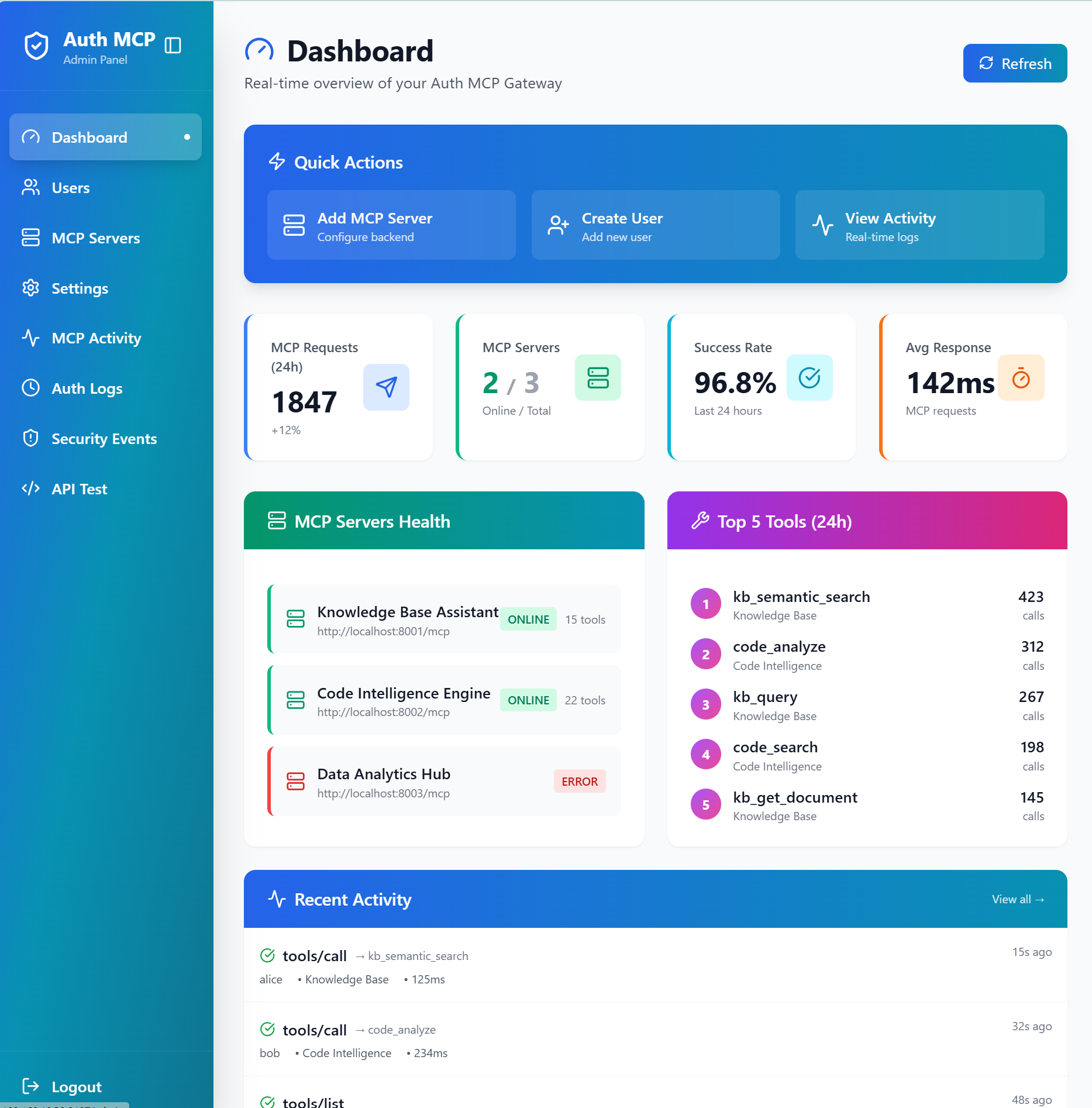
*Live statistics, server health monitoring, top tools usage, and recent activity feed*
</details>
<details>
<summary><b>🔧 MCP Servers - Connection Management</b></summary>
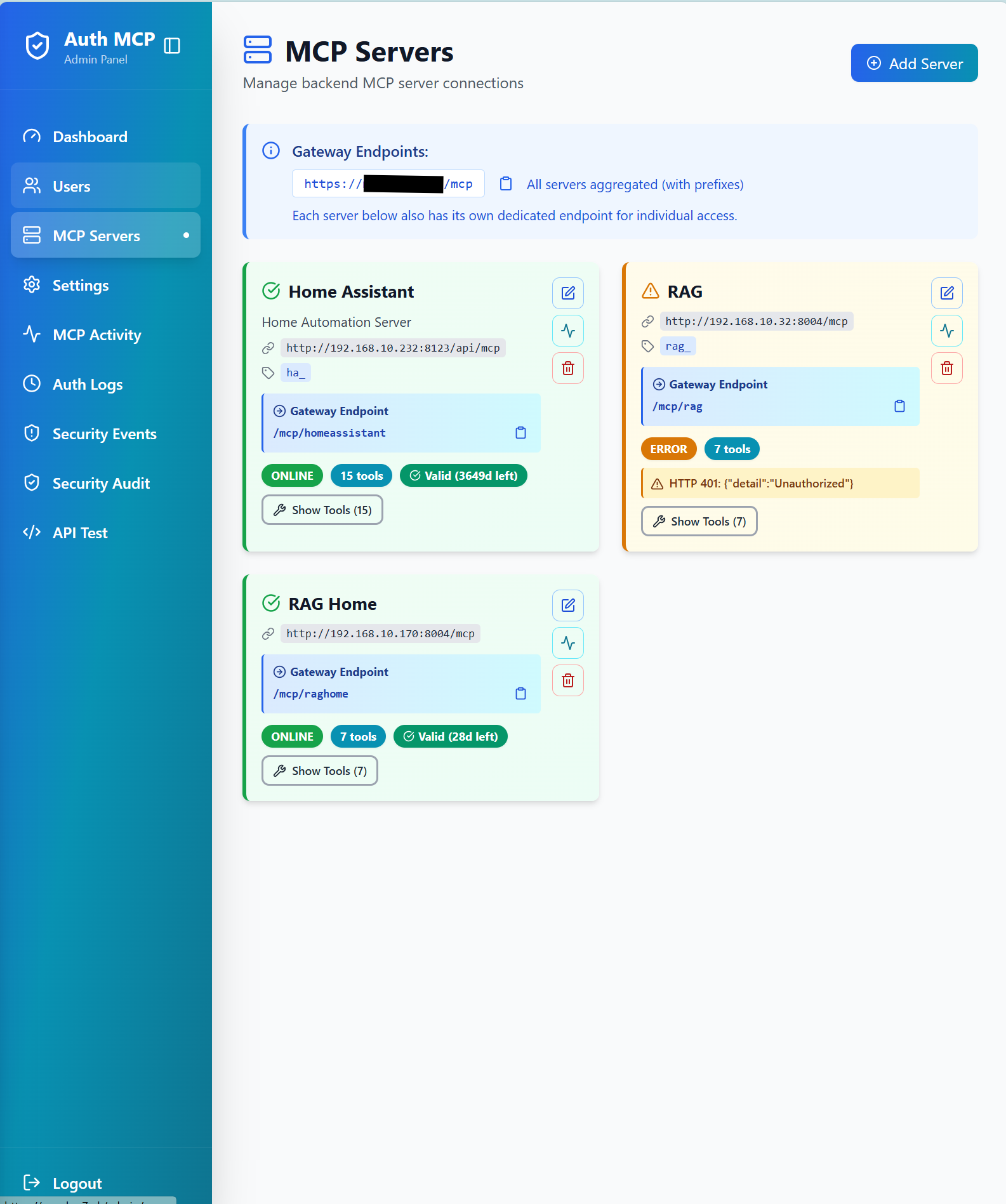
*Manage backend MCP server connections with status monitoring and health checks*
</details>
<details>
<summary><b>📊 MCP Activity Monitor - Real-time Request Tracking</b></summary>
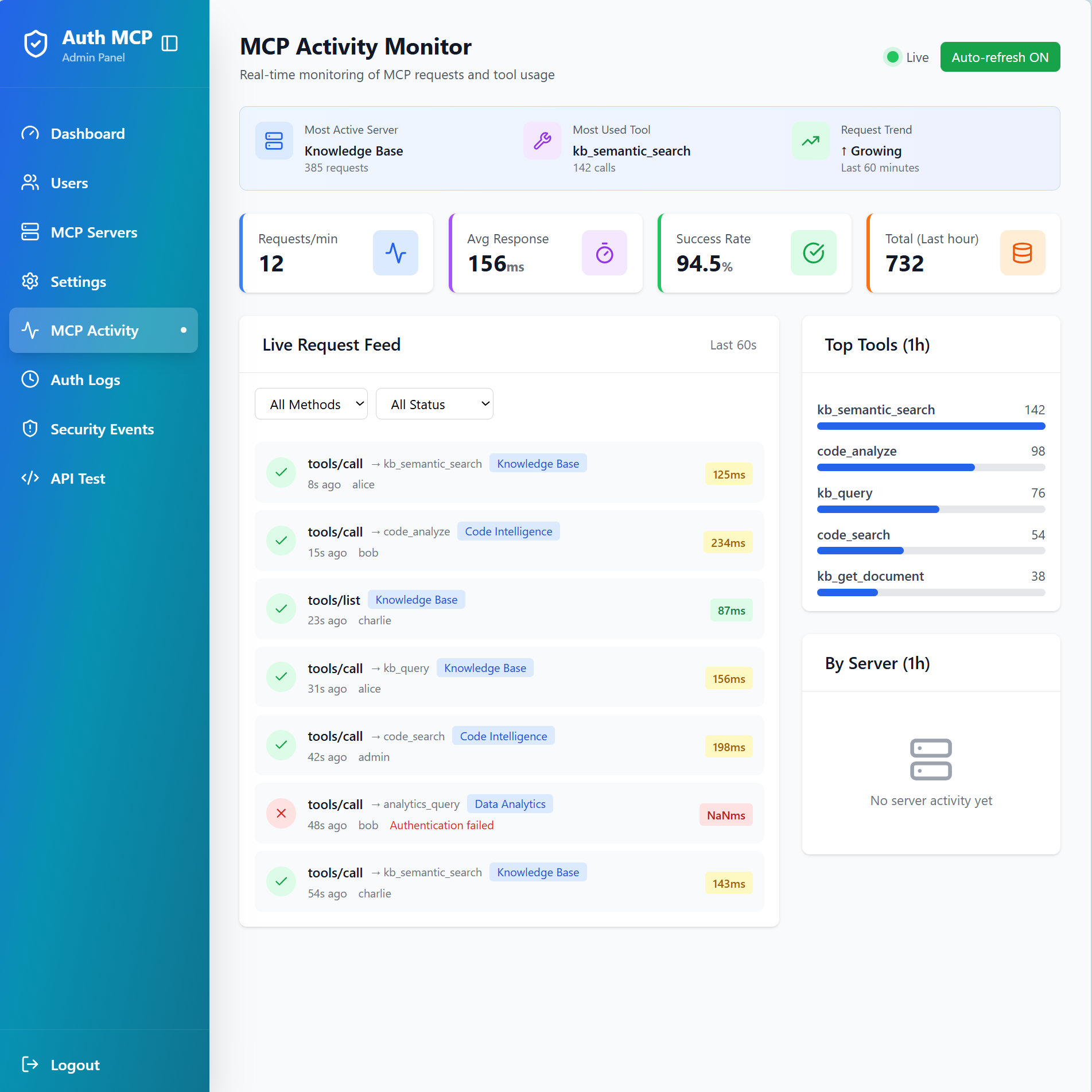
*Monitor live MCP requests with detailed metrics, top tools ranking, and request feed*
</details>
<details>
<summary><b>🛡️ Security Events - Threat Detection</b></summary>
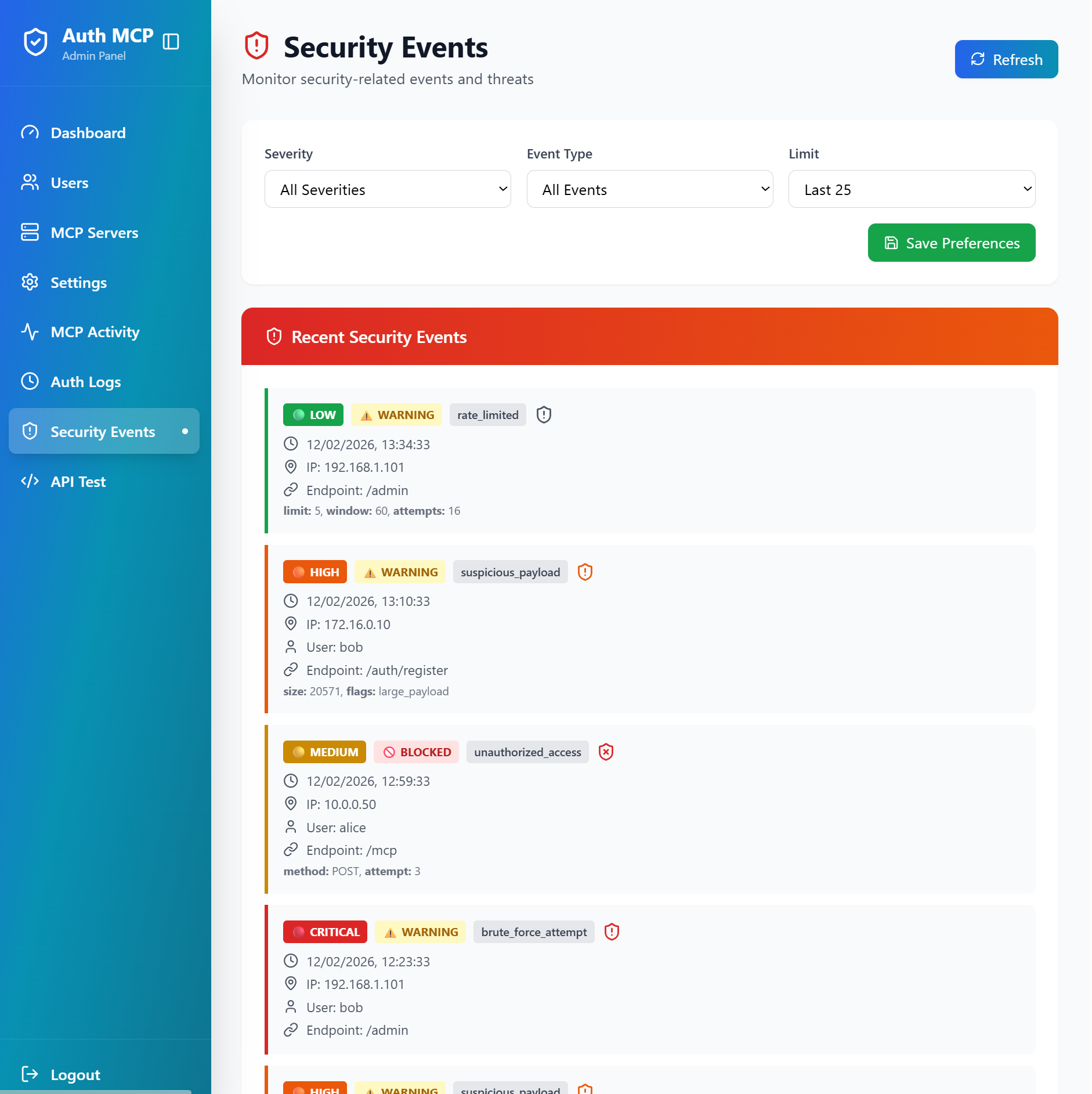
*Track security events, rate limiting, suspicious payloads, and unauthorized access attempts*
</details>
<details>
<summary><b>🔒 MCP Security Audit - Vulnerability Scanner</b></summary>
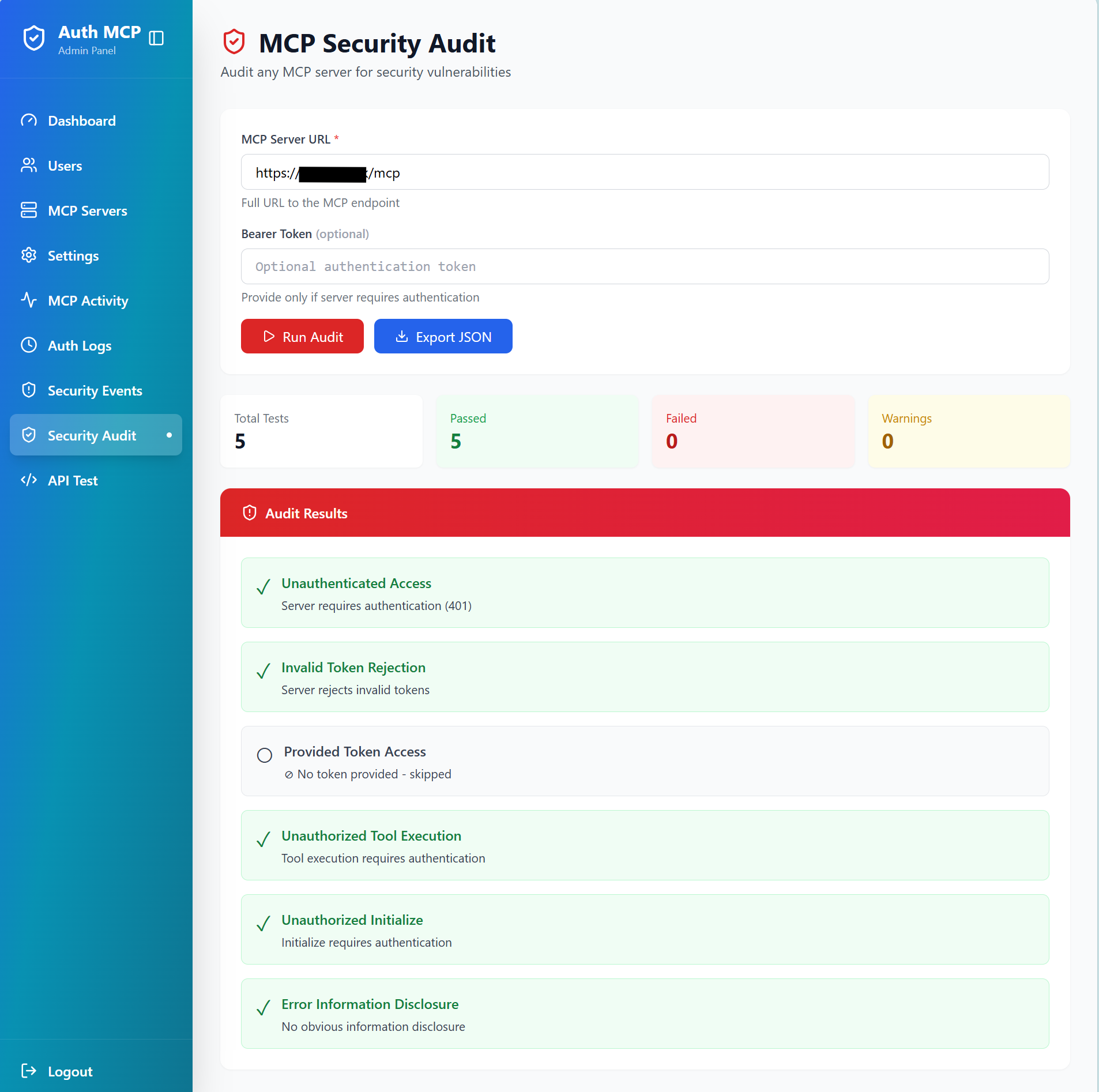
*Test any MCP server for security vulnerabilities with comprehensive automated checks*
</details>
---
## 🚀 Quick Start
### Option 1: PyPI Package (Recommended)
**1. Install:**
```bash
pip install authmcp-gateway
```
**2. First Run:**
```bash
authmcp-gateway start
# ✓ Auto-creates .env with JWT_SECRET_KEY
# ✓ Auto-creates data/ directory
# ✓ Initializes database
```
**3. Access Setup Wizard:**
Open **http://localhost:8000/** in your browser to create admin user.
**4. Optional - Customize Configuration:**
```bash
# Edit auto-generated .env or download full example
curl -o .env https://raw.githubusercontent.com/loglux/authmcp-gateway/main/.env.example.pypi
# Common settings to customize in .env:
# PORT=9000 # Change server port
# PASSWORD_REQUIRE_SPECIAL=false # Relax password requirements
# LOG_LEVEL=DEBUG # More detailed logs
# Restart to apply changes
authmcp-gateway start
```
**Available Commands:**
```bash
authmcp-gateway start # Start server (default: 0.0.0.0:8000)
authmcp-gateway start --port 9000 # Start on custom port
authmcp-gateway start --host 127.0.0.1 # Bind to localhost only
authmcp-gateway start --env-file custom.env # Use custom config file
authmcp-gateway init-db # Initialize database
authmcp-gateway create-admin # Create admin user via CLI
authmcp-gateway version # Show version
authmcp-gateway --help # Show all options
```
### Option 2: Docker Compose
1. **Clone and configure:**
```bash
git clone https://github.com/loglux/authmcp-gateway.git
cd authmcp-gateway
cp .env.example .env
# Edit .env with your settings
```
2. **Start the gateway:**
```bash
docker-compose up -d
```
3. **Access admin panel:**
- Open http://localhost:9105/
- Complete setup wizard to create admin user
- Add your MCP servers
## ⚙️ Configuration
### Environment Variables
```bash
# Gateway Settings
GATEWAY_PORT=9105 # Host port mapping for Docker (container listens on 8000)
JWT_SECRET_KEY=your-secret-key # JWT signing key (auto-generated if not set)
AUTH_REQUIRED=true # Enable authentication (default: true)
# Admin Settings
ADMIN_USERNAME=admin # Initial admin username
ADMIN_PASSWORD=secure-password # Initial admin password
```
### Adding MCP Servers
Via Admin Panel:
1. Navigate to **MCP Servers** → **Add Server**
2. Enter server details:
- Name (e.g., "GitHub MCP")
- URL (e.g., "http://github-mcp:8000/mcp")
- Backend token (if required)
Via API:
```bash
curl -X POST http://localhost:9105/admin/api/mcp-servers \
-H "Authorization: Bearer YOUR_TOKEN" \
-H "Content-Type: application/json" \
-d '{
"name": "GitHub MCP",
"url": "http://github-mcp:8000/mcp",
"backend_token": "optional-token"
}'
```
## 💡 Usage
### For End Users
1. **Login to get access token:**
```bash
curl -X POST http://localhost:9105/auth/login \
-H "Content-Type: application/json" \
-d '{"username":"your-username","password":"your-password"}'
```
2. **Use token to access MCP endpoints:**
```bash
# List tools from all backends
curl -X POST http://localhost:9105/mcp \
-H "Authorization: Bearer YOUR_ACCESS_TOKEN" \
-H "Content-Type: application/json" \
-d '{"jsonrpc":"2.0","id":1,"method":"tools/list"}'
# List resources
curl -X POST http://localhost:9105/mcp \
-H "Authorization: Bearer YOUR_ACCESS_TOKEN" \
-H "Content-Type: application/json" \
-d '{"jsonrpc":"2.0","id":2,"method":"resources/list"}'
# List prompts
curl -X POST http://localhost:9105/mcp \
-H "Authorization: Bearer YOUR_ACCESS_TOKEN" \
-H "Content-Type: application/json" \
-d '{"jsonrpc":"2.0","id":3,"method":"prompts/list"}'
# Ping
curl -X POST http://localhost:9105/mcp \
-H "Authorization: Bearer YOUR_ACCESS_TOKEN" \
-H "Content-Type: application/json" \
-d '{"jsonrpc":"2.0","id":4,"method":"ping"}'
```
### For Administrators
**Admin Panel Features:**
- **Dashboard** - Overview of users, servers, and activity
- **MCP Activity** - Real-time monitoring of all MCP requests
- **Security Events** - View unauthorized access attempts and suspicious activity
- **User Management** - Create and manage user accounts
- **Token Management** - Monitor and refresh backend tokens
## 🏗️ Architecture
```
┌──────────────────────────────────────────┐
│ MCP Clients (Claude, Codex, etc.) │
│ OAuth 2.0 / JWT Authentication │
└────────────────────┬─────────────────────┘
│
┌────────────────────▼─────────────────────┐
│ AuthMCP Gateway │
│ MCP 2025-03-26 Proxy │
│ │
│ • Full MCP Protocol Proxy │
│ • Tools / Resources / Prompts │
│ • OAuth 2.0 + DCR │
│ • JWT Auth (HS256/RS256+JWKS) │
│ • Rate Limiting │
│ • Security Logging │
│ • Multi-Server Aggregation │
│ • Health Monitoring │
│ • Admin Dashboard │
└────────────────────┬─────────────────────┘
│
┌──────────┬──────────┬──────────┐
▼ ▼ ▼ ▼
┌────────┐ ┌────────┐ ┌────────┐ ┌────────┐
│ RAG │ │WhatsApp│ │ Docs │ │Custom │
│ MCP │ │ MCP │ │ MCP │ │ MCP │
└────────┘ └────────┘ └────────┘ └────────┘
```
## 🔌 API Endpoints
### Public Endpoints
- `POST /auth/login` - User login
- `POST /auth/register` - User registration (if enabled)
- `POST /auth/refresh` - Refresh access token
- `POST /oauth/register` - OAuth dynamic client registration (if enabled)
- `GET /.well-known/oauth-authorization-server` - OAuth discovery
### Protected Endpoints
- `POST /mcp` - Aggregated MCP endpoint (all servers)
- `POST /mcp/{server_name}` - Specific MCP server endpoint
- `GET /mcp` - Streamable MCP endpoint (SSE/stream clients)
- `GET /auth/me` - Current user info
- `POST /auth/logout` - Logout
### Supported MCP Methods
| Method | Description |
|--------|-------------|
| `initialize` | Dynamic capabilities discovery from backends |
| `ping` | Health check |
| `tools/list` | Aggregated tools from all backends |
| `tools/call` | Routed to correct backend (prefix/mapping/auto-discovery) |
| `resources/list` | Aggregated resources from all backends |
| `resources/read` | Routed by URI to owning backend |
| `resources/templates/list` | Aggregated resource templates |
| `prompts/list` | Aggregated prompts from all backends |
| `prompts/get` | Routed by name to owning backend |
| `completion/complete` | Routed by ref type (prompt/resource) |
| `logging/setLevel` | Accepted (no-op at gateway level) |
| `notifications/*` | Gracefully ignored |
| Direct tool name (e.g. `rag_query`) | Codex-style: routed as `tools/call` ([openai/codex#2264](https://github.com/openai/codex/pull/2264)) |
| Unknown namespaced methods | Returns JSON-RPC `-32601 Method not found` |
### Tool Annotations And Safe Retries
For `tools/call`, the gateway prefers standard MCP tool `annotations` when deciding whether a tool is read-only
or safe to retry:
- `annotations.readOnlyHint`
- `annotations.idempotentHint`
- `annotations.destructiveHint`
Behavior:
- Read-only tools may use safe automatic retry.
- Mutating tools are **not** retried blindly.
- If a mutating tool is marked idempotent, the gateway preserves or generates
`arguments.idempotency_key` and reuses the same key on retry.
- If metadata is missing or unclear, the gateway falls back to conservative behavior and disables
automatic retry for `tools/call`.
This keeps the gateway aligned with standard MCP annotations while allowing backend MCP servers to
implement stronger idempotency semantics where needed.
## 🤖 Codex OAuth (DCR) Login (Manual Callback)
Codex uses OAuth Authorization Code + PKCE and Dynamic Client Registration (DCR). When running in a terminal
without an auto-launching browser, you must manually open the authorization URL and then **call the localhost
callback URL yourself** to finish the login.
Steps:
1. Add the MCP server in Codex:
```bash
codex mcp add rag --url https://your-domain.com/mcp/your-backend
```
2. Codex prints an **Authorize URL**. Open it in your browser.
3. Complete the login (admin/user credentials).
4. After successful login you will be redirected to a `http://127.0.0.1:<port>/callback?...` URL.
Copy that full URL and call it from another terminal:
```bash
curl "http://127.0.0.1:<port>/callback?code=...&state=..."
```
You should see: `Authentication complete. You may close this window.`
Once completed, Codex shows the MCP server as logged in.
### Headless Token Storage (Important)
On headless servers (no desktop environment), Codex cannot access the OS keyring to store OAuth tokens.
This causes "Auth required" errors even after a successful login. To fix this, switch to file-based token storage:
```toml
# ~/.codex/config.toml
mcp_oauth_credentials_store = "file"
```
Reference: [Codex Config Reference](https://developers.openai.com/codex/config-reference)
Without this parameter Codex fails to refresh tokens because it looks for a keyring security service and
fails. That forces you to re-login each time again and again following the manual procedure above.
After updating the config, restart Codex.
### Discovery Compatibility
Some MCP clients probe OpenID discovery using non-standard paths after a successful token exchange. In
addition to the standard `/.well-known/openid-configuration`, the gateway also serves the same discovery
document at `/oauth/token/.well-known/openid-configuration` as a compatibility alias.
If you are already locked out and see this warning:
```
⚠ The rag MCP server is not logged in. Run `codex mcp login rag`.
⚠ MCP startup incomplete (failed: rag)
```
You can refresh tokens with the helper script without going through the manual authentication procedure again:
```bash
python3 scripts/codex_refresh_mcp.py rag https://your-domain.com/oauth/token
```
### Codex Multi-Machine Note
If Codex runs on multiple machines, each machine stores its own local tokens. In that case, a login from one
machine can invalidate tokens on another when **Enforce Single Session** is enabled (one active token per user).
Disable **Enforce Single Session** in the admin settings to avoid forced logouts in multi-machine setups.
## 🔐 Security
### Security Features
- ✅ JWT-based authentication with refresh tokens
- ✅ Rate limiting per user
- ✅ Security event logging
- ✅ MCP request tracking with suspicious activity detection
- ✅ Health monitoring for backend servers
- ✅ CORS protection
- ✅ Secure credential storage
## 🛠️ Development
Release process: see `docs/RELEASE.md`.
### Local Development
```bash
# Clone repository
git clone https://github.com/loglux/authmcp-gateway.git
cd authmcp-gateway
# Create virtual environment
python3 -m venv venv
source venv/bin/activate # or `venv\Scripts\activate` on Windows
# Install dependencies
pip install -e .
# Run gateway
authmcp-gateway
```
### Running Tests
The suite is split into fast unit tests and slower integration tests
(the latter use real SQLite fixtures, ~4.5 s setup per test):
```bash
make test # tests/unit only — ~3 min, run before every release
make test-slow # tests/integration only
make test-all # both (full suite)
make test-cov # full suite + HTML coverage report
```
### Project Structure
```
authmcp-gateway/
├── src/authmcp_gateway/
│ ├── admin/ # Admin panel routes and logic
│ ├── auth/ # Authentication & authorization
│ ├── mcp/ # MCP proxy and handlers
│ ├── security/ # Security logging and monitoring
│ ├── middleware.py # Request middleware
│ └── app.py # Main application
│ ├── templates/ # Jinja2 templates (admin UI)
├── docs/ # Documentation
├── tests/ # Test suite
└── docker-compose.yml # Docker deployment
```
## 📊 Monitoring
### Real-Time Dashboard
Access `/admin/mcp-activity` for:
- Live request feed (updates every 3 seconds)
- Requests per minute
- Average response times
- Success rates
- Top tools usage
- Per-server statistics
### Logs
View logs in real-time:
```bash
docker logs -f authmcp-gateway
```
## 🔧 Troubleshooting
**Cannot access admin panel:**
- Ensure you've completed the setup wizard at `/setup`
- Check that cookies are enabled
- Verify JWT_SECRET_KEY is set correctly
**MCP server shows as offline:**
- Check server URL is correct and reachable
- Verify backend token if required
- View error details in MCP Servers page
**401 Unauthorized errors:**
- Token may have expired - use refresh token
- Verify Authorization header format: `Bearer YOUR_TOKEN`
- Check user has permission for the MCP server
For more help, see the troubleshooting and usage sections above.
## License
MIT License - see [LICENSE](LICENSE) file for details.
Maintenance
ActivityMaintained
ResponsivenessNo issues