
Tibber MCP
# Tibber MCP Server
This is a [Model Context Protocol (MCP)](https://modelcontextprotocol.io/introduction) Server for [Tibber](https://tibber.com/), a Norwegian power supplier.
You can run the MCP server locally and access it via different hosts such as Claude Desktop or [Roo Code](https://marketplace.visualstudio.com/items?itemName=RooVeterinaryInc.roo-cline).
For more details, check out my blog post:
[Building a Tibber MCP Server: Connect Your AI Agent to Energy Consumption Data](https://feng.lu/2025/03/28/Building-a-Tibber-MCP-Server-Connect-Your-AI-Agent-to-Energy-Consumption-Data/)
## Overview
The Tibber MCP server provides an AI agent with a convenient way to interact with the [Tibber API](https://developer.tibber.com/docs) and query information such as current energy prices and your energy consumption data.
## Example Queries
Once connected to the MCP server, you can ask questions like:
- "Analyze my power consumption data and present the usual peak hours and any other interesting patterns in an easy-to-read format."
- "When did I use the most power yesterday?"
- "How much power did I consume yesterday at 7 AM?"
- "What is the current energy price?"
- "List the 3 cheapest hours of tomorrow."
- "Is the energy price higher or lower tomorrow?"
## Demo video
[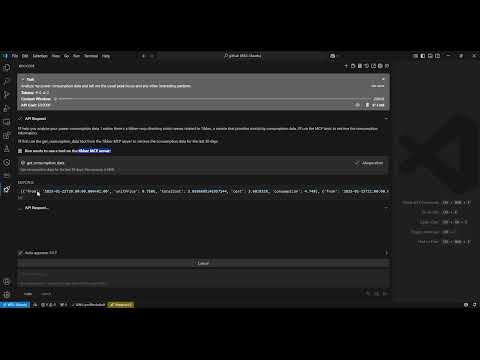](https://www.youtube.com/watch?v=FiqKPa9i6V4)
## Architecture

## Requirements
- Python 3.12
- Tibber API token (You can get it from [Tibber developer portal](https://developer.tibber.com/settings/access-token))
## Installation
1. Install `uv`:
```bash
# On macOS and Linux
curl -LsSf https://astral.sh/uv/install.sh | sh
```
```powershell
# On Windows
powershell -ExecutionPolicy ByPass -c "irm https://astral.sh/uv/install.ps1 | iex"
```
2. Clone this repository:
```
git clone https://github.com/linkcd/tibber-mcp.git
cd tibber-mcp
```
3. Set up the Python virtual environment and install dependencies:
```
uv venv --python 3.12 && source .venv/bin/activate && uv pip install --requirement pyproject.toml
```
## Host Configuration
In Claude Desktop or Roo Code in VS
```json
{
"mcpServers":{
"tibber":{
"command":"uv",
"args":[
"--directory",
"[PATH-TO-ROOT-OF-THE-CLONED-TIBBER-MCP-FOLDER]",
"run",
"server.py"
],
"env":{
"TIBBER_API_TOKEN":"[YOUR-TIBBER-TOKEN]"
}
}
}
}
```
> **IMPORTANT**: Replace `[YOUR-TIBBER-TOKEN]` with your actual token. Never commit actual credentials to version control.
### Debug and test the MCP server locally
Run the server locally and run [MCP inspector](https://github.com/modelcontextprotocol/inspector) against it
```bash
npx @modelcontextprotocol/inspector -e TIBBER_API_TOKEN=[YOUR-TIBBER-TOKEN] python server.py
```
### Available Tools
The server exposes the following tools that LLM can use:
1. **`get_consumption_data()`**: Get the hourly consumption data for the last 30 days, such as time period, total cost, base energy cost, and consumpted kwh
2. **`get_price_and_home_info()`**: Get price info (current, today and tomorrow) and home info (owner, address, subscription...)
## License
[MIT License](LICENSE)
## Acknowledgments
- This tool uses Anthropic's MCP framework
- Built with [FastMCP](https://github.com/jlowin/fastmcp) for server implementation
- The tibber ingeratoin is based on [pyTibber](https://github.com/Danielhiversen/pyTibber) library
TDQS
Scored across 2 tools
The two tools have clearly distinct purposes: one focuses on consumption data (historical usage and costs), while the other focuses on price information and home details (current, forecasted pricing and location/timezone). There is no overlap in functionality, making it easy for an agent to select the correct tool based on the query.
Both tools follow a consistent verb_noun pattern with 'get_' prefix and descriptive names (get_consumption_data and get_price_and_home_info). The naming is predictable and readable, adhering to a clear convention throughout the set.
With only 2 tools, the server feels thin for a domain like energy/utility management, which typically involves more operations such as setting preferences, controlling devices, or accessing billing history. While the tools cover key data retrieval aspects, the count is borderline low for comprehensive agent interaction.
The tools provide good read-only coverage for consumption and pricing data, but there are notable gaps: no update/delete operations, no ability to manage home settings or devices, and no support for actions like adjusting energy usage or handling billing. This limits the server to data retrieval only, which may cause agent failures in broader utility management tasks.