A
licenseNot graded
qualityD
maintenanceEnables AI-powered SMS messaging through Twilio with automatic conversation threading, message status tracking, and webhook support for receiving inbound messages.
62 npm
1
MIT

Provides visualization of SMS volume data through a live dashboard with charts displaying message history
Supports environment variable configuration for API keys and server settings
Integrates with LangChain through an agent script, allowing LangChain-based AI applications to connect to the MCP server
Integrates with OpenAI's GPT models to power AI-driven SMS responses and provide contextual conversation memory
Click on "Deploy Server".
Wait a few minutes for the server to deploy. Once ready, it will show a "Started" state.
In the chat, type @ followed by the MCP server name and your instructions, e.g., "@AI-Powered MCP Server send an SMS to +61412345678 saying I'll be 10 minutes late"
That's it! The server will respond to your query, and you can continue using it as needed.
Here is a step-by-step guide with screenshots.
An AI-native SMS assistant powered by GPT and MessageMedia — now with a live SMS report dashboard!
Send and receive SMS via GPT
View full SMS conversation history
Auto-reply via GPT using webhook
Contextual memory per phone number
MCP-compliant with /meta and /function-schema
LangChain agent integration
📊 Live SMS Report Dashboard (NEW!)
Related MCP server: Twilio SMS Server
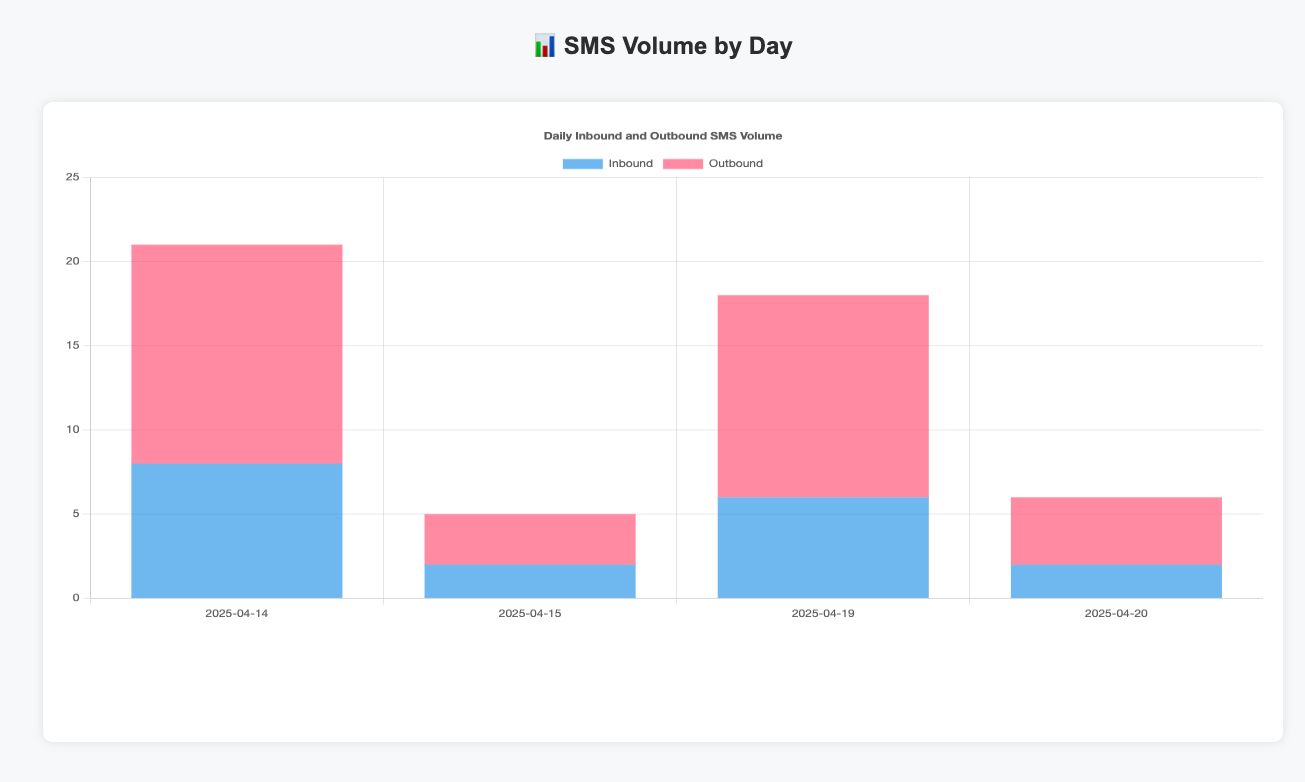
Below is a screenshot of the embedded high bar chart showing SMS volume:

User ↔ chat.html
     ↕
GPT Chat Server (OpenAI-router.js)
     ↕ (tool calls)
MCP Server (index.js)
     ↕
MessageMedia SMS APIindex.js: Core MCP server, webhook processor, /context + /send + /report endpoints
Openai-router.js: ChatGPT proxy handling tool calls via OpenAI Functions
chat.html: Interactive frontend for messaging and tools
sms_report_live_dashboard.html: Live chart using /report
npm install
OPENAI_API_KEY=your_key node start-all.js
Access Chat UI: http://localhost:3000/chat.html
Access Report Dashboard: http://localhost:3000/sms_report_live_dashboard.html
.
├── index.js                # MCP Server
├── Openai-router.js        # GPT Chat Interface
├── webhook-log.json        # Legacy logs (if not using MessageMedia)
├── chat.html               # GPT chat client
├── sms_report_live_dashboard.html  # Dashboard with Chart.js
├── langchain_mcp_agent.py  # LangChain integration script
├── .env                    # Environment variables
├── public/
│ └── sms_report_preview.png # Chart screenshotget_sms_context
send_sms
show_sms_report (NEW)
🔄 Auto-classification of replies
📈 Sentiment + urgency scoring
🤖 Unified Copilot with webhook/CLI/chat
A new feature has been added to display a live dashboard of SMS volume by day.
You can now ask in the chat.html interface:
"Show me my report history of +61412345678"
The assistant will respond with an embedded report like this:
This server cannot be deployed
Communication stack for AI agents: SMS, AI voice calls, phone numbers, and account events.
Business texting for AI agents: send texts, read threads, manage contacts and run campaigns.
Phone, SMS and email for AI agents. One remote MCP endpoint, OAuth login, zero install.
The Mobile Text Alerts SMS MCP server enables your AI to send SMS messages & manage contacts