
mcp-jenkins
# MCP Jenkins

[](https://pepy.tech/projects/mcp-jenkins)
[](https://github.com/lanbaoshen/mcp-jenkins/actions/workflows/test.yml/badge.svg)
[](https://codecov.io/gh/lanbaoshen/mcp-jenkins)

The Model Context Protocol (MCP) is an open-source implementation that bridges Jenkins with AI language models following Anthropic's MCP specification. This project enables secure, contextual AI interactions with Jenkins tools while maintaining data privacy and security.
## Installation
Choose one of these installation methods:
```
# Using uv (recommended)
pip install uv
uvx mcp-jenkins
# Using pip
pip install mcp-jenkins
mcp-jenkins
# Docker
docker pull ghcr.io/lanbaoshen/mcp-jenkins:latest
docker run -p 9887:9887 --rm ghcr.io/lanbaoshen/mcp-jenkins:latest --transport streamable-http
```
## Line Arguments
When using command line arguments, you can specify the Jenkins server details as follows:
```shell
# Simple streamable-http example
uvx mcp-jenkins --transport streamable-http
```
| Argument | Description | Required |
|--------------------------------------------------------------|-----------------------------------------------------------------------------------------------------------------|----------|
| `--env-file` | Path to a `.env` file to load configuration from. See [Environment Variables / .env file](#environment-variables--env-file) below. | No |
| `--jenkins-url` | The URL of the Jenkins server. (Http app can set it via headers `x-jenkins-url`) | No |
| `--jenkins-username` | The username for Jenkins authentication. (Http app can set it via headers `x-jenkins-username`) Set it together with the password, or leave both unset to access Jenkins anonymously. | No |
| `--jenkins-password` | The password or API token for Jenkins authentication. (Http app can set it via headers `x-jenkins-password`) Set it together with the username, or leave both unset to access Jenkins anonymously: what the server can then do is decided by the anonymous user's permissions in Jenkins. | No |
| `--jenkins-timeout` | Timeout for Jenkins API requests in seconds. Default is `5` seconds. | No |
| `--jenkins-verify-ssl/--no-jenkins-verify-ssl` | Whether to verify SSL certificates when connecting to Jenkins. Default is to verify. | No |
| `--jenkins-session-singleton/--no-jenkins-session-singleton` | Whether to use a singleton Jenkins client for all requests in the same session. Default is True. | No |
| `--read-only` | Whether to enable read-only mode. Default is False | No |
| `--transport` | Transport method to use for communication. Options are `stdio`, `sse` or `streamable-http`. Default is `stdio`. | No |
| `--host` | Host address for `streamable-http` transport. Default is `0.0.0.0` | No |
| `--port` | Port number for `streamable-http` transport. Default is `9887`. | No |
## Environment Variables / .env file
Instead of passing credentials on the command line, you can set them as environment variables, or put them in a `.env` file:
```
JENKINS_URL=https://jenkins.example.com
JENKINS_USERNAME=alice
JENKINS_PASSWORD=xxxx
JENKINS_TIMEOUT=5
JENKINS_VERIFY_SSL=true
```
If a `.env` file is present in the current directory (or a parent directory), it is loaded automatically — no flag needed:
```shell
uvx mcp-jenkins --transport streamable-http
```
To load a `.env` file from a specific location, use `--env-file`:
```shell
uvx mcp-jenkins --env-file /path/to/.env --transport streamable-http
```
Values already set in the real environment take precedence over the `.env` file, and any `--jenkins-*` CLI flag takes precedence over both.
## Configuration and Usage
### Jetbrains Github Copilot
1. Open Jetbrains Settings
2. Navigate to Github Copilot > MCP > Configure
3. Add the following configuration:
```json
{
"servers": {
"my-mcp-server": {
"type": "stdio",
"command": "uvx",
"args": [
"mcp-jenkins",
"--jenkins-url=xxx",
"--jenkins-username=xxx",
"--jenkins-password=xxx"
]
}
}
}
```
### VSCode Copilot Chat
1. Create `.vscode` folder with `mcp.json` file in you workspace for local setup or edit `settings.json` trough settings menu.
2. Insert the following configuration:
- SSE mode
```json
{
"servers": {
"jenkins": {
"url": "http://localhost:9887/sse",
"type": "sse"
}
}
}
```
- Streamable-Http mode
```json
{
"servers": {
"mcp-jenkins-mcp": {
"autoApprove": [],
"disabled": false,
"timeout": 60,
"type": "streamableHttp",
"url": "http://localhost:9887/mcp"
}
}
}
```
Run the Jenkins MCP server with the following command:
```shell
uvx mcp-jenkins \
--jenkins-url xxx \
--jenkins-username xxx \
--jenkins-password xxx \
--transport sse
```
## Health Check Endpoint
When running with `--transport streamable-http` or `--transport sse`, the server exposes a plain HTTP liveness endpoint:
```
GET /healthz -> 200 OK
```
It always returns `200` and bypasses the `x-jenkins-*` auth headers, so it is safe to use directly as a Kubernetes liveness/readiness probe without any Jenkins credentials. Example probe:
```yaml
livenessProbe:
httpGet:
path: /healthz
port: 9887
initialDelaySeconds: 5
periodSeconds: 10
```
Note: this is a liveness check only — it does not verify connectivity to the upstream Jenkins server.
## Available Tools
| Tool | Description |
|----------------------------|-----------------------------------------------------|
| `get_item` | Get a specific item by name. |
| `get_item_config` | Get the configuration of a specific item. |
| `get_item_parameters` | Get the parameters of a specific item. |
| `get_all_items` | Get all items in Jenkins. |
| `query_items` | Query items based on pattern. |
| `build_item` | Build a item. |
| `get_all_nodes` | Get all nodes in Jenkins. |
| `get_node` | Get a specific node by name. |
| `get_node_config` | Get the configuration of a specific node. |
| `get_all_queue_items` | Get all queue items in Jenkins. |
| `get_queue_item` | Get a specific queue item by ID. |
| `cancel_queue_item` | Cancel a specific queue item by ID. |
| `get_build` | Get a specific build by job name and build number. |
| `get_build_scripts` | Get scripts associated with a specific build. |
| `get_build_console_output` | Get the console output of a specific build. |
| `get_build_parameters` | Get the parameters of a specific build. |
| `get_build_test_report` | Get the test report of a specific build. |
| `get_build_test_failures` | Get the failing tests of a specific build. |
| `get_running_builds` | Get all currently running builds in Jenkins. |
| `stop_build` | Stop a specific build by job name and build number. |
| `get_pending_inputs` | Get the pending input steps of a build paused for input. |
| `submit_input` | Proceed with or abort a pipeline input step of a build. |
| `get_all_build_artifacts` | List the artifacts of a specific build. |
| `get_build_artifact` | Download an artifact from a specific build. |
| `get_build_artifact_url` | Get the direct URL of an artifact from a specific build. |
| `get_view` | Get a specific view by name. |
| `get_all_views` | Get the configuration of a specific view. |
| `get_all_plugins` | Get all installed plugins. |
| `get_plugin` | Get a specific plugin by short name. |
| `get_plugins_with_problems` | Get plugins with problems (missing dependencies, version mismatch, etc.). |
| `get_plugins_with_backup` | Get plugins that can be downgraded. |
| `get_plugins_with_updates` | Get plugins that have available updates. |
| `get_plugin_dependency_graph` | Get dependency graph for a plugin in Graphviz format. |
| `run_groovy_script` | Execute an arbitrary Groovy script on Jenkins. |
Note: `get_pending_inputs` reads the `wfapi` endpoint served by the `pipeline-rest-api` plugin (bundled with
`pipeline-stage-view`). `submit_input` only needs that plugin when `input_id` is omitted — pass `input_id`
explicitly and it works on any Jenkins with the `pipeline-input-step` plugin.
## Contributing
[CONTRIBUTING.md](CONTRIBUTING.md)
## License
Licensed under MIT - see [LICENSE](LICENSE) file. This is not an official Jenkins product.
## Star History
[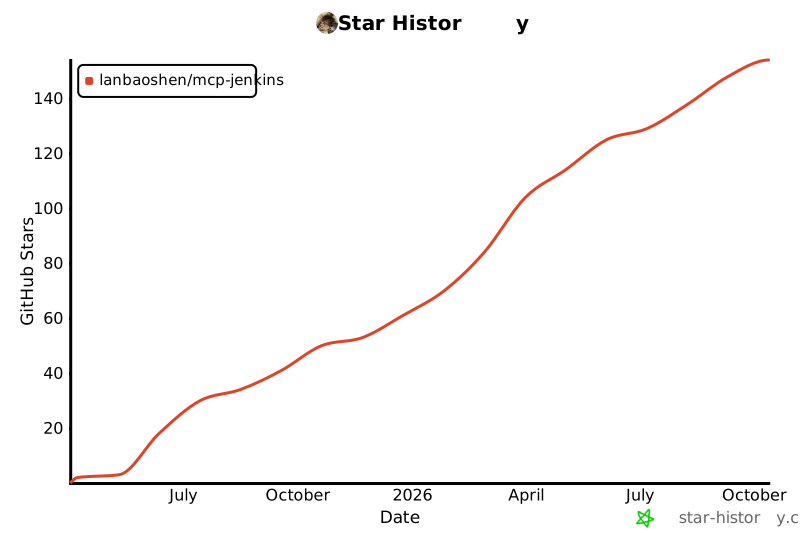](https://www.star-history.com/#lanbaoshen/mcp-jenkins&Date)
TDQS
Scored across 36 tools
Most tools target distinct resources and actions, and descriptions actively disambiguate near-neighbors (e.g. get_build_test_report warns to use get_build_test_failures instead, get_pending_inputs/submit_input explain their relationship). Minor overlap remains between get_all_items/query_items and among the many get_build_* variants, but the naming and args keep them separable.
Strong dominant verb_noun pattern (get_build, set_item_config, build_item, stop_build, cancel_queue_item, run_groovy_script). Slight inconsistencies appear in the get_all_X vs query_items vs get_item phrasing and get_build_artifact vs get_all_build_artifacts, but overall the convention is predictable.
36 tools is on the heavy side and exceeds the typical comfortable range. Jenkins genuinely spans many sub-domains (builds, items, nodes, plugins, queue, views, groovy), so most tools earn their place, but the surface is large enough to feel bloated and harder to navigate.
Coverage is broad: build lifecycle (get/stop/console/tests/params/artifacts), item config and triggering, node config, plugin inspection with dependency graphs, queue management, views, and an escape-hatch groovy script. Missing item/node create-delete operations are minor gaps an agent can work around via groovy or config setters.