
F
licenseNot graded
qualityD
maintenanceLow-code MCP middleware development using microservices architecture for scalable and automated MCP server functionality.
1
-

동일한 MCP 서버의 여러 개의 분리된 인스턴스가 고유한 네임스페이스와 구성을 통해 독립적으로 공존할 수 있도록 하는 미들웨어 서버입니다.
멀티버스 MCP 서버는 동일한 MCP 서버가 충돌 없이 동시에 실행될 수 있는 격리된 운영 공간을 생성합니다. 각 "유니버스"는 자체 구성, 파일 시스템 액세스 및 함수 명명 방식을 유지하므로 개발자는 서로 다른 컨텍스트 또는 프로젝트 간에 완벽한 분리를 유지하면서 동일한 서버 유형의 여러 인스턴스를 실행할 수 있습니다.
동일한 MCP 서버 유형의 여러 인스턴스를 독립적으로 동시에 실행할 수 있습니다. 각 인스턴스는 별도의 구성을 사용하여 자체적으로 격리된 환경에서 작동합니다. 이를 통해 다음과 같은 시나리오가 가능합니다.
여러 개의 MySQL 서버 mcp-server-mysql 서로 다른 데이터베이스를 가리킴
다양한 개인 액세스 토큰을 사용하는 여러 Git 서버 mcp-server-git
여러 파일 시스템 서버 mcp-server-filesystem 서로 다른 루트 경로에 접근합니다.
개발 중에 MCP 서버에 파일 감시 기능을 등록하세요. 이 기능을 활성화하면 서버가 지정된 디렉터리의 변경 사항을 자동으로 감지하고 정상적으로 재시작하여 개발 및 테스트가 원활하게 진행됩니다.
간단하고 유연한 JSON 구성 형식을 사용하여 멀티버스 설정을 정의하세요. 각 서버 인스턴스는 다음과 같이 자체적으로 구성할 수 있습니다.
명령과 인수
환경 변수
경로 해결 규칙
파일 감시 설정
Related MCP server: Multi Cluster Kubernetes MCP Server
먼저, Claude Desktop 앱을 다운로드하여 설치했고 npm도 설치했는지 확인하세요.
다음으로, 이 항목을 claude_desktop_config.json 에 추가하세요.
Mac에서는 ~/Library/Application\ Support/Claude/claude_desktop_config.json 에서 찾을 수 있습니다.
Windows에서는 C:\Users\<username>\AppData\Roaming\Claude\claude_desktop_config.json 에서 찾을 수 있습니다.
이제 실행할 멀티버스 서버 수를 추가하세요. 예를 들어, mcp-server-multiverse 인스턴스를 두 개(하나는 작업용, 다른 하나는 사이드 프로젝트용)로 실행하려면 다음 구성을 추가하세요.
지엑스피1
이 구성을 사용하면 앱을 시작할 때 Claude Desktop이 자동으로 mcp-server-multiverse 인스턴스를 시작할 수 있습니다.
mcp-server-mysql 의 두 개의 분리된 인스턴스를 만듭니다.job-multiverse.json 파일
{
  "serverName": "JobMultiverse",
  "functionsPrefix": "job",
  "servers": [
    {
      "command": "npx",
      "args": [
        "-y",
        "@benborla29/mcp-server-mysql"
      ],
      "env": {
        "MYSQL_HOST": "127.0.0.1",
        "MYSQL_PORT": "3306",
        "MYSQL_USER": "root",
        "MYSQL_PASS": "",
        "MYSQL_DB": "my-job-db"
      }
    }
  ]
}
side-project-multiverse.json 파일
{
  "serverName": "SideProjectMultiverse",
  "functionsPrefix": "side-project",
  "servers": [
    {
      "command": "npx",
      "args": [
        "-y",
        "@benborla29/mcp-server-mysql"
      ],
      "env": {
        "MYSQL_HOST": "127.0.0.1",
        "MYSQL_PORT": "3306",
        "MYSQL_USER": "root",
        "MYSQL_PASS": "",
        "MYSQL_DB": "side-project-db"
      }
    }
  ]
}
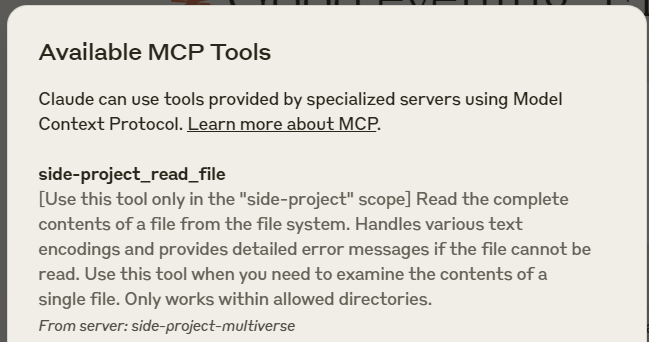
mcp-server-filesystem 의 격리된 인스턴스를 만듭니다.mcp-server-filesystem 의 기능은 side-project``side-project_read_file , side-project_write_file 과 같이 side-project 접두사와 함께 노출됩니다.
pathResolution 구성을 사용하면 루트 경로를 클라이언트(예: Claude Desktop)에서 숨길 수 있습니다.
pathResolution 선택 사항이며 클라이언트에서 루트 경로를 숨기려는 경우에만 필요합니다.
multiverse.json 파일
{
  "serverName": "MySideProject",
  "functionsPrefix": "side-project",
  "servers": [
    {
      "command": "npx",
      "args": [
        "-y",
        "@modelcontextprotocol/server-filesystem@latest",
        "/full/path/to/side-project"
      ],
      "pathResolution": {
        "root": "/full/path/to/side-project",
        "applyTo": [
          "path",
          "paths"
        ]
      }
    }
  ]
}
fileWatch 사용하여 파일 변경 시 자동으로 서버 재시작multiverse.json 파일
{
  "serverName": "MySideProject",
  "functionsPrefix": "side-project",
  "servers": [
    {
      "command": "node",
      "args": [
        "/my-own/mcp-server/i-m-working-on/build/index.js"
      ],
      "fileWatch": {
        "enabled": true,
        "path": "/my-own/mcp-server/i-m-working-on/build/"
      }
    }
  ]
}
hideFunctions 옵션을 사용하여 특정 기능 숨기기hideFunctions 배열을 사용하여 래핑된 서버에서 특정 함수를 선택적으로 숨길 수 있습니다. 이 기능은 서버를 사용하면서 잠재적으로 위험하거나 불필요한 특정 함수에 대한 접근을 제한하려는 경우 유용합니다.
hideFunctions 배열은 래핑된 서버에서 숨겨야 하는 함수 이름 목록을 받습니다. 함수가 숨겨지면:
메인 MCP 서버에 등록되지 않습니다.
클라이언트에서는 사용할 수 없습니다(예: Claude Desktop)
사용 가능한 기능 목록에 나타나지 않습니다.
이 기능은 다음과 같은 경우에 특히 유용합니다.
잠재적으로 위험한 기능에 대한 액세스 제한(예: GitHub의 delete_repository )
거의 사용되지 않는 기능을 숨겨서 인터페이스를 단순화합니다.
다양한 서버 인스턴스에 대해 서로 다른 권한 수준 생성
{
  "serverName": "GitHubWithRestrictions",
  "functionsPrefix": "github",
  "servers": [
    {
      "command": "npx",
      "args": [
        "-y",
        "@modelcontextprotocol/server-github@latest"
      ],
      "env": {
        "GITHUB_PERSONAL_ACCESS_TOKEN": "<your-personal-access-token>"
      },
      "hideFunctions": [
        "create_repository",
        "delete_repository",
        "create_issue"
      ]
    }
  ]
}
이 예에서 GitHub 서버는 정상적으로 시작되지만 create_repository , delete_repository , create_issue 함수는 숨겨져 클라이언트에서 사용할 수 없습니다.
enabled 플래그로 특정 서버 비활성화enabled 플래그를 false 로 설정하면 JSON 파일에서 서버를 제거하지 않고도 구성에서 특정 서버를 선택적으로 비활성화할 수 있습니다. 이 기능은 개발이나 테스트 중에 서버를 일시적으로 비활성화하는 데 유용합니다.
{
  "serverName": "MySideProject",
  "functionsPrefix": "side-project",
  "servers": [
    {
      "command": "npx",
      "args": [
        "-y",
        "@modelcontextprotocol/server-filesystem@latest",
        "/full/path/to/side-project"
      ],
      "hideFunctions": [ "write_file" ]
    },
    {
      "enabled": false,
      "command": "npx",
      "args": [
        "-y",
        "@modelcontextprotocol/server-github@latest"
      ]
    }
  ]
}
이 예에서 첫 번째 서버(파일 시스템)는 시작되지만 write_file 함수는 숨겨져 있고, 두 번째 서버(GitHub)는 비활성화되어 시작되지 않습니다.
multiverse.json 파일의 전체 예이 예제에서는 다양한 서버 유형의 여러 인스턴스를 사용하여 멀티버스 서버를 만드는 방법을 보여줍니다.
pathResolution 선택 사항이며 클라이언트에서 루트 경로를 숨기려는 경우에만 필요합니다.
{
  "serverName": "HugeProjectWithALotOfResources",
  "functionsPrefix": "huge-project",
  "servers": [
    {
      "command": "node",
      "args": [
        "/my-own/mcp-server/i-m-working-on/build/index.js"
      ],
      "fileWatch": {
        "enabled": true,
        "path": "/my-own/mcp-server/i-m-working-on/build/"
      }
    },
    {
      "command": "npx",
      "args": [
        "-y",
        "@modelcontextprotocol/server-filesystem@latest",
        "/full/path/to/huge-project"
      ],
      "pathResolution": {
        "root": "/full/path/to/huge-project",
        "applyTo": [
          "path",
          "paths"
        ]
      }
    },
    {
      "command": "npx",
      "args": [
        "-y",
        "@modelcontextprotocol/server-github@latest"
      ],
      "env": {
        "GITHUB_PERSONAL_ACCESS_TOKEN": "<your-personal-access-token>"
      }
    },
    {
      "command": "uvx",
      "args": [
        "mcp-server-git",
        "--repository",
        "/full/path/to/huge-project"
      ],
      "pathResolution": {
        "root": "/full/path/to/huge-project",
        "applyTo": [
          "repo_path"
        ]
      }
    }
  ]
}[ ] Prompts 에 대한 지원 추가
[ ] Resources 에 대한 지원 추가
[ ] 멀티버스 서버를 관리하기 위한 GUI 추가
[x] 윈도우
[ ] 맥OS
[ ] 리눅스
MIT
This server cannot be deployed
MCP server for Appcircle mobile CI/CD platform.
MCP server for building and testing AI agents with multi-model experimentation and insights.
An MCP memory server. One memory your agents share — across models, devices and apps.
MCP server with quote and live cryptocurrency price tools, local and cloud-deployed transports.