A
licenseA
qualityD
maintenanceA TypeScript-based Model Context Protocol server that enables large language models to directly invoke Alibaba Cloud's Tongyi Wanxiang text-to-image generation API.
4
1,027 npm
6
MIT

This server is an MCP (Model Context Protocol) agent that provides AI chat capabilities powered by Alibaba Cloud DashScope's large language models. You can engage in multi-turn conversations using the ai_chat tool with the default qwen-turbo model or other configurable models. Customize your interactions by adjusting temperature (0-1, default 0.7) to control response creativity and providing system prompts to guide AI behavior. Access the service through a web interface at http://localhost:3000 (npm run api) or integrate it as a pure MCP server via stdio communication (npm start) with MCP-compatible clients like Claude Desktop. The server supports MCP protocol features including tool calling, resource access, and extensible architecture with TypeScript for adding custom tools and resources in src/tools/ and src/resources/ directories.
Click on "Deploy Server".
Wait a few minutes for the server to deploy. Once ready, it will show a "Started" state.
In the chat, type @ followed by the MCP server name and your instructions, e.g., "@MCP Agent with DashScope Explain the key advantages of using the Model Context Protocol."
That's it! The server will respond to your query, and you can continue using it as needed.
Here is a step-by-step guide with screenshots.
基于阿里百炼 DashScope 平台的 Model Context Protocol (MCP) Agent 样例工程。
✅ 完整的 MCP 协议实现
✅ 已集成阿里百炼 DashScope 大模型(通过 ai_chat 工具调用)
✅ 支持工具调用(Tools):AI 对话工具
✅ 支持资源访问(Resources)
✅ TypeScript 类型安全
✅ 标准化的项目结构
Related MCP server: Alibaba Cloud FC MCP Server
Node.js 18.0.0 或更高版本(需要内置 fetch API 支持)
npm install项目已包含 .env 文件,API Key 已配置。如需修改,编辑 .env 文件:
DASHSCOPE_API_KEY=your-api-key-herenpm run build用户通过 Web 界面(HTML 页面)访问,无需了解底层 stdio 通信:
npm run api然后在浏览器中访问:http://localhost:3000
直接运行 MCP 服务器(用于集成到 Claude Desktop 等 MCP 客户端):
npm start或开发模式(自动重新编译):
npm run dev注意: npm start 启动的是纯 MCP 服务器,通过 stdio 与 MCP 客户端通信。如果要在浏览器中使用,请使用 npm run api 启动 Web 服务器。
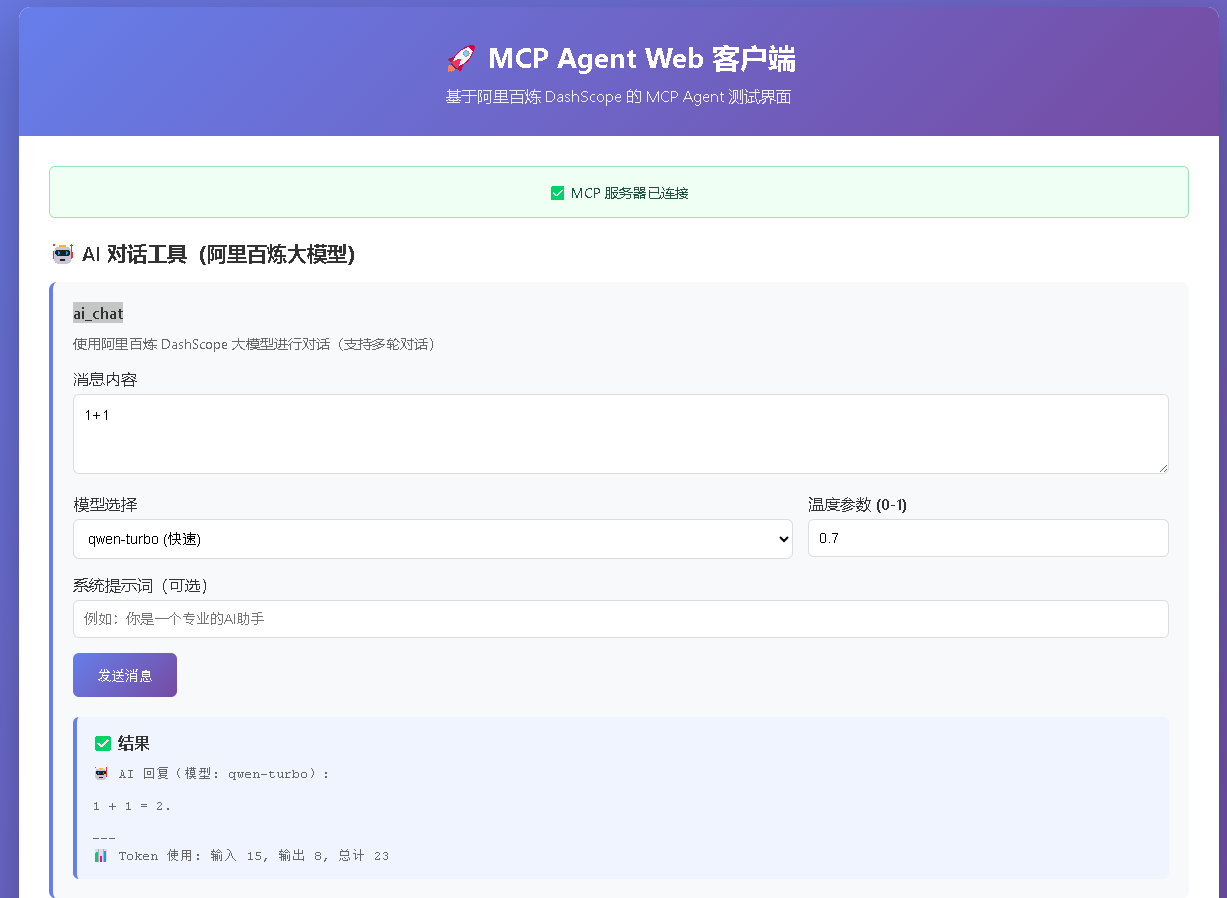
你将看到一个美观的 Web 界面,可以直接使用所有功能!
说明: 用户通过 Web 界面(HTML 页面)与系统交互,底层 MCP 服务器通过 stdio 通信是内部实现细节,用户无需关心。
mcp-agent/
├── src/
│   ├── index.ts              # 主入口文件
│   ├── server.ts             # MCP 服务器实现
│   ├── dashscope-client.ts   # DashScope API 客户端
│   ├── api-server.ts         # Web API 服务器
│   ├── web-client.html       # Web 界面
│   ├── tools/                # 工具定义
│   │   └── ai-chat.ts        # AI 对话工具
│   └── resources/            # 资源定义
│       └── file-system.ts
├── dist/                     # 编译输出
├── package.json
├── tsconfig.json
├── test-mcp-client.js        # 测试客户端
└── README.md本项目实现了 Model Context Protocol 的核心功能:
Tools: 可调用的工具函数
Resources: 可访问的资源
Prompts: 提示词模板
当用户通过 Web 界面使用 AI 对话功能时,完整的调用流程如下:
用户 → Web 界面 → HTTP API → MCP 协议(stdio)→ MCP 服务器 → ai_chat 工具 → DashScope API用户操作: 在 Web 界面输入消息,点击"发送消息"按钮
Web 界面: 调用 callAIChat() 函数,发送 HTTP POST 请求到 /api/mcp/tools/call
HTTP API: API 服务器接收请求,通过 stdio 发送 JSON-RPC 请求到 MCP 服务器
MCP 协议: 使用 JSON-RPC 2.0 协议,通过标准输入输出(stdio)通信
MCP 服务器: 解析请求,路由到 ai_chat 工具处理器
ai_chat 工具: 执行工具函数,调用 DashScope 客户端
DashScope API: 发送 HTTP 请求到阿里百炼 DashScope API,获取 AI 回复
结果返回: 按照相反路径返回结果,最终显示在 Web 界面上
启动 Web 服务器后,在浏览器中访问 http://localhost:3000,即可使用 AI 对话功能。
直接运行 MCP 服务器(用于集成到其他 MCP 客户端):
npm start注意: 直接运行 npm start 会启动纯 MCP 服务器,通过 stdio 与 MCP 客户端通信。如果要通过 Web 界面使用,请使用 npm run api 启动 Web 服务器。
在 src/tools/ 目录下创建新的工具文件,然后在 src/server.ts 中注册。
在 src/resources/ 目录下创建新的资源文件,然后在 src/server.ts 中注册。
MIT
使用阿里百炼 DashScope 大模型进行对话(支持多轮对话)
| Name | Required | Description | Default |
|---|---|---|---|
| message | Yes | 用户消息内容 | |
| system_prompt | No | 系统提示词(可选) | |
| model | No | 使用的模型(可选,默认 qwen-turbo) | qwen-turbo |
| temperature | No | 温度参数(0-1,可选,默认 0.7) |
Does the description disclose side effects, auth requirements, rate limits, or destructive behavior?
With no annotations provided, the description carries the full burden of behavioral disclosure. It mentions multi-turn conversation support, which adds some context beyond basic functionality. However, it doesn't disclose important behavioral traits like rate limits, authentication requirements, error handling, response format, or whether this is a read-only or mutating operation. For a tool with zero annotation coverage, this is insufficient.
Agents need to know what a tool does to the world before calling it. Descriptions should go beyond structured annotations to explain consequences.
Is the description appropriately sized, front-loaded, and free of redundancy?
The description is a single, efficient sentence that communicates the core functionality. It's appropriately sized for a tool with 4 parameters and no annotations. While it could potentially be more front-loaded with critical information, there's no wasted verbiage or redundancy.
Shorter descriptions cost fewer tokens and are easier for agents to parse. Every sentence should earn its place.
Given the tool's complexity, does the description cover enough for an agent to succeed on first attempt?
Given that there's no output schema and no annotations, the description should provide more complete context. It doesn't explain what the tool returns, error conditions, or important behavioral constraints. For a tool that interacts with an external AI service (which typically has rate limits, costs, and specific response formats), this description leaves significant gaps in understanding how to use it effectively.
Complex tools with many parameters or behaviors need more documentation. Simple tools need less. This dimension scales expectations accordingly.
Does the description clarify parameter syntax, constraints, interactions, or defaults beyond what the schema provides?
The schema description coverage is 100%, so the schema already documents all 4 parameters thoroughly. The description doesn't add any parameter-specific information beyond what's in the schema. It mentions multi-turn conversations generally, but doesn't explain how this relates to specific parameters. The baseline score of 3 is appropriate when the schema does the heavy lifting.
Input schemas describe structure but not intent. Descriptions should explain non-obvious parameter relationships and valid value ranges.
Does the description clearly state what the tool does and how it differs from similar tools?
The description clearly states the tool's purpose: '使用阿里百炼 DashScope 大模型进行对话' (using Alibaba Bailian DashScope large model for conversation). It specifies the verb ('进行对话' - conduct conversation) and resource (DashScope model), and mentions support for multi-turn conversations. However, without sibling tools, it cannot demonstrate differentiation from alternatives, so it doesn't reach the highest score.
Agents choose between tools based on descriptions. A clear purpose with a specific verb and resource helps agents select the right tool.
Does the description explain when to use this tool, when not to, or what alternatives exist?
The description provides no guidance on when to use this tool versus alternatives. It doesn't mention any prerequisites, limitations, or typical use cases. The only contextual information is the mention of multi-turn conversation support, but this doesn't constitute usage guidance for tool selection.
Agents often have multiple tools that could apply. Explicit usage guidance like "use X instead of Y when Z" prevents misuse.
Recent tool additions, removals, and schema changes observed during successful MCP inspections.
ai_chatScored across 1 tool
With only one tool, there is no possibility of ambiguity or overlap between tools. The tool's purpose is clearly defined as using DashScope for chat conversations, so an agent cannot misselect between non-existent alternatives.
The single tool name 'ai_chat' follows a clear and consistent pattern (snake_case with descriptive verb_noun structure). Since there is only one tool, there is no inconsistency to evaluate, and the naming is appropriate and readable.
The server has only one tool, which feels thin and limited for a general-purpose 'MCP Agent with DashScope'. A single chat tool lacks the breadth expected for an agent interface, such as tools for different model types, configurations, or related AI tasks, making it under-scoped for its apparent purpose.
The tool surface is severely incomplete for an AI agent domain. While 'ai_chat' covers basic conversation, there are obvious gaps: no tools for model selection, parameter tuning, batch processing, or other common AI operations. This limits agents to only chat interactions, missing core functionalities expected from such a server.
MCP server for AI dialogue using various LLM models via AceDataCloud
A comprehensive Model Context Protocol (MCP) server that enables AI assistants to interact with yo…
An MCP server that integrates with Discord to provide AI-powered features.
MCP server for OpenAI API (chat completions, image generation, embeddings) via AceDataCloud
