F
licenseNot graded
qualityD
maintenanceProvides real-time weather information and forecasts, connecting AI assistants with live weather data for current conditions and multi-day forecasts for any location worldwide.
-

Click on "Deploy Server".
Wait a few minutes for the server to deploy. Once ready, it will show a "Started" state.
In the chat, type @ followed by the MCP server name and your instructions, e.g., "@MCP Weather Server what is the 7-day forecast for New York City?"
That's it! The server will respond to your query, and you can continue using it as needed.
Here is a step-by-step guide with screenshots.
An Enterprise-grade Model Context Protocol (MCP) server that provides weather information using the Open-Meteo API. Built with TypeScript, Node.js 22.x, featuring advanced monitoring, audit logging, security features, and resilience patterns with 3-layer SOLID architecture.








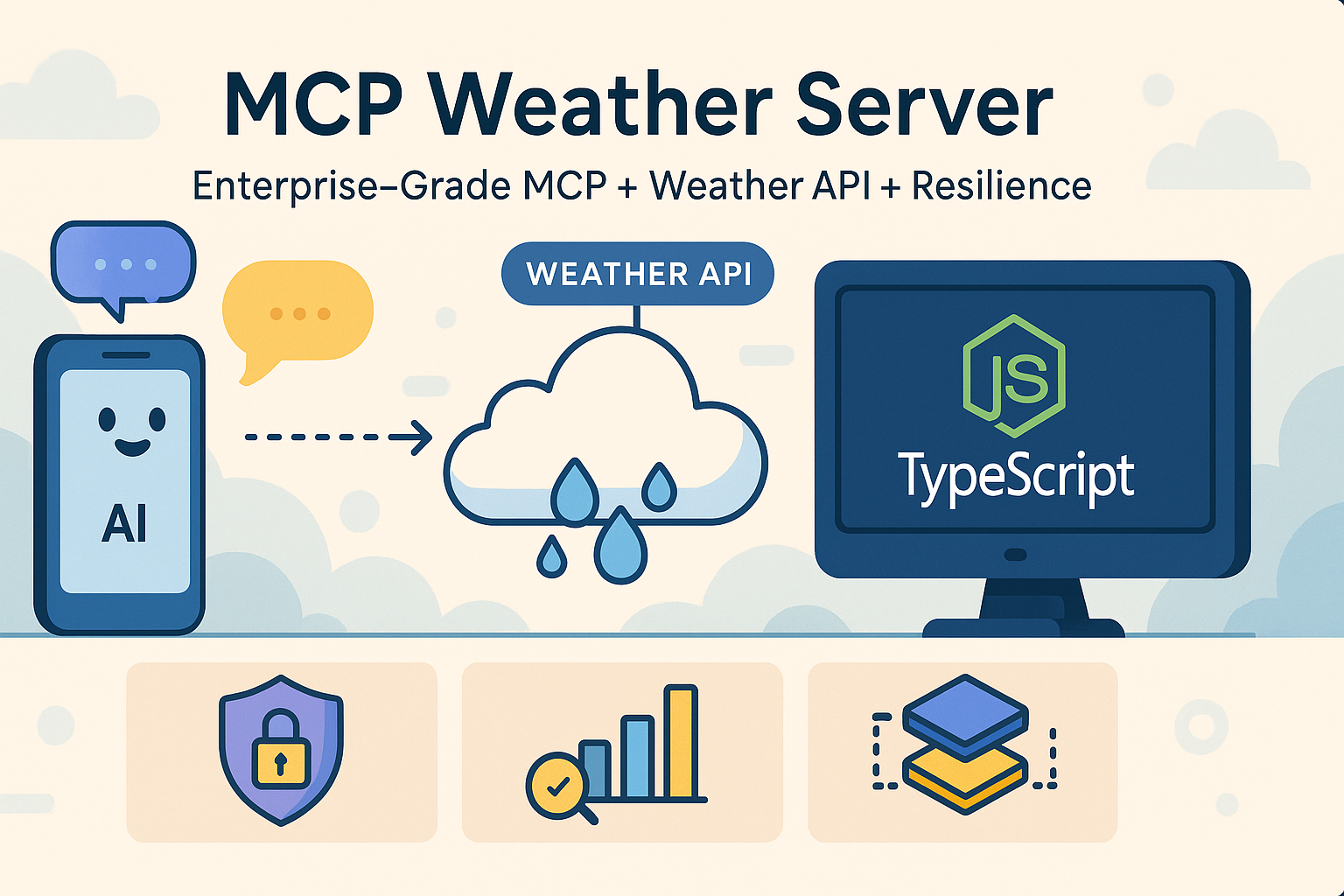
Related MCP server: Weather MCP Server
🏗️ Perfect SOLID Architecture: Clean 3-layer separation with zero cross-contamination
⚡ Latest MCP SDK Patterns: Modern McpServer, registerTool(), and Zod validation
🤖 LLM-Friendly Design: Clear tool descriptions, structured responses, and intelligent error handling
🌤️ Real-time Weather: Current weather conditions with temperature, humidity, wind speed
📅 Weather Forecasts: Up to 7-day forecasts with detailed conditions
🤖 AI Agent Support: retrieve_weather_context tool for natural language queries
🔄 Modern Dual Transport:
Official Stdio: Local development with Cline in VS Code
Official Streamable HTTP: Production APIs, LangChain, microservices
🛡️ Enterprise Resilience: Circuit breaker, retry strategies, rate limiting, bulkhead isolation
⚡ Ultra Performance: Fastify + Undici with connection pooling and streaming
🔒 Security First: Input validation, Origin checks, CORS support, session management
📊 Advanced Observability: Structured Pino logging, real-time metrics, health monitoring
🧪 Comprehensive Testing: Unit tests, integration tests, chaos engineering, load testing
🚀 Production Ready: Docker containerization, graceful shutdown, error recovery
Technology | Version | Purpose |
| JavaScript runtime environment | |
| Type-safe JavaScript development | |
| Latest MCP SDK with modern patterns | |
| Runtime schema validation and TypeScript inference | |
| High-performance web framework (transport layer) | |
| Production structured logging | |
| Next-generation testing framework | |
| High-performance HTTP client with resilience | |
N/A | Free weather data provider |
Note: The project includes an advanced
undici-resiliencepackage that enhances the standard undici client with enterprise-grade resilience patterns including circuit breakers, retry strategies, rate limiting, and comprehensive monitoring. This ensures reliable weather API calls even under adverse conditions.
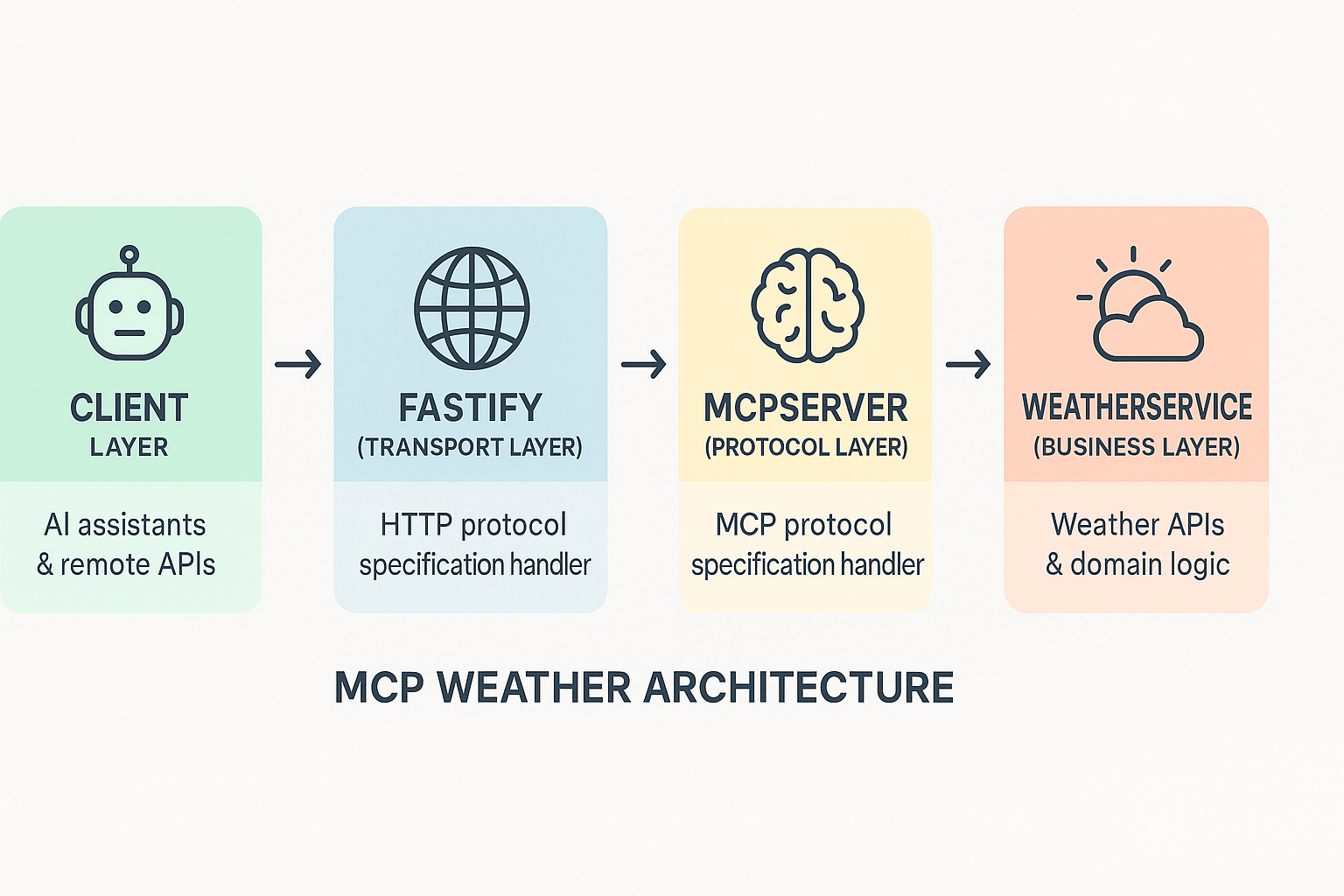
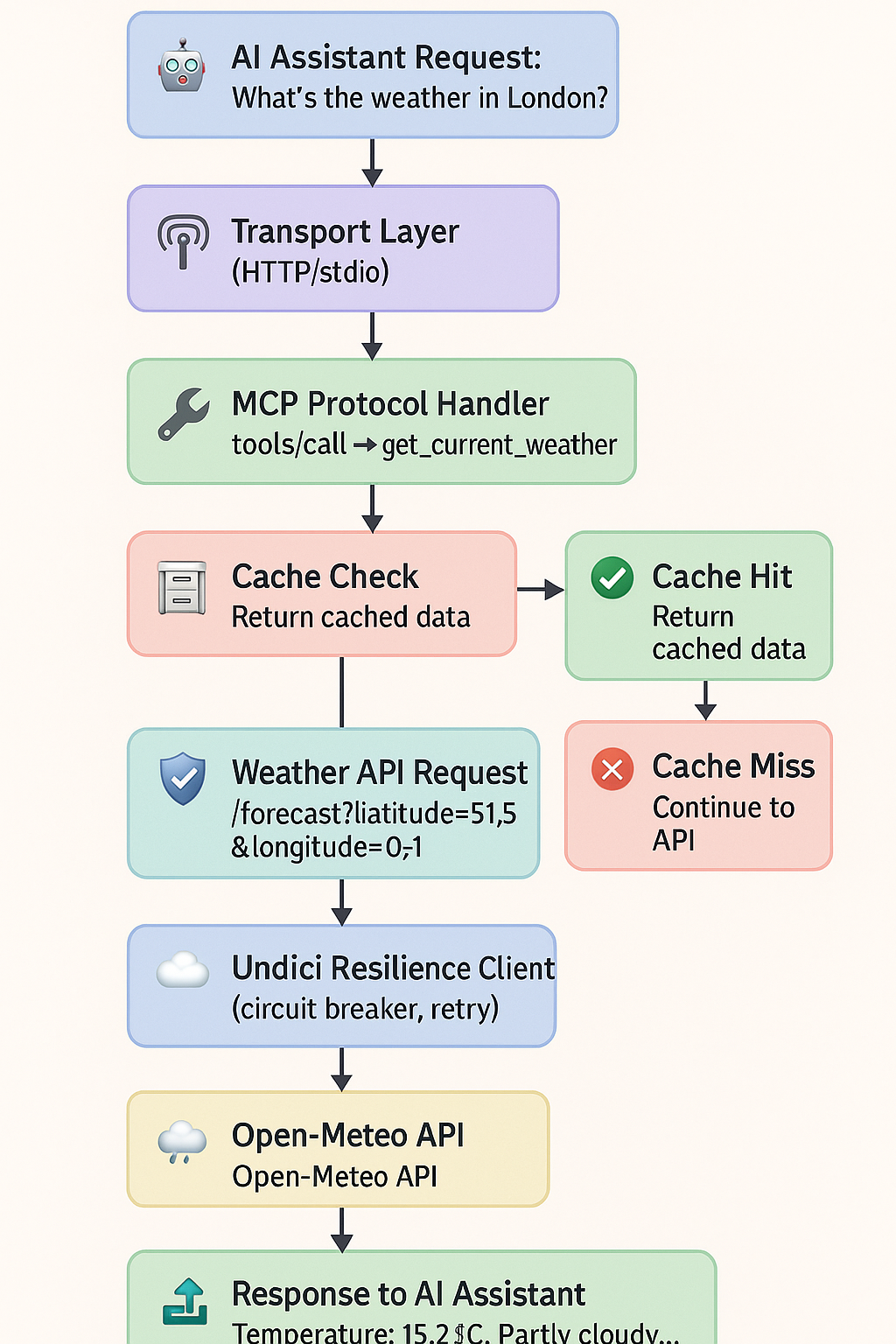
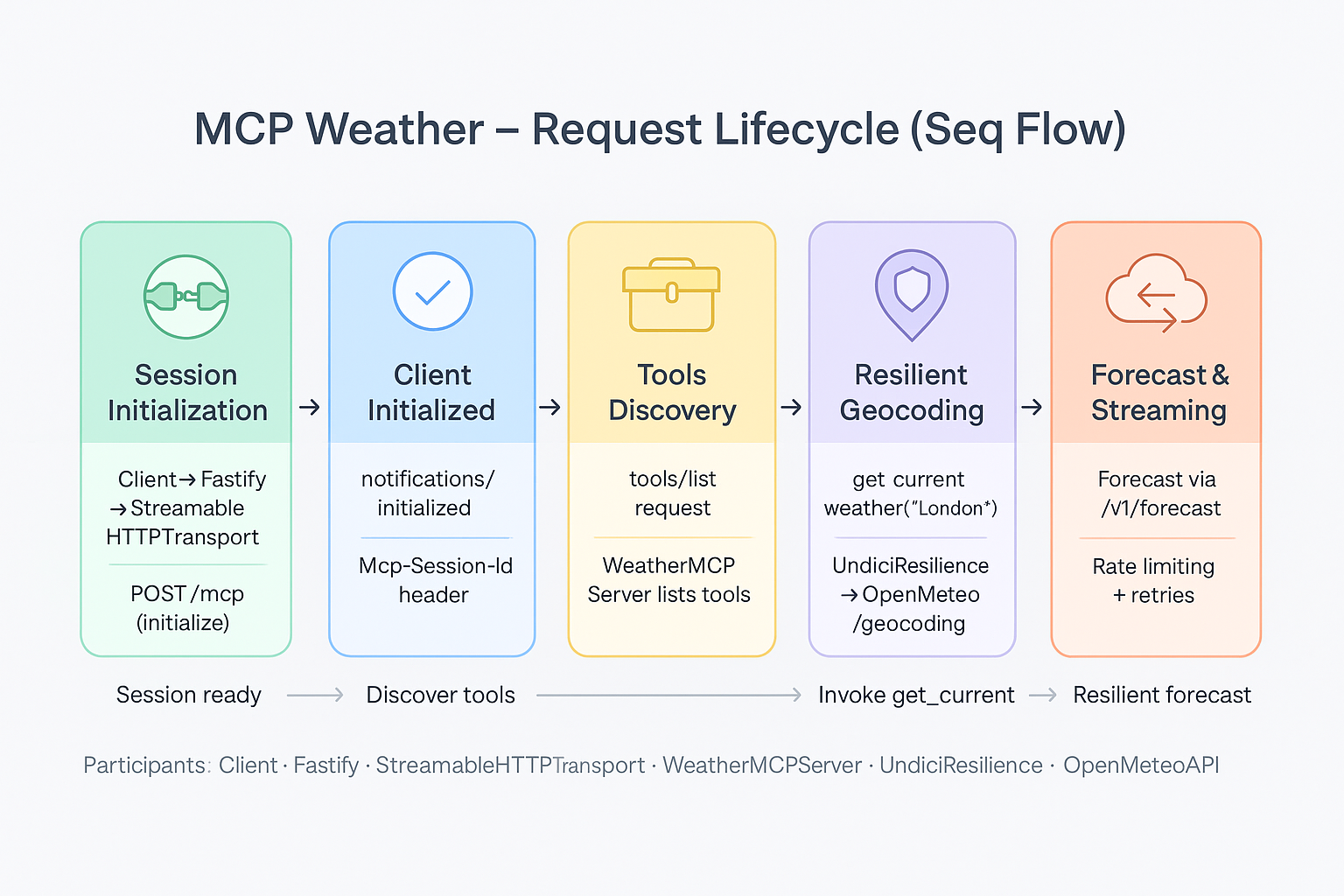
This server provides weather information tools to AI assistants, enabling them to:
Get current weather conditions for any location
Retrieve weather forecasts (1-7 days)
Handle complex weather queries with context
Provide reliable, cached responses with resilience patterns
Node.js 22.x or later
npm or yarn
# Clone the repository
git clone https://github.com/kumaran-is/mcp-weather-server.git
cd mcp-weather-server

# Install dependencies
npm install

# Build the project
npm run build
Local Configuration (cline_mcp_settings.json):
{
  "mcpServers": {
    "weather": {
      "autoApprove": [
        "get_current_weather",
        "get_weather_forecast",
        "retrieve_weather_context"
      ],
      "disabled": true,
      "timeout": 30000,
      "type": "stdio",
      "command": "npx",
      "args": [
        "tsx",
        "src/server.ts"
      ],
      "cwd": "/path-to/mcp-weather-server",
      "env": {
        "MCP_TRANSPORT": "stdio",
        "LOG_LEVEL": "info",
        "NODE_ENV": "production"
      }
    }
  }
}Configuration (~/Library/Application Support/Claude/claude_desktop_config.json on macOS):
For standard setup with your actual paths (using tsx to run TypeScript directly):
{
  "mcpServers": {
    "mcp-weather-server": {
      "command": "/your/path/.nvm/versions/node/v22.15.0/bin/npx",
      "args": [
        "tsx",
        "/your/path/mcp-weather-server/src/server.ts"
      ],
      "env": {
        "MCP_TRANSPORT": "stdio",
        "NODE_ENV": "production",
        "PRETTY_LOGS": "false",
        "LOG_LEVEL": "info"
      },
      "timeout": 30000
    }
  }
}
After adding the configuration, restart Claude Desktop to load the Weather MCP Server.
Copy and paste below prompts into Cline or Claude Desktop to test Weather MCP capabilities:
Travel Planning Assistant:
I'm planning a 2-week trip across Europe starting next week. Can you check the weather for:

1. Current conditions in my departure city: London
2. 7-day forecasts for my planned stops:
   - Paris (days 1-3)
   - Rome (days 4-6)
   - Vienna (days 7-9)
   - Prague (days 10-12)
   - Amsterdam (days 13-14)

Based on the weather, should I pack heavy winter clothing or lighter layers? Any cities I should avoid due to weather conditions?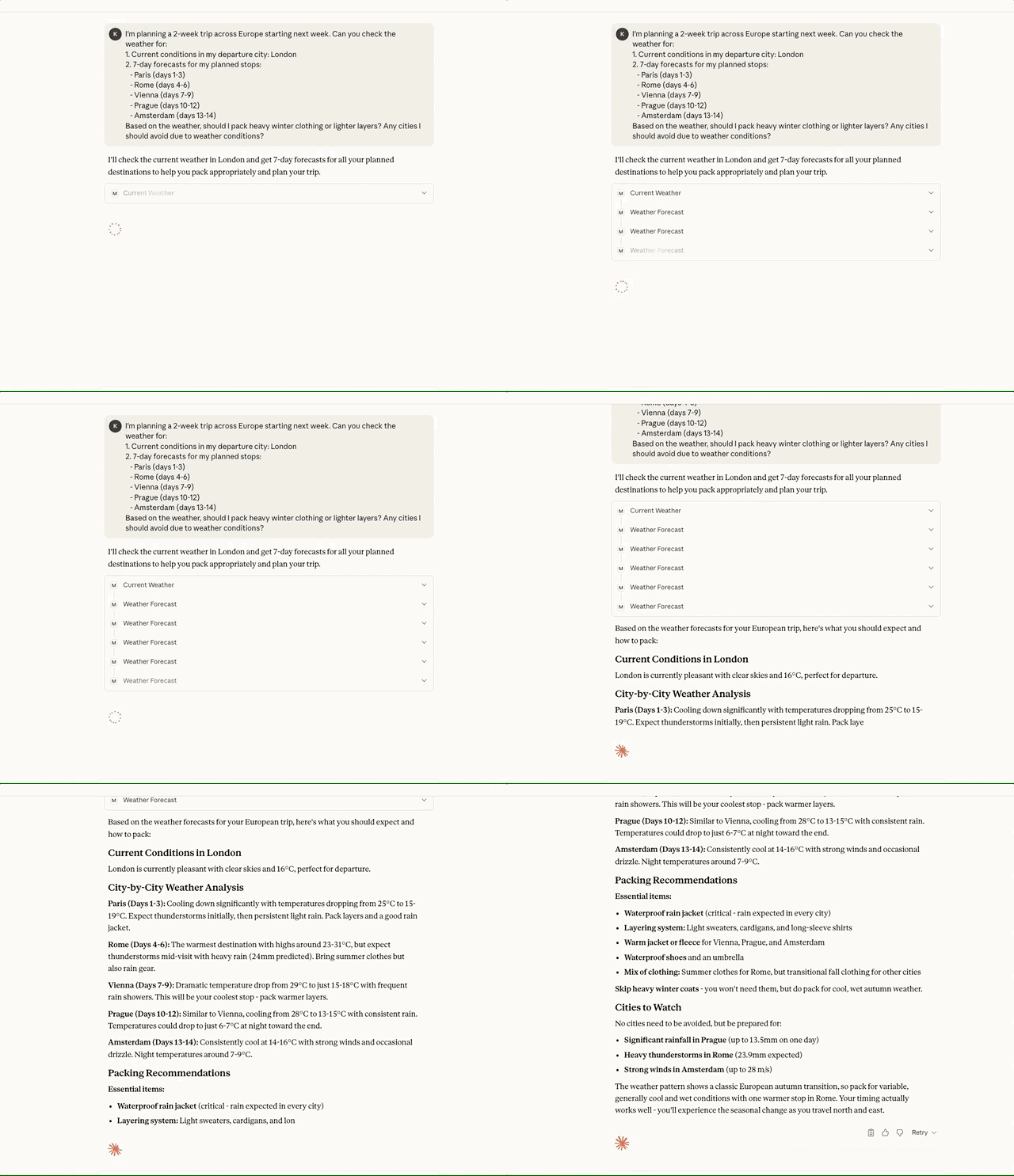
Configuration (.cursor/mcp_config.json in project root):
{
  "mcpServers": {
    "weather": {
      "command": "npx",
      "args": ["tsx", "src/server.ts"],
      "cwd": "${workspaceFolder}",
      "env": {
        "MCP_TRANSPORT": "stdio"
      }
    }
  }
}{
"github.copilot.mcpServers": {
"weather": {
"command": "node",
"args": ["./dist/server.js"],
"transport": "stdio"
}
}
}Copy and paste these natural language prompts into Cline, Claude Desktop, or any MCP-compatible AI assistant to test weather capabilities:
I need comprehensive weather information for travel planning. Can you help me with the following?

First, give me the CURRENT weather conditions for these cities:
- London, UK
- Tokyo, Japan
- New York, USA
- Sydney, Australia
- Dubai, UAE

Next, I need 5-day weather forecasts for these vacation destinations:
- Paris, France
- Bali, Indonesia
- Miami, USA
- Barcelona, Spain

Finally, help me understand the weather context for these specific travel scenarios:
- "What's the weather like in Berlin for outdoor photography?"
- "Weather conditions in Singapore for business meetings"
- "Is the weather in Mumbai suitable for beach activities?"

Format everything in a clear, organized way that helps with travel planning decisions.Event Planning Coordinator:
I'm organizing outdoor events and need detailed weather information:

1. Check current weather for immediate decisions in:
   - Los Angeles (concert tonight)
   - Chicago (street fair this afternoon)
   - Boston (marathon tomorrow morning)

2. Get 3-day forecasts for upcoming events in:
   - Seattle (tech conference)
   - Denver (mountain wedding)
   - Orlando (theme park opening)

3. Weather context for: "outdoor wedding in San Francisco this weekend"

Please highlight any concerning weather patterns like rain, extreme temperatures, or high winds.
Agriculture & Farming Advisor:
I manage farms in multiple regions and need weather data for agricultural planning:

1. Current weather conditions for immediate field work decisions:
   - Des Moines, Iowa
   - Sacramento, California
   - Houston, Texas
   - Jacksonville, Florida

2. 7-day forecasts for planting/harvesting schedules:
   - Kansas City (wheat fields)
   - Portland (orchards)
   - Phoenix (cotton farms)

3. Context analysis: "weather in Nebraska for corn planting season"

Focus on precipitation, temperature ranges, and humidity levels that affect crop management.
Sports & Recreation Planner:
I coordinate outdoor sports activities and need weather assessments:

Current conditions for today's activities:
- Skiing in Aspen, Colorado
- Surfing in Honolulu, Hawaii
- Golfing in Phoenix, Arizona
- Sailing in San Diego, California

Get 5-day forecasts for upcoming tournaments:
- Tennis in Melbourne
- Football in Green Bay
- Baseball in Atlanta

Also check: "weather in Vancouver for mountain biking this weekend"

Emphasize wind speeds, precipitation, and visibility conditions.
Emergency Response Coordinator:
I need weather data for emergency preparedness and response planning:

1. Current severe weather check for these high-risk areas:
   - New Orleans, Louisiana
   - Oklahoma City, Oklahoma
   - Buffalo, New York
   - Phoenix, Arizona

2. 3-day forecasts for resource deployment:
   - Minneapolis (potential snowstorm)
   - Houston (flooding risk)
   - Los Angeles (fire weather)

3. Context queries:
   - "weather conditions in Miami for hurricane preparedness"
   - "weather in Denver for avalanche risk assessment"

Flag any extreme weather conditions, temperature anomalies, or precipitation warnings.
Aviation & Transportation Manager:
I manage flight operations and ground transportation. Please provide:

Current weather at major hub airports:
- Atlanta (ATL)
- Chicago (ORD)
- London (Heathrow area)
- Tokyo (Narita area)
- Dubai

48-hour forecasts for flight planning:
- Frankfurt
- Singapore
- Los Angeles
- New York

Weather context for: "flying conditions in Dallas today"

Focus on visibility, wind speeds, precipitation, and temperature extremes that affect operations.Test 1 - Current Weather Retrieval:
What's the current weather in London? I need temperature, humidity, wind speed, and general conditions.Test 2 - Multi-City Weather Check:
Can you check the current weather in Paris, Rome, and Madrid? I'm trying to decide which city to visit today.Test 3 - Extended Forecast:
Show me a 7-day weather forecast for Tokyo. I'm planning outdoor activities and need to know the best days.Test 4 - Short-term Forecast:
What's the weather forecast for the next 3 days in San Francisco? Keep it brief.Test 5 - Natural Language Context Query:
I'm wondering about the weather in Seattle for hiking this weekend. Can you help me understand if it's suitable?Test 6 - Business Context Query:
What's the weather situation in New York for outdoor business lunch meetings?Test 7 - Extreme Weather Locations:
Check the weather in these extreme locations:
- Reykjavik, Iceland (cold climate)
- Cairo, Egypt (hot desert)
- Singapore (tropical)
- La Paz, Bolivia (high altitude)Test the system's error handling with these challenging requests:
1. Check weather for cities with ambiguous names:
- "Paris" (which Paris? France or Texas?)
- "London" (UK or Ontario?)
- "Sydney" (Australia or Nova Scotia?)
2. Test with misspelled city names:
- "Tokio" instead of "Tokyo"
- "San Franciso" instead of "San Francisco"
- "Mosco" instead of "Moscow"
3. Request forecasts with invalid parameters:
- "Show me a 10-day forecast for Berlin" (exceeds 7-day limit)
- "Get weather forecast for 0 days in Rome"
- "Weather forecast for -5 days in Madrid"
4. Try non-existent or very small cities:
- "Weather in Atlantis"
- "Current conditions in Hogwarts"
- "Forecast for Middle Earth"
5. Test with special characters and injection attempts:
- "Weather in London'; DROP TABLE weather;--"
- "Forecast for <script>alert('test')</script>"
- "Current weather in ${city}"
6. Query without clear city reference:
- "What's the weather like?"
- "Is it raining?"
- "Tell me about the forecast"
7. Multiple cities in one context query:
- "Weather for traveling from Paris to London to Amsterdam"
Show me how the system handles these edge cases gracefully.Let's test the caching and performance:
1. First request - Check weather in London (should hit the API)
2. Immediately check London weather again (should be cached)
3. Wait 1 minute and check London again (still cached?)
4. Check weather for 10 different cities rapidly:
- London, Paris, Tokyo, New York, Sydney
- Dubai, Singapore, Moscow, Rio, Cairo
Notice any performance differences between cached and fresh requests?I need to compare weather conditions across different regions:
1. Current weather comparison:
- Tropical: Singapore, Bangkok, Manila
- Desert: Dubai, Phoenix, Cairo
- Temperate: London, Paris, Berlin
- Cold: Reykjavik, Helsinki, Oslo
2. Weekly forecast comparison for vacation planning:
- Beach destinations: Miami, Cancun, Bali
- Ski resorts: Aspen, Zurich, Innsbruck
- City breaks: Rome, Barcelona, Prague
3. Context for decision making:
- "Compare weather in Tokyo vs Seoul for cherry blossom viewing"
- "Weather differences between San Francisco and Los Angeles for tech conferences"
Help me identify the best weather patterns for different activities.When testing with the prompts above, you should see:
✅ Current Weather: Real-time data from Open-Meteo API with temperature, humidity, wind speed, conditions
✅ Forecasts: Accurate 1-7 day predictions with daily high/low temperatures and conditions
✅ Context Queries: Natural language understanding extracting city names and providing relevant weather context
✅ Caching: Fast responses for repeated queries (10-minute cache TTL)
✅ Error Handling: Graceful handling of invalid cities, misspellings, and edge cases
✅ Resilience: Circuit breaker protection, automatic retries, and rate limiting
✅ Formatted Output: Clear, readable weather information formatted for AI assistants
✅ Performance Metrics: Correlation IDs and timing data in logs
✅ Security: Input sanitization preventing injection attacks
✅ Multi-city Support: Ability to handle multiple weather requests efficiently
🚫 Invalid City: "No city found" or "Invalid city name provided" messages
🚫 API Failures: Circuit breaker opens after repeated failures, returns cached data if available
🚫 Rate Limiting: Requests throttled when limits exceeded (10 req/sec default)
🚫 Invalid Parameters: Days outside 1-7 range auto-corrected to valid values
🚫 Malicious Input: Attack patterns detected and blocked with security logging
🚫 Network Issues: Automatic retries with exponential backoff
🚫 Service Degradation: Graceful fallback to cached data when possible
src/
├── server.ts                ← 🎯 **Layer 1: Transport & Infrastructure**
├── mcp-server.ts            ← 🧠 **Layer 2: Protocol & MCP SDK (MODERNIZED)**
├── weather-service.ts       ← 🌤️ **Layer 3: Business & Domain Logic**
├── types.ts                 ← 📝 TypeScript interfaces
├── logger-pino.ts           ← 📊 Production logging with Pino
│
├── config/                  ← ⚙️ Configuration management
│   ├── config.ts           ← Main configuration with Zod validation
│   ├── config.spec.ts      ← Configuration tests
│   └── auth-config.ts      ← Authentication configuration
│
├── cache/                   ← 🗄️ Intelligent LRU caching
│   ├── weather-cache.ts    ← Multi-tier caching system
│   └── weather-cache.spec.ts ← Cache layer tests
│
├── errors/                  ← 🚨 Custom error handling
│   ├── weather-errors.ts   ← Specialized error classes
│   └── weather-errors.spec.ts ← Error handling tests
│
├── middleware/              ← 🛡️ Request validation & security
│   ├── validation.ts       ← JSON-RPC & MCP validation
│   ├── validation.spec.ts  ← Validation tests
│   ├── auth.ts             ← Authentication middleware
│   ├── rate-limit.ts       ← Rate limiting protection
│   └── sanitization.ts     ← Input sanitization
│
├── security/                ← � Security utilities
│   └── sanitizer.ts        ← DOMPurify-based sanitization
│
├── undici-resilience/       ← �🛡️ Advanced HTTP resilience
│   ├── index.ts             ← Main exports & pool manager
│   ├── index.spec.ts       ← Resilience integration tests
│   ├── logger.ts           ← Resilience-specific logging
│   │
│   ├── config/              ← Resilience configuration
│   │   └── pool-config.ts  ← Pool & resilience settings
│   │
│   ├── http/                ← Connection pooling
│   │   └── pool-manager.ts ← HTTP connection management
│   │
│   ├── resilience/          ← Resilience patterns
│   │   ├── circuit-breaker.ts     ← Circuit breaker pattern
│   │   ├── circuit-breaker.spec.ts ← Circuit breaker tests
│   │   ├── retry-strategy.ts      ← Retry with backoff
│   │   ├── rate-limiter.ts        ← Request throttling
│   │   └── bulkhead.ts           ← Resource isolation
│   │
│   ├── streaming/           ← Backpressure handling
│   │   ├── streaming-pool-manager.ts    ← Streaming pool management
│   │   ├── streaming-metrics.ts         ← Stream metrics collection
│   │   └── backpressure-handler.ts     ← Adaptive backpressure
│   │
│   └── monitoring/          ← Metrics and health
│       └── metrics.ts      ← Performance metrics
│
└── utils/                   ← � Utility functions
    ├── version.ts          ← Version information utility
    └── version.spec.ts     ← Version utility tests

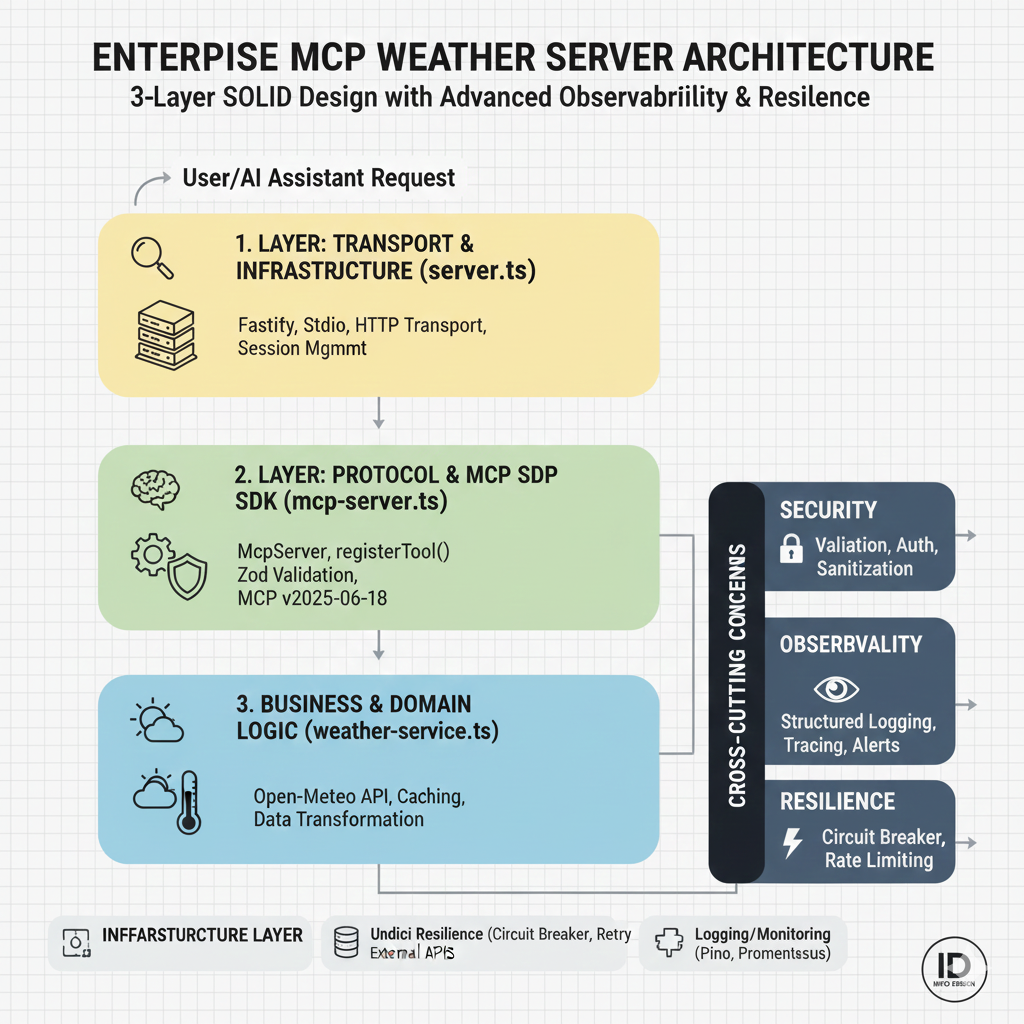
**🏗️ Perfect 3-Layer SOLID Architecture:**
- **Layer 1 (server.ts)**: Pure infrastructure - Fastify, transports, sessions
- **Layer 2 (mcp-server.ts)**: Modern MCP SDK - `McpServer`, `registerTool()`, Zod
- **Layer 3 (weather-service.ts)**: Pure business logic - weather APIs, caching

**🔒 Security & Middleware Layer:**
- **Authentication**: Multi-tier API key validation system
- **Rate Limiting**: Global, per-client, per-IP, per-endpoint protection
- **Input Sanitization**: DOMPurify-based with attack pattern detection
- **Validation**: JSON-RPC 2.0 and MCP protocol compliance

**🛡️ Enterprise Resilience Layer:**
- **Circuit Breaker**: Automatic failure detection and recovery
- **Retry Strategy**: Exponential backoff with jitter
- **Rate Limiting**: Token bucket and sliding window algorithms
- **Bulkhead Pattern**: Resource isolation and protection
- **Connection Pooling**: Optimized HTTP connection reuse
- **Streaming Support**: Backpressure handling and adaptive thresholds
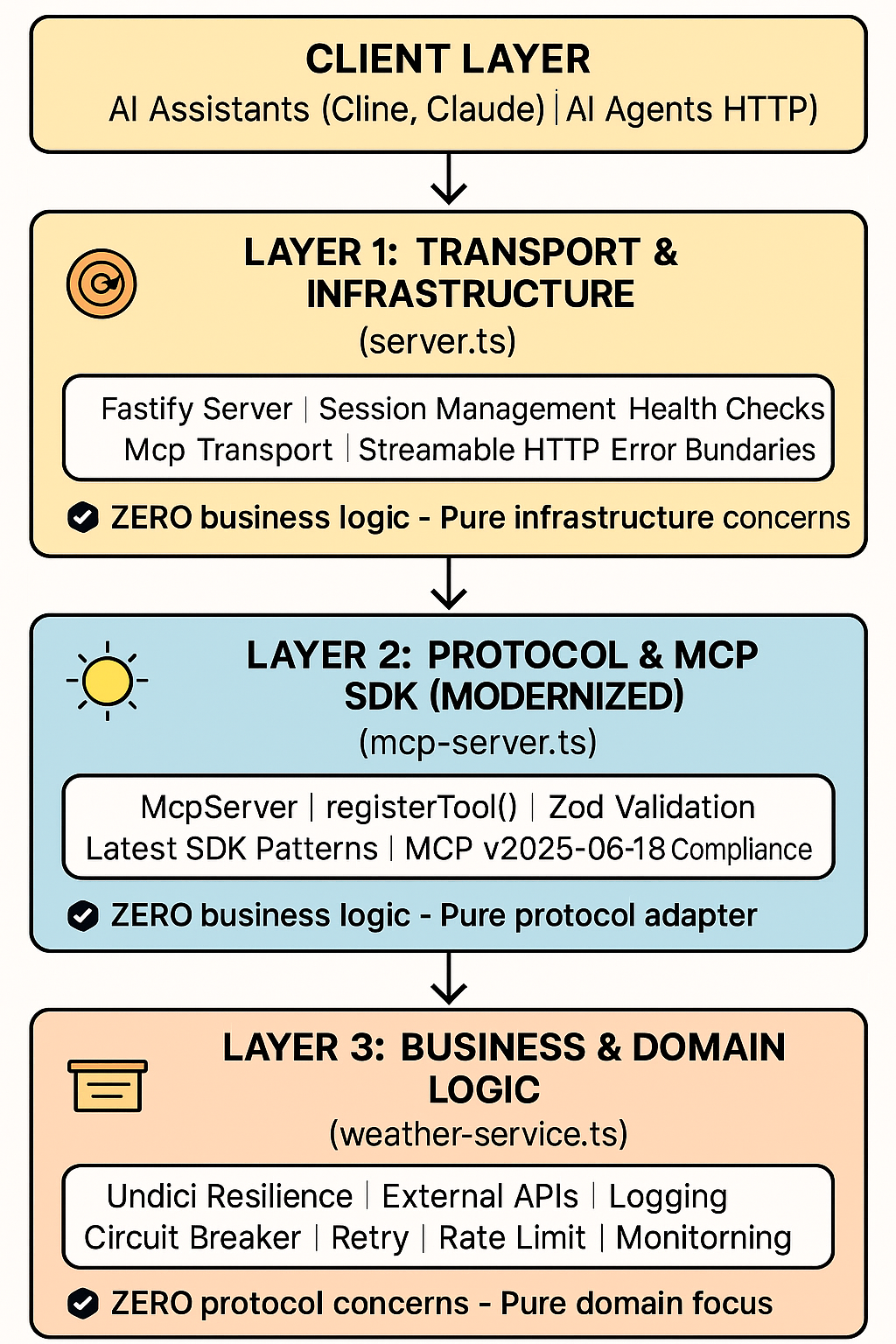
🎯 SOLID Principles: 100% Compliance
Single Responsibility: Each layer has exactly one purpose
Open/Closed: Easy to extend without modification
Liskov Substitution: Components are fully substitutable
Interface Segregation: Clean, minimal interfaces
Dependency Inversion: Proper abstraction dependencies
The MCP Weather Server implements a modern dual-transport strategy with perfect separation:
Transport | Port | Best For | Protocol | Cline Support |
Official Stdio | N/A | Local development, VS Code | Process I/O | ✅ Local only |
Official Streamable HTTP | 8080 | Production APIs, LangChain | Streamable HTTP | ❌ No |
Architecture Evolution (v2.5.0): The server now uses the latest MCP SDK patterns with McpServer and registerTool() for significantly simplified code, better type safety, and automatic protocol compliance while maintaining the clean dual-transport architecture.
Why Both Are Needed:
The server uses two different technologies that serve completely different architectural layers:
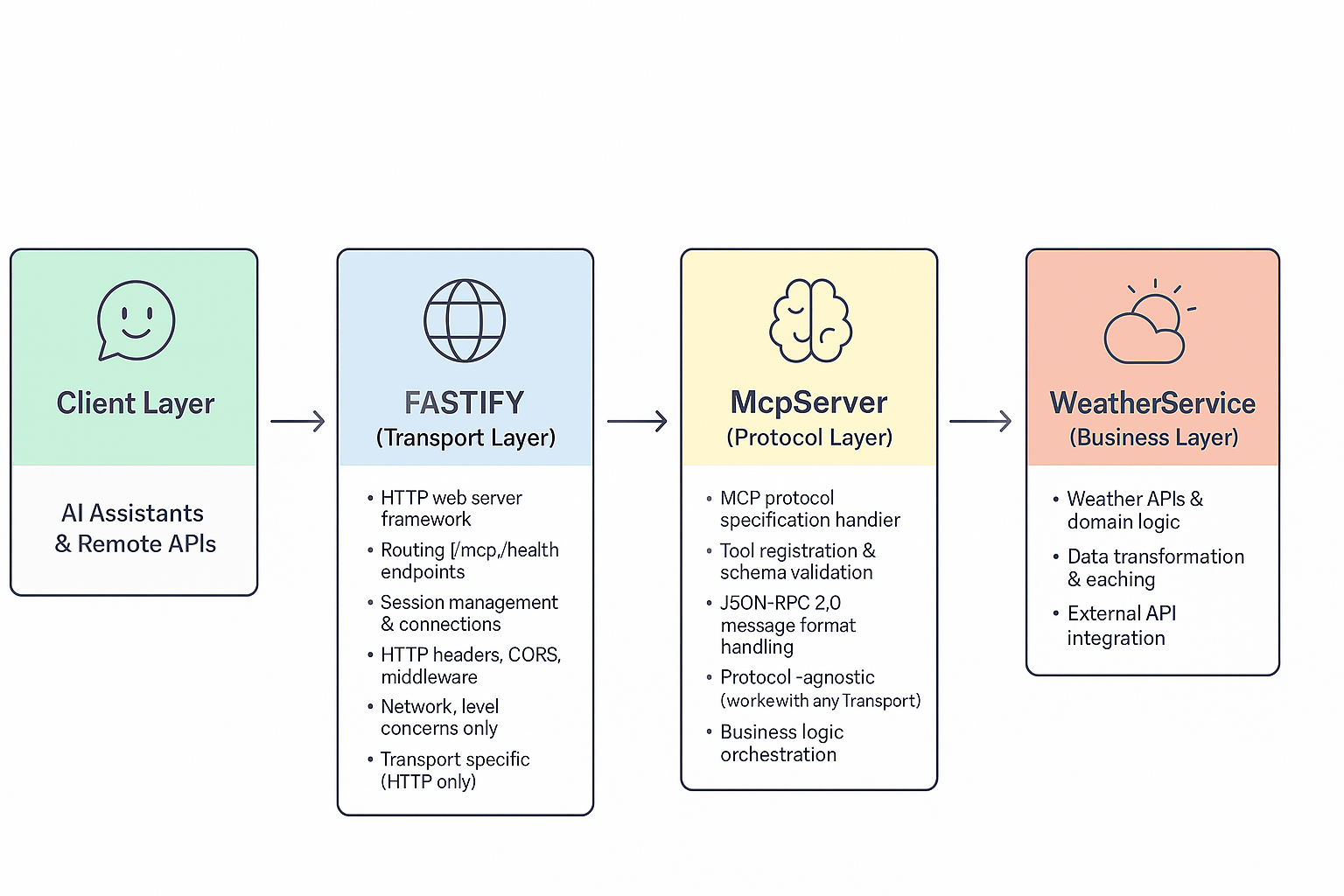
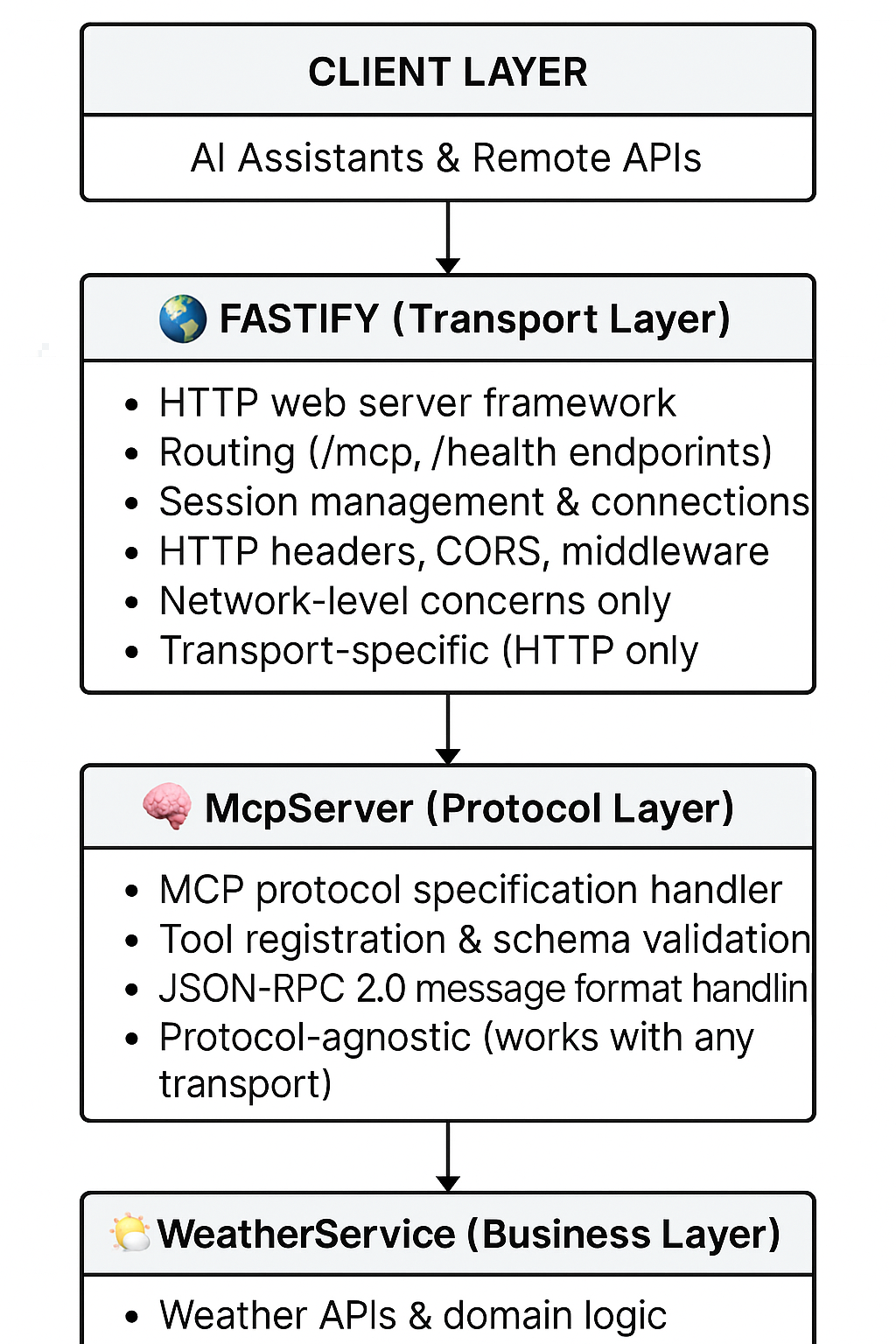
Key Differences:
Aspect | McpServer (Protocol) | Fastify (Transport) |
Purpose | Implements MCP specification | HTTP web server framework |
Scope | Protocol logic, tools, schemas | HTTP routing, sessions, connections |
Transport | Works with ANY transport | HTTP only |
Concerns | MCP messages, JSON-RPC 2.0 | HTTP headers, CORS, middleware |
Business Logic | ❌ Zero business logic | ❌ Zero business logic |
Multi-Transport Architecture:
HTTP Transport (for remote connections):
Client → Fastify (HTTP) → McpServer (MCP Protocol) → WeatherServiceStdio Transport (for local AI tools like Cline):
Client → StdioTransport → McpServer (MCP Protocol) → WeatherServiceBenefits of This Separation:
Reusable Logic: Same McpServer works with multiple transports
Clean Architecture: HTTP concerns vs Protocol concerns vs Business logic
🚀 Flexibility: Can add new transports (WebSocket, gRPC, TCP, Unix sockets) without changing MCP logic
Standards Compliance: Fastify handles HTTP standards, McpServer handles MCP standards
Future Transport Extensibility: The architecture supports adding any transport protocol:
WebSocket: Real-time bidirectional communication for web apps
gRPC: High-performance RPC for microservices integration
TCP/Unix Sockets: Direct socket communication for local services
Custom Protocols: Any protocol implementing the Transport interface
Example: Adding WebSocket Support
// No changes needed to McpServer or WeatherService!
const wsTransport = new WebSocketTransport(server);
await mcpServer.connect(wsTransport); // Same MCP logic works
The same weather tools work whether called from Cline (stdio) or a web client (HTTP) because the McpServer layer is transport-agnostic. This flexibility enables the server to adapt to any integration scenario without code duplication.
Your Need | Recommended Transport | Start Command |
Local Cline in VS Code | Stdio | (auto-spawned) |
Production API | Streamable HTTP |
|
Docker deployment | Streamable HTTP | See docker-compose |
LangChain integration | Streamable HTTP |
|
MCP Inspector testing | Any | See docs |
sequenceDiagram
    participant Client
    participant Fastify
    participant StreamableHTTPTransport
    participant WeatherMCPServer
    participant WeatherService
    participant UndiciResilience
    participant OpenMeteoAPI

    %% Initialization Phase
    Client->>Fastify: POST /mcp (initialize)
    Note over Client,Fastify: Headers: MCP-Protocol-Version, Accept: application/json, text/event-stream
    Fastify->>StreamableHTTPTransport: handleRequest()
    StreamableHTTPTransport->>WeatherMCPServer: handleInitialize()
    WeatherMCPServer-->>StreamableHTTPTransport: Server capabilities & info
    StreamableHTTPTransport-->>Fastify: Session UUID generated
    Fastify-->>Client: 200 OK + Mcp-Session-Id header
    Note over Fastify,Client: Returns server info + session ID

    Client->>Fastify: POST /mcp (notifications/initialized)
    Note over Client,Fastify: Headers include Mcp-Session-Id
    Fastify->>StreamableHTTPTransport: processMessage()
    StreamableHTTPTransport->>WeatherMCPServer: handleInitialized()
    WeatherMCPServer-->>StreamableHTTPTransport: Acknowledged
    StreamableHTTPTransport-->>Fastify: 202 Accepted
    Fastify-->>Client: 202 Accepted

    %% Tool Operations
    Client->>Fastify: POST /mcp (tools/list)
    Note over Client,Fastify: Headers: Mcp-Session-Id
    Fastify->>StreamableHTTPTransport: processMCPMessage()
    StreamableHTTPTransport->>WeatherMCPServer: handleToolsList()
    WeatherMCPServer-->>StreamableHTTPTransport: Available tools array
    StreamableHTTPTransport-->>Fastify: JSON response
    Fastify-->>Client: 200 OK (tools array)

    %% Weather Request Flow with Resilience
    Client->>Fastify: POST /mcp (tools/call: get_current_weather)
    Note over Client,Fastify: {"name": "get_current_weather", "arguments": {"city": "London"}}
    Fastify->>StreamableHTTPTransport: processMCPMessage()
    StreamableHTTPTransport->>WeatherMCPServer: handleToolsCall()
    WeatherMCPServer->>WeatherService: getCurrentWeather("London")

    %% Geocoding with Resilience Patterns
    WeatherService->>UndiciResilience: Request with circuit breaker
    UndiciResilience->>OpenMeteoAPI: GET /geocoding-api/v1/search?name=London
    Note over UndiciResilience,OpenMeteoAPI: Circuit breaker monitors health
    OpenMeteoAPI-->>UndiciResilience: Geocoding response
    UndiciResilience-->>WeatherService: Coordinates (with retry if needed)

    %% Weather Data Fetch with Resilience
    WeatherService->>UndiciResilience: Request with rate limiting
    UndiciResilience->>OpenMeteoAPI: GET /v1/forecast?latitude=51.5&longitude=-0.1
    Note over UndiciResilience,OpenMeteoAPI: Rate limited, retries on failure
    OpenMeteoAPI-->>UndiciResilience: Weather data
    UndiciResilience-->>WeatherService: Weather response

    WeatherService-->>WeatherMCPServer: Formatted weather data
    WeatherMCPServer-->>StreamableHTTPTransport: Tool result
    StreamableHTTPTransport-->>Fastify: JSON-RPC response
    Fastify-->>Client: 200 OK (SSE format if streaming)
    Note over Fastify,Client: data: {"jsonrpc":"2.0","result":...}

    %% SSE Stream for Real-time Updates
    Client->>Fastify: GET /mcp (SSE stream)
    Note over Client,Fastify: Accept: text/event-stream
    Fastify->>StreamableHTTPTransport: handleGET()
    StreamableHTTPTransport-->>Fastify: 200 OK + SSE headers
    Fastify-->>Client: SSE connection established
Note over StreamableHTTPTransport,Client: Persistent connection for notificationssequenceDiagram
participant AI Assistant
participant StdioTransport
participant WeatherMCPServer
participant WeatherService
participant UndiciResilience
participant OpenMeteoAPI
%% Connection Establishment
AI Assistant->>StdioTransport: Start MCP server process (npx tsx src/server.ts)
StdioTransport->>WeatherMCPServer: Initialize server
WeatherMCPServer-->>StdioTransport: Server ready on stdin/stdout
%% MCP Protocol Handshake
AI Assistant->>StdioTransport: {"jsonrpc":"2.0","id":"1","method":"initialize","params":{...}}
StdioTransport->>WeatherMCPServer: handleInitialize()
WeatherMCPServer-->>StdioTransport: {"jsonrpc":"2.0","id":"1","result":{"capabilities":...}}
StdioTransport-->>AI Assistant: Server capabilities & protocol version
AI Assistant->>StdioTransport: {"jsonrpc":"2.0","method":"notifications/initialized"}
StdioTransport->>WeatherMCPServer: handleInitialized()
Note over WeatherMCPServer: Server fully initialized
%% Tool Discovery
AI Assistant->>StdioTransport: {"jsonrpc":"2.0","id":"2","method":"tools/list"}
StdioTransport->>WeatherMCPServer: handleToolsList()
WeatherMCPServer-->>StdioTransport: {"tools":[...]}
StdioTransport-->>AI Assistant: 3 available tools
Note over AI Assistant: get_current_weather, get_weather_forecast, retrieve_weather_context
%% Weather Query Processing with Resilience
AI Assistant->>StdioTransport: {"jsonrpc":"2.0","id":"3","method":"tools/call","params":{"name":"get_current_weather","arguments":{"city":"Tokyo"}}}
StdioTransport->>WeatherMCPServer: handleToolsCall()
WeatherMCPServer->>WeatherService: getCurrentWeather("Tokyo")
%% API Integration with Resilience Patterns
WeatherService->>UndiciResilience: Request with circuit breaker
UndiciResilience->>OpenMeteoAPI: GET /geocoding-api/v1/search?name=Tokyo
Note over UndiciResilience: Monitor latency, apply retry logic
OpenMeteoAPI-->>UndiciResilience: {"results":[{"latitude":35.68,"longitude":139.69}]}
UndiciResilience-->>WeatherService: Coordinates (with backoff retry)
WeatherService->>UndiciResilience: Request with rate limiting
UndiciResilience->>OpenMeteoAPI: GET /v1/forecast?latitude=35.68&longitude=139.69
Note over UndiciResilience: Rate limit: 10 req/sec
OpenMeteoAPI-->>UndiciResilience: Weather data JSON
UndiciResilience-->>WeatherService: Parsed weather response
WeatherService-->>WeatherMCPServer: Formatted weather object
WeatherMCPServer-->>StdioTransport: {"jsonrpc":"2.0","id":"3","result":{"content":[...]}}
StdioTransport-->>AI Assistant: Weather information via stdout
%% Error Handling with Circuit Breaker
Note over WeatherService,UndiciResilience: If circuit open or API fails
UndiciResilience-->>WeatherService: Circuit breaker open/API error
WeatherService-->>WeatherMCPServer: Error with details
WeatherMCPServer-->>StdioTransport: {"jsonrpc":"2.0","id":"3","error":{"code":-32603,"message":"..."}}
StdioTransport-->>AI Assistant: Error responsegraph TB
A[Client/AI Assistant] --> B[Transport Layer]
B --> C{MCP Protocol Handler}
C --> D[WeatherMCPServer]
D --> E[WeatherService]
E --> R[Undici Resilience Layer]
R --> F[Open-Meteo Geocoding API]
R --> G[Open-Meteo Weather API]
D --> H[Pino Logger]
D --> I[Configuration]
B --> J[HTTP Transport<br/>StreamableHTTPTransport]
B --> K[Stdio Transport<br/>StdioServerTransport]
J --> L[Fastify Server]
J --> M[SSE Handler]
J --> S[Session Manager]
R --> CB[Circuit Breaker]
R --> RL[Rate Limiter]
R --> RT[Retry Strategy]
R --> BH[Bulkhead Pattern]
R --> PM[Pool Manager]
subgraph "Core Components"
D
E
H
I
end
subgraph "Transport Options"
J
K
L
M
S
end
subgraph "Resilience Patterns"
CB
RL
RT
BH
PM
end
subgraph "External APIs"
F
G
end
style R fill:#f9f,stroke:#333,stroke-width:2px
style CB fill:#ffd,stroke:#333,stroke-width:1px
style RL fill:#ffd,stroke:#333,stroke-width:1px
style RT fill:#ffd,stroke:#333,stroke-width:1px
style BH fill:#ffd,stroke:#333,stroke-width:1px
style PM fill:#ffd,stroke:#333,stroke-width:1pxThe server uses environment variables for configuration. Copy .env.example to .env and modify as needed.
# Transport selection (stdio, http)
MCP_TRANSPORT=stdio

# Port configuration
MCP_HTTP_PORT=8080  # For HTTP transport

# Logging
LOG_LEVEL=info
For complete configuration options, see:
.env.example - Development configuration
.env.production.example - Production configuration
The server implements the Model Context Protocol (2025-06-18) with the following tools:
get_current_weatherGet current weather for a city.
Parameters:
city (string): City name (e.g., "London", "New York")
Example:
{
  "jsonrpc": "2.0",
  "id": "123",
  "method": "tools/call",
  "params": {
    "name": "get_current_weather",
    "arguments": { "city": "London" }
  }
}
Response:
{
  "jsonrpc": "2.0",
  "id": "123",
  "result": {
    "content": [{
      "type": "text",
      "text": "Weather in London:\n• Temperature: 15.2°C\n• Condition: Partly cloudy\n• Humidity: 72%\n• Wind Speed: 8.5 m/s\n• Feels Like: 14.8°C\n• Pressure: 1013.25 hPa"
    }]
  }
}get_weather_forecastGet weather forecast for a city (1-7 days).
Parameters:
city (string): City name
days (number, optional): Number of days (1-7, default: 5)
Example:
{
  "jsonrpc": "2.0",
  "id": "124",
  "method": "tools/call",
  "params": {
    "name": "get_weather_forecast",
    "arguments": { "city": "Tokyo", "days": 3 }
  }
}retrieve_weather_contextRetrieve weather context for AI agent queries.
Parameters:
query (string): Natural language query containing city reference
Example:
{
  "jsonrpc": "2.0",
  "id": "125",
  "method": "tools/call",
  "params": {
    "name": "retrieve_weather_context",
    "arguments": { "query": "weather in Paris for travel" }
  }
}When using HTTP transport, the server exposes endpoints:
POST /mcp - Send MCP messages
GET /mcp - Establish SSE stream for receiving messages
DELETE /mcp - Terminate session
Headers:
MCP-Protocol-Version: 2025-06-18
Mcp-Session-Id: <uuid>
Content-Type: application/json
Accept: application/json, text/event-stream
For comprehensive testing instructions, see TESTING.md - a complete guide covering all three transports (stdio, HTTP, and SSE).
Run All Tests
npm testRun Tests with Coverage
npm run test:coverageStart HTTP Server
npm run httpTest with curl
# Initialize session
curl -X POST http://localhost:8080/mcp \
  -H "Content-Type: application/json" \
  -H "MCP-Protocol-Version: 2025-06-18" \
  -d '{"jsonrpc":"2.0","id":"1","method":"initialize","params":{"protocolVersion":"2025-06-18","capabilities":{},"clientInfo":{"name":"curl-test","version":"1.0.0"}}}'

# Get current weather (use session ID from initialize response)
curl -X POST http://localhost:8080/mcp \
  -H "Content-Type: application/json" \
  -H "Mcp-Session-Id: YOUR_SESSION_ID" \
  -d '{"jsonrpc":"2.0","id":"2","method":"tools/call","params":{"name":"get_current_weather","arguments":{"city":"London"}}}'
Health Check
curl http://localhost:8080/healthQuick Stdio Test
echo '{"jsonrpc":"2.0","id":"1","method":"tools/list"}' | npm run stdioFor comprehensive testing with the official MCP Inspector tool:
MCP Inspector Guide - Step-by-step testing with visual interface
Supports all three transports (stdio, HTTP, SSE)
Interactive tool testing and protocol validation
For detailed testing scenarios including manual curl commands, environment configuration, load testing, and troubleshooting, refer to docs/TESTING.md.
Quick Import:
Start the server: npm run http
Open Postman and click "Import"
Import the file docs/mcp_weather.postman_collection.json
All requests are pre-configured with proper headers and variables!
Complete Setup Guide: See CLINE-INTEGRATION.md for detailed Cline integration instructions.
Use Case | Transport | Config File |
Local Cline | Stdio | |
Remote Cline | Custom SSE | |
Documentation Only | Streamable HTTP |
Note: Cline does NOT support HTTP transport. Use Stdio for local or SSE for remote connections.
Usage: Ask Cline natural language questions like "What's the weather in London?" or "Should I bring an umbrella to Paris?"
The server uses structured logging with Pino:
{
  "level": "info",
  "time": "2025-01-08T16:30:00.000Z",
  "msg": "Weather MCP Server initialized",
  "name": "weather-mcp-server",
  "version": "1.0.0",
  "protocolVersion": "2025-06-18"
}curl http://localhost:8080/healthRequest/response times
API call success rates
Active connections
Error rates by endpoint
Input Validation: All inputs are validated and sanitized
Origin Checks: CORS validation for HTTP requests
Rate Limiting: Built-in request throttling
HTTPS: SSL/TLS support in production
No API Keys: Uses free Open-Meteo API (no credentials needed)
The HTTP transport includes a sophisticated session management system for handling stateful connections over HTTP/SSE:
Generates unique UUID v4 session IDs for each client
Session ID transmitted via Mcp-Session-Id header
Sessions persist across multiple HTTP requests
private clients: Map<string, ClientConnection> = new Map();Maintains active SSE connections mapped by session ID
Tracks response objects for real-time message delivery
Enables targeted notifications to specific clients
private messageQueues: Map<string, unknown[]> = new Map();In-memory message buffering for disconnected clients
Messages queued when client temporarily offline
Automatic delivery when client reconnects with same session ID
Supports resumable connections via Last-Event-Id header
Session Creation: New UUID generated on first request without session ID
Keep-Alive: Maintains persistent SSE connections for real-time updates
Graceful Disconnection: Automatic cleanup on client disconnect
Explicit Termination: DELETE request ends session and clears queues
When Messages are Queued:
Client connection lost (network interruption)
Client not yet established SSE stream
Server needs to send notification to offline client
Queue Limitations: ⚠️ Important: Messages are stored in-memory only
Lost on server restart
No persistence to disk/database
Limited by available RAM
No built-in size limits or TTL
Queue Cleanup Triggers:
Client disconnects normally (SSE stream closes)
Connection error occurs
Session explicitly terminated (DELETE request)
Server shutdown
Client disconnects unexpectedly
Server queues subsequent messages for that session
Client reconnects with same Mcp-Session-Id
Client provides Last-Event-Id header (optional)
Server delivers all queued messages
Normal SSE stream resumes
For production deployments, consider:
Adding Redis/database for persistent message storage
Implementing queue size limits and message TTL
Setting session timeout policies
Adding metrics for queue depths and session counts
Implementing distributed session storage for multi-server deployments
The project uses comprehensive GitHub Actions workflows for continuous integration and deployment.
CI Pipeline: Linting, TypeScript checks, unit tests, build verification
Integration Tests: Cross-transport testing (stdio/HTTP), API validation
Security Scanning: NPM audit, secret detection, SAST analysis, license compliance
Docker Support: Multi-platform builds (amd64/arm64) with GitHub Container Registry
Performance Monitoring: Startup benchmarks, memory profiling, load testing
Documentation: Auto-generated API docs, architecture diagrams
Dependency Updates: Automated security patches and version updates
ci.yml - Main CI pipeline with testing and validation
integration-tests.yml - Comprehensive integration and API testing
security.yml - Security scanning and vulnerability checks
docker.yml - Docker image building and publishing to ghcr.io
performance.yml - Performance benchmarking and monitoring
docs.yml - Auto-generate docs and deploy to GitHub Pages
dependency-update.yml - Automated dependency management
release.yml - Release automation with changelog generation
See GitHub Actions Setup Guide for detailed workflow documentation.
Fork the repository
Create a feature branch: git checkout -b feature/amazing-feature
Commit changes: git commit -m 'Add amazing feature'
Push to branch: git push origin feature/amazing-feature
Open a Pull Request
This project is licensed under the MIT License - see the LICENSE file for details.
Model Context Protocol - The protocol specification
Open-Meteo - Free weather API
Pino - Node.js logging library
Node.js - JavaScript runtime
Issues: GitHub Issues
Discussions: GitHub Discussions
Documentation: See docs/ directory
Cline Integration: CLINE-INTEGRATION.md - Complete Cline setup guide
Made with ❤️ for the AI assistant community
This server cannot be deployed
Global weather via Open-Meteo: forecast, historical, marine, air quality, geocoding, elevation.
Get current weather for any city and create images from your prompts. Streamline planning, reports…
US weather & geo for AI agents: forecasts, alerts, earthquakes, elevation, geocoding. No keys.
US weather & geo for AI agents: forecasts, alerts, earthquakes, elevation, geocoding. No keys.