
migrate-to-n8n
by kotiniiqq
README.md
# migrate-to-n8n
<!-- mcp-name: io.github.kotiniiqq/migrate-to-n8n -->
[](https://www.npmjs.com/package/migrate-to-n8n)
[](https://www.npmjs.com/package/migrate-to-n8n)
[](https://github.com/kotiniiqq/migrate-to-n8n/actions/workflows/ci.yml)
[](LICENSE)
Move your **Make** scenarios and **Zapier** zaps to **n8n**. Give it the export, get an n8n workflow you can
import, plus a report on every step: what converted, what you should check, and how to finish the rest.
It works as an MCP server (ask Claude, Cursor, VS Code or any MCP client to "convert this to n8n") and as a
plain command-line tool. Free and open source. Your scenarios stay on your computer.
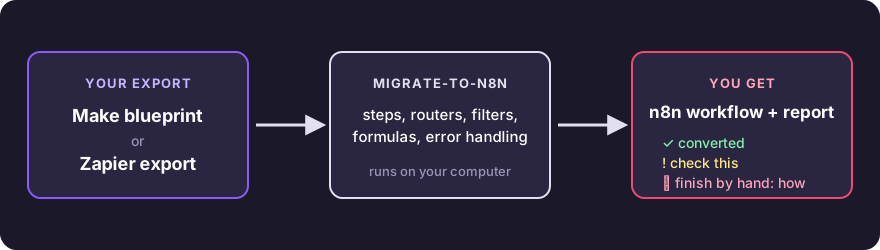
## What you get
Every step of your scenario ends up in one of three states, and the report lists them all:
| | What it means | Example |
|---|---|---|
| ✅ **converted** | Runs after import. You only reconnect credentials. | Webhook, HTTP request, router, iterator, Gmail send |
| ⚠️ **review** | Converted, with one named thing to check. | A formula with no exact n8n twin, a sheet written by column letter |
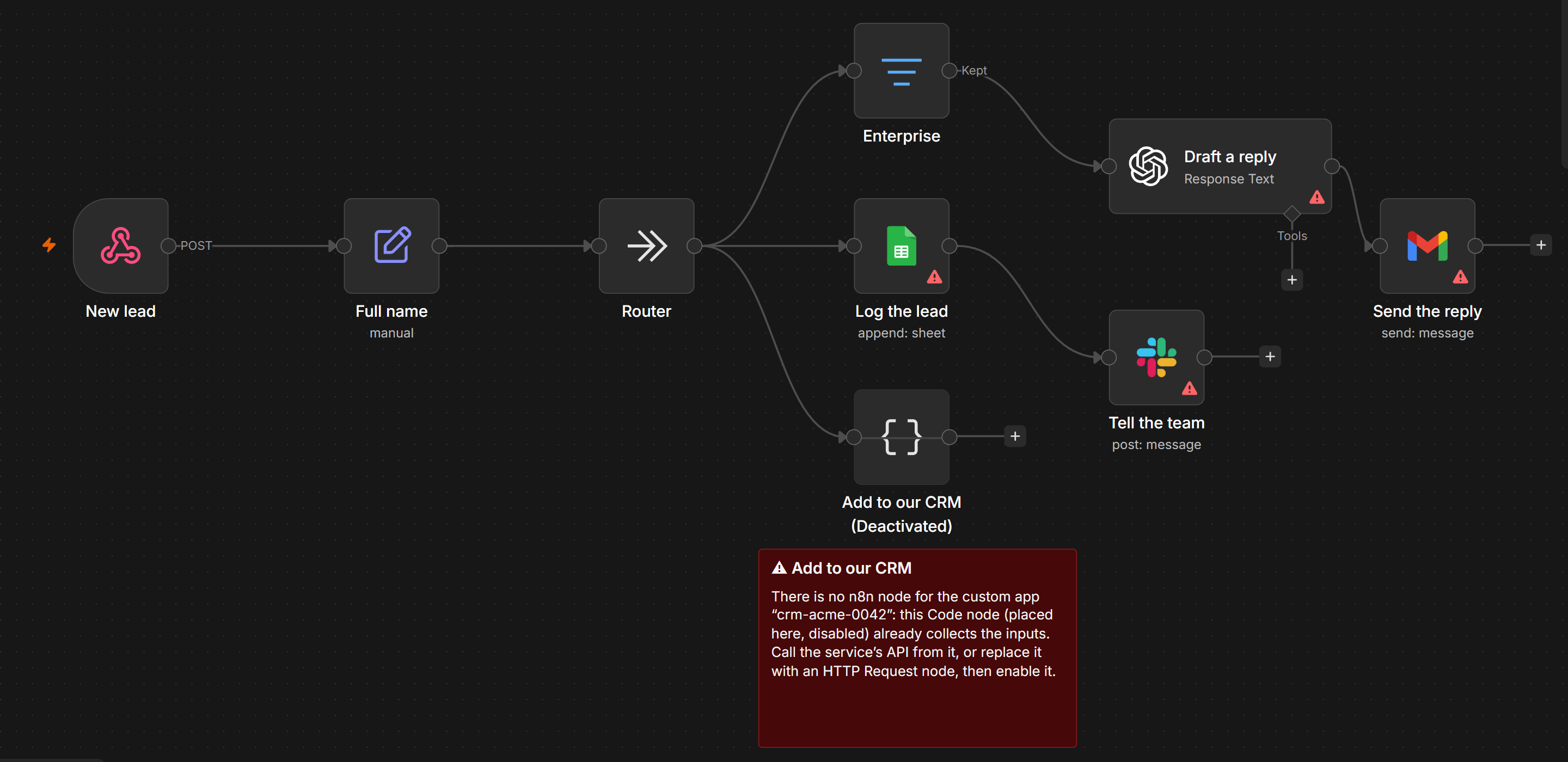
| 🛠 **manual** | No safe automatic equivalent. The step sits in place, disabled, with a sticky note that says what to do. | A private Make app: you get a Code node that already collects its inputs |
Nothing gets dropped. Manual steps keep the workflow connected, so it imports and runs while you finish them.
This is the [demo scenario](docs/demo/lead-routing.blueprint.json) after conversion, opened in n8n 2.44: the
private CRM app has no n8n node, so its step waits disabled, with a note on what to do.
Formulas carry over too: `{{formatDate(1.date; "DD.MM.YYYY")}}` becomes
`{{ DateTime.fromISO(String($('Webhook').item.json.body.date)).toFormat('dd.LL.yyyy') }}`.
<!-- corpus:start -->
Measured on 2026-10-21 on the public Make blueprints and Zapier exports found on GitHub:
| Source | Workflows | Steps | ✅ Converted | ⚠️ To review | 🛠 Manual | Broken outputs | Time (median) |
|---|---:|---:|---:|---:|---:|---:|---:|
| Make | 1,432 | 10,129 | 42% | 38.1% | 19.9% | 0 | 1.1 ms |
| Zapier | 148 | 910 | 7% | 63.7% | 29.2% | 0 | 0.3 ms |
<!-- corpus:end -->
"Broken outputs" counts workflows that n8n would reject. The test suite also imports a sample of these
workflows into real n8n 2.44 and 1.123, and runs some of them through their webhooks to compare the answers
with Make. Many public Zapier exports come without step settings or code, which keeps the Zapier numbers lower.
## Try it in one minute
You need [Node.js](https://nodejs.org) 22 or newer.
```bash
npx migrate-to-n8n convert my-scenario.blueprint.json
```
The workflow and the report go to `Documents/migrate-to-n8n`. Import the `.n8n.json` file in n8n:
**Workflows → Import from File**.
No export at hand? Try the [demo scenario](docs/demo/lead-routing.blueprint.json): download it and run the same
command on it.
## Step by step
### 1. Export from Make or Zapier
- **Make**: open the scenario, click **⋯** at the bottom of the editor, choose **Export Blueprint**.
- **Zapier**: **Settings → Security and data → Download my Zap workflows**. You get one file with all your zaps.
Pick the ones you want with `list_zaps` (or `migrate-to-n8n list-zaps <file>`).
### 2. Connect it to your AI client
**Claude Desktop**: download [migrate-to-n8n.mcpb](https://github.com/kotiniiqq/migrate-to-n8n/releases/latest/download/migrate-to-n8n.mcpb)
and open it. Claude Desktop installs it in one click. The settings are optional: an output folder, and your n8n
address and API key if you want uploads.
**Claude Code**:
```bash
claude mcp add migrate-to-n8n -- npx -y migrate-to-n8n serve
```
**Cursor, VS Code, Windsurf and other clients**: add this to the client's MCP config
(`.cursor/mcp.json`, `.vscode/mcp.json`, …):
```json
{
"mcpServers": {
"migrate-to-n8n": {
"command": "npx",
"args": ["-y", "migrate-to-n8n", "serve"],
"env": { "N8N_URL": "", "N8N_API_KEY": "" }
}
}
}
```
VS Code uses `"servers"` instead of `"mcpServers"`.
### 3. Convert
Attach the file in the chat (or give its path) and ask:
> Convert this Make scenario to n8n and help me finish what doesn't convert.
The assistant gets the report and walks you through every step marked ⚠️ or 🛠.
### 4. Import into n8n
Import the `.n8n.json` file (**Workflows → Import from File**), pick your credentials in the nodes the report lists,
point webhook senders to the new URL, run it once with test data, then activate it.
With `N8N_URL` and `N8N_API_KEY` set (n8n → **Settings → n8n API**), the assistant can upload the workflow
for you. It creates a new, inactive workflow named "… (migrated)" and never touches existing ones.
## Tools
| Tool | What it does |
|---|---|
| `convert_make` | Make blueprint → n8n workflow file + report |
| `convert_zapier` | Zapier export → one workflow file + report per zap |
| `list_zaps` | The zaps in a Zapier export: title, steps, apps, on/off |
| `suggest_replacement` | How one module or step is handled, and what to use instead |
| `supported_modules` | Search what converts automatically |
| `check_n8n_workflow` | Problems left in a workflow file: broken links, disabled steps, placeholders, credentials |
| `upload_to_n8n` | Create the workflow in your n8n, inactive (only when `N8N_URL` and `N8N_API_KEY` are set) |
## What converts
Flow control converts in full on both sides: routers and paths (every matching route runs, as in Make and
Zapier), filters with AND/OR groups, iterators and aggregators, error handlers, schedules, variables, webhooks and
responses, HTTP requests, JSON, Formatter, Code, Delay, Storage. About 50 Make formula functions, Make date
formats, operators and 25 Zapier Formatter transforms translate to n8n expressions.
<!-- supported:start -->
<details>
<summary><b>Make</b>: 111 modules and steps convert automatically</summary>
| Module / step | Becomes in n8n |
|---|---|
| `*:makeApiCall` | HTTP Request (the app's API) |
| `airtable:ActionCreateRecord` | Airtable: Create |
| `airtable:ActionGetRecord` | Airtable: Get |
| `airtable:ActionSearchRecords` | Airtable: Search |
| `airtable:ActionUpdateRecords` | Airtable: Update |
| `airtable:TriggerWatchRecords` | Airtable Trigger |
| `anthropic-claude:createAMessage` | Anthropic: Message a Model |
| `anthropic-claude:simpleTextPrompt` | Anthropic: Message a Model |
| `apify:fetchDatasetItems` | HTTP Request (Apify API) |
| `apify:finishedActorRuns` | Webhook (Apify) |
| `apify:runActor` | HTTP Request (Apify API) |
| `builtin:BasicAggregator` | Aggregate |
| `builtin:BasicFeeder` | Split Out |
| `builtin:BasicFilter` | No Operation |
| `builtin:BasicIterator` | Split Out |
| `builtin:BasicRepeater` | Code (repeat) |
| `builtin:BasicRouter` | No Operation (fan-out) |
| `code:ExecuteCode` | Code |
| `datastore:AddRecord` | Data Table: Insert Row |
| `datastore:ExistRecord` | Data Table: If Row Exists |
| `datastore:GetRecord` | Data Table: Get Rows |
| `datastore:SearchRecord` | Data Table: Get Rows |
| `datastore:UpdateRecord` | Data Table: Update / Upsert |
| `discord:createMessage` | Discord: Send Message |
| `dropbox:createShareLink` | HTTP Request (Dropbox API) |
| `dropbox:uploadLargeFile` | Dropbox: Upload |
| `email:ActionSendEmail` | Send Email (SMTP) |
| `gateway:CustomWebHook` | Webhook |
| `gateway:WebhookRespond` | Respond to Webhook |
| `gemini-ai:createACompletionGeminiPro` | Google Gemini: Message a Model |
| `gmail:ActionSendEmail` | Gmail: Send |
| `gmail:sendAnEmail` | Gmail: Send |
| `gmail:TriggerNewEmail` | Gmail Trigger |
| `google-calendar:createAnEvent` | Google Calendar: Create Event |
| `google-calendar:searchEvents` | Google Calendar: Get Many Events |
| `google-docs:createADocument` | Google Docs: Create |
| `google-docs:createADocumentFromTemplate` | Google Drive: Copy (template) |
| `google-drive:createAFolder` | Google Drive: Create Folder |
| `google-drive:getAFile` | Google Drive: Download |
| `google-drive:moveAFileIntoAFolder` | Google Drive: Move |
| `google-drive:searchForFilesFolders` | Google Drive: Search |
| `google-drive:shareAFileFolder` | Google Drive: Share |
| `google-drive:uploadAFile` | Google Drive: Upload |
| `google-drive:watchFilesInAFolder` | Google Drive Trigger |
| `google-email:ActionSendEmail` | Gmail: Send |
| `google-email:createADraft` | Gmail: Create Draft |
| `google-email:sendAnEmail` | Gmail: Send |
| `google-email:TriggerNewEmail` | Gmail Trigger |
| `google-email:TriggerWatchEmails` | Gmail Trigger |
| `google-email:triggerWatchNewEmails` | Gmail Trigger |
| `google-sheets:addRow` | Google Sheets: Append Row |
| `google-sheets:deleteRow` | Google Sheets: Delete Rows |
| `google-sheets:filterRows` | Google Sheets: Get Rows (+ Filter) |
| `google-sheets:getCell` | HTTP Request (Sheets API, read a cell) |
| `google-sheets:getSheetContent` | Google Sheets: Get Rows (+ Filter) |
| `google-sheets:searchRows` | Google Sheets: Get Rows (+ Filter) |
| `google-sheets:searchRowsAdvanced` | Google Sheets: Get Rows (+ Filter) |
| `google-sheets:updateCell` | HTTP Request (Sheets API, write a cell) |
| `google-sheets:updateRow` | Google Sheets: Update Row |
| `google-sheets:watchRows` | Google Sheets Trigger (row added) |
| `http:ActionGetFile` | HTTP Request (file) |
| `http:ActionSendData` | HTTP Request |
| `http:ActionSendDataAPIKeyAuth` | HTTP Request (API key) |
| `http:ActionSendDataBasicAuth` | HTTP Request (basic auth) |
| `http:DownloadFile` | HTTP Request (file) |
| `http:MakeRequest` | HTTP Request |
| `json:AggregateToJSON` | Aggregate + Edit Fields |
| `json:CreateJSON` | Edit Fields |
| `json:ParseJSON` | Edit Fields (JSON) |
| `json:TransformToJSON` | Edit Fields |
| `linkedin:CreateCompanyImagePost` | LinkedIn: Create Post |
| `linkedin:CreateCompanyPost` | LinkedIn: Create Post |
| `linkedin:CreatePost` | LinkedIn: Create Post |
| `linkedin:ShareImage` | LinkedIn: Create Post |
| `markdown:Compile` | Markdown → HTML |
| `notion:createAPage` | Notion: Create Database Page |
| `openai-gpt-3:CreateCompletion` | OpenAI: Message a Model |
| `openai-gpt-3:createModelResponse` | OpenAI: Message a Model |
| `openai-gpt-3:GenerateImage` | OpenAI: Generate an Image |
| `openai-gpt-3:messageAssistantAdvanced` | OpenAI: Message a Model (instructions) |
| `openai-gpt-3:transformTextToStructuredData` | OpenAI: Message a Model (JSON) |
| `perplexity-ai:createAChatCompletion` | HTTP Request (Perplexity API) |
| `placeholder:Placeholder` | No Operation |
| `regexp:HTMLToText` | Edit Fields |
| `regexp:Parser` | Code |
| `regexp:Replace` | Edit Fields |
| `resend:sendAnEmail` | HTTP Request (Resend API) |
| `rss:ActionReadArticles` | RSS Read |
| `rss:TriggerNewArticle` | RSS Feed Trigger |
| `scenario-service:ReturnData` | Edit Fields (sub-workflow output) |
| `slack:CreateMessage` | Slack: Send Message |
| `slack:InviteUsers` | Slack: Invite to Channel |
| `supabase:createARow` | Supabase: Create Row |
| `supabase:searchRows` | Supabase: Get Many Rows |
| `supabase:upsertARecord` | Supabase: Create Row |
| `telegram:DownloadFile` | Telegram: Get File |
| `telegram:SendReplyMessage` | Telegram: Send Message |
| `telegram:WatchUpdates` | Telegram Trigger |
| `twilio:SendSMS` | Twilio: Send SMS |
| `typeform:WatchEventsWithResponses` | Typeform Trigger |
| `util:ComposeTransformer` | Edit Fields |
| `util:FunctionIncrement` | Code (counter) |
| `util:FunctionSleep` | Wait |
| `util:GetVariable2` | Edit Fields |
| `util:GetVariables` | Edit Fields |
| `util:SetMultipleVariables` | Edit Fields |
| `util:SetVariable2` | Edit Fields |
| `util:SetVariables` | Edit Fields |
| `util:Switcher` | Edit Fields |
| `util:TextAggregator` | Aggregate + Edit Fields |
| `whatsapp-business-cloud:sendMessage` | WhatsApp: Send Message |
</details>
<details>
<summary><b>Zapier</b>: 98 modules and steps convert automatically</summary>
| Module / step | Becomes in n8n |
|---|---|
| `AICLIAPI:get_completion` | OpenAI: Message a Model |
| `AirtableCLIAPI:create_or_update_record` | Airtable: Upsert |
| `AirtableCLIAPI:createRecord` | Airtable: Create |
| `AirtableCLIAPI:newRecordInView` | Airtable Trigger |
| `AirtableCLIAPI:updateRecord` | Airtable: Update |
| `BranchingAPI:branch` | No Operation (fan-out) |
| `ChatGPTCLIAPI:chat_completion` | OpenAI: Message a Model |
| `ChatGPTCLIAPI:chat_completion_memory` | OpenAI: Message a Model |
| `ChatGPTCLIAPI:conversation` | OpenAI: Message a Model |
| `CodeCLIAPI:*` | Code |
| `DelayAPI:delay_for` | Wait |
| `DelayAPI:delay_until` | Wait |
| `DelayCLIAPI:delay_for` | Wait |
| `DelayCLIAPI:delay_until` | Wait |
| `EmailCLIAPI:*` | Send Email |
| `ExcelCLIAPI:add_row` | Microsoft Excel: Append to Table |
| `ExcelCLIAPI:add_rows` | Microsoft Excel: Append to Table |
| `FilterAPI:filter` | Filter |
| `FilterCLIAPI:filter` | Filter |
| `FilterCLIAPI:zapier_filter` | Filter |
| `GmailAPI:message` | Gmail: Send (or Gmail Trigger as the first step) |
| `GmailV2API:message` | Gmail: Send (or Gmail Trigger as the first step) |
| `GoogleMailCLIAPI:message` | Gmail: Send (or Gmail Trigger as the first step) |
| `GoogleMailV2CLIAPI:message` | Gmail: Send (or Gmail Trigger as the first step) |
| `GoogleSheetsAPI:add_row` | Google Sheets: Append Row |
| `GoogleSheetsAPI:add_rows` | Google Sheets: Append Row |
| `GoogleSheetsCLIAPI:add_row` | Google Sheets: Append Row |
| `GoogleSheetsCLIAPI:add_rows` | Google Sheets: Append Row |
| `GoogleSheetsV2API:add_row` | Google Sheets: Append Row |
| `GoogleSheetsV2API:add_rows` | Google Sheets: Append Row |
| `GoogleSheetsV2API:new_or_updated_row` | Google Sheets Trigger |
| `GoogleSheetsV2API:new_row` | Google Sheets Trigger |
| `GoogleSheetsV2API:new_row_notify_hook` | Google Sheets Trigger |
| `GoogleSheetsV2API:updated_row_notify_hook` | Google Sheets Trigger |
| `GoogleSheetsV2CLIAPI:add_row` | Google Sheets: Append Row |
| `GoogleSheetsV2CLIAPI:add_rows` | Google Sheets: Append Row |
| `GoogleSheetsV2CLIAPI:new_or_updated_row` | Google Sheets Trigger |
| `GoogleSheetsV2CLIAPI:new_row` | Google Sheets Trigger |
| `GoogleSheetsV2CLIAPI:new_row_notify_hook` | Google Sheets Trigger |
| `GoogleSheetsV2CLIAPI:updated_row_notify_hook` | Google Sheets Trigger |
| `HubSpotCLIAPI:_zap_raw_request` | HTTP Request (HubSpot API: API request) |
| `HubSpotCLIAPI:company_crmSearch` | HTTP Request (HubSpot API: Search companies) |
| `HubSpotCLIAPI:contact_crmSearch` | HTTP Request (HubSpot API: Search contacts) |
| `HubSpotCLIAPI:create_associations` | HTTP Request (HubSpot API: Create an association between two records) |
| `HubSpotCLIAPI:deal_crmSearch` | HTTP Request (HubSpot API: Search deals) |
| `HubSpotCLIAPI:find_associations` | HTTP Request (HubSpot API: Find the associations of a record) |
| `HubSpotCLIAPI:update_crm_deal` | HTTP Request (HubSpot API: Update a deal) |
| `HubSpotCLIAPI:upsert_contact` | HubSpot: Create or Update Contact |
| `InterfacesCLIAPI:new_form_submission` | n8n Form Trigger |
| `LinearCLIAPI:create_issue` | Linear: Create Issue |
| `LoopingCLIAPI:*` | Split Out |
| `NotionCLIAPI:create_database_item` | Notion: Create Database Page |
| `OpenAiCLIAPI:send_prompt` | OpenAI: Message a Model |
| `S3API:file` | AWS S3: Upload |
| `ScheduleAPI:*` | Schedule Trigger |
| `SlackAPI:channel_message` | Slack: Send Message (or Slack Trigger as the first step) |
| `SlackAPI:direct_message` | Slack: Send Message (to a user) |
| `SlackAPI:send_channel_message` | Slack: Send Message (or Slack Trigger as the first step) |
| `SlackCLIAPI:channel_message` | Slack: Send Message (or Slack Trigger as the first step) |
| `SlackCLIAPI:direct_message` | Slack: Send Message (to a user) |
| `SlackCLIAPI:send_channel_message` | Slack: Send Message (or Slack Trigger as the first step) |
| `StorageCLIAPI:get_all_values` | Code (static data) |
| `StorageCLIAPI:get_value` | Code (static data) |
| `StorageCLIAPI:increment_value` | Code (static data) |
| `StorageCLIAPI:remove_value` | Code (static data) |
| `StorageCLIAPI:set_value` | Code (static data) |
| `TableCLIAPI:create_record` | Data Table: Insert Row |
| `TableCLIAPI:find_record` | Data Table: Get Rows |
| `TableCLIAPI:increment_value` | Code (increment a Data Table value) |
| `TableCLIAPI:new_or_updated_record` | Schedule + Data Table (watch rows) |
| `TableCLIAPI:new_record` | Schedule + Data Table (watch rows) |
| `TableCLIAPI:update_record` | Data Table: Update Row |
| `TableCLIAPI:updated_record` | Schedule + Data Table (watch rows) |
| `TallyCLIAPI:response` | Webhook (Tally) |
| `TelegramCLIAPI:send_message` | Telegram: Send Message |
| `TodoistV2DevAPI:new_task` | Todoist: Create Task |
| `WebHookCLIAPI:catch_hook` | Webhook |
| `WebHookCLIAPI:catch_raw_hook` | Webhook |
| `WebHookCLIAPI:custom_request` | HTTP Request |
| `WebHookCLIAPI:get` | HTTP Request |
| `WebHookCLIAPI:hook` | Webhook |
| `WebHookCLIAPI:hook_raw` | Webhook |
| `WebHookCLIAPI:hook_v2` | Webhook |
| `WebHookCLIAPI:patch` | HTTP Request |
| `WebHookCLIAPI:post` | HTTP Request |
| `WebHookCLIAPI:put` | HTTP Request |
| `WebhooksCLIAPI:catch_hook` | Webhook |
| `WebhooksCLIAPI:catch_raw_hook` | Webhook |
| `WebhooksCLIAPI:custom_request` | HTTP Request |
| `WebhooksCLIAPI:get` | HTTP Request |
| `WebhooksCLIAPI:hook` | Webhook |
| `WebhooksCLIAPI:hook_raw` | Webhook |
| `WebhooksCLIAPI:hook_v2` | Webhook |
| `WebhooksCLIAPI:patch` | HTTP Request |
| `WebhooksCLIAPI:post` | HTTP Request |
| `WebhooksCLIAPI:put` | HTTP Request |
| `ZapierFormatterCLIAPI:*` | Edit Fields |
| `ZapierMailCLIAPI:outbound` | Send Email |
</details>
<!-- supported:end -->
Anything else still gets a place in the workflow: the closest of 362 n8n app nodes, an HTTP request to the
app's API, or a Code node with the inputs already wired, each disabled with a note on how to finish it.
## What does not convert, and why
- **Credentials.** Make and Zapier never export them. Create them in n8n; the report lists which nodes need one.
- **Data.** Make data stores and Zapier Tables become n8n Data Tables (n8n 1.113 or newer) with the same
fields, but the rows stay behind.
- **Webhook URLs.** n8n gives each webhook a new address. The report names them so you can update the senders.
- **Python code** from Zapier or Make. n8n runs Python, but reads inputs differently in 1.x and 2.x: the code is
placed in a Code node for you to adapt.
- **Output field names of apps.** n8n's app nodes sometimes name results differently. Steps that read them are
marked ⚠️ so you can check the field once after a test run.
## Command line
```text
migrate-to-n8n convert <file> [-o <folder>] [--zap <id or title>]...
migrate-to-n8n list-zaps <file>
migrate-to-n8n supported [text] [--source make|zapier]
migrate-to-n8n check <workflow.json>
migrate-to-n8n upload <workflow.json> # needs N8N_URL and N8N_API_KEY
migrate-to-n8n serve # MCP server over stdio
```
## Development
```bash
npm install
npm run n8n-types # n8n's node catalogs, for the tests (kept out of the package)
npm test # unit tests, golden conversions, checks against n8n's own node descriptions
npm run corpus -- download && npm run corpus -- stats # measure on public exports (needs gh)
docker compose -f docker-compose.e2e.yml up -d && npm run e2e # real n8n 2.x and 1.x
```
Every node the converter writes is checked against the parameter descriptions of n8n 2.44 and 1.123: names,
allowed values and display rules. The n8n catalogs are downloaded for tests only and never ship.
## Roadmap
- Routers inside Make error-handler routes (today the modules of a handler are placed in one line on the error output).
- More apps, driven by what people convert. Tell me which ones you need.
## Contact
Feedback, ideas, job offers or custom projects (n8n, MCP, AI automation): [kotiniiqq@gmail.com](mailto:kotiniiqq@gmail.com).
Bug reports and feature requests are welcome in [Issues](https://github.com/kotiniiqq/migrate-to-n8n/issues).
## License
MIT. Make, Zapier and n8n are trademarks of their owners; this project is not affiliated with them.
This server cannot be deployed
Maintenance
ActivityMaintained
ResponsivenessNo issues