
cartotree
README.md
# 🌲 cartotree
> Tell your coding agent which files to open first. Fewer grep calls, fewer tokens, same answers.
[](https://www.npmjs.com/package/cartotree)
[](./LICENSE)
Ask an agent "why does this bug happen?" and it usually runs grep dozens of times and reads whole files before it finds where to look. cartotree keeps a local index of your repo and answers that first question directly: a ranked list of files with the matching lines as evidence. Works with Claude Code, Cursor, Codex and anything that speaks MCP.
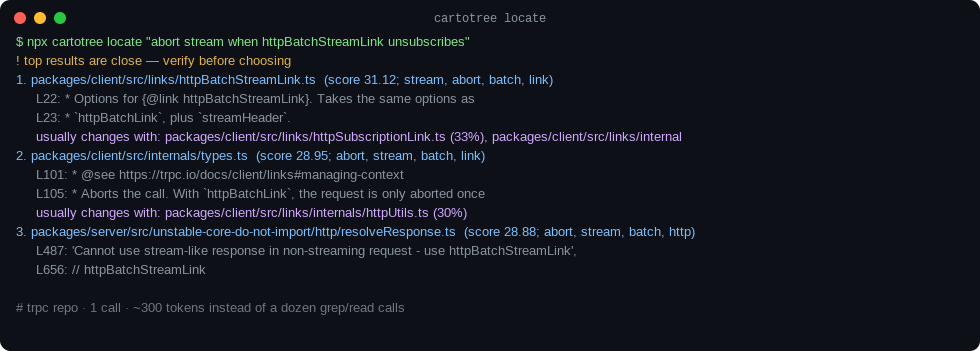
```bash
npx cartotree init # installs a skill + MCP server for your agent (shows every change, --dry-run to preview)
```
---
## What the agent gets
Three commands, each returning a few lines instead of a wall of grep output:
```bash
npx cartotree locate "abort JSONL stream on httpBatchStreamLink unsubscribe" # which files to open first
npx cartotree peek packages/client/src/links/httpBatchStreamLink.ts abort unsubscribe # only the matching lines
npx cartotree links httpBatchStreamLink # where a symbol is defined and called
npx cartotree links src/foo.ts # imports, importers, files usually changed with it (git)
```
## Setup
```bash
npx cartotree init # skill + MCP server + SessionStart reminder (shows every change)
npx cartotree init --dry-run # preview only
```
Or as a Claude Code plugin:
```bash
claude plugin marketplace add kingluminance/cartotree
claude plugin install cartotree@cartotree
```
The MCP server (`npx cartotree mcp`) exposes `cartotree_locate`, `cartotree_peek` and `cartotree_links`.
After the first call the index stays in memory (~10 ms per lookup). An on-disk cache in `.cartotree/` is keyed by git HEAD and your uncommitted changes.
## How locate ranks files
BM25F over four fields of every source file: path words, exported names, code identifiers (scored per function so one matching function is not diluted by a long file) and **past commit messages that touched the file**. Plus light stemming, an import-neighbor boost, 1–2 evidence lines per result, a warning when the top results are close, and "usually changes with" from git co-change history. No LLM, no network.
---
## Benchmark
[deepseek-harness](https://github.com/deepseek-ai/deepseek-harness) (21,632 files). Questions are real commit messages ("which files were changed?"), answered by a Claude Haiku agent with cartotree vs. the same agent with only ls/find/grep. Each setup was run twice and averaged. Git history was cut off before the test commits so the tool cannot see the answers.
**Fast mode, 15 questions** (default)
| | grep only | cartotree |
|---|---|---|
| right file in top 3 | 13.5 / 15 | 14 / 15 |
| right file ranked 1st | 12 / 15 | 11 / 15 |
| tool-output tokens | ~37k | ~7.5k (**−80%**) |
| total agent tokens | ~153k | ~100k (**−35%**) |
| time | ~130 s | ~45 s (**−66%**) |
**Careful mode, 30 questions** (agent verifies with `peek` before answering)
| | grep only | cartotree |
|---|---|---|
| right file ranked 1st | 22 / 30 | 22.5 / 30 |
| right file in top 3 | 25.5 / 30 | 24.5 / 30 |
| tool-output tokens | baseline | **−63%** |
| time | baseline | **−17%** |
Accuracy is on par with grep (within ±1.5 questions); the gain is cost and speed. One thing we tried and reverted: telling the agent to "answer immediately when confident" made it list fewer candidates and lowered top-3 accuracy.
---
## Annotated directory trees
The original cartotree command still works: a compact, annotated map of your codebase to paste into any AI chat.
### The problem it started with
When you paste your project structure into an AI assistant, two things happen:
1. **Token waste** — Raw `tree` output burns hundreds of tokens on ASCII box characters with zero semantic value.
2. **Hallucination** — AI has no idea what each folder *does*, so it guesses wrong.
### The Solution
cartotree generates a compact, annotated map of your codebase — folder descriptions, exported functions, and an AI-optimized serialization format that fits your architecture into a fraction of the tokens.
---
### Quick Start
```bash
npx cartotree
```
No install required.
---
### Output Formats
### Default — Annotated ASCII Tree
```
my-app/
├── src/ # Core application source
│ ├── components/ # Reusable UI components
│ │ ├── Button.tsx <Button, ButtonProps>
│ │ └── Modal.tsx <Modal, useModal>
│ ├── hooks/
│ │ └── useAuth.ts <useAuth, useUser>
│ └── services/
│ └── api.ts <fetchUser, postData>
└── package.json
```
### `--ai` — Token-Optimized Serialization
```
# cartotree fmt: name{desc}[children]<exports>
my-app{Core application source}[src{Core application source}[components{Reusable UI components}[Button.tsx<Button,ButtonProps>,Modal.tsx<Modal,useModal>],hooks[useAuth.ts<useAuth,useUser>],services[api.ts<fetchUser,postData>]],package.json]
```
### `--json` — JSON Format
```json
{
"my-app": {
"src": {
"_desc": "Core application source",
"components": {
"Button.tsx": ["Button", "ButtonProps"],
"Modal.tsx": ["Modal", "useModal"]
}
}
}
}
```
---
### Usage
```bash
# Default annotated ASCII tree
npx cartotree
# AI-optimized single-line serialization
npx cartotree --ai
# JSON format
npx cartotree --json
# Copy to clipboard (paste directly into AI)
npx cartotree --ai --copy
# Sync into CLAUDE.md / AGENTS.md
npx cartotree --ai --sync
# Sync into custom file
npx cartotree --sync .cursorrules
# Limit depth
npx cartotree --depth 2
# No depth limit
npx cartotree --full
# Exclude patterns
npx cartotree --exclude "tests,*.log"
# Disable export parsing
npx cartotree --no-exports
```
---
### Options
| Option | Default | Description |
|--------|---------|-------------|
| `--ai` | false | AI-optimized compact serialization |
| `--json` | false | JSON format |
| `--copy` | false | Copy output to clipboard |
| `--sync [file]` | CLAUDE.md | Inject into AI config file |
| `--depth <n>` | 3 | Max traversal depth |
| `--full` | false | No depth limit |
| `--exclude <patterns>` | — | Comma-separated exclude patterns |
| `--no-exports` | false | Disable export parsing |
---
### Configuration
Create `.cartotreerc` in your project root to set persistent defaults:
```json
{
"default": {
"ai": true,
"exports": false,
"depth": 3
}
}
```
Now `npx cartotree` automatically runs with `--ai --no-exports`.
---
### Folder Annotations
Add a `.folder.md` to any directory — the first line becomes the annotation:
```
# Reusable UI components
Atomic design system built with Radix UI primitives.
```
cartotree also falls back to the first line of `README.md` if no `.folder.md` exists.
---
### Ignoring Files
Create `.cartotreeignore` in your project root:
```
# .cartotreeignore
*.log
temp
coverage
.env*
```
`node_modules`, `.git`, `dist`, `build` are excluded by default.
---
### `--sync` Integration
Running `cartotree --sync` injects the tree between marker tags:
```html
<!-- CARTOTREE-START -->
(auto-updated on every sync)
<!-- CARTOTREE-END -->
```
Works with `CLAUDE.md`, `AGENTS.md`, `.cursorrules`, or any file.
---
### Export Parsing
cartotree reads your source files and surfaces exported symbols directly in the tree:
```
hooks/
└── useAuth.ts <useAuth, useUser, AuthProvider>
```
Supports `.js`, `.ts`, `.jsx`, `.tsx`, `.mjs`, `.cjs`.
---
## License
MIT
This server cannot be deployed
Maintenance
ActivityMaintained
ResponsivenessNo recent community issues