
xbsl-mcp
by keyfire
README.md
# XBSL
**English** · [Русский](https://github.com/keyfire/xbsl/blob/main/README.ru.md)
**Documentation: [docs.keyfire.ru/xbsl](https://docs.keyfire.ru/xbsl/)**

The XBSL toolkit for 1C:Element: a linter with autofixes, an LSP server, a project index,
platform documentation search, metadata scaffolding, translation of sources into English
spellings and an MCP server for AI agents. Plus a VS Code extension on the same engine. It works
on pairs of files: `Name.yaml` describes an element, `Name.xbsl` holds its code. And it answers
long before the server-side compilation that runs on deploy.
> Not affiliated with 1C. "1C:Element", "1C:Fresh" and related names are trademarks of their
> respective owners. Language data is generated from your own distribution. See [NOTICE](https://github.com/keyfire/xbsl/blob/main/NOTICE).
Development notes and updates (in Russian): the [1C × AI: engineering workshop](https://t.me/ceh_1c_ai) Telegram channel.
## Why
1C:Element has no tooling outside the platform. The only check on the code is the server-side
compilation on deploy, which is slow and knows nothing about a project's conventions. xbsl
answers right away on your own machine, catches what the compiler never looks at, and takes over
the metadata mechanics: creating objects, attributes and forms.
## How it works
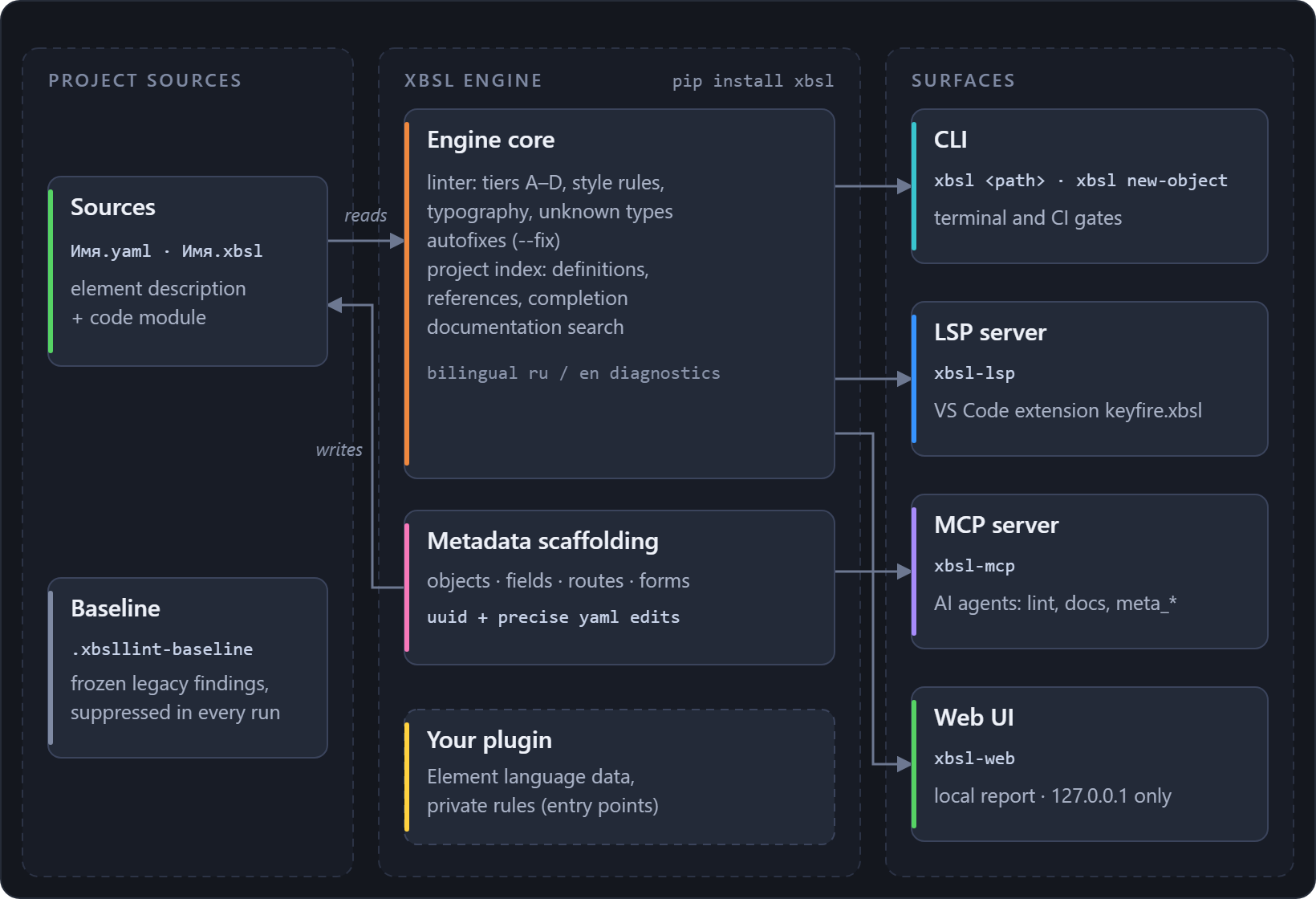
One engine, four surfaces. The core reads the `<element>.yaml` and `<element>.xbsl` pairs, and
the scaffolding writes them back. The CLI, the LSP server, the MCP server and the web UI are thin
adapters over that core, so all four see the same rules, data and templates:
## Quick start
**Step 1 – install.**
```sh
pip install xbsl # or from a clone of the repository: pip install -e .
```
**Step 2 – generate the language data.** The linter judges by tables taken from **your**
1C:Element distribution: keywords, the stdlib type catalog, the configuration metamodel, terms,
the documentation index, the component schema. None of that is bundled in this repository:
```sh
xbsl extract --dist "<path to the 1C:Element distribution>"
```
The command runs every extractor in one go. From a clone the same entry point is
`python tools/extract.py`, and `--only` picks a subset of the steps. It detects the platform
version itself and places the data under `xbsl/data/element/`, a folder listed in `.gitignore`.
Where the data lives and how a private package can ship it is covered in the
[guide](https://github.com/keyfire/xbsl/blob/main/docs/start.md#language-data).
**Step 3 – run.**
```sh
xbsl path/to/sources # or: python -m xbsl path/to/sources
xbsl data-diff # what changed in the platform between two data versions
xbsl translate SOURCES # rewrite a project into English spellings (a project dictionary)
xbsl self-update # upgrade to the latest PyPI version, safe with busy exe stubs
```
The main flags: `--list-rules`, `--fix`, `--select`/`--enable`/`--ignore`,
`--baseline`/`--write-baseline`, `--format text|json|codeclimate`, `--lang ru|en`. The full flag
reference, the `--stdin`/`--index` editor modes, the native mypyc wheels and how `self-update`
works are all in the [guide](https://github.com/keyfire/xbsl/blob/main/docs/linting.md#cli-flags).
## What it does
**Rules.** 280 rules in the base set, in four tiers. **A** covers structure and the yaml schema.
**B** covers text and typography conventions. **C** covers code structure: blocks, brackets,
unused locals, the `style/` conventions. **D** covers semantics against the platform data and the
project itself: every type position in code and yaml, enumeration values, `Query{...}` block
tables, cross-file consistency, the types of attached `.xlib` libraries. The full list with
severities and documentation links is in
[docs/RULES.md](https://github.com/keyfire/xbsl/blob/main/docs/RULES.md), and `xbsl --list-rules`
prints it on the spot. What tier D verifies in depth is in
[the guide](https://github.com/keyfire/xbsl/blob/main/docs/linting.md#rules-in-depth).
**Autofixes.** `--fix` applies available edits for the selected rules, including code fixes,
then reports remaining findings. With `--baseline`, accepted occurrences are protected and the
baseline file is not rewritten. Ambiguous or overlapping edits stay for manual review.
**Baseline.** You can adopt a rule on an old codebase without cleaning all of it first. Freeze
the current findings once, and only new code answers to the rule. The same file records point
exclusions with reasons.
[Details](https://github.com/keyfire/xbsl/blob/main/docs/linting.md#baseline-adopt-a-rule-on-a-legacy-codebase).
**Metadata scaffolding.** Objects, attributes, routes and forms are created without
hand-written yaml: 33 element kinds, forms generated with real content, a context-aware
`rename-object`, access-control editing. The same operations are available through the CLI, MCP
and LSP:
```sh
xbsl new-object vendor/App/Main Catalog Goods # the kind in either language
xbsl add-field vendor/App/Main/Goods.yaml <item-kind> Color --type String # kinds: add-field --help
xbsl add-form . --name Goods # object + list forms, registered
xbsl rename-object . Goods Products # rename files + update references
```
The platform is bilingual: an element kind has an English name and a Russian one for the same
thing, and the tool takes either spelling. It resolves the kinds through the term dictionary
extracted from your distribution. The item kind of `add-field` (an attribute, a tabular section
and so on) is a word of the tool itself, the same in a project of either language:
`xbsl add-field --help` lists them, and `xbsl new-object --help` lists the kinds it can create.
All subcommands with their options –
[the guide](https://github.com/keyfire/xbsl/blob/main/docs/scaffolding.md#metadata-scaffolding).
**Editors.** The [VS Code extension](https://github.com/keyfire/xbsl/blob/main/editors/vscode/README.md)
([Marketplace](https://marketplace.visualstudio.com/items?itemName=keyfire.xbsl),
[Open VSX](https://open-vsx.org/extension/keyfire/xbsl)) gives you syntax highlighting, live and
project-wide diagnostics, go-to-definition and completion, the form designer, a metadata tree and
a deploy button. It runs on `xbsl-lsp`, a Language Server any LSP-capable editor can spawn
([details](https://github.com/keyfire/xbsl/blob/main/docs/servers.md#lsp-server)).
**Code templates.** Type the first letters of a construct, press Ctrl+Space, and the whole
construct arrives with its edit points. There are 51 builtin templates, each one parsed by the
linter's own parser, so none of them can insert broken code. Your own live in
`.xbsl-templates.json`, with a management panel in VS Code. The mechanism and the file format
mirror 1C:EDT.
[Details](https://github.com/keyfire/xbsl/blob/main/docs/scaffolding.md#code-templates).
**Documentation search.** `tools/extract_docs.py` turns the distribution's Element reference
into a local full-text `docs.sqlite`; the `xbsl.docs` API and the MCP tools search it.
[Details](https://github.com/keyfire/xbsl/blob/main/docs/platform-data.md#documentation-search).
**MCP server.** `claude mcp add xbsl -- xbsl-mcp` gives an agent linting, documentation search,
`type_members` and every scaffolding operation as `meta_*` tools. The agent creates an object and
gets the lint of the written files in one round trip.
[Details](https://github.com/keyfire/xbsl/blob/main/docs/servers.md#mcp-server).
**Web interface.** `xbsl-web` – a local page over the same engine: rule toggles, filters,
themes. [Details](https://github.com/keyfire/xbsl/blob/main/docs/servers.md#web-interface).
**CI.** The exit code is non-zero only on error-severity findings, so `xbsl` gates a pipeline
as it is. `--format codeclimate` feeds the GitLab Code Quality widget. Ready-made GitHub Actions
and GitLab CI jobs are in
[the guide](https://github.com/keyfire/xbsl/blob/main/docs/linting.md#use-in-ci).
**Extending.** Entry points let a private package add rules, ship language data and override
severities without forking the linter. `XBSL_NO_PLUGINS=1` turns every plugin off.
[Details](https://github.com/keyfire/xbsl/blob/main/docs/servers.md#extending-your-own-rules-data-and-severities).
Output language (RU/EN), Element data versions and the order the data root is resolved in are
covered in the same [guide](https://github.com/keyfire/xbsl/blob/main/docs/start.md#output-language).
## Tests
```sh
pip install -e ".[dev]"
pytest
```
Tests that need the data skip themselves when the data has not been generated.
## License
MIT – see [LICENSE](https://github.com/keyfire/xbsl/blob/main/LICENSE). Trademarks and data provenance – [NOTICE](https://github.com/keyfire/xbsl/blob/main/NOTICE).
How to add a rule – [CONTRIBUTING.md](https://github.com/keyfire/xbsl/blob/main/CONTRIBUTING.md).
Release history – [CHANGELOG.md](https://github.com/keyfire/xbsl/blob/main/CHANGELOG.md).
This server cannot be deployed
Maintenance
ActivityActive
ResponsivenessWithin a week