
everything-search-mcp
README.md
<div align="center">
<img src="https://raw.githubusercontent.com/kanishka-namdeo/everything-search-mcp/main/assets/social-preview.png" alt="everything-search-mcp — whole-drive file search for your AI agents" width="100%">
[](https://www.npmjs.com/package/everything-search-mcp)
[](https://www.npmjs.com/package/everything-search-mcp)
[](https://github.com/kanishka-namdeo/everything-search-mcp/blob/main/LICENSE)
[](https://nodejs.org/)



[](https://github.com/modelcontextprotocol/typescript-sdk)
[](https://insiders.vscode.dev/redirect/mcp/install?name=everything-search-mcp&config=%7B%22command%22%3A%22npx%22%2C%22args%22%3A%5B%22-y%22%2C%22everything-search-mcp%22%5D%7D)
[](https://insiders.vscode.dev/redirect/mcp/install?name=everything-search-mcp&config=%7B%22command%22%3A%22npx%22%2C%22args%22%3A%5B%22-y%22%2C%22everything-search-mcp%22%5D%7D&quality=insiders)
[](https://cursor.com/en/install-mcp?name=everything-search-mcp&config=eyJjb21tYW5kIjoibnB4IiwiYXJncyI6WyIteSIsImV2ZXJ5dGhpbmctc2VhcmNoLW1jcCJdfQ%3D%3D)
[](https://kiro.dev/launch/mcp/add?name=everything-search-mcp&config=%7B%22command%22%3A%22npx%22%2C%22args%22%3A%5B%22-y%22%2C%22everything-search-mcp%22%5D%7D)
[](https://lmstudio.ai/install-mcp?name=everything-search-mcp&config=eyJjb21tYW5kIjoibnB4IiwiYXJncyI6WyIteSIsImV2ZXJ5dGhpbmctc2VhcmNoLW1jcCJdfQ%3D%3D)
</div>
# everything-search-mcp
**Whole-drive file search for your AI agents.** A [Model Context Protocol](https://modelcontextprotocol.io) (MCP) server that exposes your machine's native search index — Everything on Windows, Spotlight on macOS, ripgrep/locate on Linux — as three simple tools any MCP client can call. No cloud, no API keys, no indexing to wait for.
## Demo
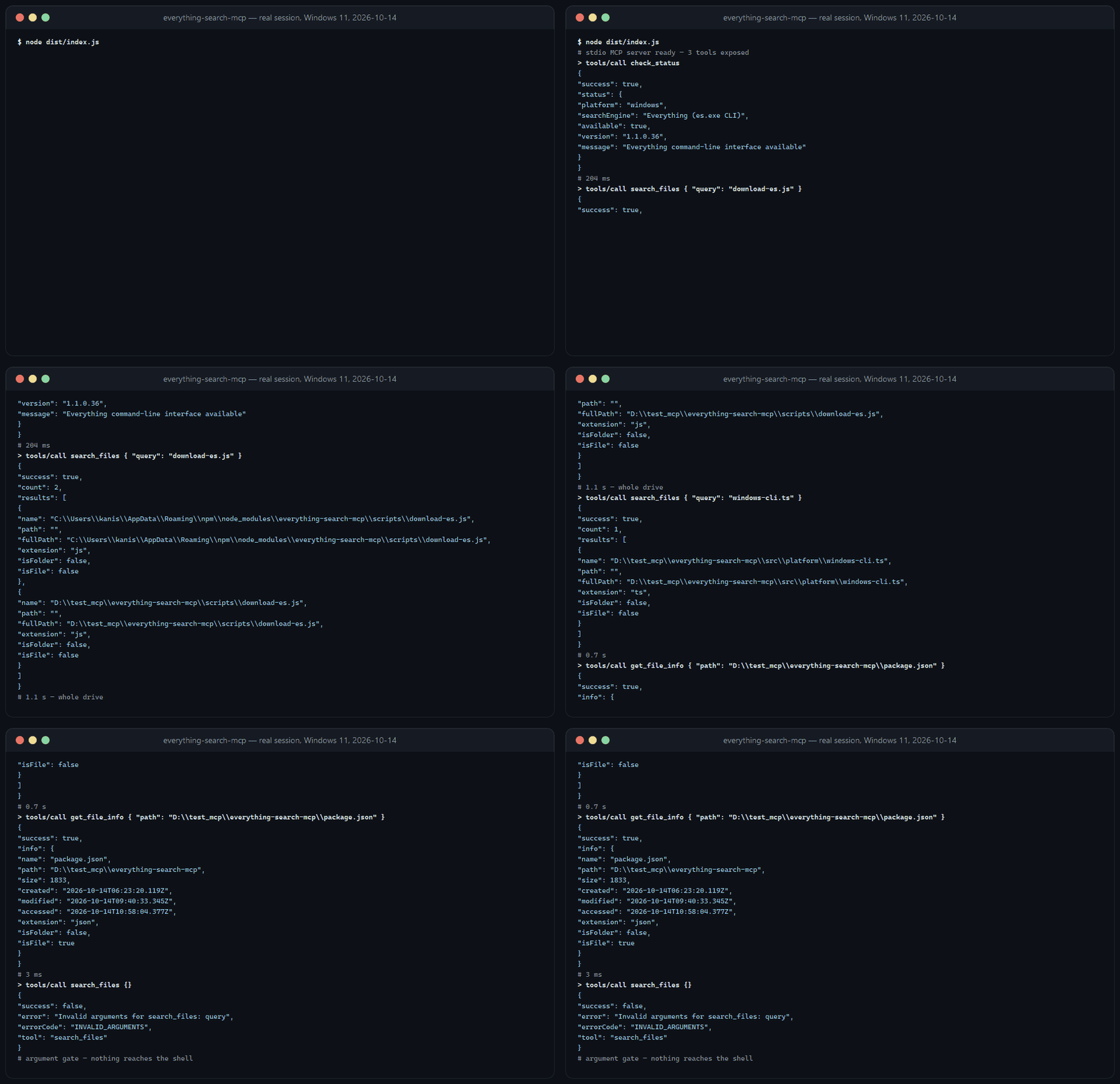
Real session against the built server (Windows 11, Everything `es.exe` 1.1.0.36). A whole-drive query for `download-es.js` finds both the repo copy and the global npm-install copy; the argument gate rejects a call missing `query`:
## Why
- **Agents can't search your disk.** Filesystems are the one context window no LLM can read. This server hands it a search index instead.
- **The OS already indexed everything.** Everything, Spotlight and ripgrep-backed locate keep a live index of your drives; this server queries it rather than walking folders.
- **Three tools, zero configuration.** No environment variables, no API keys, no allowlists to maintain. Queries never leave your machine — the server only shells out locally.
- **Belt and suspenders on input.** Every call passes a zod argument gate, then length/content validation and shell-argument sanitization before a subprocess is touched.
## Install
Requires Node.js >= 20. Nothing else — the Windows search CLI ships in the package.
```bash
npm install -g everything-search-mcp
```
Or skip installing entirely: MCP clients that support `npx` can launch the server on demand (the configs below do exactly that).
### Claude Desktop
Add to `claude_desktop_config.json` (macOS: `~/Library/Application Support/Claude/claude_desktop_config.json`, Windows: `%APPDATA%\Claude\claude_desktop_config.json`), then restart Claude Desktop:
```json
{
"mcpServers": {
"everything-search": {
"command": "npx",
"args": ["-y", "everything-search-mcp"]
}
}
}
```
### Claude Code
```bash
claude mcp add --transport stdio --scope user everything-search-mcp -- npx -y everything-search-mcp
```
### Every other client (Cursor, VS Code, Codex, OpenCode, …)
```bash
npx add-mcp everything-search-mcp
```
The [`add-mcp`](https://add-mcp.com) one-liner writes the right config into whichever supported client it finds — same for the one-click buttons at the top (VS Code, Cursor, Kiro, LM Studio). Platform setup, query syntax and troubleshooting are in [QUICKSTART.md](QUICKSTART.md).
### What happens on Windows
`bin/es.exe` (the official voidtools Everything CLI) is bundled in the npm package. The install hook downloads it only if the file is missing, so offline and CI installs skip the network entirely. macOS and Linux need no extra setup beyond [optional ripgrep](QUICKSTART.md#platform-setup).
## How it works
<picture>
<source media="(prefers-color-scheme: light)" srcset="https://raw.githubusercontent.com/kanishka-namdeo/everything-search-mcp/main/assets/architecture-light.png">
<img src="https://raw.githubusercontent.com/kanishka-namdeo/everything-search-mcp/main/assets/architecture-dark.png" alt="Architecture: MCP client speaks stdio JSON-RPC to the server; a zod gate and validation layer sit in front of per-OS adapters (es.exe, mdfind, ripgrep/locate); get_file_info bypasses all CLIs and reads metadata via Node fs." width="100%">
</picture>
- `src/index.ts` registers the three tools over a stdio MCP transport; every response is a JSON envelope in a single text content item.
- Every `search_files` / `get_file_info` call passes the zod argument gate (`src/tool-args.ts`), then length, traversal and metacharacter validation (`src/utils/validation.ts`).
- `src/search/unified.ts` routes the search to exactly one platform adapter: `es.exe` (Windows), `mdfind` (macOS), `rg` with `locate` fallback (Linux).
- `get_file_info` deliberately **bypasses all CLIs**: it reads live metadata with a shell-free Node `fs` helper (`src/platform/file-info.ts`) on every platform.
## Tool reference
### search_files
Search for files and folders using the platform's native engine.
| Parameter | Type | Required | Description | Limits |
|-----------|------|----------|-------------|--------|
| query | string | Yes | Search query. Wildcards (`*`, `?`), operators (`AND`, `OR`, `NOT`) and regex on Windows; Spotlight syntax on macOS; regex on Linux | 1–1000 characters |
| maxResults | number | No | Maximum results (default 100) | Values above 1000 are clamped to 1000 |
| offset | number | No | Results to skip (default 0) | Applied on macOS/Linux; currently ignored on Windows |
| sortBy | string | No | `name`, `path`, `size`, `extension`, `date_modified`, `date_created`, `attributes`, `run_count` | Windows only |
| sortOrder | string | No | `ascending` or `descending` | Windows only |
| matchPath | boolean | No | Match against the full path | Windows only |
| matchCase | boolean | No | Case-sensitive matching | All platforms |
| matchWholeWord | boolean | No | Whole-word matching | Windows only |
| regex | boolean | No | Regex mode | Windows and Linux |
Results are returned as recorded — real output from a live session:
```json
{
"success": true,
"count": 1,
"results": [
{
"name": "D:\\test_mcp\\everything-search-mcp\\src\\platform\\windows-cli.ts",
"path": "",
"fullPath": "D:\\test_mcp\\everything-search-mcp\\src\\platform\\windows-cli.ts",
"extension": "ts",
"isFolder": false,
"isFile": false
}
]
}
```
Note the platform reality: `es.exe` prints one full path per line, so on Windows `name` carries the whole path and `path`/`isFile`/`isFolder` are not populated, and search results never include size or dates on any platform. For rich metadata on a specific hit, call `get_file_info` — that is the intended pairing.
### get_file_info
Detailed metadata for one file or folder — live `fs` reads, no shell involved.
| Parameter | Type | Required | Description | Limits |
|-----------|------|----------|-------------|--------|
| path | string | Yes | Full path to a file or folder | 1–4096 characters |
```json
{
"success": true,
"info": {
"name": "package.json",
"path": "D:\\test_mcp\\everything-search-mcp",
"size": 1833,
"created": "2026-10-14T06:23:20.119Z",
"modified": "2026-10-14T09:40:33.345Z",
"accessed": "2026-10-14T09:45:51.763Z",
"extension": "json",
"isFolder": false,
"isFile": true
}
}
```
### check_status
Report the detected platform and search engine. No parameters.
```json
{
"success": true,
"status": {
"platform": "windows",
"searchEngine": "Everything (es.exe CLI)",
"available": true,
"version": "1.1.0.36",
"message": "Everything command-line interface available"
}
}
```
### Failed calls
Rejections share one envelope, returned with `isError: true`:
```json
{
"success": false,
"error": "Invalid arguments for search_files: query",
"errorCode": "INVALID_ARGUMENTS",
"tool": "search_files"
}
```
Codes: `INVALID_ARGUMENTS` (missing/mistyped required argument — the zod gate), plus `QUERY_TOO_LONG`, `PATH_TRAVERSAL`, `HOME_PATH_NOT_ALLOWED`, `INVALID_CHARACTERS`, `PATH_TOO_LONG` from the validation layer. Loose-but-valid input is accepted deliberately: numeric strings coerce (`"50"` → 50), `null` falls back to defaults, unknown keys are stripped, and out-of-enum `sortBy`/`sortOrder` reach the adapter's default sort.
## Query syntax
Full per-platform operator tables and examples live in [QUICKSTART.md](QUICKSTART.md#query-syntax-by-platform). A taste:
| Platform | Engine | Example |
|----------|--------|---------|
| Windows | Everything (`es.exe`) | `invoice AND (pdf OR docx)`, `*.txt`, `report NOT draft` |
| macOS | Spotlight (`mdfind`) | `kind:pdf document`, `name:report` |
| Linux | ripgrep → locate | `\.txt$` (regex), plain substring |
## Security
Search queries and paths are validated and sanitized before reaching a subprocess; `get_file_info` never reaches one. Searches carry a 30-second timeout and a 50 MB output cap. The full model, including known limitations, is in [SECURITY.md](SECURITY.md).
## Quality
- **89 automated tests** across 4 suites (security, integration, argument-gate, file-info): `npm test`
- Evidence and how to reproduce: [TEST_RESULTS.md](TEST_RESULTS.md)
- End-to-end manual QA procedure: [MANUAL_TESTING_GUIDE.md](MANUAL_TESTING_GUIDE.md)
- CI publishes on release: [.github/workflows/npm-publish.yml](.github/workflows/npm-publish.yml)
## Development
```bash
npm install
npm run build # tsc -> dist/
npm test # vitest run
npm run dev # tsx src/index.ts
```
## Contributing
Issues and pull requests are welcome. For larger changes, open an issue first so we can agree on scope. Release procedure for maintainers is in [PUBLISHING.md](PUBLISHING.md).
## License
MIT — see [LICENSE](LICENSE).
## Acknowledgments
- [Everything](https://www.voidtools.com/) and its `es.exe` CLI by voidtools
- [Model Context Protocol](https://modelcontextprotocol.io) by Anthropic
This server cannot be deployed
Maintenance
ActivitySlowing
ResponsivenessNo recent community issues