Glama
falahgs

MCP Storybook Image Generator

by falahgs

MCP Storybook Image Generator

A professional-grade server that generates beautiful storybook images with matching children's stories using Google's Gemini AI.

🎬 Demo

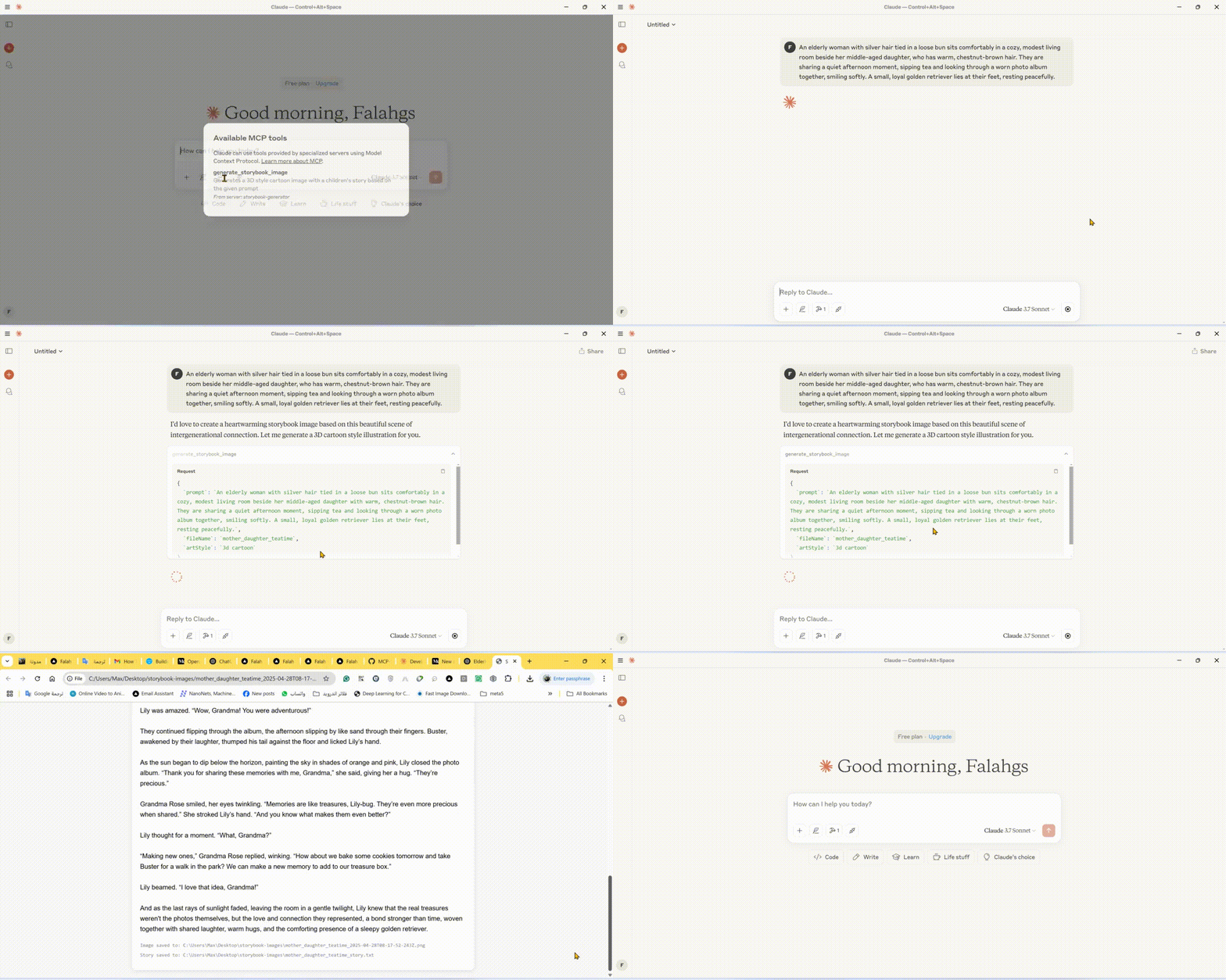
Storybook Generator Demo

🌟 Features

  • Storybook Image Generation: Creates high-quality images in various art styles for children's stories

  • Automatic Story Creation: Generates engaging children's stories to match the images

  • Multiple Art Styles: Choose from 3D cartoon, watercolor, pixel art, hand drawn, or claymation styles

  • Instant Preview: Automatically opens generated images and stories in your browser

  • Local Storage: Saves images and stories in an organized output directory

πŸ› οΈ Technical Stack

  • Core Framework: Model Context Protocol (MCP) SDK

  • AI Integration: Google Generative AI (Gemini)

  • Runtime: Node.js v14+

  • Language: TypeScript

  • Package Manager: npm

πŸ“‹ Prerequisites

  • Node.js (v14 or higher)

  • Google Gemini API key

  • TypeScript

βš™οΈ Installation

  1. Install dependencies:

npm install
  1. Configure environment: Create a .env file in the root directory:

GEMINI_API_KEY=your_api_key_here
  1. Build the project:

npm run build

πŸš€ Using the CLI

You can use the storybook generator directly from the command line:

# Using npx (after publishing to npm)
npx mcp-storybook-image-generator --api-key your_api_key_here --save-to-desktop

# Or run locally
node build/cli.js --api-key your_api_key_here --save-to-desktop

Command Line Options

Option

Description

--api-key <key>

Set your Gemini API key

--save-to-desktop

Save generated files to desktop

--debug

Enable debug logging

--help

Show help information

πŸ”§ Configuring Claude Desktop with MCP Server

To integrate this server with Claude Desktop:

  1. Locate the Claude Desktop Configuration File:

    • Windows: %APPDATA%\Claude\claude_desktop_config.json

    • macOS: ~/Library/Application Support/Claude/claude_desktop_config.json

    • Linux: ~/.config/Claude/claude_desktop_config.json

  2. Add the following configuration:

{
  "mcpServers": {
    "storybook-generator": {
      "command": "npx",
      "args": [
        "-y",
        "mcp-storybook-image-generator@latest",
        "--api-key",
        "your_gemini_api_key_here"
      ],
      "env": {
        "SAVE_TO_DESKTOP": "true",
        "DEBUG": "false"
      }
    }
  }
}

πŸš€ Available Tool

Storybook Image Generator Tool

{
  "name": "generate_storybook_image",
  "description": "Generates a 3D style cartoon image with a children's story based on the given prompt",
  "inputSchema": {
    "type": "object",
    "properties": {
      "prompt": {
        "type": "string",
        "description": "The prompt describing the storybook scene to generate"
      },
      "fileName": {
        "type": "string",
        "description": "Base name for the output files (without extension)"
      },
      "artStyle": {
        "type": "string",
        "description": "The art style for the image (default: '3d cartoon')",
        "enum": ["3d cartoon", "watercolor", "pixel art", "hand drawn", "claymation"]
      }
    },
    "required": ["prompt", "fileName"]
  }
}

πŸ“„ Example Usage

Storybook Generation Examples

// Generate a storybook with a 3D cartoon style
{
  "name": "generate_storybook_image",
  "arguments": {
    "prompt": "A friendly dragon teaching kids how to fly",
    "fileName": "dragon_flight_lesson",
    "artStyle": "3d cartoon"
  }
}

// Generate a storybook with a watercolor style
{
  "name": "generate_storybook_image",
  "arguments": {
    "prompt": "A rabbit and turtle having a tea party in the forest",
    "fileName": "forest_tea_party",
    "artStyle": "watercolor"
  }
}

// Generate a storybook with pixel art style
{
  "name": "generate_storybook_image",
  "arguments": {
    "prompt": "A space adventure with a kid astronaut meeting friendly aliens",
    "fileName": "space_adventure",
    "artStyle": "pixel art"
  }
}

βš™οΈ Configuration Options

Environment Variables

Variable

Description

Default

GEMINI_API_KEY

Google Gemini API key for AI generation

(Required)

SAVE_TO_DESKTOP

Force saving to desktop directory

false

DEBUG

Enable verbose debug logging

false

πŸ“ Output Files

For each storybook generation request, the server produces:

  1. PNG Image: The generated illustration matching your prompt in the requested art style

  2. Text File: The matching children's story in plain text format

  3. HTML Preview: A combined view showing both the image and story together

These files are saved to either:

  • Your desktop in a folder called "storybook-images" (if SAVE_TO_DESKTOP=true)

  • The server's directory in a folder called "storybook-images"

🀝 Contributing

Contributions, issues, and feature requests are welcome! Feel free to check issues page.

πŸ“„ License

This project is licensed under the MIT License - see the LICENSE file for details.

Install Server
A
security – no known vulnerabilities
F
license - not found
A
quality - confirmed to work

Resources

Unclaimed servers have limited discoverability.

Looking for Admin?

If you are the server author, to access and configure the admin panel.

Latest Blog Posts

MCP directory API

We provide all the information about MCP servers via our MCP API.

curl -X GET 'https://glama.ai/api/mcp/v1/servers/falahgs/MCP-Storybook-Image-Generator'

If you have feedback or need assistance with the MCP directory API, please join our Discord server