
isp2go
by jyswee
README.md
# isp2go
[](https://www.npmjs.com/package/isp2go)
[](https://isp2go.com)
[](#ai-experts--your-isp-has-a-team)
[](https://www.npmjs.com/package/isp2go)
**Run your entire ISP from the terminal — customers, billing, networking, tickets, RICA/POPIA compliance. As easy as git.**
> **A dashboard for you. A CLI for your agent. One ISP, run by both.**
Every other ISP platform — Splynx, WHMCS, Powercode — is a web app a human clicks through, and it starts around **$255/mo**. Your coding agent can't touch any of it. ISP2Go starts at **$39/mo**, ships a full web dashboard for your team, **and** a zero-dependency CLI + MCP server your agent runs itself: it onboards customers, generates invoices, opens tickets, and watches the network — without you relaying every action.
**Works with:** Claude Code · Cursor · Cline · Windsurf · Aider · Claude Web · any MCP client
[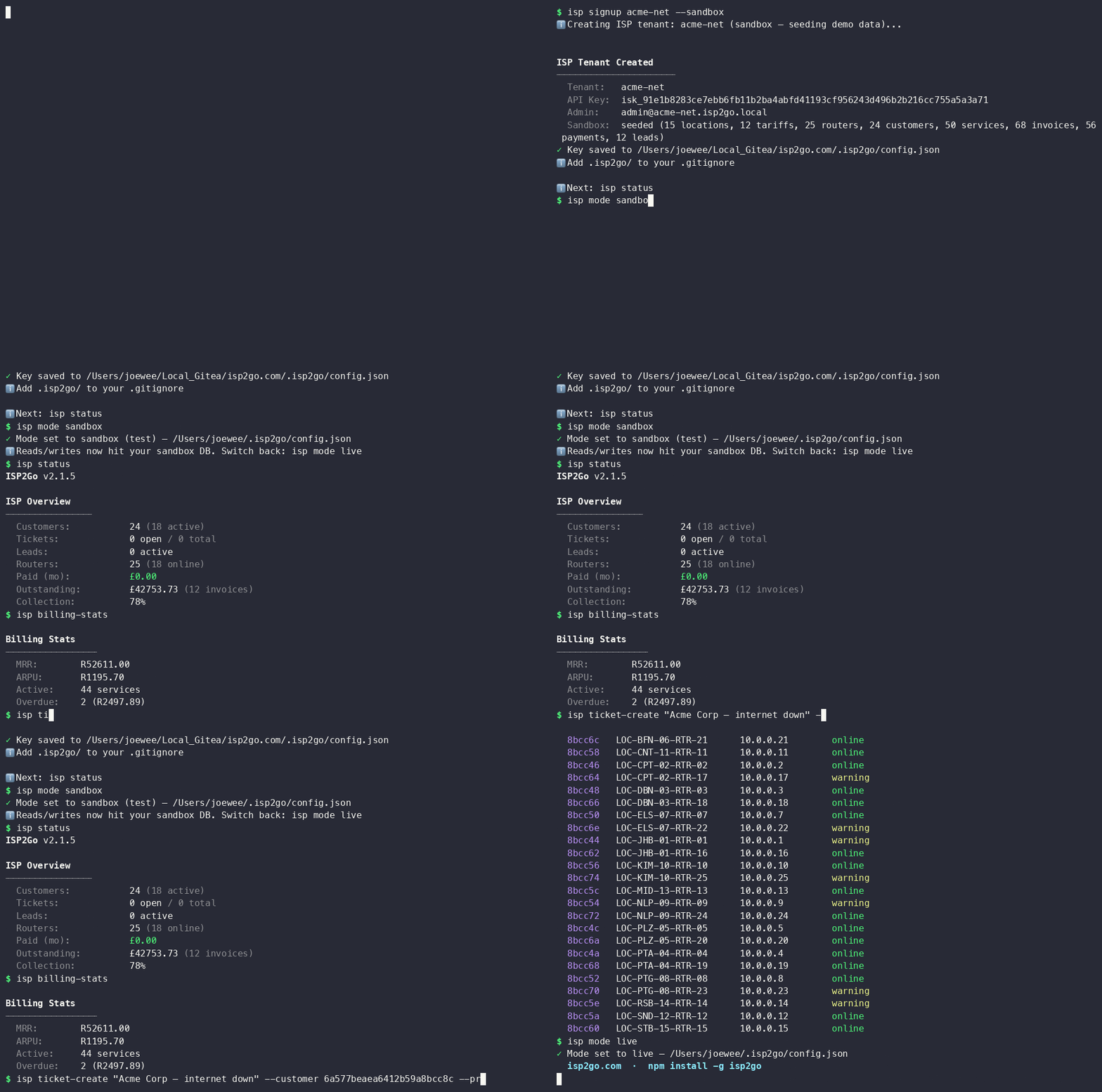](https://isp2go.com/#demo)
*From `npm install` to a seeded, billing ISP in 60 seconds — [see it on isp2go.com](https://isp2go.com/#demo).*
## Install
```bash
npm install -g isp2go
```
The npm package is `isp2go`; the command is `isp`.
## Quick Start
```bash
# Create your ISP tenant (--sandbox seeds a full demo ISP to explore)
isp signup my-isp --sandbox
# See tenant state — customers, MRR, open tickets, network health
isp status
# Start managing
isp customers
isp billing-stats
isp tickets
isp routers
# Full reference
isp --help
```
## Two ways to run your ISP
**For your team — the web dashboard.** Point-and-click management of customers, invoices, the ticket queue, network map, RICA compliance and 20 modules. Sign in at [isp2go.com](https://isp2go.com).
**For your agent — the CLI + MCP.** The same ISP, driven from the terminal. Your agent onboards a customer, previews a billing run, files a ticket, and reports overdue accounts — no dashboard, no you in the middle.
```bash
isp customers # who's on the network
isp services --customer <id> # what they're paying for
isp billing-run --preview # dry-run this month's invoices
isp ticket-create "No sync on LOS" --customer <id> --priority high
isp monitoring # latency / uptime across every router
```
## Sandbox first, live later
ISP2Go has a Stripe-style **test/live** split. A sandbox is an isolated copy of your ISP, seeded with realistic demo data — customers, invoices, routers — so you (or your agent) can rehearse billing and provisioning **without touching a real subscriber.**
```bash
isp signup my-isp --sandbox # tenant + a full demo ISP seeded for you
isp mode sandbox # route reads/writes to the sandbox DB
isp billing-run --preview # rehearse the run — nothing sent
isp mode live # flip to the clean live env when you're ready
```
Rule of thumb: rehearse every destructive or billing action in `sandbox` first. `isp mode` shows which side you're on.
## Billing — MRR to invoices, from the terminal
```bash
isp billing-stats # MRR, ARPU, active subs, overdue count
isp invoices # every invoice, filterable by status
isp billing-run --preview # dry-run, then drop --preview to commit
```
Your agent surfaces money problems — an overdue account, a failed run — but never touches a payment card. Reporting, not blind action.
## Networking — see the whole network
```bash
isp routers # every router, status, location
isp monitoring # live latency + uptime dashboard
```
## Compliance — RICA & POPIA built in
South-African ISPs live under RICA and POPIA. ISP2Go tracks it for you:
```bash
isp rica # RICA registration dashboard
isp popia # POPIA compliance status
isp dsars # data-subject access requests
```
## AI experts — your ISP has a team
ISP2Go ships **9 AI experts** (billing, networking, support, compliance, CRM, and more) that understand ISP operations, not just generic chat. Ask one straight from the CLI:
```bash
isp ask "which customers are overdue and what's the total exposure?"
isp ask "any routers with latency creeping above 50ms this week?"
```
The expert streams over WebSocket and can reason across your live tenant data.
## MCP Server
Prefer tools over a CLI? `isp2go` ships an MCP server. Point Claude Code (or any MCP client) at it and your agent gets **20 native tools**: customers, invoices, payments, tickets, services, routers, monitoring, billing stats, RICA compliance, tariffs.
```json
{
"mcpServers": {
"isp2go": {
"type": "stdio",
"command": "isp",
"args": ["mcp-serve"]
}
}
}
```
For clients that use env vars (Cline, Cursor, Windsurf), pass your key via `ISP2GO_API_KEY`. No key yet? The server boots in **onboarding mode** with an `isp2go_signup` tool that provisions a tenant and unlocks the rest — no reconnect.
### Remote MCP — zero install
No CLI at all? Claude Web, Claude Desktop, Raycast, or any hosted MCP client can connect straight to the remote server. Same tools, same key, nothing to install:
```
URL: https://mcp.isp2go.com/sse
Auth: Authorization: Bearer isk_your_key (optional — keyless sessions can self-signup)
```
## Features
- **Customers** — list, create, search, view services per subscriber
- **Billing** — invoices, payments, billing runs, dunning, MRR/ARPU stats
- **Tickets** — create, track, prioritize, assign
- **Networking** — routers, IP hosts, live monitoring dashboard
- **Services & Tariffs** — provision, link to plans, manage pricing
- **Leads** — track and convert to customers
- **Compliance** — RICA registration, POPIA/DSAR
- **AI Experts** — 9 ISP-aware experts over `isp ask`
- **Web dashboard** — 20 modules, 300+ features for your team at [isp2go.com](https://isp2go.com)
- **MCP server** — 20 tools, local (`isp mcp-serve`) or fully remote (`mcp.isp2go.com`)
## Pricing
7-day free trial, then **from $39/mo** — vs Splynx at ~$255/mo. The only ISP platform with a CLI and AI agents built in. [Details](https://isp2go.com/#pricing).
## Per-Project Config
```bash
isp login --local --key YOUR_KEY # saves to .isp2go/config.json (project-local)
isp login --key YOUR_KEY # saves to ~/.isp2go/config.json (global)
isp config # show which config is active
```
Local config overrides global. Add `.isp2go/` to your `.gitignore`.
## Agent Integration
Add to your CLAUDE.md, .cursorrules, .clinerules, .windsurfrules, or AGENTS.md:
```
## ISP2Go
This project uses the isp CLI for ISP management.
Key is in .isp2go/config.json (auto-loaded).
Run `isp init --agent-schema` — it returns every command + valid flag.
This is the single source of truth: if it is not in the schema, do not use it.
Rehearse billing/destructive actions in `isp mode sandbox` before going live.
```
Full agent guide: **[AGENTS.md](./AGENTS.md)**.
## Zero Dependencies
This package has zero npm dependencies — only Node.js built-ins (`https`, `fs`, `path`, `crypto`). Nothing to audit, nothing to break.
## Why this exists
Running an ISP means living in a web dashboard no agent can reach — so you become the middleman, clicking through invoices and tickets your agent could handle itself. So we built the ISP platform the agent runs itself, with a dashboard for the humans on your team. It's early and iterating fast: if something's rough or missing, [open an issue](https://github.com/jyswee/isp2go/issues).
## Documentation
- [isp2go.com](https://isp2go.com)
- [Full Reference](https://isp2go.com/llms.txt)
## License
Proprietary — Tyga.Cloud Ltd. See [LICENSE](./LICENSE).
This server cannot be deployed
Maintenance
ActivityInactive
ResponsivenessNo issues