

F
licenseA
qualityF
maintenanceA Model Context Protocol server that enables Docker container management through natural language interactions using a custom GPT interface.
7
15
-

Includes GitHub integration for repository management, displaying project analytics via Repobeats, and hosting project assets.
Integrates with PyPI for package distribution and version management, allowing users to install the server directly from the Python Package Index.
Provides tools for managing VMware Fusion virtual machines via the Fusion REST API, enabling operations such as listing VMs, retrieving VM details, performing power actions (on, off, suspend, pause, unpause, reset), and querying VM power states.
Features YouTube integration for demonstration videos, with embedded video content showing the server's capabilities.
Click on "Deploy Server".
Wait a few minutes for the server to deploy. Once ready, it will show a "Started" state.
In the chat, type @ followed by the MCP server name and your instructions, e.g., "@VMware Fusion MCP Server list all my virtual machines"
That's it! The server will respond to your query, and you can continue using it as needed.
Here is a step-by-step guide with screenshots.
A Model Context Protocol (MCP) server for managing VMware Fusion virtual machines via the Fusion REST API, built with FastMCP.
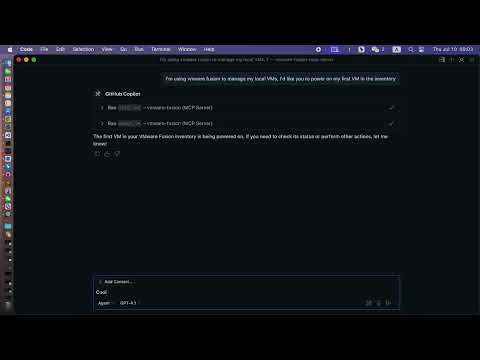
List VMs: View all VMs registered in VMware Fusion.
Get VM Info: Retrieve detailed information about a specific VM.
Power Operations: Perform power actions (on, off, suspend, pause, unpause, reset) on a VM.
Get Power State: Query the current power state of a VM.
Modern MCP/LLM Integration: Exposes all features as MCP tools for LLMs and agent frameworks.
Related MCP server: OpenAPI MCP Server
VMware Fusion Pro (with REST API enabled)
Python 3.10+
uv (recommended) or pip
uvx (for VS Code/LLM integration)
Clone the repository:
git clone https://github.com/yeahdongcn/vmware-fusion-mcp-server.git
cd vmware-fusion-mcp-server
Set up the environment and install dependencies:
make envEnable the REST API:
Open VMware Fusion > Preferences > Advanced
Check "Enable REST API"
Note the API port (default: 8697)
Start the REST API service:
vmrestThe API will be available at http://localhost:8697 by default.
The server connects to VMware Fusion's REST API at http://localhost:8697 by default. You must configure authentication for the vmrest API using environment variables:
VMREST_USER: Username for the vmrest API (required if authentication is enabled)
VMREST_PASS: Password for the vmrest API (required if authentication is enabled)
These must be set in your shell, in your VS Code MCP config, or in your deployment environment.
{
  "mcpServers": {
    "vmware-fusion": {
      "command": "uvx",
      "args": ["vmware-fusion-mcp-server"],
      "env": {
        "VMREST_USER": "your-username",
        "VMREST_PASS": "your-password"
      }
    }
  }
}
Set VMREST_USER and VMREST_PASS to your vmrest credentials.
VMREST_USER=your-username VMREST_PASS=your-password make runVMREST_USER=your-username VMREST_PASS=your-password uvx vmware-fusion-mcp-serverTo use this server as a tool provider in VS Code (or any MCP-compatible client):
Install uvx:
uv pip install uvxAdd to your MCP server config (e.g., .vscode/mcp.json):
{
  "mcpServers": {
    "vmware-fusion": {
      "command": "uvx",
      "args": ["vmware-fusion-mcp-server"],
      "env": {
        "VMREST_USER": "your-username",
        "VMREST_PASS": "your-password"
      }
    }
  }
}
Set VMREST_USER and VMREST_PASS to your vmrest credentials.
You can now use the VMware Fusion tools in any MCP-enabled LLM or agent in VS Code.
Description: List all VMs in VMware Fusion.
Parameters: None
Description: Get detailed information about a specific VM.
Parameters:
vm_id (string): The ID of the VM
Description: Perform a power action on a VM.
Parameters:
vm_id (string): The ID of the VM
action (string): One of: "on", "off", "suspend", "pause", "unpause", "reset"
Description: Get the power state of a specific VM.
Parameters:
vm_id (string): The ID of the VM
make testmake fmtmake lintvmware_fusion_mcp/server.py - Main FastMCP server implementation
vmware_fusion_mcp/vmware_client.py - VMware Fusion REST API client
tests/ - Unit and integration tests
MIT License - see LICENSE for details.
Fork the repository
Create a feature branch
Make your changes
Run tests and linting: make test && make lint
Submit a pull request
Get detailed information about a specific VM.
| Name | Required | Description | Default |
|---|---|---|---|
| vm_id | Yes |
| Name | Required | Description |
|---|---|---|
No output parameters | ||
Does the description disclose side effects, auth requirements, rate limits, or destructive behavior?
With no annotations provided, the description carries the full burden of behavioral disclosure. It states the tool gets 'detailed information' but doesn't specify what that includes (e.g., configuration, status, metadata), whether it's read-only, or any prerequisites like authentication. This leaves significant gaps in understanding the tool's behavior beyond the basic action.
Agents need to know what a tool does to the world before calling it. Descriptions should go beyond structured annotations to explain consequences.
Is the description appropriately sized, front-loaded, and free of redundancy?
The description is a single, efficient sentence that directly states the tool's purpose without any fluff. It's appropriately sized and front-loaded, making it easy to parse quickly.
Shorter descriptions cost fewer tokens and are easier for agents to parse. Every sentence should earn its place.
Given the tool's complexity, does the description cover enough for an agent to succeed on first attempt?
Given the tool's low complexity (1 parameter) and the presence of an output schema (which handles return values), the description is somewhat complete. However, with no annotations and minimal parameter guidance, it lacks details on behavioral traits and usage context, making it adequate but with clear gaps.
Complex tools with many parameters or behaviors need more documentation. Simple tools need less. This dimension scales expectations accordingly.
Does the description clarify parameter syntax, constraints, interactions, or defaults beyond what the schema provides?
The input schema has 1 parameter with 0% description coverage, so the schema provides no semantic information. The description adds minimal context by implying 'vm_id' identifies a specific VM, but doesn't explain what format the ID should be (e.g., UUID, name) or where to find it. This partially compensates for the schema gap but remains vague.
Input schemas describe structure but not intent. Descriptions should explain non-obvious parameter relationships and valid value ranges.
Does the description clearly state what the tool does and how it differs from similar tools?
The description clearly states the verb ('Get') and resource ('detailed information about a specific VM'), making the purpose unambiguous. It distinguishes from siblings like 'list_vms' (which lists multiple VMs) and 'power_vm' (which controls power state), though it doesn't explicitly mention 'get_vm_power_state' which might overlap in scope.
Agents choose between tools based on descriptions. A clear purpose with a specific verb and resource helps agents select the right tool.
Does the description explain when to use this tool, when not to, or what alternatives exist?
No guidance is provided on when to use this tool versus alternatives. It doesn't mention that 'list_vms' might be better for discovering VMs, or that 'get_vm_power_state' might be sufficient if only power state is needed. The description implies usage for a specific VM but offers no exclusions or context.
Agents often have multiple tools that could apply. Explicit usage guidance like "use X instead of Y when Z" prevents misuse.
Get the power state of a specific VM.
| Name | Required | Description | Default |
|---|---|---|---|
| vm_id | Yes |
| Name | Required | Description |
|---|---|---|
No output parameters | ||
Does the description disclose side effects, auth requirements, rate limits, or destructive behavior?
With no annotations provided, the description carries the full burden of behavioral disclosure. It states the tool gets power state, implying a read-only operation, but doesn't specify if it requires authentication, has rate limits, returns specific error conditions, or details the output format. This leaves significant gaps in understanding the tool's behavior beyond the basic purpose.
Agents need to know what a tool does to the world before calling it. Descriptions should go beyond structured annotations to explain consequences.
Is the description appropriately sized, front-loaded, and free of redundancy?
The description is a single, clear sentence with no wasted words. It's front-loaded with the core purpose and efficiently conveys the essential information without unnecessary elaboration, making it highly concise and well-structured.
Shorter descriptions cost fewer tokens and are easier for agents to parse. Every sentence should earn its place.
Given the tool's complexity, does the description cover enough for an agent to succeed on first attempt?
Given the tool's low complexity (1 parameter, no nested objects) and the presence of an output schema (which should document return values), the description is minimally adequate. However, it lacks context on usage guidelines and behavioral details, which are important for a tool that interacts with system resources like VMs, leaving room for improvement.
Complex tools with many parameters or behaviors need more documentation. Simple tools need less. This dimension scales expectations accordingly.
Does the description clarify parameter syntax, constraints, interactions, or defaults beyond what the schema provides?
The input schema has 0% description coverage, so the description must compensate. It mentions 'a specific VM', which implies the 'vm_id' parameter identifies the VM, but doesn't clarify the ID format, source, or constraints. This adds minimal semantic value beyond what the schema's title ('Vm Id') suggests, meeting the baseline for low schema coverage.
Input schemas describe structure but not intent. Descriptions should explain non-obvious parameter relationships and valid value ranges.
Does the description clearly state what the tool does and how it differs from similar tools?
The description clearly states the verb ('Get') and resource ('power state of a specific VM'), making the purpose unambiguous. However, it doesn't explicitly differentiate from sibling tools like 'get_vm_info' (which might include power state among other details) or 'list_vms' (which lists VMs rather than querying a specific one's state), so it doesn't reach the highest score.
Agents choose between tools based on descriptions. A clear purpose with a specific verb and resource helps agents select the right tool.
Does the description explain when to use this tool, when not to, or what alternatives exist?
The description provides no guidance on when to use this tool versus alternatives. It doesn't mention sibling tools like 'get_vm_info' (which might retrieve power state along with other info) or 'power_vm' (which changes power state), leaving the agent to infer usage context without explicit direction.
Agents often have multiple tools that could apply. Explicit usage guidance like "use X instead of Y when Z" prevents misuse.
List all VMs in VMware Fusion.
| Name | Required | Description | Default |
|---|---|---|---|
No parameters | |||
| Name | Required | Description |
|---|---|---|
No output parameters | ||
Does the description disclose side effects, auth requirements, rate limits, or destructive behavior?
No annotations are provided, so the description carries the full burden of behavioral disclosure. It states the action but doesn't describe what 'list' entails—e.g., whether it returns names, IDs, statuses, or pagination details. For a tool with zero annotation coverage, this leaves significant gaps in understanding its behavior and output.
Agents need to know what a tool does to the world before calling it. Descriptions should go beyond structured annotations to explain consequences.
Is the description appropriately sized, front-loaded, and free of redundancy?
The description is a single, efficient sentence that directly states the tool's purpose without any wasted words. It is front-loaded and appropriately sized for a simple listing operation.
Shorter descriptions cost fewer tokens and are easier for agents to parse. Every sentence should earn its place.
Given the tool's complexity, does the description cover enough for an agent to succeed on first attempt?
Given the tool's simplicity (0 parameters, output schema exists), the description is minimally adequate. However, with no annotations and an output schema present, it doesn't explain what the listing includes or how to interpret results, leaving some context gaps despite the structured output.
Complex tools with many parameters or behaviors need more documentation. Simple tools need less. This dimension scales expectations accordingly.
Does the description clarify parameter syntax, constraints, interactions, or defaults beyond what the schema provides?
The input schema has 0 parameters with 100% coverage, meaning no parameters are documented in the schema. The description doesn't add parameter details, which is appropriate since there are none. A baseline of 4 is applied for zero parameters, as no compensation is needed.
Input schemas describe structure but not intent. Descriptions should explain non-obvious parameter relationships and valid value ranges.
Does the description clearly state what the tool does and how it differs from similar tools?
The description clearly states the verb ('List') and resource ('all VMs in VMware Fusion'), making the purpose immediately understandable. It doesn't differentiate from sibling tools like get_vm_info (which retrieves detailed info for a specific VM) or power_vm (which controls power state), but the basic action is unambiguous.
Agents choose between tools based on descriptions. A clear purpose with a specific verb and resource helps agents select the right tool.
Does the description explain when to use this tool, when not to, or what alternatives exist?
No guidance is provided on when to use this tool versus alternatives. The description doesn't mention that list_vms returns a broad overview while get_vm_info provides detailed data for a specific VM, or that it might be a prerequisite for operations like power_vm. Usage context is implied but not explicit.
Agents often have multiple tools that could apply. Explicit usage guidance like "use X instead of Y when Z" prevents misuse.
Perform a power action on a VM. Valid actions are 'on', 'off', 'shutdown', 'suspend', 'pause', 'unpause'.
| Name | Required | Description | Default |
|---|---|---|---|
| vm_id | Yes | ||
| action | Yes |
| Name | Required | Description |
|---|---|---|
No output parameters | ||
Does the description disclose side effects, auth requirements, rate limits, or destructive behavior?
With no annotations provided, the description carries full burden but only states what actions are valid. It doesn't disclose behavioral traits like whether actions are immediate or queued, permission requirements, whether 'shutdown' is graceful or forced, side effects on other VMs, or error handling. The description is minimal beyond stating valid actions.
Agents need to know what a tool does to the world before calling it. Descriptions should go beyond structured annotations to explain consequences.
Is the description appropriately sized, front-loaded, and free of redundancy?
The description is a single, efficient sentence with zero waste. It's front-loaded with the core purpose and follows with essential action details, making it easy to parse quickly.
Shorter descriptions cost fewer tokens and are easier for agents to parse. Every sentence should earn its place.
Given the tool's complexity, does the description cover enough for an agent to succeed on first attempt?
Given the tool's complexity (power operations on VMs) and no annotations, the description is incomplete. It covers valid actions but lacks crucial context like permissions, side effects, or differences between actions. The presence of an output schema helps, but the description doesn't reference it or explain return values.
Complex tools with many parameters or behaviors need more documentation. Simple tools need less. This dimension scales expectations accordingly.
Does the description clarify parameter syntax, constraints, interactions, or defaults beyond what the schema provides?
The description adds significant value beyond the 0% schema coverage by explicitly listing all valid action values ('on', 'off', 'shutdown', 'suspend', 'pause', 'unpause'), which the schema doesn't document. However, it doesn't explain the 'vm_id' parameter or provide context about action differences.
Input schemas describe structure but not intent. Descriptions should explain non-obvious parameter relationships and valid value ranges.
Does the description clearly state what the tool does and how it differs from similar tools?
The description clearly states the verb ('perform a power action') and resource ('on a VM'), specifying the exact scope of operations. It distinguishes from sibling tools like 'get_vm_info' or 'list_vms' by focusing on power state changes rather than information retrieval.
Agents choose between tools based on descriptions. A clear purpose with a specific verb and resource helps agents select the right tool.
Does the description explain when to use this tool, when not to, or what alternatives exist?
The description implies usage for power state changes but doesn't explicitly state when to use this tool versus alternatives like 'get_vm_power_state' for checking status. It provides valid action values but no guidance on prerequisites, error conditions, or when certain actions are appropriate.
Agents often have multiple tools that could apply. Explicit usage guidance like "use X instead of Y when Z" prevents misuse.
Recent tool additions, removals, and schema changes observed during successful MCP inspections.
get_vm_infoget_vm_power_statelist_vmspower_vmScored across 4 tools
Each tool has a clearly distinct purpose: get_vm_info retrieves detailed VM data, get_vm_power_state focuses only on power status, list_vms enumerates all VMs, and power_vm performs power operations. There is no overlap or ambiguity between these functions.
All tool names follow a consistent verb_noun pattern with snake_case: get_vm_info, get_vm_power_state, list_vms, and power_vm. The naming is predictable and uniform throughout the set.
With 4 tools, the count is reasonable for basic VM management, covering listing, info retrieval, power state checks, and power actions. It might be slightly thin for advanced operations like configuration changes, but it's well-scoped for core functionality.
The tools cover core VM operations (list, info, power state, power actions), but there are notable gaps for a full VM management domain, such as creating/deleting VMs, modifying settings, or handling snapshots. Agents can perform basic tasks but may hit dead ends for more complex workflows.
A comprehensive Model Context Protocol (MCP) server that enables AI assistants to interact with yo…
The Mercado Pago MCP Server implements the Model Context Protocol to provide AI agents and LLMs with access to Mercado Pago's APIs and tools within compatible development environments. It acts as an intermediary that translates Mercado Pago resources into executable functions (tools) that AI applications can invoke to perform actions and automate flows. The server simplifies integration, enables using documentation to implement or improve code, and optimizes operations through natural language interactions without manual implementations.
An MCP server that provides an API to LLMs to manage their JumpCloud resources.
A Model Context Protocol server for Wix AI tools