FRD Orchestrator
Enables GitHub Copilot to read and execute multi-phase architectural generation plans by accessing structured Functional Requirements Documents (FRDs).
Enables the automatic generation of unit tests, mocks, and coverage reports using the Jest testing framework.
Provides specialized blueprints for the automated generation of NestJS boilerplates following Clean Architecture and SOLID principles.
Orchestrates the implementation of JWT-based authentication and secure endpoint protection using the Passport framework.
Sets up SQLite as the default database engine for rapid persistence development in generated projects.
Automatically configures and integrates Swagger documentation for all API endpoints within the generated boilerplate.
Facilitates the integration of database persistence layers, repository patterns, and migrations using TypeORM.
Click on "Install Server".
Wait a few minutes for the server to deploy. Once ready, it will show a "Started" state.
In the chat, type
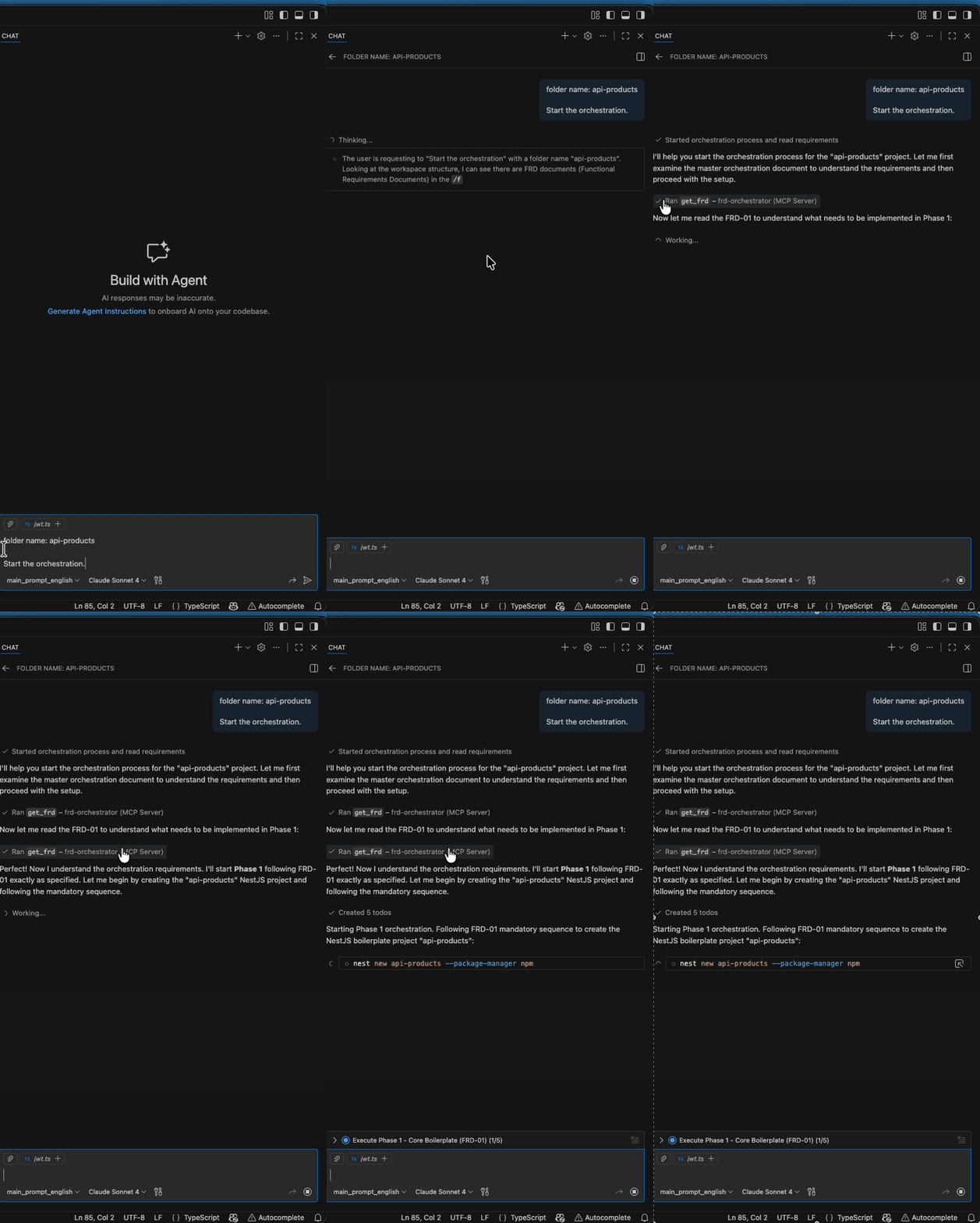
@followed by the MCP server name and your instructions, e.g., "@FRD Orchestratorfolder name: shop-api. Start the orchestration."
That's it! The server will respond to your query, and you can continue using it as needed.
Here is a step-by-step guide with screenshots.
FRD Orchestrator - MCP Server
๐ Automated NestJS boilerplate generation powered by MCP and structured FRDs
MCP (Model Context Protocol) server that exposes NestJS boilerplate FRDs so GitHub Copilot can regenerate the complete architecture from scratch in any project, following Clean Architecture, SOLID principles, and best practices.
๐ค What is MCP and why use it?
MCP (Model Context Protocol) is a standardized way for AI assistants like GitHub Copilot to access external tools and data sources. Think of it as a "bridge" that allows Copilot to:
๐ Read live documents (your FRDs) instead of outdated copies
๐ง Access specialized tools beyond basic file operations
๐ Get structured data with validation and logging
๐ Always stay updated - changes to FRDs are immediately available
Why FRDs via MCP instead of just reading files?
Traditional File Reading | MCP + FRDs |
โ Stale content when files change | โ Always fresh content |
โ No validation or error handling | โ Built-in validation and logging |
โ Manual file path management | โ Structured ID-based access |
โ No usage tracking | โ Full audit trail of what was read |
Related MCP server: Gigaspec
๐ฏ What does this server do?
This MCP server exposes 5 carefully crafted FRDs that define a complete NestJS boilerplate:
FRD-00: ๐ญ Master orchestration - How GitHub Copilot should execute the 4 phases
FRD-01: ๐๏ธ Boilerplate core - Basic NestJS + Products CRUD + Swagger
FRD-02: ๐๏ธ Database layer - TypeORM + migrations + repository pattern
FRD-03: ๐ Authentication - JWT + Passport + protected endpoints
FRD-04: ๐งช Unit testing - Jest + mocks + coverage for all modules
๐ How does the orchestration work?
When you tell GitHub Copilot to generate a boilerplate, here's what happens:
๐ Copilot reads FRD-00 (master orchestration) to understand the plan
๐๏ธ Phase 1: Reads FRD-01 โ Creates basic NestJS + Products CRUD
๐๏ธ Phase 2: Reads FRD-02 โ Adds database + TypeORM + migrations
๐ Phase 3: Reads FRD-03 โ Implements JWT auth + protected routes
๐งช Phase 4: Reads FRD-04 โ Generates unit tests for everything
๐ Final: Generates comprehensive README with setup instructions
Each phase is automatic - no manual intervention required. GitHub Copilot follows the FRDs religiously and ensures each phase works before moving to the next.
โจ Complete workflow example
# 1. You say this to GitHub Copilot:
"folder name: my-api. Start the orchestration."
# 2. GitHub Copilot automatically:
# - Reads FRD-00 to understand the plan
# - Creates `my-api/` directory
# - Executes Phase 1: Basic NestJS setup
# - Executes Phase 2: Database integration
# - Executes Phase 3: JWT authentication
# - Executes Phase 4: Unit tests
# - Generates final README
# 3. Result: Complete production-ready API with:
# โ
Products CRUD with validation
# โ
Swagger documentation at /api
# โ
Database persistence (SQLite by default)
# โ
JWT authentication protecting all routes
# โ
Unit tests with >80% coverage
# โ
Clean Architecture + SOLID principles
# โ
Complete setup documentationThe entire process takes 5-10 minutes and results in a production-ready NestJS API that you can deploy immediately.
Requirements
Python 3.10+
VS Code with GitHub Copilot enabled
uv (recommended) or
pip
Installation
1. Clone/Copy this folder to your project
# Add this MCP server to your existing project
git clone <your-repo> mcp-server
cd mcp-server2. Install dependencies
Option A: With uv (recommended)
uv syncOption B: With pip
pip install fastmcp3. Verify installation
python main.pyYou should see logs like:
[FRD-Orchestrator] 12:34:56 | INFO | Starting MCP FRD-Orchestrator server (stdio)
[FRD-Orchestrator] 12:34:56 | INFO | FRD Directory: /path/to/mcp-server/frdVS Code + GitHub Copilot Configuration
1. Create MCP configuration in your workspace
Create .vscode/mcp.json in your project root:
{
"_note": "This configuration is for academic purposes. The command path depends on the execution environment and may vary based on where the UV tool is installed on different systems.",
"servers": {
"frd-orchestrator": {
"type": "stdio",
"command": "/Users/[your-username]/.local/bin/uv",
"args": ["run", "main.py"]
}
}
}โ ๏ธ Important:
Adjust the path to UV according to your system
Use
which uvto find your UV installation pathIf using Python directly:
"command": "python"and"args": ["main.py"]
2. Ensure GitHub Copilot has MCP access
GitHub Copilot in VS Code automatically detects MCP servers configured in .vscode/mcp.json when MCP support is enabled.
3. Test the connection
Open VS Code in your project and ask GitHub Copilot:
"Show me what's available in FRD-00"If working correctly, you'll see logs in the terminal and Copilot will access the FRD content.
Usage
Once configured, GitHub Copilot automatically has access to the get_frd tool and can read all FRDs on demand.
๐ฏ Simple commands to get started:
"folder name: my-awesome-api. Start the orchestration."That's it! GitHub Copilot will:
Create the folder
Read all FRDs automatically
Execute all 4 phases in sequence
Generate a complete, working API
๐ ๏ธ Advanced usage:
"Generate just the core boilerplate (Phase 1 only)"
"Add database layer following FRD-02"
"Implement JWT authentication according to FRD-03"
"Generate comprehensive unit tests per FRD-04"
"Show me what FRD-01 contains"๐ Behind the scenes:
When GitHub Copilot executes, you'll see logs like:
[FRD-Orchestrator] Reading FRD from disk: /path/to/frd/FRD-01-boilerplate-core-products.md
[FRD-Orchestrator] Tool get_frd requested with frd_id=01
[FRD-Orchestrator] FRD read successfully: FRD-01-boilerplate-core-products.md (15,432 characters)This means GitHub Copilot is actively reading the latest version of your FRDs and following them exactly.
โก What makes this powerful:
๐ฏ Zero configuration - Just one command and everything works
๐ Structured approach - Each phase builds on the previous
๐ Always updated - FRDs are read fresh every time
๐๏ธ Production ready - Not just demos, real deployable code
๐ Self-documenting - Generated README explains everything
๐งช Fully tested - Unit tests included for all modules
File structure
mcp-server/
โโโ main.py # MCP Server
โโโ README.md # This file
โโโ pyproject.toml # Dependencies (create if not exists)
โโโ frd/
โโโ FRD-00-master-orchestration.md
โโโ FRD-01-boilerplate-core-products.md
โโโ FRD-02-products-database.md
โโโ FRD-03-auth-security.md
โโโ FRD-04-unit-testing.mdTroubleshooting
Claude doesn't recognize the get_frd tool
Verify that Claude Desktop is restarted
Check logs in:
macOS:
~/Library/Logs/Claude/mcp*.logWindows:
%APPDATA%\Claude\logs\
Make sure to use absolute paths in
claude_desktop_config.json
Error: FRD_DIR does not exist
The frd/ directory must be next to main.py:
ls -la mcp-server/
# Should show: main.py, frd/Logs don't appear
Change the log level in claude_desktop_config.json:
"env": {
"FRD_ORCH_LOG_LEVEL": "DEBUG"
}Python not found
If using uv:
{
"command": "uv",
"args": ["run", "/absolute/path/to/mcp-server/main.py"]
}Environment variables
Variable | Description | Default |
| Logging level ( |
|
Portability
This directory is 100% portable. To use in another project:
Copy the entire
mcp-server/folderUpdate the path in
claude_desktop_config.jsonRestart Claude Desktop
Ready โ
Update FRDs
To modify an FRD:
Edit the file in
frd/*.mdIt's not necessary to restart the server
The next time Jarvis calls
get_frd, it will get the updated version
Author: @jorgegomez
Version: 1.0.0
Date: December 2025
Available Tools
1 toolget_frdB
Returns the content of an FRD by id. 00 -> FRD-00-master-orchestration.md 01 -> FRD-01-boilerplate-core-products.md ...
| Name | Required | Description | Default |
|---|---|---|---|
| frd_id | Yes |
Output Schema
| Name | Required | Description |
|---|---|---|
| result | Yes |
TDQS
Does the description disclose side effects, auth requirements, rate limits, or destructive behavior?
No annotations are provided, so the description carries the full burden of behavioral disclosure. It states the tool returns content, implying a read-only operation, but lacks details on permissions, error handling, rate limits, or output format. The mention of specific FRD IDs adds some context but doesn't cover key behavioral traits.
Agents need to know what a tool does to the world before calling it. Descriptions should go beyond structured annotations to explain consequences.
Is the description appropriately sized, front-loaded, and free of redundancy?
The description is front-loaded with the core purpose, but the list of FRD ID mappings is verbose and could be condensed. While it provides useful examples, the structure is not optimally efficient, as the mappings might be better placed elsewhere or summarized.
Shorter descriptions cost fewer tokens and are easier for agents to parse. Every sentence should earn its place.
Given the tool's complexity, does the description cover enough for an agent to succeed on first attempt?
Given the tool's simplicity (1 parameter, output schema exists), the description is somewhat complete but has gaps. It explains the purpose and parameter semantics but lacks behavioral details. The output schema handles return values, so the description doesn't need to cover that, but it should address usage and transparency more thoroughly.
Complex tools with many parameters or behaviors need more documentation. Simple tools need less. This dimension scales expectations accordingly.
Does the description clarify parameter syntax, constraints, interactions, or defaults beyond what the schema provides?
The input schema has 1 parameter with 0% description coverage, but the description compensates by listing examples of FRD IDs (e.g., '00 -> FRD-00-master-orchestration.md'), which clarifies the semantics beyond the enum values. Since there is only one parameter, the baseline is 4, and the examples add meaningful context.
Input schemas describe structure but not intent. Descriptions should explain non-obvious parameter relationships and valid value ranges.
Does the description clearly state what the tool does and how it differs from similar tools?
The description clearly states the tool's purpose: 'Returns the content of an FRD by id.' This is a specific verb ('Returns') and resource ('content of an FRD'), making the function unambiguous. However, it doesn't distinguish from siblings since there are none, so it cannot achieve a perfect 5.
Agents choose between tools based on descriptions. A clear purpose with a specific verb and resource helps agents select the right tool.
Does the description explain when to use this tool, when not to, or what alternatives exist?
The description provides no guidance on when to use this tool versus alternatives. It mentions specific FRD IDs (e.g., '00 -> FRD-00-master-orchestration.md'), but this is more of an example than usage guidance. There are no explicit instructions on prerequisites, context, or exclusions.
Agents often have multiple tools that could apply. Explicit usage guidance like "use X instead of Y when Z" prevents misuse.
TDQS
With only one tool, there is no possibility of ambiguity or overlap between tools. The single tool 'get_frd' has a clear and distinct purpose of retrieving FRD content by ID.
The naming is trivially consistent as there is only one tool. The tool name 'get_frd' follows a clear verb_noun pattern (get + FRD), which would be appropriate if more tools were added.
A single tool is too few for a server named 'FRD Orchestrator', which implies orchestration capabilities beyond simple retrieval. The scope suggests operations like create, update, delete, or manage FRDs, but only a read operation is provided.
The tool surface is severely incomplete for an orchestrator. It only supports retrieving FRDs by ID, lacking essential operations such as creating, updating, deleting, listing, or searching FRDs. This will cause significant agent failures in orchestration tasks.
Maintenance
Resources
Unclaimed servers have limited discoverability.
Looking for Admin?
If you are the server author, to access and configure the admin panel.
Related MCP Connectors
MCP server unifying ERPs, CRMs, APIs and knowledge base for Claude, ChatGPT and Gemini.
MCP server for AI agents to plan, verify, and deploy Cloudflare-native apps.
MCP server that lets AI assistants use all OneSchema features exposed via the public API.
Nifty's MCP server โ exposes tasks, projects, messages, and files as tools for AI agents.
Related MCP Servers
- FlicenseNot gradedqualityDmaintenanceA Model Context Protocol server built with NestJS that provides OAuth 2.1 authentication with GitHub and exposes MCP tools through Server-Sent Events transport. Enables secure, real-time communication with JWT-based protection and dependency injection.
- AlicenseNot gradedqualityDmaintenanceAn AI-native specification framework that enables deep requirements analysis and structured project planning through intelligent Q\&A workflows. The MCP server provides tools for project initialization, requirement analysis, and the generation of living documentation like development plans and architecture specs.16Apache 2.0
- AlicenseNot gradedqualityDmaintenanceA production-ready NestJS backend template with built-in MCP server enabling AI agents to query your data via standardized protocol, featuring RAG pipeline, semantic search, and comprehensive developer tooling.1MIT
- FlicenseNot gradedqualityDmaintenanceMulti-stack scaffolding engine for generating production-ready module structures (NestJS, Java Spring, Python FastAPI) directly from an MCP-compatible AI client, reducing token usage for boilerplate code.
Appeared in Searches
Latest Blog Posts
- Who's Calling? MCP Hosts Are an Identity Blind Spot (And the Spec Knows It)By Om-Shree-0709 on .mcpAgent IdentityOAuth 2.1
- Your AI Chatbot Just Exposed Your CEO's Salary to an InternBy Om-Shree-0709 on .Agent IdentityMCP SecurityOAuth Delegation
- Why MCP Servers Need Execution Sandboxing (And Why Your Current Stack Isn't Enough)By Om-Shree-0709 on .Agentic AiPrompt InjectionWebAssembly
MCP directory API
We provide all the information about MCP servers via our MCP API.
curl -X GET 'https://glama.ai/api/mcp/v1/servers/jorge6242/boilerplate-nestjs-mcp'
If you have feedback or need assistance with the MCP directory API, please join our Discord server