
Hyperfabric MCP Server
Provides comprehensive infrastructure management for Cisco Nexus Hyperfabric through 79 REST API tools, enabling fabric configuration, device management, network operations, VNI/VRF management, and node/port configuration.
Click on "Deploy Server".
Wait a few minutes for the server to deploy. Once ready, it will show a "Started" state.
In the chat, type
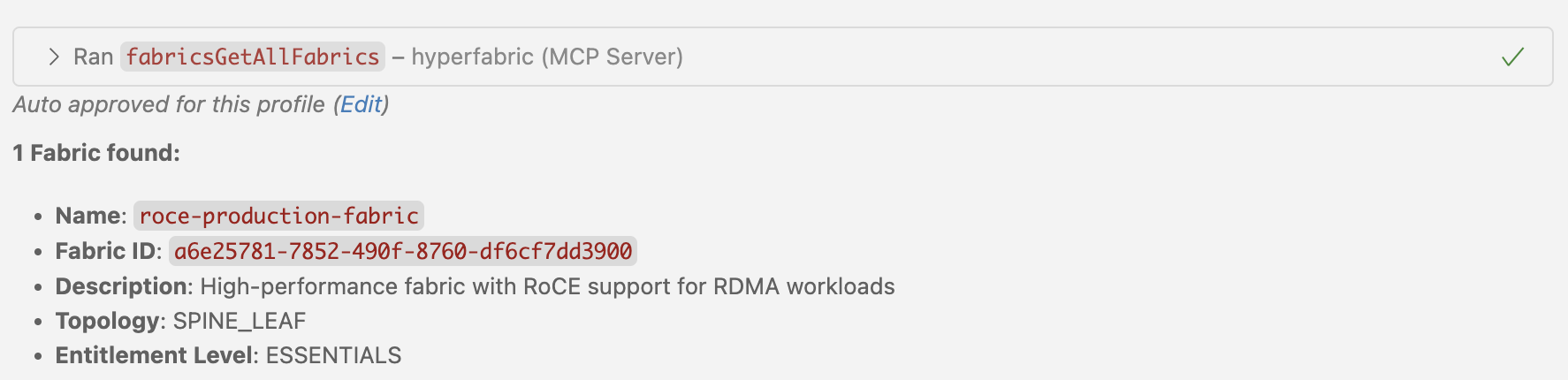
@followed by the MCP server name and your instructions, e.g., "@Hyperfabric MCP Server list all fabrics in my organization"
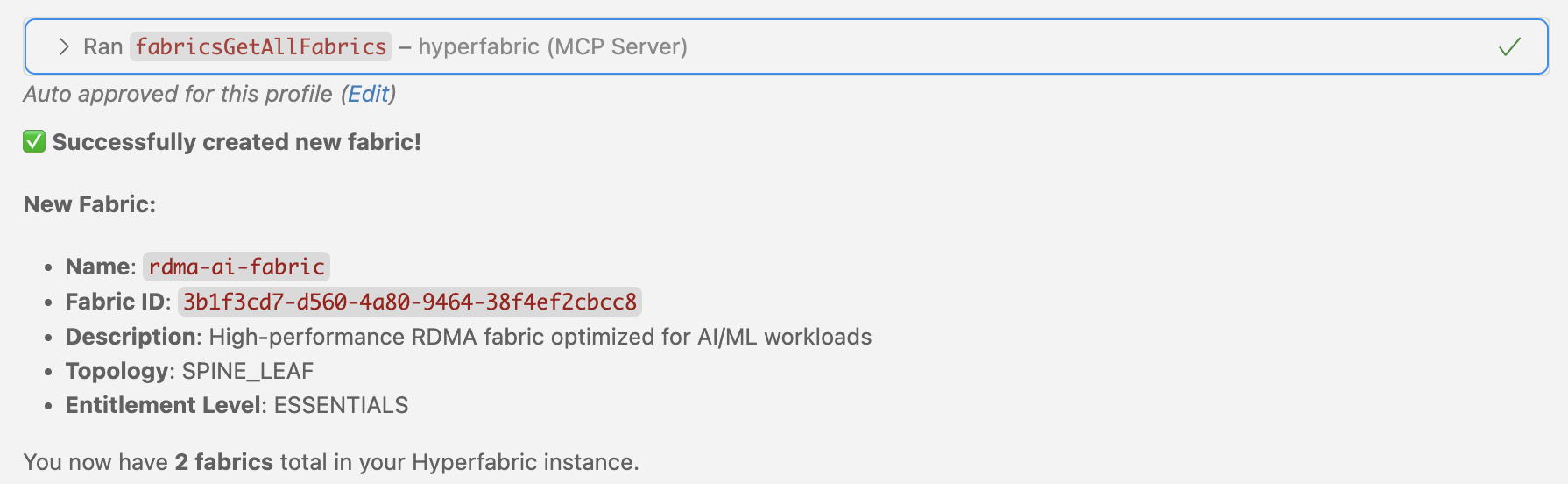
That's it! The server will respond to your query, and you can continue using it as needed.
Here is a step-by-step guide with screenshots.
Hyperfabric MCP Server
An MCP (Model Context Protocol) server that enables LLMs to interact with Hyperfabric APIs. This server exposes all 79 Hyperfabric OpenAPI endpoints as tools for comprehensive infrastructure management and automation.
🔧 Dynamic Tool Generation: Automatically parses Hyperfabric OpenAPI specs and creates MCP tools
🛡️ Secure Authentication: Handles Hyperfabric API token authentication with proper security
📊 Complete API Coverage: Exposes all 79 available Hyperfabric endpoints for infrastructure management
✨ Clean Tool Names: Tools display with intuitive names like fabricsGetAllFabrics for easy discovery
Prerequisites
Node.js 18+ installed
VSCode with GitHub Copilot or Claude Desktop
Hyperfabric API credentials (API Token)
Hyperfabric OpenAPI specification file
1. Build the Server
npm install
npm run build2. Configure LLM Client
For VSCode with GitHub Copilot
Open VSCode Settings:
Cmd+Shift+P→ "Preferences: Open User Settings (JSON)"Add this configuration to your
settings.json:
{
"github.copilot.chat.mcp.servers": {
"hyperfabric": {
"command": "node",
"args": ["/path/to/hyperfabric-mcp-server/dist/main.js"],
"env": {
"HYPERFABRIC_API_TOKEN": "your-api-token",
"LOG_LEVEL": "info"
}
}
}
}Reload VS Code:
Cmd+Shift+P→ "Developer: Reload Window"
For Claude Desktop
Locate your Claude Desktop configuration file:
macOS:
~/Library/Application Support/Claude/claude_desktop_config.jsonWindows:
%APPDATA%\Claude\claude_desktop_config.jsonLinux:
~/.config/Claude/claude_desktop_config.json
Add this configuration to
claude_desktop_config.json:
{
"mcpServers": {
"hyperfabric": {
"command": "node",
"args": ["/path/to/hyperfabric-mcp-server/dist/main.js"],
"env": {
"HYPERFABRIC_API_TOKEN": "your-api-token",
"LOG_LEVEL": "info"
}
}
}
}Restart Claude Desktop application


Available Tools and Capabilities
The MCP server automatically generates 79 tools from the complete Nexus Hyperfabric REST API v1.1.0 specification:
� Authentication & User Management (9 tools)
Bearer Token Management: Secure API authentication
authGetBearerTokens- List all bearer tokens for the userauthCreateBearerTokens- Create new bearer tokensauthGetBearerToken- Get specific bearer token detailsauthDeleteBearerToken- Delete a specific bearer token
User Management: User account operations
authGetUsers- List all users in organizationauthGetUser- Get specific user detailsauthSetUsers- Create or update usersauthUpdateUser- Update existing userauthDeleteUser- Delete a user account
🖥️ Device Management (3 tools)
Device Operations: Physical device management and binding
devicesGetDevices- List all devices (bound and unbound)devicesBindDevice- Bind a device to a fabric nodedevicesUnbindDevice- Unbind device from a fabric node
🏗️ Fabric Management (16 tools)
Fabric Configuration: Core fabric operations
fabricsGetAllFabrics- List all fabrics in organizationfabricsAddFabrics- Create new fabricsfabricsGetFabric- Get specific fabric detailsfabricsUpdateFabric- Update fabric configurationfabricsDeleteFabric- Delete a fabric
Connection Management: Fabric network connections
fabricsGetFabricConnections- List all connections in fabricfabricsAddFabricConnections- Add new connectionsfabricsGetFabricConnection- Get specific connection detailsfabricsSetFabricConnections- Replace all connectionsfabricsDeleteFabricConnections- Delete all connectionsfabricsDeleteFabricConnection- Delete specific connection
Configuration Management: Candidate configurations and deployment
fabricsGetFabricCandidates- List candidate configurationsfabricsGetFabricCandidate- Get specific candidate configfabricsCommitFabricCandidate- Deploy candidate to running configfabricsRevertFabricCandidate- Discard candidate configurationfabricsReviewFabricCandidate- Add comments to candidate config
🌐 Network Configuration (3 tools)
Spanning Tree Protocol: Global STP settings
networksGetFabricStp- Get fabric STP configurationnetworksUpdateFabricStp- Update STP settingsnetworksResetFabricStp- Reset STP to defaults
� Node Management (25 tools)
Node Operations: Fabric node configuration
nodesGetFabricNodes- List all nodes in fabricnodesAddFabricNodes- Add new nodes to fabricnodesGetNamedFabricNode- Get specific node detailsnodesUpdateFabricNode- Update node configurationnodesDeleteFabricNode- Remove node from fabric
Port Management: Node port configuration
nodesGetPorts- List all ports for a nodenodesGetPort- Get specific port detailsnodesUpdatePort- Update port configurationnodesSetPorts- Replace all port configurationsnodesResetPort- Reset port to defaults
Management Ports: Out-of-band management interfaces
nodesGetManagementPorts- List management portsnodesAddManagementPorts- Add management portsnodesGetManagementPort- Get specific management portnodesUpdateManagementPort- Update management port config
Loopback Interfaces: Virtual interfaces for routing
nodesGetNodeLoopbacks- List loopback interfacesnodesAddNodeLoopbacks- Create loopback interfacesnodesGetNodeLoopback- Get specific loopback detailsnodesUpdateNodeLoopback- Update loopback configurationnodesDeleteNodeLoopback- Delete loopback interface
Sub-Interfaces: VLAN and sub-interface configuration
nodesGetNodeSubInterfaces- List sub-interfacesnodesAddNodeSubInterfaces- Create sub-interfacesnodesGetNodeSubInterface- Get specific sub-interfacenodesUpdateNodeSubInterface- Update sub-interface confignodesDeleteNodeSubInterface- Delete sub-interface
� Port Channel Management (5 tools)
Link Aggregation: Port channel operations
portchannelsGetAllPortChannels- List all port channelsportchannelsAddPortChannels- Create port channelsportchannelsGetPortChannel- Get specific port channelportchannelsUpdatePortChannel- Update port channel configportchannelsDeletePortChannel- Delete port channel
🏷️ VNI Management (9 tools)
Virtual Network Identifiers: VXLAN network segmentation
vnisGetFabricVnis- List all VNIs in fabricvnisAddFabricVnis- Create new VNIsvnisGetFabricVni- Get specific VNI detailsvnisUpdateFabricVni- Update VNI configurationvnisDeleteFabricVni- Delete VNI
VNI Membership: Member interface management
vnisGetFabricVniMembers- List VNI membersvnisAddFabricVniMembers- Add members to VNIvnisGetFabricVniMember- Get specific member detailsvnisDeleteFabricVniMember- Remove member from VNI
�️ VRF Management (9 tools)
Virtual Routing and Forwarding: Layer 3 network isolation
vrfsGetFabricVrfs- List all VRFs in fabricvrfsAddFabricVrfs- Create new VRFsvrfsGetFabricVrf- Get specific VRF detailsvrfsUpdateFabricVrf- Update VRF configurationvrfsDeleteFabricVrf- Delete VRF
Static Routing: Static route management within VRFs
vrfsGetFabricStaticRoutes- List static routes in VRFvrfsAddFabricStaticRoutes- Add static routesvrfsGetFabricStaticRoute- Get specific route detailsvrfsUpdateFabricStaticRoute- Update static routevrfsDeleteFabricStaticRoute- Delete static route
Related MCP server: network-mcp
Environment Variables
Variable | Description | Default | Required |
| Your Hyperfabric API token | - | ✅ |
| Logging level (debug, info, warn, error) | info | ❌ |
| Path to OpenAPI spec file | hf_spec_modified.json | ❌ |
Development Setup
Project Structure
hyperfabric-mcp-server/
├── src/main.ts # Main server implementation
├── dist/ # Compiled JavaScript
├── .vscode/ # VS Code configuration
├── package.json # Dependencies & scripts
├── tsconfig.json # TypeScript config
├── hf_spec_modified.json # Complete Nexus Hyperfabric REST API v1.1.0 spec
├── cisco_nexus_hyperfabric_rest_api_1_1_0_rev_2025_10_29_838_c_8.yaml # Original YAML spec file
└── README.md # This documentationTroubleshooting
Common Issues
Missing API Token
# Check environment file
cat .env | grep HYPERFABRIC_API_TOKENMissing OpenAPI Spec
# Verify spec file exists
ls -la hf_spec_modified.jsonCompilation Errors
# Check compilation
npm run buildAvailable Tools
79 toolsauthCreateBearerTokensC
Add one or more bearer tokens.
To use this tool, pass the required fields as direct arguments (e.g., fabrics=[{name:"my-fabric", description:"...", ...}])
Inputs: tokens.
authDeleteBearerTokenC
Delete a specific bearer token.
Inputs: tokenId (required).
authDeleteUserC
Delete a specific user.
Inputs: userId (required).
authGetBearerTokenC
Get a specific bearer token.
Inputs: tokenId (required), includeMetadata.
authGetBearerTokensC
Get the list of bearer tokens.
Inputs: includeMetadata.
authGetUserC
Get a specific user.
Inputs: userId (required), includeMetadata.
authGetUsersC
Get a list of users.
Inputs: emails, enabled, roles, includeMetadata.
authSetUsersC
Add one or more users.
To use this tool, pass the required fields as direct arguments (e.g., fabrics=[{name:"my-fabric", description:"...", ...}])
Inputs: users.
authUpdateUserC
Update a specific user.
To use this tool, pass the resource ID and the fields to update as arguments
Inputs: userId (required), enabled, labels, role.
devicesBindDeviceC
Bind a specific device to a node.
To use this tool, pass the resource ID and the fields to update as arguments
Inputs: fabricId (required), nodeId (required), deviceId (required).
devicesGetDevicesC
Get the list of devices.
Inputs: no named parameters.
devicesUnbindDeviceC
Unbind the bound device from a node.
Inputs: fabricId (required), nodeId (required).
fabricsAddFabricConnectionsC
Add one or more connections.
To use this tool, pass the required fields as direct arguments (e.g., fabrics=[{name:"my-fabric", description:"...", ...}])
Inputs: fabricId (required), connections.
fabricsAddFabricsC
Add a fabric.
To use this tool, pass the required fields as direct arguments (e.g., fabrics=[{name:"my-fabric", description:"...", ...}])
Inputs: fabrics.
fabricsCommitFabricCandidateC
Commit a specific candidate configuration.
To use this tool, pass the required fields as direct arguments (e.g., fabrics=[{name:"my-fabric", description:"...", ...}])
Inputs: fabricId (required), name (required), comments (required), revisionId.
fabricsDeleteFabricC
Delete a specific fabric.
Inputs: fabricId (required).
fabricsDeleteFabricConnectionC
Delete a specific connection.
Inputs: fabricId (required), connectionId (required).
fabricsDeleteFabricConnectionsC
Delete all connections.
Inputs: fabricId (required).
fabricsGetAllFabricsC
Get the list of fabrics.
Inputs: fabricId, candidate, includeMetadata, max, +1 more.
fabricsGetFabricC
Get a specific fabric.
Inputs: fabricId (required), candidate, includeMetadata.
fabricsGetFabricCandidateC
Get a specific candidate configuration.
Inputs: fabricId (required), name (required), needInactive, needReviews, +1 more.
fabricsGetFabricCandidatesC
Get the list of candidate configurations.
Inputs: fabricId (required), name, txnId, needInactive, +6 more.
fabricsGetFabricConnectionC
Get a specific connection.
Inputs: fabricId (required), connectionId (required), candidate.
fabricsGetFabricConnectionsC
Get the list of connections.
Inputs: fabricId (required), candidate.
fabricsRevertFabricCandidateC
Discard a specific candidate configuration.
Inputs: fabricId (required), name (required).
fabricsReviewFabricCandidateC
Comment on a specific candidate configuration.
To use this tool, pass the resource ID and the fields to update as arguments
Inputs: fabricId (required), name (required), comments.
fabricsSetFabricConnectionsC
Update the list of connections.
To use this tool, pass the resource ID and the fields to update as arguments
Inputs: fabricId (required), connections.
fabricsUpdateFabricC
Update a specific fabric.
To use this tool, pass the resource ID and the fields to update as arguments
Inputs: fabricId (required), name (required), address, annotations, +7 more.
networksGetFabricStpC
Get fabric spanning tree protocol settings.
Inputs: fabricId (required), candidate, includeMetadata.
networksResetFabricStpC
Reset fabric spanning tree protocol settings.
Inputs: fabricId (required).
networksUpdateFabricStpC
Update fabric spanning tree protocol settings.
To use this tool, pass the resource ID and the fields to update as arguments
Inputs: fabricId (required), enabled, metadata, priority, +1 more.
nodesAddFabricNodesC
Add one or more nodes.
To use this tool, pass the required fields as direct arguments (e.g., fabrics=[{name:"my-fabric", description:"...", ...}])
Inputs: fabricId (required), nodes.
nodesAddManagementPortsC
Add one or more management port.
To use this tool, pass the required fields as direct arguments (e.g., fabrics=[{name:"my-fabric", description:"...", ...}])
Inputs: fabricId (required), nodeId (required), ports.
nodesAddNodeLoopbacksC
Add one or more loopbacks.
To use this tool, pass the required fields as direct arguments (e.g., fabrics=[{name:"my-fabric", description:"...", ...}])
Inputs: fabricId (required), nodeId (required), loopbacks.
nodesAddNodeSubInterfacesC
Add one or more sub-interfaces.
To use this tool, pass the required fields as direct arguments (e.g., fabrics=[{name:"my-fabric", description:"...", ...}])
Inputs: fabricId (required), nodeId (required), subInterfaces.
nodesDeleteFabricNodeC
Delete a specific node.
Inputs: fabricId (required), nodeId (required).
nodesDeleteNodeLoopbackC
Delete a specific loopback.
Inputs: fabricId (required), nodeId (required), loopbackId (required).
nodesDeleteNodeSubInterfaceC
Delete a specific sub-interface.
Inputs: fabricId (required), nodeId (required), subInterfaceId (required).
nodesGetFabricNodesC
Get the list of nodes.
Inputs: fabricId (required), candidate, includeMetadata.
nodesGetManagementPortC
Get a specific management port.
Inputs: fabricId (required), nodeId (required), id (required), candidate, +1 more.
nodesGetManagementPortsC
Get the list of management ports.
Inputs: fabricId (required), nodeId (required), candidate, includeMetadata.
nodesGetNamedFabricNodeC
Get a specific node.
Inputs: fabricId (required), nodeId (required), candidate, includeMetadata.
nodesGetNodeLoopbackC
Get a specific loopback.
Inputs: fabricId (required), nodeId (required), loopbackId (required), candidate, +1 more.
nodesGetNodeLoopbacksB
Get the list of loopbacks.
Inputs: fabricId (required), nodeId (required), candidate, includeMetadata.
nodesGetNodeSubInterfaceC
Get a specific sub-interface.
Inputs: fabricId (required), nodeId (required), subInterfaceId (required), candidate, +1 more.
nodesGetNodeSubInterfacesC
Get the list of sub-interfaces.
Inputs: fabricId (required), nodeId (required), candidate, includeMetadata.
nodesGetPortC
Get a specific port.
Inputs: fabricId (required), nodeId (required), portId (required), candidate, +1 more.
nodesGetPortsC
Get the list of ports.
Inputs: fabricId (required), nodeId (required), candidate, includeMetadata.
nodesResetPortC
Reset a specific port.
Inputs: fabricId (required), nodeId (required), portId (required).
nodesSetPortsB
Update the list of ports.
[SAFE OPERATION] This tool configures network fabric port settings (speed, MTU, VLAN, etc.) via REST API. It does NOT execute code or commands on the system.
To use this tool, pass the resource ID and the fields to update as arguments
Inputs: fabricId (required), nodeId (required), ports.
nodesUpdateFabricNodeC
Update a specific node.
To use this tool, pass the resource ID and the fields to update as arguments
Inputs: fabricId (required), nodeId (required), annotations, description, +10 more.
nodesUpdateManagementPortC
Update a specific management port.
To use this tool, pass the resource ID and the fields to update as arguments
Inputs: fabricId (required), nodeId (required), id (required), cloudUrls, +21 more.
nodesUpdateNodeLoopbackC
Update a specific loopback.
To use this tool, pass the resource ID and the fields to update as arguments
Inputs: fabricId (required), nodeId (required), loopbackId (required), annotations, +9 more.
nodesUpdateNodeSubInterfaceC
Update a specific sub-interface.
To use this tool, pass the resource ID and the fields to update as arguments
Inputs: fabricId (required), nodeId (required), subInterfaceId (required), annotations, +11 more.
nodesUpdatePortA
Update a specific port.
[SAFE OPERATION] This tool configures network fabric port settings (speed, MTU, VLAN, etc.) via REST API. It does NOT execute code or commands on the system.
To use this tool, pass the resource ID and the fields to update as arguments
Inputs: fabricId (required), nodeId (required), portId (required), annotations, +26 more.
portchannelsAddPortChannelsC
Add one or more port channels.
To use this tool, pass the required fields as direct arguments (e.g., fabrics=[{name:"my-fabric", description:"...", ...}])
Inputs: fabricId (required), portChannels.
portchannelsDeletePortChannelC
Delete a specific port channel.
Inputs: fabricId (required), id (required).
portchannelsGetAllPortChannelsC
Get the list of port channels.
Inputs: fabricId (required), candidate, includeMetadata.
portchannelsGetPortChannelB
Get a specific port channel.
Inputs: fabricId (required), id (required), candidate, includeMetadata.
portchannelsUpdatePortChannelC
Update a specific port channel.
To use this tool, pass the resource ID and the fields to update as arguments
Inputs: fabricId (required), id (required), annotations, description, +13 more.
vnisAddFabricVniMembersC
Add one or more VNI members.
To use this tool, pass the required fields as direct arguments (e.g., fabrics=[{name:"my-fabric", description:"...", ...}])
Inputs: fabricId (required), vniId (required), members.
vnisAddFabricVnisC
Add one or more VNIs.
To use this tool, pass the required fields as direct arguments (e.g., fabrics=[{name:"my-fabric", description:"...", ...}])
Inputs: fabricId (required), vnis.
vnisDeleteFabricVniC
Delete a specific VNI.
Inputs: fabricId (required), vniId (required).
vnisDeleteFabricVniMemberC
Delete a specific VNI member.
Inputs: fabricId (required), vniId (required), memberId (required).
vnisGetFabricVniC
Get a specific VNI.
Inputs: fabricId (required), vniId (required), candidate, includeMetadata.
vnisGetFabricVniMemberC
Get a specific VNI member.
Inputs: fabricId (required), vniId (required), memberId (required), candidate, +1 more.
vnisGetFabricVniMembersC
Get the list of VNI members.
Inputs: fabricId (required), vniId (required), candidate, includeMetadata.
vnisGetFabricVnisC
Get the list of VNIs.
Inputs: fabricId (required), candidate, includeMetadata.
vnisUpdateFabricVniC
Update a specific VNI.
To use this tool, pass the resource ID and the fields to update as arguments
Inputs: fabricId (required), vniId (required), annotations, description, +8 more.
vrfsAddFabricStaticRoutesC
Add one or more static routes.
To use this tool, pass the required fields as direct arguments (e.g., fabrics=[{name:"my-fabric", description:"...", ...}])
Inputs: fabricId (required), vrfId (required), staticRoutes.
vrfsAddFabricVrfsC
Add one or more VRFs.
To use this tool, pass the required fields as direct arguments (e.g., fabrics=[{name:"my-fabric", description:"...", ...}])
Inputs: fabricId (required), vrfs.
vrfsDeleteFabricStaticRouteC
Delete a specific static route.
Inputs: fabricId (required), vrfId (required), routeId (required).
vrfsDeleteFabricVrfC
Delete a specific VRF.
Inputs: fabricId (required), vrfId (required).
vrfsGetFabricStaticRouteC
Get a specific static route.
Inputs: fabricId (required), vrfId (required), routeId (required), candidate, +1 more.
vrfsGetFabricStaticRoutesC
Get the list of static routes.
Inputs: fabricId (required), vrfId (required), candidate, includeMetadata.
vrfsGetFabricVrfC
Get a specific VRF.
Inputs: fabricId (required), vrfId (required), candidate, includeMetadata.
vrfsGetFabricVrfsC
Get the list of VRFs.
Inputs: fabricId (required), candidate, includeMetadata.
vrfsUpdateFabricStaticRouteC
Update a specific static route.
To use this tool, pass the resource ID and the fields to update as arguments
Inputs: fabricId (required), vrfId (required), routeId (required), annotations, +7 more.
vrfsUpdateFabricVrfC
Update a specific VRF.
To use this tool, pass the resource ID and the fields to update as arguments
Inputs: fabricId (required), vrfId (required), annotations, asn, +9 more.
Tool Schema Changelog
Recent tool additions, removals, and schema changes observed during successful MCP inspections.
Loading tool schema changelog…
TDQS
Scored across 79 tools
Tools are well-organized by resource categories (auth, devices, fabrics, nodes, etc.) with clear distinctions between actions like get, add, update, and delete. However, some potential overlaps exist, such as multiple 'add' tools for different sub-resources within a category that might be confusing if the agent doesn't carefully parse the resource type.
Naming follows a highly consistent pattern: resourceActionResource or resourceActionResources (e.g., authGetUser, fabricsAddFabrics, nodesUpdatePort). All tools use camelCase uniformly, and the verb-noun structure is predictable across all 79 tools, making them easy to parse and understand.
With 79 tools, the count is excessive for typical MCP server purposes, likely overwhelming for agents and users. While the domain (network fabric management) is complex, this many tools suggests over-fragmentation of operations that could have been consolidated, making it heavy and difficult to navigate.
The tool set provides comprehensive CRUD coverage across all major resources (fabrics, nodes, ports, VRFs, VNIs, etc.), including lifecycle operations like commit, revert, and review for candidates. No obvious gaps are present; agents can perform full management workflows without dead ends.
Maintenance
Related MCP Connectors
Provides capabilities that let LLM agents perform a range of infrastructure management tasks.
Protocol-native energy infrastructure orchestration for AI data centers. Provides 46 MCP tools across 8 grid protocols (IEC-61850, DNP3, Modbus, OCPP, OpenADR, IEEE 2030.5, IEC 60870-5-104, ICCP) with 5 core API primitives: connect, dispatch, settle, comply, and intel. Enables AI agents to programmatically interact with substations, grid interfaces, and energy assets for real-time workload-grid coordination.
Manage your HyperLake data lake: clusters, catalogs, access policy, apps and agents.
1Lets AI agents analyze API metrics, request logs, and traces, and manage apps and alerts.
Related MCP Servers
- AlicenseNot gradedqualityDmaintenanceEnables LLMs to interact with Cisco Intersight APIs for managing data center infrastructure, including server monitoring, policy management, network configuration, and hardware telemetry across 199 tools.9MIT
- AlicenseNot gradedqualityDmaintenanceProvides AI assistants with direct access to multi-vendor network devices for tasks like configuration management, health checks, and topology discovery through 35 specialized tools. It enables natural language control over platforms including Cisco, Juniper, and Nokia using SSH, NETCONF, and SNMP protocols.12MIT
- FlicenseNot gradedqualityDmaintenanceExposes 90 production-grade tools for interacting with the complete HPE Aruba Networking Central REST API surface, including network inventory, configuration, and security management. It features enterprise-ready OAuth2 handling and semantic tool filtering for optimized performance with both hosted and local LLMs.-
- AlicenseAqualityBmaintenanceEnables AI agents to manage infrastructure through natural language queries to Redfish API endpoints, supporting listing endpoints and retrieving resource data.320BSD 3-Clause