
mcp-popup-ui
# mcp-popup-ui
An MCP (Model Context Protocol) server that lets AI assistants ask you questions through a visual popup in your browser - instead of just printing text options.
> **📢 A Note on the Future**
>
> This project started as an experimental solution to a gap in the MCP ecosystem: letting AI assistants collect user input through a visual interface rather than plain text. It works today with any MCP-compatible client.
>
> The MCP specification now includes [MCP Apps](https://modelcontextprotocol.io/docs/extensions/apps) - an official extension that embeds interactive UIs directly in the chat conversation. This provides a better user experience (no browser popup, no context switching) and will eventually be the recommended approach.
>
> **For now**, mcp-popup-ui remains useful because MCP Apps support is still limited to a few clients (Claude, VS Code Insiders, Goose, Postman, MCPJam). Once MCP Apps becomes widely available, consider migrating to an MCP Apps-based solution for the best experience.
## What This Does
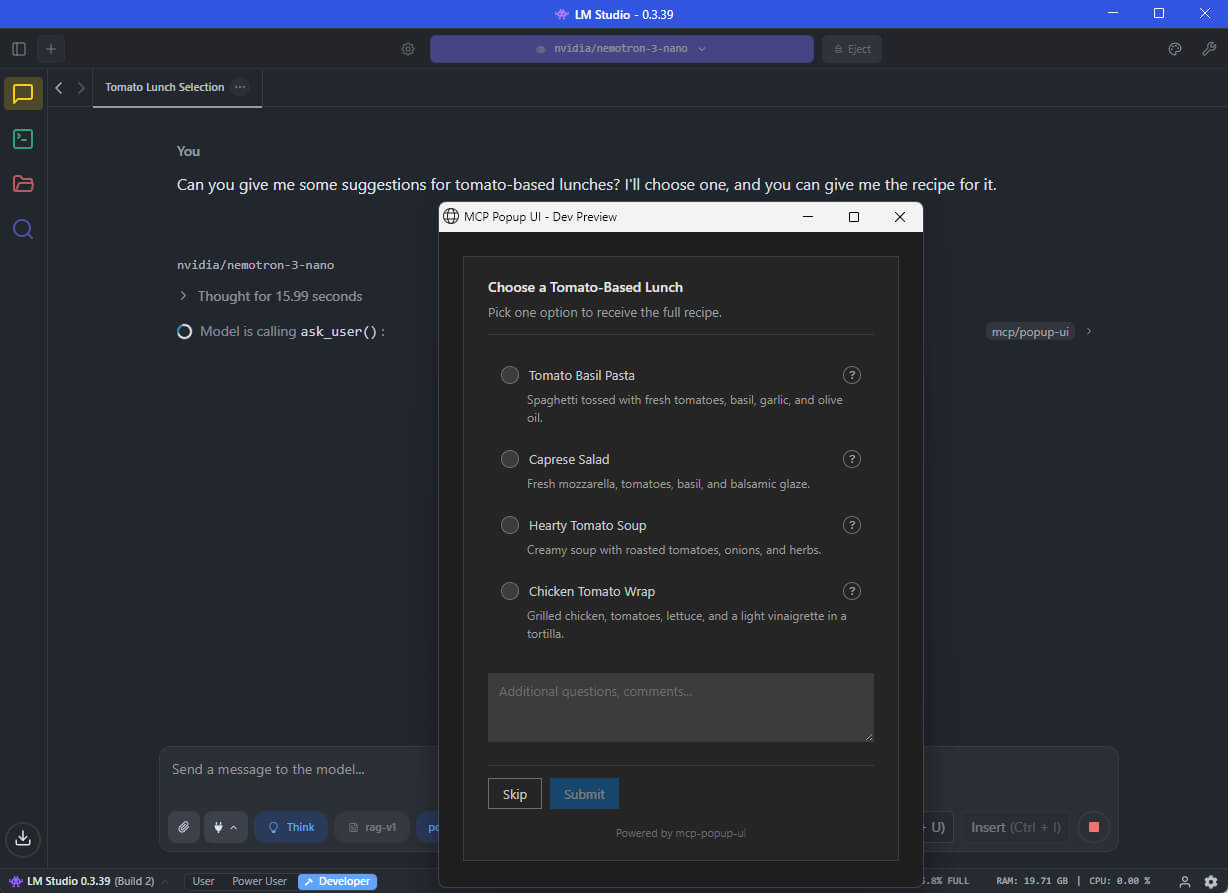
When you chat with an AI assistant (like GitHub Copilot, Claude, or a local LLM), the AI sometimes needs your input - for example, "Which framework do you want?" or "Select the features to include."
Without this tool, the AI would print a numbered list and ask you to type your choice. **With mcp-popup-ui**, a clean popup opens in your browser where you can click your selection directly.
**Two tools are provided:**
| Tool | Purpose | UI Element |
|------|---------|------------|
| `ask_user` | Pick exactly one option | Radio buttons |
| `ask_user_multiple` | Pick one or more options | Checkboxes |
## Installation
Install globally via npm:
```bash
npm install -g mcp-popup-ui
```
Or run directly without installing:
```bash
npx y- mcp-popup-ui
```
**Requirements:** Node.js 18 or higher.
## Setup
Choose the setup guide for your AI application:
### VS Code (GitHub Copilot)
1. Open your project folder in VS Code
2. Create or edit the file `.vscode/mcp.json`:
```json
{
"servers": {
"popup-ui": {
"command": "npx",
"args": ["mcp-popup-ui"]
}
}
}
```
3. Restart VS Code or reload the window
### LM Studio
1. Open LM Studio settings
2. Navigate to the MCP Servers section
3. Add a new server with these settings:
```json
{
"mcp-popup-ui": {
"command": "npx",
"args": ["mcp-popup-ui"]
}
}
```
4. Enable the server and start a new chat
### Ollama (via Open WebUI or similar)
Ollama itself does not natively support MCP. However, you can use it with frontends that support MCP, such as Open WebUI with MCP plugins. The configuration depends on your specific frontend - consult its documentation for adding MCP servers.
### Claude Desktop
Add to your Claude Desktop configuration file:
- **Windows:** `%APPDATA%\Claude\claude_desktop_config.json`
- **macOS:** `~/Library/Application Support/Claude/claude_desktop_config.json`
```json
{
"mcpServers": {
"popup-ui": {
"command": "npx",
"args": ["mcp-popup-ui"]
}
}
}
```
Restart Claude Desktop after saving.
## Copilot Instructions (Optional)
To ensure the AI uses the popup tools automatically instead of listing options in text, add this to your project's `.github/copilot-instructions.md`:
```markdown
## User Input Collection
Use MCP tools for user choices:
- `ask_user` - single selection (radio buttons)
- `ask_user_multiple` - multiple selection (checkboxes)
Use these tools when presenting options like framework choices, implementation approaches, or any list of alternatives.
```
## Tool Reference
### ask_user
Displays a popup with radio buttons. The user picks exactly one option.
**Parameters:**
| Parameter | Required | Description |
|-----------|----------|-------------|
| `options` | Yes | Array of options (minimum 2). Each option has a `label` (required), optional `description`, and optional `recommended` flag. |
| `title` | No | Heading displayed above the options |
| `description` | No | Additional text displayed below the title |
| `allow_other` | No | If `true`, adds a text field for custom input |
| `other_label` | No | Label for the custom input option (default: "Other") |
**Example call:**
```json
{
"options": [
{ "label": "React", "description": "Component-based UI library" },
{ "label": "Vue", "description": "Progressive JavaScript framework" },
{ "label": "Svelte", "description": "Compile-time framework", "recommended": true }
],
"title": "Choose a Frontend Framework",
"description": "Select one framework for your project."
}
```
**Response:**
```json
{
"action": "submit",
"selection": "Svelte"
}
```
If the user clicks Skip:
```json
{
"action": "skip"
}
```
### ask_user_multiple
Displays a popup with checkboxes. The user picks one or more options.
**Parameters:**
| Parameter | Required | Description |
|-----------|----------|-------------|
| `options` | Yes | Array of options (minimum 2). Each option has a `label` (required), optional `description`, and optional `recommended` flag. |
| `title` | No | Heading displayed above the options |
| `description` | No | Additional text displayed below the title |
| `allow_other` | No | If `true`, adds a text field for custom input |
| `other_label` | No | Label for the custom input option (default: "Other") |
**Example call:**
```json
{
"options": [
{ "label": "TypeScript", "recommended": true },
{ "label": "ESLint" },
{ "label": "Prettier" },
{ "label": "Jest" }
],
"title": "Select Project Features",
"description": "Choose all features to include."
}
```
**Response:**
```json
{
"action": "submit",
"selections": ["TypeScript", "ESLint", "Prettier"]
}
```
## Additional Features
- **Skip button:** Users can skip any question without selecting an option
- **Comments field:** Users can add additional notes with their selection
- **Explanation request:** Users can ask for more details about an option before deciding
- **Markdown support:** Option descriptions support Markdown formatting
## Documentation
- [Tool Design Best Practices](docs/TOOL_DESIGN.md) - Research on LLM tool design patterns
## Contributing
See [CONTRIBUTING.md](CONTRIBUTING.md) for development setup and guidelines.
## License
MIT
TDQS
Scored across 2 tools
The two tools are clearly differentiated by singular vs. plural selection. Ask_user restricts to exactly one option, while ask_user_multiple allows multiple selections, with descriptions emphasizing this distinction.
Both tools follow a consistent snake_case verb_noun pattern: ask_user and ask_user_multiple. The naming clearly communicates the shared purpose and the single/multiple distinction.
With only 2 tools, the server feels thin, especially given the broader 'popup-ui' name. The two selection modes cover a narrow niche, and while they are well-defined, the overall surface is minimal.
The tools handle single and multiple choice popups, but other common popup interactions such as free-form text input, simple confirmations, or informational dialogs are missing. Agents must rely on allow_other for custom input, which is not ideal, leaving notable gaps.