
Better GitLab MCP Server
by javens0601
README.md
# Better GitLab MCP Server
## @zereight/mcp-gitlab
[](https://smithery.ai/server/@zereight/gitlab-mcp)
GitLab MCP(Model Context Protocol) Server. **Includes bug fixes and improvements over the original GitLab MCP server.**
<a href="https://glama.ai/mcp/servers/7jwbk4r6d7"><img width="380" height="200" src="https://glama.ai/mcp/servers/7jwbk4r6d7/badge" alt="gitlab mcp MCP server" /></a>
## Usage
### Using with Claude App, Cline, Roo Code, Cursor
When using with the Claude App, you need to set up your API key and URLs directly.
#### npx
```json
{
"mcpServers": {
"GitLab communication server": {
"command": "npx",
"args": ["-y", "@zereight/mcp-gitlab"],
"env": {
"GITLAB_PERSONAL_ACCESS_TOKEN": "your_gitlab_token",
"GITLAB_API_URL": "your_gitlab_api_url",
"GITLAB_READ_ONLY_MODE": "false",
"USE_GITLAB_WIKI": "false", // use wiki api?
"USE_MILESTONE": "false", // use milestone api?
"USE_PIPELINE": "false" // use pipeline api?
}
}
}
}
```
#### vscode .vscode/mcp.json
```json
{
"inputs": [
{
"type": "promptString",
"id": "gitlab-token",
"description": "Gitlab Token to read API",
"password": true
}
],
"servers": {
"GitLab-MCP": {
"type": "stdio",
"command": "npx",
"args": ["-y", "@zereight/mcp-gitlab"],
"env": {
"GITLAB_PERSONAL_ACCESS_TOKEN": "${input:gitlab-token}",
"GITLAB_API_URL": "your-fancy-gitlab-url",
"GITLAB_READ_ONLY_MODE": "true",
...
}
}
}
}
```
#### Docker
- stdio mcp.json
```json
{
"mcpServers": {
"GitLab communication server": {
"command": "docker",
"args": [
"run",
"-i",
"--rm",
"-e",
"GITLAB_PERSONAL_ACCESS_TOKEN",
"-e",
"GITLAB_API_URL",
"-e",
"GITLAB_READ_ONLY_MODE",
"-e",
"USE_GITLAB_WIKI",
"-e",
"USE_MILESTONE",
"-e",
"USE_PIPELINE",
"iwakitakuma/gitlab-mcp"
],
"env": {
"GITLAB_PERSONAL_ACCESS_TOKEN": "your_gitlab_token",
"GITLAB_API_URL": "https://gitlab.com/api/v4", // Optional, for self-hosted GitLab
"GITLAB_READ_ONLY_MODE": "false",
"USE_GITLAB_WIKI": "true",
"USE_MILESTONE": "true",
"USE_PIPELINE": "true"
}
}
}
}
```
- sse
```shell
docker run -i --rm \
-e GITLAB_PERSONAL_ACCESS_TOKEN=your_gitlab_token \
-e GITLAB_API_URL= "https://gitlab.com/api/v4"\
-e GITLAB_READ_ONLY_MODE=true \
-e USE_GITLAB_WIKI=true \
-e USE_MILESTONE=true \
-e USE_PIPELINE=true \
-e SSE=true \
-p 3333:3002 \
iwakitakuma/gitlab-mcp
```
```json
{
"mcpServers": {
"GitLab communication server": {
"type": "sse",
"url": "http://localhost:3333/sse"
}
}
}
```
- streamable-http
```shell
docker run -i --rm \
-e GITLAB_PERSONAL_ACCESS_TOKEN=your_gitlab_token \
-e GITLAB_API_URL="https://gitlab.com/api/v4" \
-e GITLAB_READ_ONLY_MODE=true \
-e USE_GITLAB_WIKI=true \
-e USE_MILESTONE=true \
-e USE_PIPELINE=true \
-e STREAMABLE_HTTP=true \
-p 3333:3002 \
iwakitakuma/gitlab-mcp
```
```json
{
"mcpServers": {
"GitLab communication server": {
"url": "http://localhost:3333/mcp"
}
}
}
```
#### Docker Image Push
```shell
$ sh scripts/image_push.sh docker_user_name
```
### Environment Variables
- `GITLAB_PERSONAL_ACCESS_TOKEN`: Your GitLab personal access token.
- `GITLAB_API_URL`: Your GitLab API URL. (Default: `https://gitlab.com/api/v4`)
- `GITLAB_PROJECT_ID`: Default project ID. If set, Overwrite this value when making an API request.
- `GITLAB_READ_ONLY_MODE`: When set to 'true', restricts the server to only expose read-only operations. Useful for enhanced security or when write access is not needed. Also useful for using with Cursor and it's 40 tool limit.
- `USE_GITLAB_WIKI`: When set to 'true', enables the wiki-related tools (list_wiki_pages, get_wiki_page, create_wiki_page, update_wiki_page, delete_wiki_page). By default, wiki features are disabled.
- `USE_MILESTONE`: When set to 'true', enables the milestone-related tools (list_milestones, get_milestone, create_milestone, edit_milestone, delete_milestone, get_milestone_issue, get_milestone_merge_requests, promote_milestone, get_milestone_burndown_events). By default, milestone features are disabled.
- `USE_PIPELINE`: When set to 'true', enables the pipeline-related tools (list_pipelines, get_pipeline, list_pipeline_jobs, get_pipeline_job, get_pipeline_job_output, create_pipeline, retry_pipeline, cancel_pipeline). By default, pipeline features are disabled.
- `GITLAB_AUTH_COOKIE_PATH`: Path to an authentication cookie file for GitLab instances that require cookie-based authentication. When provided, the cookie will be included in all GitLab API requests.
- `SSE`: When set to 'true', enables the Server-Sent Events transport.
- `STREAMABLE_HTTP`: When set to 'true', enables the Streamable HTTP transport. If both **SSE** and **STREAMABLE_HTTP** are set to 'true', the server will prioritize Streamable HTTP over SSE transport.
[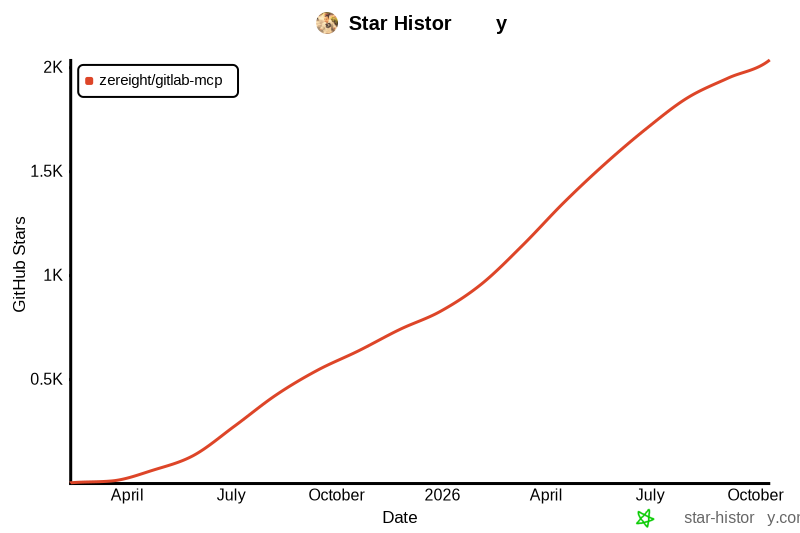](https://www.star-history.com/#zereight/gitlab-mcp&Date)
## Tools 🛠️
+<!-- TOOLS-START -->
1. `create_or_update_file` - Create or update a single file in a GitLab project
2. `search_repositories` - Search for GitLab projects
3. `create_repository` - Create a new GitLab project
4. `get_file_contents` - Get the contents of a file or directory from a GitLab project
5. `push_files` - Push multiple files to a GitLab project in a single commit
6. `create_issue` - Create a new issue in a GitLab project
7. `create_merge_request` - Create a new merge request in a GitLab project
8. `fork_repository` - Fork a GitLab project to your account or specified namespace
9. `create_branch` - Create a new branch in a GitLab project
10. `get_merge_request` - Get details of a merge request (Either mergeRequestIid or branchName must be provided)
11. `get_merge_request_diffs` - Get the changes/diffs of a merge request (Either mergeRequestIid or branchName must be provided)
12. `list_merge_request_diffs` - List merge request diffs with pagination support (Either mergeRequestIid or branchName must be provided)
13. `get_branch_diffs` - Get the changes/diffs between two branches or commits in a GitLab project
14. `update_merge_request` - Update a merge request (Either mergeRequestIid or branchName must be provided)
15. `create_note` - Create a new note (comment) to an issue or merge request
16. `create_merge_request_thread` - Create a new thread on a merge request
17. `mr_discussions` - List discussion items for a merge request
18. `update_merge_request_note` - Modify an existing merge request thread note
19. `create_merge_request_note` - Add a new note to an existing merge request thread
20. `update_issue_note` - Modify an existing issue thread note
21. `create_issue_note` - Add a new note to an existing issue thread
22. `list_issues` - List issues in a GitLab project with filtering options
23. `get_issue` - Get details of a specific issue in a GitLab project
24. `update_issue` - Update an issue in a GitLab project
25. `delete_issue` - Delete an issue from a GitLab project
26. `list_issue_links` - List all issue links for a specific issue
27. `list_issue_discussions` - List discussions for an issue in a GitLab project
28. `get_issue_link` - Get a specific issue link
29. `create_issue_link` - Create an issue link between two issues
30. `delete_issue_link` - Delete an issue link
31. `list_namespaces` - List all namespaces available to the current user
32. `get_namespace` - Get details of a namespace by ID or path
33. `verify_namespace` - Verify if a namespace path exists
34. `get_project` - Get details of a specific project
35. `list_projects` - List projects accessible by the current user
36. `list_labels` - List labels for a project
37. `get_label` - Get a single label from a project
38. `create_label` - Create a new label in a project
39. `update_label` - Update an existing label in a project
40. `delete_label` - Delete a label from a project
41. `list_group_projects` - List projects in a GitLab group with filtering options
42. `list_wiki_pages` - List wiki pages in a GitLab project
43. `get_wiki_page` - Get details of a specific wiki page
44. `create_wiki_page` - Create a new wiki page in a GitLab project
45. `update_wiki_page` - Update an existing wiki page in a GitLab project
46. `delete_wiki_page` - Delete a wiki page from a GitLab project
47. `get_repository_tree` - Get the repository tree for a GitLab project (list files and directories)
48. `list_pipelines` - List pipelines in a GitLab project with filtering options
49. `get_pipeline` - Get details of a specific pipeline in a GitLab project
50. `list_pipeline_jobs` - List all jobs in a specific pipeline
51. `get_pipeline_job` - Get details of a GitLab pipeline job number
52. `get_pipeline_job_output` - Get the output/trace of a GitLab pipeline job number
53. `create_pipeline` - Create a new pipeline for a branch or tag
54. `retry_pipeline` - Retry a failed or canceled pipeline
55. `cancel_pipeline` - Cancel a running pipeline
56. `list_merge_requests` - List merge requests in a GitLab project with filtering options
57. `list_milestones` - List milestones in a GitLab project with filtering options
58. `get_milestone` - Get details of a specific milestone
59. `create_milestone` - Create a new milestone in a GitLab project
60. `edit_milestone` - Edit an existing milestone in a GitLab project
61. `delete_milestone` - Delete a milestone from a GitLab project
62. `get_milestone_issue` - Get issues associated with a specific milestone
63. `get_milestone_merge_requests` - Get merge requests associated with a specific milestone
64. `promote_milestone` - Promote a milestone to the next stage
65. `get_milestone_burndown_events` - Get burndown events for a specific milestone
66. `get_users` - Get GitLab user details by usernames
<!-- TOOLS-END -->
This server cannot be deployed
Maintenance
ActivityInactive
ResponsivenessNo recent community issues