
A
licenseNot graded
qualityD
maintenanceA TypeScript-based MCP server that interacts with Contentful's Delivery API, enabling users to create, query, and summarize text notes through natural language.
6 npm
8
MIT

Powers the REST API for project and task management, handling HTTP requests and routing for the application
Provides database storage for project and task management data, allowing persistent storage and retrieval of project information through Prisma ORM
Provides ORM capabilities for database operations, enabling type-safe database queries and migrations for the project tracker
Implements caching functionality for the project tracker API, improving performance for frequently accessed project and task data
Click on "Deploy Server".
Wait a few minutes for the server to deploy. Once ready, it will show a "Started" state.
In the chat, type @ followed by the MCP server name and your instructions, e.g., "@Project Tracker MCP Server Show me all overdue tasks for project Alpha"
That's it! The server will respond to your query, and you can continue using it as needed.
Here is a step-by-step guide with screenshots.


A TypeScript-based REST API for project and task management with MCP (Model Context Protocol) integration, featuring enterprise-level AI agent capabilities.
Jatinder (Jay) Bhola - Engineering Leader & Tech Lead
🏠 Location: Toronto, ON, Canada
🎯 Expertise: Cloud-Native & Event-Driven Architectures, Building Scalable Systems
"Engineering leader with 10+ years of experience improving developer workflows and scaling cloud-native systems. Proven track record in leading and delivering high-impact, customer-facing platforms and empowering engineering teams to build fast, resilient web applications."
Related MCP server: MCP Server
# Clone the repo
git clone https://github.com/jatinderbhola/mcp-taskflow-tracker-api.git

# setup everything in one command
npm run setup
This will:
✅ Install all dependencies
✅ Start PostgreSQL and Redis services
✅ Create databases and run migrations
✅ Seed test data
✅ Build the project
✅ Run tests to verify everything works
# Start the API server
npm run dev

# In another terminal, test MCP
npm run mcp:test

# Interactive testing with MCP Inspector
npm run mcp:inspectorTry these natural language queries:
"Show Alice's overdue tasks"
"Analyze Bob's workload"
"Assess risk for project Alpha"
Tool | Purpose | Example |
Natural Language Query | Process natural language queries |
|
Workload Analysis | Analyze team member capacity |
|
Risk Assessment | Assess project health |
|
src/
├── routes/                     # API routes
├── controllers/                # API route handlers
├── services/                   # Business logic layer
├── models/                     # Database models (single source of truth)
├── middleware/                 # API routing middleware
├── mcp/                        # MCP server implementation
│   ├── tools/                  # MCP tools
│   ├── promptEngine/           # AI prompt processing
│   └── server.ts               # MCP server
├── config/                     # Database and app configuration
└── test/                       # Test setup and utilities
└── utils/ # Utility functionsTechnical Deep-Dive - Complete MCP implementation details
Production Guide - Enterprise deployment and scaling
Security Roadmap - Production security considerations
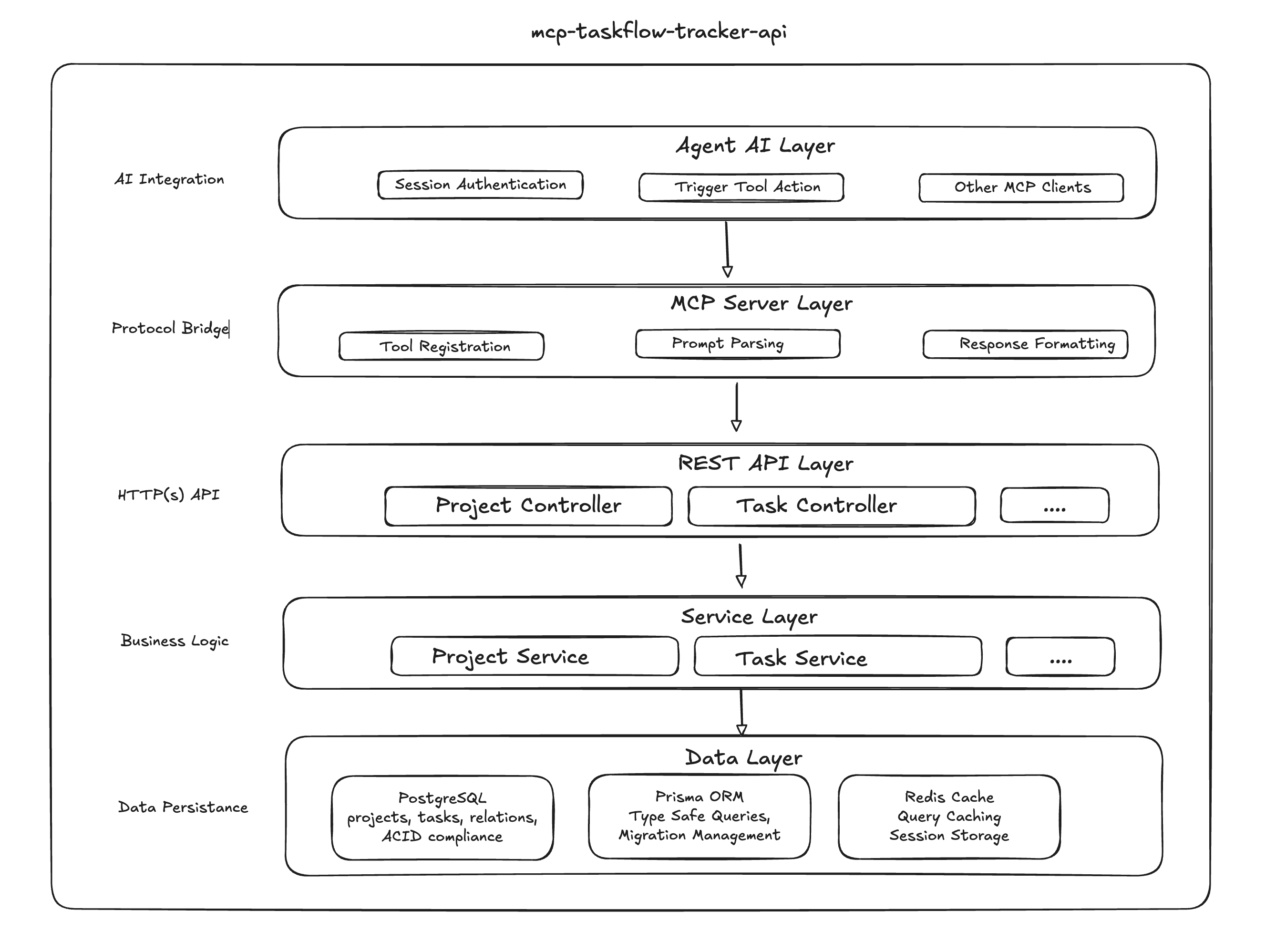

Detailed internal processing pipeline and decision flow

Once the server is running, visit the interactive API documentation:
Swagger UI: http://localhost:3000/api-docs/
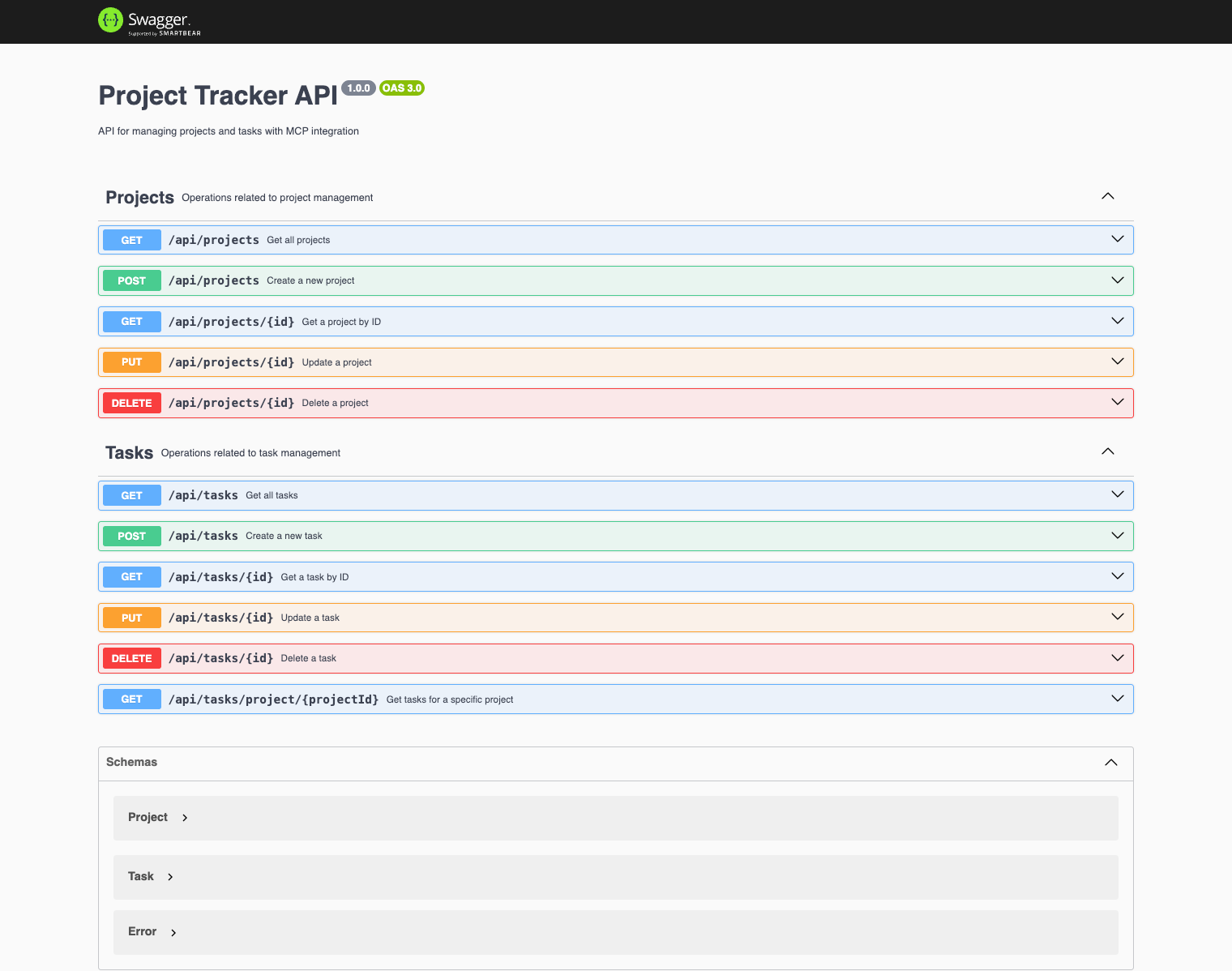
The Swagger documentation provides:
✅ Interactive API testing - Try endpoints directly from the browser
✅ Request/Response examples - See expected data formats
✅ Authentication details - Understand required headers and tokens
✅ Error responses - View possible error codes and messages
✅ Schema definitions - Complete data models for all endpoints
npm run dev          # Start development server
npm run build        # Build for production
npm run mcp:start    # Start MCP server
npm run mcp:test     # Test MCP integration
npm run mcp:inspector # Interactive MCP testingnpm run prisma:generate # Generate Prisma client
npm run prisma:migrate # Run database migrations
npm run prisma:studio # Open Prisma Studionpm test # Run all tests
npm run test:unit # Unit tests only
npm run test:integration # Integration tests onlyCreate a .env file if does not exists
cp .env.example .env⚠️ Warning: THIS
.env.exampleIS CARRYING JUST DEFAUTL ENV KEYS TO KEEP IT SIMPLE FOR THE ASSESSMENT
# Create databases
createdb taskflow
createdb taskflow_test

# Install dependencies
npm install

# Run migrations
npm run prisma:migrate

# Seed test data
node scripts/seed-test-data.js

# Build and test
npm run build
npm run mcp:testResponse Time: < 50ms for simple queries
Accuracy: 95%+ intent recognition
Scalability: 100+ concurrent requests
Cache Hit Rate: 85%+ for repeated queries
This implementation demonstrates:
✅ Modern AI Integration: MCP protocol with natural language processing
✅ Professional Code Quality: Clean TypeScript with proper error handling
✅ System Design Excellence: Layered architecture with clear separation
✅ Enterprise Features: Production-ready with comprehensive testing
✅ User-Friendly Design: Name-based queries instead of email addresses
⚠️ Note: Portions of this codebase were co-authored with the help of AI-assisted code completion tools to accelerate development.
ISC
Process natural language queries with enhanced entity discovery and intelligent analysis
| Name | Required | Description | Default |
|---|---|---|---|
| prompt | Yes | Natural language query (e.g., "Show me John's overdue tasks") |
Does the description disclose side effects, auth requirements, rate limits, or destructive behavior?
No annotations are provided, so the description carries the full burden of behavioral disclosure. It mentions 'enhanced entity discovery and intelligent analysis,' which hints at processing capabilities, but fails to describe key behavioral traits such as whether it's read-only or mutative, authentication needs, rate limits, or what the output looks like (e.g., structured data, analysis results). This leaves significant gaps for an agent to understand how the tool behaves.
Agents need to know what a tool does to the world before calling it. Descriptions should go beyond structured annotations to explain consequences.
Is the description appropriately sized, front-loaded, and free of redundancy?
The description is a single, efficient sentence: 'Process natural language queries with enhanced entity discovery and intelligent analysis.' It is front-loaded with the core purpose and includes no unnecessary words, making it highly concise and well-structured for quick understanding.
Shorter descriptions cost fewer tokens and are easier for agents to parse. Every sentence should earn its place.
Given the tool's complexity, does the description cover enough for an agent to succeed on first attempt?
Given the complexity implied by 'enhanced entity discovery and intelligent analysis,' the lack of annotations, and no output schema, the description is incomplete. It doesn't explain what the tool returns (e.g., analysis results, entities discovered), behavioral constraints, or how it integrates with sibling tools. This leaves the agent with insufficient context for effective use.
Complex tools with many parameters or behaviors need more documentation. Simple tools need less. This dimension scales expectations accordingly.
Does the description clarify parameter syntax, constraints, interactions, or defaults beyond what the schema provides?
The input schema has 100% description coverage, with the 'prompt' parameter clearly documented as a natural language query with length constraints. The description adds minimal value beyond this, as it doesn't provide additional context like examples of effective prompts or semantic nuances. With high schema coverage, the baseline score of 3 is appropriate, as the schema does the heavy lifting.
Input schemas describe structure but not intent. Descriptions should explain non-obvious parameter relationships and valid value ranges.
Does the description clearly state what the tool does and how it differs from similar tools?
The description clearly states the tool's purpose: 'Process natural language queries with enhanced entity discovery and intelligent analysis.' It specifies the verb ('process') and resource ('natural language queries'), and mentions key capabilities ('entity discovery', 'intelligent analysis'). However, it doesn't explicitly differentiate from sibling tools like 'Risk Assessment' or 'Workload Analysis' in terms of when to use each, which prevents a perfect score.
Agents choose between tools based on descriptions. A clear purpose with a specific verb and resource helps agents select the right tool.
Does the description explain when to use this tool, when not to, or what alternatives exist?
The description provides no guidance on when to use this tool versus the sibling tools ('Risk Assessment' and 'Workload Analysis'). It doesn't specify contexts, exclusions, or alternatives. The only implied usage is for natural language queries, but this is too vague for effective tool selection among siblings.
Agents often have multiple tools that could apply. Explicit usage guidance like "use X instead of Y when Z" prevents misuse.
Comprehensive project risk assessment with pattern detection and predictive analytics
| Name | Required | Description | Default |
|---|---|---|---|
| projectId | Yes | Project ID to assess (e.g., "project-1", "alpha") |
Does the description disclose side effects, auth requirements, rate limits, or destructive behavior?
With no annotations provided, the description carries the full burden of behavioral disclosure. It mentions 'comprehensive' assessment with 'pattern detection and predictive analytics', which hints at analysis capabilities, but doesn't disclose critical behavioral traits like whether this is a read-only operation, if it requires specific permissions, what the output format might be, or any rate limits. The description is too vague about actual behavior.
Agents need to know what a tool does to the world before calling it. Descriptions should go beyond structured annotations to explain consequences.
Is the description appropriately sized, front-loaded, and free of redundancy?
The description is a single, efficient sentence that gets straight to the point without unnecessary words. It's appropriately sized for a tool with one parameter, though it could be slightly more structured by separating core function from additional features.
Shorter descriptions cost fewer tokens and are easier for agents to parse. Every sentence should earn its place.
Given the tool's complexity, does the description cover enough for an agent to succeed on first attempt?
Given the complexity implied by 'comprehensive risk assessment' with analytics, no annotations, and no output schema, the description is incomplete. It doesn't explain what 'comprehensive' entails, what kind of risks are assessed, how results are returned, or any dependencies. For a tool that likely produces detailed analysis, this leaves significant gaps for an AI agent.
Complex tools with many parameters or behaviors need more documentation. Simple tools need less. This dimension scales expectations accordingly.
Does the description clarify parameter syntax, constraints, interactions, or defaults beyond what the schema provides?
The schema description coverage is 100%, with the single parameter 'projectId' well-documented in the schema. The description doesn't add any meaningful parameter semantics beyond what the schema already provides (e.g., it doesn't explain how the projectId influences the risk assessment or what formats are expected). Baseline 3 is appropriate when the schema does the heavy lifting.
Input schemas describe structure but not intent. Descriptions should explain non-obvious parameter relationships and valid value ranges.
Does the description clearly state what the tool does and how it differs from similar tools?
The description clearly states the tool performs 'comprehensive project risk assessment' with 'pattern detection and predictive analytics', specifying both the verb (assessment) and resource (project risk). However, it doesn't explicitly distinguish this from sibling tools like 'Natural Language Query' or 'Workload Analysis', which might also involve analysis functions.
Agents choose between tools based on descriptions. A clear purpose with a specific verb and resource helps agents select the right tool.
Does the description explain when to use this tool, when not to, or what alternatives exist?
The description provides no guidance on when to use this tool versus the sibling tools. It doesn't mention any prerequisites, alternatives, or specific contexts where this tool is preferred over others like 'Workload Analysis' for risk-related tasks.
Agents often have multiple tools that could apply. Explicit usage guidance like "use X instead of Y when Z" prevents misuse.
Comprehensive workload analysis with proactive insights and predictive recommendations
| Name | Required | Description | Default |
|---|---|---|---|
| assignee | Yes | Person to analyze (e.g., "John", "Jane") |
Does the description disclose side effects, auth requirements, rate limits, or destructive behavior?
No annotations are provided, so the description carries full burden. While 'analysis' suggests a read operation, it doesn't clarify whether this tool makes changes, requires specific permissions, has rate limits, or what format results take. 'Proactive insights and predictive recommendations' hints at computational complexity but lacks concrete behavioral details needed for safe invocation.
Agents need to know what a tool does to the world before calling it. Descriptions should go beyond structured annotations to explain consequences.
Is the description appropriately sized, front-loaded, and free of redundancy?
The description is a single, efficient sentence that gets straight to the point without unnecessary words. While it could be more informative, every word contributes to describing the tool's function. The structure is appropriately front-loaded with the core purpose.
Shorter descriptions cost fewer tokens and are easier for agents to parse. Every sentence should earn its place.
Given the tool's complexity, does the description cover enough for an agent to succeed on first attempt?
For a tool with no annotations, no output schema, and sibling tools present, the description is insufficiently complete. It doesn't explain what 'workload' encompasses, what format results take, or how this differs from sibling tools. The agent lacks necessary context to use this tool effectively versus alternatives.
Complex tools with many parameters or behaviors need more documentation. Simple tools need less. This dimension scales expectations accordingly.
Does the description clarify parameter syntax, constraints, interactions, or defaults beyond what the schema provides?
Schema description coverage is 100% with only one parameter ('assignee') clearly documented in the schema. The description adds no additional parameter information beyond what the schema already provides. With high schema coverage and minimal parameters, the baseline score of 3 is appropriate - the description doesn't compensate but doesn't need to given the schema's completeness.
Input schemas describe structure but not intent. Descriptions should explain non-obvious parameter relationships and valid value ranges.
Does the description clearly state what the tool does and how it differs from similar tools?
The description states the tool performs 'workload analysis' with 'insights and recommendations', which gives a general purpose but lacks specificity about what resources or data it analyzes. It doesn't clearly distinguish from sibling tools like 'Risk Assessment' or 'Natural Language Query' - all could potentially analyze workload data. The description is somewhat vague rather than tautological.
Agents choose between tools based on descriptions. A clear purpose with a specific verb and resource helps agents select the right tool.
Does the description explain when to use this tool, when not to, or what alternatives exist?
No guidance is provided about when to use this tool versus alternatives. The description doesn't mention prerequisites, appropriate contexts, or exclusions. With sibling tools like 'Risk Assessment' and 'Natural Language Query' available, the agent receives no help in choosing between them for workload-related tasks.
Agents often have multiple tools that could apply. Explicit usage guidance like "use X instead of Y when Z" prevents misuse.
Recent tool additions, removals, and schema changes observed during successful MCP inspections.
Natural Language QueryRisk AssessmentWorkload AnalysisScored across 3 tools
Each tool has a clearly distinct purpose: Natural Language Query handles query processing, Risk Assessment focuses on risk analysis, and Workload Analysis deals with workload insights. There is no overlap in their described functions, making them easily distinguishable.
The tool names use a mixed convention: 'Natural Language Query' and 'Risk Assessment' are multi-word phrases with spaces, while 'Workload Analysis' follows a similar pattern but with slight stylistic variation. They are readable but lack a strict verb_noun or other consistent naming pattern.
With 3 tools, the count is borderline for a project tracker server. It feels thin, as typical project management domains might require more operations (e.g., task creation, status updates, reporting). However, the tools cover high-level analysis functions, so it's not severely lacking.
For a project tracker domain, there are significant gaps in the tool surface. Missing are core CRUD operations like creating/updating projects or tasks, tracking progress, or managing resources. The existing tools focus only on analysis, leaving agents unable to perform basic project management actions.
Work management where AI agents are first-class members: tasks, projects, memory over hosted MCP
Task management your AI agents can actually run. One line becomes a context-ready task over MCP.
Project management shared by people and AI agents, with persistent project state through MCP.
Nifty's MCP server — exposes tasks, projects, messages, and files as tools for AI agents.