
my-mcp-server
README.md
# my-mcp-server
[](https://github.com/jason-bourne-gg/my-mcp-server/actions/workflows/ci.yml)
An [MCP](https://modelcontextprotocol.io) server that exposes **Aniket Charjan's
resume as a queryable API for AI assistants**. Add it to Claude Desktop, Cursor,
or any MCP client and ask *"What did Aniket do at BrowserStack?"* or *"Has he
shipped anything with WebRTC?"* — answered from structured, sourced data instead
of guesswork.
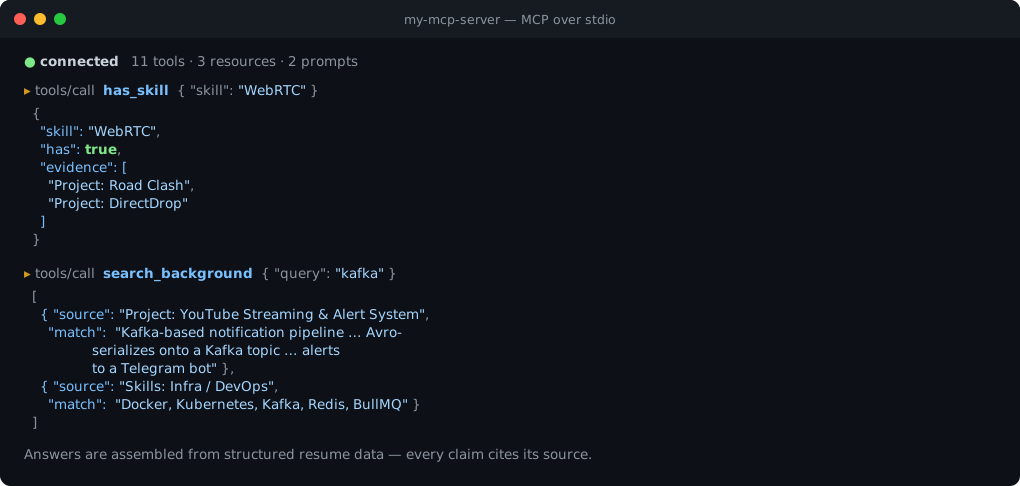
*Real output from the server — `has_skill` returns evidence rather than a yes/no,
and `search_background` cites the project or skill group each match came from.*
It implements all three MCP primitives — **Tools**, **Resources**, and
**Prompts** — so it works as a complete reference server, not just a tool dump.
## Tools
| Tool | Returns |
| --- | --- |
| `get_profile` | Name, current role, location, summary, links |
| `get_experience` | Full work history with highlights and per-role stack |
| `get_projects` | All side projects |
| `get_project(name)` | One project by name (partial match) |
| `get_skills` | Skills grouped by category |
| `has_skill(skill)` | Whether he has a skill **+ supporting evidence** |
| `get_highlights` | Headline career metrics |
| `get_education` | Education history |
| `get_contact` | Contact details and availability |
| `get_resume` | The entire resume as one Markdown document |
| `search_background(query)` | Free-text AND-search across experience, projects, skills |
## Resources
| URI | Content |
| --- | --- |
| `resume://full` | The full resume as Markdown |
| `resume://profile` | Profile summary as JSON |
| `resume://all` | All structured data as JSON |
## Prompts
| Prompt | Purpose |
| --- | --- |
| `screen_for_role(job_description)` | Score Aniket's fit for a role, citing evidence |
| `draft_outreach(company, role?)` | Draft a tailored recruiter outreach message |
## Use it
No install and no npm account needed — npm can run it straight from this repo:
```bash
npx -y github:jason-bourne-gg/my-mcp-server
```
That clones the repo, builds it, and starts the server on stdio.
Or clone it yourself if you want to poke at the source:
```bash
git clone https://github.com/jason-bourne-gg/my-mcp-server.git
cd my-mcp-server
npm install && npm run build
```
### Claude Desktop
Add to `claude_desktop_config.json` (Settings → Developer → Edit Config), using
the absolute path to the built file:
```json
{
"mcpServers": {
"aniket": {
"command": "node",
"args": ["/absolute/path/to/my-mcp-server/dist/index.js"]
}
}
}
```
Restart Claude Desktop, then ask: *"Using the aniket tools, what's his experience with LLMs?"*
### Cursor
Add the same block to `~/.cursor/mcp.json` (or Settings → MCP).
To skip the build step entirely, point the client at the repo instead:
```json
{
"mcpServers": {
"aniket": {
"command": "npx",
"args": ["-y", "github:jason-bourne-gg/my-mcp-server"]
}
}
}
```
## Develop
```bash
npm install
npm run build # tsc → dist/
npm start # run the built server on stdio
```
Smoke-test over stdio without a client:
```bash
printf '%s\n' \
'{"jsonrpc":"2.0","id":1,"method":"initialize","params":{"protocolVersion":"2024-11-05","capabilities":{},"clientInfo":{"name":"t","version":"1"}}}' \
'{"jsonrpc":"2.0","method":"notifications/initialized"}' \
'{"jsonrpc":"2.0","id":2,"method":"tools/list","params":{}}' \
'{"jsonrpc":"2.0","id":3,"method":"resources/list","params":{}}' \
'{"jsonrpc":"2.0","id":4,"method":"prompts/list","params":{}}' \
| node dist/index.js
```
All content lives in `src/data.ts` — edit there and rebuild.
## How it works
A stdio MCP server built on
[`@modelcontextprotocol/sdk`](https://github.com/modelcontextprotocol/typescript-sdk).
It registers the `tools`, `resources`, and `prompts` capabilities and handles the
corresponding `list` / `call` / `read` / `get` requests. `search_background` and
`has_skill` run over a flattened index of every experience highlight, project, and
skill, returning each hit with its source. Tool handling is wrapped so a single
bad request can never crash the server, and `SIGINT`/`SIGTERM` shut it down
cleanly.
## License
[MIT](LICENSE) © Aniket Ravindra Charjan
TDQS
A3.7/5.0
Scored across 11 tools
Disambiguation5/5
Each tool targets a distinct piece of information about the individual, with clear boundaries between contact, education, experience, projects, skills, and search. No two tools overlap in purpose.
Naming Consistency4/5
Most tools follow a consistent get_<noun> pattern, but has_skill and search_background deviate from this convention, introducing minor inconsistency.
Tool Count5/5
With 11 tools, the server covers a wide range of personal and professional details without being excessive. Each tool serves a distinct informational need.
Completeness5/5
The set covers all major aspects of a personal profile: contact, education, experience, skills, projects, resume, and search. It provides comprehensive read access to the individual's background.
Maintenance
ActivitySlowing
ResponsivenessNo issues