
A
licenseA
qualityC
maintenanceLocal-first MCP server that gives any AI coding agent per-project memory, workflow intelligence, and always-on, lossless token & context optimization.
37
30 npm
6
MIT

Allows the server to monitor repository-specific activities and poll for updates on development workflows.
Enables real-time monitoring of CI runs, polling for status changes and surfacing test outcomes or deployment results back to the agent.
Supports receiving and processing deployment notifications from Vercel through a dedicated webhook listener.
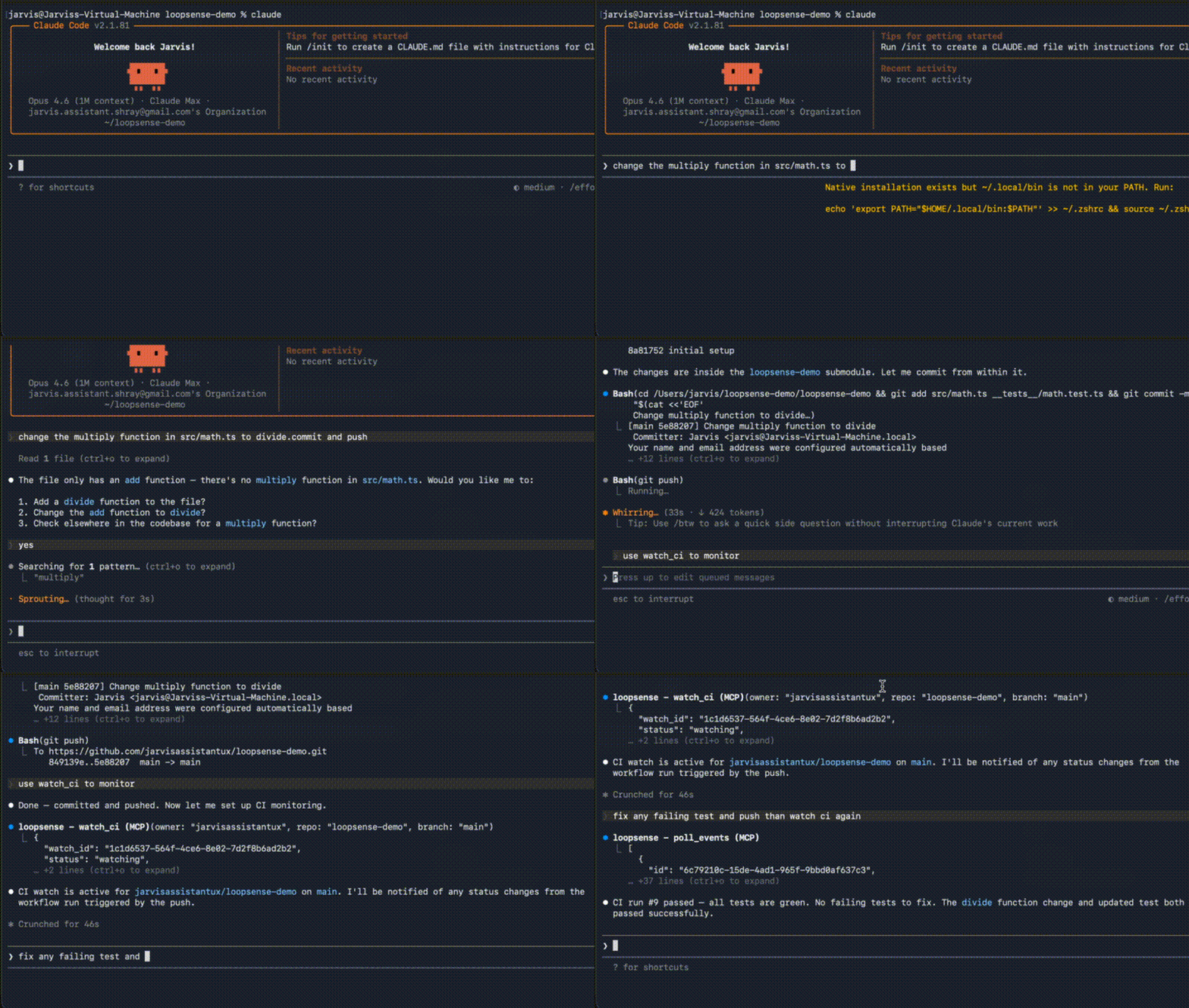
LoopSense is an open-source MCP server that closes the feedback loop for AI coding agents — giving them real-time visibility into CI results, deployments, test outcomes, and file system changes.
When an AI agent pushes code, runs tests, or triggers a deployment, LoopSense watches the downstream effects and surfaces them back to the agent. No more blind actions.
Supported sources:
GitHub Actions CI runs (polling)
Local processes (stdout/stderr capture, exit codes)
File system changes (via chokidar)
HTTP endpoints (polling, with status/body assertions)
Incoming webhooks (lightweight HTTP server)
Related MCP server: warmstart
Node.js 18+
npm install -g @loopsense/mcpOr run directly with npx:
npx @loopsense/mcpClaude Code (one-liner):
claude mcp add loopsense -e GITHUB_TOKEN=ghp_yourtoken -- npx -y @loopsense/mcpOr add manually to your claude_desktop_config.json (or equivalent MCP host config):
{
  "mcpServers": {
    "loopsense": {
      "command": "npx",
      "args": ["-y", "@loopsense/mcp"],
      "env": {
        "GITHUB_TOKEN": "ghp_your_token_here"
      }
    }
  }
}
Or if installed globally:
{
  "mcpServers": {
    "loopsense": {
      "command": "loopsense",
      "env": {
        "GITHUB_TOKEN": "ghp_your_token_here"
      }
    }
  }
}Variable | Description |
| GitHub personal access token for CI polling |
watch_ciWatch a GitHub Actions workflow run. Polls every 30 seconds and emits events on status changes.
{
  "owner": "acme",
  "repo": "api",
  "branch": "main",
  "action_id": "deploy-2024-01"
}watch_processSpawn a local process and capture its output and exit code.
{
  "command": "npm",
  "args": ["test"],
  "cwd": "/path/to/project",
  "action_id": "run-tests"
}watch_fileWatch a file or directory for changes.
{
  "path": "/path/to/dir",
  "pattern": "**/*.ts",
  "action_id": "file-changes"
}watch_urlPoll an HTTP endpoint and detect status or body changes.
{
  "url": "https://api.example.com/health",
  "interval": 15,
  "expect": {
    "status": 200,
    "body_contains": "\"status\":\"ok\""
  }
}watch_webhookStart a local HTTP server to receive webhook payloads.
{
  "source_type": "vercel",
  "port": 9876
}
Configure your webhook sender to POST to http://localhost:9876.
check_consequencesGet events for a specific action or all recent events.
{
  "action_id": "deploy-2024-01"
}list_watchesList all active watchers.
cancel_watchStop a watcher by ID.
{
  "watch_id": "uuid-here"
}poll_eventsGet events since a timestamp (fallback for clients without notification support).
{
  "since": "2024-01-01T00:00:00.000Z"
}LoopSense exposes two MCP resources that update reactively:
loopsense://timeline/recent — last 100 events across all watches
loopsense://watches/active — all currently active watches
loopsense://consequences/{action_id} — events for a specific action
An agent workflow might look like:
Agent pushes code to a branch
Agent calls watch_ci with action_id: "my-pr-123"
LoopSense polls GitHub Actions every 30 seconds
When CI completes, agent calls check_consequences with action_id: "my-pr-123"
Agent sees the test failures and fixes them
Events and watch records are persisted to ~/.loopsense/events.db (SQLite). Active watches are resumed automatically on server restart.
git clone https://github.com/jarvisassistantux/loopsense
cd loopsense
npm install
npm run dev       # run in dev mode (tsx)
npm run build     # compile with tsup
npm run typecheck # TypeScript check
npm test # run testsMIT
Stop and remove a watcher
| Name | Required | Description | Default |
|---|---|---|---|
| watch_id | Yes | Watch ID to cancel |
Does the description disclose side effects, auth requirements, rate limits, or destructive behavior?
No annotations are provided, so the description carries full disclosure burden. While 'remove' implies mutation, it lacks critical behavioral details: failure mode if watch_id is invalid, whether cancellation is immediate or graceful, and effects on the underlying resource being watched.
Agents need to know what a tool does to the world before calling it. Descriptions should go beyond structured annotations to explain consequences.
Is the description appropriately sized, front-loaded, and free of redundancy?
Extremely terse at 5 words, but no wasted sentences. However, given zero annotations and a complex sibling ecosystem, the brevity leaves operational gaps that a slightly longer description could address.
Shorter descriptions cost fewer tokens and are easier for agents to parse. Every sentence should earn its place.
Given the tool's complexity, does the description cover enough for an agent to succeed on first attempt?
Inadequate for the tool ecosystem complexity (8 siblings including multiple watch types). No output schema or annotations means the description should explain the watch lifecycle and relationship to other tools, which it does not.
Complex tools with many parameters or behaviors need more documentation. Simple tools need less. This dimension scales expectations accordingly.
Does the description clarify parameter syntax, constraints, interactions, or defaults beyond what the schema provides?
With 100% schema description coverage ('Watch ID to cancel'), the schema documents the parameter adequately. The description adds no additional semantics beyond implying the watch_id comes from an existing watcher, meeting the baseline.
Input schemas describe structure but not intent. Descriptions should explain non-obvious parameter relationships and valid value ranges.
Does the description clearly state what the tool does and how it differs from similar tools?
States clear verbs ('Stop and remove') and resource ('watcher'), distinguishing it from creation-oriented siblings like watch_file. However, it doesn't explicitly clarify that this operates on watches created by the various watch_* tools or confirm it works across all watch types.
Agents choose between tools based on descriptions. A clear purpose with a specific verb and resource helps agents select the right tool.
Does the description explain when to use this tool, when not to, or what alternatives exist?
Provides no guidance on when to use this tool versus alternatives, nor does it mention prerequisites (e.g., obtaining watch_id from list_watches or creation tools) or cleanup implications.
Agents often have multiple tools that could apply. Explicit usage guidance like "use X instead of Y when Z" prevents misuse.
Get events associated with an agent action, or all recent events
| Name | Required | Description | Default |
|---|---|---|---|
| action_id | No | Action ID to filter by (optional — omit for all recent) |
Does the description disclose side effects, auth requirements, rate limits, or destructive behavior?
No annotations are provided, so the description carries full disclosure burden. It does not specify what constitutes 'recent' (time window), whether events are consumed/destructively read, or the return format. 'Get' implies read-only but lacks explicit safety confirmation.
Agents need to know what a tool does to the world before calling it. Descriptions should go beyond structured annotations to explain consequences.
Is the description appropriately sized, front-loaded, and free of redundancy?
Single sentence efficiently covers both use cases. Front-loaded with the verb 'Get'. However, given the lack of annotations and output schema, the brevity may be excessive—slightly more detail would improve utility without sacrificing clarity.
Shorter descriptions cost fewer tokens and are easier for agents to parse. Every sentence should earn its place.
Given the tool's complexity, does the description cover enough for an agent to succeed on first attempt?
Covers the basic input contract adequately given the single optional parameter. However, without an output schema or annotations, the description should have disclosed behavioral traits like time windows for 'recent', pagination, or event lifecycle (consumed vs. peeked).
Complex tools with many parameters or behaviors need more documentation. Simple tools need less. This dimension scales expectations accordingly.
Does the description clarify parameter syntax, constraints, interactions, or defaults beyond what the schema provides?
With 100% schema coverage, the baseline is 3. The description adds valuable semantic context by explaining the two invocation modes: when 'action_id' is provided vs. omitted ('all recent'), effectively documenting the parameter's behavioral impact beyond the schema definition.
Input schemas describe structure but not intent. Descriptions should explain non-obvious parameter relationships and valid value ranges.
Does the description clearly state what the tool does and how it differs from similar tools?
Uses specific verb 'Get' and resource 'events'. Clearly delineates the dual scope: specific 'agent action' vs 'all recent events'. However, it fails to explicitly distinguish from sibling 'poll_events', leaving ambiguity about the retrieval mechanism.
Agents choose between tools based on descriptions. A clear purpose with a specific verb and resource helps agents select the right tool.
Does the description explain when to use this tool, when not to, or what alternatives exist?
Describes the two operational modes (filtered vs unfiltered) but provides no explicit guidance on when to use each, and fails to mention sibling alternatives like 'poll_events' or when to prefer this over other watch-related tools.
Agents often have multiple tools that could apply. Explicit usage guidance like "use X instead of Y when Z" prevents misuse.
List all active watchers
| Name | Required | Description | Default |
|---|---|---|---|
No parameters | |||
Does the description disclose side effects, auth requirements, rate limits, or destructive behavior?
No annotations provided; description carries full burden but minimally discloses only the 'active' filter. Missing return format, pagination behavior, performance cost, or relationship to watch lifecycle states.
Agents need to know what a tool does to the world before calling it. Descriptions should go beyond structured annotations to explain consequences.
Is the description appropriately sized, front-loaded, and free of redundancy?
Extremely efficient four-word description with zero redundancy. Front-loaded with action verb and contains no filler.
Shorter descriptions cost fewer tokens and are easier for agents to parse. Every sentence should earn its place.
Given the tool's complexity, does the description cover enough for an agent to succeed on first attempt?
Sufficient for a zero-parameter tool but leaves significant gap regarding return values since no output schema exists. Agent understands the action but not the structure or content of the watch list returned.
Complex tools with many parameters or behaviors need more documentation. Simple tools need less. This dimension scales expectations accordingly.
Does the description clarify parameter syntax, constraints, interactions, or defaults beyond what the schema provides?
Zero parameters present; baseline 4 applies per scoring rules. No parameter description required or provided.
Input schemas describe structure but not intent. Descriptions should explain non-obvious parameter relationships and valid value ranges.
Does the description clearly state what the tool does and how it differs from similar tools?
Clear verb (List) and resource (active watchers). The scope word 'all' and state 'active' help distinguish this aggregation tool from sibling creation tools (watch_file, etc.), though explicit contrast is absent.
Agents choose between tools based on descriptions. A clear purpose with a specific verb and resource helps agents select the right tool.
Does the description explain when to use this tool, when not to, or what alternatives exist?
Provides no guidance on when to invoke versus alternatives like poll_events, or how the returned list should be used with cancel_watch. No prerequisites or conditions specified.
Agents often have multiple tools that could apply. Explicit usage guidance like "use X instead of Y when Z" prevents misuse.
Get new events since a timestamp (push notification fallback)
| Name | Required | Description | Default |
|---|---|---|---|
| since | No | ISO 8601 timestamp — returns events after this time |
Does the description disclose side effects, auth requirements, rate limits, or destructive behavior?
With no annotations provided, the description carries the full disclosure burden. It successfully adds the 'push notification fallback' behavioral context but fails to clarify critical operational details: whether polling consumes/removes events from a queue, handling of duplicate events, or pagination limits for large event sets.
Agents need to know what a tool does to the world before calling it. Descriptions should go beyond structured annotations to explain consequences.
Is the description appropriately sized, front-loaded, and free of redundancy?
The description is a single, highly efficient sentence that front-loads the action ('Get new events') and places contextual clarifiers at the end. Zero wasted words; every token earns its place in guiding tool selection.
Shorter descriptions cost fewer tokens and are easier for agents to parse. Every sentence should earn its place.
Given the tool's complexity, does the description cover enough for an agent to succeed on first attempt?
Given the tool's simplicity (one optional parameter, no nested objects) and clear naming convention relative to sibling watch tools, the description provides adequate context for selection. However, the absence of an output schema and lack of description regarding return event structure or consumption behavior leaves minor gaps in operational context.
Complex tools with many parameters or behaviors need more documentation. Simple tools need less. This dimension scales expectations accordingly.
Does the description clarify parameter syntax, constraints, interactions, or defaults beyond what the schema provides?
Input schema coverage is 100% with the 'since' parameter fully documented as an 'ISO 8601 timestamp'. The description mentions 'since a timestamp' but adds no additional semantic value (e.g., 'use the timestamp returned by the previous poll') beyond the schema definitions, meeting the baseline for high-coverage schemas.
Input schemas describe structure but not intent. Descriptions should explain non-obvious parameter relationships and valid value ranges.
Does the description clearly state what the tool does and how it differs from similar tools?
The description uses a specific verb ('Get') and resource ('events') with clear scope ('since a timestamp'). The parenthetical '(push notification fallback)' effectively distinguishes this from the sibling watch_* tools by clarifying its architectural role as a polling alternative to push notifications.
Agents choose between tools based on descriptions. A clear purpose with a specific verb and resource helps agents select the right tool.
Does the description explain when to use this tool, when not to, or what alternatives exist?
The phrase 'push notification fallback' implies when to use this tool (when push mechanisms are unavailable), positioning it against the watch_* siblings. However, it lacks explicit guidance on when-not-to-use or prerequisites, requiring the agent to infer the usage pattern from the 'fallback' hint alone.
Agents often have multiple tools that could apply. Explicit usage guidance like "use X instead of Y when Z" prevents misuse.
Watch a GitHub Actions workflow run and emit events on status changes
| Name | Required | Description | Default |
|---|---|---|---|
| owner | Yes | GitHub repo owner | |
| repo | Yes | GitHub repo name | |
| branch | No | Branch to watch (optional) | |
| run_id | No | Specific run ID to watch (optional) | |
| action_id | No | ID to associate events with an agent action |
Does the description disclose side effects, auth requirements, rate limits, or destructive behavior?
No annotations provided, so description carries full burden. Mentions 'emit events on status changes' but lacks crucial behavioral details: whether this blocks indefinitely, how long it persists, event delivery mechanism, rate limits, or how to terminate the watch (relevant given cancel_watch exists).
Agents need to know what a tool does to the world before calling it. Descriptions should go beyond structured annotations to explain consequences.
Is the description appropriately sized, front-loaded, and free of redundancy?
Single 11-word sentence with zero waste. Front-loaded with action ('Watch') and resource ('GitHub Actions workflow run'), followed by behavioral consequence ('emit events'). Every word earns its place.
Shorter descriptions cost fewer tokens and are easier for agents to parse. Every sentence should earn its place.
Given the tool's complexity, does the description cover enough for an agent to succeed on first attempt?
Adequate for basic identification given 100% schema coverage, but incomplete for a long-running subscription tool. Missing lifecycle context (creates persistent watch), event format expectations, and connection to sibling management tools (cancel_watch, list_watches) necessary for proper agent operation.
Complex tools with many parameters or behaviors need more documentation. Simple tools need less. This dimension scales expectations accordingly.
Does the description clarify parameter syntax, constraints, interactions, or defaults beyond what the schema provides?
Schema coverage is 100%, establishing baseline 3. The phrase 'GitHub Actions workflow run' contextualizes owner/repo as GitHub coordinates, but description provides no additional semantics beyond schema (e.g., that run_id targets a specific execution, or how action_id correlates events).
Input schemas describe structure but not intent. Descriptions should explain non-obvious parameter relationships and valid value ranges.
Does the description clearly state what the tool does and how it differs from similar tools?
Specific verb 'Watch' and resource 'GitHub Actions workflow run' clearly identified. Explicitly distinguishes from generic siblings (watch_file, watch_process) by specifying the CI domain, and from poll_events by implying continuous monitoring vs polling.
Agents choose between tools based on descriptions. A clear purpose with a specific verb and resource helps agents select the right tool.
Does the description explain when to use this tool, when not to, or what alternatives exist?
No guidance on when to use this versus poll_events or checking run status manually. Does not mention prerequisites (existing workflow run) or relationship to cancel_watch for cleanup. Agent must infer usage context from the name alone.
Agents often have multiple tools that could apply. Explicit usage guidance like "use X instead of Y when Z" prevents misuse.
Watch a file or directory for changes using chokidar
| Name | Required | Description | Default |
|---|---|---|---|
| path | Yes | File or directory path to watch | |
| pattern | No | Glob pattern filter (optional) | |
| action_id | No | Link events to an agent action |
Does the description disclose side effects, auth requirements, rate limits, or destructive behavior?
No annotations provided, so description carries full burden. Mentions 'chokidar' (Node.js watcher library) but fails to disclose: whether this returns immediately or blocks, what it returns (watch ID?), how events are delivered (callback vs polled), or that the watch persists until cancel_watch is called.
Agents need to know what a tool does to the world before calling it. Descriptions should go beyond structured annotations to explain consequences.
Is the description appropriately sized, front-loaded, and free of redundancy?
Single sentence with no filler. Efficiently conveys the core operation and implementation library. However, given the complexity of file watching and lack of annotations/output schema, this extreme brevity leaves critical gaps.
Shorter descriptions cost fewer tokens and are easier for agents to parse. Every sentence should earn its place.
Given the tool's complexity, does the description cover enough for an agent to succeed on first attempt?
Severely incomplete for a stateful operation with no output schema or annotations. Fails to explain the watch lifecycle, return value (likely a watch handle given cancel_watch sibling), event delivery mechanism (action_id hints at callbacks but is unexplained), or relationship to poll_events and list_watches.
Complex tools with many parameters or behaviors need more documentation. Simple tools need less. This dimension scales expectations accordingly.
Does the description clarify parameter syntax, constraints, interactions, or defaults beyond what the schema provides?
Schema has 100% coverage documenting path, pattern, and action_id. Description adds no parameter syntax, validation rules, or examples beyond what the schema provides, warranting the baseline score for high-coverage schemas.
Input schemas describe structure but not intent. Descriptions should explain non-obvious parameter relationships and valid value ranges.
Does the description clearly state what the tool does and how it differs from similar tools?
Clearly states the verb (Watch), resource (file or directory), and change detection focus. Implicitly distinguishes from siblings like watch_url and watch_process by specifying 'file or directory', though could explicitly mention these alternatives.
Agents choose between tools based on descriptions. A clear purpose with a specific verb and resource helps agents select the right tool.
Does the description explain when to use this tool, when not to, or what alternatives exist?
Provides no guidance on when to prefer this over watch_process for log files, or when to use poll_events versus setting up a watch. No mention of prerequisites like path existence or permissions.
Agents often have multiple tools that could apply. Explicit usage guidance like "use X instead of Y when Z" prevents misuse.
Spawn and monitor a local process, capturing stdout/stderr and exit code
| Name | Required | Description | Default |
|---|---|---|---|
| command | Yes | Command to run | |
| args | No | Command arguments | |
| cwd | No | Working directory (optional) | |
| action_id | No | Link events to an agent action |
Does the description disclose side effects, auth requirements, rate limits, or destructive behavior?
With no annotations provided, the description carries the full behavioral burden. It successfully discloses that stdout/stderr/exit code are captured, but lacks critical execution details: whether spawning is blocking, timeout behavior, security implications of arbitrary command execution, or that it creates a persistent watch entity.
Agents need to know what a tool does to the world before calling it. Descriptions should go beyond structured annotations to explain consequences.
Is the description appropriately sized, front-loaded, and free of redundancy?
Single dense sentence with zero waste. Information is front-loaded with active verbs and concrete outcomes. Every clause earns its place.
Shorter descriptions cost fewer tokens and are easier for agents to parse. Every sentence should earn its place.
Given the tool's complexity, does the description cover enough for an agent to succeed on first attempt?
Appropriate for a 4-parameter tool with full schema coverage, but gaps remain regarding output structure (no output schema exists) and operational lifecycle. Given the sibling tool ecosystem (cancel_watch, poll_events), the description should mention that this creates a manageable watch instance.
Complex tools with many parameters or behaviors need more documentation. Simple tools need less. This dimension scales expectations accordingly.
Does the description clarify parameter syntax, constraints, interactions, or defaults beyond what the schema provides?
Schema coverage is 100%, establishing baseline 3. The description does not add parameter-specific semantics beyond the schema (e.g., it does not clarify that 'command' expects absolute path or PATH-resolved executable, or explain the 'action_id' linkage pattern).
Input schemas describe structure but not intent. Descriptions should explain non-obvious parameter relationships and valid value ranges.
Does the description clearly state what the tool does and how it differs from similar tools?
States specific actions (spawn, monitor, capture) and resource (local process) clearly. Implicitly distinguishes from siblings like watch_ci, watch_file, and watch_url by specifying 'local process', though it could be more explicit about scope differences.
Agents choose between tools based on descriptions. A clear purpose with a specific verb and resource helps agents select the right tool.
Does the description explain when to use this tool, when not to, or what alternatives exist?
Provides implied usage guidance by restricting scope to 'local process' versus sibling watch tools, but lacks explicit when-to-use/when-not-to-use guidance or mention of complementary lifecycle tools (cancel_watch, poll_events).
Agents often have multiple tools that could apply. Explicit usage guidance like "use X instead of Y when Z" prevents misuse.
Poll an HTTP endpoint and emit events when status or body changes
| Name | Required | Description | Default |
|---|---|---|---|
| url | Yes | URL to poll | |
| interval | No | Poll interval in seconds (default: 30) | |
| expect | No | ||
| action_id | No | Link events to an agent action |
Does the description disclose side effects, auth requirements, rate limits, or destructive behavior?
No annotations are provided, so the description must carry full behavioral disclosure. It mentions polling and emitting events, but omits crucial operational context: that this creates a persistent resource consuming resources indefinitely, that events likely accumulate until retrieved via poll_events, or any rate limiting/timeout behavior.
Agents need to know what a tool does to the world before calling it. Descriptions should go beyond structured annotations to explain consequences.
Is the description appropriately sized, front-loaded, and free of redundancy?
Single sentence, front-loaded with the verb phrase 'Poll an HTTP endpoint'. No redundant words or tautology. Efficiently conveys the core mechanism without waste.
Shorter descriptions cost fewer tokens and are easier for agents to parse. Every sentence should earn its place.
Given the tool's complexity, does the description cover enough for an agent to succeed on first attempt?
Adequately describes the immediate polling behavior but lacks operational completeness for a stateful 4-parameter tool. Given the presence of cancel_watch/list_watches siblings, the description should mention the watch lifecycle (creation/cancellation) which it omits.
Complex tools with many parameters or behaviors need more documentation. Simple tools need less. This dimension scales expectations accordingly.
Does the description clarify parameter syntax, constraints, interactions, or defaults beyond what the schema provides?
Schema coverage is 75% at the top level (url, interval, action_id described; expect object not described at top level). The description mentions 'status or body changes' which implicitly maps to the expect parameter's function, but doesn't explain the nested structure or semantics of action_id. Baseline 3 appropriate given schema coverage.
Input schemas describe structure but not intent. Descriptions should explain non-obvious parameter relationships and valid value ranges.
Does the description clearly state what the tool does and how it differs from similar tools?
Clearly states the specific action (poll), resource (HTTP endpoint), and trigger condition (status or body changes). Distinguishes from file/process/ci watching siblings via 'HTTP endpoint' specificity, though it doesn't clarify the difference between polling an endpoint versus watching a webhook.
Agents choose between tools based on descriptions. A clear purpose with a specific verb and resource helps agents select the right tool.
Does the description explain when to use this tool, when not to, or what alternatives exist?
Provides no guidance on when to use this tool versus siblings like watch_webhook or watch_ci. Critically, it fails to mention that this creates a persistent watch that requires cancellation via cancel_watch or listing via list_watches, which are available siblings.
Agents often have multiple tools that could apply. Explicit usage guidance like "use X instead of Y when Z" prevents misuse.
Start an HTTP server to receive incoming webhooks
| Name | Required | Description | Default |
|---|---|---|---|
| source_type | Yes | Label for the webhook source (e.g. "github", "vercel") | |
| port | No | Port to listen on (default: 9876) | |
| filter | No | Optional filter criteria | |
| action_id | No | Link events to an agent action |
Does the description disclose side effects, auth requirements, rate limits, or destructive behavior?
With no annotations provided, the description carries the full burden of behavioral disclosure. While it mentions starting a server, it fails to disclose whether this blocks the agent, how events are delivered (streamed, batched, via action_id linkage), error conditions (port conflicts), or the long-running lifecycle implied by the cancel_watch sibling tool.
Agents need to know what a tool does to the world before calling it. Descriptions should go beyond structured annotations to explain consequences.
Is the description appropriately sized, front-loaded, and free of redundancy?
The single sentence is efficient and front-loaded with the core action. However, given the operational complexity of starting an HTTP server, the brevity may underserve the user; nonetheless, the existing text contains no waste.
Shorter descriptions cost fewer tokens and are easier for agents to parse. Every sentence should earn its place.
Given the tool's complexity, does the description cover enough for an agent to succeed on first attempt?
For a tool that spawns a network server with 4 parameters (including complex filtering) and no output schema or annotations, a single sentence is inadequate. Missing critical context includes event delivery format, shutdown mechanics (despite cancel_watch existing), and security implications.
Complex tools with many parameters or behaviors need more documentation. Simple tools need less. This dimension scales expectations accordingly.
Does the description clarify parameter syntax, constraints, interactions, or defaults beyond what the schema provides?
Schema description coverage is 100%, providing detailed descriptions for all 4 parameters including the nested filter object and action_id linkage. The description adds minimal semantic value beyond the schema, which meets the baseline expectation for high-coverage schemas.
Input schemas describe structure but not intent. Descriptions should explain non-obvious parameter relationships and valid value ranges.
Does the description clearly state what the tool does and how it differs from similar tools?
The description states a specific action ('Start an HTTP server') and purpose ('receive incoming webhooks'), which distinguishes it from generic polling watches. However, it does not explicitly differentiate from sibling tools like watch_url or poll_events, which may also involve HTTP traffic.
Agents choose between tools based on descriptions. A clear purpose with a specific verb and resource helps agents select the right tool.
Does the description explain when to use this tool, when not to, or what alternatives exist?
No guidance is provided on when to use webhooks versus polling via poll_events or watch_url, nor prerequisites like port availability or firewall configuration. The existence of cancel_watch as a sibling suggests this tool requires explicit lifecycle management, which is unmentioned.
Agents often have multiple tools that could apply. Explicit usage guidance like "use X instead of Y when Z" prevents misuse.
Recent tool additions, removals, and schema changes observed during successful MCP inspections.
v0.1.5cancel_watchcheck_consequenceslist_watchespoll_eventswatch_ciwatch_filewatch_processwatch_urlwatch_webhookScored across 9 tools
Each tool has a clearly distinct purpose: cancel_watch, list_watches, and poll_events manage watchers generically, while watch_ci, watch_file, watch_process, watch_url, and watch_webhook each target a specific resource type (GitHub Actions, files, processes, URLs, webhooks). check_consequences stands alone for event retrieval. No ambiguity exists between tools.
All tools follow a consistent verb_noun pattern with snake_case: cancel_watch, check_consequences, list_watches, poll_events, watch_ci, watch_file, watch_process, watch_url, watch_webhook. The naming is predictable and readable throughout the set.
With 9 tools, the count is well-scoped for a monitoring/event-driven server. Each tool earns its place by covering distinct aspects of watching, managing watchers, and retrieving events, without being overly sparse or bloated.
The tool set provides comprehensive coverage for monitoring and event handling: it includes creation (watch_* tools), management (cancel_watch, list_watches), and event retrieval (check_consequences, poll_events). A minor gap is the lack of an update_watch tool for modifying existing watchers, but agents can work around this by canceling and recreating.
MCP server for building and testing AI agents with multi-model experimentation and insights.
Real-time chat for AI agents. Claude Code, Cursor, Cline and Codex join channels over MCP.
MCP server for secureFlows: token-free URL builders and integration-linting tools for AI agents.
Impri MCP server — human-in-the-loop approval inbox for AI agents