

A
licenseNot graded
qualityD
maintenanceA bridge that enables AI models like Claude and GPT to access XRP Ledger data and functionality through a standardized API interface.
10
MIT

Provides the web service framework for HTTP mode access to the WaniKani MCP functionality.
Supports containerized deployment of the WaniKani MCP server with environment configuration.
Used for storing user data, learning metrics, and authentication information, enabling persistent tracking of WaniKani learning progress across sessions.
Recommended deployment platform for hosting the WaniKani MCP server, with specific deployment instructions provided.
Click on "Deploy Server".
Wait a few minutes for the server to deploy. Once ready, it will show a "Started" state.
In the chat, type @ followed by the MCP server name and your instructions, e.g., "@WaniKani MCP Server How many reviews do I have available right now?"
That's it! The server will respond to your query, and you can continue using it as needed.
Here is a step-by-step guide with screenshots.
A production-ready MCP (Model Context Protocol) server that connects AI assistants like Claude Code to WaniKani learning data. Get real-time progress updates, identify problem items, and manage your Japanese learning workflow through natural conversation.
Set up the MCP server connection:
cd wanikani-mcp
claude mcp add-json wanikani '{"command": "uv", "args": ["run", "python", "-m", "wanikani_mcp.server"], "env": {}, "cwd": "/path/to/wanikani-mcp"}'
Verify connection: Run claude mcp list - wanikani should show as "connected"
Register your WaniKani account:
Register me with WaniKani API token: your-wanikani-tokenStart learning:
How many lessons and reviews do I have?
What are my worst leeches that need practice?git clone https://github.com/jackedney/wanikani-mcp.git
cd wanikani-mcp
uv install
cp .env.example .env # Configure your database
uv run alembic upgrade head
task devRelated MCP server: Yomitan MCP Server
Real Learning Integration: Your AI assistant can now see your actual WaniKani progress and help with personalized study strategies.
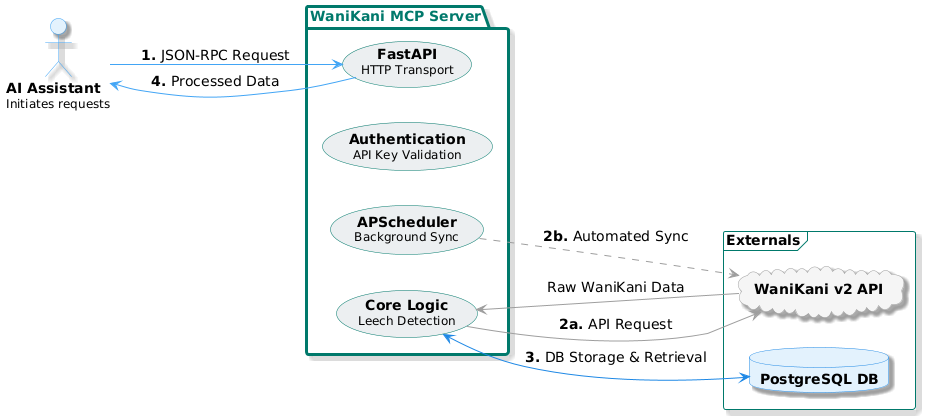
Core Features:
Live Status: Current level, lesson count, review count, next review time
Leech Detection: Identifies consistently difficult items for focused practice
Background Sync: Keeps data fresh automatically (every 30 minutes)
Multi-User: Secure per-user authentication with MCP API keys
Example Conversations:
You: "How am I doing with my Japanese studies?"
Claude: "You're Level 8 with 30 lessons and 206 reviews available. Your next reviews are at 11:00 PM."

You: "What should I focus on?"
Claude: "You have 15 leeches - items you consistently get wrong. Let's practice these kanji: 体, 茶, 牛..."register_user: Connect your WaniKani account securely
get_status: Current level, lessons, reviews, next review time
get_leeches: Items that need extra practice (wrong >3 times)
sync_data: Manual data refresh from WaniKani
user_progress: Detailed statistics and learning metrics
review_forecast: Timeline of upcoming review sessions
item_database: Searchable collection of your WaniKani items
Fork this repository
Connect to Render:
Create new Web Service from your fork
Environment: DATABASE_URL (PostgreSQL connection string)
Build: uv install
Start: uv run python -m wanikani_mcp.http_server
Run migrations: uv run alembic upgrade head
# Install dependencies
uv install

# Set up database
cp .env.example .env
# Edit .env with your PostgreSQL URL
uv run alembic upgrade head

# Run in stdio mode (for Claude Code)
task dev

# Run in HTTP mode (for web access)
task dev-http# Build
podman build -t wanikani-mcp .
# Run
podman run -p 8000:8000 \
-e DATABASE_URL="postgresql://user:pass@host/db" \
wanikani-mcpTwo-Tier Security:
WaniKani API Token: Your personal WaniKani API key (from wanikani.com/settings/personal_access_tokens)
MCP API Key: Generated server key for Claude Code authentication
Registration Flow:
Get your WaniKani API token from https://www.wanikani.com/settings/personal_access_tokens
Use register_user tool with your WaniKani token
Receive MCP API key for all future requests
MCP API key authenticates you for get_status, get_leeches, sync_data
Privacy: Each user's data is completely isolated. MCP API keys are securely generated and hashed.
Environment Variables (copy .env.example to .env):
DATABASE_URL=postgresql://user:pass@host:5432/dbname
WANIKANI_API_BASE_URL=https://api.wanikani.com/v2
SYNC_INTERVAL_MINUTES=30
MAX_CONCURRENT_SYNCS=3
RATE_LIMIT_PER_MINUTE=60
LOG_LEVEL=INFO
MCP Server Configuration (for Claude Code):
Method 1: JSON Configuration (Recommended)
cd /path/to/wanikani-mcp
claude mcp add-json wanikani '{"command": "uv", "args": ["run", "python", "-m", "wanikani_mcp.server"], "env": {}, "cwd": "/path/to/wanikani-mcp"}'
Method 2: Manual Configuration
{
  "mcpServers": {
    "wanikani": {
      "command": "uv",
      "args": ["run", "python", "-m", "wanikani_mcp.server"],
      "cwd": "/path/to/wanikani-mcp",
      "env": {}
    }
  }
}Important:
Must specify cwd (working directory) for the server to find dependencies
Server uses file logging to avoid interfering with stdio MCP communication
Run uv install first to ensure dependencies are available
Code Quality:
uv run ruff check .      # Linting
uv run ruff format .     # Formatting
uvx ty check .           # Type checking
uv run pytest           # Testing
Database Management:
# Create migration
uv run alembic revision --autogenerate -m "description"

# Apply migrations
uv run alembic upgrade head

# Reset database (development only)
uv run python -c "from wanikani_mcp.database import reset_database; reset_database()"
Tech Stack:
Framework: FastAPI + Python MCP SDK
Database: PostgreSQL + SQLModel ORM
Background Jobs: APScheduler
Package Manager: uv
Containerization: Podman
Deployment: Render
Before deploying:
PostgreSQL database configured
Environment variables set
Database migrations applied
Rate limiting configured
Monitoring/logging enabled
SSL/TLS certificates in place
Backup strategy implemented
Health Check Endpoint: GET /health
Metrics: Built-in logging for sync operations, API calls, and errors
Database: Monitor connection pool, query performance, storage usage
See LICENSE for details.
WaniKani: For providing the excellent Japanese learning platform and API
Anthropic: For the MCP specification and Claude Code integration
Python MCP SDK: For the foundational MCP implementation
This server cannot be deployed
Real SEO data for AI assistants: page audits, Keyword Planner volumes, Search Console history.
Query your team's drift, vulnerability, and upgrade data from any AI assistant. OAuth 2.1, 51 tools.
Connect your AI assistant to Revensi OS agents, workflows, and business data.
Your strength-training data for any AI assistant: workouts, progress, muscle volume, routines.