Glama
HowardQin

fastmcp-opengauss

by HowardQin

Model Context Protocol Server for openGauss

Features

  • Build with FastMCP 2.0 .

  • Support Stdio, SSE and Streamable-Http transporting method.

  • MCP server transporting method, listerning port, host and path are Configurable via command-line argument.

  • openGauss connection parameters are configurable via environment variables or .env files.

Related MCP server: PostgreSQL MCP Server

Deployment

Note: uv and python >= 3.12 is required.

git clone https://github.com/HowardQin/fastmcp-opengauss.git
cd fastmcp-opengauss
cp .env.example .env
uv sync

openGauss connection parameters are loaded from .env, for example:

OPENGAUSS_HOST=172.32.148.228
OPENGAUSS_PORT=31001
OPENGAUSS_USER=app
OPENGAUSS_PASSWORD=Postgres1234
OPENGAUSS_DBNAME=app

These parameters can be overwriten if identical environment variables are set.

Usage with Claude Desktop

Claude Desktop only supports Stdio mode, so we add the Stdio starting command in claude_desktop_config.json:

{
    "mcpServers": {
        "openGauss": {
            "command": "uv",
            "args": [
                "--directory",
                "C:\\Users\\qinh\\fastmcp-opengauss",
                "run",
                "server.py",
                "--transport",
                "stdio"
            ]
        }
    }
}

Usage with CherryStudio

CherryStudio supports all three transporting modes: Stdio, SSE and Streamable-Http

Stdio:
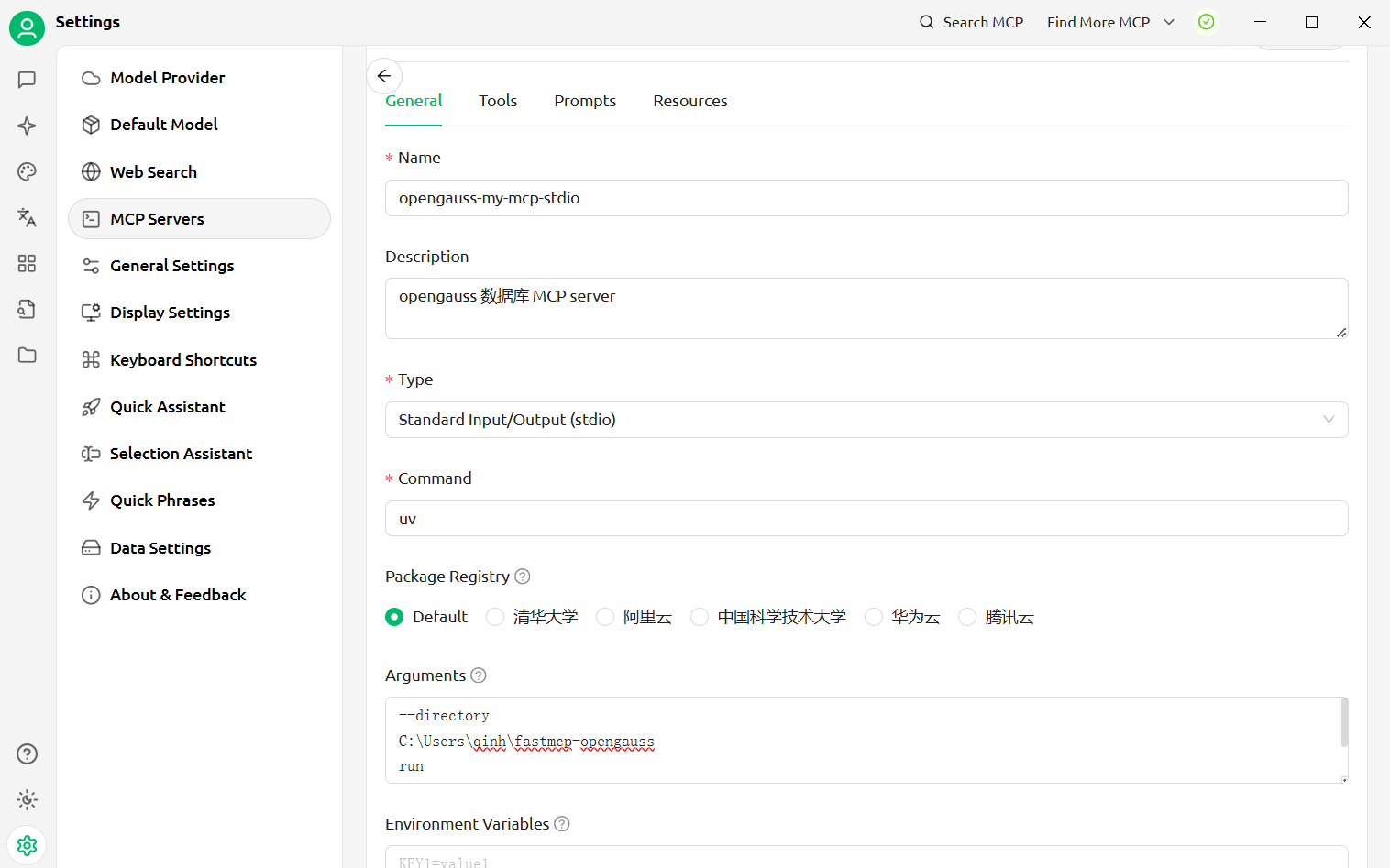
CherryStudio with stdio fastmcp-opengauss Arguments:

--directory
C:\Users\qinh\fastmcp-opengauss
run
server.py
--transport=stdio

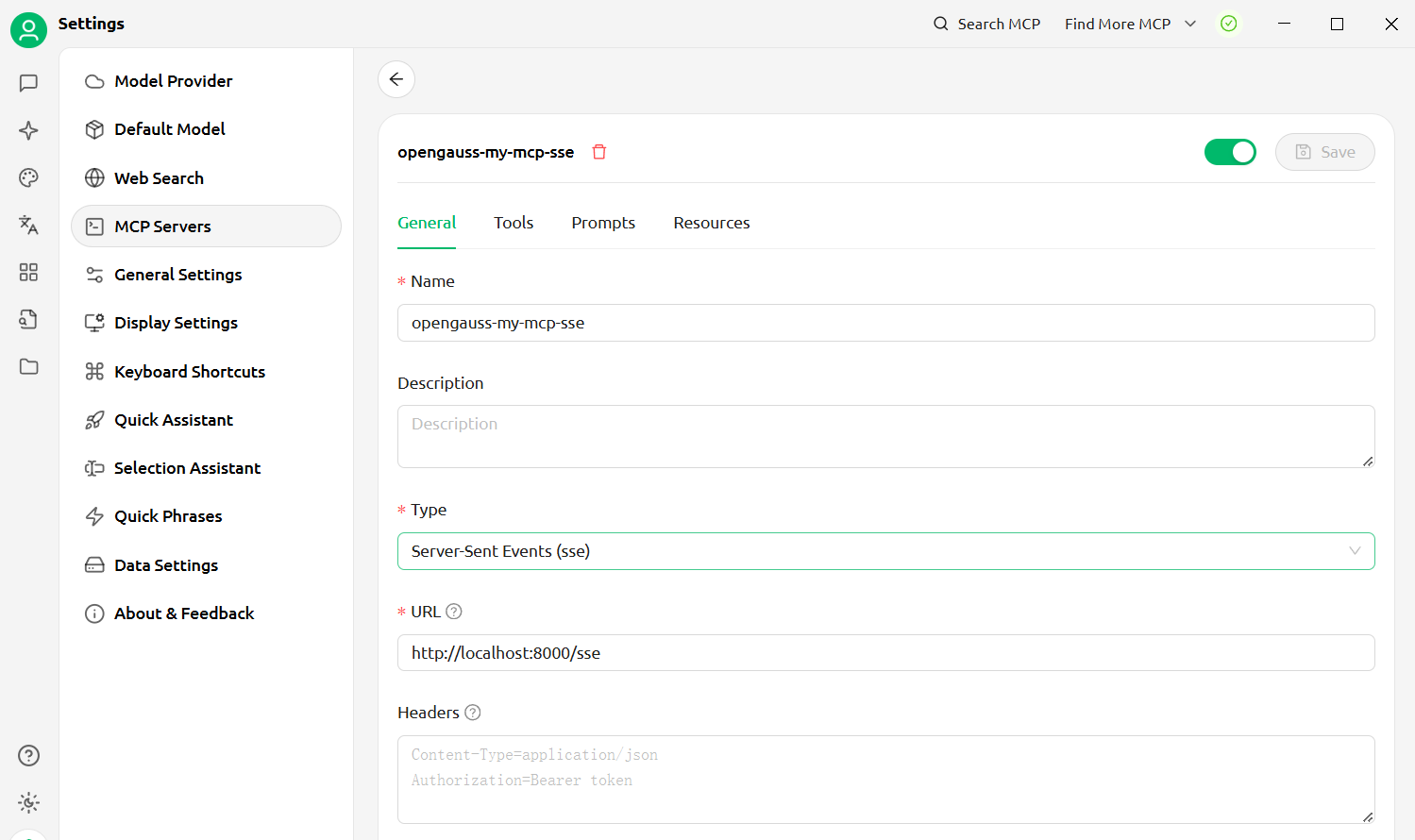
SSE:

For SSE transport mode, we need to start a standalone mcp server, run following command in project root directory, or in any directory with --directory specifing project root dir :

uv --directory C:\Users\qinh\fastmcp-opengauss run .\server.py --transport=sse --port=8000 --path=/sse --host=0.0.0.0

Then configure CherryStudio to connect to sse mcp server: CherryStudio with sse fastmcp-opengauss
Streamable-Http:

For Streamable-Http, we need to start a standalone mcp server, run following command in project root directory, or in any directory with --directory specifing project root dir:

uv --directory C:\Users\qinh\fastmcp-opengauss run .\server.py --transport=streamable-http --port=8000 --path=/mcp --host=0.0.0.0

Then configure CherryStudio to connect to streamable-http mcp server: CherryStudio with sse fastmcp-opengauss

Install Server
F
license - not found
C
quality
D
maintenance

Maintenance

Maintainers
Response time
Release cycle
Releases (12mo)
Commit activity

Resources

Unclaimed servers have limited discoverability.

Looking for Admin?

If you are the server author, to access and configure the admin panel.

Related MCP Servers

  • A
    license
    -
    quality
    D
    maintenance
    Enables interaction with PostgreSQL databases through both HTTP and stdio transports. Supports executing read-only SQL queries, listing tables, and retrieving schema information with stateful session management.
    Last updated
    90
    MIT
  • A
    license
    -
    quality
    D
    maintenance
    Enables natural language interaction with PostgreSQL databases, supporting query execution, schema management, data operations, user management, and database maintenance with secure remote access via HTTP/SSE transport.
    Last updated
    MIT
  • A
    license
    -
    quality
    D
    maintenance
    Enables interaction with PostgreSQL databases through both HTTP and Stdio transports, supporting read-only SQL queries, table listing, and schema inspection. Features stateful session management for HTTP transport and flexible deployment options including Docker support.
    Last updated
    90
    MIT
  • A
    license
    -
    quality
    D
    maintenance
    Provides LLMs with full PostgreSQL database access, including tools for query execution, schema management, and data export. It also features a dedicated insights system for storing business memos and supports both local stdio and remote HTTP transport.
    Last updated
    MIT

View all related MCP servers

Related MCP Connectors

  • Comprehensive PostgreSQL documentation and best practices, including ecosystem tools

  • Connect to PlanetScale databases, branches, schema, query insights, and execute SQL

  • GibsonAI MCP server: manage your databases with natural language

View all MCP Connectors

Latest Blog Posts

MCP directory API

We provide all the information about MCP servers via our MCP API.

curl -X GET 'https://glama.ai/api/mcp/v1/servers/HowardQin/fastmcp-opengauss'

If you have feedback or need assistance with the MCP directory API, please join our Discord server