Glama
HowardQin

fastmcp-opengauss

by HowardQin

Model Context Protocol Server for openGauss

Features

  • Build with FastMCP 2.0 .

  • Support Stdio, SSE and Streamable-Http transporting method.

  • MCP server transporting method, listerning port, host and path are Configurable via command-line argument.

  • openGauss connection parameters are configurable via environment variables or .env files.

Related MCP server: PostgreSQL MCP Server

Deployment

Note: uv and python >= 3.12 is required.

git clone https://github.com/HowardQin/fastmcp-opengauss.git
cd fastmcp-opengauss
cp .env.example .env
uv sync

openGauss connection parameters are loaded from .env, for example:

OPENGAUSS_HOST=172.32.148.228
OPENGAUSS_PORT=31001
OPENGAUSS_USER=app
OPENGAUSS_PASSWORD=Postgres1234
OPENGAUSS_DBNAME=app

These parameters can be overwriten if identical environment variables are set.

Usage with Claude Desktop

Claude Desktop only supports Stdio mode, so we add the Stdio starting command in claude_desktop_config.json:

{
    "mcpServers": {
        "openGauss": {
            "command": "uv",
            "args": [
                "--directory",
                "C:\\Users\\qinh\\fastmcp-opengauss",
                "run",
                "server.py",
                "--transport",
                "stdio"
            ]
        }
    }
}

Usage with CherryStudio

CherryStudio supports all three transporting modes: Stdio, SSE and Streamable-Http

Stdio:
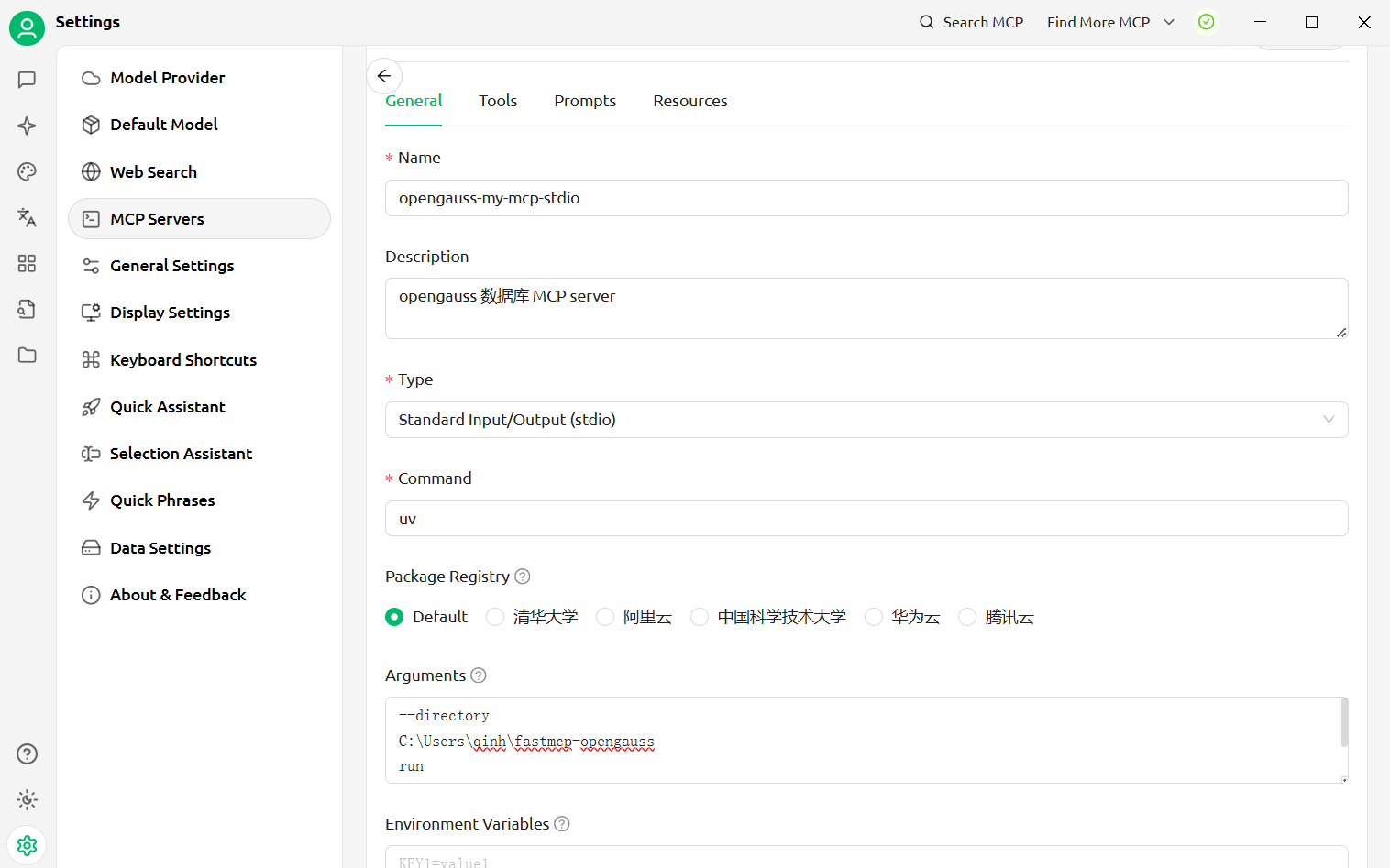
CherryStudio with stdio fastmcp-opengauss Arguments:

--directory
C:\Users\qinh\fastmcp-opengauss
run
server.py
--transport=stdio

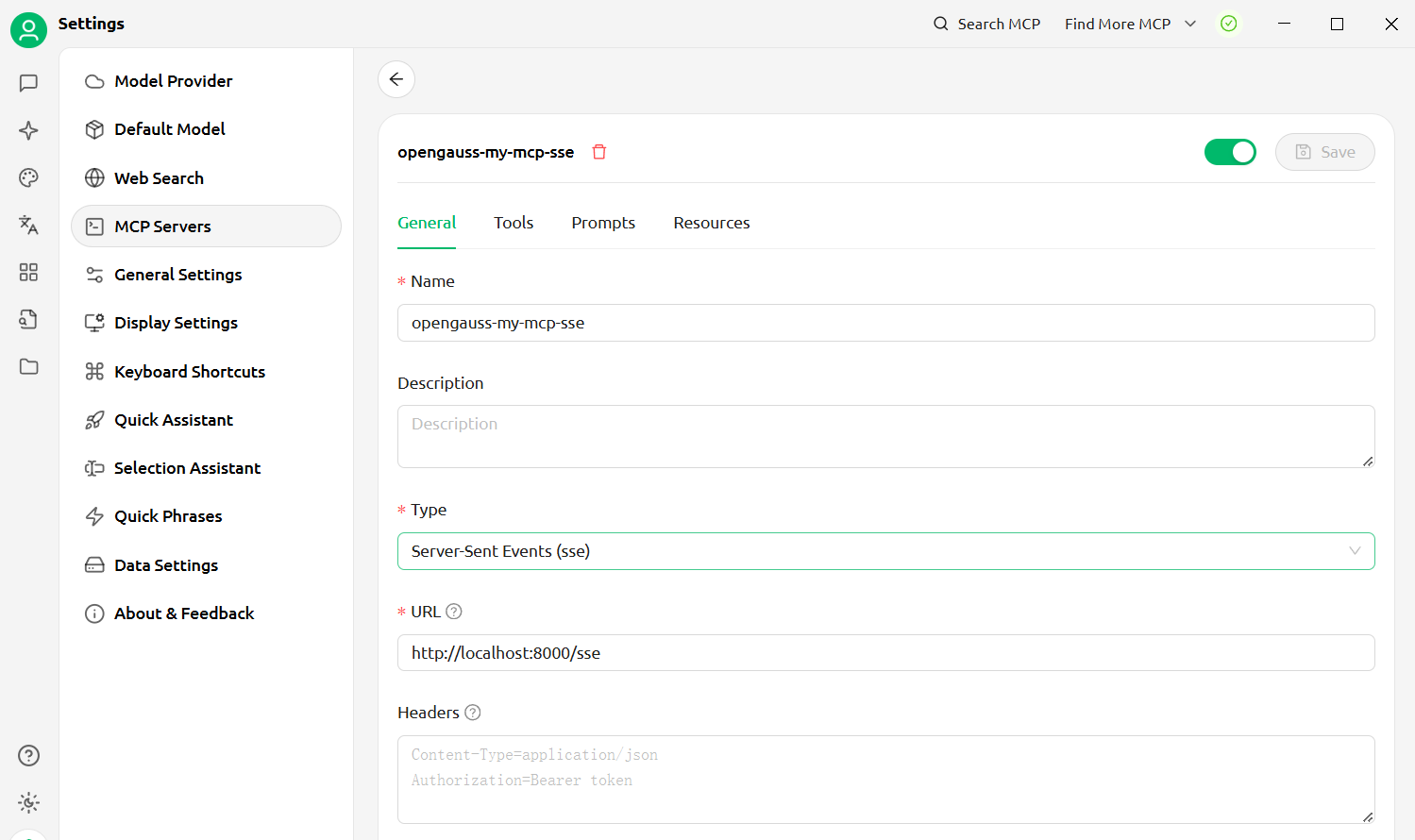
SSE:

For SSE transport mode, we need to start a standalone mcp server, run following command in project root directory, or in any directory with --directory specifing project root dir :

uv --directory C:\Users\qinh\fastmcp-opengauss run .\server.py --transport=sse --port=8000 --path=/sse --host=0.0.0.0

Then configure CherryStudio to connect to sse mcp server: CherryStudio with sse fastmcp-opengauss
Streamable-Http:

For Streamable-Http, we need to start a standalone mcp server, run following command in project root directory, or in any directory with --directory specifing project root dir:

uv --directory C:\Users\qinh\fastmcp-opengauss run .\server.py --transport=streamable-http --port=8000 --path=/mcp --host=0.0.0.0

Then configure CherryStudio to connect to streamable-http mcp server: CherryStudio with sse fastmcp-opengauss

Available Tools

4 tools
execute_queryC

Execute an SQL commands on the openGauss server.

Args: query: SQL command

ParametersJSON Schema
NameRequiredDescriptionDefault
queryYes

Output Schema

ParametersJSON Schema
NameRequiredDescription
resultYes

TDQS

C2.9/5.0
Behavior2/5

Does the description disclose side effects, auth requirements, rate limits, or destructive behavior?

No annotations are provided, so the description carries the full burden of behavioral disclosure. It states the tool executes SQL commands but doesn't clarify whether this includes read/write operations, permissions required, potential side effects (e.g., data modification), error handling, or transaction behavior. This is a significant gap for a tool that could be destructive.

Agents need to know what a tool does to the world before calling it. Descriptions should go beyond structured annotations to explain consequences.

Conciseness4/5

Is the description appropriately sized, front-loaded, and free of redundancy?

The description is concise and front-loaded with the main purpose in the first sentence. The 'Args' section is clear but could be integrated more smoothly. It avoids unnecessary fluff, though it's slightly fragmented between the statement and parameter note.

Shorter descriptions cost fewer tokens and are easier for agents to parse. Every sentence should earn its place.

Completeness3/5

Given the tool's complexity, does the description cover enough for an agent to succeed on first attempt?

Given the tool's potential complexity (executing arbitrary SQL), lack of annotations, and an output schema (which helps), the description is incomplete. It doesn't address safety, scope, or behavioral traits needed for proper use. However, the output schema mitigates some gaps by documenting return values.

Complex tools with many parameters or behaviors need more documentation. Simple tools need less. This dimension scales expectations accordingly.

Parameters3/5

Does the description clarify parameter syntax, constraints, interactions, or defaults beyond what the schema provides?

The description adds minimal semantics: it names the parameter ('query') and indicates it's an 'SQL command.' However, schema description coverage is 0%, and the description doesn't elaborate on syntax, supported SQL types, or constraints beyond what the basic schema provides. With one parameter, the baseline is 4, but the lack of detail reduces it to 3.

Input schemas describe structure but not intent. Descriptions should explain non-obvious parameter relationships and valid value ranges.

Purpose4/5

Does the description clearly state what the tool does and how it differs from similar tools?

The description clearly states the tool's purpose: 'Execute an SQL commands on the openGauss server.' It specifies the verb ('Execute') and resource ('SQL commands'), though it doesn't explicitly differentiate from sibling tools like get_table_definition or list_tables_in_current_schema, which are read-only queries versus this general execution tool.

Agents choose between tools based on descriptions. A clear purpose with a specific verb and resource helps agents select the right tool.

Usage Guidelines2/5

Does the description explain when to use this tool, when not to, or what alternatives exist?

The description provides no guidance on when to use this tool versus alternatives. It doesn't mention that siblings like get_table_definition or list_tables_in_current_schema might be preferred for specific read operations, or that this tool can handle both read and write queries. There's no context on prerequisites or exclusions.

Agents often have multiple tools that could apply. Explicit usage guidance like "use X instead of Y when Z" prevents misuse.

get_current_user_and_schemaB

Get current schema and current user.

ParametersJSON Schema
NameRequiredDescriptionDefault

No parameters

Output Schema

ParametersJSON Schema
NameRequiredDescription
resultYes

TDQS

B3.2/5.0
Behavior2/5

Does the description disclose side effects, auth requirements, rate limits, or destructive behavior?

With no annotations provided, the description carries the full burden of behavioral disclosure but only states what the tool does, not how it behaves. It doesn't cover aspects like whether this is a read-only operation, authentication requirements, rate limits, or the format of returned data, leaving significant gaps.

Agents need to know what a tool does to the world before calling it. Descriptions should go beyond structured annotations to explain consequences.

Conciseness5/5

Is the description appropriately sized, front-loaded, and free of redundancy?

The description is extremely concise and front-loaded, using a single sentence that directly states the tool's function without any wasted words. Every part of the sentence earns its place by clearly conveying the core action and resources.

Shorter descriptions cost fewer tokens and are easier for agents to parse. Every sentence should earn its place.

Completeness3/5

Given the tool's complexity, does the description cover enough for an agent to succeed on first attempt?

Given the tool's complexity (simple retrieval with no parameters) and the presence of an output schema, the description is adequate but minimal. It states what is retrieved but doesn't provide context on why or how this differs from other tools, making it complete only at a basic level.

Complex tools with many parameters or behaviors need more documentation. Simple tools need less. This dimension scales expectations accordingly.

Parameters4/5

Does the description clarify parameter syntax, constraints, interactions, or defaults beyond what the schema provides?

The tool has 0 parameters, and the schema description coverage is 100%, so there's no need for parameter details in the description. The baseline for such cases is 4, as the description appropriately avoids redundant information and focuses on the tool's purpose.

Input schemas describe structure but not intent. Descriptions should explain non-obvious parameter relationships and valid value ranges.

Purpose4/5

Does the description clearly state what the tool does and how it differs from similar tools?

The description clearly states the tool's purpose with specific verbs ('get') and resources ('current schema and current user'), making it immediately understandable. However, it doesn't differentiate from sibling tools like 'get_table_definition' or 'list_tables_in_current_schema' that also retrieve schema-related information, which prevents a perfect score.

Agents choose between tools based on descriptions. A clear purpose with a specific verb and resource helps agents select the right tool.

Usage Guidelines2/5

Does the description explain when to use this tool, when not to, or what alternatives exist?

The description provides no guidance on when to use this tool versus alternatives. It doesn't mention scenarios like needing user context versus schema structure, or how it differs from siblings such as 'execute_query' for data retrieval, leaving the agent without usage context.

Agents often have multiple tools that could apply. Explicit usage guidance like "use X instead of Y when Z" prevents misuse.

get_table_definitionD

Get table definition.

ParametersJSON Schema
NameRequiredDescriptionDefault
tableYes
schYes

Output Schema

ParametersJSON Schema
NameRequiredDescription
resultYes

TDQS

D1.7/5.0
Behavior1/5

Does the description disclose side effects, auth requirements, rate limits, or destructive behavior?

With no annotations provided, the description carries the full burden of behavioral disclosure but offers none. It doesn't indicate whether this is a read-only operation, what permissions might be required, whether it's idempotent, what happens if the table doesn't exist, or what format the definition will be returned in. The description fails to provide any behavioral context beyond the basic action.

Agents need to know what a tool does to the world before calling it. Descriptions should go beyond structured annotations to explain consequences.

Conciseness5/5

Is the description appropriately sized, front-loaded, and free of redundancy?

The description is extremely concise at just three words, with zero wasted language. While this conciseness comes at the expense of completeness, the description is perfectly front-loaded and contains no unnecessary verbiage. Every word directly contributes to stating the tool's basic purpose.

Shorter descriptions cost fewer tokens and are easier for agents to parse. Every sentence should earn its place.

Completeness2/5

Given the tool's complexity, does the description cover enough for an agent to succeed on first attempt?

Given that this tool has 2 required parameters with 0% schema coverage, no annotations, and no explanation of what a 'table definition' contains, the description is severely incomplete. While the existence of an output schema reduces the need to describe return values, the description fails to address the critical gaps in parameter documentation and behavioral context for a database metadata tool.

Complex tools with many parameters or behaviors need more documentation. Simple tools need less. This dimension scales expectations accordingly.

Parameters1/5

Does the description clarify parameter syntax, constraints, interactions, or defaults beyond what the schema provides?

With 0% schema description coverage for both parameters, the description provides no information about what 'table' and 'sch' parameters represent or how they should be used. The description doesn't mention these parameters at all, leaving them completely undocumented. For a tool with two required parameters, this represents a critical gap in documentation.

Input schemas describe structure but not intent. Descriptions should explain non-obvious parameter relationships and valid value ranges.

Purpose2/5

Does the description clearly state what the tool does and how it differs from similar tools?

The description 'Get table definition' is a tautology that essentially restates the tool name 'get_table_definition' without adding meaningful clarification. It does specify a verb ('Get') and resource ('table definition'), but fails to distinguish this tool from its sibling 'list_tables_in_current_schema' or explain what a 'table definition' actually contains (e.g., schema, columns, constraints).

Agents choose between tools based on descriptions. A clear purpose with a specific verb and resource helps agents select the right tool.

Usage Guidelines1/5

Does the description explain when to use this tool, when not to, or what alternatives exist?

The description provides absolutely no guidance on when to use this tool versus alternatives. It doesn't mention the sibling tools 'execute_query' or 'list_tables_in_current_schema', nor does it explain prerequisites like needing to specify both 'table' and 'sch' parameters. There's no indication of appropriate contexts or exclusions for usage.

Agents often have multiple tools that could apply. Explicit usage guidance like "use X instead of Y when Z" prevents misuse.

list_tables_in_current_schemaB

List table names in current schema on the openGauss server.

ParametersJSON Schema
NameRequiredDescriptionDefault

No parameters

Output Schema

ParametersJSON Schema
NameRequiredDescription
resultYes

TDQS

B3.4/5.0
Behavior2/5

Does the description disclose side effects, auth requirements, rate limits, or destructive behavior?

With no annotations provided, the description carries full burden but only states what the tool does, not how it behaves. It doesn't disclose whether this requires specific permissions, what format the output takes (though output schema exists), whether it's paginated, or if there are rate limits. The description is minimal and lacks behavioral context beyond the basic operation.

Agents need to know what a tool does to the world before calling it. Descriptions should go beyond structured annotations to explain consequences.

Conciseness5/5

Is the description appropriately sized, front-loaded, and free of redundancy?

The description is a single, efficient sentence that states exactly what the tool does with zero wasted words. It's appropriately sized for a simple list operation and front-loads the core functionality immediately.

Shorter descriptions cost fewer tokens and are easier for agents to parse. Every sentence should earn its place.

Completeness3/5

Given the tool's complexity, does the description cover enough for an agent to succeed on first attempt?

Given the tool's simplicity (0 parameters, output schema exists), the description is minimally adequate but lacks context about permissions, output format details, or connection requirements. While the output schema handles return values, the description doesn't provide helpful context about what 'current schema' means operationally or how this interacts with sibling tools.

Complex tools with many parameters or behaviors need more documentation. Simple tools need less. This dimension scales expectations accordingly.

Parameters4/5

Does the description clarify parameter syntax, constraints, interactions, or defaults beyond what the schema provides?

The tool has zero parameters, and schema description coverage is 100% (empty schema). The description correctly indicates no parameters are needed by not mentioning any, which aligns perfectly with the schema. For zero-parameter tools, a baseline of 4 is appropriate when the description doesn't incorrectly suggest parameters.

Input schemas describe structure but not intent. Descriptions should explain non-obvious parameter relationships and valid value ranges.

Purpose4/5

Does the description clearly state what the tool does and how it differs from similar tools?

The description clearly states the verb ('List') and resource ('table names in current schema'), making the purpose unambiguous. It specifies 'in current schema' which distinguishes it from potential sibling tools that might list tables across schemas or databases. However, it doesn't explicitly differentiate from 'get_table_definition' which retrieves table structure rather than just names.

Agents choose between tools based on descriptions. A clear purpose with a specific verb and resource helps agents select the right tool.

Usage Guidelines3/5

Does the description explain when to use this tool, when not to, or what alternatives exist?

The description implies usage context ('current schema') but doesn't provide explicit guidance on when to use this tool versus alternatives like 'execute_query' for custom SQL queries or 'get_table_definition' for detailed table information. No when-not-to-use scenarios or prerequisites are mentioned.

Agents often have multiple tools that could apply. Explicit usage guidance like "use X instead of Y when Z" prevents misuse.

TDQS

C2.9/5.0
Disambiguation5/5

Each tool has a clearly distinct purpose with no ambiguity: execute_query runs SQL commands, get_current_user_and_schema retrieves metadata, get_table_definition provides table structure, and list_tables_in_current_schema enumerates tables. The descriptions clearly differentiate these functions, making misselection unlikely.

Naming Consistency4/5

The tools follow a consistent verb_noun pattern (e.g., execute_query, get_table_definition) with all using snake_case. However, get_current_user_and_schema is slightly longer and combines two nouns, which is a minor deviation from the simpler patterns of the other tools, but overall naming remains highly readable and predictable.

Tool Count4/5

With 4 tools, the count is appropriate for a database server focused on basic querying and metadata operations. It covers essential functions without being overly sparse or bloated, though it could be considered slightly thin if more advanced features were expected, but it's reasonable for the apparent scope.

Completeness3/5

The toolset covers core database operations like query execution and metadata retrieval, but there are notable gaps. For example, it lacks tools for creating or modifying tables, managing users, or handling transactions, which are common in database interfaces. This could limit agent workflows, but basic querying and inspection are supported.

Maintenance

ActivityInactive
ResponsivenessSyncing

Resources

Unclaimed servers have limited discoverability.

Looking for Admin?

If you are the server author, to access and configure the admin panel.

Related MCP Connectors

Related MCP Servers

  • A
    license
    Not graded
    quality
    D
    maintenance
    Enables interaction with PostgreSQL databases through both HTTP and stdio transports. Supports executing read-only SQL queries, listing tables, and retrieving schema information with stateful session management.
    101
    MIT
  • A
    license
    Not graded
    quality
    D
    maintenance
    Enables natural language interaction with PostgreSQL databases, supporting query execution, schema management, data operations, user management, and database maintenance with secure remote access via HTTP/SSE transport.
    MIT
  • A
    license
    Not graded
    quality
    D
    maintenance
    Enables interaction with PostgreSQL databases through both HTTP and Stdio transports, supporting read-only SQL queries, table listing, and schema inspection. Features stateful session management for HTTP transport and flexible deployment options including Docker support.
    101
    MIT
  • A
    license
    Not graded
    quality
    D
    maintenance
    Provides LLMs with full PostgreSQL database access, including tools for query execution, schema management, and data export. It also features a dedicated insights system for storing business memos and supports both local stdio and remote HTTP transport.
    MIT

Latest Blog Posts

MCP directory API

We provide all the information about MCP servers via our MCP API.

curl -X GET 'https://glama.ai/api/mcp/v1/servers/HowardQin/fastmcp-opengauss'

If you have feedback or need assistance with the MCP directory API, please join our Discord server