
The SAP HANA MCP Server enables AI agents and development tools to securely interact with SAP HANA databases through the Model Context Protocol (MCP).
Database Operations:
Execute custom SQL queries, including parameterized queries for prepared statements
Retrieve sample data and count rows in tables
Test database connectivity and view configuration settings
Schema Management:
List all schemas, tables within schemas, and describe table structures
List and describe indexes for tables
Explore database schema through natural language commands
System Administration:
Monitor memory usage statistics and system information
Get current database user information
Debug environment variables
Integration & Security:
Seamlessly integrates with Claude Desktop, VSCode extensions, and custom AI applications
Features enterprise-grade security with SSL/TLS support and secure credential management
Provides both command-line interface and React-based web UI
Uses JSON-RPC 2.0 with modular architecture for easy extension
Uses .env files for configuration management of server settings and connection parameters
Uses Flask to implement the REST API layer of the MCP server architecture
Utilizes pandas as a prerequisite library, likely for data manipulation and analysis within the model execution context
Built on Python 3.8+ as the core programming language for the server implementation
Provides integration with SAP HANA Cloud Database, allowing for machine learning operations and model management directly with the SAP HANA Cloud environment
Click on "Install Server".
Wait a few minutes for the server to deploy. Once ready, it will show a "Started" state.
In the chat, type
@followed by the MCP server name and your instructions, e.g., "@HANA Cloud MCP Servershow me the top 5 customers by total sales"
That's it! The server will respond to your query, and you can continue using it as needed.
Here is a step-by-step guide with screenshots.
HANA MCP Server




Model Context Protocol (MCP) server for SAP HANA: connect AI assistants and development tools to your database.
🎯 Use cases
Use case | Transport | Go to |
Claude Desktop — Chat over HANA data | stdio | |
IDEs — Claude Code, VS Code, Cline, Cursor, Windsurf | stdio | |
Hosted / apps — Run server for multiple clients or your app | HTTP |
Install from npm (npm install -g hana-mcp-server) or use npx in your client config; no global install required for IDEs or HTTP.
Related MCP server: MCP Development Framework
🖥️ Claude Desktop
Edit your Claude Desktop config file:
macOS:
~/Library/Application Support/Claude/claude_desktop_config.jsonWindows:
%APPDATA%\claude\claude_desktop_config.jsonLinux:
~/.config/claude/claude_desktop_config.json
Add the MCP server (use the same configuration env vars as needed):
{
  "mcpServers": {
    "HANA Database": {
      "command": "hana-mcp-server",
      "env": {
        "HANA_HOST": "your-hana-host.com",
        "HANA_PORT": "443",
        "HANA_USER": "your-username",
        "HANA_PASSWORD": "your-password",
        "HANA_SCHEMA": "your-schema",
        "HANA_SSL": "true",
        "HANA_ENCRYPT": "true",
        "HANA_VALIDATE_CERT": "true",
        "HANA_CONNECTION_TYPE": "auto",
        "HANA_INSTANCE_NUMBER": "10",
        "HANA_DATABASE_NAME": "HQQ",
        "LOG_LEVEL": "info",
        "ENABLE_FILE_LOGGING": "true",
        "ENABLE_CONSOLE_LOGGING": "false"
      }
    }
  }
}
Restart Claude Desktop.
For a UI to manage configs and deploy to Claude Desktop: HANA MCP UI (npx hana-mcp-ui).
💻 IDEs & code agents
Use stdio; same configuration env vars as above. One canonical example (Claude Code):
Add to ~/.claude.json (global) or .mcp.json (project root):
{
  "mcpServers": {
    "hana": {
      "type": "stdio",
      "timeout": 600,
      "command": "npx",
      "args": ["-y", "hana-mcp-server"],
      "env": {
        "HANA_HOST": "<host>",
        "HANA_PORT": "31013",
        "HANA_USER": "<user>",
        "HANA_PASSWORD": "<password>",
        "HANA_SCHEMA": "SAPABAP1",
        "HANA_DATABASE_NAME": "HQQ",
        "HANA_SSL": "false",
        "HANA_ENCRYPT": "false",
        "HANA_VALIDATE_CERT": "false",
        "LOG_LEVEL": "info",
        "ENABLE_FILE_LOGGING": "true",
        "ENABLE_CONSOLE_LOGGING": "false"
      }
    }
  }
}
Same pattern for VS Code, Cline, Cursor, and Windsurf—add this server to your IDE’s MCP list with the same command / args / env. For MDC tenants set HANA_DATABASE_NAME (e.g. HQQ). Restart MCP after config changes.
🌐 Hosted & HTTP
For HTTP (remote or multi-client), start the server:
npm run start:httpDefault: http://127.0.0.1:3100/mcp. Override with MCP_HTTP_PORT and optionally MCP_HTTP_HOST. Send JSON-RPC via POST to /mcp; include MCP-Protocol-Version: 2025-11-25 (or a supported version) if your client supports it.
For production: run behind a reverse proxy with authentication and bind to localhost unless you need remote access.
🛠️ Configuration
Set the same environment variables in your client or server env. Full reference:
Required
Parameter | Description | Example |
| Database hostname or IP |
|
| Database username |
|
| Database password | — |
Optional
Parameter | Description | Default | Options |
| Database port |
| Any valid port |
| Default schema | — | Schema name |
| Connection type |
|
|
| Instance number (MDC) | — | e.g. |
| Database name (MDC tenant) | — | e.g. |
| Enable SSL |
|
|
| Enable encryption |
|
|
| Validate SSL certificates |
|
|
| Logging level |
|
|
| File logging |
|
|
| Console logging |
|
|
Database connection types
1. Single-container database
Standard HANA database with a single tenant.
Required: HANA_HOST, HANA_USER, HANA_PASSWORD
Optional: HANA_PORT, HANA_SCHEMA
{
  "HANA_HOST": "hana.company.com",
  "HANA_PORT": "443",
  "HANA_USER": "DBADMIN",
  "HANA_PASSWORD": "password",
  "HANA_SCHEMA": "SYSTEM",
  "HANA_CONNECTION_TYPE": "single_container"
}
2. MDC system database
Multi-tenant system database (manages tenants).
Required: HANA_HOST, HANA_PORT, HANA_INSTANCE_NUMBER, HANA_USER, HANA_PASSWORD
Optional: HANA_SCHEMA
{
  "HANA_HOST": "192.168.1.100",
  "HANA_PORT": "31013",
  "HANA_INSTANCE_NUMBER": "10",
  "HANA_USER": "SYSTEM",
  "HANA_PASSWORD": "password",
  "HANA_SCHEMA": "SYSTEM",
  "HANA_CONNECTION_TYPE": "mdc_system"
}
3. MDC tenant database
Multi-tenant tenant database (specific tenant).
Required: HANA_HOST, HANA_PORT, HANA_INSTANCE_NUMBER, HANA_DATABASE_NAME, HANA_USER, HANA_PASSWORD
Optional: HANA_SCHEMA
{
  "HANA_HOST": "192.168.1.100",
  "HANA_PORT": "31013",
  "HANA_INSTANCE_NUMBER": "10",
  "HANA_DATABASE_NAME": "HQQ",
  "HANA_USER": "DBADMIN",
  "HANA_PASSWORD": "password",
  "HANA_SCHEMA": "SYSTEM",
  "HANA_CONNECTION_TYPE": "mdc_tenant"
}
Auto-detection
When HANA_CONNECTION_TYPE is set to auto (default), the server infers the type:
If
HANA_INSTANCE_NUMBER+HANA_DATABASE_NAME→ MDC tenantIf only
HANA_INSTANCE_NUMBER→ MDC systemIf neither → Single-container
🎯 Capabilities
Schema exploration: List schemas, tables, table structures.
Query execution: Run SQL; sample data; system info.
Natural language: e.g. “Show me all tables in the SYSTEM schema”, “Describe the structure of table CUSTOMERS”, “Get sample data from ORDERS table”.
MCP features (spec 2025-11-25)
Tools: All tools include
titleand annotations (readOnlyHint,destructiveHint,idempotentHint,openWorldHint). Query execution supports optional task for long-running runs.Resources: Schemas and tables under
hana:///;resources/list,resources/read,resources/templates/list.Tasks: Long-running tool calls (e.g.
hana_execute_query) can usetask: { ttl }; polltasks/getandtasks/result. In-memory; do not persist across restarts.
🖥️ HANA MCP UI
Web UI to configure environments, deploy to Claude Desktop, and test connectivity:
npx hana-mcp-ui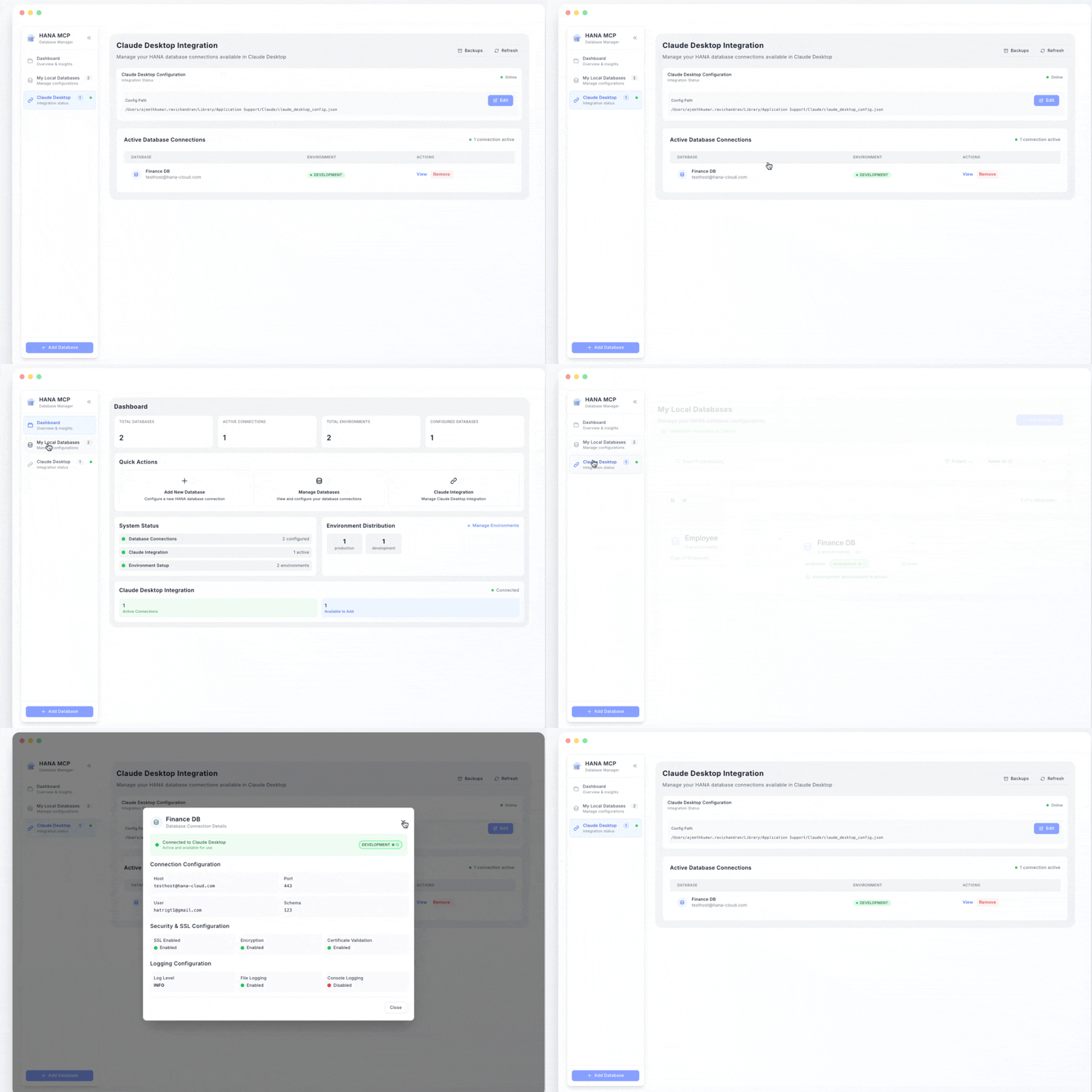
🔧 Troubleshooting
Connection refused: Check HANA host and port.
Authentication failed / No client available: Verify user/password; for MDC tenants set
HANA_DATABASE_NAME(e.g.HQQ). The connection test tool returns the last HANA error when the client is unavailable.SSL certificate error: Set
HANA_VALIDATE_CERT=falseor install valid certificates.MDC: If you omit
HANA_DATABASE_NAMEfor a tenant, you may see auth failures. MDC often uses SQL port (e.g. 31013); setHANA_PORTandHANA_INSTANCE_NUMBERas required.
Debug: export LOG_LEVEL="debug" and export ENABLE_CONSOLE_LOGGING="true", then run the server.
🏗️ Architecture
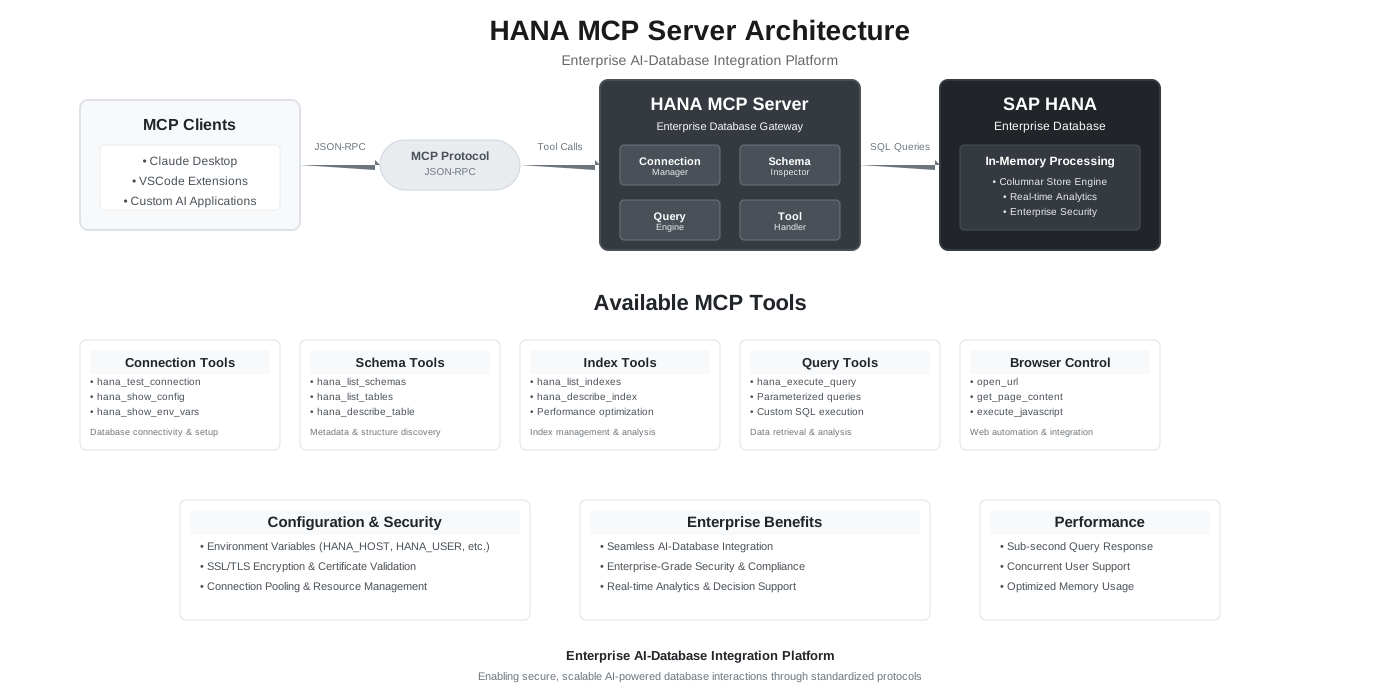
hana-mcp-server/
├── src/
│   ├── server/           # MCP protocol, lifecycle, resources, HTTP transport
│   ├── tools/            # Schema, table, query, index, config tools
│   ├── database/         # HANA client, connection manager, query executor
│   ├── utils/            # Logger, config, validators, formatters
│   └── constants/        # MCP constants, tool definitions
├── tests/
├── docs/
└── hana-mcp-server.js    # Entry point
📦 Package info
Size: 21.7 kB
Dependencies: @sap/hana-client, axios
Node.js: 18+
Platforms: macOS, Linux, Windows
🤝 Support
Issues: GitHub Issues
UI: HANA MCP UI
📄 License
MIT — see LICENSE.
Resources
Unclaimed servers have limited discoverability.
Looking for Admin?
If you are the server author, to access and configure the admin panel.