SOAR MCP Server

A Model Context Protocol (MCP) server based on the OctoMation SOAR Platform, providing security orchestration, automation, and response capabilities to AI clients such as Claude Desktop, Cherry Studio, Cursor, and Trae.



Features • Quick Start • Changelog • Upgrading from Older Versions • Management Tools • Configuration • Security Features • Troubleshooting
Overview
SOAR MCP Server is an innovative security orchestration platform integration solution, designed specifically for the OctoMation SOAR Platform. By using the Model Context Protocol, it integrates SOAR (Security Orchestration, Automation and Response) capabilities directly into various AI clients, including Claude Desktop, Cherry Studio, Cursor, and Trae. It provides comprehensive security event management, playbook execution, threat intelligence querying, and other functions, empowering AI assistants with professional cybersecurity response capabilities.
Related MCP server: Malware Analysis MCP Server
🆕 v1.6.0 Update Summary
Key Result Extraction: Added keyword support for playbook action node names, enabling the extraction of key nodes and asset results from playbook execution results.
Result Semantic Splitting: Added query_playbook_execution_overview_by_activity_id and query_playbook_execution_key_results_by_activity_id.
Upgrade Governance: Added migrate_db.py manual migration script; README updated with upgrade risks and steps.
Version Visibility: Current version is now displayed in the management console header, statistics page, and footer for easy verification.
For full changes, please see CHANGELOG.md.
🏗️ System Architecture
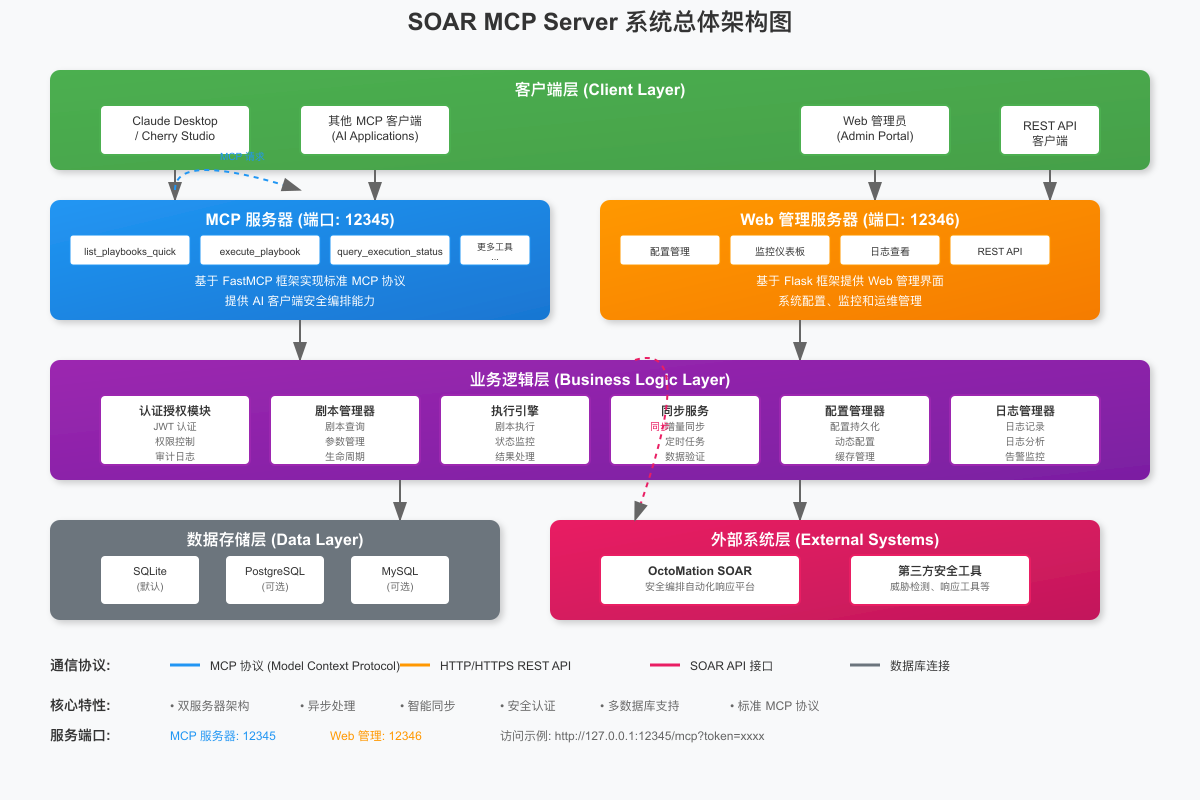
SOAR MCP Server adopts a dual-server architecture design, including an MCP server, a Web management server, a business logic layer, a data storage layer, and an external system integration layer, providing a complete security orchestration and automation solution.
Technical Architecture Highlights
Module | Technology Stack | Description |
MCP Service | FastMCP 2.x + Streamable-HTTP | Asynchronous tool functions, shared httpx connection pool |
Management Console | Flask | JWT authentication, RESTful API |
Database | SQLAlchemy ORM + SQLite | Context manager session, BigInteger ID |
MCP Authentication | Bearer Token + URL parameters | Dual-mode authentication, Bearer recommended |
Password Security | bcrypt | Salted hashing, protection against rainbow table attacks |
Request Context | contextvars | Native support for asynchronous coroutine isolation |
Logging | RotatingFileHandler | Automatic rotation, 10MB per file, 5 backups kept |
🎯 OctoMation SOAR Platform
This project is designed for the OctoMation SOAR Platform. OctoMation is a powerful security orchestration, automation, and response platform providing:
🛡️ Complete Security Toolchain: Supports mainstream security products and platforms.
📚 Rich Security Playbooks: Pre-configured with numerous practical security response playbooks.
🔄 Flexible Workflows: Visual playbook orchestration and automated execution.
🌐 Open Architecture: Supports custom integrations and extensions.
Core Advantages
🔒 Security Orchestration: Seamless integration with the OctoMation SOAR platform.
🤖 AI-Driven: Intelligent security response via various AI clients.
⚡ Asynchronous Architecture: Fully asynchronous MCP tool functions with httpx connection pool reuse.
🌐 Web Management: Intuitive visual management interface.
🔧 Flexible Configuration: Supports multiple deployment and configuration methods.
🛡️ Security Hardening: bcrypt password hashing, JWT key persistence, and log desensitization.
Features
🛠️ MCP Toolset
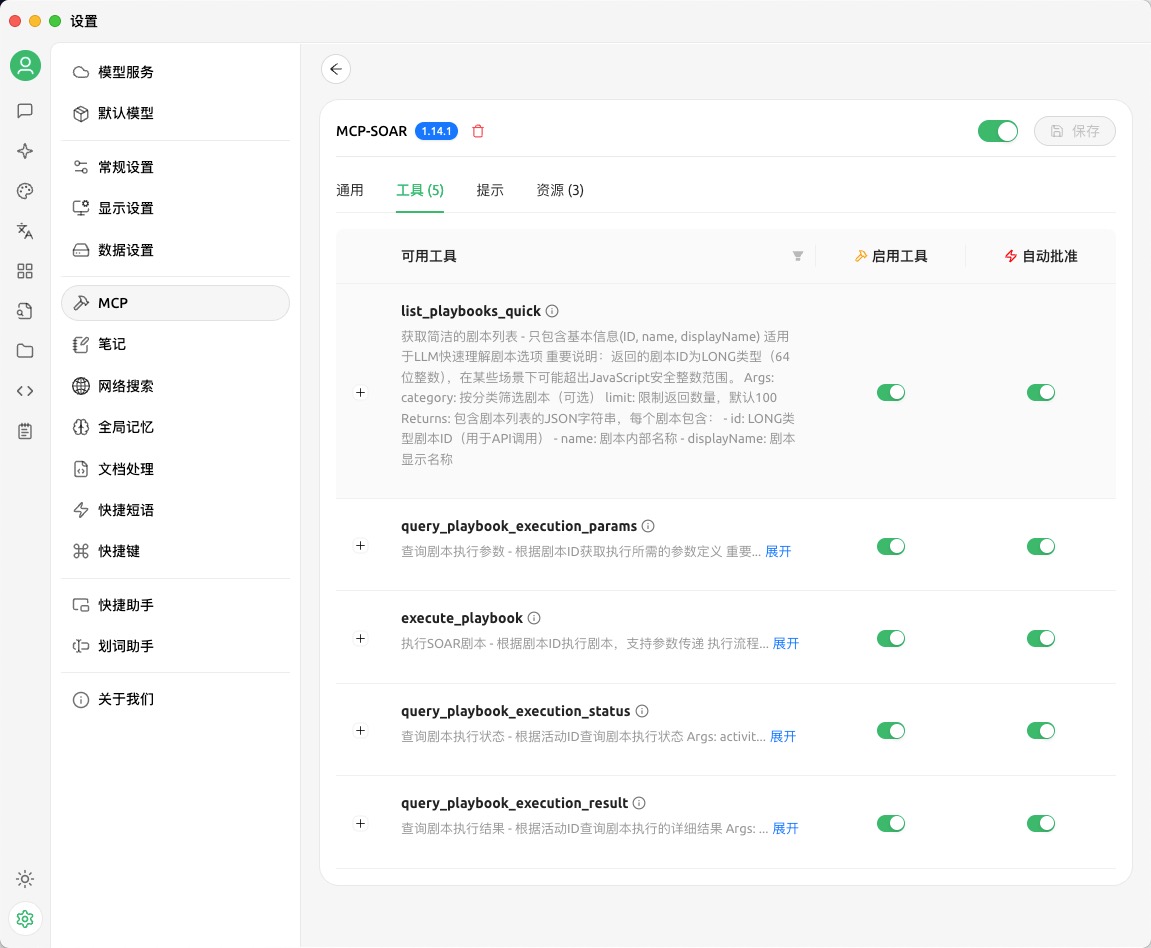 The complete toolset provided by the SOAR MCP Server
Playbook Query and Execution
list_playbooks_quick - Get a concise list of playbooks (ID, name, displayName), suitable for AI to quickly understand playbook options.
query_playbook_execution_params - Query parameter definitions required for execution based on playbook ID.
execute_playbook - Execute a specified SOAR playbook, supporting parameter passing (asynchronous).
query_playbook_execution_status_by_activity_id - Query playbook execution status based on activity ID (asynchronous).
query_playbook_execution_overview_by_activity_id - Query playbook execution overview results based on activity ID (asynchronous).
query_playbook_execution_key_results_by_activity_id - Query playbook execution key results based on activity ID (asynchronous).
Important Notes
Playbook ID Format: Supports LONG type (64-bit integer); can use integer or string format.
Execution Flow: Query parameters → Execute playbook → Check status → Query overview results / Query key results.
Compatibility: Playbook IDs may exceed the JavaScript safe integer range; string format is recommended.
Key Result Extraction: query_playbook_execution_key_results_by_activity_id does not require extra keywords; keywords are derived from the playbook configuration in the management console.
📊 MCP Resources
soar://playbooks - SOAR playbook list
soar://applications - SOAR application list
soar://executions - Execution activity records
🌐 Web Management Interface
 SOAR MCP Server Web Management Interface - Playbook Management Page
Playbook Management: Visual playbook list, status management, and execution monitoring.
Token Management: Creation, management, and monitoring of API access credentials.
System Configuration: SOAR connection settings, synchronization configuration, and SSL verification toggle.
Password Management: Dedicated administrator password change portal and security policy documentation.
Statistics: System status, execution statistics, and synchronization time.
In the playbook details within the management console, you can configure "Playbook Action Node Name Keywords" for each playbook:
Supports entering multiple keywords separated by Enter, English comma ,, or Chinese comma ,.
Multiple keywords are treated with an "OR" relationship.
The system matches these node name keywords against nodeResultModels.displayName in the playbook execution results.
Upon a match, the system returns these nodes and their corresponding assetResultModels.
Tip: To make key result extraction more stable, it is recommended to include these keywords directly in the SOAR playbook node display names, e.g., [Threat Intel] Query IP, [Isolation] Cloud Host Security Group Disposal.
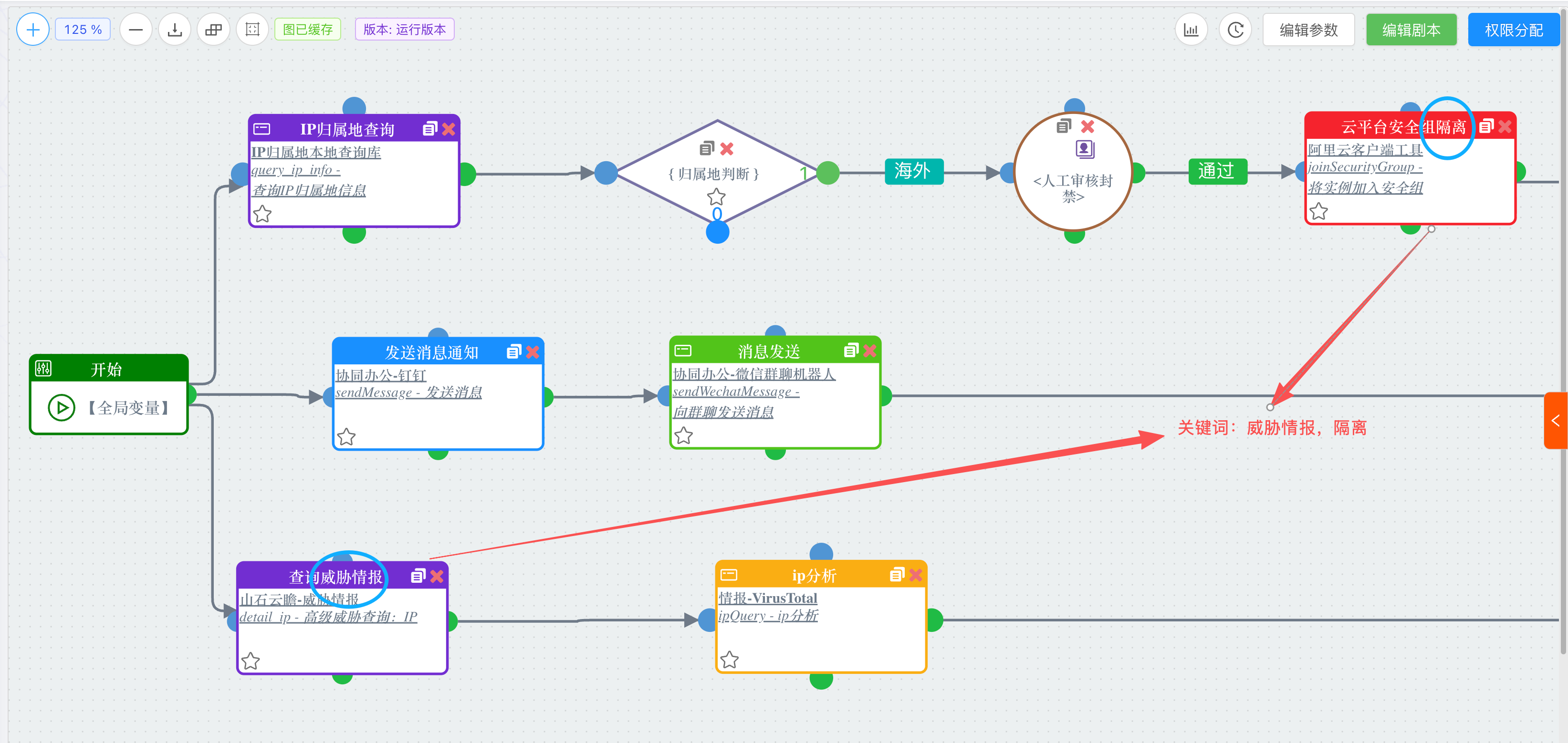 "Playbook Action Node Name Keywords" display and configuration entry in the management console
🚀 Quick Start
This guide will take you through deploying and configuring the SOAR MCP Server from scratch.
📋 Environment Requirements
System Requirements:
Supported Platforms:
🛠️ Step 1: Project Deployment
You can choose Native Deployment, Docker Deployment, or Offline Package Release based on your needs.
Option 1: Native Python Deployment (Recommended for development environments)
1. Get project code
# 克隆项目
git clone https://github.com/flagify-com/soar-mcp.git
cd soar-mcp

# 或直接下载发布版本
wget https://github.com/flagify-com/soar-mcp/releases/latest/download/soar-mcp.zip
unzip soar-mcp.zip && cd soar-mcp
2. Environment configuration
# 创建 Python 虚拟环境
python3 -m venv venv

# 激活虚拟环境
# Linux/macOS:
source venv/bin/activate
# Windows:
# venv\Scripts\activate

# 升级 pip 并安装依赖
pip install --upgrade pip
pip install -r requirements.txt
3. First launch
# 直接启动服务器
python3 soar_mcp_server.py
🎉 Congratulations! The server has started.
Upon first run, the system will automatically:
✅ Create the database and initial configuration.
✅ Generate an administrator password (displayed only once in the console, not written to log files).
✅ Generate and persist the JWT signing key.
✅ Start the MCP server and Web management interface.
⚠️ Skip SOAR playbook synchronization (requires subsequent configuration).
Important Output Information:
============================================================
  🔑 管理员初始密码: a$bC9*xYz2M&
  ⚠️  请妥善保管,此密码不会再次显示!
============================================================

📊 MCP服务: http://127.0.0.1:12345/mcp
   认证方式1: Authorization: Bearer <token> (推荐)
   认证方式2: http://127.0.0.1:12345/mcp?token=<token> (兼容)
🎛️  管理后台: http://127.0.0.1:12346/admin
⚠️ Security Note: The administrator password is only displayed via the console during the first launch and is not recorded in log files. Please be sure to save it immediately. If lost, you can reset it using ./reset_admin_password.sh.
🔐 Deployment Suggestion: After logging into the console for the first time, please immediately go to the "Password Management" page in the navigation bar to change the administrator password before proceeding with SOAR platform initialization configuration.
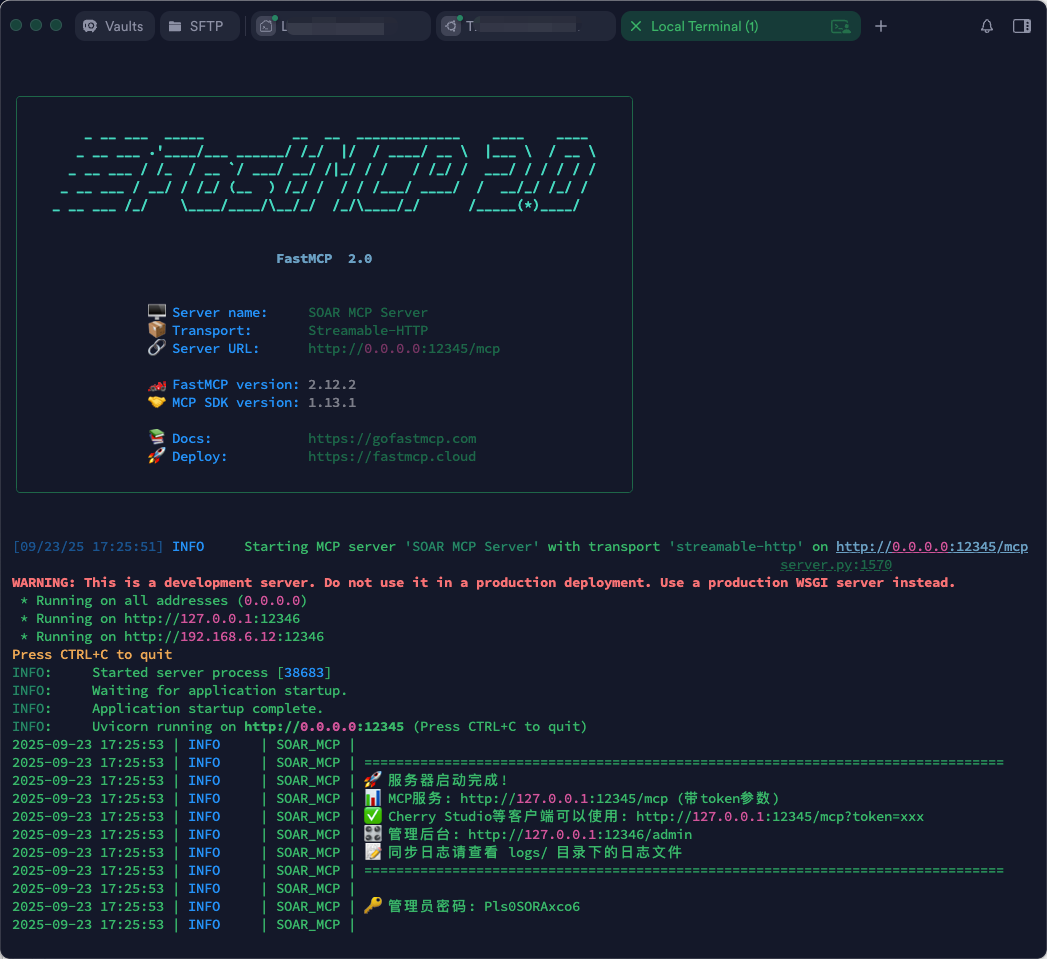 Console output interface after SOAR MCP Server startup
Option 2: Docker Container Deployment (Recommended for server environments)
The project natively includes Dockerfile and docker-compose.yml, greatly simplifying the deployment process.
Build and start the service in the background directly:
# 为避免卷挂载时 sqlite db 尚未生成而被 Docker 误创建为空目录,请先进行本地文件预占位
mkdir -p logs && touch soar_mcp.db

# 一键构建镜像并启动
docker-compose up -d --build
View running logs to get the initial password:
# 强烈建议在此步查看日志,获取管理员初始随机密码
docker-compose logs -f soar-mcp-server
Option 3: Offline Packaging and Remote One-Click Deployment
If you need to migrate a tested service to an intranet server without external network access, you can use the project's built-in code and image export tools to achieve fully automated intranet packaging and migration:
Execute "packaging" on a development machine or jump server capable of building images:
# 此脚本会自动归档最新构建的 Docker 镜像和挂载目录,生成完全离线可用的发布包
./export_release.sh
# 构建完成后当前目录将生成:soar-mcp-release.tar.gz
Transfer the packaged soar-mcp-release.tar.gz to the target intranet server and extract it for use:
tar -xzvf soar-mcp-release.tar.gz
cd soar-mcp-release

# 执行自动化一键部署脚本(已自带 docker load 镜像加载逻辑)
./install.sh
⚙️ Step 2: SOAR Platform Configuration
1. Access the management console
Open your browser and visit http://127.0.0.1:12346/admin
Log in using the administrator password displayed in the console.
If SOAR is not configured, the system will automatically enter "System Configuration" and display the first-time configuration guide.
2. Configure SOAR connection
Enter the following information on the system configuration page:
Configuration Item | Description | Example Value |
SOAR Server API Address | Base API address of the SOAR platform | https://your-soar.com
|
API Token | JWT authentication token for the SOAR platform | eyJhbGciOiJIUzI1NiIs...
|
Timeout | API request timeout (seconds) | 30
|
SSL Certificate Verification | HTTPS certificate verification toggle | Enabled
|
Sync Cycle | Data synchronization interval | 12 hours
|
Playbook Fetch Tags | Playbook tags to filter for synchronization | MCP
|
3. Test and save
Click the "Test Connection" button to verify the configuration.
After seeing ✅ "API connection test successful!", click "Save Configuration".
The system will automatically start synchronizing SOAR playbook data.
Note: SOAR connection parameters are now based on database configuration; the running service will no longer read API_URL, API_TOKEN, or SSL_VERIFY from .env as runtime configuration.
🤖 Step 3: MCP Client Configuration
Supports various LLM-based MCP clients, including but not limited to: Cherry Studio, Claude Desktop, Cursor, Trae, etc.
Cherry Studio (Recommended)
 Configuring SOAR MCP Server in Cherry Studio
Open Cherry Studio
Go to Settings → MCP Servers
Edit the configuration file and add the following content:
Method 1: URL Parameters (Good compatibility)
{
  "mcpServers": {
    "soar-mcp": {
      "type": "http",
      "name": "soar-mcp",
      "description": "SOAR 安全编排平台集成",
      "url": "http://127.0.0.1:12345/mcp?token=xxxx"
    }
  }
}
Method 2: Bearer Token (Recommended, more secure)
{
  "mcpServers": {
    "soar-mcp": {
      "type": "http",
      "name": "soar-mcp",
      "description": "SOAR 安全编排平台集成",
      "url": "http://127.0.0.1:12345/mcp",
      "headers": {
        "Authorization": "Bearer xxxx"
      }
    }
  }
}
Save and restart Cherry Studio
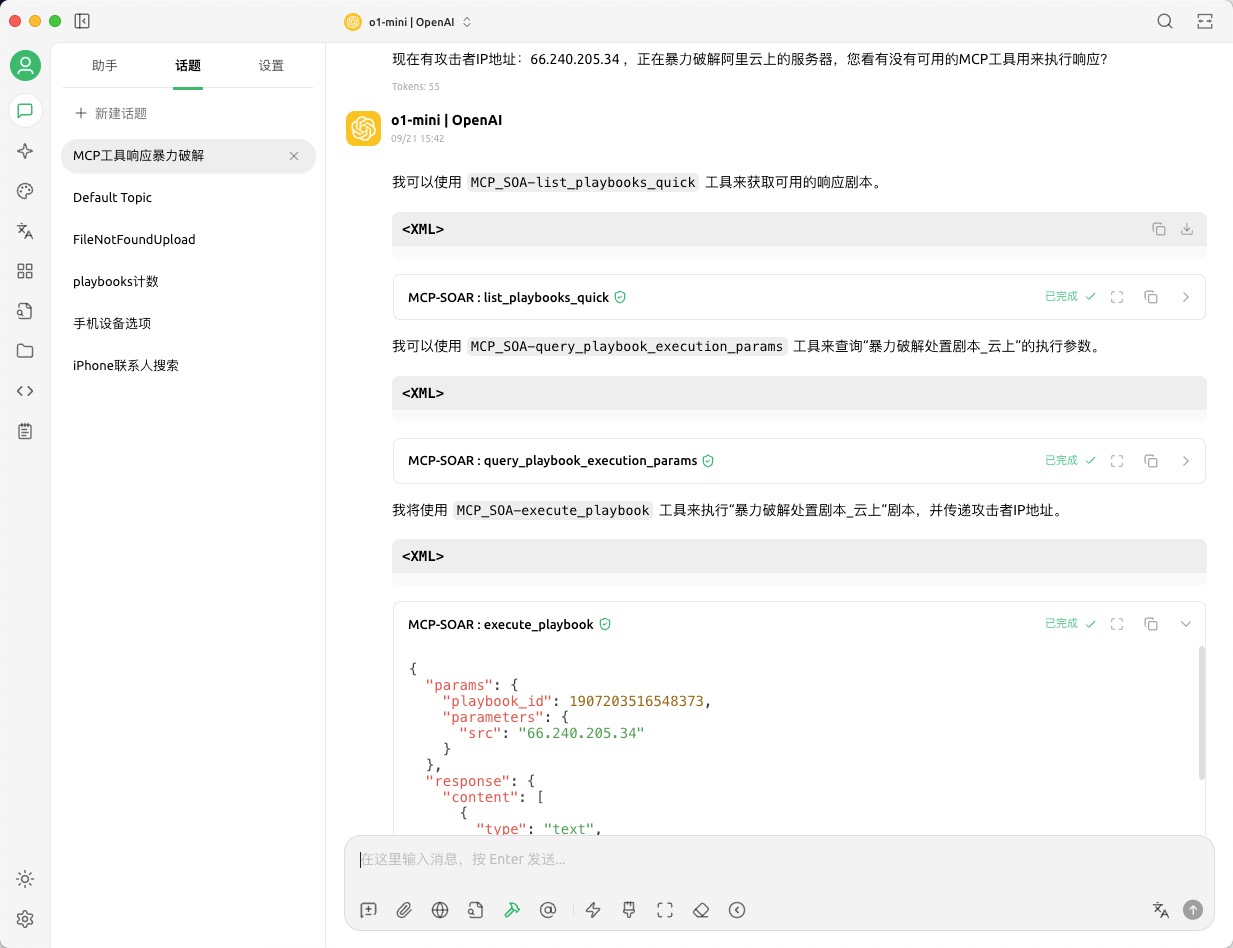 Successfully using SOAR MCP Server in Cherry Studio
⚠️ Important: Replace xxxx with the actual API Token obtained from the management console. The Bearer Token method is more secure as the token is not exposed in URLs or logs.
Claude Desktop
Edit the Claude Desktop MCP configuration file:
Location:
Configuration Content (URL Parameter method):
{
  "mcpServers": {
    "soar-mcp": {
      "type": "http",
      "name": "soar-mcp",
      "description": "SOAR 安全编排平台集成",
      "url": "http://127.0.0.1:12345/mcp?token=xxxx"
    }
  }
}
Configuration Content (Bearer Token method, recommended):
{
  "mcpServers": {
    "soar-mcp": {
      "type": "http",
      "name": "soar-mcp",
      "description": "SOAR 安全编排平台集成",
      "url": "http://127.0.0.1:12345/mcp",
      "headers": {
        "Authorization": "Bearer xxxx"
      }
    }
  }
}
⚠️ Important:
Replace xxxx with the actual API Token obtained from the management console.
The Bearer Token method is more secure and is recommended.
Claude Desktop requires a restart to load new configurations.
Other MCP Clients
General Configuration Parameters:
Protocol: HTTP (Streamable-HTTP)
Server URL: http://127.0.0.1:12345/mcp
Authentication Method (Choose one):
🧪 Step 4: Functional Verification
Verify MCP connection
Enter the following in your MCP client:
Normally, it will return:
📋 当前可用的 SOAR 剧本:

1. 🔍 IP信誉检查剧本 (ID: "1907203516548373")
   - 内部名称: ip_reputation_check
   - 显示名称: IP信誉检查剧本
   - 状态: 启用中
Full Execution Flow Example
Query playbook parameters:
请查询剧本 1907203516548373 需要哪些执行参数
Execute playbook:
请执行剧本 1907203516548373,检查IP地址 192.168.1.100
Check execution status:
Get execution results:
Get key results:
Local Unit Testing
It is recommended to run the following local unit tests after modifying logic related to playbook result extraction:
python3 -m unittest discover -s tests -p 'test_playbook_result_views.py'
📦 Upgrading from Older Versions
The current version has one database schema addition and one MCP tool semantic adjustment compared to older versions. If you are a new deployment user, you can ignore this section; if you are upgrading with historical data, please follow the steps below.
What changed in this upgrade
1. Database Changes
A new field has been added to the playbooks table:
result_focus_keywords TEXT DEFAULT '[]'
This field is used to save the "Playbook Action Node Name Keywords" configured for each playbook, used by query_playbook_execution_key_results_by_activity_id to automatically filter key node results.
2. MCP Tool Semantic Adjustment
Playbook execution result querying has been split into two semantic tools:


