
primer-mcp
<!-- mcp-name: io.github.ivanlai/primer-mcp -->
# primer-mcp
[](https://github.com/ivanlai/primer-mcp/actions/workflows/ci.yml)
[](https://pypi.org/project/primer-mcp/)
> **Beta** — the core workflow is stable and tested, but the tool is new. Expect rough edges.
A Jira-lite MCP server that guides planning-first workflows for AI-assisted development — tickets as markdown files, your AI agent as the interface.
Does it work? [An eval of 108 runs](https://github.com/ivanlai/primer-mcp-eval) found it took planning-before-coding from 0/15 to 15/15 on features and open-ended requests. But one line in CLAUDE.md got a saved plan too, so what primer-mcp adds is the structure of the record. [Details below](#does-it-work).
## Why
Getting real value from AI coding agents takes more than prompting. It takes shaping what they build, engineering the workflow around them, and deploying something that holds up in practice.
Left to their own devices, agents jump straight to implementation. Primer-mcp makes them plan first:
- state why the work matters
- record decisions and weigh trade-offs
- break the work into stories and tasks
- check the plan with you before coding
- complete and verify each one
The tickets are plain markdown with YAML frontmatter, committed alongside your code. There's no external service and no database. Everything is visible in your repo and easy to browse with tools like [Obsidian](https://obsidian.md).
primer-mcp is designed for solo developers and small projects — one person (and their AI agent) working through a backlog. It doesn't have assignment, notifications, or multi-user coordination, and that's deliberate: it's a lightweight complement to the AI workflow, not a replacement for Jira.
## Quick start
Requires Python 3.12+ and [uv](https://docs.astral.sh/uv/getting-started/installation/).
Add to your MCP client config (e.g. Claude Code `settings.json`, Claude Desktop `claude_desktop_config.json`):
```json
{
"mcpServers": {
"primer-mcp": {
"command": "uvx",
"args": ["primer-mcp"]
}
}
}
```
That's it — your MCP client downloads and runs primer-mcp automatically. You don't need to install anything manually.
Tell your AI agent what you want to build — it handles the rest. The server guides the agent through a planning-first workflow: why the work matters, decisions, stories, tasks, completion. Not sure what to do next? Ask your agent — it reads the current state and knows what comes next.
### Manual install (optional)
If you prefer to install primer-mcp as a standalone tool (e.g. for the `list-actionable` CLI command):
```bash
uv tool install primer-mcp
# Update to latest
uv tool upgrade primer-mcp
# Uninstall
uv tool uninstall primer-mcp
```
## What it looks like
A typical session — you describe the work, the agent handles the planning:
```
You: I want to add user authentication.
Agent: You have EP-001: "Launch the app" — auth fits under that.
Or I can create a separate epic if this is a bigger initiative.
You: EP-001 is fine.
Agent: Before we build, we should decide on the auth approach.
A few common options:
1. JWT with refresh tokens — stateless, good for mobile/SPAs
2. Server-side sessions — simple, but needs sticky storage
3. OAuth2 only — delegates to a provider, less to maintain
...
You: Option 1 — we need mobile support.
Agent: I'll record that decision so we don't revisit it later.
→ Recorded ADR-003: "Use JWT with refresh tokens"
Rejected: server-side sessions (no mobile support),
OAuth2 only (need local accounts too)
Breaking this into stories.
→ Created ST-005: "Login and registration endpoints"
→ Created ST-006: "Token refresh and revocation"
And tasks for the first story:
→ Created TK-010: "Add /register endpoint with validation"
→ Created TK-011: "Add /login endpoint returning JWT pair"
→ Created TK-012: "Write integration tests for auth flow"
You: Let's start with TK-010.
Agent: → Started TK-010
[implements the register endpoint]
Done — added POST /register with email/password validation,
password hashing, and duplicate-email check.
→ Completed TK-010
You: Looks good, verify it.
Agent: → Verified TK-010 (evidence: "all tests pass — a1b2c3d")
TK-011 is next. Want me to continue?
```
Every ticket is a markdown file in `primer/`, committed alongside your code. The `export_graph` tool visualises how they connect:
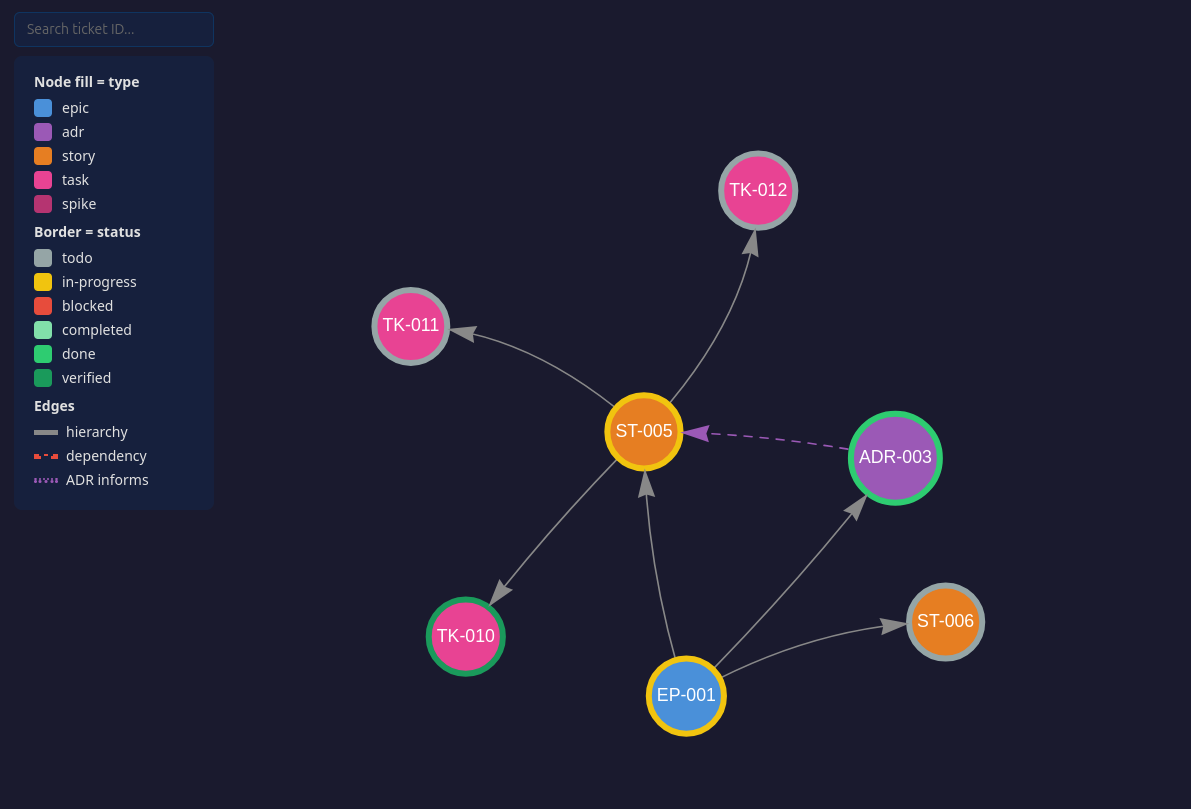
*Clone the repo and open [assets/demo-graph.html](assets/demo-graph.html) for the interactive version — click any node to see its full ticket.*
Since tickets are plain markdown with wikilinks, you can also open `primer/` as an [Obsidian](https://obsidian.md) vault for a live graph that updates as tickets change — no need to re-export.
## Tools
Your AI agent calls these tools automatically — you don't need to invoke them directly. You can also ask your agent to call a specific tool if you want more control.
### Setup
| Tool | What it does |
|------|-------------|
| `init_project` | Create the `primer/` ticket store and add the workflow section to CLAUDE.md |
### Planning
| Tool | What it does |
|------|-------------|
| `plan_epic` | Create an epic — the top-level container for a body of work |
| `record_adr` | Record an architecture decision: context, decision, rejected alternatives, consequences |
| `create_story` | Create a story under an epic — a deliverable with acceptance criteria |
| `create_task` | Create a task under a story — a concrete unit of work with a testable outcome |
| `create_spike` | Create a spike — a timeboxed investigation to answer a question |
### Execution
| Tool | What it does |
|------|-------------|
| `start_task` | Move a task to in-progress |
| `complete_task` | Mark a task completed with notes on what was done |
| `verify_task` | Verify a completed task with evidence (point at the commit) |
| `complete_spike` | Close a spike with findings |
### Query
| Tool | What it does |
|------|-------------|
| `list_actionable` | List what can be acted on right now, with epic context and recommendations |
| `get_ticket` | Read a ticket by ID with its full body |
| `list_tickets` | List tickets, filterable by type or status |
| `update_ticket` | Amend a ticket's status, dependencies, body sections, or external refs |
### Export
| Tool | What it does |
|------|-------------|
| `export_graph` | Generate a self-contained HTML file visualising the project as an interactive graph |
## Prompts
| Prompt | What it does |
|--------|-------------|
| `plan_story` | Walk through a planning conversation before creating a story |
| `export_jira` | Export primer-mcp tickets to Jira via a Jira MCP server |
| `import_jira` | Import a Jira epic and its hierarchy into primer-mcp |
## Agent instructions
When your project is initialized (automatically on first use, or via `init_project`), this section is appended to your agent config file (CLAUDE.md, AGENTS.md) to guide the agent. If you prefer to add it manually:
```markdown
## primer-mcp
This project uses primer-mcp for planning-first development.
Tickets are markdown files under `primer/` — they are yours to read and edit.
Prefer the tools for creating and updating them: they allocate IDs, follow the templates
and guide the workflow. Hand-edit where the tools fall short.
- Plan before code. Recommended flow: Epic -> ADR -> Story -> Task,
suggest rather than enforce — skip steps when it makes sense.
- Unsure what to do next? Call `list_actionable`.
- Completion is two-phase: `complete_task` with notes, then `verify_task`
with evidence (point at the commit, not the output). Both are
recommended — the tools will nudge you if you skip a step.
- After tickets creation or changes, offer to regenerate the project graph with `export_graph`.
- Before committing, check that completion notes on finished tickets
still reflect the actual work — update both the frontmatter
`completed_notes` and the `## Completion Notes` section if needed.
- Before implementing new work, propose a ticket and parent. Small fixes (1–2
tasks) go under the standing bug-fix story; larger efforts get their
own story. The user can decline.
```
## Graduating to Jira (experimental)
primer-mcp tickets map directly to Jira concepts (Epic, Story, Task, ADR). When a project outgrows local markdown files:
- **`export_jira`** pushes tickets to Jira through any Jira MCP server. Each ticket's `external_ref` field tracks its Jira key, so re-exports update existing issues instead of creating duplicates.
- **`import_jira`** goes the other direction.
Both prompts are experimental and have not been tested end-to-end.
## Does it work?
[primer-mcp-eval](https://github.com/ivanlai/primer-mcp-eval) tests whether primer-mcp changes how an AI coding agent works. It gives headless Claude Code the same 12 change requests three ways:
- plain
- with primer-mcp
- with one line in CLAUDE.md asking for a plan saved in `docs/` before coding
That's 108 isolated runs, scored from transcripts with no LLM judge.
**What it found:**
- **primer-mcp** took a written plan before coding from 0 of 15 runs to 15 of 15 on features and open-ended requests. It changed little on bug fixes and refactors, where its guidance lets the agent skip planning.
- **The one-line instruction** got a saved plan on all 36 runs, for about 7% extra cost against primer-mcp's 50%.
- **Outcomes:** none of the three made a measurable difference.
So primer-mcp isn't needed to get a plan written. What it adds is the shape of the record, which the plan files lacked:
- goals kept apart from implementation steps
- decisions with the options that were rejected
- a status for each piece of work
Whether that structure pays off in later sessions is untested.
**Overhead.** Wherever the agent planned with primer-mcp, it took about 15–25 extra turns. That grew with the number of tickets created, not with the size of the code change, so it should be a smaller share of larger work (untested).
The methodology and full results are in that repo.
## This repo dogfoods itself
The `primer/` directory in this repo is the project's own backlog, created with the tools in `src/` and committed deliberately — a tool that tells you to commit your ticket store should commit its own. Browse it on GitHub to see what a real store looks like before installing:
- `primer/adrs/` — design decisions, including rejected alternatives and why
- `primer/stories/` and `primer/tasks/` — what is done, what is next, and verification evidence
**It is project management, not part of the package.** The wheel ships `src/primer_mcp` only, and `primer/` is excluded from the distribution. Your own `primer/` is created automatically when you start planning.
## Development
[DEVELOPMENT.md](DEVELOPMENT.md) covers setting up a checkout, running the checks, pointing an MCP client at unreleased code, and how the code is put together — from a tool call arriving over MCP to the ticket file being written.
## License
MIT
TDQS
Scored across 17 tools
Each planning entity has a dedicated creation/lifecycle tool and the descriptions clarify boundaries, but `update_ticket` can also set status to `in-progress`, which overlaps with `start_task`; `list_tickets` and `list_actionable` could also be confused at a glance. Overall, tools are mostly distinct.
All tools use lowercase snake_case imperative verb + object names such as `create_story`, `complete_spike`, and `delete_ticket`, and even less common names like `sweep_blocked_by` follow the same pattern. There are no mixed conventions or vague generic verbs.
Seventeen tools is slightly above the typical 3–15 sweet spot, but nearly every tool covers a genuine lifecycle stage or query/cleanup need. The count is reasonable for a planning/ticketing server, though it could feel heavy to an agent.
The surface covers project init, epic/ADR/story/task/spike creation, task and spike completion, verification, dependency cleanup, and graph export. A notable gap is that epics and stories have no finished/closed status or dedicated completion tool, so the top-level planning items cannot be explicitly closed out.