MSSQL MCP Server
English | 中文
Overview
MSSQL MCP Server, provides database interaction and business intelligence capabilities. This server enables running SQL queries, analyzing business data, and automatically generating business insight memos.
Refer to the official website's SQLite for modifications to adapt to MSSQL.
Built on the official MCP Python SDK (FastMCP), supporting the MCP 2025-06-18 specification: structured tool output (structuredContent), tool annotations, resource templates, and elicitation-based write confirmation.
Highlights:
Multi-database — mount dev/staging/prod connections in one server; every tool takes an optional database parameter, each connection with its own readonly / query_timeout / max_rows / confirm_writes settings
Stored procedures — list signatures and execute procedures with full multi-result-set harvesting
Resource templates — schema://{database}/{schema}/{table} serves table structures on demand without burning tool-schema tokens every turn
Safety guardrails — SQL whitelisting, read-only mode, row limits, query timeouts, optional elicitation confirmation before writes
Related MCP server: SQLite MCP Server
Components
read_query
write_query
create_table
list_tables
list_views
describe_table
View full schema for a specific table (type, nullable, default, primary key, identity, foreign keys, indexes)
list_databases
list_procedures
execute_procedure
append_insight
Resources
memo://insights — a living business-insights memo, updated in real time via append_insight
schema://{schema}/{table} — table structure of the default database (JSON: columns / PK / identity / FKs / indexes)
schema://{database}/{schema}/{table} — table structure of a named database connection
Resource templates are fetched on demand: unlike tool schemas they are not resent to the LLM every turn, which keeps long conversations lean.
Security
All SQL goes through static validation before execution:
read_query only accepts a single SELECT / WITH statement and rejects any write or EXEC keyword (blocks e.g. WITH c AS (...) DELETE FROM t)
write_query uses a whitelist (INSERT / UPDATE / DELETE / MERGE only); EXEC, DROP, TRUNCATE, ALTER are rejected
Multi-statement batches (separated by ;) are rejected
trusted_connection: true switches to Windows integrated auth (the connection string uses Trusted_Connection=yes, no username/password needed); false keeps the configured SQL account login
readonly: true disables all write operations, including stored procedures (they are black boxes that may write)
Stored procedure names are strictly validated as 1–3 dotted identifier parts before being embedded into {CALL ...}
Results are truncated at max_rows rows; queries are aborted after query_timeout seconds
With confirm_writes: true, all state-changing operations (write_query writes, create_table, execute_procedure) first ask the user for confirmation via MCP elicitation
⚠️ Important limitation: the confirmation relies on the client implementing the MCP Elicitation protocol. Clients without elicitation support (e.g. TraeWork / Cursor ...) skip the confirmation and execute writes directly — meaning confirm_writes: true provides no protection on such clients (a skip warning is logged server-side). For reliable write protection on any client, use readonly: true instead (hard-blocks all writes regardless of client capabilities)
Comments and string literals are stripped before validation, so they cannot be used to bypass checks
Demo
The database table is as follows. The column names are not standardized, and AI will match them on its own. Errors during SQL execution will self correct.

The following is the demo.
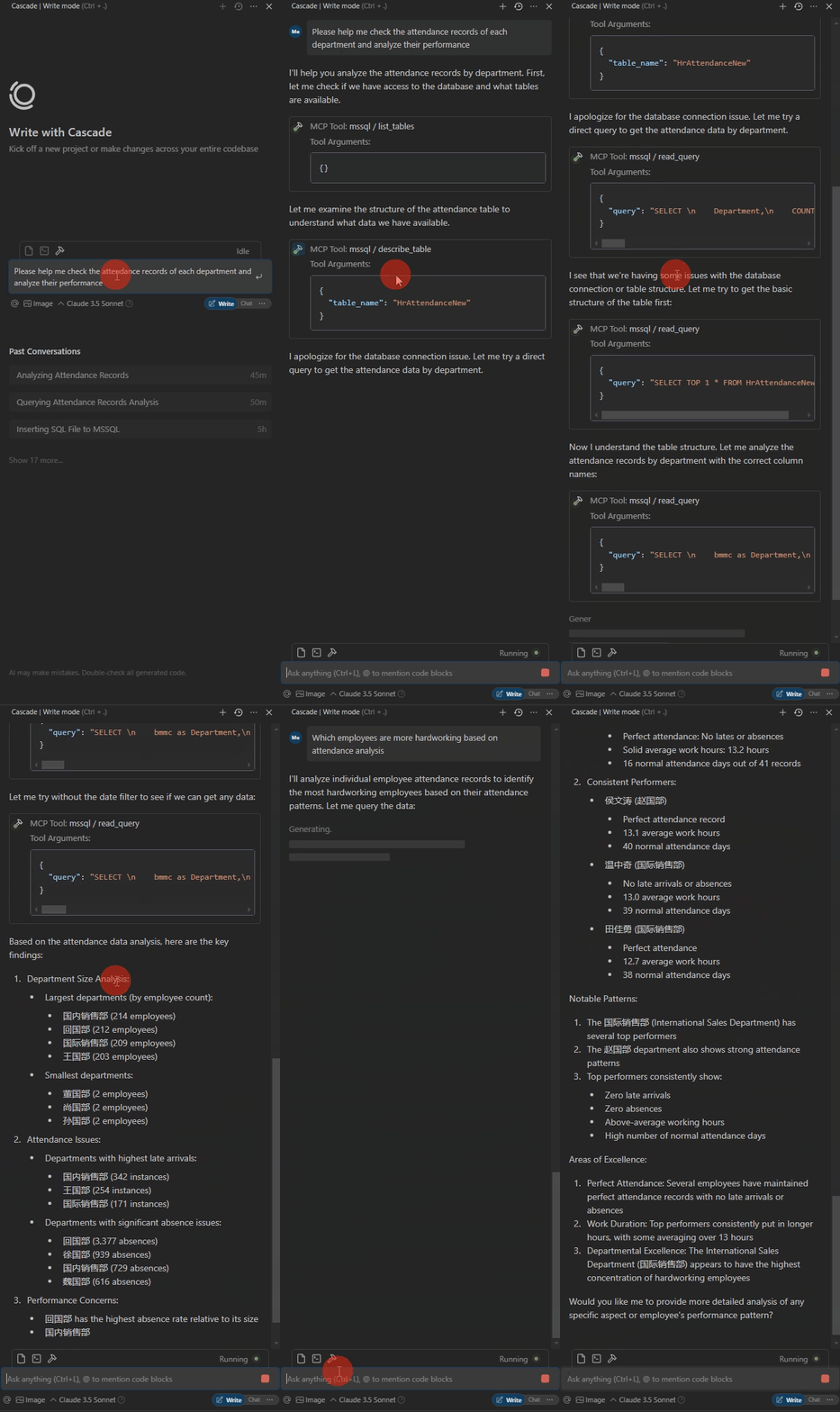
Operating environment
Usage
Install packages
From source:
git clone <this repo>
CD /d ~/mssql-mcp
pip install -r requirements.txt
Or as a package (pip >= 21.3):
config
Create config.json. Single-database format:
{
    "database": {
        "driver": "ODBC Driver 17 for SQL Server",
        "server": "server ip",
        "database": "db name",
        "username": "username",
        "password": "password",
        "trusted_connection": false,
        "readonly": false,
        "query_timeout": 30,
        "max_rows": 200,
        "confirm_writes": false
    },
    "server": {
        "name": "mssql-manager",
        "version": "0.2.0"
    }
}
Multi-database format (recommended — each connection has independent settings, e.g. prod stays read-only):
{
    "databases": {
        "default": { "server": "localhost", "database": "dev_db", "...": "..." },
        "prod":    { "server": "10.0.0.5", "database": "prod_db", "readonly": true, "...": "..." }
    },
    "default_database": "default",
    "server": { "name": "mssql-manager", "version": "0.2.0" }
}
Connection names and the default connection: the keys in databases are the connection names — the LLM passes one of them as the database parameter to switch connections. Keys are arbitrary (you do not have to call one of them default). default_database decides which connection is used when database is not passed, resolved in this order:
If default_database: "xxx" is explicitly set, use the connection named xxx
Otherwise, if a connection named default exists, use it
Otherwise, use the first connection in the dictionary
Recommended: explicitly set default_database and also keep a connection literally named default as a safety net — this way adding new connections (which may end up first in iteration order) won't silently change the default.
Config file lookup order: MSSQL_MCP_CONFIG env var → config.json next to server.py → config.json in the working directory.
Optional fields (per connection):
Field | Default | Description |
readonly
| false
| Read-only mode: blocks all write operations (incl. procedures) |
query_timeout
| 30
| Query timeout in seconds |
max_rows
| 200
| Max rows per result set; extra rows are truncated |
confirm_writes
| false
| Ask for user confirmation (elicitation) before all state-changing operations (writes / CREATE TABLE / procedures); requires client Elicitation support — unsupported clients (e.g. TraeWork / Cursor) execute directly; for hard protection use readonly |
encrypt
| (none) | ODBC encryption, for Driver 18 (true / false) |
trust_server_certificate
| false
| Trust self-signed certificates, useful with Driver 18 |
Environment variables:
Variable | Default | Description |
MSSQL_MCP_CONFIG
| (none) | Path to an alternative config file |
MSSQL_MCP_LOG_LEVEL
| INFO
| Log level (DEBUG / INFO / WARNING / ERROR) |
Client Configuration (Claude Desktop / Cursor / Windsurf, etc.)
Mainstream stdio clients (Claude Desktop, Cursor, Windsurf, Cline, etc.) share the same mcpServers JSON format. Take Claude Desktop as an example — for other clients, add the same entry to their MCP config file:
# add to claude_desktop_config.json. Note:use your path
{
    "mcpServers": {
        "mssql": {
            "command": "python",
            "args": [
                # your path,e.g.:"C:\\mssql-mcp\\src\\server.py"
                "~/server.py"
            ]
        }
    }
}
If installed as a package, the command can simply be mssql-mcp (no args needed).
MCP Inspector
# Note:use your path
npx -y @modelcontextprotocol/inspector python C:\\mssql-mcp\\src\\server.py
Run tests
pip install pytest
python -m pytest tests -q
tests/test_validation.py — SQL / procedure-name validation (no database needed)
tests/test_config.py — config parsing: legacy single-db compatibility, multi-db, error cases (no database needed)
tests/test_integration.py — end-to-end against the database in src/config.json (writes only touch dedicated mcp_upgrade_* test objects, cleaned up automatically)
Project Structure
mssql-mcp
├── .git
├── .gitignore
├── LICENSE
├── README.md
├── README_en.md
├── README_zh.md
├── imgs
│   ├── table.png
│   └── demo.gif
├── pyproject.toml        (packaging: src/ is installed as the mssql_mcp package)
├── requirements.txt
├── src
│   ├── __init__.py
│   ├── config.json      (gitignored, local database config)
│   └── server.py
└── tests
    ├── test_validation.py
    ├── test_config.py
    └── test_integration.py
License
MIT License

