
jevmem-mcp
# jevmem
**Long-term memory for AI agents that costs fractions of a cent, never calls an LLM, and cleans up after itself.**
[](https://github.com/illescasDaniel/jev-mem/actions/workflows/ci.yml)
[](https://pypi.org/project/jevmem/)
[](https://github.com/illescasDaniel/jev-mem/blob/main/LICENSE)


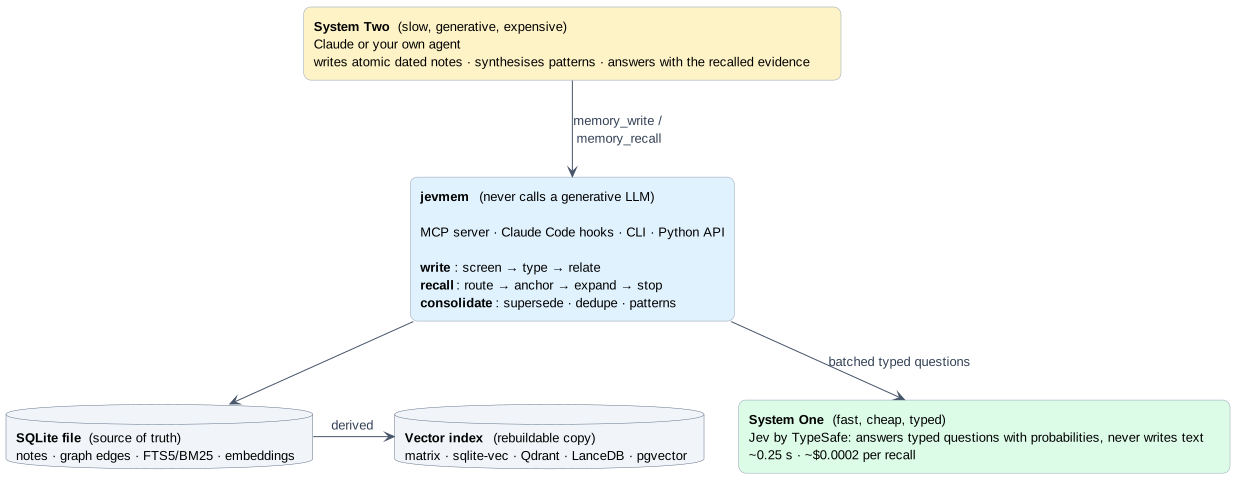
Your agent forgets everything when the session ends. Most memory add-ons fix that by asking a big LLM to
summarise, tag, deduplicate and re-rank on every write and read: slow, expensive, and one more thing that can hallucinate.
jevmem takes the approach of the [**Jev-Mem paper**](https://arxiv.org/abs/2609.23986)
(*Jev-Mem: System-One-Controlled Agentic Memory for Efficient AI Agents*): split the work.
- **System One** (fast, cheap): [Jev](https://typesafe.ai) answers *typed questions* with probabilities. Is this note
safe? what kind is it? does it contradict an older one? which notes matter for this question? is that enough yet?
- **System Two** (slow, smart): your agent (Claude) writes the notes, synthesises patterns and answers.
jevmem is the memory layer built on that idea: an MCP server, Claude Code and Cursor configs, hooks and skill, a CLI and
a Python library on top of one SQLite file. Install it from PyPI: [pypi.org/project/jevmem](https://pypi.org/project/jevmem/).
## Why you would want it
**Your agent stops repeating itself.** "We never use pip here", "the month-end job moved to 22:00 because the
warehouse was downsized", "that flaky test is a timezone bug": decisions, gotchas and preferences survive across
sessions and are injected when they matter, not dumped into every prompt.
**It is cheap and fast enough to run on every prompt.** A recall is about one Jev call (~0.25 s) in the common case,
roughly $0.0002 in the heavy case, and zero generative tokens. A hook can decide per prompt whether memory is needed at
all, and inject nothing when it is not.
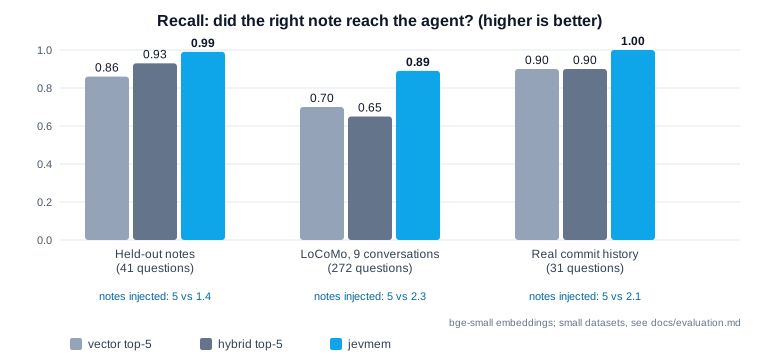
**It sends less, and the right thing.** Plain vector search returns five notes and hopes. jevmem judges relevance,
follows links between notes to find the *why* behind a fact, and returns one to three:
**It knows when it does not know.** Recall reports `sufficient: false` instead of returning five plausible
notes for a question memory cannot answer (abstains on 94-98% of unanswerable questions), so the agent looks in the code
instead of guessing.
**Memory that stays clean.** Newer facts supersede older ones, duplicates collapse, repeated episodes become
proposals for a general rule that the agent writes. Nothing is deleted behind your back: stale notes just rank lower.
**Safe by construction.** Every write is screened: credentials are rejected, prompt-injection text aimed at the
agent is rejected, near-duplicates are rejected, and "next step is X" status notes (which rot silently) are rejected
too. Recalled notes are always presented to the agent as data, never as instructions.
**Git-aware.** Notes remember the branch and commit they were written on. All worktrees of a repository share one
memory; notes from an abandoned branch rank lower.
**It never gets in the way.** Everything fails open: if Jev is down, hooks inject nothing and recall degrades to
hybrid search. Your agent never blocks on its memory.
**It scales down and up.** Zero setup on a laptop (one SQLite file, in-RAM exact search). When you outgrow it, point
`JEVMEM_INDEX` at Qdrant, LanceDB or Postgres/pgvector (sqlite-vec takes over automatically past 100k notes): SQLite stays the source of truth and the index is
a rebuildable copy.
### What it adds to an agentic workflow
| Without jevmem | With jevmem |
|---|---|
| Re-explain conventions every session, or paste them into `CLAUDE.md` forever | Decisions and gotchas are recalled by relevance, and old ones retire themselves |
| Vector top-k: five notes, some stale, some contradicting each other | One to three notes, superseded facts filtered, the causal "why" attached |
| An LLM in the memory loop: slow, costly, nondeterministic writes | Typed probabilities from a small model; thresholds in code, tuned on data |
| Memory poisoning goes unnoticed | Injection, secrets, duplicates and status rot are screened at write time |
| "I don't remember" is indistinguishable from "here are five loosely related notes" | An explicit `sufficient` / `missing` signal |
| Multi-agent setups share nothing, or everything | Shared `project:` scope plus private `agent:` scopes |
It also ships a small **Judge** API (route a task to the right agent, prune tool output, screen untrusted text, decide
when to stop) for using the same cheap typed decisions outside memory. See
[Python library](https://github.com/illescasDaniel/jev-mem/blob/main/docs/architecture.md#using-it-from-your-own-python-agents).
## How it works in 60 seconds
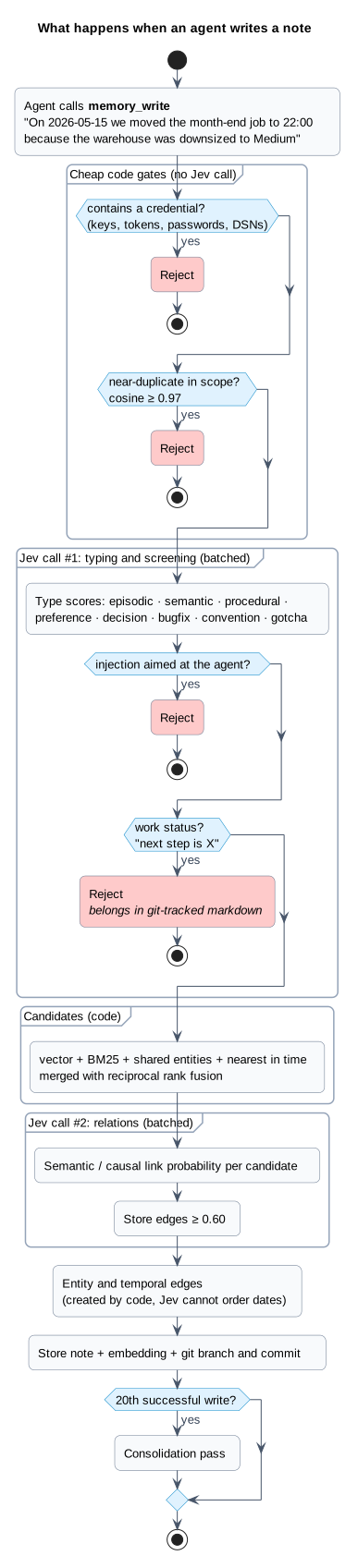
1. **Write**: your agent calls `memory_write("On 2026-05-15 we moved the month-end job to 22:00 because the warehouse
was downsized to Medium")`. Code rejects secrets and duplicates; one batched Jev call types the note and screens it for
injection and status rot; a second call links it to related notes. ([write path](https://github.com/illescasDaniel/jev-mem/blob/main/docs/architecture.md#write-path-writepy))
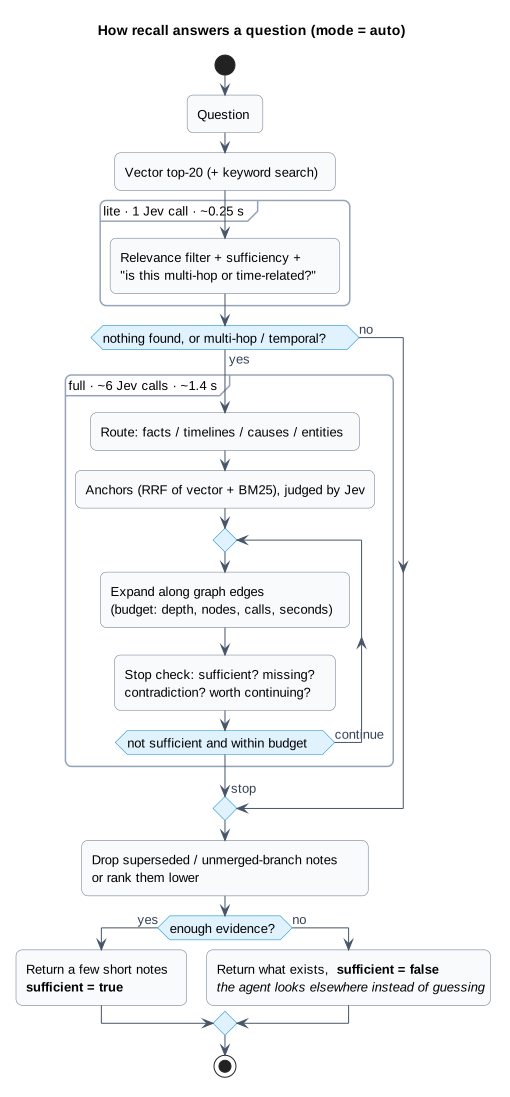
2. **Recall**: a later question, "why does the month-end job run at night?", is answered by `lite` mode (one call),
escalating to `full` mode (route, graph expansion, stop check) only when it looks multi-hop or temporal. The
graph edge from the job note to the warehouse note finds the cause even though they share no words.
([recall path](https://github.com/illescasDaniel/jev-mem/blob/main/docs/architecture.md#recall-path-retrievepy))
3. **Hooks** inject pinned notes and the strongest conventions at session start, and relevant notes per prompt, with no
effort from the agent. ([hooks](https://github.com/illescasDaniel/jev-mem/blob/main/docs/architecture.md#hooks-hookspy))
4. **Consolidate**: every 20 writes, Jev compares new notes with their neighbours and flags what is superseded,
duplicated or repeated. ([consolidation](https://github.com/illescasDaniel/jev-mem/blob/main/docs/architecture.md#consolidation-consolidatepy))
<details>
<summary>See the write and recall pipelines</summary>
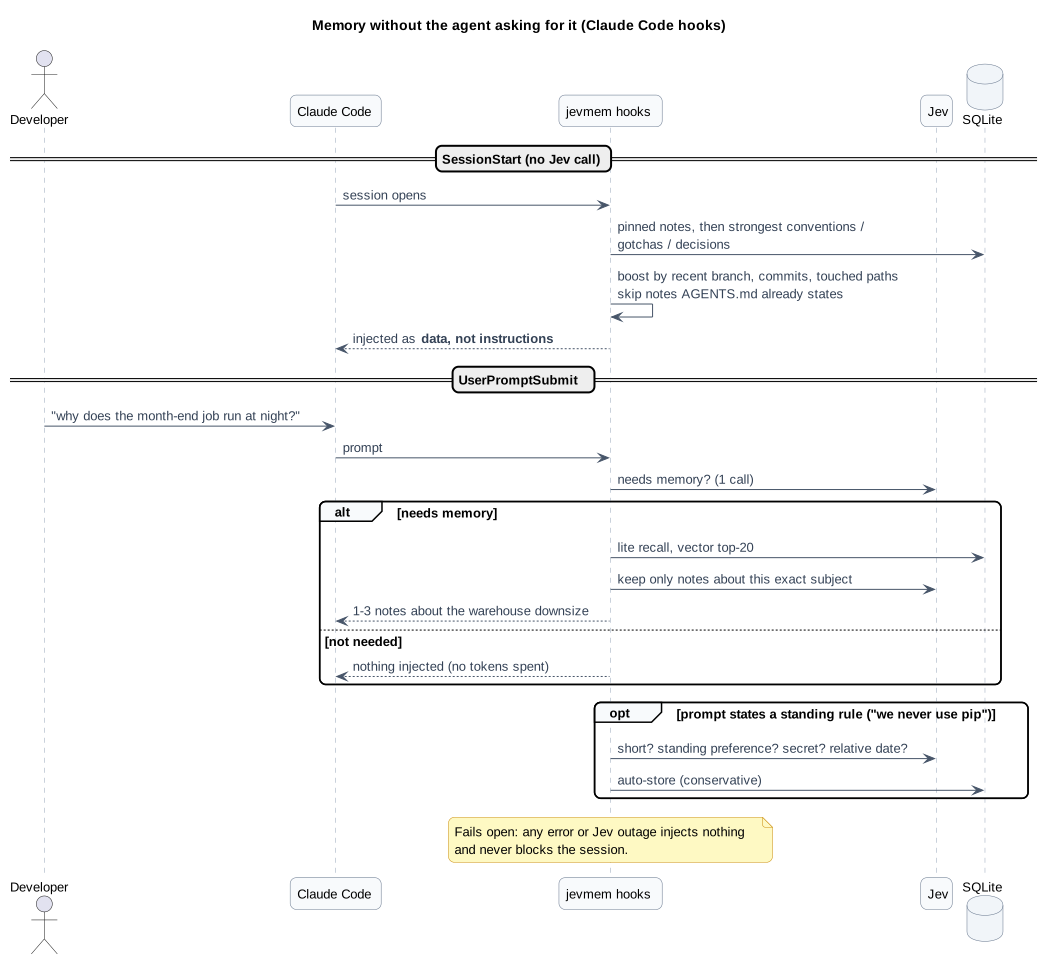
</details>
## Quickstart
You need Python 3.12+, [uv](https://docs.astral.sh/uv/), an MCP host ([Claude Code](https://docs.anthropic.com/en/docs/claude-code)
or [Cursor](https://cursor.com/docs/mcp)), and a decision model: either a TypeSafe API key for hosted Jev (currently
waitlisted, what the [results](#results) were measured with) or a
[local or third-party model](#using-a-local-or-third-party-model), which needs no key.
Create your settings file once; it holds the key (and, if you want, the database path) for every project and editor, and
the CLI, MCP server and hooks read it automatically. It lives in `~/.jevmem/config.jsonc` (Windows:
`%USERPROFILE%\.jevmem\config.jsonc`), outside every repository:
```bash
uvx jevmem config init --api-key "..." # omit --api-key to be prompted (hidden), or to skip it for a local model
```
### Claude Code
```bash
claude mcp add --scope user jevmem -- uvx --from jevmem jevmem-mcp
```
No clone needed: `uvx` fetches [jevmem from PyPI](https://pypi.org/project/jevmem/). Notes go to a per-project scope
(`project:<repository name>`, found from the folder the agent works in) unless the agent says `global` (for personal
preferences that apply everywhere) or you set `-e JEVMEM_SCOPE=...`. Recall searches the project plus `global`.
> **Python 3.15 or newer?** `uvx` may silently install an old release (0.1.0, which ignores `~/.jevmem/config.jsonc`)
> because `fastembed` needs `onnxruntime`, which has no wheels for 3.15 yet. Pin a supported Python:
> `uvx --python 3.14 --from jevmem jevmem-mcp`. See [installation](https://github.com/illescasDaniel/jev-mem/blob/main/docs/installation.md#2-install-the-python-package).
### Cursor
Add a user-wide server in `%USERPROFILE%\.cursor\mcp.json` (Windows) or `~/.cursor/mcp.json` (macOS/Linux), or a
project file at `.cursor/mcp.json`.:
```json
{
"mcpServers": {
"jevmem": {
"type": "stdio",
"command": "uvx",
"args": ["--from", "jevmem", "jevmem-mcp"]
}
}
}
```
This repo already ships `.cursor/mcp.json` for working on jevmem itself. Reload MCP in Cursor after saving
(Customize → MCP), then confirm `memory_write` / `memory_recall` appear under Available Tools.
The default install is the one the [results](#results) were measured with: it includes a small local embedding model
(fastembed, ONNX, no API) and the sqlite-vec index. The model (about 70 MB) downloads on first use, so run
`uvx --from jevmem jevmem warmup` once while online. Optional vector backends (`jevmem[qdrant]`, `[lancedb]`,
`[pgvector]`, `[all]`) and the lighter `JEVMEM_EMBEDDER=hash` opt-out are in the
[installation guide](https://github.com/illescasDaniel/jev-mem/blob/main/docs/installation.md#2-install-the-python-package).
Then ask the agent to remember something ("remember that we deploy through ops/deploy.sh, never by hand") and, in a new
session, ask how to deploy. For the full experience:
- copy the [`jev-memory` skill](https://github.com/illescasDaniel/jev-mem/blob/main/.claude/skills/jev-memory/SKILL.md)
to `~/.claude/skills/` (Claude Code) or use this repo's `.cursor/skills/jev-memory/` (Cursor);
- add the two Claude Code hooks for automatic injection ([snippet](https://github.com/illescasDaniel/jev-mem/blob/main/docs/installation.md#5-skill-and-hooks));
- seed it from what you already have: `uvx jevmem import-claude-memory` or `uvx jevmem import-markdown AGENTS.md`.
Windows notes (paths, PowerShell, Cursor, no-bash MCP launch): see
[installation § Windows and Cursor](https://github.com/illescasDaniel/jev-mem/blob/main/docs/installation.md#windows-and-cursor).
### Using a local or third-party model
jevmem only needs a server that speaks Jev's `/v1/systemone` API, so any compatible model works in place of hosted Jev, and
the `api_key` in your settings file is **not needed** then. Example with `jevk5:4b`, run locally through [`ollaya`](https://ollaya.dev/)
(a runner for decision models; install it from there):
```bash
ollaya pull jevk5:4b # one-time download, 4.5 GB
ollaya serve # leave running; listens on http://localhost:11435
ollaya ps # after the first call: check the model is on cuda, not cpu (about 5.5 GB of VRAM)
ollaya stop # when you are done: unloads the models and stops the server
```
Then point jevmem at the server and name the model:
```bash
claude mcp add --scope user jevmem \
-e JEVMEM_BASE_URL=http://localhost:11435 -e JEVMEM_MODEL=jevk5:4b \
-- uvx --from jevmem jevmem-mcp
```
| Env var | Purpose |
|---|---|
| `JEVMEM_BASE_URL` | the server's address; setting it switches jevmem off hosted Jev |
| `JEVMEM_MODEL` | model name to ask for (the server's default if unset) |
| `JEVMEM_API_KEY` | only if that server wants a key. `TYPESAFE_API_KEY` is never sent to a custom address |
| `JEVMEM_TIMEOUT` | seconds per call (default 60); raise it for a slow model on CPU |
Put them in `~/.jevmem/config.jsonc` (`base_url`, `model`, `api_key`, `timeout`) instead of `-e` flags if you prefer. Run the model on its own: with a GPU shared with another
model it can silently fall back to CPU, which is much slower. Things to know before relying on one:
- **Thresholds are calibrated for hosted Jev.** A model that scores differently needs its own cutoffs
([`Config`](https://github.com/illescasDaniel/jev-mem/blob/main/src/jevmem/config.py)); rerun `jevmem eval` and
`jevmem eval-injection` against it before trusting the screens.
- **Recall makes batched calls** (up to ~30 questions per request). A model with a short context rejects them and recall
quietly falls back to plain vector search.
- Measured so far: `jevk5:4b` on a local GPU is usable for recall but trims much less context than Jev and is a weaker
injection and conflict screen; `laya` is not suitable. Numbers in
[docs/evaluation.md](https://github.com/illescasDaniel/jev-mem/blob/main/docs/evaluation.md#local-decision-models).
To work on the code, `git clone` this repo and `uv sync`. Full setup, every environment variable, the CLI and the hooks:
[docs/installation.md](https://github.com/illescasDaniel/jev-mem/blob/main/docs/installation.md).
## Use it with a memory bank
jevmem is a **supplement** to a markdown memory bank, not a replacement. Keep current state (focus, blockers, next
steps) in a few git-tracked files the agent reads whole each session, so it follows the branch and shows in PR diffs;
keep the dated facts that stay true (decisions with reasons, bug causes, gotchas, preferences) in jevmem, where they are
recalled by relevance. Rules stay in `AGENTS.md` / `CLAUDE.md`. Never put "next step is X" in jevmem: it goes stale
silently, and `memory_write` rejects it.
If you do not have a memory bank yet, [memory-bank](https://github.com/illescasDaniel/memory-bank) is a ready-made one:
an Agent Skill plus templates for Claude Code and Cursor, written to work alongside jevmem.
```bash
npx skills add illescasDaniel/memory-bank
```
## Results
Measured live against Jev on small datasets we built ourselves, with real embeddings (`bge-small`). They are
indications, not benchmarks; methodology, datasets and caveats are in [docs/evaluation.md](https://github.com/illescasDaniel/jev-mem/blob/main/docs/evaluation.md).
| | vector top-5 | jevmem |
|---|---|---|
| Recall, held-out notes (41 questions) | 0.86 | **0.99** |
| Recall, LoCoMo slice, 9 conversations (272 questions, never used for tuning) | 0.70 | **0.89** (`lite`: 0.84 for ~1/5 of the Jev tokens) |
| Recall, 57 real commit-history notes | 0.90 | **1.00** |
| Multi-hop questions, LoCoMo slice (conv-26) | 0.20 | **0.70** |
| Notes sent to the agent per question | 5 | **1.4 to 2.3** |
| Unanswerable questions correctly flagged | never | **94-98%** |
| `auto` mode vs `full` mode, pooled over 466 questions | | same recall (0.911 vs 0.910) for ~40% fewer Jev tokens |
| Consolidation, labelled stale/duplicate pairs, held out | | 44/44 right (22/44 before the rework), no false flags |
| Write-time screens | | 0 false captures on 123 real prompts; 0 of 10 injections missed (regression set, tuned on itself) |
## Documentation
| | |
|---|---|
| [Installation and configuration](https://github.com/illescasDaniel/jev-mem/blob/main/docs/installation.md) | setup, Windows/Cursor, env vars, tools, CLI, hooks, skill, indexes |
| [Architecture](https://github.com/illescasDaniel/jev-mem/blob/main/docs/architecture.md) | write, recall, hooks, consolidation, scopes, Python API, code layout |
| [Concepts](https://github.com/illescasDaniel/jev-mem/blob/main/docs/concepts.md) | Jev, System One/Two, embeddings, vector search and databases, explained from scratch |
| [Evaluation](https://github.com/illescasDaniel/jev-mem/blob/main/docs/evaluation.md) | methodology, datasets, every number above, caveats, 1M-note benchmark |
| [Known limitations](https://github.com/illescasDaniel/jev-mem/blob/main/docs/limitations.md) | what is weak, honestly, and what we would try next |
| [Changelog](https://github.com/illescasDaniel/jev-mem/blob/main/CHANGELOG.md) | what changed |
## Status
Beta (v0.4.0). Core library, MCP server and CLI, Claude Code / Cursor configs, skill and hooks, consolidation, an
evaluation harness and pluggable vector indexes are in and tested (`uv run pytest`; CI runs Linux, macOS and Windows on
Python 3.12 and 3.13). Expect rough edges: the
tuning data is small and mostly from one project, and Jev itself is a waitlisted hosted service. Issues and
experience reports are very welcome, especially from projects that are not ours.
## Credits and license
Based on *Jev-Mem: System-One-Controlled Agentic Memory for Efficient AI Agents* (Jiang, Li and Li,
[arXiv:2609.23986](https://arxiv.org/abs/2609.23986)). Typed decisions by [Jev](https://typesafe.ai) from TypeSafe.
This project is not affiliated with the paper's authors or TypeSafe.
MIT, see [LICENSE](https://github.com/illescasDaniel/jev-mem/blob/main/LICENSE).
TDQS
Scored across 11 tools
The core tools have distinct roles across writing, recall, browsing, deletion, consolidation, and maintenance. There is minor overlap because memory_write can also pin notes and memory_resolve is another storage path, but the descriptions clearly scope those special cases.
All tools use snake_case and a consistent memory_ prefix. Action-oriented and resource-oriented suffixes remain predictable across both core and administrative operations.
Eleven tools are well suited to a memory service with both core operations and an advanced consolidation lifecycle. Each tool supports a recognizable workflow, with no obvious filler.
The surface covers storage, retrieval, listing, deletion, pinning, consolidation, proposal resolution or dismissal, queued-write recovery, and operational statistics. These operations connect into complete workflows without an obvious lifecycle dead end.