
Briar
by iklobato
README.md
<div align="center">
# briar
**The local CLI that turns your team's tools into knowledge, then runs
coding agents that open draft PRs with it.**
[](https://pypi.org/project/briar-cli/)
[](https://pypi.org/project/briar-cli/)
[](https://pypi.org/project/briar-cli/)
[](https://hub.docker.com/r/iklob1/briar)
[](https://github.com/iklobato/briar/actions/workflows/tests.yml)
[](https://github.com/iklobato/briar/blob/main/LICENSE)
[Install](#install) · [Quickstart](#quickstart) · [Docs](https://usebriar.com/docs) · [Website](https://usebriar.com) · [Changelog](https://github.com/iklobato/briar/blob/main/CHANGELOG.md)
<img src="https://raw.githubusercontent.com/iklobato/briar/main/docs/demo/01-setup-and-extract.gif" alt="briar init, briar doctor, then briar extract collects facts about the repo and briar context get prints them" width="800">
New to briar? [Learn it in 3 examples](#learn-briar-in-3-examples), from install to AI agents.
</div>
briar is a command-line tool (you run it in your terminal) that helps AI
coding assistants do better work on your team's code.
**The problem:** an AI assistant like Claude can write code, but it does
not know your team. It does not know which tests you run, who reviews what,
how your PRs usually look, or what the ticket really asks. So it guesses,
and you fix its guesses.
**What briar does about it**, in two parts:
1. **It collects facts.** It reads your team's tools (GitHub or Bitbucket,
Jira or Linear, AWS, Fireflies meeting notes) and writes what it learns
into plain text files on your computer. briar calls these facts
"knowledge".
2. **It gives those facts to AI agents.** An agent is an AI that works on
its own, step by step. One briar agent takes a ticket and opens a draft
PR (a PR marked "not ready to merge yet"). Another one fixes the review
comments on a PR. You always review and merge yourself.
There is no briar server and no account. briar only talks to the services
you set up: your code host, your tracker, your cloud and your AI provider.
Your tokens stay in a file on your computer.
## What you get
- **Facts from your tools.** briar has 23 extractors. An extractor is a
small reader for one kind of fact, for example "how long PRs take to
merge" or "which files change the most". They read GitHub, Bitbucket,
Jira, Linear, AWS, GCP, Azure and Fireflies, and write plain markdown text
to a folder (or to a Postgres database), once or on a schedule.
- **AI agents that read the facts first.** `briar agent implement` takes a
ticket, reads the facts it needs, writes the code in a fresh copy of your
repo, runs your tests and opens a draft PR. `briar agent prfix` answers
each review comment with its own small commit. Agents never force-push,
amend or rebase, so they never rewrite history that is already there.
- **A whole board, one card at a time.** `briar plan` reads a Jira board or
a GitHub Project (the list of tickets your team works on), puts the cards
in order and works on them one by one. When a card needs another card's
code, it starts from that card's branch, so the PRs build on each other.
- **You stay in charge.** Agents only open draft PRs. briar has no command
that merges.
- **Works with your other AI tools.** `--merge-claude-md` adds the facts to
`CLAUDE.md`, the file Claude Code reads when it starts. `briar mcp serve`
shares the facts with any app that speaks MCP (a standard way for AI apps
to call tools); it offers 10 tools.
- **Runs on your computer.** No account. Keys stay in a file on your
machine, or in AWS Secrets Manager, SSM or Vault.
## Where the knowledge comes from, and where the work goes
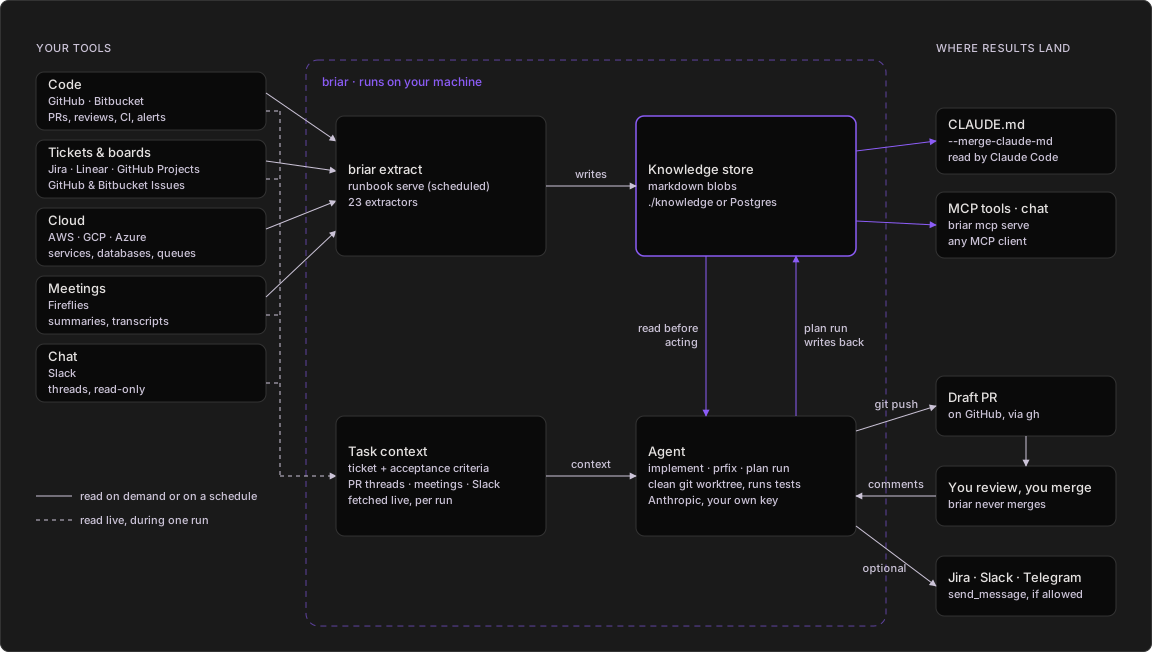
Everything in the dashed box runs on your machine and reads from your
tools. Agents push branches, open draft PRs and reply on reviews; their
`send_message` tool only reaches the channels you list in the runbook.
1. Extractors read your tools, on demand or on a schedule, and write
markdown knowledge to a local folder or to Postgres.
2. You point an agent at a ticket or a PR. It fetches the ticket, the PR's
review threads, and matching meeting notes and Slack messages live.
3. In a clean git worktree it first reads the knowledge sections that fit
its job (conventions, hotspots, reviewers, PR history), writes the code
on a new branch and runs your tests. Coding agents run on Anthropic with
your own key.
4. It pushes and opens a draft PR. If you allow those channels in the
runbook, it can also comment on the ticket or post in Slack or Telegram.
5. You review. `briar agent prfix` answers the comments with one commit per
thread. You merge; briar never does.
6. A plan run writes what each card taught into the plan's knowledge, which
its selector reads before the next pick. All knowledge also feeds Claude
Code (`CLAUDE.md`) and any MCP client.
More diagrams are in [See it run](#see-it-run).
## Install
```bash
pip install briar-cli
briar version
```
briar needs Python 3.10 or later. To run `briar agent` or `briar plan run`
you also need `git` and the GitHub CLI `gh`, because the agent runs them.
The base install covers GitHub, Bitbucket, AWS, Jira, Linear, Fireflies,
Anthropic (Claude) and AWS Bedrock, with a file or Postgres store, and
runs the coding agents. Extras add more:
```bash
pip install 'briar-cli[mcp]' # briar mcp serve, briar chat, MCP tools for agents
pip install 'briar-cli[all]' # openai, gemini, mcp, gcp, azure, vault
```
Or skip the install and use the Docker image, which also has `git` and
`gh`:
```bash
docker run --rm iklob1/briar version
```
Mounts, keys and running agents in Docker:
[usebriar.com/docs/install#docker](https://usebriar.com/docs/install#docker).
What each extra adds:
[usebriar.com/docs/install#extras](https://usebriar.com/docs/install#extras).
## Quickstart
The short version, for a GitHub repo with Jira tickets. New to briar?
[Learn it in 3 examples](#learn-briar-in-3-examples) instead.
```bash
# 1. Save a GitHub token and Jira login. They go to ~/.config/briar/secrets.env
briar auth login github-pat --company acme
briar auth login jira-token --company acme
# 2. Give briar a Claude key. It reads it from your shell.
export ANTHROPIC_API_KEY=sk-ant-your-key
# 3. Read the repo's recent PRs and its tools into the blob knowledge:acme
briar extract --company acme --repo acme-co/acme-app \
--include pr-archaeology --include codebase-conventions --max 50
# 4. Read what was saved
briar context get knowledge:acme
# 5. Print the agent's prompt for ticket ACME-42. No cost, nothing pushed.
briar agent implement --company acme --repo acme-co/acme-app \
--ticket-key ACME-42 --tracker jira --dry-run
# 6. Run it for real: clone, branch, code, test, open a draft PR
briar agent implement --company acme --repo acme-co/acme-app \
--ticket-key ACME-42 --tracker jira
```
After step 3 you have `./knowledge/knowledge/acme.md`. After step 6 you
have a branch `chore/acme-42` and a draft PR on `acme-co/acme-app`.
## Learn briar in 3 examples
Written for someone who has never used briar. Each example says the
problem it solves, what each command does, what happens behind the scenes,
and what you get. Every GIF is a real run in a clone of this repo on briar
1.1.99: the commands really ran; only the typing is paced, and a long
output is shown one screen at a time so you can read it.
**Before you start** (once, about 2 minutes):
```bash
pip install briar-cli # installs the briar command (needs Python 3.10 or later)
cd path/to/your-repo # go into any GitHub repo you can read
export GITHUB_TOKEN=$(gh auth token) # gives briar your GitHub login, so it can read the repo
```
If you do not use the GitHub CLI `gh`, run
`briar auth login github-pat --company myteam` and paste a GitHub token
instead. That token is all examples 1 and 2 need. Nothing is sent to an
AI, so they cost nothing. Example 3 also uses `--dry-run`, so it costs
nothing either; you only need an AI key (`export ANTHROPIC_API_KEY=...`)
when you drop `--dry-run` and let the agent really work.
**Words you will see:**
| Word | What it means |
|---|---|
| extractor | A reader for one kind of fact, like "merged PRs" or "CI runs". |
| knowledge, blob | The facts briar saved. One markdown file, named like `knowledge:myteam`. |
| agent | An AI that works on its own, step by step: it reads files, runs commands and writes code. |
| prompt | The instructions text that briar gives the AI. |
| `--dry-run` | "Show me what you would do, but do not do it." No AI call, nothing changes. |
| draft PR | A PR marked "not ready", so nobody merges it by accident. |
| runbook | A YAML file that lists which extractors to run, for which team, and how often. |
### Example 1: Set up briar and collect facts
**The problem:** an AI that writes code for you does not know your repo or
how your team works: how fast PRs get merged, who writes them, how often
you release, how often CI passes.
```bash
briar init --company myteam # creates .briar.toml, a small settings file in your repo
briar doctor # checks that briar has everything it needs
briar extract --include pr-archaeology --include release-cadence --include ci-health --merge-claude-md
# collects three kinds of facts and tells Claude Code where they are
briar context get knowledge:myteam # prints the facts briar saved
```
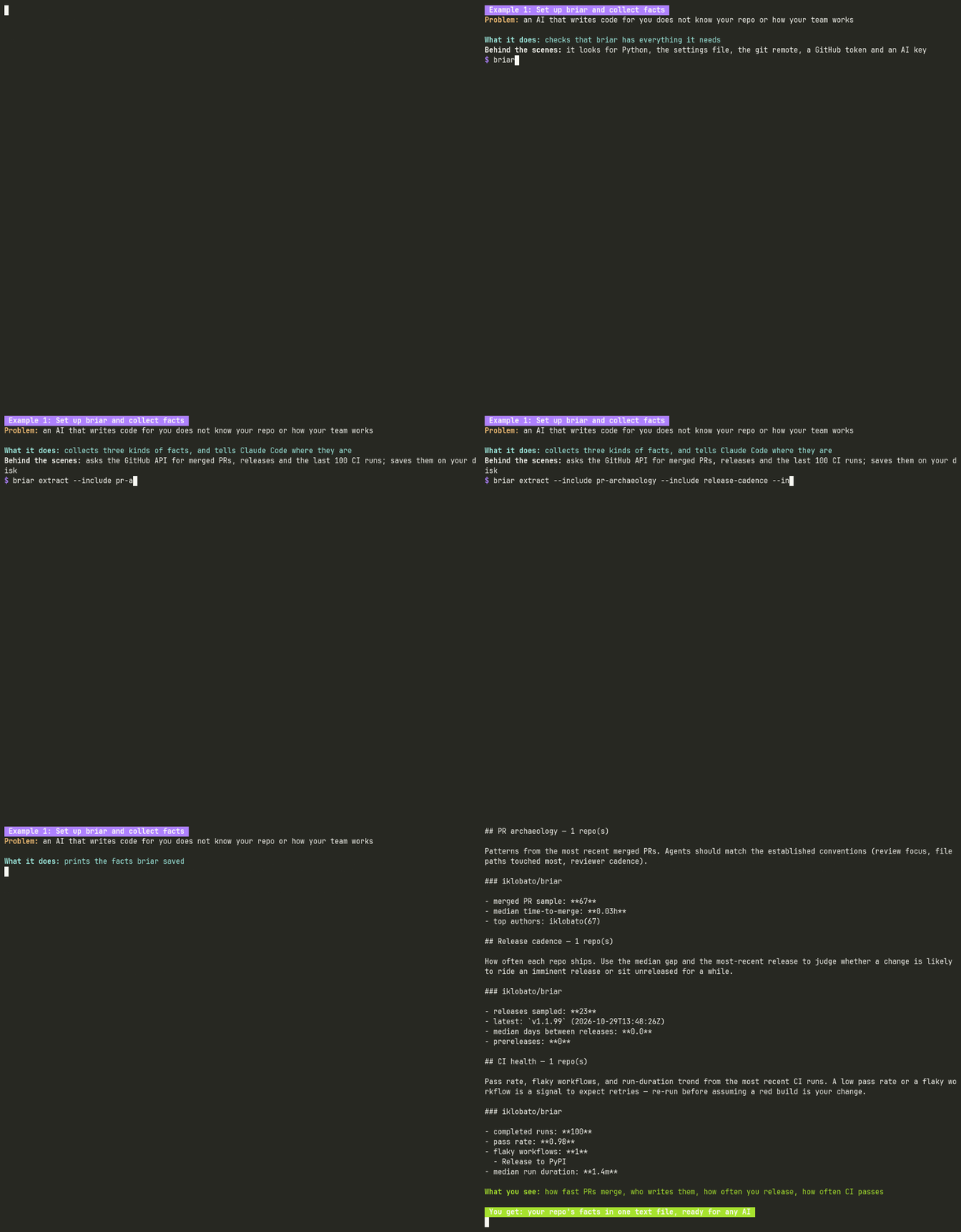
**What happens:**
- `init` runs `git remote get-url origin` to find the GitHub owner and repo
name, and writes them into `.briar.toml` with the team name you chose
(`myteam` is just a label). After this, no command needs `--company` or
`--repo`. To see each setting and where it came from, run
`briar config show`.
- `doctor` checks Python, the settings file, the git remote, your GitHub
token and your AI key. `ok` means ready; `warn` tells you what is missing
and what needs it.
- `extract` runs the extractors you name with `--include`. They ask the
GitHub API for your merged PRs (`pr-archaeology`), your releases
(`release-cadence`) and your last 100 CI runs (`ci-health`), and sum
them up. The result is saved as one markdown file under `./knowledge/`,
called `knowledge:myteam`.
- `--merge-claude-md` also writes the facts to `.briar/knowledge/myteam.md`
and adds a short block to `CLAUDE.md` that points to it. Claude Code (an
AI coding assistant) reads `CLAUDE.md` when it starts, so every session
begins with your facts. Your own text in `CLAUDE.md` stays as it is.
- `context get` prints the saved file. It only reads your disk; nothing
goes online.
**You get:** your repo's facts in one text file, ready for any AI.
`briar extract -h` lists all 23 extractors. Good ones to add later:
`code-hotspots` (the files that change the most),
`codebase-conventions` (your test runner, linter and formatter) and
`stale-prs` (open PRs nobody touched for a while). Running `extract` again
only replaces the sections of the extractors that ran, so the facts you
already have stay. `briar extract` with no `--include` runs all 23; on this
repo that took about 4 minutes.
### Example 2: Keep the facts fresh with a runbook
**The problem:** facts from last month are wrong today, and you do not want
to type the extract command every day.
Save this as `runbooks/myteam.yaml`. It lists the same three extractors as
example 1:
```yaml
version: 1
companies:
myteam:
schedules:
- task: extractors
every: "minute" # only for the demo; use "day at 03:17" for real
extract:
- name: pr-archaeology
args: {pr_repo: [iklobato/briar]}
- name: release-cadence
args: {release_repo: [iklobato/briar]}
- name: ci-health
args: {cihealth_repo: [iklobato/briar]}
```
```bash
briar runbook serve runbooks # start a scheduler for every runbook in the folder
```
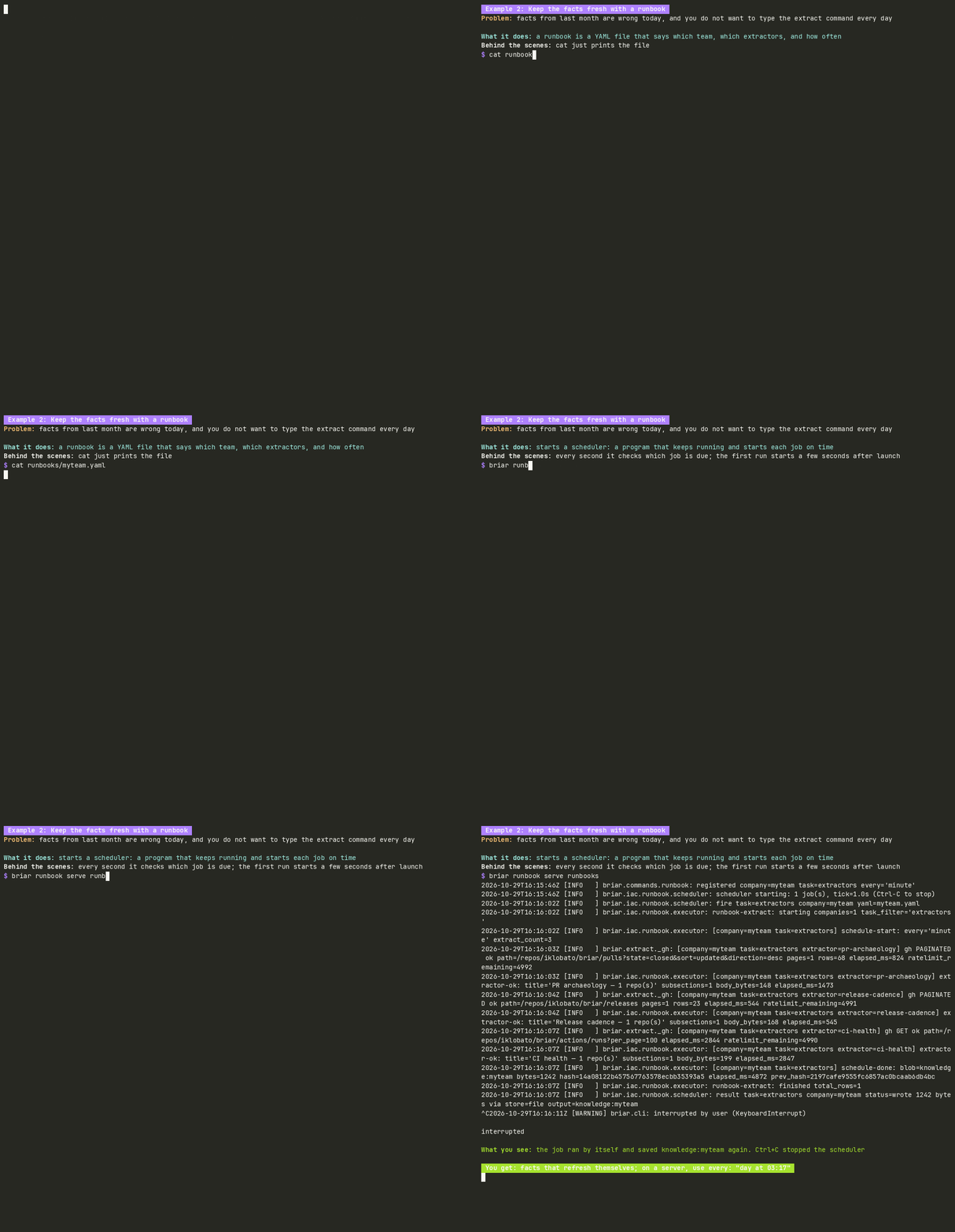
**What happens:**
- `serve` is a scheduler: a program that keeps running and starts each job
on time. Every second it checks which job is due.
- When the job is due, it does the same work as `briar extract` and saves
`knowledge:myteam` again. The log lines show each step.
- It runs until you press Ctrl+C. On a server you leave it running.
- To run the file once, right now, use `briar runbook extract runbooks/myteam.yaml`.
- More teams go under `companies:`. Each team gets its own file, and their
first runs start a few seconds apart, so they do not all call GitHub at
the same moment.
- A runbook writes its whole file each time, so list in it every extractor
you want to keep.
**You get:** facts that refresh themselves, without anyone typing a
command.
### Example 3: Let AI agents do the work
An agent reads your facts first, then works on its own. briar has two:
one turns a ticket into a draft PR, the other answers review comments.
Both are shown with `--dry-run`, so you see exactly what the AI would be
told, without running it.
#### A ticket becomes a draft PR
**The problem:** before an AI can write good code for a ticket, it needs
the ticket, your repo's rules and your team's facts, all in one set of
instructions, and it must not be able to do anything risky.
```bash
briar agent implement --ticket-key 38 --tracker github-issues --dry-run # build the agent's prompt for issue #38
```
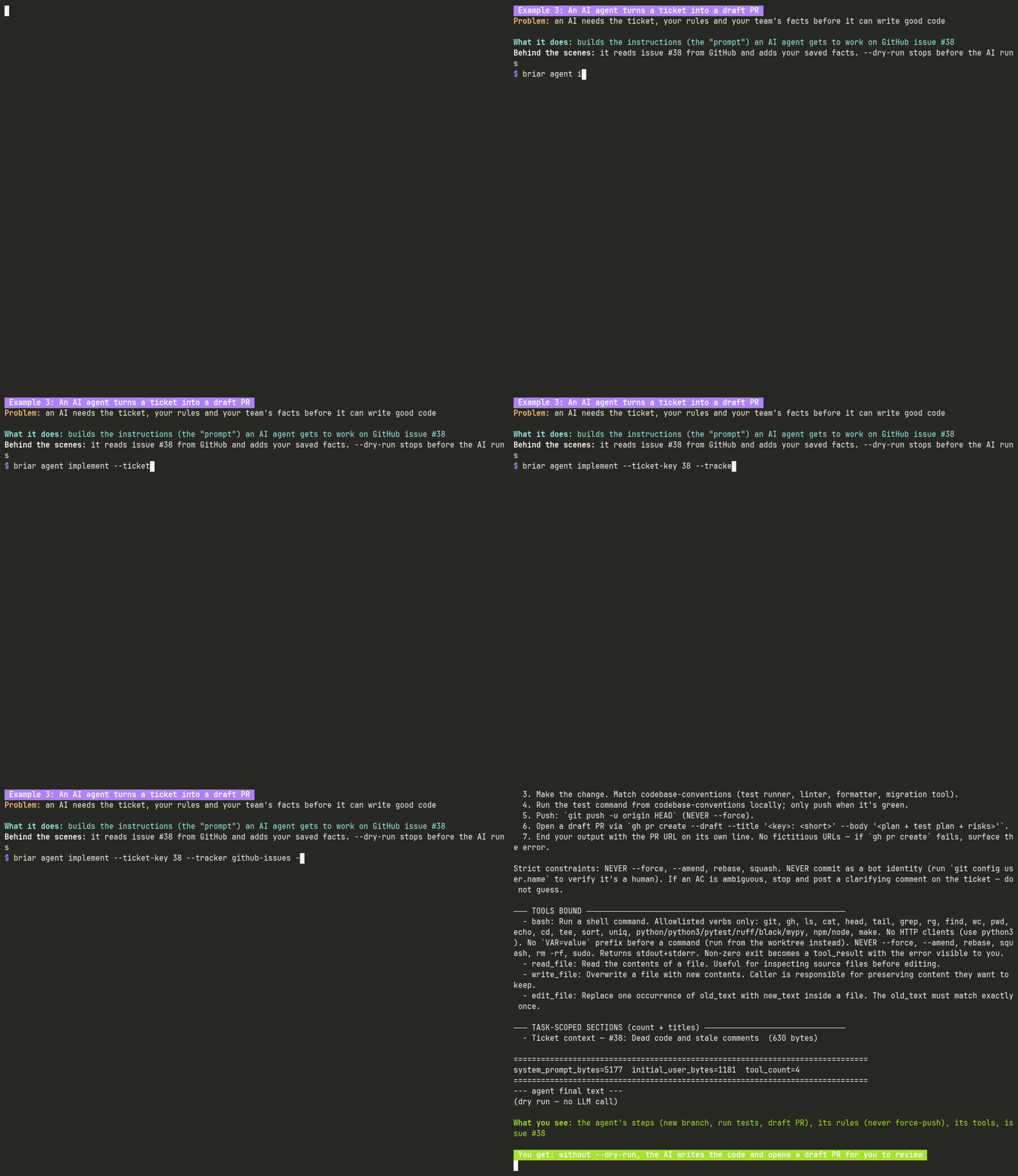
**What happens:**
- briar reads issue #38 from GitHub and your saved facts, and builds the
prompt: the agent's steps (make a new branch, write the code, run the
tests, open a draft PR), its rules (never force-push, amend or rebase),
and the tools it may use (a limited shell, and reading and editing files).
- `--dry-run` prints all of that and stops. No AI is called, nothing is
cloned, nothing is pushed.
**You get:** run it again without `--dry-run`, with `ANTHROPIC_API_KEY`
set, and the agent writes the code on a new branch, runs your tests and
opens a draft PR. You review it and merge it; briar never merges. Jira and
Linear tickets work the same way (`--tracker jira`, `--tracker linear`).
#### Review comments get answered
**The problem:** reviewers leave comments on your PR, and fixing each one,
committing and replying on GitHub takes time.
```bash
briar agent prfix --pr 75 --branch docs/readme-hero --dry-run # build the agent's prompt for PR #75
```
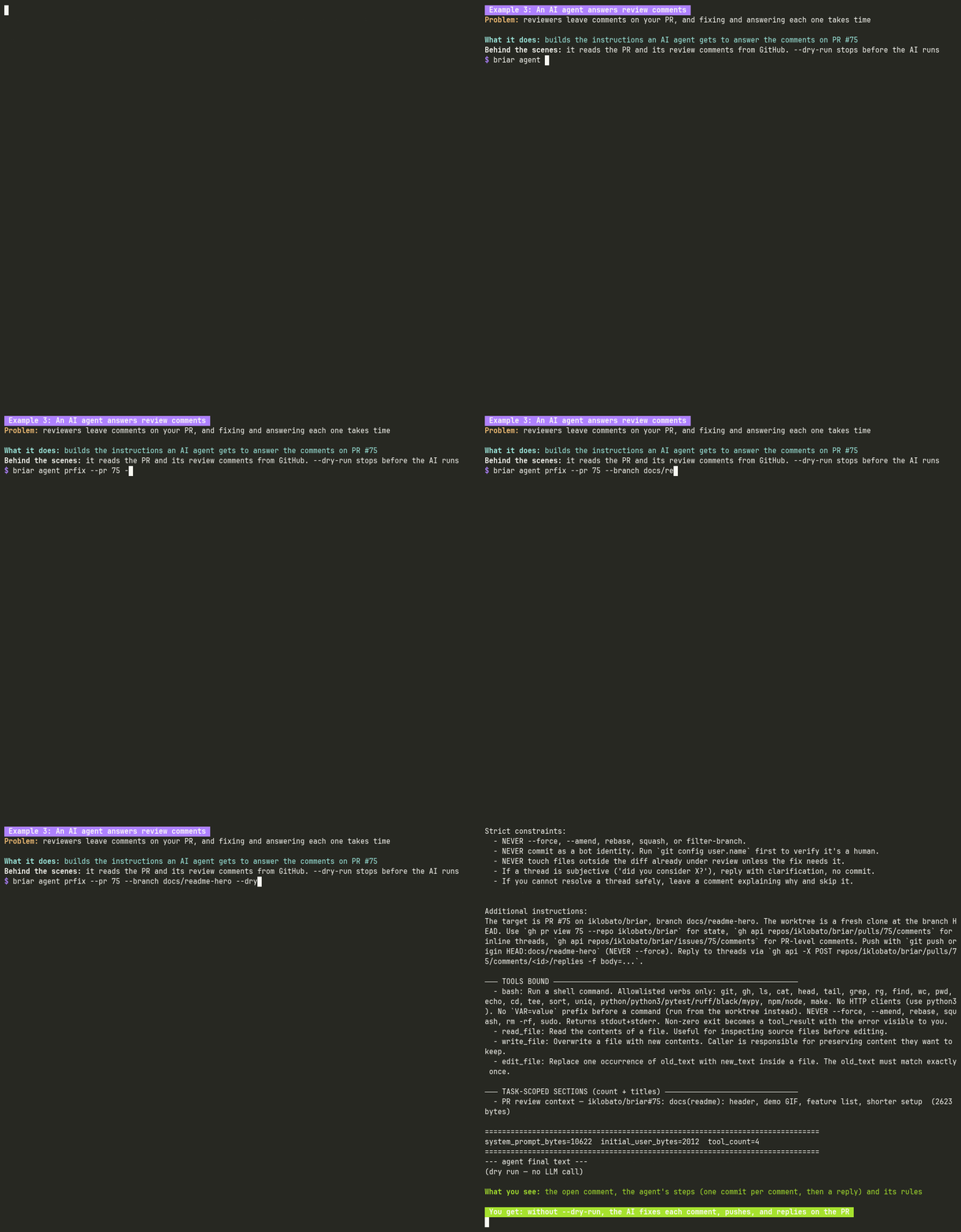
**What happens:**
- briar reads PR #75, its description and its open review comments from
GitHub (here there is one, shown under "Inline review comments (1)").
- It builds the prompt: one small commit per comment, then a reply on the
comment with the commit's SHA (its id), and the same safety rules as
above.
- `--dry-run` prints it and stops. Nothing changes on the PR.
**You get:** run it without `--dry-run` and the agent fixes each comment,
pushes to the PR's branch and replies on GitHub.
## Commands
Each command has a manual in [`agents/`](https://github.com/iklobato/briar/blob/main/agents/README.md).
The same reference, with more examples, is at
[usebriar.com/docs](https://usebriar.com/docs).
| Command | What it does | Manual |
|---|---|---|
| `briar extract` | Reads your tools into a knowledge blob (23 extractors). | [extract.md](https://github.com/iklobato/briar/blob/main/agents/extract.md) |
| `briar agent implement` | Takes one ticket and opens a draft PR. | [agent.md](https://github.com/iklobato/briar/blob/main/agents/agent.md) |
| `briar agent prfix` | Fixes and answers the review comments on one PR. | [agent.md](https://github.com/iklobato/briar/blob/main/agents/agent.md) |
| `briar plan` | Turns a Jira or GitHub Projects board into a plan, then runs it card by card. | [plan.md](https://github.com/iklobato/briar/blob/main/agents/plan.md) |
| `briar runbook` | Runs extractors from a YAML file, once or on a schedule. | [runbook.md](https://github.com/iklobato/briar/blob/main/agents/runbook.md) |
| `briar context` | Reads, writes, lists and deletes knowledge blobs. | [context.md](https://github.com/iklobato/briar/blob/main/agents/context.md) |
| `briar scaffold` | Writes a JSON config bundle for an agent workflow. | [scaffold.md](https://github.com/iklobato/briar/blob/main/agents/scaffold.md) |
| `briar auth` | Saves credentials (`login`, `logout`, `list`, `status`, `refresh`). | [auth.md](https://github.com/iklobato/briar/blob/main/agents/auth.md) |
| `briar secrets` | Shows which credentials are missing (`doctor`, `bootstrap`). | [creds.md](https://github.com/iklobato/briar/blob/main/agents/creds.md) |
| `briar journal` | Shows the decisions that `plan run` and `scaffold` recorded. | [journal.md](https://github.com/iklobato/briar/blob/main/agents/journal.md) |
| `briar dashboard` | Serves a read-only status page. | [dashboard.md](https://github.com/iklobato/briar/blob/main/agents/dashboard.md) |
| `briar mcp serve`, `briar chat` | Serves briar as MCP tools, or drives them from a chat in your terminal. | [mcp.md](https://github.com/iklobato/briar/blob/main/agents/mcp.md) |
| `briar init`, `config show`, `doctor`, `completion` | Setup helpers. | [setup.md](https://github.com/iklobato/briar/blob/main/agents/setup.md) |
| `briar telemetry` | Shows or changes what usage data is sent. | [telemetry.md](https://github.com/iklobato/briar/blob/main/agents/telemetry.md) |
| `briar version` | Prints the version. | [version.md](https://github.com/iklobato/briar/blob/main/agents/version.md) |
Recipes that chain these commands are in
[flows.md](https://github.com/iklobato/briar/blob/main/agents/flows.md). A
runbook that uses every feature is
[examples/all_features.yaml](https://github.com/iklobato/briar/blob/main/examples/all_features.yaml).
Three flags work with every command, anywhere on the line:
| Flag | What it does |
|---|---|
| `--format table\|json\|yaml\|csv\|quiet` | Output shape. Lists default to `table`, single records to `json`. |
| `--verbose`, `-v` | Debug logs on stderr. `BRIAR_VERBOSE=1` does the same. |
| `--version`, `-V` | Print the version and exit. |
## See it run
The same four diagrams as on [usebriar.com](https://usebriar.com/#diagrams). Click one to open it.
<details>
<summary><b>Which command?</b></summary>
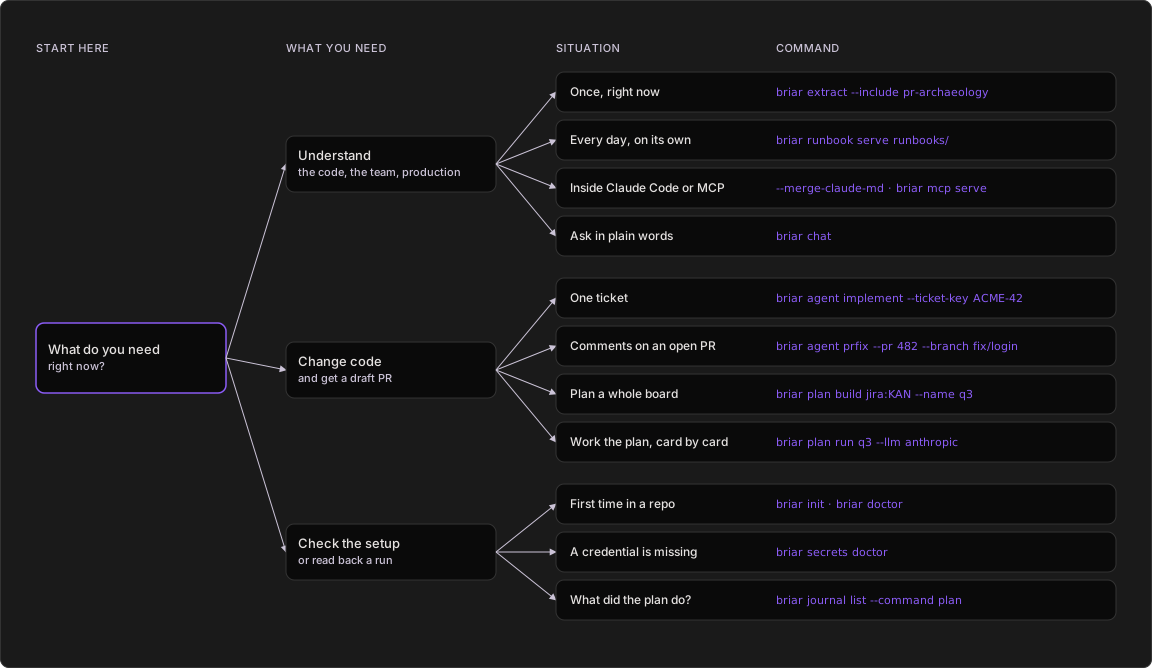
1. Want to know something about the code, the team or production? Read it
once with `briar extract`, every day with `runbook serve`, from Claude
Code or any MCP client, or ask `briar chat`.
2. Want code changed? One ticket is `agent implement`, an open PR with
review comments is `agent prfix`, and a whole board is `plan build` once,
then `plan run`.
3. Setting up or checking? `briar init` and `briar doctor` first,
`secrets doctor` when a credential is missing, and `journal list` to read
back what a plan run decided.
</details>
<details>
<summary><b>Inside an agent run</b></summary>
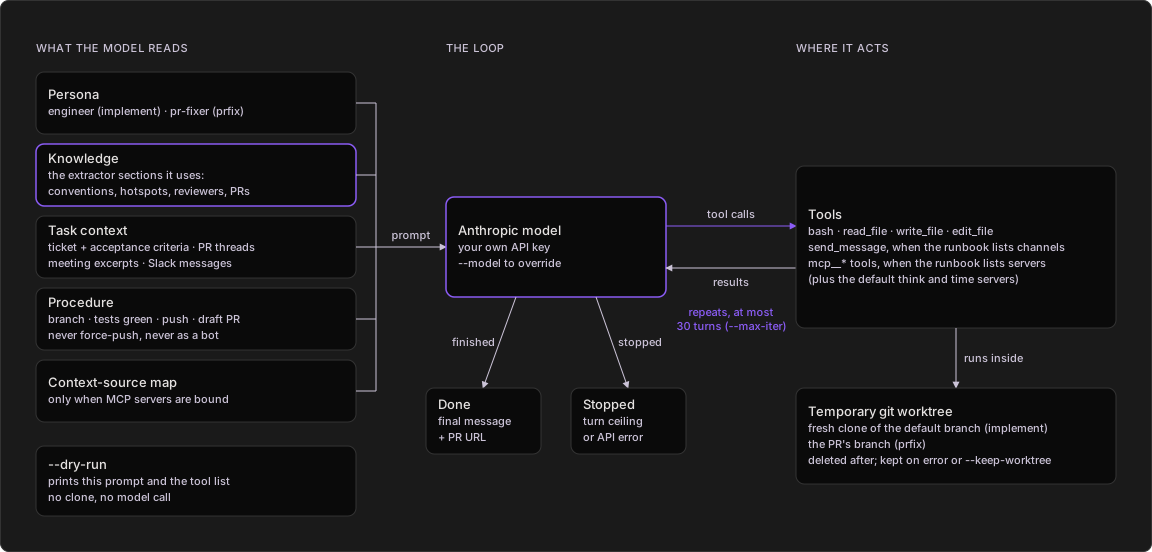
1. briar builds one system prompt: the agent's persona, the knowledge
sections that persona reads (for implement: codebase conventions, code
hotspots, reviewer profiles, active work, PR history and the meeting
digest), the ticket or PR context, and the procedure to follow.
2. The Anthropic model answers with tool calls. briar runs them inside a
temporary git worktree and sends back the results. This repeats for at
most 30 turns (`--max-iter`).
3. The tools are bash and file read, write and edit. `send_message` and MCP
tools are added only when the runbook lists channels or servers.
4. When the model finishes, briar prints its final message (ending with the
PR URL) and deletes the worktree. On an error or the turn ceiling the
worktree is kept so you can look.
5. `--dry-run` prints the prompt and the tool list and stops there: no
clone, no model call.
</details>
<details>
<summary><b>Answering a review</b></summary>
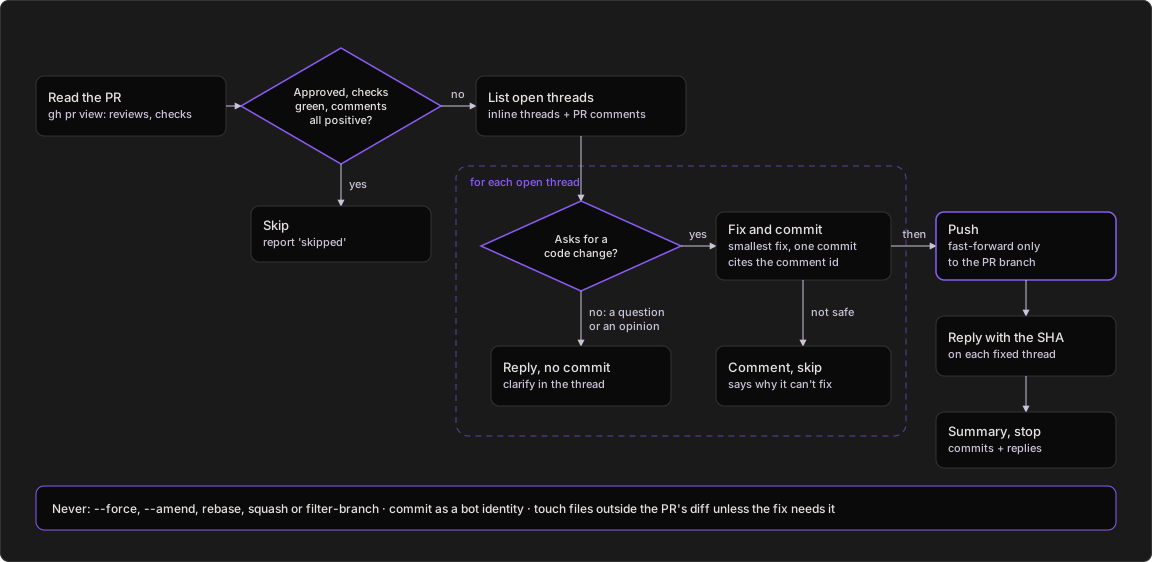
1. prfix reads the PR with `gh pr view`: review decision, branch and
checks.
2. If it is approved, every required check is green and every open thread
is positive, it reports "skipped" and stops.
3. Otherwise it lists every open review thread and PR comment and handles
them one at a time.
4. A requested code change gets the smallest fix and its own commit citing
the comment. A question or opinion gets a reply, no commit. A fix that
isn't safe gets a comment saying why.
5. Then it pushes fast-forward to the PR branch and replies on each thread
it addressed with the commit SHA.
6. It never force-pushes, amends, rebases or squashes, and never commits as
a bot identity.
</details>
<details>
<summary><b>Working a board</b></summary>
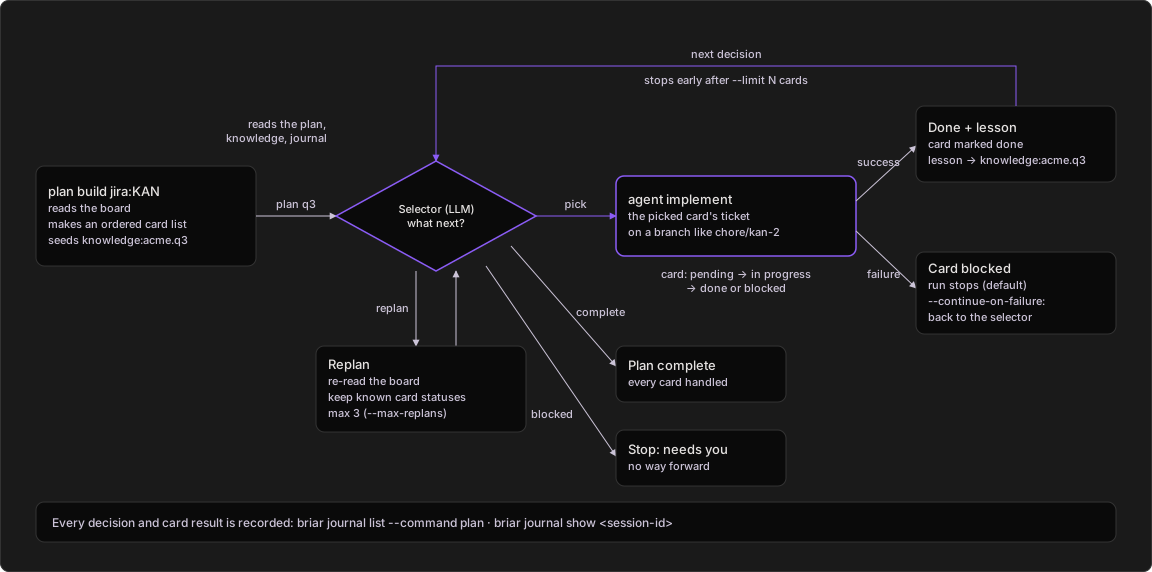
1. `plan build` reads a Jira board or GitHub Project and turns it into an
ordered card list (with `--with-knowledge`, using your knowledge too). It
also seeds a `knowledge:acme.q3` blob for the plan.
2. `plan run` asks the selector (an LLM) what to do next. It reads the
plan, the knowledge and the journal of earlier decisions.
3. Pick: the card's ticket goes to `agent implement`, on the card's branch
(`chore/kan-2` when built without an LLM), from the card's parent
branch. Success marks it done and writes a lesson into
`knowledge:acme.q3`, which the selector reads before its next pick.
4. A failed card is marked blocked. The run stops there, unless
`--continue-on-failure`.
5. Replan: briar re-reads the board, keeps the status of cards it already
knew, and adds new ones as pending. At most 3 times per run
(`--max-replans`).
6. Complete ends the run. Blocked stops it until you step in. `--limit N`
stops after N cards. Every decision lands in the journal.
</details>
## Contributing
Bug reports and PRs are welcome: open an
[issue](https://github.com/iklobato/briar/issues) or read
[CONTRIBUTING.md](https://github.com/iklobato/briar/blob/main/CONTRIBUTING.md)
first. Every merge to `main` is a release on PyPI and Docker Hub, and
[CHANGELOG.md](https://github.com/iklobato/briar/blob/main/CHANGELOG.md)
lists what each version changed. If briar helps you, a star on GitHub
helps other people find it.
## Telemetry
briar sends error reports and usage counts by default. No prompts, file
contents, ticket keys, repo names, paths or secret values leave your
machine. Turn it off with `briar telemetry off`, `BRIAR_TELEMETRY=off`
or `DO_NOT_TRACK=1`.
## License
MIT. See [LICENSE](https://github.com/iklobato/briar/blob/main/LICENSE).
This server cannot be deployed
Maintenance
ActivityMaintained
ResponsivenessNo recent community issues