


F
licenseNot graded
qualityF
maintenanceProvides automated shopping capabilities for the Shufersal website using Puppeteer, enabling LLMs to search products, create shopping lists, and add items to shopping carts.
19
-

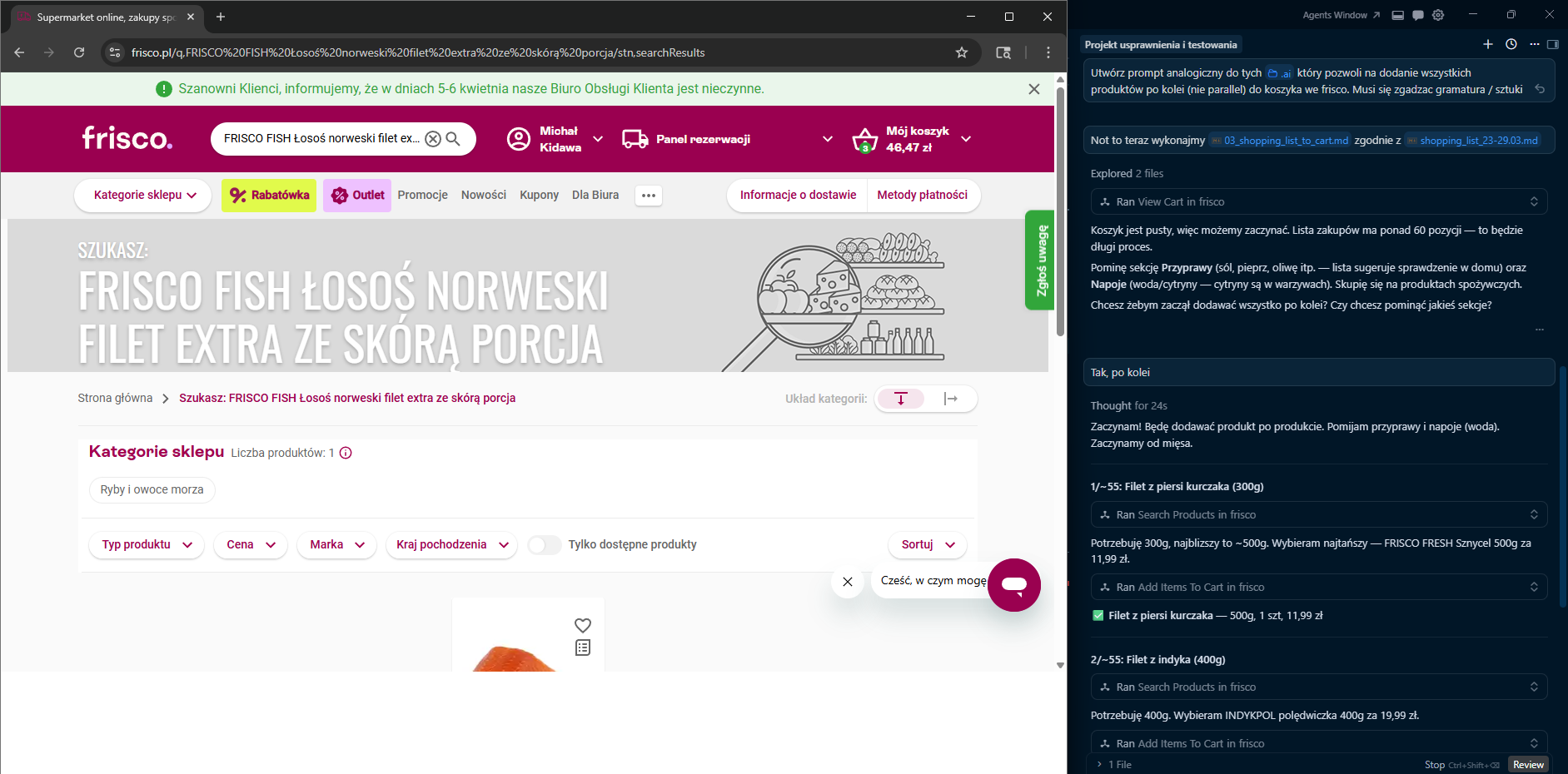
The Frisco MCP server enables AI assistants to interact with frisco.pl, Poland's online grocery store, through browser automation — supporting session management, product discovery, cart operations, and logging.
Session Management: Log in manually via a visible Chromium browser window (login), proceed to checkout for manual payment and delivery selection (finish_session), or clear saved session data (clear_session). Credentials are never stored — only session cookies.
Product Discovery: Search for products with prices and availability (search_products), and retrieve detailed product info including nutritional values, weight, ingredients, and pricing (get_product_info).
Cart Operations: Add a list of products by name/search query, optionally clearing the cart first (add_items_to_cart); view cart contents and total price (view_cart); and remove items by name with partial match support (remove_item_from_cart).
Logging & Diagnostics: Retrieve persisted JSONL log events for the current or a specific session (get_logs), or fetch only the most recent log events (tail_logs).
Click on "Deploy Server".
Wait a few minutes for the server to deploy. Once ready, it will show a "Started" state.
In the chat, type @ followed by the MCP server name and your instructions, e.g., "@Frisco MCP add milk, eggs and bread to my cart"
That's it! The server will respond to your query, and you can continue using it as needed.
Here is a step-by-step guide with screenshots.
A TypeScript Model Context Protocol (MCP) server that lets AI assistants (Claude, Gemini, etc.) interact with frisco.pl — Poland's online grocery store.
Security First — The server never stores your email or password. You log in manually in a visible browser window; only session cookies are persisted locally.
Tool | Description |
| Opens a visible Chromium window at the login page. You log in manually; the server polls for success and saves session cookies. |
| Opens the browser at the checkout page so you can select a delivery slot and pay. No automatic payment. |
| Closes the browser and deletes the saved session file. |
Tool | Description |
| Adds products to cart. Supports two flows: (1) via |
| Returns the current cart contents and total price. |
| Removes a specific product from the cart by name (partial match). |
| Changes the quantity of a product already in the cart (partial name match). |
| Detects sold-out or unavailable products in the cart and lists available substitutes for each. |
| Shows active promotions, discounts, and total savings in the current cart. |
Tool | Description |
| Searches frisco.pl, returns top N results with prices/availability, and saves search URL/context for cart add. |
| Returns detailed product info: nutritional values (macros per 100g), weight/grammage, ingredients, price (including original price and unit price if on promotion). |
| Returns customer reviews and ratings (from Trustmate) for a product. |
Tool | Description |
| Returns JSONL log events for the current or a specific session. |
| Returns the N most recent log events. |
Related MCP server: Rohlik MCP Server
flowchart LR
    A[MCP Client / AI Assistant] -->|stdio| B[src/index.ts<br/>McpServer]

    B --> C[Session Tools<br/>src/tools/session.ts]
    B --> D[Cart Tools<br/>src/tools/cart.ts]
    B --> E[Product Tools<br/>src/tools/products.ts]

    C --> G[src/browser.ts<br/>Playwright singleton]
    D --> G
    E --> G

    C --> H[src/auth.ts<br/>session cookies]
    D --> H
    E --> H

    D --> I[src/tools/helpers.ts<br/>navigation, HTML parsing & formatters]
    E --> I

    H --> J[(~/.frisco-mcp/session.json)]
    B --> L[src/logger.ts] --> M[(~/.frisco-mcp/logs/)]
    G --> N[(in-memory lastSearchContext)]
    G --> K[frisco.pl 🌐]
    I --> K
More diagrams (login flow, cart flow): docs/DIAGRAMS.md
Node.js 20 or later
Chromium for Playwright (installed via the setup command below)
npm install
npx playwright install chromium
npm run buildThe server communicates over stdio — point your MCP client at node dist/index.js.
Add to claude_desktop_config.json:
{
  "mcpServers": {
    "frisco": {
      "command": "node",
      "args": ["/absolute/path/to/frisco-mcp/dist/index.js"]
    }
  }
}The .gemini/settings.json in this repo already contains the configuration:
{
  "mcpServers": {
    "frisco-mcp": {
      "command": "node",
      "args": ["/absolute/path/to/frisco-mcp/dist/index.js"]
    }
  }
}Add to your Cursor MCP settings (~/.cursor/mcp.json or workspace .cursor/mcp.json):
{
  "mcpServers": {
    "frisco": {
      "command": "node",
      "args": ["/absolute/path/to/frisco-mcp/dist/index.js"]
    }
  }
}
Note: Replace the path with the absolute path to
dist/index.json your machine.
"Log me in to Frisco"
The login tool opens a Chromium window at frisco.pl/login. Log in manually — the server waits up to 5 minutes and saves your session cookies once it detects a successful login.
"Find me natural yogurt"
The search_products tool returns a list of matching products with prices. Unavailable products are marked with ⚠️ NIEDOSTĘPNY. It also saves the current search URL and result context for subsequent cart operations.
"Tell me more about the PIĄTNICA Skyr"
The get_product_info tool navigates to the product page and extracts detailed information: nutritional values (kcal, protein, fat, carbohydrates, sugars, salt per 100g), weight/grammage, ingredients, price (including original price and unit price for promotional products), and the product URL.
"Add it to cart"
The add_items_to_cart tool supports two flows: (1) if a productUrl is provided (e.g. from get_product_info), it navigates directly to that product page and clicks "Do koszyka" — this is the preferred flow; (2) otherwise, it uses the latest search_products results page to find and add the product.
"Remove the butter from my cart"
The remove_item_from_cart tool finds a product in the cart by name and removes it.
"Change the milk quantity to 3"
The update_item_quantity tool finds the product in the cart and updates its quantity.
"Are there any issues with my cart?"
The check_cart_issues tool scans the cart for sold-out products and shows available substitutes for each.
"What reviews does Skyr Piątnica have?"
The get_product_reviews tool fetches customer ratings and reviews from Trustmate.
"Show me active promotions in my cart"
The view_promotions tool lists all active promotions, discount badges, and total savings.
"Finish my Frisco session"
The finish_session tool opens your cart at frisco.pl/stn,cart so you can choose a delivery slot and pay — the server never performs payment automatically.
frisco-mcp/
├── src/
│   ├── index.ts          # MCP server setup, tool registration
│   ├── auth.ts           # Session cookie save/restore, login check
│   ├── browser.ts        # Playwright browser singleton, product cache, last search context
│   ├── logger.ts         # JSONL session logging
│   ├── types.ts          # Shared TypeScript types
│   └── tools/
│       ├── session.ts    # login, finish_session, clear_session
│       ├── cart.ts       # add_items_to_cart, view_cart, remove_item_from_cart,
│       │                 #   update_item_quantity, check_cart_issues, view_promotions
│       ├── products.ts   # search_products, get_product_info, get_product_reviews
│       └── helpers.ts    # Navigation, popup dismissal, DOM parsing, formatters
│   └── __tests__/        # Unit tests (Vitest)
├── test_data/            # Sample HTML fixtures for tests
│   └── products/         #   Product page HTMLs (skyr, chicken, bananas, eggs, bag, promotion)
├── docs/
│   └── DIAGRAMS.md       # Mermaid architecture & flow diagrams
├── .github/
│   └── workflows/
│       └── test.yml      # CI — runs tests on push & PR
├── dist/                 # Compiled JS (generated by `npm run build`)
├── vitest.config.ts
├── package.json
├── tsconfig.json
└── .gitignoreAll user data is stored locally in ~/.frisco-mcp/:
File | Purpose |
| Saved browser cookies (no credentials) |
| Pointer to the active log session |
| Per-session event logs |
# Run in dev mode (tsx, no separate build step)
npm run dev

# Build
npm run build

# Run built server
npm start

# Run tests
npm test

# Watch mode for tests
npm run test:watchTests run automatically on every push and pull request to master via GitHub Actions (.github/workflows/test.yml). The matrix tests against Node.js 20 and 22.
Library | Role |
MCP server framework | |
Browser automation (Chromium) | |
HTML parsing for product info | |
Input schema validation | |
Language & build | |
Unit testing framework |
This project is licensed under the MIT License.
Searches for and adds a list of products to the cart. By default appends to current cart, optionally clearing it first.
| Name | Required | Description | Default |
|---|---|---|---|
| items | Yes | JSON array of items, e.g. [{"name":"Milk","searchQuery":"mleko 2l","quantity":2}] | |
| clearCartFirst | No | If true, clears cart before adding items |
Does the description disclose side effects, auth requirements, rate limits, or destructive behavior?
With no annotations provided, the description carries the full burden of behavioral disclosure. It successfully documents the mutation semantics (append vs. replace via clearing) and hints at the internal search logic. However, it omits crucial operational details such as failure handling (partial vs. total failure), atomicity guarantees, authentication requirements, or return value structure.
Agents need to know what a tool does to the world before calling it. Descriptions should go beyond structured annotations to explain consequences.
Is the description appropriately sized, front-loaded, and free of redundancy?
The description consists of two efficient, front-loaded sentences where every word earns its place. The first establishes the core operation and the second immediately clarifies default behavior and options, with no redundant or filler text.
Shorter descriptions cost fewer tokens and are easier for agents to parse. Every sentence should earn its place.
Given the tool's complexity, does the description cover enough for an agent to succeed on first attempt?
Given the 100% schema coverage, the description adequately covers the input contract. However, with no output schema and no annotations, it falls short of completeness by failing to describe return values, error conditions, or side effects that an agent would need to handle the tool invocation properly.
Complex tools with many parameters or behaviors need more documentation. Simple tools need less. This dimension scales expectations accordingly.
Does the description clarify parameter syntax, constraints, interactions, or defaults beyond what the schema provides?
Schema description coverage is 100%, with the items parameter's JSON structure and the clearCartFirst boolean both well-documented in the schema. The description references the 'list of products' and 'clearing' behavior which map to parameters, but adds no additional syntax guidance or format details beyond what the schema already provides, warranting the baseline score.
Input schemas describe structure but not intent. Descriptions should explain non-obvious parameter relationships and valid value ranges.
Does the description clearly state what the tool does and how it differs from similar tools?
The description uses specific verbs ('Searches for and adds') and clearly identifies the resource (cart). It effectively distinguishes this tool from siblings like search_products (which likely only returns results) by stating it performs both search and add operations, and implicitly contrasts with remove_item_from_cart and view_cart through its additive action.
Agents choose between tools based on descriptions. A clear purpose with a specific verb and resource helps agents select the right tool.
Does the description explain when to use this tool, when not to, or what alternatives exist?
The description provides implicit usage guidance by explaining the default append behavior and the clearCartFirst option, which helps users decide when to set that flag. However, it lacks explicit comparisons to sibling tools—for example, when to use search_products alone versus this tool, or prerequisites like requiring login.
Agents often have multiple tools that could apply. Explicit usage guidance like "use X instead of Y when Z" prevents misuse.
Clears the saved session and closes the browser.
| Name | Required | Description | Default |
|---|---|---|---|
No parameters | |||
Does the description disclose side effects, auth requirements, rate limits, or destructive behavior?
With no annotations provided, the description carries the full burden of behavioral disclosure. It successfully adds the 'closes the browser' side effect beyond the tool name, but fails to characterize the destructive nature of clearing session data (e.g., cart loss, logout state) or whether this action is reversible.
Agents need to know what a tool does to the world before calling it. Descriptions should go beyond structured annotations to explain consequences.
Is the description appropriately sized, front-loaded, and free of redundancy?
The description is a single, efficient sentence with zero wasted words. It is appropriately front-loaded with the most critical actions (clearing session, closing browser) stated immediately.
Shorter descriptions cost fewer tokens and are easier for agents to parse. Every sentence should earn its place.
Given the tool's complexity, does the description cover enough for an agent to succeed on first attempt?
Given the zero-parameter simplicity, the description covers the basic operation but remains incomplete regarding safety warnings. For a destructive operation that likely discards cart contents and authentication state, the lack of warnings about data loss or the relationship to 'login'/'finish_session' leaves gaps that could lead to agent errors.
Complex tools with many parameters or behaviors need more documentation. Simple tools need less. This dimension scales expectations accordingly.
Does the description clarify parameter syntax, constraints, interactions, or defaults beyond what the schema provides?
The tool has zero parameters, which per evaluation rules establishes a baseline score of 4. No parameter description is needed or expected.
Input schemas describe structure but not intent. Descriptions should explain non-obvious parameter relationships and valid value ranges.
Does the description clearly state what the tool does and how it differs from similar tools?
The description uses specific verbs ('clears', 'closes') and resources ('saved session', 'browser') to define the action clearly. However, it does not explicitly differentiate from the sibling tool 'finish_session', leaving some ambiguity about when to prefer this tool over ending a session normally.
Agents choose between tools based on descriptions. A clear purpose with a specific verb and resource helps agents select the right tool.
Does the description explain when to use this tool, when not to, or what alternatives exist?
No guidance is provided on when to use this tool versus alternatives like 'finish_session' or 'login'. The description states what happens but not the conditions that should trigger its use (e.g., 'use when you need to reset state completely' or 'use before switching users').
Agents often have multiple tools that could apply. Explicit usage guidance like "use X instead of Y when Z" prevents misuse.
Opens the browser at the checkout page so you can select a delivery time and pay.
| Name | Required | Description | Default |
|---|---|---|---|
No parameters | |||
Does the description disclose side effects, auth requirements, rate limits, or destructive behavior?
With no annotations provided, the description carries the full burden. It successfully discloses that the tool opens an external browser (significant side effect), but fails to clarify session lifecycle implications suggested by the name 'finish_session'—specifically whether the session terminates, cart clears, or if this action is reversible.
Agents need to know what a tool does to the world before calling it. Descriptions should go beyond structured annotations to explain consequences.
Is the description appropriately sized, front-loaded, and free of redundancy?
A single, efficiently structured sentence delivers all necessary information without redundancy. The action ('Opens the browser') is front-loaded, followed by location ('checkout page') and purpose ('select a delivery time and pay').
Shorter descriptions cost fewer tokens and are easier for agents to parse. Every sentence should earn its place.
Given the tool's complexity, does the description cover enough for an agent to succeed on first attempt?
Given the tool's simplicity (zero parameters, no output schema) and the lack of annotations, the description provides adequate context for invocation. It explains the user-facing outcome (browser navigation to checkout) sufficiently for an agent to select this tool appropriately.
Complex tools with many parameters or behaviors need more documentation. Simple tools need less. This dimension scales expectations accordingly.
Does the description clarify parameter syntax, constraints, interactions, or defaults beyond what the schema provides?
The input schema contains zero parameters. According to the rubric, 0 parameters warrants a baseline score of 4. The description appropriately does not invent parameter semantics where none exist.
Input schemas describe structure but not intent. Descriptions should explain non-obvious parameter relationships and valid value ranges.
Does the description clearly state what the tool does and how it differs from similar tools?
The description uses a specific verb ('Opens the browser') and resource ('checkout page') to clearly identify this as the payment finalization step. It effectively distinguishes itself from sibling cart management tools (add_items_to_cart, view_cart, clear_session) by specifying the checkout context and payment intent.
Agents choose between tools based on descriptions. A clear purpose with a specific verb and resource helps agents select the right tool.
Does the description explain when to use this tool, when not to, or what alternatives exist?
The phrase 'so you can select a delivery time and pay' implies this is for the final purchase phase, providing implicit context for when to use it. However, it lacks explicit prerequisites (e.g., 'use after adding items to cart') or guidance on when not to use it (e.g., empty cart scenarios).
Agents often have multiple tools that could apply. Explicit usage guidance like "use X instead of Y when Z" prevents misuse.
Returns persisted JSONL log events for the current or selected session.
| Name | Required | Description | Default |
|---|---|---|---|
| sessionId | No | Optional session ID, defaults to current session | |
| limit | No | Max number of events to return (default 200, max 2000) |
Does the description disclose side effects, auth requirements, rate limits, or destructive behavior?
No annotations are provided, so the description carries the full disclosure burden. While it reveals the data format (JSONL) and persistence nature, it lacks critical behavioral context: it does not confirm read-only safety, specify event ordering (chronological vs reverse), or explain error cases (e.g., invalid sessionId).
Agents need to know what a tool does to the world before calling it. Descriptions should go beyond structured annotations to explain consequences.
Is the description appropriately sized, front-loaded, and free of redundancy?
The description is a single, efficient sentence with no redundant words. It front-loads the action ('Returns') and immediately specifies the resource and format, making optimal use of limited space.
Shorter descriptions cost fewer tokens and are easier for agents to parse. Every sentence should earn its place.
Given the tool's complexity, does the description cover enough for an agent to succeed on first attempt?
For a two-parameter tool without an output schema, the description adequately covers the core function but leaves gaps. It should disclose behavioral traits (ordering, read-only nature) and clarify the relationship to 'tail_logs' given the sibling tool context.
Complex tools with many parameters or behaviors need more documentation. Simple tools need less. This dimension scales expectations accordingly.
Does the description clarify parameter syntax, constraints, interactions, or defaults beyond what the schema provides?
With 100% schema description coverage, the baseline is 3. The description adds minimal value beyond the schema, though it does reinforce the 'current session' default behavior mentioned in the sessionId parameter description.
Input schemas describe structure but not intent. Descriptions should explain non-obvious parameter relationships and valid value ranges.
Does the description clearly state what the tool does and how it differs from similar tools?
The description uses a specific verb ('Returns') and clearly identifies the resource ('persisted JSONL log events') and scope ('current or selected session'). The term 'persisted' implicitly distinguishes this from the sibling 'tail_logs', though it could be more explicit about this distinction.
Agents choose between tools based on descriptions. A clear purpose with a specific verb and resource helps agents select the right tool.
Does the description explain when to use this tool, when not to, or what alternatives exist?
The description provides no guidance on when to use this tool versus alternatives like 'tail_logs', nor does it mention prerequisites or when not to use it. The only usage hint is the implicit session selection behavior.
Agents often have multiple tools that could apply. Explicit usage guidance like "use X instead of Y when Z" prevents misuse.
Gets detailed info for a product: nutritional values (macros per 100g), weight/grammage, ingredients, and price.
| Name | Required | Description | Default |
|---|---|---|---|
| query | Yes | Product name or search query |
Does the description disclose side effects, auth requirements, rate limits, or destructive behavior?
With no annotations provided, the description carries the full burden. It discloses what data is returned (macros, ingredients, price), which adds value, but omits read-only status, error handling behavior (e.g., what happens if product not found), or rate limiting.
Agents need to know what a tool does to the world before calling it. Descriptions should go beyond structured annotations to explain consequences.
Is the description appropriately sized, front-loaded, and free of redundancy?
Single, efficient sentence with action front-loaded ('Gets detailed info') followed by colon-separated enumeration of return fields. Every word serves a purpose; no redundancy or filler.
Shorter descriptions cost fewer tokens and are easier for agents to parse. Every sentence should earn its place.
Given the tool's complexity, does the description cover enough for an agent to succeed on first attempt?
Given the lack of an output schema, the description effectively compensates by listing the specific data fields returned. However, it lacks error handling documentation and explicit differentiation from 'search_products' which would prevent misuse.
Complex tools with many parameters or behaviors need more documentation. Simple tools need less. This dimension scales expectations accordingly.
Does the description clarify parameter syntax, constraints, interactions, or defaults beyond what the schema provides?
Schema coverage is 100% (the 'query' parameter is fully described as 'Product name or search query'), establishing a baseline of 3. The description focuses entirely on output semantics and adds no additional context about the input parameter syntax or format.
Input schemas describe structure but not intent. Descriptions should explain non-obvious parameter relationships and valid value ranges.
Does the description clearly state what the tool does and how it differs from similar tools?
Description uses specific verb 'Gets' with resource 'detailed info for a product' and enumerates exact data fields returned (nutritional values, weight, ingredients, price). The specificity distinguishes it from sibling 'search_products' (detailed single product lookup vs. search).
Agents choose between tools based on descriptions. A clear purpose with a specific verb and resource helps agents select the right tool.
Does the description explain when to use this tool, when not to, or what alternatives exist?
No guidance provided on when to use this versus sibling 'search_products' or prerequisites like authentication. The description implies usage but never states explicit conditions or alternatives.
Agents often have multiple tools that could apply. Explicit usage guidance like "use X instead of Y when Z" prevents misuse.
Opens a visible Chromium browser to log in to Frisco manually. Run this first to establish a session.
| Name | Required | Description | Default |
|---|---|---|---|
No parameters | |||
Does the description disclose side effects, auth requirements, rate limits, or destructive behavior?
With no annotations provided, the description carries full behavioral disclosure burden. It effectively reveals that the browser is visible (not headless), requires manual user interaction ('manually'), and creates persistent state ('establish a session'). Could clarify blocking behavior or timeouts, but covers the critical UX aspects.
Agents need to know what a tool does to the world before calling it. Descriptions should go beyond structured annotations to explain consequences.
Is the description appropriately sized, front-loaded, and free of redundancy?
Two sentences with zero waste: first defines the action and mechanics, second gives clear temporal guidance. Appropriately front-loaded and sized.
Shorter descriptions cost fewer tokens and are easier for agents to parse. Every sentence should earn its place.
Given the tool's complexity, does the description cover enough for an agent to succeed on first attempt?
Given zero parameters and no output schema, the description adequately covers the tool's essential behavior for an authentication utility. Explains the visible browser mechanism and session outcome sufficiently for tool selection, though success/failure indicators could be added.
Complex tools with many parameters or behaviors need more documentation. Simple tools need less. This dimension scales expectations accordingly.
Does the description clarify parameter syntax, constraints, interactions, or defaults beyond what the schema provides?
Zero parameters present; per rubric guidelines, this merits baseline score of 4.
Input schemas describe structure but not intent. Descriptions should explain non-obvious parameter relationships and valid value ranges.
Does the description clearly state what the tool does and how it differs from similar tools?
Description clearly specifies the action (opens visible Chromium browser), target (Frisco), and interaction mode (manual login). It distinguishes from siblings by focusing on session establishment rather than cart operations or product queries.
Agents choose between tools based on descriptions. A clear purpose with a specific verb and resource helps agents select the right tool.
Does the description explain when to use this tool, when not to, or what alternatives exist?
Provides explicit sequencing guidance ('Run this first to establish a session'), clearly indicating this is a prerequisite step. Lacks explicit 'when-not-to-use' guidance (e.g., when already logged in) or alternatives, but the 'first' instruction provides clear context.
Agents often have multiple tools that could apply. Explicit usage guidance like "use X instead of Y when Z" prevents misuse.
Removes a specific product from the Frisco cart by name (partial match supported).
| Name | Required | Description | Default |
|---|---|---|---|
| productName | Yes | Full or partial name of the product to remove |
Does the description disclose side effects, auth requirements, rate limits, or destructive behavior?
No annotations provided, so description carries full burden. While it discloses partial-matching capability, it omits critical behavioral details for a destructive operation: error handling when product not found, behavior when multiple products match the partial string, and whether removal is immediate/reversible.
Agents need to know what a tool does to the world before calling it. Descriptions should go beyond structured annotations to explain consequences.
Is the description appropriately sized, front-loaded, and free of redundancy?
Single sentence, front-loaded with action verb, zero redundant words. 'Frisco cart' provides necessary domain context without verbosity. Every clause earns its place.
Shorter descriptions cost fewer tokens and are easier for agents to parse. Every sentence should earn its place.
Given the tool's complexity, does the description cover enough for an agent to succeed on first attempt?
Adequate for a single-parameter tool with simple intent, but insufficient for a destructive operation lacking annotations. Missing edge-case behavior (multiple matches, non-existent products) that would complete the agent's understanding of outcomes.
Complex tools with many parameters or behaviors need more documentation. Simple tools need less. This dimension scales expectations accordingly.
Does the description clarify parameter syntax, constraints, interactions, or defaults beyond what the schema provides?
Schema coverage is 100% (productName fully described). The description reinforces the partial-match semantics but adds no additional syntax guidance, format examples, or validation rules beyond the schema. Baseline 3 appropriate.
Input schemas describe structure but not intent. Descriptions should explain non-obvious parameter relationships and valid value ranges.
Does the description clearly state what the tool does and how it differs from similar tools?
Excellent specificity: 'Removes' (verb) + 'product from the Frisco cart' (resource) + 'by name (partial match supported)' (mechanism). The 'Frisco' qualifier and partial-match detail distinguish it from generic cart operations and potential ID-based alternatives.
Agents choose between tools based on descriptions. A clear purpose with a specific verb and resource helps agents select the right tool.
Does the description explain when to use this tool, when not to, or what alternatives exist?
Provides implied usage context ('specific product') suggesting use when targeting a single item versus bulk operations. However, lacks explicit guidance on when to prefer this over clear_session (which clears everything) or how to handle ambiguous partial matches.
Agents often have multiple tools that could apply. Explicit usage guidance like "use X instead of Y when Z" prevents misuse.
Searches frisco.pl for products and returns top matches with prices.
| Name | Required | Description | Default |
|---|---|---|---|
| query | Yes | Product name to search for | |
| topN | No | Number of results to return (default 5) |
Does the description disclose side effects, auth requirements, rate limits, or destructive behavior?
With no annotations provided, the description carries the full disclosure burden. It successfully identifies the external dependency ('frisco.pl') and return data content ('prices'), but omits operational details like rate limits, authentication requirements, or behavior when no matches are found.
Agents need to know what a tool does to the world before calling it. Descriptions should go beyond structured annotations to explain consequences.
Is the description appropriately sized, front-loaded, and free of redundancy?
The description is a single, efficient sentence with no redundant words. It front-loads the action (searches), specifies the domain (frisco.pl), and concludes with the return value (matches with prices), demonstrating excellent information density.
Shorter descriptions cost fewer tokens and are easier for agents to parse. Every sentence should earn its place.
Given the tool's complexity, does the description cover enough for an agent to succeed on first attempt?
For a simple 2-parameter search tool without output schema, the description adequately covers the essential behavior. It appropriately mentions price data (critical for shopping context) but could strengthen completeness by hinting that results likely include product identifiers needed for sibling cart operations.
Complex tools with many parameters or behaviors need more documentation. Simple tools need less. This dimension scales expectations accordingly.
Does the description clarify parameter syntax, constraints, interactions, or defaults beyond what the schema provides?
Schema coverage is 100% with both 'query' and 'topN' fully documented in the input schema. The description adds no additional parameter semantics beyond what's in the schema, meeting the baseline expectation for high-coverage schemas.
Input schemas describe structure but not intent. Descriptions should explain non-obvious parameter relationships and valid value ranges.
Does the description clearly state what the tool does and how it differs from similar tools?
The description provides a specific verb ('Searches'), resource ('frisco.pl for products'), and output details ('returns top matches with prices'). It clearly distinguishes from sibling 'get_product_info' by emphasizing the search/matching functionality rather than specific product lookup.
Agents choose between tools based on descriptions. A clear purpose with a specific verb and resource helps agents select the right tool.
Does the description explain when to use this tool, when not to, or what alternatives exist?
The description implies usage context (finding products with prices) but provides no explicit when-to-use guidance or comparison to alternatives like 'get_product_info'. The agent must infer that this is for discovery while 'get_product_info' is for specific product details.
Agents often have multiple tools that could apply. Explicit usage guidance like "use X instead of Y when Z" prevents misuse.
Returns the most recent events from persisted session logs.
| Name | Required | Description | Default |
|---|---|---|---|
| sessionId | No | Optional session ID, defaults to current session | |
| lines | No | How many latest events to return (default 50, max 500) |
Does the description disclose side effects, auth requirements, rate limits, or destructive behavior?
With no annotations provided, the description carries the full burden of behavioral disclosure. It mentions 'persisted' (indicating storage durability) and 'events' (hinting at data structure), but fails to disclose read-only safety, authentication requirements, rate limits, or return format details.
Agents need to know what a tool does to the world before calling it. Descriptions should go beyond structured annotations to explain consequences.
Is the description appropriately sized, front-loaded, and free of redundancy?
The description consists of a single, efficient sentence that front-loads the action verb. There is no redundant or wasted language; every word contributes to understanding the tool's core function.
Shorter descriptions cost fewer tokens and are easier for agents to parse. Every sentence should earn its place.
Given the tool's complexity, does the description cover enough for an agent to succeed on first attempt?
Given the tool's low complexity (two primitive parameters, no nesting) and absence of an output schema, the description provides minimum viable context. It adequately explains what the tool retrieves but leaves gaps regarding the event data structure and operational constraints.
Complex tools with many parameters or behaviors need more documentation. Simple tools need less. This dimension scales expectations accordingly.
Does the description clarify parameter syntax, constraints, interactions, or defaults beyond what the schema provides?
The input schema has 100% description coverage for both parameters ('sessionId' and 'lines'), establishing a baseline score. The description itself adds no explicit parameter semantics, relying entirely on the schema documentation to explain the optional session ID and line count constraints.
Input schemas describe structure but not intent. Descriptions should explain non-obvious parameter relationships and valid value ranges.
Does the description clearly state what the tool does and how it differs from similar tools?
The description uses a specific verb ('Returns') and clearly identifies the resource ('most recent events from persisted session logs'). The phrase 'most recent' effectively distinguishes this from the sibling 'get_logs' tool, though it doesn't explicitly name that alternative.
Agents choose between tools based on descriptions. A clear purpose with a specific verb and resource helps agents select the right tool.
Does the description explain when to use this tool, when not to, or what alternatives exist?
The description provides no explicit guidance on when to use this tool versus the sibling 'get_logs' or other alternatives. While 'most recent' implies a use case for recent log inspection, there are no stated prerequisites, exclusions, or selection criteria.
Agents often have multiple tools that could apply. Explicit usage guidance like "use X instead of Y when Z" prevents misuse.
Returns the current contents and total of the Frisco cart.
| Name | Required | Description | Default |
|---|---|---|---|
No parameters | |||
Does the description disclose side effects, auth requirements, rate limits, or destructive behavior?
With no annotations provided, the description carries the full burden of behavioral disclosure. It successfully indicates what data is returned ('contents and total'), compensating for the lack of output schema. However, it omits explicit confirmation that this is a safe read-only operation or any rate limit considerations.
Agents need to know what a tool does to the world before calling it. Descriptions should go beyond structured annotations to explain consequences.
Is the description appropriately sized, front-loaded, and free of redundancy?
The description is a single, efficient sentence with zero waste. It is front-loaded with the action verb and immediately specifies the return value scope ('contents and total'), making it easy for an agent to parse quickly.
Shorter descriptions cost fewer tokens and are easier for agents to parse. Every sentence should earn its place.
Given the tool's complexity, does the description cover enough for an agent to succeed on first attempt?
Given the low complexity (zero parameters, simple read operation) and absence of an output schema, the description adequately compensates by specifying the return payload ('contents and total'). It could be improved by mentioning the data format or whether the cart might be empty, but it meets the minimum requirements for this tool type.
Complex tools with many parameters or behaviors need more documentation. Simple tools need less. This dimension scales expectations accordingly.
Does the description clarify parameter syntax, constraints, interactions, or defaults beyond what the schema provides?
The tool accepts zero parameters, which per guidelines establishes a baseline of 4. The description appropriately requires no additional parameter context since the schema is trivially complete at 100% coverage with no properties to document.
Input schemas describe structure but not intent. Descriptions should explain non-obvious parameter relationships and valid value ranges.
Does the description clearly state what the tool does and how it differs from similar tools?
The description uses the specific verb 'Returns' and clearly identifies the resource as 'current contents and total of the Frisco cart.' It effectively distinguishes from siblings like search_products (catalog search) and get_product_info (product metadata) by focusing on the cart state specifically.
Agents choose between tools based on descriptions. A clear purpose with a specific verb and resource helps agents select the right tool.
Does the description explain when to use this tool, when not to, or what alternatives exist?
While there are no explicit when-to-use instructions, the verb 'Returns' combined with sibling tools using distinct action verbs (add_items_to_cart, remove_item_from_cart) provides clear implied usage. However, it lacks explicit guidance on when to prefer this over finish_session or clear_session.
Agents often have multiple tools that could apply. Explicit usage guidance like "use X instead of Y when Z" prevents misuse.
Recent tool additions, removals, and schema changes observed during successful MCP inspections.
v1.0.0add_items_to_cartclear_sessionfinish_sessionget_logsget_product_infologinremove_item_from_cartsearch_productstail_logsview_cartScored across 10 tools
Most tools are clearly distinct: search_products vs get_product_info, add_items_to_cart vs view_cart vs remove_item_from_cart. The only real overlap is get_logs vs tail_logs, both returning persisted log events, though the descriptions (all events vs most recent) provide some separation.
Tool names consistently follow a verb_noun snake_case pattern: get_logs, tail_logs, finish_session, clear_session, add_items_to_cart, search_products, get_product_info, remove_item_from_cart, view_cart. Even 'login' fits the simple verb style without breaking the pattern.
10 tools is well-scoped for an online grocery automation server. Each tool maps to a clear workflow stage: session management, product discovery, cart manipulation, and checkout handoff. No redundant or superfluous tools.
The core shopping lifecycle is covered: login, search products, inspect product details, add/remove/view cart, and finish session for checkout. Minor gaps exist, such as no explicit quantity adjustment or standalone clear-cart tool, but add_items_to_cart's optional clearing and the manual checkout flow mitigate most dead ends.
Turn any shopping list into a ready-to-checkout grocery cart across 26 European supermarkets.
Agentic commerce gateway: discovery, search, checkout across Shopify/Woo/Odoo/PrestaShop.
AI-powered browser automation — navigate, click, fill forms, and extract data from any website.
Stealth web automation for AI agents. Login, signup, navigate, screenshot.