Todo MCP Server
A TypeScript MCP (Model Context Protocol) server that provides AI agents with powerful task management capabilities. This server enables Claude and other AI assistants to create, organize, and manage ordered task lists - perfect for breaking down complex projects into manageable, prioritized steps.
Installation
Prerequisites
Node.js 18.0.0 or higher
npm or yarn
Setup
Clone this repository
Install dependencies:
Build the project:
Related MCP server: Project Tracker MCP Server
Claude Desktop Configuration
To use this server with Claude Desktop, add the following to your Claude Desktop config file:
Windows
Edit %APPDATA%\Claude\claude_desktop_config.json:
{
  "mcpServers": {
    "todo": {
      "command": "node",
      "args": ["path/to/todo-mcp-server/dist/index.js"]
    }
  }
}
macOS
Edit ~/Library/Application Support/Claude/claude_desktop_config.json:
{
  "mcpServers": {
    "todo": {
      "command": "node",
      "args": ["/path/to/todo-mcp-server/dist/index.js"]
    }
  }
}
Linux
Edit ~/.config/Claude/claude_desktop_config.json:
{
  "mcpServers": {
    "todo": {
      "command": "node",
      "args": ["/path/to/todo-mcp-server/dist/index.js"]
    }
  }
}
Note: Replace path/to/todo-mcp-server with the actual path to your installed server.
Features
Core Task Management
Create Todo Items - Add new tasks with titles and optional descriptions
Get Next Task - Retrieve the next priority task to work on
Update Tasks - Modify task titles, descriptions, or status
Complete Tasks - Mark tasks as completed
Delete Tasks - Remove tasks from the list
Task Statistics - Get overview of pending and completed tasks
Advanced Organization
Ordered Task Lists - Tasks are automatically ordered by creation priority
Status Filtering - Filter tasks by pending or completed status
Bulk Operations - Clear all tasks when needed
Persistent Storage - Tasks persist across server restarts
MCP Resources
The server exposes several resources for easy data access:
todo://todos - All todo items
todo://todos/pending - Only pending tasks
todo://todos/completed - Only completed tasks
todo://todos/next - The next task to work on
Showcase
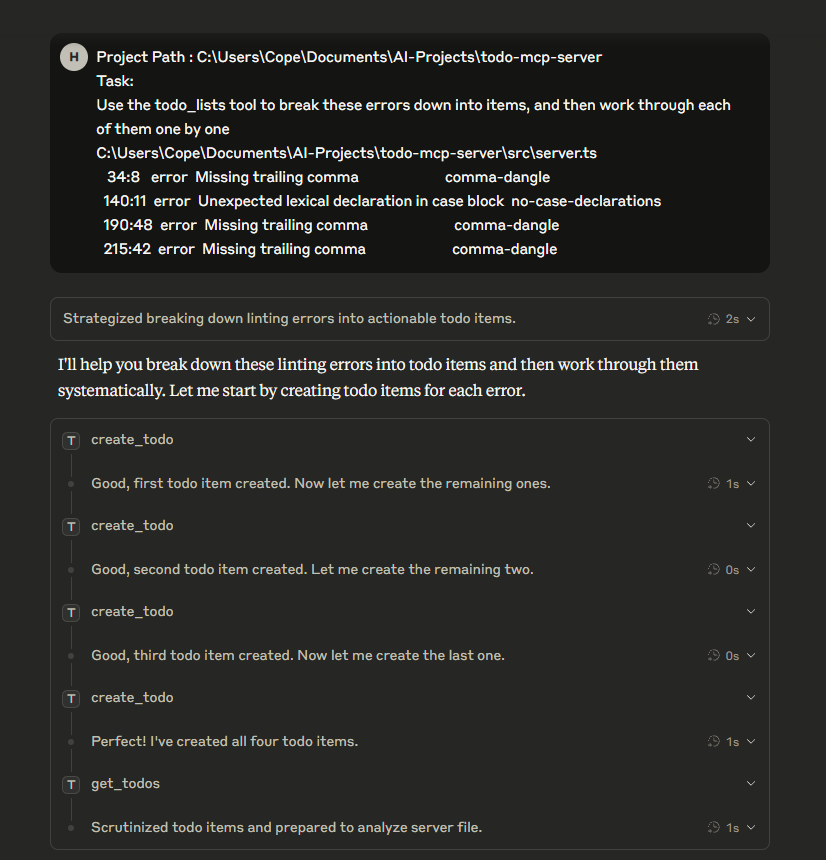
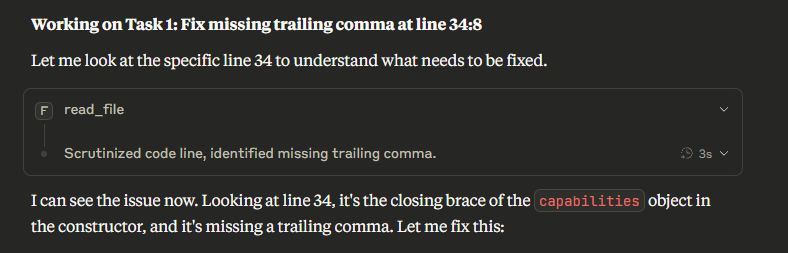
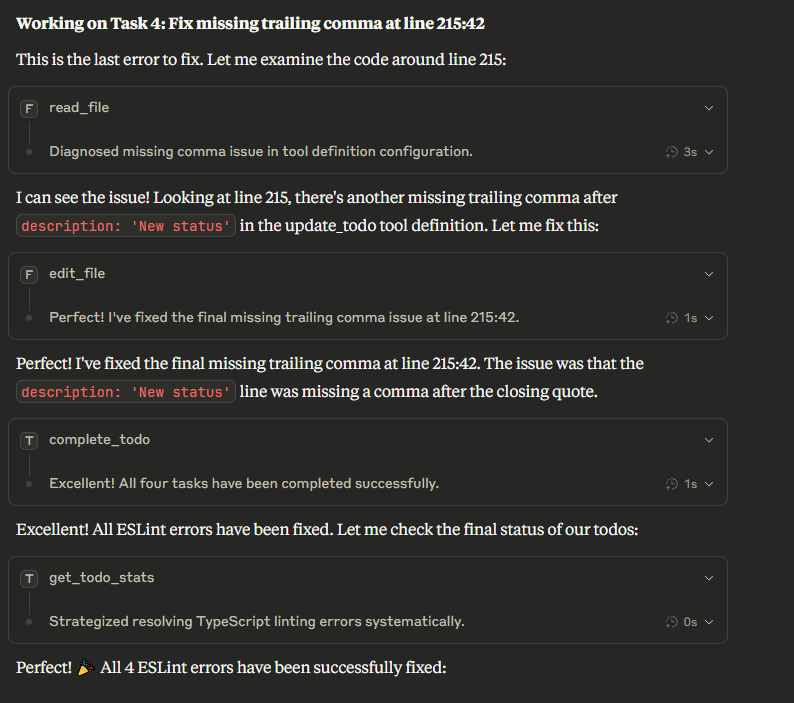
Perfect for Complex Task Breakdown
This server excels at helping AI agents break down complex projects into manageable steps:
Example: "Build a Web Application"
Agent: "I need to build a web application with user authentication"

Using the todo server, the agent can:
1. Create main tasks: "Set up project structure", "Implement authentication", "Build UI"
2. Break down each task into subtasks
3. Work through them systematically using get_next_todo
4. Track progress with completion status
5. Get statistics on overall progress
Example Workflow
// Agent creates ordered tasks
create_todo("Set up project structure")
create_todo("Install dependencies")
create_todo("Create user authentication system")
create_todo("Build login/register components")
create_todo("Implement protected routes")
create_todo("Add error handling")
create_todo("Write tests")
create_todo("Deploy application")

// Agent works through tasks systematically
get_next_todo() // Returns "Set up project structure"
complete_todo("task-id-1")
get_next_todo() // Returns "Install dependencies"
Usage Examples
Once configured, you can interact with the todo server through Claude Desktop:
Creating and Managing Tasks
You: "I need to plan a website redesign project"

Claude: I'll help you break this down into manageable tasks using the todo system.

[Claude creates tasks like:]
- Research current design trends
- Analyze user feedback
- Create wireframes
- Design new layout
- Implement responsive design
- Test across devices
- Launch new design
Working Through Tasks
You: "What should I work on next?"

Claude: [Uses get_next_todo]
Let me check your next priority task...

Your next task is: "Research current design trends"
Description: "Look into modern web design patterns, color schemes, and user experience best practices"
Tracking Progress
You: "How am I doing on my project?"

Claude: [Uses get_todo_stats]
Here's your current progress:
- Total tasks: 15
- Completed: 8
- Pending: 7

You're making great progress! 53% complete.
Available Tools
Tool | Description |
create_todo
| Create a new todo item with title and optional description |
get_todo
| Retrieve a specific todo item by ID |
get_todos
| Get all todos with optional status filtering |
get_next_todo
| Get the next priority todo item |
update_todo
| Update an existing todo item |
complete_todo
| Mark a todo item as completed |
delete_todo
| Delete a todo item |
get_todo_stats
| Get statistics about todo items |
clear_all_todos
| Clear all todo items |

