Code MCP Server
Click on "Deploy Server".
Wait a few minutes for the server to deploy. Once ready, it will show a "Started" state.
In the chat, type
@followed by the MCP server name and your instructions, e.g., "@Code MCP Server open_project my-web-app and show me the main files"
That's it! The server will respond to your query, and you can continue using it as needed.
Here is a step-by-step guide with screenshots.
VSCode MCP
This monorepo contains the VSCode MCP Server and its companion VSCode Extension, which together enable AI agents and assistants, like Goose or Claude, to interact with VSCode through the Model Context Protocol.
Project Structure
vscode-mcp/
├── server/ # MCP server implementation
└── extension/ # VS Code extensionRelated MCP server: LSP-MCP
Quick Start
Install the MCP Server
npx vscode-mcp-server installInstall the MCP Extension
Configuration
Goose Desktop Setup
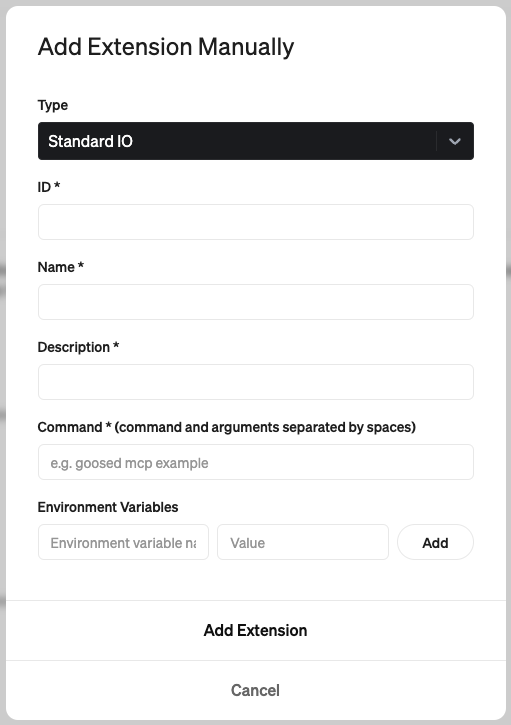
ID:
code-mcpName:
VS CodeDescription:
Allows interaction with VS Code through the Model Context ProtocolCommand:
npx vscode-mcp-server
Claude Desktop Setup
Add this to your Claude Desktop config file (~/Library/Application Support/Claude/claude_desktop_config.json):
{
"mcpServers": {
"vscode-mcp-server": {
"command": "npx",
"args": ["vscode-mcp-server"],
"env": {}
}
}
}Available Tools
The Code MCP server provides the following tools for AI agents to interact with VS Code:
create_diff
Creates and shows a diff for modifying existing files:
Shows changes preview before applying
Requires user approval
Only works with existing files
open_file
Opens files in the VS Code editor:
Used for viewing new or modified files
open_project
Opens a project folder in VS Code:
Sets up working directory for AI agent
check_extension_status
Checks if extension is installed and responding
get_extension_port
Gets the port number for VS Code MCP Extension
list_available_projects
Shows projects from port registry file
License
This project is licensed under the Apache License 2.0 - see the LICENSE file for details.
Copyright 2025 Block, Inc.
This product includes software developed at Block, Inc.
Available Tools
73 toolsadd_allowed_commandB
Add a command to the project's allowed commands list
Inputs: command (required).
analyze_codeC
Analyze code structure and dependencies
Inputs: path (required), language.
analyze_file_differencesC
Analyze differences between two files with detailed statistics
Inputs: file1 (required), file2 (required).
apply_patchC
Apply a patch file to the workspace
Inputs: patchFile (required), dryRun, reverse, stripPaths, +1 more.
auto_commit_changesC
Automatically commit AI-made changes with tracking
Inputs: message (required), files, amendSession.
auto_select_workspaceC
Automatically select the most appropriate VS Code workspace
Inputs: no named parameters.
compare_commitsC
Compare two commits with detailed analysis
Inputs: commit1 (required), commit2 (required), filePattern, format, +1 more.
compare_filesB
Compare two files and show differences with multiple format options
Inputs: file1 (required), file2 (required), format, contextLines, +4 more.
create_directoryC
Create a new directory
Inputs: path (required).
create_patchB
Create a patch file from differences between files or directories
Inputs: source (required), target (required), outputFile.
create_projectC
Create a new project with boilerplate
Inputs: name (required), type (required), path.
delete_fileC
Delete a file or directory
Inputs: path (required).
detect_vscode_workspacesB
Automatically detect open VS Code instances and their workspaces
Inputs: includeRecent, includeRunning, maxResults.
docker_buildB
Build a Docker image from a Dockerfile
Inputs: context, dockerfile, tag, build_args, +4 more.
docker_check_availabilityB
Check if Docker is installed and available
Inputs: no named parameters.
docker_cleanupB
Clean up tracked Docker containers and resources
Inputs: no named parameters.
docker_composeC
Manage Docker Compose services
Inputs: action (required), service, file, detach, +7 more.
docker_containersB
Manage Docker containers (list, start, stop, remove, etc.)
Inputs: action (required), container, command, follow, +4 more.
docker_imagesC
Manage Docker images (list, pull, push, remove, etc.)
Inputs: action (required), image, tag, force, +2 more.
docker_networksC
Manage Docker networks
Inputs: action (required), network, container, driver, +2 more.
docker_runC
Run a Docker container
Inputs: image (required), name, command, args, +13 more.
docker_systemC
Docker system operations and information
Inputs: action (required), all, volumes, force.
docker_volumesC
Manage Docker volumes
Inputs: action (required), volume, driver, force, +1 more.
end_coding_sessionA
End the current coding session
Inputs: no named parameters.
enhanced_git_diffC
Show git diff with multiple format options (unified, side-by-side, stat, word-diff)
Inputs: staged, file, format, contextLines, +5 more.
find_and_replaceC
Find and replace text across multiple files with preview option
Inputs: searchPattern (required), replacement (required), files, filePattern, +5 more.
generate_docker_composeC
Generate a Docker Compose file template
Inputs: services (required), include_database.
generate_dockerfileB
Generate a Dockerfile template for a specific language/framework
Inputs: language (required), framework.
generate_sample_configC
Generate a sample .vscode-mcp.toml configuration file
Inputs: saveToFile.
get_allowed_commandsA
Get list of commands that are allowed to run in this project
Inputs: no named parameters.
get_current_sessionB
Get information about the current coding session
Inputs: no named parameters.
get_diff_statsB
Get diff statistics (files changed, lines added/removed)
Inputs: staged, file, commit1, commit2, +1 more.
get_session_historyA
Get history of all coding sessions and their commits
Inputs: limit.
get_session_infoB
Get information about the current coding session
Inputs: no named parameters.
get_workspaceB
Get current workspace path
Inputs: no named parameters.
git_addB
Stage files for commit
Inputs: files, all, cwd.
git_branchC
List, create, or switch branches
Inputs: action (required), name, cwd.
git_commitB
Commit staged changes
Inputs: message (required), cwd.
git_diffC
Show git diff
Inputs: staged, file, cwd.
git_logB
Show commit history
Inputs: limit, oneline, cwd.
git_pullC
Pull changes from remote
Inputs: remote, branch, cwd.
git_pushB
Push commits to remote
Inputs: remote, branch, cwd.
git_statusC
Get git repository status
Inputs: cwd.
install_dependenciesC
Install all project dependencies
Inputs: path.
list_directoryC
List contents of a directory with details
Inputs: path (required), recursive.
list_processesA
List all running processes started by the agent
Inputs: no named parameters.
list_workspacesB
List recently used workspaces
Inputs: no named parameters.
load_project_configB
Load project-specific configuration from .vscode-mcp.toml
Inputs: path.
move_fileB
Move or rename a file or directory
Inputs: source (required), destination (required).
npm_commandB
Run npm commands (install, test, build, etc)
Inputs: command (required), args, cwd.
pip_installC
Install Python packages using pip
Inputs: packages, requirements_file, venv.
present_workspace_choiceB
Present detected workspaces to user for selection
Inputs: no named parameters.
preview_changesB
Preview all changes before committing
Inputs: no named parameters.
preview_changes_enhancedC
Enhanced change preview with multiple format options
Inputs: format, contextLines, ignoreWhitespace, filePattern, +1 more.
read_fileB
Read the contents of a file
Inputs: path (required).
remove_allowed_commandB
Remove a command from the project's allowed commands list
Inputs: command (required).
rollback_sessionB
Rollback all changes made in the current AI session
Inputs: confirm (required), preserveUnstaged.
run_commandC
Execute a shell command
Inputs: command (required), cwd, env.
run_custom_toolB
Execute a custom tool defined in project configuration
Inputs: toolName (required), args.
run_javascriptB
Execute JavaScript code or script with Node.js
Inputs: code, script_path, args.
run_pythonC
Execute Python code or script
Inputs: code, script_path, args, venv.
run_testsC
Run tests using appropriate test runner
Inputs: language (required), framework, path, pattern.
save_project_configB
Save project-specific configuration to .vscode-mcp.toml
Inputs: config (required), path.
search_codeC
Search for patterns in code
Inputs: query (required), path (required), file_pattern, regex.
secure_run_commandA
Execute a command with security restrictions (only allowed commands)
Inputs: command (required), cwd, timeout, env, +2 more.
secure_run_command_sequenceC
Execute multiple commands in sequence with security restrictions
Inputs: commands (required), cwd, timeout, commitResult, +2 more.
set_workspaceC
Set the active workspace directory
Inputs: path (required).
smart_workspace_initB
Intelligently initialize workspace with VS Code detection and user choice
Inputs: no named parameters.
start_coding_sessionB
Start a new coding session for change tracking
Inputs: description (required), branch.
start_serverC
Start a development server
Inputs: command (required), name (required), port, cwd.
stop_serverB
Stop a running server
Inputs: name (required).
update_project_configC
Update specific project configuration settings
Inputs: allowedCommands, formatOnSave, gitAutoCommit, formatCommand, +1 more.
write_fileB
Write content to a file
Inputs: path (required), content (required).
Tool Schema Changelog
Recent tool additions, removals, and schema changes observed during successful MCP inspections.
Loading tool schema changelog…
TDQS
Scored across 73 tools
Multiple tools have overlapping purposes, causing ambiguity. For example, 'git_diff' and 'enhanced_git_diff' both show git differences, 'preview_changes' and 'preview_changes_enhanced' both preview changes, and 'get_current_session' and 'get_session_info' appear to retrieve the same information. Tools like 'run_command', 'secure_run_command', and 'secure_run_command_sequence' also have unclear boundaries, making it difficult for an agent to choose the right one without trial and error.
Most tools follow a consistent verb_noun or verb_adjective_noun pattern (e.g., 'create_directory', 'analyze_code', 'docker_build'), with clear and descriptive names. However, there are minor deviations, such as 'npm_command' and 'pip_install' using different naming styles, and some redundancy in names like 'git_diff' vs. 'enhanced_git_diff', but overall the naming is readable and predictable.
With 73 tools, the count is excessive for a code-focused server, leading to bloat and potential confusion. Many tools could be consolidated (e.g., multiple Docker tools, redundant git and preview tools) without losing functionality. This large number suggests poor scoping and makes the toolset overwhelming for agents to navigate effectively.
The toolset provides comprehensive coverage for code development, including file operations, git management, Docker containerization, dependency installation, and session tracking. It supports full CRUD/lifecycle operations across these domains, with no obvious gaps. Agents can perform end-to-end workflows from project creation to deployment and cleanup.
Related MCP Connectors
Enable secure connectivity between Sentry issues and debugging data, and LLM clients, using a Model Context Protocol (MCP) server.
A comprehensive Model Context Protocol (MCP) server that enables AI assistants to interact with yo…
A Model Context Protocol server for Wix AI tools
Connect AI agents to Replynodes over the Model Context Protocol.
Related MCP Servers
- AlicenseNot gradedqualityDmaintenanceA lightweight bridge extension that enables Claude Desktop to connect to VSCode workspaces via Model Context Protocol, allowing Claude to read and write files, create directories, and list contents in your workspace.9MIT
- AlicenseNot gradedqualityFmaintenanceBridges the Model Context Protocol with Language Server Protocol to provide AI agents with persistent access to code intelligence features including navigation, diagnostics, refactoring, and completion across 7+ programming languages.1,791 npmMIT
- AlicenseNot gradedqualityCmaintenanceEnables AI assistants to leverage VS Code's language intelligence for code navigation, refactoring, and analysis via the MCP protocol.MIT
- AlicenseNot gradedqualityDmaintenanceA Model Context Protocol (MCP) server that provides VSCode context and filesystem operations for AI assistants.9MIT
Appeared in Searches
- Developing and redeveloping web frontend and Python backend projects, including frontend-backend integration and debugging
- Exploring information about DeepSeek
- A search for resources or information about coding
- How to reformat Claude code to match the original Anthropic version
- A server for opening and running applications on Windows and Mac