
Open-WebSearch MCP Server
<div align="center">
# Open-WebSearch MCP Server
[](https://www.modelscope.cn/mcp/servers/Aasee1/open-webSearch)
[](https://archestra.ai/mcp-catalog/aas-ee__open-websearch)
[](https://smithery.ai/server/@Aas-ee/open-websearch)



**[🇨🇳 中文](./README-zh.md) | 🇺🇸 English**
</div>
A Model Context Protocol (MCP) server based on multi-engine search results, supporting free web search without API keys.
## Features
- Web search using multi-engine results
- bing
- baidu
- ~~linux.do~~ temporarily unsupported
- csdn
- duckduckgo
- exa
- brave
- juejin
- HTTP proxy configuration support for accessing restricted resources
- No API keys or authentication required
- Returns structured results with titles, URLs, and descriptions
- Configurable number of results per search
- Customizable default search engine
- Support for fetching individual article content
- csdn
- github (README files)
- generic HTTP(S) page / Markdown content
## TODO
- Support for ~~Bing~~ (already supported), ~~DuckDuckGo~~ (already supported), ~~Exa~~ (already supported), ~~Brave~~ (already supported), Google and other search engines
- Support for more blogs, forums, and social platforms
- Optimize article content extraction, add support for more sites
- ~~Support for GitHub README fetching~~ (already supported)
## Installation Guide
### NPX Quick Start (Recommended)
The fastest way to get started:
```bash
# Basic usage
npx open-websearch@latest
# With environment variables (Linux/macOS)
DEFAULT_SEARCH_ENGINE=duckduckgo ENABLE_CORS=true npx open-websearch@latest
# Windows PowerShell
$env:DEFAULT_SEARCH_ENGINE="duckduckgo"; $env:ENABLE_CORS="true"; npx open-websearch@latest
# Windows CMD
set MODE=stdio && set DEFAULT_SEARCH_ENGINE=duckduckgo && npx open-websearch@latest
# Cross-platform (requires cross-env, Used for local development)
npm install -g open-websearch
npx cross-env DEFAULT_SEARCH_ENGINE=duckduckgo ENABLE_CORS=true open-websearch
```
**Environment Variables:**
| Variable | Default | Options | Description |
|----------|-------------------------|---------|-------------|
| `ENABLE_CORS` | `false` | `true`, `false` | Enable CORS |
| `CORS_ORIGIN` | `*` | Any valid origin | CORS origin configuration |
| `DEFAULT_SEARCH_ENGINE` | `bing` | `bing`, `duckduckgo`, `exa`, `brave`, `baidu`, `csdn`, `juejin` | Default search engine |
| `USE_PROXY` | `false` | `true`, `false` | Enable HTTP proxy |
| `PROXY_URL` | `http://127.0.0.1:7890` | Any valid URL | Proxy server URL |
| `MODE` | `both` | `both`, `http`, `stdio` | Server mode: both HTTP+STDIO, HTTP only, or STDIO only |
| `PORT` | `3000` | 1-65535 | Server port |
| `ALLOWED_SEARCH_ENGINES` | empty (all available) | Comma-separated engine names | Limit which search engines can be used; if the default engine is not in this list, the first allowed engine becomes the default |
| `MCP_TOOL_SEARCH_NAME` | `search` | Valid MCP tool name | Custom name for the search tool |
| `MCP_TOOL_FETCH_LINUXDO_NAME` | `fetchLinuxDoArticle` | Valid MCP tool name | Custom name for the Linux.do article fetch tool |
| `MCP_TOOL_FETCH_CSDN_NAME` | `fetchCsdnArticle` | Valid MCP tool name | Custom name for the CSDN article fetch tool |
| `MCP_TOOL_FETCH_GITHUB_NAME` | `fetchGithubReadme` | Valid MCP tool name | Custom name for the GitHub README fetch tool |
| `MCP_TOOL_FETCH_JUEJIN_NAME` | `fetchJuejinArticle` | Valid MCP tool name | Custom name for the Juejin article fetch tool |
| `MCP_TOOL_FETCH_WEB_NAME` | `fetchWebContent` | Valid MCP tool name | Custom name for generic web/Markdown fetch tool |
**Common configurations:**
```bash
# Enable proxy for restricted regions
USE_PROXY=true PROXY_URL=http://127.0.0.1:7890 npx open-websearch@latest
# Full configuration
DEFAULT_SEARCH_ENGINE=duckduckgo ENABLE_CORS=true USE_PROXY=true PROXY_URL=http://127.0.0.1:7890 PORT=8080 npx open-websearch@latest
```
### Local Installation
1. Clone or download this repository
2. Install dependencies:
```bash
npm install
```
3. Build the server:
```bash
npm run build
```
4. Add the server to your MCP configuration:
**Cherry Studio:**
```json
{
"mcpServers": {
"web-search": {
"name": "Web Search MCP",
"type": "streamableHttp",
"description": "Multi-engine web search with article fetching",
"isActive": true,
"baseUrl": "http://localhost:3000/mcp"
}
}
}
```
**VSCode (Claude Dev Extension):**
```json
{
"mcpServers": {
"web-search": {
"transport": {
"type": "streamableHttp",
"url": "http://localhost:3000/mcp"
}
},
"web-search-sse": {
"transport": {
"type": "sse",
"url": "http://localhost:3000/sse"
}
}
}
}
```
**Claude Desktop:**
```json
{
"mcpServers": {
"web-search": {
"type": "http",
"url": "http://localhost:3000/mcp"
},
"web-search-sse": {
"type": "sse",
"url": "http://localhost:3000/sse"
}
}
}
```
**NPX Command Line Configuration:**
```json
{
"mcpServers": {
"web-search": {
"args": [
"open-websearch@latest"
],
"command": "npx",
"env": {
"MODE": "stdio",
"DEFAULT_SEARCH_ENGINE": "duckduckgo",
"ALLOWED_SEARCH_ENGINES": "duckduckgo,bing,exa"
}
}
}
}
```
**Local STDIO Configuration for Cherry Studio (Windows):**
```json
{
"mcpServers": {
"open-websearch-local": {
"command": "node",
"args": ["C:/path/to/your/project/build/index.js"],
"env": {
"MODE": "stdio",
"DEFAULT_SEARCH_ENGINE": "duckduckgo",
"ALLOWED_SEARCH_ENGINES": "duckduckgo,bing,exa"
}
}
}
}
```
### Docker Deployment
Quick deployment using Docker Compose:
```bash
docker-compose up -d
```
Or use Docker directly:
```bash
docker run -d --name web-search -p 3000:3000 -e ENABLE_CORS=true -e CORS_ORIGIN=* ghcr.io/aas-ee/open-web-search:latest
```
Environment variable configuration:
| Variable | Default | Options | Description |
|----------|-------------------------|---------|-------------|
| `ENABLE_CORS` | `false` | `true`, `false` | Enable CORS |
| `CORS_ORIGIN` | `*` | Any valid origin | CORS origin configuration |
| `DEFAULT_SEARCH_ENGINE` | `bing` | `bing`, `duckduckgo`, `exa`, `brave` | Default search engine |
| `USE_PROXY` | `false` | `true`, `false` | Enable HTTP proxy |
| `PROXY_URL` | `http://127.0.0.1:7890` | Any valid URL | Proxy server URL |
| `PORT` | `3000` | 1-65535 | Server port |
Then configure in your MCP client:
```json
{
"mcpServers": {
"web-search": {
"name": "Web Search MCP",
"type": "streamableHttp",
"description": "Multi-engine web search with article fetching",
"isActive": true,
"baseUrl": "http://localhost:3000/mcp"
},
"web-search-sse": {
"transport": {
"name": "Web Search MCP",
"type": "sse",
"description": "Multi-engine web search with article fetching",
"isActive": true,
"url": "http://localhost:3000/sse"
}
}
}
}
```
## Usage Guide
The server provides six tools: `search`, `fetchLinuxDoArticle`, `fetchCsdnArticle`, `fetchGithubReadme`, `fetchJuejinArticle`, and `fetchWebContent`.
### search Tool Usage
```typescript
{
"query": string, // Search query
"limit": number, // Optional: Number of results to return (default: 10)
"engines": string[] // Optional: Engines to use (bing,baidu,linuxdo,csdn,duckduckgo,exa,brave,juejin) default bing
}
```
Usage example:
```typescript
use_mcp_tool({
server_name: "web-search",
tool_name: "search",
arguments: {
query: "search content",
limit: 3, // Optional parameter
engines: ["bing", "csdn", "duckduckgo", "exa", "brave", "juejin"] // Optional parameter, supports multi-engine combined search
}
})
```
Response example:
```json
[
{
"title": "Example Search Result",
"url": "https://example.com",
"description": "Description text of the search result...",
"source": "Source",
"engine": "Engine used"
}
]
```
### fetchCsdnArticle Tool Usage
Used to fetch complete content of CSDN blog articles.
```typescript
{
"url": string // URL from CSDN search results using the search tool
}
```
Usage example:
```typescript
use_mcp_tool({
server_name: "web-search",
tool_name: "fetchCsdnArticle",
arguments: {
url: "https://blog.csdn.net/xxx/article/details/xxx"
}
})
```
Response example:
```json
[
{
"content": "Example search result"
}
]
```
### fetchLinuxDoArticle Tool Usage
Used to fetch complete content of Linux.do forum articles.
```typescript
{
"url": string // URL from linuxdo search results using the search tool
}
```
Usage example:
```typescript
use_mcp_tool({
server_name: "web-search",
tool_name: "fetchLinuxDoArticle",
arguments: {
url: "https://xxxx.json"
}
})
```
Response example:
```json
[
{
"content": "Example search result"
}
]
```
### fetchGithubReadme Tool Usage
Used to fetch README content from GitHub repositories.
```typescript
{
"url": string // GitHub repository URL (supports HTTPS, SSH formats)
}
```
Usage example:
```typescript
use_mcp_tool({
server_name: "web-search",
tool_name: "fetchGithubReadme",
arguments: {
url: "https://github.com/Aas-ee/open-webSearch"
}
})
```
Supported URL formats:
- HTTPS: `https://github.com/owner/repo`
- HTTPS with .git: `https://github.com/owner/repo.git`
- SSH: `git@github.com:owner/repo.git`
- URLs with parameters: `https://github.com/owner/repo?tab=readme`
Response example:
```json
[
{
"content": "<div align=\"center\">\n\n# Open-WebSearch MCP Server..."
}
]
```
### fetchWebContent Tool Usage
Fetch content directly from public HTTP(S) links, including Markdown files (`.md`) and ordinary web pages.
```typescript
{
"url": string, // Public HTTP(S) URL
"maxChars": number // Optional: max returned content length (1000-200000, default 30000)
}
```
Usage example:
```typescript
use_mcp_tool({
server_name: "web-search",
tool_name: "fetchWebContent",
arguments: {
url: "https://raw.githubusercontent.com/Aas-ee/open-webSearch/main/README.md",
maxChars: 12000
}
})
```
Response example:
```json
{
"url": "https://raw.githubusercontent.com/Aas-ee/open-webSearch/main/README.md",
"finalUrl": "https://raw.githubusercontent.com/Aas-ee/open-webSearch/main/README.md",
"contentType": "text/plain; charset=utf-8",
"title": "",
"truncated": false,
"content": "# Open-WebSearch MCP Server ..."
}
```
### fetchJuejinArticle Tool Usage
Used to fetch complete content of Juejin articles.
```typescript
{
"url": string // Juejin article URL from search results
}
```
Usage example:
```typescript
use_mcp_tool({
server_name: "web-search",
tool_name: "fetchJuejinArticle",
arguments: {
url: "https://juejin.cn/post/7520959840199360563"
}
})
```
Supported URL format:
- `https://juejin.cn/post/{article_id}`
Response example:
```json
[
{
"content": "🚀 开源 AI 联网搜索工具:Open-WebSearch MCP 全新升级,支持多引擎 + 流式响应..."
}
]
```
## Usage Limitations
Since this tool works by scraping multi-engine search results, please note the following important limitations:
1. **Rate Limiting**:
- Too many searches in a short time may cause the used engines to temporarily block requests
- Recommendations:
- Maintain reasonable search frequency
- Use the limit parameter judiciously
- Add delays between searches when necessary
2. **Result Accuracy**:
- Depends on the HTML structure of corresponding engines, may fail when engines update
- Some results may lack metadata like descriptions
- Complex search operators may not work as expected
3. **Legal Terms**:
- This tool is for personal use only
- Please comply with the terms of service of corresponding engines
- Implement appropriate rate limiting based on your actual use case
4. **Search Engine Configuration**:
- Default search engine can be set via the `DEFAULT_SEARCH_ENGINE` environment variable
- Supported engines: bing, duckduckgo, exa, brave
- The default engine is used when searching specific websites
5. **Proxy Configuration**:
- HTTP proxy can be configured when certain search engines are unavailable in specific regions
- Enable proxy with environment variable `USE_PROXY=true`
- Configure proxy server address with `PROXY_URL`
## Contributing
Welcome to submit issue reports and feature improvement suggestions!
### Contributor Guide
If you want to fork this repository and publish your own Docker image, you need to make the following configurations:
#### GitHub Secrets Configuration
To enable automatic Docker image building and publishing, please add the following secrets in your GitHub repository settings (Settings → Secrets and variables → Actions):
**Required Secrets:**
- `GITHUB_TOKEN`: Automatically provided by GitHub (no setup needed)
**Optional Secrets (for Alibaba Cloud ACR):**
- `ACR_REGISTRY`: Your Alibaba Cloud Container Registry URL (e.g., `registry.cn-hangzhou.aliyuncs.com`)
- `ACR_USERNAME`: Your Alibaba Cloud ACR username
- `ACR_PASSWORD`: Your Alibaba Cloud ACR password
- `ACR_IMAGE_NAME`: Your image name in ACR (e.g., `your-namespace/open-web-search`)
#### CI/CD Workflow
The repository includes a GitHub Actions workflow (`.github/workflows/docker.yml`) that automatically:
1. **Trigger Conditions**:
- Push to `main` branch
- Push version tags (`v*`)
- Manual workflow trigger
2. **Build and Push to**:
- GitHub Container Registry (ghcr.io) - always enabled
- Alibaba Cloud Container Registry - only enabled when ACR secrets are configured
3. **Image Tags**:
- `ghcr.io/your-username/open-web-search:latest`
- `your-acr-address/your-image-name:latest` (if ACR is configured)
#### Fork and Publish Steps:
1. **Fork the repository** to your GitHub account
2. **Configure secrets** (if you need ACR publishing):
- Go to Settings → Secrets and variables → Actions in your forked repository
- Add the ACR-related secrets listed above
3. **Push changes** to the `main` branch or create version tags
4. **GitHub Actions will automatically build and push** your Docker image
5. **Use your image**, update the Docker command:
```bash
docker run -d --name web-search -p 3000:3000 -e ENABLE_CORS=true -e CORS_ORIGIN=* ghcr.io/your-username/open-web-search:latest
```
#### Notes:
- If you don't configure ACR secrets, the workflow will only publish to GitHub Container Registry
- Make sure your GitHub repository has Actions enabled
- The workflow will use your GitHub username (converted to lowercase) as the GHCR image name
<div align="center">
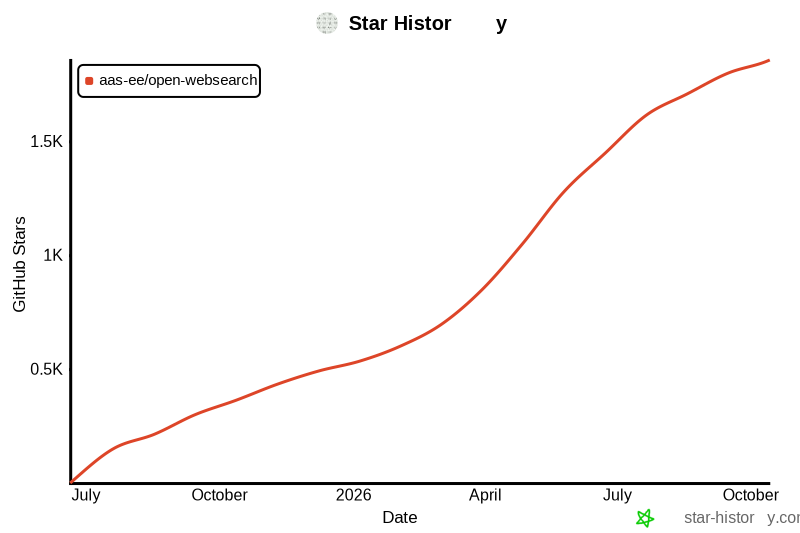
## Star History
If you find this project helpful, please consider giving it a ⭐ Star!
[](https://www.star-history.com/#Aas-ee/open-webSearch&Date)
</div>
TDQS
Scored across 8 tools
There are two nearly identical search tools (`search` and `web_search`) and two nearly identical page-fetch tools (`fetchWebContent` and `fetch_webpage`); an agent cannot reliably choose between them from names alone. The platform-specific fetchers (linux.do, CSDN, Juejin, GitHub README) are distinct, but they also overlap with the generic `fetchWebContent`, creating multiple ambiguous boundaries.
The set mixes snake_case (`web_search`, `fetch_webpage`), bare verbs (`search`), and camelCase with platform names (`fetchCsdnArticle`, `fetchGithubReadme`). The pattern is only half-readable: the `fetch*Article` group is coherent, but it clashes with the snake_case group introduced alongside it.
Eight tools is a well-sized surface for a search-and-fetch server. The only weakness is that two of those eight are redundant duplicates, so not every slot strictly earns its place.
The domain of web search plus content extraction is broadly covered: multi-engine search, a generic fetcher, and specialized extractors for common sources. Minor gaps remain (no way to select engine or result count, no batch fetch, and only four hardcoded platforms get dedicated handling), but the generic fetcher lets agents work around these.