A
licenseNot graded
qualityC
maintenanceEnables AI assistants to interact with Yuque (语雀) platform through MCP protocol, supporting knowledge base management, document operations, search, and team collaboration features.
10
MIT

The dingtalk-wiki-mcp server complements DingTalk's official MCP by adding read, browse, and write capabilities for DingTalk Wiki/Docs, plus organizational data access.
Wiki & Document Management
List all accessible Wiki workspaces and get details of a specific workspace
Browse nodes (documents/folders) within a workspace, including sub-folders via parent node ID
Get metadata for a specific Wiki node
Create new content (DOC, WORKBOOK, MIND, FOLDER) in a workspace
Search Wiki content by keyword
Notable / .able Records
List Notable sheets and records via the official API
Organization & User Management
List departments (with optional recursive child fetching)
Get members of a specific department (with pagination)
Retrieve detailed info for a specific user
Configuration
Set the active operator (unionId) for API calls
Display current local configuration (default user, workspace list)
AI Agent Integration
MCP-compatible via stdio (works with OpenClaw, mcporter, etc.)
Includes SKILL.md for OpenClaw-style agent workflows
Enables use cases like auto-generating weekly reports, exploring Wiki structure before writing, and initializing project knowledge bases
Click on "Deploy Server".
Wait a few minutes for the server to deploy. Once ready, it will show a "Started" state.
In the chat, type @ followed by the MCP server name and your instructions, e.g., "@dingtalk-wiki-mcp Create a new document called 'Weekly Summary' in the Marketing workspace"
That's it! The server will respond to your query, and you can continue using it as needed.
Here is a step-by-step guide with screenshots.
DingTalk Wiki / Docs read-write MCP server that fills the gap left by DingTalk official MCP.
DingTalk's official MCP does not provide Wiki / Docs read-write capability.
This project is an open-source complement that makes AI agents and MCP clients actually able to read, browse, and create DingTalk Wiki / Docs content.
Official MCP gap: Wiki / Docs read-write is not covered
This project adds it: workspace browsing, node browsing, and document creation
MCP-compatible: works with stdio-based MCP clients
Agent-ready: includes SKILL.md for OpenClaw-style skill workflows
Related MCP server: Feishu MCP Server
npm installcp .env.example .envRequired:
DINGTALK_APP_KEY=your-app-key
DINGTALK_APP_SECRET=your-app-secret
index.js now auto-loads .env from the current working directory (or the repo directory) if those variables are not already present in the environment.
cp config.example.json config.jsonnpm startOr:
node index.js
npx dingtalk-wiki-mcpis a future-friendly path after npm publishing.
This repository already includes the correct CLI entry (bin), but npm distribution is not part of the current release yet.
Capability | DingTalk official MCP | dingtalk-wiki-mcp |
Wiki read | Not covered | ✅ |
Wiki write | Not covered | ✅ |
Create docs | Not covered | ✅ |
Create folders | Not covered | ✅ |
Create mind maps | Not covered | ✅ |
Browse workspaces | Not covered | ✅ |
Browse nodes / folders | Not covered | ✅ |
Read Notable / | Not covered | ✅ |
MCP client compatibility | Partial / official scope only | ✅ stdio MCP-compatible |
OpenClaw skill packaging | No | ✅ includes |
Positioning principle: this project does not replace the official DingTalk MCP. It complements it by filling the Wiki / Docs gap.
List Wiki workspaces
Get workspace details
List Wiki nodes (folders / docs)
Create:
DOC
WORKBOOK
MIND
FOLDER
Search Wiki by linking to DingTalk search
Read Notable / .able sheets and records via official API
List departments
List department users
Get user info
Set current operator (unionId)
Use a default operator from local config
Inspect current local config
This repo is not only an MCP server. It also includes:
SKILL.md
So it can be reused as a skill package in OpenClaw-style agent workflows.
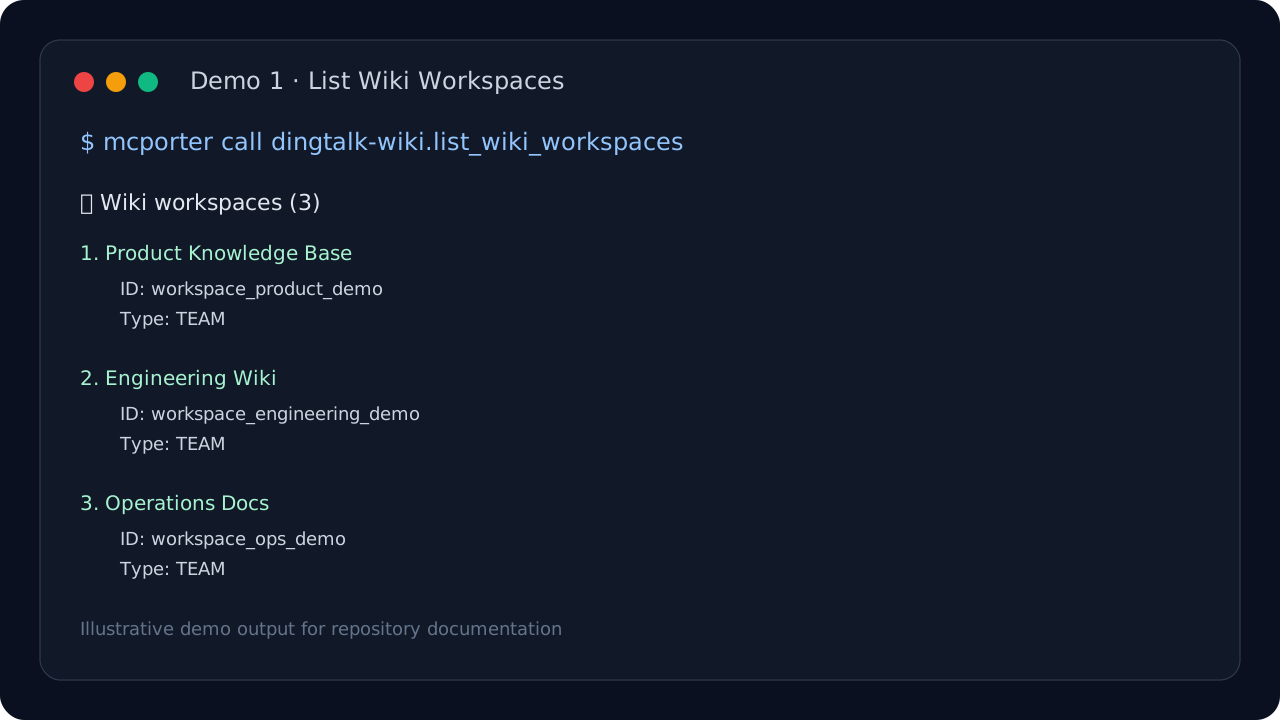
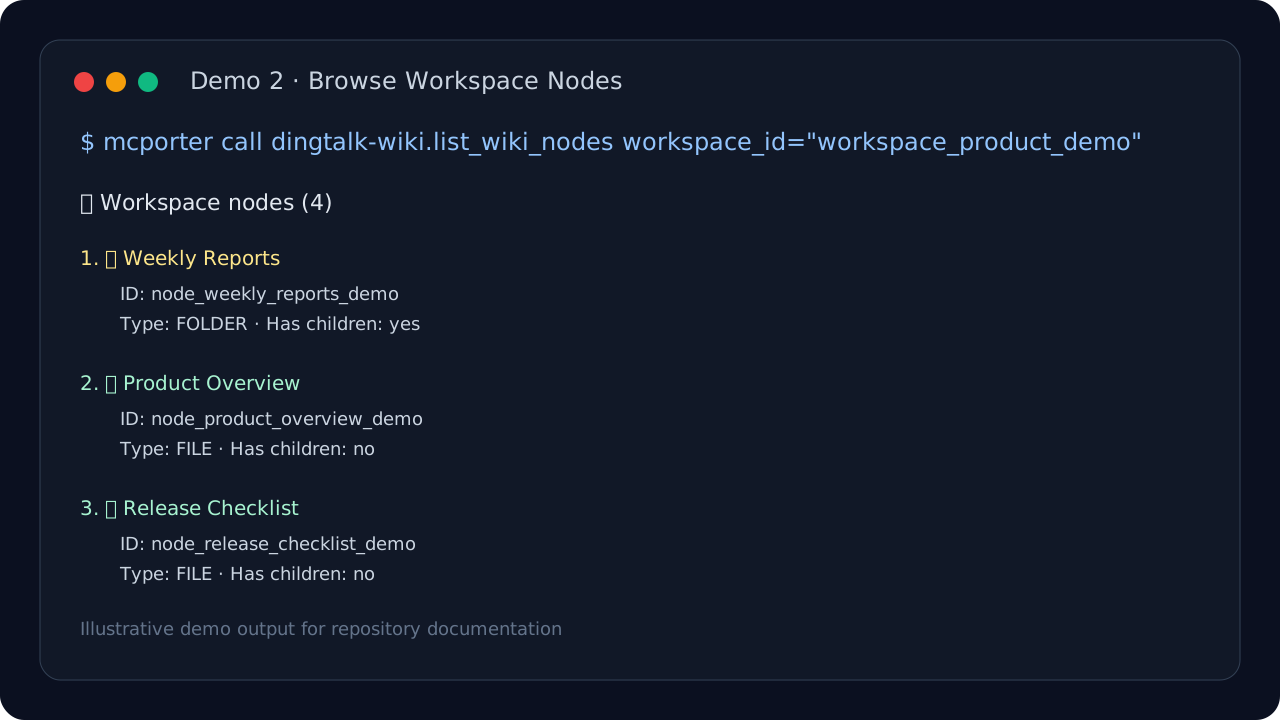
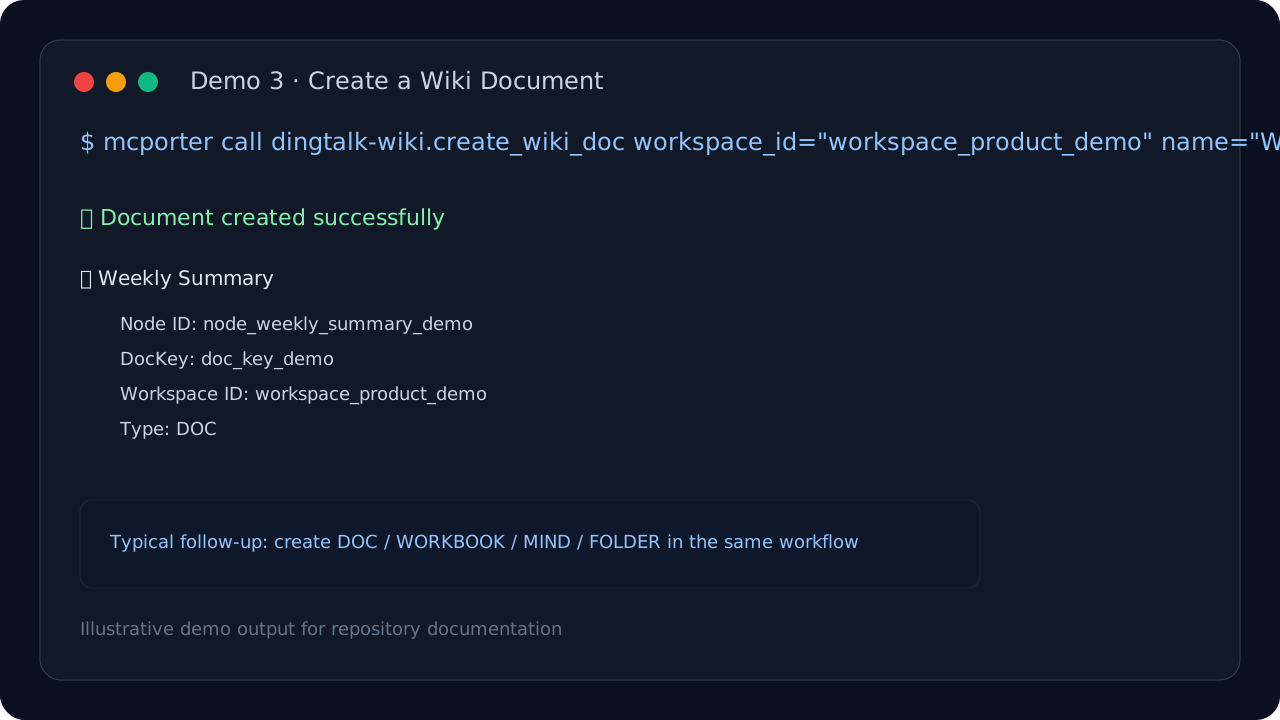
These demo images are illustrative documentation assets built from representative command/output flows, with all tenant-specific data removed.
Your AI agent can create a fresh DingTalk Wiki document every week for sales, product, or ops reporting.
Before generating content, an agent can inspect workspaces and folders first, then choose the right target node.
When a new project starts, automation can create a standard folder tree such as:
Project Overview
Weekly Reports
Specs
Release Notes
Retrospectives
If you have registered this server in your MCP client config under the name dingtalk-wiki:
mcporter call dingtalk-wiki.show_config
mcporter call dingtalk-wiki.list_wiki_workspaces
mcporter call dingtalk-wiki.list_wiki_nodes workspace_id="your_workspace_id"
mcporter call dingtalk-wiki.create_wiki_doc workspace_id="your_workspace_id" name="Weekly Summary" doc_type="DOC"
mcporter call dingtalk-wiki.get_user_info userid="your_user_id"If you want to run the server directly without pre-registering it, call the tool names directly:
mcporter call --stdio "node ./index.js" show_config
mcporter call --stdio "node ./index.js" list_wiki_workspaces
mcporter call --stdio "node ./index.js" list_wiki_nodes workspace_id="your_workspace_id"
mcporter call --stdio "node ./index.js" create_wiki_doc workspace_id="your_workspace_id" name="Weekly Summary" doc_type="DOC"set_operator
show_config
list_wiki_workspaces
get_wiki_workspace
list_wiki_nodes
get_wiki_node
create_wiki_doc
search_wiki
list_departments
get_department_users
get_user_info
list_notable_sheets
list_notable_records
Node.js 18+
A DingTalk app with the required API permissions
A stdio-compatible MCP client, such as:
OpenClaw
mcporter
other MCP hosts / clients
Depending on what you use, your DingTalk app may need permissions such as:
Document.WorkspaceDocument.Write
Wiki read permissions
Department read permissions
User read permissions
Please refer to DingTalk Open Platform documentation for the latest permission names and approval requirements.
config.json contains your local user and workspace metadata, so do not commit it
this repository already ignores config.json and .env
inject AppKey / AppSecret via environment variables instead of hardcoding them
This is a community-maintained complement, not an official DingTalk project
Some APIs require enterprise approval on the DingTalk side
search_wiki is currently more of a search-entry helper than a full-text search implementation
Reading normal DingTalk document body content via official public API is still not implemented in this project
Notable / .able support currently covers sheets and records, not arbitrary document-body export
MIT
在知识库中创建新文档(需要 Document.WorkspaceDocument.Write 权限)
| Name | Required | Description | Default |
|---|---|---|---|
| workspace_id | Yes | 知识库工作空间 ID | |
| name | Yes | 文档名称 | |
| doc_type | No | 文档类型: DOC(文字), WORKBOOK(表格), MIND(脑图), FOLDER(文件夹) | DOC |
| parent_node_id | No | 父节点 ID(可选,不传则创建在根目录) | |
| content | No | 文档内容(可选) |
Does the description disclose side effects, auth requirements, rate limits, or destructive behavior?
With no annotations provided, the description carries the full burden of behavioral disclosure. It mentions the required permission, which is valuable context. However, it doesn't describe what happens on success/failure, whether the operation is idempotent, rate limits, or other behavioral traits. The description adds some value but leaves significant gaps.
Agents need to know what a tool does to the world before calling it. Descriptions should go beyond structured annotations to explain consequences.
Is the description appropriately sized, front-loaded, and free of redundancy?
The description is a single, efficient sentence that communicates the core purpose and critical permission requirement. There's zero waste - every word earns its place. It's appropriately sized and front-loaded with essential information.
Shorter descriptions cost fewer tokens and are easier for agents to parse. Every sentence should earn its place.
Given the tool's complexity, does the description cover enough for an agent to succeed on first attempt?
For a creation tool with 5 parameters, no annotations, and no output schema, the description provides basic purpose and permission context but lacks information about return values, error conditions, or behavioral details. It's minimally adequate but has clear gaps given the tool's complexity and lack of structured metadata.
Complex tools with many parameters or behaviors need more documentation. Simple tools need less. This dimension scales expectations accordingly.
Does the description clarify parameter syntax, constraints, interactions, or defaults beyond what the schema provides?
Schema description coverage is 100%, so the schema already fully documents all 5 parameters. The description doesn't add any parameter-specific information beyond what's in the schema. According to the rules, when schema_description_coverage is high (>80%), the baseline is 3 even with no param info in the description.
Input schemas describe structure but not intent. Descriptions should explain non-obvious parameter relationships and valid value ranges.
Does the description clearly state what the tool does and how it differs from similar tools?
The description clearly states the action ('创建新文档' - create new document) and resource ('在知识库中' - in the knowledge base), providing specific verb+resource pairing. However, it doesn't explicitly differentiate this creation tool from potential sibling tools like 'get_wiki_node' or 'list_wiki_nodes', which would require a 5.
Agents choose between tools based on descriptions. A clear purpose with a specific verb and resource helps agents select the right tool.
Does the description explain when to use this tool, when not to, or what alternatives exist?
The description includes explicit permission requirements ('需要 Document.WorkspaceDocument.Write 权限'), which provides clear context about when this tool can be used. However, it doesn't mention when NOT to use it or suggest alternatives for related operations, preventing a score of 5.
Agents often have multiple tools that could apply. Explicit usage guidance like "use X instead of Y when Z" prevents misuse.
获取部门成员列表
| Name | Required | Description | Default |
|---|---|---|---|
| dept_id | Yes | 部门 ID | |
| cursor | No | 分页游标 | |
| size | No | 每页数量 |
Does the description disclose side effects, auth requirements, rate limits, or destructive behavior?
No annotations are provided, so the description carries the full burden of behavioral disclosure. The description only states what the tool does (get department member list) without any information about permissions required, rate limits, pagination behavior (implied by parameters but not explained), or response format. For a read operation with pagination, this leaves significant gaps in understanding how the tool behaves.
Agents need to know what a tool does to the world before calling it. Descriptions should go beyond structured annotations to explain consequences.
Is the description appropriately sized, front-loaded, and free of redundancy?
The description is a single, efficient phrase '获取部门成员列表' that directly states the tool's purpose without any wasted words. It's appropriately sized and front-loaded, making it easy for an agent to parse quickly. Every word earns its place by conveying essential information.
Shorter descriptions cost fewer tokens and are easier for agents to parse. Every sentence should earn its place.
Given the tool's complexity, does the description cover enough for an agent to succeed on first attempt?
Given the tool has 3 parameters (including pagination), no annotations, and no output schema, the description is incomplete. It doesn't explain the pagination mechanism (cursor-based), what the response contains, or any behavioral constraints. For a tool that returns lists with pagination, the description should provide more context about how to use it effectively.
Complex tools with many parameters or behaviors need more documentation. Simple tools need less. This dimension scales expectations accordingly.
Does the description clarify parameter syntax, constraints, interactions, or defaults beyond what the schema provides?
Schema description coverage is 100%, with all parameters ('dept_id', 'cursor', 'size') documented in the schema. The description adds no additional parameter information beyond what's in the schema. According to the rules, when schema coverage is high (>80%), the baseline score is 3 even with no param info in the description, which applies here.
Input schemas describe structure but not intent. Descriptions should explain non-obvious parameter relationships and valid value ranges.
Does the description clearly state what the tool does and how it differs from similar tools?
The description '获取部门成员列表' (Get department member list) clearly states the verb '获取' (get) and resource '部门成员列表' (department member list), making the purpose immediately understandable. It doesn't explicitly distinguish from sibling tools like 'get_user_info' or 'list_departments', but the resource specificity is clear. This is better than vague or tautological descriptions.
Agents choose between tools based on descriptions. A clear purpose with a specific verb and resource helps agents select the right tool.
Does the description explain when to use this tool, when not to, or what alternatives exist?
The description provides no guidance on when to use this tool versus alternatives. It doesn't mention when to use 'get_department_users' instead of 'get_user_info' for individual user details or 'list_departments' for department metadata. There's no context about prerequisites or exclusions, leaving the agent to infer usage from the tool name alone.
Agents often have multiple tools that could apply. Explicit usage guidance like "use X instead of Y when Z" prevents misuse.
获取用户详细信息
| Name | Required | Description | Default |
|---|---|---|---|
| userid | Yes | 用户 ID |
Does the description disclose side effects, auth requirements, rate limits, or destructive behavior?
With no annotations provided, the description carries full burden for behavioral disclosure. While '获取' (get) implies a read operation, the description doesn't disclose important behavioral traits: whether this requires authentication, what format the detailed information returns, if there are rate limits, error conditions, or what happens with invalid user IDs. For a tool with zero annotation coverage, this leaves significant behavioral gaps.
Agents need to know what a tool does to the world before calling it. Descriptions should go beyond structured annotations to explain consequences.
Is the description appropriately sized, front-loaded, and free of redundancy?
The description is extremely concise - a single phrase that gets straight to the point. There's no wasted language or unnecessary elaboration. However, this conciseness comes at the cost of completeness, as noted in other dimensions. The structure is front-loaded with the core purpose but lacks supporting information.
Shorter descriptions cost fewer tokens and are easier for agents to parse. Every sentence should earn its place.
Given the tool's complexity, does the description cover enough for an agent to succeed on first attempt?
Given the tool's simplicity (1 parameter, no output schema, no annotations), the description is incomplete. While the purpose is clear, it lacks crucial context: no output format information, no behavioral traits disclosure, no usage differentiation from sibling tools, and no indication of what '详细信息' (detailed information) actually includes. For even a simple read tool, this leaves the agent with significant gaps in understanding.
Complex tools with many parameters or behaviors need more documentation. Simple tools need less. This dimension scales expectations accordingly.
Does the description clarify parameter syntax, constraints, interactions, or defaults beyond what the schema provides?
The input schema has 100% description coverage with 'userid' clearly documented as '用户 ID' (user ID). The description adds no additional parameter semantics beyond what the schema already provides. With high schema coverage and only one parameter, the baseline score of 3 is appropriate - the schema does the heavy lifting, and the description doesn't compensate with extra context about parameter usage or constraints.
Input schemas describe structure but not intent. Descriptions should explain non-obvious parameter relationships and valid value ranges.
Does the description clearly state what the tool does and how it differs from similar tools?
The description '获取用户详细信息' (Get user detailed information) clearly states the verb ('get') and resource ('user detailed information'), providing a basic purpose. However, it doesn't distinguish this tool from potential sibling tools like 'get_department_users' or 'set_operator' - it's vague about what specific user information is retrieved versus other user-related operations.
Agents choose between tools based on descriptions. A clear purpose with a specific verb and resource helps agents select the right tool.
Does the description explain when to use this tool, when not to, or what alternatives exist?
The description provides no guidance on when to use this tool versus alternatives. There's no mention of prerequisites, when this tool is appropriate versus 'get_department_users' (which might retrieve multiple users), or any context about required permissions or system state. The agent receives no usage differentiation from sibling tools.
Agents often have multiple tools that could apply. Explicit usage guidance like "use X instead of Y when Z" prevents misuse.
获取知识库节点详情
| Name | Required | Description | Default |
|---|---|---|---|
| node_id | Yes | 节点 ID |
Does the description disclose side effects, auth requirements, rate limits, or destructive behavior?
No annotations are provided, so the description carries full burden for behavioral disclosure. The description only states what the tool does ('get details') without mentioning whether it's read-only, requires authentication, has rate limits, returns structured data, or handles errors. For a tool with no annotations, this leaves significant behavioral gaps.
Agents need to know what a tool does to the world before calling it. Descriptions should go beyond structured annotations to explain consequences.
Is the description appropriately sized, front-loaded, and free of redundancy?
The description is a single phrase ('获取知识库节点详情'), which is extremely concise and front-loaded. However, it's arguably too brief, bordering on under-specified rather than efficiently informative. It earns a 4 for zero waste but loses a point for potentially insufficient detail.
Shorter descriptions cost fewer tokens and are easier for agents to parse. Every sentence should earn its place.
Given the tool's complexity, does the description cover enough for an agent to succeed on first attempt?
Given the lack of annotations and output schema, the description is incomplete. It doesn't explain what 'details' include, the return format, error conditions, or how it differs from sibling tools. For a tool that presumably returns structured node information, more context is needed to guide effective use.
Complex tools with many parameters or behaviors need more documentation. Simple tools need less. This dimension scales expectations accordingly.
Does the description clarify parameter syntax, constraints, interactions, or defaults beyond what the schema provides?
The input schema has 100% description coverage, with the single parameter 'node_id' documented as '节点 ID' (node ID). The description adds no additional meaning about parameter usage, constraints, or examples beyond what the schema provides. With high schema coverage, the baseline score of 3 is appropriate.
Input schemas describe structure but not intent. Descriptions should explain non-obvious parameter relationships and valid value ranges.
Does the description clearly state what the tool does and how it differs from similar tools?
The description '获取知识库节点详情' translates to 'Get knowledge base node details', which provides a basic verb+resource combination. However, it's vague about what constitutes 'details' and doesn't differentiate from sibling tools like 'get_wiki_workspace' or 'list_wiki_nodes'. The purpose is understandable but lacks specificity about what information is retrieved.
Agents choose between tools based on descriptions. A clear purpose with a specific verb and resource helps agents select the right tool.
Does the description explain when to use this tool, when not to, or what alternatives exist?
No guidance is provided about when to use this tool versus alternatives. The description doesn't mention prerequisites, context for usage, or comparisons to sibling tools like 'list_wiki_nodes' (for listing) or 'get_wiki_workspace' (for workspace-level details). Users must infer usage from the tool name alone.
Agents often have multiple tools that could apply. Explicit usage guidance like "use X instead of Y when Z" prevents misuse.
获取知识库工作空间详情
| Name | Required | Description | Default |
|---|---|---|---|
| workspace_id | Yes | 知识库工作空间 ID |
Does the description disclose side effects, auth requirements, rate limits, or destructive behavior?
No annotations are provided, so the description carries the full burden of behavioral disclosure. It states it 'gets' details, implying a read-only operation, but doesn't specify whether it requires authentication, returns structured data, handles errors, or has rate limits. For a tool with zero annotation coverage, this leaves significant gaps in understanding its behavior.
Agents need to know what a tool does to the world before calling it. Descriptions should go beyond structured annotations to explain consequences.
Is the description appropriately sized, front-loaded, and free of redundancy?
The description is a single, efficient sentence in Chinese that directly states the tool's purpose without unnecessary words. It is appropriately sized and front-loaded, making it easy to understand at a glance.
Shorter descriptions cost fewer tokens and are easier for agents to parse. Every sentence should earn its place.
Given the tool's complexity, does the description cover enough for an agent to succeed on first attempt?
Given the lack of annotations and output schema, the description is incomplete. It doesn't explain what details are returned (e.g., workspace name, settings, permissions) or any behavioral aspects like error handling. For a tool that likely returns structured data, more context is needed to guide effective use.
Complex tools with many parameters or behaviors need more documentation. Simple tools need less. This dimension scales expectations accordingly.
Does the description clarify parameter syntax, constraints, interactions, or defaults beyond what the schema provides?
The description adds no parameter semantics beyond what the input schema provides. The schema has 100% coverage with a clear description for 'workspace_id', so the baseline is 3. The description doesn't explain the format or source of the workspace ID, but the schema adequately covers the parameter.
Input schemas describe structure but not intent. Descriptions should explain non-obvious parameter relationships and valid value ranges.
Does the description clearly state what the tool does and how it differs from similar tools?
The description clearly states the verb ('获取' meaning 'get') and resource ('知识库工作空间详情' meaning 'knowledge base workspace details'), making the purpose specific and understandable. It doesn't explicitly differentiate from siblings like 'list_wiki_workspaces' or 'get_wiki_node', but the focus on details for a specific workspace is implied.
Agents choose between tools based on descriptions. A clear purpose with a specific verb and resource helps agents select the right tool.
Does the description explain when to use this tool, when not to, or what alternatives exist?
The description provides no guidance on when to use this tool versus alternatives. It doesn't mention siblings like 'list_wiki_workspaces' for listing workspaces or 'get_wiki_node' for node details, nor does it specify prerequisites such as needing a workspace ID. Usage is implied only by the tool name and description.
Agents often have multiple tools that could apply. Explicit usage guidance like "use X instead of Y when Z" prevents misuse.
列出钉钉组织架构中的部门列表
| Name | Required | Description | Default |
|---|---|---|---|
| fetch_child | No | 是否递归获取子部门 |
Does the description disclose side effects, auth requirements, rate limits, or destructive behavior?
No annotations are provided, so the description carries the full burden of behavioral disclosure. It states the action ('list') but doesn't describe traits like whether it's read-only, requires specific permissions, handles pagination, returns structured data, or has rate limits. For a tool with zero annotation coverage, this is a significant gap in transparency.
Agents need to know what a tool does to the world before calling it. Descriptions should go beyond structured annotations to explain consequences.
Is the description appropriately sized, front-loaded, and free of redundancy?
The description is a single, efficient sentence in Chinese that directly states the tool's purpose without unnecessary words. It's front-loaded with the core action and resource, making it highly concise and well-structured.
Shorter descriptions cost fewer tokens and are easier for agents to parse. Every sentence should earn its place.
Given the tool's complexity, does the description cover enough for an agent to succeed on first attempt?
Given the lack of annotations and output schema, the description is incomplete. It doesn't address behavioral aspects (e.g., safety, permissions) or output details (e.g., format, pagination), which are critical for a list operation. The tool has low complexity but minimal contextual support.
Complex tools with many parameters or behaviors need more documentation. Simple tools need less. This dimension scales expectations accordingly.
Does the description clarify parameter syntax, constraints, interactions, or defaults beyond what the schema provides?
The description adds no parameter information beyond what the input schema provides. Since schema description coverage is 100% (the 'fetch_child' parameter is fully documented in the schema), the baseline score is 3. The description doesn't compensate with additional context like usage examples or implications of the parameter.
Input schemas describe structure but not intent. Descriptions should explain non-obvious parameter relationships and valid value ranges.
Does the description clearly state what the tool does and how it differs from similar tools?
The description clearly states the verb '列出' (list) and the resource '钉钉组织架构中的部门列表' (department list in DingTalk organizational structure), providing a specific purpose. However, it doesn't explicitly differentiate from sibling tools like 'get_department_users', which focuses on users within departments rather than the department list itself.
Agents choose between tools based on descriptions. A clear purpose with a specific verb and resource helps agents select the right tool.
Does the description explain when to use this tool, when not to, or what alternatives exist?
The description provides no guidance on when to use this tool versus alternatives. It doesn't mention scenarios like needing department hierarchies, comparing to 'get_department_users' for user-focused queries, or prerequisites such as authentication or access rights.
Agents often have multiple tools that could apply. Explicit usage guidance like "use X instead of Y when Z" prevents misuse.
列出知识库中的节点(文档和目录)
| Name | Required | Description | Default |
|---|---|---|---|
| workspace_id | Yes | 知识库工作空间 ID | |
| parent_node_id | No | 父节点 ID(不传则获取根目录) |
Does the description disclose side effects, auth requirements, rate limits, or destructive behavior?
No annotations are provided, so the description carries full burden for behavioral disclosure. It states it lists nodes but doesn't describe return format (e.g., pagination, fields included), permissions required, rate limits, or whether it's a read-only operation. For a tool with no annotation coverage, this leaves significant gaps in understanding its behavior.
Agents need to know what a tool does to the world before calling it. Descriptions should go beyond structured annotations to explain consequences.
Is the description appropriately sized, front-loaded, and free of redundancy?
The description is a single, efficient sentence in Chinese that directly states the tool's purpose without unnecessary words. It's appropriately sized for a simple listing tool and front-loads the core functionality.
Shorter descriptions cost fewer tokens and are easier for agents to parse. Every sentence should earn its place.
Given the tool's complexity, does the description cover enough for an agent to succeed on first attempt?
Given no annotations, no output schema, and 2 parameters, the description is incomplete. It doesn't explain what the tool returns (node structure, fields), how results are organized, or behavioral aspects like error handling. For a listing tool with no structured output documentation, the description should provide more context about the return value.
Complex tools with many parameters or behaviors need more documentation. Simple tools need less. This dimension scales expectations accordingly.
Does the description clarify parameter syntax, constraints, interactions, or defaults beyond what the schema provides?
Schema description coverage is 100%, with both parameters clearly documented in the schema. The description adds no additional parameter information beyond what the schema provides. According to scoring rules, when schema coverage is high (>80%), the baseline is 3 even with no param info in the description.
Input schemas describe structure but not intent. Descriptions should explain non-obvious parameter relationships and valid value ranges.
Does the description clearly state what the tool does and how it differs from similar tools?
The description clearly states the action ('列出' - list) and resource ('知识库中的节点' - nodes in the knowledge base), specifying it includes both documents and directories. It distinguishes from sibling tools like 'get_wiki_node' (singular) and 'search_wiki' (search functionality), but doesn't explicitly differentiate from 'list_wiki_workspaces' which lists workspaces rather than nodes.
Agents choose between tools based on descriptions. A clear purpose with a specific verb and resource helps agents select the right tool.
Does the description explain when to use this tool, when not to, or what alternatives exist?
The description provides no guidance on when to use this tool versus alternatives. It doesn't mention when to choose 'list_wiki_nodes' over 'get_wiki_node' (for a single node) or 'search_wiki' (for filtered searches), nor does it specify prerequisites like needing workspace access. Usage is implied by the action but not explicitly defined.
Agents often have multiple tools that could apply. Explicit usage guidance like "use X instead of Y when Z" prevents misuse.
列出用户有权限的知识库工作空间列表
| Name | Required | Description | Default |
|---|---|---|---|
| operator_id | No | 操作者 unionid(不传则使用之前设置的) |
Does the description disclose side effects, auth requirements, rate limits, or destructive behavior?
No annotations are provided, so the description carries the full burden of behavioral disclosure. It states the tool lists workspaces based on user permissions, but does not describe the return format (e.g., list structure, pagination), error conditions, or any rate limits. The description is minimal and lacks details needed for an agent to understand the tool's behavior fully.
Agents need to know what a tool does to the world before calling it. Descriptions should go beyond structured annotations to explain consequences.
Is the description appropriately sized, front-loaded, and free of redundancy?
The description is a single, clear sentence in Chinese: '列出用户有权限的知识库工作空间列表'. It is front-loaded with the core purpose, has zero redundant words, and is appropriately sized for a simple listing tool. Every part of the sentence earns its place.
Shorter descriptions cost fewer tokens and are easier for agents to parse. Every sentence should earn its place.
Given the tool's complexity, does the description cover enough for an agent to succeed on first attempt?
Given the tool's low complexity (one optional parameter) and lack of annotations or output schema, the description is minimally adequate. It states what the tool does but omits details like return values or usage context. For a listing tool with no behavioral annotations, it should ideally include more about the output format or permissions handling to be fully complete.
Complex tools with many parameters or behaviors need more documentation. Simple tools need less. This dimension scales expectations accordingly.
Does the description clarify parameter syntax, constraints, interactions, or defaults beyond what the schema provides?
The input schema has 100% description coverage, with the single parameter 'operator_id' documented as '操作者 unionid(不传则使用之前设置的)' (operator unionid, if not passed, use previously set). The description does not add any meaning beyond this, as it does not mention parameters at all. With high schema coverage, the baseline score of 3 is appropriate.
Input schemas describe structure but not intent. Descriptions should explain non-obvious parameter relationships and valid value ranges.
Does the description clearly state what the tool does and how it differs from similar tools?
The description clearly states the tool's purpose: '列出用户有权限的知识库工作空间列表' (List wiki workspaces the user has permission to access). It specifies the verb ('列出' - list) and resource ('知识库工作空间' - wiki workspaces), but does not explicitly differentiate it from sibling tools like 'get_wiki_workspace' (singular) or 'search_wiki', which might have overlapping functionality.
Agents choose between tools based on descriptions. A clear purpose with a specific verb and resource helps agents select the right tool.
Does the description explain when to use this tool, when not to, or what alternatives exist?
The description provides no guidance on when to use this tool versus alternatives. It does not mention sibling tools like 'get_wiki_workspace' (which might fetch a single workspace) or 'search_wiki' (which might filter results), nor does it specify prerequisites such as needing to set an operator first (implied by the parameter description but not stated in the tool description).
Agents often have multiple tools that could apply. Explicit usage guidance like "use X instead of Y when Z" prevents misuse.
搜索知识库内容
| Name | Required | Description | Default |
|---|---|---|---|
| keyword | Yes | 搜索关键词 | |
| workspace_id | No | 指定知识库 ID(可选) |
Does the description disclose side effects, auth requirements, rate limits, or destructive behavior?
No annotations are provided, so the description carries the full burden of behavioral disclosure. It only states the action ('搜索') without detailing how the search works (e.g., case sensitivity, pagination, error handling), what permissions are needed, or what the output looks like. For a search tool with zero annotation coverage, this leaves critical behavioral traits unspecified.
Agents need to know what a tool does to the world before calling it. Descriptions should go beyond structured annotations to explain consequences.
Is the description appropriately sized, front-loaded, and free of redundancy?
The description is a single, efficient phrase ('搜索知识库内容') that directly states the tool's function without unnecessary words. It is appropriately sized and front-loaded, making it easy to parse quickly. Every word earns its place by conveying the core purpose.
Shorter descriptions cost fewer tokens and are easier for agents to parse. Every sentence should earn its place.
Given the tool's complexity, does the description cover enough for an agent to succeed on first attempt?
Given the complexity of a search operation, lack of annotations, and no output schema, the description is incomplete. It doesn't explain the search behavior, result format, or error conditions. For a tool with two parameters and no structured output information, more context is needed to guide effective use by an AI agent.
Complex tools with many parameters or behaviors need more documentation. Simple tools need less. This dimension scales expectations accordingly.
Does the description clarify parameter syntax, constraints, interactions, or defaults beyond what the schema provides?
The schema description coverage is 100%, with clear descriptions for both parameters ('keyword' as search term, 'workspace_id' as optional knowledge base ID). The description adds no additional meaning beyond the schema, such as examples or constraints. With high schema coverage, the baseline score of 3 is appropriate as the schema adequately documents parameters.
Input schemas describe structure but not intent. Descriptions should explain non-obvious parameter relationships and valid value ranges.
Does the description clearly state what the tool does and how it differs from similar tools?
The description '搜索知识库内容' (search knowledge base content) states the basic action and resource but lacks specificity. It doesn't distinguish this tool from potential alternatives like 'list_wiki_nodes' or 'get_wiki_node', nor does it clarify what type of search it performs (full-text, keyword matching, etc.). The purpose is understandable but vague.
Agents choose between tools based on descriptions. A clear purpose with a specific verb and resource helps agents select the right tool.
Does the description explain when to use this tool, when not to, or what alternatives exist?
No guidance is provided on when to use this tool versus siblings like 'list_wiki_nodes' or 'get_wiki_node'. The description implies searching content, but it doesn't specify use cases (e.g., for finding specific documents vs. browsing), prerequisites, or exclusions. Without this, the agent must infer usage from context alone.
Agents often have multiple tools that could apply. Explicit usage guidance like "use X instead of Y when Z" prevents misuse.
设置操作者 unionid(用于访问 Wiki API)
| Name | Required | Description | Default |
|---|---|---|---|
| unionid | Yes | 用户的 unionid |
Does the description disclose side effects, auth requirements, rate limits, or destructive behavior?
No annotations are provided, so the description carries the full burden of behavioral disclosure. It states this sets an operator unionid for Wiki API access, implying a configuration or authentication step, but doesn't describe whether this is persistent, if it requires specific permissions, what the default behavior is without it, or any error conditions. The description adds minimal behavioral context beyond the basic action.
Agents need to know what a tool does to the world before calling it. Descriptions should go beyond structured annotations to explain consequences.
Is the description appropriately sized, front-loaded, and free of redundancy?
The description is a single, concise sentence that directly states the tool's function and purpose. It's front-loaded with the main action and includes a brief rationale. There's no wasted verbiage, though it could be slightly more informative without losing conciseness.
Shorter descriptions cost fewer tokens and are easier for agents to parse. Every sentence should earn its place.
Given the tool's complexity, does the description cover enough for an agent to succeed on first attempt?
Given the tool has no annotations, no output schema, and a simple parameter (1 required), the description is incomplete. It doesn't explain what 'setting' the operator entails (e.g., session-based, persistent), what happens after setting it, or how it interacts with sibling Wiki tools. For a configuration/authentication tool, more context on usage and effects is needed.
Complex tools with many parameters or behaviors need more documentation. Simple tools need less. This dimension scales expectations accordingly.
Does the description clarify parameter syntax, constraints, interactions, or defaults beyond what the schema provides?
The input schema has 100% description coverage, with the single parameter 'unionid' documented as '用户的 unionid' (user's unionid). The description adds that this is '用于访问 Wiki API' (for accessing Wiki API), providing some context about the parameter's purpose, but doesn't elaborate on format, sourcing, or validation. With high schema coverage, the baseline is 3, and the description adds marginal value.
Input schemas describe structure but not intent. Descriptions should explain non-obvious parameter relationships and valid value ranges.
Does the description clearly state what the tool does and how it differs from similar tools?
The description states the tool's purpose ('设置操作者 unionid') which translates to 'set operator unionid', providing a specific verb ('set') and resource ('operator unionid'). However, it doesn't distinguish this from sibling tools or explain what 'operator' means in this context. The mention of '用于访问 Wiki API' (for accessing Wiki API) adds some context but remains somewhat vague about the exact function.
Agents choose between tools based on descriptions. A clear purpose with a specific verb and resource helps agents select the right tool.
Does the description explain when to use this tool, when not to, or what alternatives exist?
The description provides no explicit guidance on when to use this tool versus alternatives. It mentions it's 'for accessing Wiki API', which implies a prerequisite or configuration step, but doesn't specify when this should be done relative to other operations or what happens if it's not used. No alternatives or exclusions are mentioned.
Agents often have multiple tools that could apply. Explicit usage guidance like "use X instead of Y when Z" prevents misuse.
显示当前配置信息(默认用户和知识库列表)
| Name | Required | Description | Default |
|---|---|---|---|
No parameters | |||
Does the description disclose side effects, auth requirements, rate limits, or destructive behavior?
No annotations are provided, so the description carries the full burden of behavioral disclosure. The description indicates this is a read-only operation ('显示' means display/show) and specifies what information is returned (configuration, default user, knowledge base list). However, it doesn't disclose important behavioral traits like whether this requires authentication, rate limits, error conditions, or the format/structure of the returned data. For a tool with zero annotation coverage, this leaves significant gaps in understanding how the tool behaves.
Agents need to know what a tool does to the world before calling it. Descriptions should go beyond structured annotations to explain consequences.
Is the description appropriately sized, front-loaded, and free of redundancy?
The description is a single, efficient sentence in Chinese that directly states the tool's purpose without unnecessary words. It's appropriately sized for a simple tool with no parameters, and every part of the sentence ('显示当前配置信息' and the parenthetical detail) adds value by clarifying what configuration data is included.
Shorter descriptions cost fewer tokens and are easier for agents to parse. Every sentence should earn its place.
Given the tool's complexity, does the description cover enough for an agent to succeed on first attempt?
Given the tool's simplicity (0 parameters, no output schema, no annotations), the description is adequate but has clear gaps. It explains what the tool does and what data it returns, but lacks details on behavioral aspects (e.g., authentication needs, error handling) and doesn't provide usage guidance relative to siblings. For a configuration display tool, this is minimally viable but could be more complete by addressing when to use it versus other tools.
Complex tools with many parameters or behaviors need more documentation. Simple tools need less. This dimension scales expectations accordingly.
Does the description clarify parameter syntax, constraints, interactions, or defaults beyond what the schema provides?
The tool has 0 parameters, and schema description coverage is 100% (since there are no parameters to describe). The description doesn't need to add parameter semantics, so it meets the baseline expectation. No additional parameter information is required or provided.
Input schemas describe structure but not intent. Descriptions should explain non-obvious parameter relationships and valid value ranges.
Does the description clearly state what the tool does and how it differs from similar tools?
The description clearly states the tool's purpose: '显示当前配置信息(默认用户和知识库列表)' translates to 'Display current configuration information (default user and knowledge base list)'. This specifies the verb 'display' and the resource 'configuration information' with additional details about what configuration data is included. However, it doesn't explicitly distinguish this from sibling tools like 'get_user_info' or 'list_wiki_workspaces', which might also retrieve configuration-related data.
Agents choose between tools based on descriptions. A clear purpose with a specific verb and resource helps agents select the right tool.
Does the description explain when to use this tool, when not to, or what alternatives exist?
The description provides no guidance on when to use this tool versus alternatives. It doesn't mention prerequisites, timing considerations, or how this differs from sibling tools like 'get_user_info' (which might retrieve user details) or 'list_wiki_workspaces' (which might list workspaces). The agent must infer usage from the purpose alone without explicit direction.
Agents often have multiple tools that could apply. Explicit usage guidance like "use X instead of Y when Z" prevents misuse.
Recent tool additions, removals, and schema changes observed during successful MCP inspections.
v1.0.0create_wiki_docget_department_usersget_user_infoget_wiki_nodeget_wiki_workspacelist_departmentslist_wiki_nodeslist_wiki_workspacessearch_wikiset_operatorshow_configScored across 11 tools
Most tools have distinct purposes targeting different resources (wiki docs, departments, users, nodes, workspaces). However, get_wiki_node and get_wiki_workspace could potentially be confused with list_wiki_nodes and list_wiki_workspaces, as the naming suggests similar scopes but different actions (get vs. list). The descriptions clarify the difference, but the overlap in naming might cause initial ambiguity.
The naming follows a consistent verb_noun pattern with snake_case throughout, such as create_wiki_doc, list_departments, and get_user_info. There are minor deviations like set_operator and show_config, which use different verbs but maintain the same structure, keeping the overall pattern readable and predictable.
With 11 tools, the count is well-scoped for a DingTalk wiki MCP server, covering user management, department listing, wiki operations (create, list, get, search), and configuration. Each tool appears to serve a specific purpose without redundancy, fitting the domain appropriately.
The tool set provides good coverage for wiki operations (create, list, get, search) and user/department management, with configuration tools like set_operator and show_config. Minor gaps exist, such as no update or delete operations for wiki documents, which could limit full lifecycle management, but agents can likely work around this for basic workflows.
Shared project wiki for AI agents: read and write pages, next actions, and activity logs over MCP.
Read and write your team's shared, AI-readable wiki from any MCP client.
Markdown workspace for AI agents: read, write, organize, and share markdown documents.
Linked team workspace: AI agents read and write docs, wikis, sheets, diagrams, boards and reviews.