OracleDB MCP Server
Click on "Install Server".
Wait a few minutes for the server to deploy. Once ready, it will show a "Started" state.
In the chat, type
@followed by the MCP server name and your instructions, e.g., "@OracleDB MCP ServerShow me the first 5 records from the CUSTOMERS table"
That's it! The server will respond to your query, and you can continue using it as needed.
Here is a step-by-step guide with screenshots.
OracleDB MCP Server
Overview
This project will install
MCP - Model Context Protocol Server, that provides configured Oracle Database Table/Columns as context to LLM's.Using this we can enable LLMs to interact with Oracle Database, Generate SQL Statements and Return Results using LLM prompts.
Related MCP server: Oracle DB Context
Installation
Install package
pip install oracledb_mcp_serverCreate .env in a folder with minimum value of
Oracle DB Connection String. Sample file available hereTest
oracledb_mcp_serverserver usinguv run oracledb_mcp_serverfrom the above folder.
Claud Desktop
Configuration details for Claud Desktop
{ "mcpServers": { "oracledb_mcp_server":{ "command": "uv", "args": ["run","oracledb_mcp_server"], "env": { "DEBUG":"True", "COMMENT_DB_CONNECTION_STRING":"oracle+oracledb://USERNAME:PASSWORD@IP:PORT/?service_name=SERVICENAME", "DB_CONNECTION_STRING":"oracle+oracledb://USERNAME:PASSWORD@IP:PORT/?service_name=SERVICENAME", "TABLE_WHITE_LIST":"ACCOUNTS,CUS_ACC_RELATIONS,CUSTOMERS", "COLUMN_WHITE_LIST":"ACCOUNTS.ACC_AAD_ID,CUS_ACC_RELATIONS.CAR_CUS_ID,CUS_ACC_RELATIONS.CAR_AAD_ID,CUSTOMERS.CUS_ID" } } } }
Configuration
List of available environment variables
DEBUG: Enable debug logging (optional default is False)COMMENT_DB_CONNECTION_STRING: Oracle DB connection String for comments. (required)DB_CONNECTION_STRING: Oracle DB connection String for execution of queries. (required)TABLE_WHITE_LIST: White Listed table names in list format ["table1", "table2"] (required)COLUMN_WHITE_LIST: White Listed table-column names in list format ["table.column1", "table.column2"] (required)QUERY_LIMIT_SIZE: Default value is 10 records if not provided(optional default is 10)
Interceptor
npx @modelcontextprotocol/inspector uv --directory "D:\\MyDev\\mcp\\oracledb_mcp_server" run -m oracledb_mcp_serverContributing
Contributions are welcome.
Please feel free to submit a Pull Request.
License
This project is licensed under the terms of the MIT license.
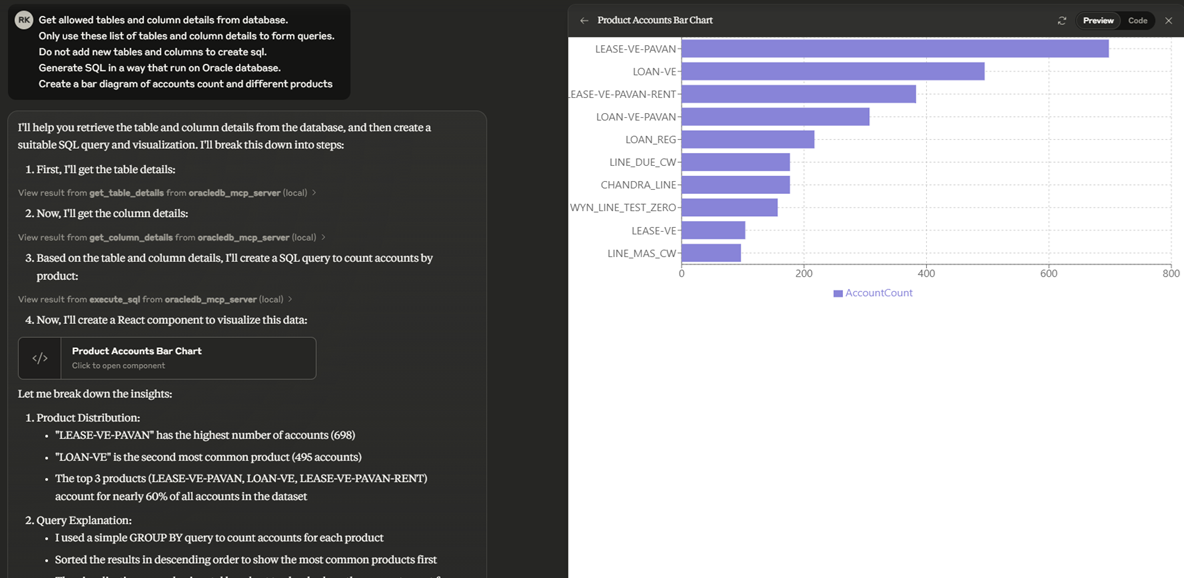
Demo

Github Stars
This server cannot be installed
Maintenance
Resources
Unclaimed servers have limited discoverability.
Looking for Admin?
If you are the server author, to access and configure the admin panel.
Related MCP Connectors
Ask data questions in natural language. Get SQL, insights, and charts from your databases.
Query PostgreSQL databases in plain English — LLM-generated, safety-validated SQL.
Ask questions in plain language, get answers from your business database. No SQL required.
Query your org's data in natural language — read-only MCP access to SQL, NoSQL, files & warehouses.
Related MCP Servers
- AlicenseNot gradedqualityDmaintenanceA Model Context Protocol Server that enables LLMs to interact with Oracle Database by providing database tables/columns as context, allowing users to generate SQL statements and retrieve results using natural language prompts.35Apache 2.0
- FlicenseNot gradedqualityDmaintenanceProvides contextual Oracle database schema information to AI assistants, enabling them to understand and work with large databases containing thousands of tables. Supports multi-database connections, smart schema caching, table lookups, and relationship mapping.-
- AlicenseAqualityCmaintenanceEnables AI tools to interact with Oracle databases through query execution, schema browsing, stored procedure calls, and transaction management. Supports multiple database connections with safety features like read-only mode and dangerous query detection.16MIT
- FlicenseNot gradedqualityDmaintenanceEnables AI applications to run SQL queries and retrieve results from Oracle Database.8-