
Dots on Paper
by heinrihs-s
README.md

# Dots on Paper
[](https://github.com/heinrihs-s/dots-on-paper/actions/workflows/ci.yml)
**Your AI's useful updates, on your desk.**
Keep a finished task, daily brief, or decision visible after your chat moves out of view. Start in the browser, then add an e-ink display. Four characters, one short result that stays put.
[Try your own note](https://heinrihs.org/dotsonpaper/try/) · [Install](docs/first-result.md) · [Beta downloads](https://github.com/heinrihs-s/dots-on-paper/releases/tag/v0.2.0-beta.1) · [Compatibility](docs/compatibility.md)
The website is a browser simulation. The local bridge renders your actual, deliberately published assistant output.
Dots on Paper is a local MCP and Home Assistant bridge. It stores an assistant's answer and renders a PNG or BMP for your display. Choose one of four characters and show either the last reply or the supplied conversation.
[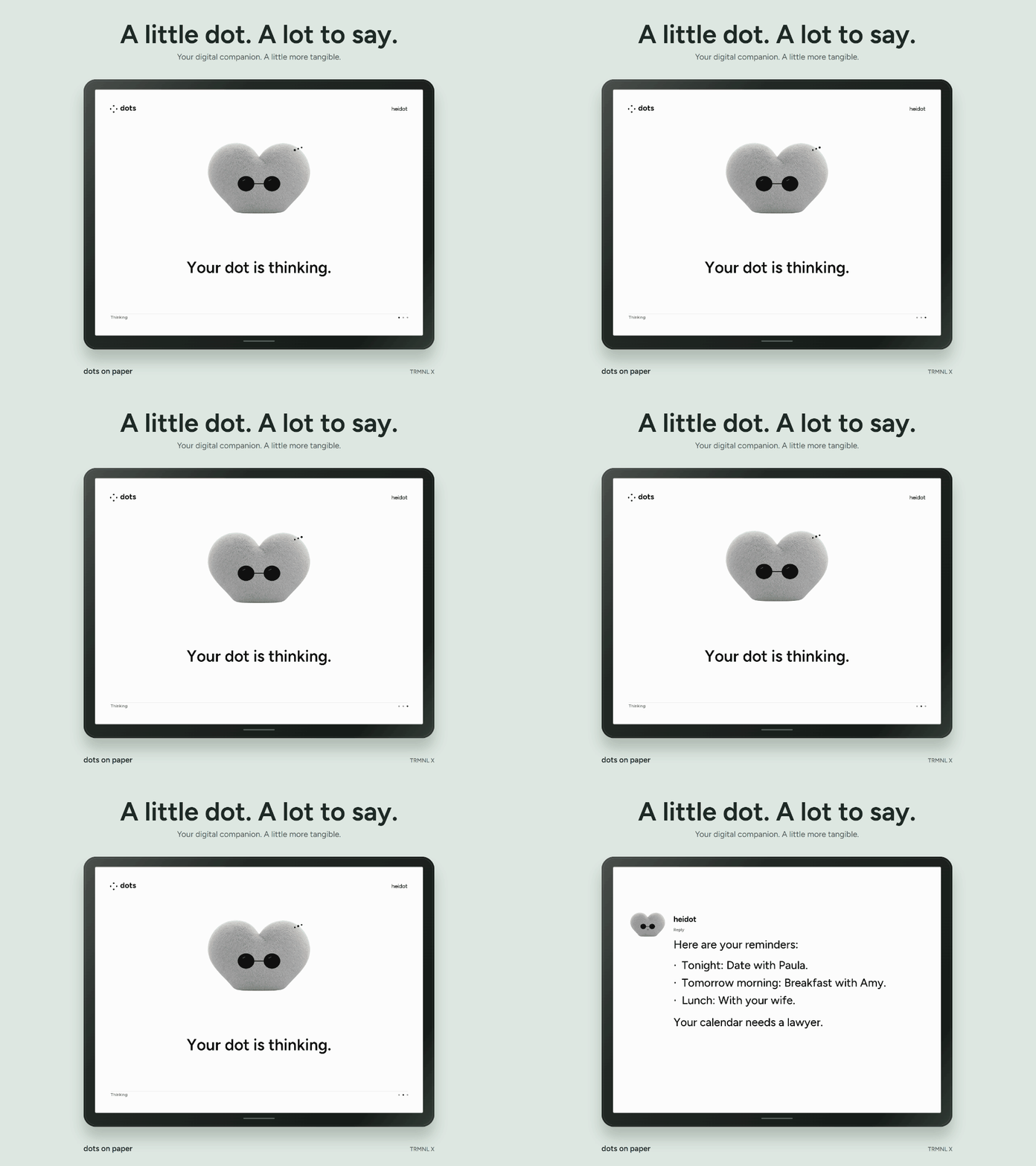](https://github.com/heinrihs-s/dots-on-paper/blob/main/campaign/media/dot-reminders.mp4)
Staged reminder example for heidot, using a fictional calendar. [Watch the MP4](https://github.com/heinrihs-s/dots-on-paper/blob/main/campaign/media/dot-reminders.mp4) · [The "NOO" film](https://github.com/heinrihs-s/dots-on-paper/blob/main/campaign/media/dot-noo.mp4) · [Campaign sources](https://github.com/heinrihs-s/dots-on-paper/tree/main/campaign)
Authenticated publishing, rendering, browser preview, and MCP forwarding have passed local checks. The connection to a live dot account, a running Home Assistant installation, and a physical display still needs verification. [Checks and limits](docs/verification.md)
## What you get
- A guided local test, browser pairing, source checklist, and installed-build diagnostics.
- A local bridge with a retained last result, thinking timeout, recovery and explicit clearing.
- Separate keys for publishing and reading images; full text stays available locally.
- Three MCP tools: `set_dot_status`, `publish_dot_reply`, and `get_dot_state`.
- Last reply and Full conversation display modes, with distinct user and assistant messages.
- A Home Assistant image entity, reply/status sensors, character and mode pickers, actions, and new-reply events.
- TRMNL BYOS endpoints and an experimental stock Webhook Image delivery queue with coalescing, quotas and persistent retries.
- ESPHome and OpenEPaperLink examples, and custom PNG/BMP sizes.
- Artist, Curious, Bookish, and Cool characters.
- A standalone animation demo and editable campaign assets.
```text
Your dot or HA assistant → authenticated bridge → PNG / BMP → e-ink display
```
Publishing is an explicit tool call from the assistant. The default battery preset serves still images; thinking animation is opt-in. A completed result stays fixed. An interrupted run expires after ten minutes by default and retains the prior result. There is no automatic feed of every ChatGPT reply. The films use the renderer at an accelerated cadence; physical refresh depends on your device.
## Choose a display mode
**Last reply** keeps the latest answer on screen. **Full conversation** shows the user and assistant turns supplied to the bridge, using dark bubbles for your messages. Switch modes in the bridge preview or Home Assistant's Display mode picker; the setting persists after restart.
For Full conversation, pass `mode: "full_conversation"` and the explicit `user_text` when reporting thinking. Publish the answer with the same `run_id`; the bridge adds the assistant turn. An answer can also include a `messages` snapshot ending with that reply. History is limited to 20 turns and 24000 characters, and the renderer fits the most recent turns to each screen. [API examples](docs/api.md#display-modes)
## Run the bridge
Install Python 3.11+, then run this from the repository root. Add Node.js 22+ when connecting the stdio MCP source:
```sh
python tools/setup.py
```
Then start it:
| Windows PowerShell | macOS / Linux |
| --- | --- |
| `.\run.ps1` | `.venv/bin/python -m dots_on_paper --data-dir ./data --open` |
The launcher opens a paired local browser. **Send test card**, generate your MCP client configuration, then ask your assistant to publish its actual completed result. Publishing and display receipts have separate checklist entries. A manual credentials-file fallback remains available. Setup and upgrades preserve your keys and state. [First-result guide](docs/first-result.md)
With the bridge running, check it using `.\run.ps1 -Doctor -Mcp` on Windows or `.venv/bin/python tools/doctor.py --mcp` on macOS/Linux. The doctor compares the installed and running build with this checkout. Update with `python tools/setup.py`, then restart using the same data directory. [Setup, LAN access, Docker, and troubleshooting](docs/setup.md)
## Connect your dot
For a cloud ChatGPT dot, use a Secure MCP Tunnel to reach the local stdio adapter. This requires a tunnel ID, a Platform runtime API key, and the relevant account and workspace permissions. Keep the bridge and tunnel client running while the dot uses the tools.
The [connection guide](docs/real-dot.md) covers the tunnel setup and portable plugin. After connecting, tell your dot:
> Use Dots on Paper for answers in this conversation. Set it to thinking when you start. Publish a short version of your actual answer when you finish.
Check that the dot can call `get_dot_state`, publish an actual answer, and show it on your display. Those steps still need testing with a live account and device. Other assistants can publish through the [REST API](docs/api.md).
heidot is the personal dot that inspired the project. Configure your own dot's display name when publishing.
## Displays and Home Assistant
| Platform | Included path | Current validation |
| --- | --- | --- |
| TRMNL / TRMNL X BYOS | Thinking pose per wake; stable result filename | Firmware contract, HTTP and renderer checked; hardware untested |
| Home Assistant | Thinking image frames, held result, conversation-agent example | Source checks; live HA runtime untested |
| ESPHome e-paper | State-aware image fetching; held result | Driver, pins, and panel refresh need your setup |
| OpenEPaperLink | HA `drawcustom` image automation | Documentation-checked; tag untested |
| Generic PNG/BMP clients, Inkplate, portrait viewers | Scoped image URL with named or custom dimensions | Renderer checked; device client required |
Copy `custom_components/dots_on_paper` into HA's `/config/custom_components/`, restart HA, and add Dots on Paper in Devices & services. Use a bridge address reachable from HA. [HA setup](examples/home-assistant/README.md) · [Profiles, authentication, and refresh behavior](docs/platforms.md)
The optional stock Webhook Image route uploads completed PNGs using a private environment setting. It is cloud-dependent and remains experimental until an account and panel are verified. An accepted upload proves receipt, not panel output. HACS publication is pending.
TRMNL uses the normal 60-second interval in the settled-image preset. Optional thinking animation uses a 15-second sleep. Boot, Wi-Fi, download, and refresh add time; a sleeping device may miss thinking. [Refresh limits](docs/platforms.md#animation-and-physical-panels)
## Try the animation
```sh
node demo/serve.mjs
```
Open http://127.0.0.1:9024/?example=calendar-chaos. Switch between the four characters, try the interruption conversation, or write a multiline reply. The [website demo](https://heinrihs.org/dotsonpaper/#demo) shows both display modes and starts when you reach it.
The [campaign](campaign/README.md) includes GIFs, MP4s, native screen stills, and four short posts. The wife-texting exchange is a scripted draft that gets cancelled; it sends no message. The Instinct-inspired image is an independent concept. There is no Instinct connector. [Product facts](docs/product-facts.md)
## Publish and contribute
The source is on [GitHub](https://github.com/heinrihs-s/dots-on-paper). The beta includes versioned runtime/wheel downloads and checksums; the container release workflow publishes a versioned image only after native AMD64 and ARM64 runtime checks. HACS registration remains pending. [Release guide](docs/github-release.md)
The [product and GitHub growth strategy](docs/strategy.md) defines the milestones, with [audit evidence](docs/strategy-evidence.md) from 5 October 2026. [Implementation and remaining gates](docs/roadmap.md) · [Three practical recipes](docs/recipes.md) · [Five bounded contributor tasks](docs/contributor-tasks.md) · [Discussions](https://github.com/heinrihs-s/dots-on-paper/discussions)
The repository also includes a Codex plugin catalog:
```sh
codex plugin marketplace add heinrihs-s/dots-on-paper --ref main
```
This adds the repository as an install source on your computer. Install Dots on Paper from that source in the Plugins Directory, then follow the [connection guide](docs/real-dot.md). Public directory publication uses OpenAI's separate submission and review process. [Distribution and publishing](docs/publishing.md)
[Contributing and checks](CONTRIBUTING.md) · [Security](SECURITY.md) · [MIT license](LICENSE) · [Asset provenance](NOTICE.md)
This server cannot be deployed
Maintenance
ActivityMaintained
ResponsivenessNo issues