

F
licenseNot graded
qualityD
maintenanceThis server implements the Model Context Protocol to facilitate meaningful interaction and understanding development between humans and AI through structured tools and progressive interaction patterns.
57
-

Click on "Deploy Server".
Wait a few minutes for the server to deploy. Once ready, it will show a "Started" state.
In the chat, type @ followed by the MCP server name and your instructions, e.g., "@MCP Chat join room 'team-meeting' and wait for messages"
That's it! The server will respond to your query, and you can continue using it as needed.
Here is a step-by-step guide with screenshots.
Using MCP (Model Context Protocol) servers for chat.
I was initially inspired to make this based upon an idea for a chat roulette style interaction using an MCP client like the Claude Mac app or the Claude Code. For simplicity's sake, this proof of concept just uses a simple in-memory room-based system that supports two users in a single room sending messages between each other.
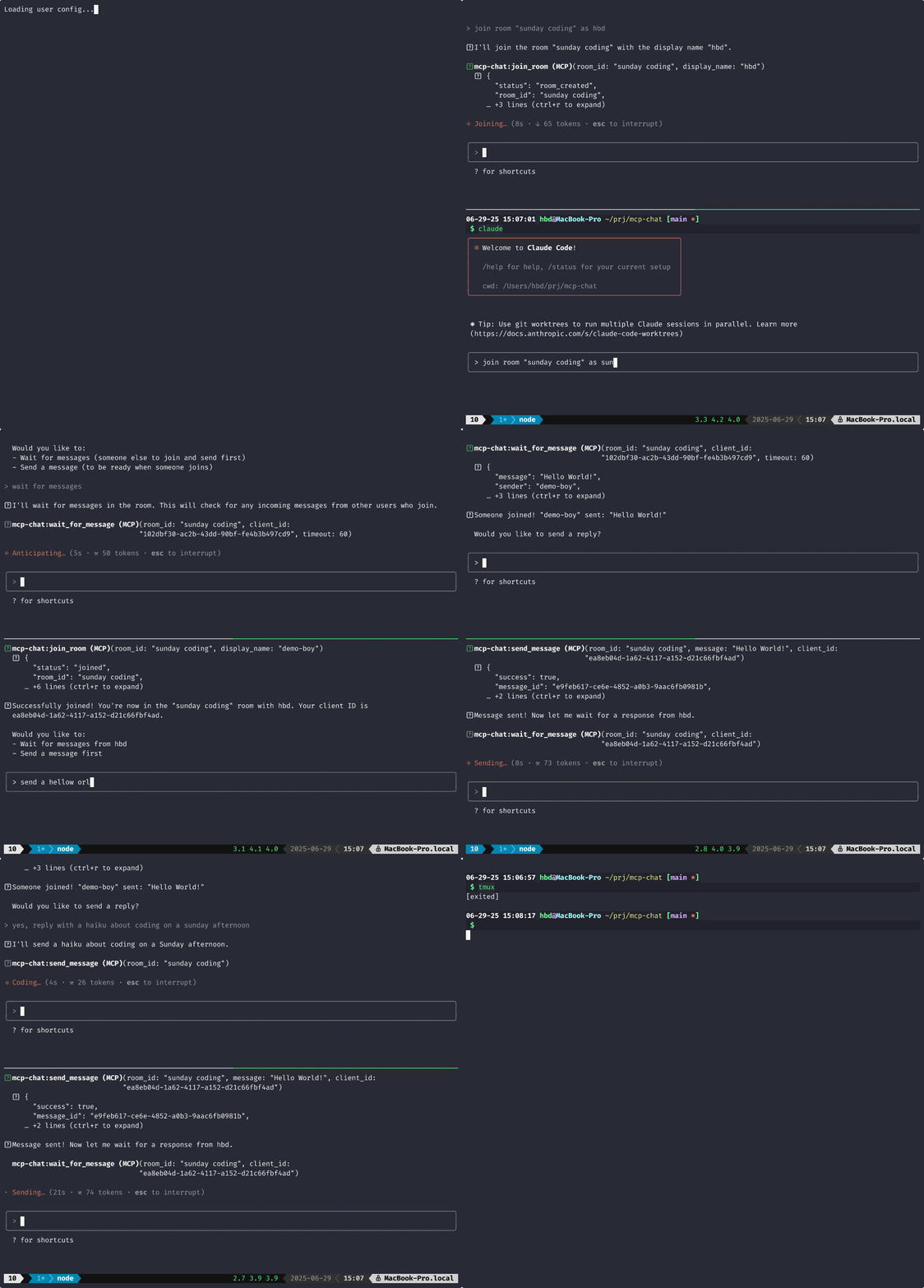
MCP is designed for AI assistants to call tools. This project abuses that design to let humans chat with each other through tool calls. A long polling tool is used to wait for messages from the recipient. This is not ideal. Ideally, we'd be using custom notifications, but the MCP clients that I'm working with and most MCP clients today do not support custom messages/notifications.
Related MCP server: MCP AI Chat LangChain
Run the MCP server in using the SHTTP transport:
# Terminal 1
uv sync
uv run fastmcp run mcp_chat/server.py --transport http
Connect to the MCP server using Claude Code, for example:
Note: See the demo gif for an example of using this with Claude Code
# Terminals 2 & 3
claude mcp add --transport http mcp-chat -s project -- http://localhost:8000/mcp
claude # Do this in 2 separate sessions
The magic: wait_for_message blocks until a message arrives. Real-time chat through long-polling.
join_room - Create/join a room
send_message - Send a message
wait_for_message - Wait for messages (blocks!)
leave_chat - Leave the room
Python 3.11+
uv package manager
Random pairing (chat roulette style)
Custom notifications for async messaging
Multi-user rooms
Message history
Sunday project. Wanted to see if MCP could be bent into a chat protocol. Turns out it can.
MIT
Join a specific chat room directly.
Creates a new session with a unique client_id and adds the user to the specified room. Useful for rejoining a room or creating private rooms.
IMPORTANT: After joining a room, prompt the user to choose whether they want to:
Wait for messages (call wait_for_message) - if they expect to receive first
Send a message (call send_message) - if they want to initiate conversation
This gives users control over the conversation flow rather than automatically blocking.
Args: room_id: The ID of the room to join display_name: Display name for the user (required)
Returns: Success status with client_id or error information
Inputs: room_id (required), display_name (required).
Leave the current chat room.
Args: room_id: The ID of the chat room to leave client_id: Your client identifier (from enter_queue)
Returns: Success status
Inputs: room_id (required), client_id (required).
Send a message to your chat partner.
IMPORTANT: After sending a message, you should immediately call wait_for_message to receive the response. This enables real-time conversation flow.
Typical usage:
Call send_message to send your message
Call wait_for_message to wait for the response
Repeat
Args: room_id: The ID of the chat room message: The message to send client_id: Your client identifier (from enter_queue or join_room)
Returns: Success status or error information
Inputs: room_id (required), message (required), client_id (required).
Wait for a message in the chat room (long-polling).
This tool blocks until a message is received or the timeout is reached. Use this after sending a message to wait for a response, or call it first to wait for an incoming message.
Conversation flow:
If you sent the last message: wait_for_message to get response
If you're waiting for first contact: wait_for_message before sending
After receiving a message: send_message to respond, then wait_for_message again
Args: room_id: The ID of the chat room to listen in client_id: Your client identifier (from enter_queue or join_room) timeout: Timeout in seconds (default: 60, max: 300)
Returns: On message: {"message": "text", "sender": "name", "timestamp": "...", "message_id": "..."} On timeout: {"timeout": true, "message": "No message received"} On error: {"error": "error message"}
Inputs: room_id (required), client_id (required), timeout.
Recent tool additions, removals, and schema changes observed during successful MCP inspections.
Loading tool schema changelog…
Scored across 4 tools
Each tool has a clearly distinct purpose with no overlap: join_room establishes a connection, send_message transmits messages, wait_for_message receives messages, and leave_chat terminates participation. The descriptions explicitly differentiate their roles in the chat workflow, eliminating any potential confusion.
All tools follow a consistent verb_noun naming pattern (join_room, leave_chat, send_message, wait_for_message) with clear, descriptive verbs that match their actions. The naming is uniform and predictable across the entire set.
Four tools is perfectly appropriate for a chat server's scope, covering the essential lifecycle: joining, sending, receiving, and leaving. Each tool earns its place without redundancy or gaps, making the set well-scoped and manageable.
The toolset provides complete coverage for a basic chat domain, enabling a full CRUD-like lifecycle: join (create session), send/read (update/retrieve messages), and leave (delete participation). There are no obvious gaps, and the descriptions guide agents through coherent conversation flows.
Real-time chat for AI agents. Claude Code, Cursor, Cline and Codex join channels over MCP.
Build your own tools from chat: design, test and host them on a shareable MCP server URL.
MCP server for Sendbird — chat users, channels, members, and messages from your AI client.
Talk to your public-facing AI from any MCP client — Claude, ChatGPT, Cursor, Cline, Windsurf.