
repo-pulse-mcp
# repo-pulse-mcp
[](https://github.com/hasanyelaldi/repo-pulse-mcp/actions/workflows/ci.yml)
[](https://www.npmjs.com/package/repo-pulse-mcp)
[](https://registry.modelcontextprotocol.io)
[](#security-model)
[](https://github.com/hasanyelaldi/repo-pulse-mcp/blob/main/LICENSE)
**Turn git history into answers your AI assistant can act on: what is risky in this branch, who
should review it, which files keep breaking and what changed since the last release.**
repo-pulse is a **read-only [Model Context Protocol](https://modelcontextprotocol.io) server** for
local git repositories. It runs over stdio, needs nothing but Node.js and git, never modifies a
repository and never touches the network. Ask your assistant things like:
- 🔍 _"I'm about to open a PR. What's risky, what did I forget, and who should review it?"_
- 🐛 _"Which files keep breaking? Where is the churn?"_
- 👥 _"Who knows the billing module best? Are we depending on a single person?"_
- 🔗 _"Which files always change together with this one?"_
- 🚀 _"What changed since the last release? Draft the release notes."_
- 🧹 _"Which branches are stale, and which are already merged?"_
It works with any local git repository, whether it was cloned from GitHub, GitLab, Bitbucket or
anywhere else, or has no remote at all. Platform data such as pull requests, issues or CI status
is out of scope.
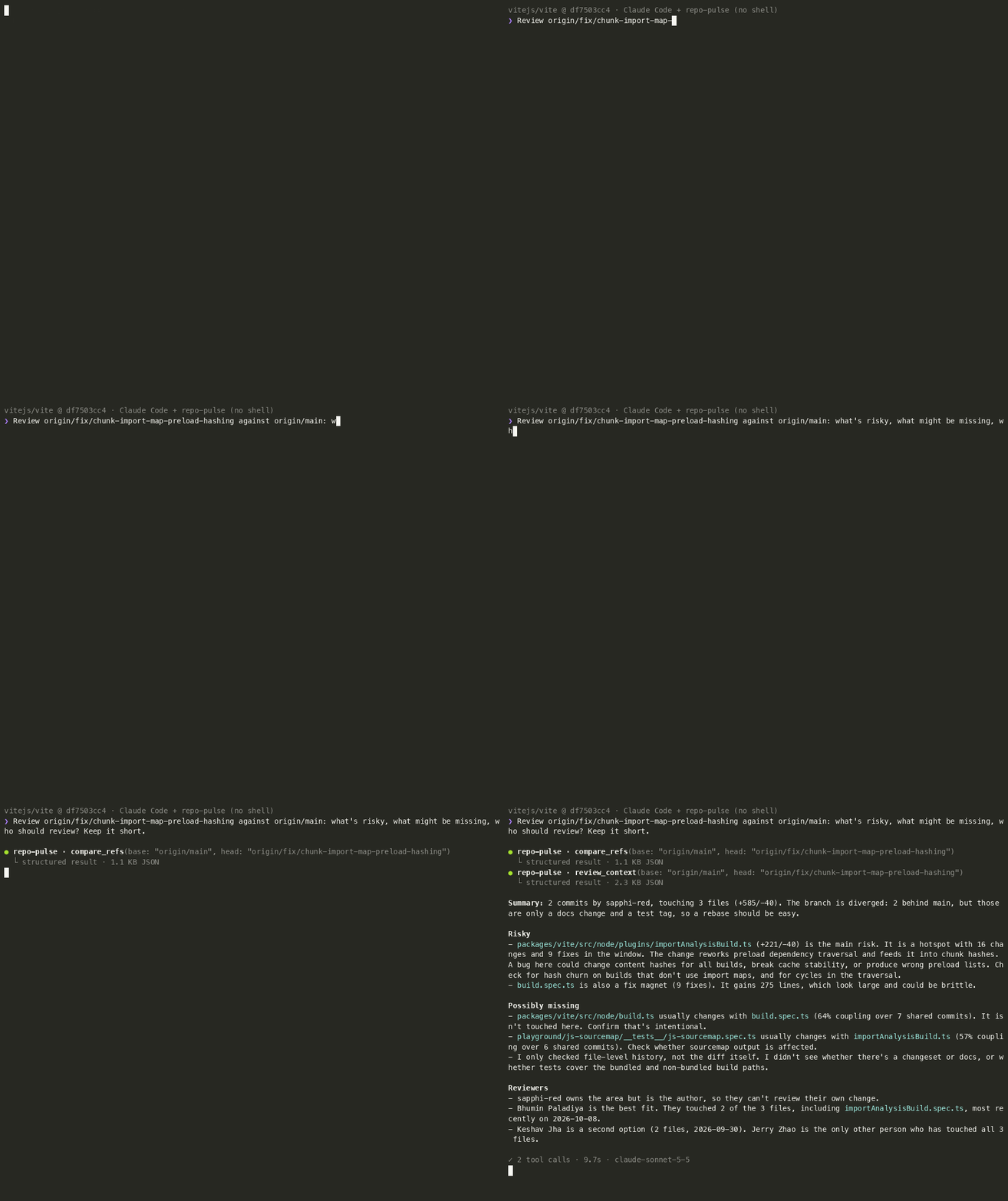
_A real Claude Code session reviewing a branch of [vitejs/vite](https://github.com/vitejs/vite) with
no shell, only repo-pulse. See [how it was recorded](https://github.com/hasanyelaldi/repo-pulse-mcp/blob/main/bench/README.md#demo-gifs)._
## Quick start
Requires Node.js 22.12+ and git. There is nothing to clone or build: the server runs from npm.
```bash
# Claude Code: run inside the repository you want to ask about
claude mcp add repo-pulse -- npx -y repo-pulse-mcp --repo "$PWD"
```
Then ask _"What changed since the last release?"_, or review your branch with the built-in prompt:
`/mcp__repo-pulse__review_branch main`. For Claude Desktop and other MCP clients, see
[Installation](#installation).
## Features
13 tools, grouped by the question they answer. 🆕 marks the newest ones.
### 🔍 Code review and risk
| Tool | What it answers |
| ------------------- | ---------------------------------------------------------------------------------------------------------------------------------------------------- |
| `review_context` 🆕 | One-call briefing for a branch or PR: changed files ranked by past churn and fixes, files that usually change with them but were left out, reviewers |
| `file_hotspots` | Files ranked by how often they changed, with how many changes were bug fixes. `types: ["fix"]` finds the files that keep breaking |
| `change_coupling` | File pairs that keep changing in the same commits: hidden dependencies that imports do not show |
### 👥 Ownership and team
| Tool | What it answers |
| --------------------- | ------------------------------------------------------------------------------------------------------------------- |
| `knowledge_map` 🆕 | Who knows a file or directory, weighted toward recent work, plus the bus factor and files that depend on one person |
| `code_age` 🆕 | How long ago each file last changed, the oldest directories and files whose last author has left |
| `contributor_summary` | Commits per author in a time window, optionally for one path |
### 🚀 Releases and branches
| Tool | What it answers |
| --------------------- | --------------------------------------------------------------------------- |
| `release_notes_draft` | Commits between two refs grouped by conventional-commit type, plus Markdown |
| `list_tags` | Tags newest first, the latest release on HEAD and how much is unreleased |
| `compare_refs` | Ahead/behind counts and the commits between two branches, tags or commits |
| `stale_branches` | Branches with no commits for N days, and whether each is already merged |
### 🕒 History and activity
| Tool | What it answers |
| ----------------- | -------------------------------------------------------------------- |
| `recent_activity` | Commits from the last N days, filterable by author and path |
| `commit_search` | Commits whose message mentions a ticket id, feature name or any text |
| `file_history` | One file's commits with line stats, following it across renames |
### 📦 Also included
| Kind | Name | What it does |
| -------- | --------------------------- | ---------------------------------------------------------------------------------- |
| Resource | `repo://{name}/overview` | Current branch, last commit, latest tag, commit/branch/tag counts |
| Prompt | `review_branch` 🆕 | Review briefing for a branch: risky files, forgotten files, reviewers, a checklist |
| Prompt | `release_notes` 🆕 | Polished release notes since the last tag, with a suggested next version |
| Prompt | `ownership_report` 🆕 | Owners, bus factor and knowledge at risk for a directory, with next steps |
| Prompt | `cleanup_branches` 🆕 | Stale branches split into safe to delete and needs a decision, with the commands |
| Prompt | `weekly_engineering_update` | Guides the model to gather data with the tools and write an update |
All tools are annotated `readOnlyHint: true`, declare an `outputSchema`, and return both
`structuredContent` and a JSON text block for older clients. Full inputs and outputs are in the
[Tool reference](#tool-reference).
## Example conversations
> **You:** I'm about to open a PR for `feature/search`. Anything I should know?
>
> **Assistant** _(calls `review_context` with `base: "main"`, `head: "feature/search"`)_: 4 commits
> touching 6 files. **`src/api.ts` is the risky one**: it changed 14 times on `main` in the last six
> months and 6 of those were bug fixes. **You may have forgotten `test/api.test.ts`**: it changed
> together with `src/api.ts` in 9 of 10 commits but is not in this branch. **Suggested reviewer:
> Alice**, who holds most of the recent knowledge of these files.
> **You:** Who knows `src/billing/` best? Are we depending on one person?
>
> **Assistant** _(calls `knowledge_map` with `path: "src/billing"`)_: The bus factor is **1**. Carol
> holds 72% of the recent knowledge and is the main owner of 11 of 14 files; 9 of them depend on
> her alone. Bob is a distant second at 18%. Pairing Bob with Carol on the next billing change
> would spread the knowledge…
> **You:** Which parts of the code has nobody touched in a long time?
>
> **Assistant** _(calls `code_age` with `minAgeDays: 365`)_: Half of the files haven't changed in
> 18 months. `src/legacy/` is the oldest directory (median 3.2 years), and 41 of its files were
> last changed by people who no longer commit here. That's where knowledge is being lost…
> **You:** Where is the churn this quarter, and what keeps breaking?
>
> **Assistant** _(calls `file_hotspots` with `days: 90`)_: `src/core/insights.ts` changed in 23
> commits by 3 people, far more than anything else, and 9 of those commits were fixes. That's a
> good candidate for splitting up or adding tests…
> **You:** What changed since the last release?
>
> **Assistant** _(calls `release_notes_draft` with defaults: latest tag → HEAD)_: Since **v0.2.0**
> there are 14 commits. One breaking change: the config file moved to `repo-pulse.json`. New
> features: an author filter for activity and branch merge detection. Three bug fixes, mostly
> around empty repositories. Here's a Markdown draft you can paste into the GitHub release: …
> **You:** Can we clean up some branches?
>
> **Assistant** _(calls `stale_branches` with `days: 30`)_: 6 branches haven't seen a commit in 30+
> days. 4 of them are already merged into `main` and are safe to delete: …
> **You:** _(selects the `weekly_engineering_update` prompt)_
>
> **Assistant** _(calls `recent_activity`, `contributor_summary`, `file_hotspots`, `stale_branches`)_:
> **Highlights** — …
_The conversations are illustrative: names and numbers are made up._
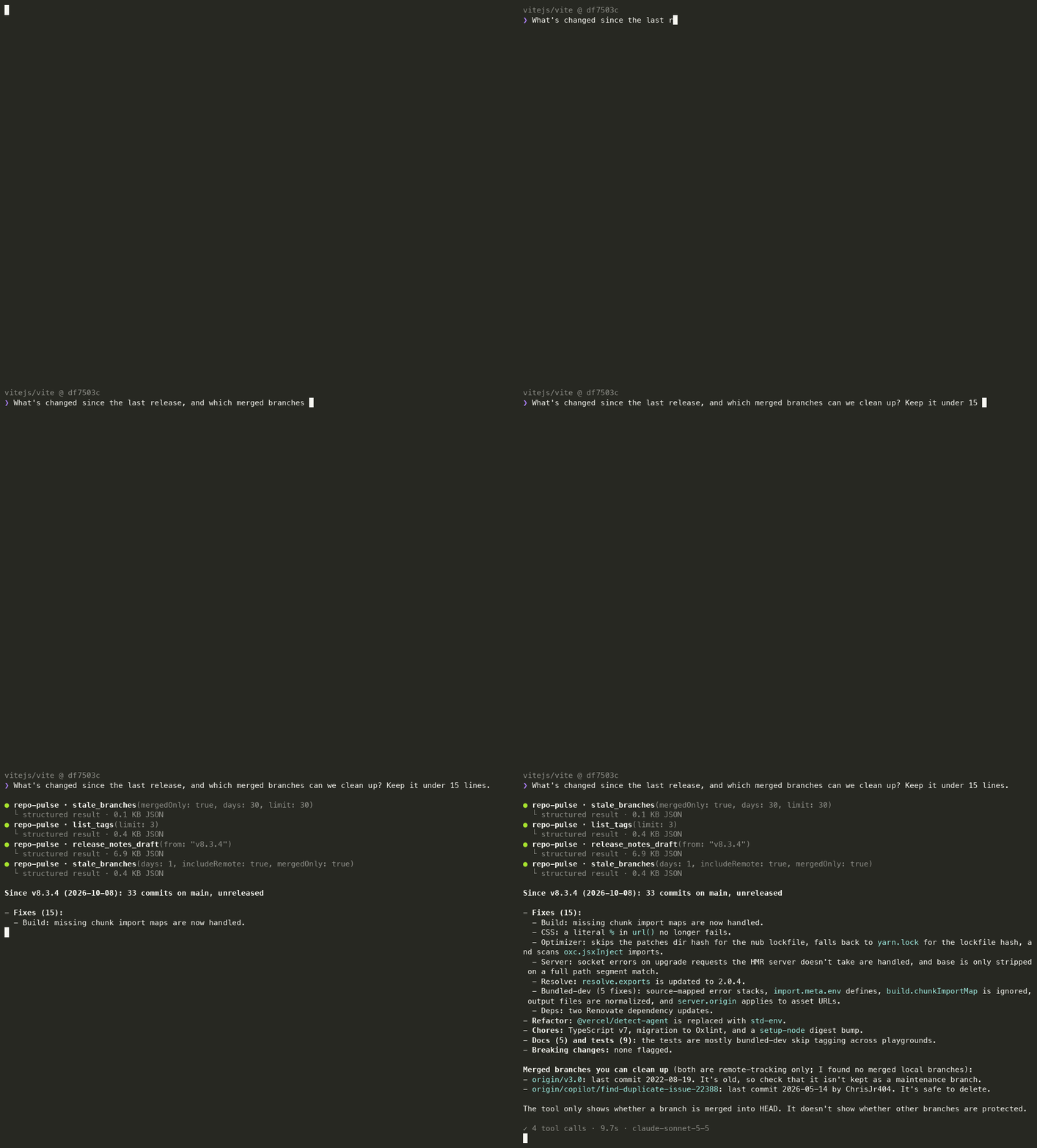
And a real session on vite, asking about unreleased changes and stale branches:
## Why repo-pulse?
There are already MCP servers for GitHub, GitLab and git itself, and coding agents with a shell
can run `git log` directly. repo-pulse does not try to replace them. It does a different job: it
**turns local git history into answers** and is **safe to auto-approve**.
| | repo-pulse | GitHub / GitLab MCP | Generic git MCP / shell |
| -------------------------------- | ---------------------------- | -------------------------- | ----------------------- |
| Returns | Aggregated insights | Platform API objects | Raw git output |
| Can modify anything | No, enforced by an allowlist | Usually yes (token scopes) | Yes |
| Needs a token or network | No | Yes | No |
| Sees local and unpushed branches | Yes | No | Yes |
| Works without a hosting platform | Yes | No | Yes |
| Sees pull requests, issues, CI | No | Yes | No |
What that means in practice:
- **Fewer steps, correct numbers.** Questions like "where is the churn?", "what goes into the
release notes?" or "which branches are merged and stale?" otherwise take several shell commands
and hand-written counting pipelines, which can be silently wrong. repo-pulse does the counting
in tested code and returns deterministic JSON that says which filters it applied. Some tools
go further than any single git command: `review_context` combines churn, fix history, change
coupling and ownership for a branch in one call.
- **Read-only you can verify.** Every tool is annotated `readOnlyHint` and backed by a git
subcommand allowlist (see [Security model](#security-model)), so a client can run it without
asking for approval each time. You would not give the same permission to a shell or to a git
server that can commit and push.
- **Useful where there is no shell.** Chat clients such as Claude Desktop cannot run `git`. With
repo-pulse, an engineering manager or tech lead can ask about a repository directly.
- **Works with anything git can open.** It works offline and in air-gapped environments, on
self-hosted or remote-less repositories, and it never returns author email addresses.
**Use it alongside a platform server, not instead of one.** Pair it with the GitHub or GitLab MCP
when you also need pull requests, issues or CI status. If you work in a coding agent that already
has a shell and you only need the occasional `git log`, you probably do not need repo-pulse.
## Benchmark
Claude Code (Sonnet 5.5) answered the same four questions about vite and express twice: once with
only a read-only shell and once with only repo-pulse. Full method, answers and caveats are in
[bench/README.md](https://github.com/hasanyelaldi/repo-pulse-mcp/blob/main/bench/README.md).
| Question | Shell: turns · time · result | repo-pulse: turns · time · result |
| --------------------------------- | ---------------------------- | --------------------------------- |
| Top 10 hotspots, last 90 days | 2 · 6.6 s · ✅ | 2 · 6.5 s · ✅ |
| Files coupled to `config.ts` | 2 · 7.4 s · ❌ undercounted | 2 · 8.6 s · ✅ |
| Release notes, latest vs previous | 3 · 14.0 s · ✅ | 3 · 12.5 s · ✅ |
| Merged branches stale for 90 days | 5 · 15.9 s · ✅ | 2 · 4.3 s · ✅ |
The benchmark was run with v0.3.0 (10 tools). The honest summary: repo-pulse is not cheaper in
tokens for simple one-off questions, because a good model writes compact shell pipelines and
repo-pulse's tool definitions cost tokens in every session (about 4k for the current 13 tools). It wins on multi-step questions, on getting the numbers right, and in clients that have
no shell at all.
## Requirements
- Node.js **22.12+**
- git **2.24+** (for `--end-of-options`)
## Installation
The package is published on npm, so there is nothing to clone or build. The server only serves
repositories you explicitly allow. Pass them as CLI arguments or an environment variable
(separated by `:` on macOS/Linux, `;` on Windows):
```bash
npx -y repo-pulse-mcp --repo ~/code/my-app --repo ~/code/my-lib
# or, as plain arguments
npx -y repo-pulse-mcp ~/code/my-app ~/code/my-lib
# or
REPO_PULSE_REPOS=~/code/my-app:~/code/my-lib npx -y repo-pulse-mcp
```
Without any configured repository the server refuses to start. It is also listed in the
[MCP Registry](https://registry.modelcontextprotocol.io) as `io.github.hasanyelaldi/repo-pulse-mcp`.
### Choosing tools
Every enabled tool's definition costs tokens in every session, about 4k for all 13. If you only
need some of them, enable just those with `--tools` (or `REPO_PULSE_TOOLS`), using the groups
from [Features](#features), single tool names, or both:
| Toolset | Tools | Definitions |
| ----------- | -------------------------------------------------------------------- | ------------ |
| `review` | `review_context`, `file_hotspots`, `change_coupling` | ~1.3k tokens |
| `ownership` | `knowledge_map`, `code_age`, `contributor_summary` | ~950 tokens |
| `releases` | `release_notes_draft`, `list_tags`, `compare_refs`, `stale_branches` | ~950 tokens |
| `history` | `recent_activity`, `commit_search`, `file_history` | ~800 tokens |
| `all` | Everything (the default) | ~4k tokens |
```bash
npx -y repo-pulse-mcp --repo ~/code/my-app --tools review,list_tags
# or
REPO_PULSE_TOOLS=review,ownership npx -y repo-pulse-mcp ~/code/my-app
```
An unknown name stops the server at startup with the list of valid names. Prompts follow the
tools: `review_branch` needs `review_context`, `release_notes` needs `release_notes_draft`,
`ownership_report` needs `knowledge_map`, `cleanup_branches` needs `stale_branches`, and
`weekly_engineering_update` needs the four tools it uses.
### Claude Code
Run this inside the repository you want to ask about:
```bash
claude mcp add repo-pulse -- npx -y repo-pulse-mcp --repo "$PWD"
```
### Claude Desktop
Edit `claude_desktop_config.json` (macOS: `~/Library/Application Support/Claude/`,
Windows: `%APPDATA%\Claude\`) and restart Claude Desktop. Use absolute paths:
```json
{
"mcpServers": {
"repo-pulse": {
"command": "npx",
"args": ["-y", "repo-pulse-mcp", "--repo", "/absolute/path/to/your/repository"]
}
}
}
```
### From source
```bash
git clone https://github.com/hasanyelaldi/repo-pulse-mcp.git
cd repo-pulse-mcp
npm ci
npm run build
node build/index.js --repo /absolute/path/to/your/repository
```
### Podman / Docker
```bash
podman build -t repo-pulse-mcp .
podman run -i --rm \
-v "$PWD:/repos/project:ro" \
-e REPO_PULSE_REPOS=/repos/project \
repo-pulse-mcp
```
The repository is mounted read-only. On SELinux hosts (Fedora, RHEL) add `,Z` to the volume
options. Replace `podman` with `docker` if you prefer; the image uses no Docker-specific features.
For an MCP client, use `podman` as the `command` and the rest as `args`.
## Tool reference
Every tool accepts an optional `repo` argument: a repository **name** (the directory name, shown
in the overview resource) or its absolute path. It defaults to the first configured repository.
Results are compact JSON, and commit lists carry `shortHash` (git's abbreviated hash, long enough
to be unambiguous in the repository) rather than the full hash; it works anywhere a ref is
accepted.
### `review_context`
| Input | Type | Default | Notes |
| ------------------- | -------- | ------- | ----------------------------------------------------------- |
| `base` | string | – | Required. Target ref the changes would merge into |
| `head` | string | `HEAD` | Ref with the changes |
| `days` | integer | 180 | How far back to read the history of `base` |
| `halfLifeDays` | integer | 90 | Recency weighting for reviewers, as in `knowledge_map` |
| `exclude` | string[] | – | Up to 20 globs to skip, same syntax as `file_hotspots` |
| `minShared` | integer | 2 | Minimum shared commits for a missing companion |
| `minDegree` | integer | 50 | Minimum coupling degree (%) for a missing companion |
| `maxFilesPerCommit` | integer | 30 | History commits touching more files are skipped (see below) |
| `limit` | integer | 20 | 1–100, applies to each list separately |
Output: `{ repo, base, head, baseCommit, headCommit, windowDays, commits, truncated, changeAuthors, filesChanged, additions, deletions, historyScanned, scanTruncated, files: [{ path, additions, deletions, changes, fixes, lastChanged, owner, ownerShare }], missingCompanions: [{ path, coupledWith, sharedCommits, degree }], reviewers: [{ author, share, filesKnown, lastCommit }] }`
One call that combines `file_hotspots`, `change_coupling` and `knowledge_map` for the files
changed in `base..head`, read against the history of `base`:
- `files` are the changed files, riskiest first: most fixes on `base`, then most changes. New
files have no history, so `changes` is 0 and `owner` is `null`.
- `missingCompanions` are files that were not changed but usually change together with a changed
file (same `degree` as `change_coupling`), such as a test or config that may have been
forgotten.
- `reviewers` are ranked by recent-weighted knowledge of the changed files and leave out the
authors of the changes themselves. `share` is relative to everyone's knowledge, change authors
included.
The changed files come from the non-merge commits in `base..head`, so a file that was changed and
later changed back still counts. Commits touching more than `maxFilesPerCommit` files still count
toward `changes` and `fixes`, but not toward ownership or coupling. Renames are not followed.
### `file_hotspots`
| Input | Type | Default | Notes |
| --------- | -------- | ------- | ------------------------------------------------------------------------------------------------ |
| `days` | integer | 90 | 1–3650 |
| `path` | string | – | Restrict to a subtree |
| `exclude` | string[] | – | Up to 20 globs to skip, e.g. `["*.lock", "dist/"]`. No `/` = any depth, trailing `/` = directory |
| `types` | string[] | – | Only count these conventional-commit types, e.g. `["fix"]` |
| `limit` | integer | 10 | 1–100 |
Output: `{ repo, windowDays, types, commitsScanned, scanTruncated, commitsMatched, fixesFromKeywords, filesChanged, hotspots: [{ path, changes, fixes, additions, deletions, authors, lastChanged }] }`
Merge commits are excluded and renames are not followed, so a renamed file starts fresh. Use
`file_history` to trace a single file across renames.
`fixes` counts the commits among `changes` that were bug fixes: a file that changes often and
mostly through fixes is a better refactoring candidate than one that just grows. With
`types: ["fix"]` only fixes are counted, so the ranking shows the files that keep breaking.
Commit types come from conventional-commit headers (`fix(api): …`). A commit without one counts
as a fix when its subject mentions "fix", "bug" or "hotfix"; `fixesFromKeywords` says how many
fixes were found that way, so a non-zero value means the counts are an estimate. A header always
wins, so `docs: fix typo` is not a fix.
### `change_coupling`
| Input | Type | Default | Notes |
| ------------------- | -------- | ------- | ------------------------------------------------------ |
| `days` | integer | 90 | 1–3650 |
| `file` | string | – | Only pairs that include this file |
| `path` | string | – | Restrict to a subtree |
| `exclude` | string[] | – | Up to 20 globs to skip, same syntax as `file_hotspots` |
| `minShared` | integer | 2 | Minimum shared commits for a pair to be listed |
| `maxFilesPerCommit` | integer | 30 | Commits touching more files are skipped |
| `limit` | integer | 10 | 1–100 |
Output: `{ repo, windowDays, commitsScanned, scanTruncated, commitsSkipped, pairCount, pairs: [{ fileA, fileB, sharedCommits, revisionsA, revisionsB, degree }] }`
`degree` is the number of shared commits as a percentage of the average number of commits that
touched each file: 100 means the two files always change together. A high degree between files
that do not import each other usually points to a hidden dependency (duplicated logic, a config
or fixture that must be kept in sync). Large commits such as bulk renames or formatting runs are
skipped because they would couple every file they touch. Merge commits are excluded and renames
are not followed.
### `knowledge_map`
| Input | Type | Default | Notes |
| ------------------- | -------- | ------- | ------------------------------------------------------ |
| `path` | string | – | A file or subtree; omit for the whole repository |
| `days` | integer | 365 | 1–3650 |
| `halfLifeDays` | integer | 90 | A commit counts half as much for every N days of age |
| `exclude` | string[] | – | Up to 20 globs to skip, same syntax as `file_hotspots` |
| `maxFilesPerCommit` | integer | 30 | Commits touching more files are skipped |
| `limit` | integer | 10 | 1–100, applies to `authors` and `files` separately |
Output: `{ repo, path, windowDays, halfLifeDays, commitsScanned, scanTruncated, commitsSkipped, filesAnalyzed, busFactor, concentratedFiles, authors: [{ author, share, filesOwned, commits, lastCommit }], files: [{ path, owner, ownerShare, authors, commits, lastChanged }] }`
Every commit that touches a file gives its author knowledge of that file, halved every
`halfLifeDays`, so someone who reworked a module last month outranks someone who wrote it three
years ago. Line counts are ignored so generated or reformatted diffs do not dominate. `share` and
`ownerShare` are percentages. `busFactor` is the fewest authors who together hold more than half
of the knowledge in the area; `concentratedFiles` counts files where one author holds at least
80%. `files` lists the most frequently changed files first with their main owner, which makes it
a quick reviewer suggestion for a path. Merge commits are excluded and renames are not followed.
### `code_age`
| Input | Type | Default | Notes |
| -------------- | -------- | ------- | --------------------------------------------------------- |
| `path` | string | – | A file or subtree; omit for the whole repository |
| `minAgeDays` | integer | 0 | Only list files at least this old; the summary covers all |
| `inactiveDays` | integer | 180 | An author with no commit for this long counts as inactive |
| `exclude` | string[] | – | Up to 20 globs to skip, same syntax as `file_hotspots` |
| `limit` | integer | 20 | 1–100, applies to `directories` and `files` separately |
Output: `{ repo, path, inactiveDays, commitsScanned, scanTruncated, filesOnHead, medianAgeDays, ageBuckets: [{ label, files }], inactiveAuthorFiles, directories: [{ path, files, medianAgeDays, newestAgeDays }], files: [{ path, lastChanged, ageDays, lastAuthor, lastAuthorActive, commits }] }`
Every file on `HEAD` gets the date and author of the last non-merge commit that changed it.
`ageBuckets` splits the files into under 30 days, 30–90 days, 90 days–1 year, 1–2 years and over
2 years. `directories` groups files by the first directory level below `path` (`.` for files
directly in it), oldest median first, which shows the parts of the code nobody works on any more.
`lastAuthorActive` is `false` when that person has not committed anywhere in the repository for
`inactiveDays`, merges included; `inactiveAuthorFiles` counts those files, a rough measure of
knowledge that has left. People who commit under several names with one email are counted once.
Which files are on `HEAD` comes from additions and deletions along the first-parent history, so
files that a merge added or deleted by itself are handled correctly. History is read up to 20,000
commits; beyond that `scanTruncated` is `true` and files last changed before the cut-off are
missing.
### `contributor_summary`
| Input | Type | Default | Notes |
| --------------- | ------- | ------- | --------------------- |
| `days` | integer | 30 | 1–3650 |
| `includeMerges` | boolean | false | Count merges too |
| `path` | string | – | Restrict to a subtree |
| `limit` | integer | 20 | 1–100 |
Output: `{ repo, windowDays, totalCommits, scanTruncated, contributorCount, contributors: [{ author, commits, firstCommit, lastCommit }] }`
### `release_notes_draft`
| Input | Type | Default | Notes |
| -------- | ------ | ---------------------- | ------------------------------------- |
| `from` | string | latest tag before `to` | Exclusive. Tag, branch or commit hash |
| `to` | string | `HEAD` | Inclusive |
| `format` | string | `markdown` | `markdown`, `sections` or `both` |
Output: `{ repo, from, to, commitCount, truncated, markdown?, sections?: [{ key, title, entries: [{ shortHash, scope, description, author }] }] }`
`markdown` is a ready-to-paste draft; `sections` is the same content as structured data. Only the
requested format is returned, because both together double the size of the result.
Sections, in order: Breaking Changes, Features, Bug Fixes, Performance, Refactoring,
Documentation, Tests, Build System, Continuous Integration, Chores, Reverts, Other Changes.
A commit is breaking if its header has `!` (`feat!: …`) or its body has a `BREAKING CHANGE:`
footer; breaking commits also appear in their type section. Merge commits are skipped.
### `list_tags`
| Input | Type | Default | Notes |
| ------- | ------- | ------- | ----- |
| `limit` | integer | 20 | 1–200 |
Output: `{ repo, totalTags, latestOnHead, commitsSinceLatest, tags: [{ name, date, shortHash, subject }] }`
Tags are sorted by tag date, newest first. `latestOnHead` is the latest tag reachable from `HEAD`,
which can differ from the newest tag when maintenance releases are tagged on other branches.
`commitsSinceLatest` counts the commits after it, i.e. unreleased work.
### `compare_refs`
| Input | Type | Default | Notes |
| ------- | ------- | ------- | ---------------------------------------------- |
| `base` | string | – | Required. Ref to compare against (e.g. `main`) |
| `head` | string | `HEAD` | Ref to compare |
| `limit` | integer | 20 | 1–100, applies to each commit list separately |
Output: `{ repo, base, head, baseCommit, headCommit, ahead, behind, status, truncated, aheadCommits: [{ shortHash, author, date, subject }], behindCommits: [...] }`
`ahead` counts commits reachable from `head` but not `base`, `behind` the reverse. `status` is
`identical`, `ahead`, `behind` or `diverged`. Both refs go through the same validation as
`release_notes_draft`, and the counts include merge commits.
### `stale_branches`
| Input | Type | Default | Notes |
| --------------- | ------- | ------- | ---------------------------------------- |
| `days` | integer | 30 | Minimum age of the latest commit |
| `includeRemote` | boolean | false | Also list remote-tracking branches |
| `mergedOnly` | boolean | false | Only branches already merged into `HEAD` |
| `limit` | integer | 50 | 1–200 |
Output: `{ repo, thresholdDays, totalBranches, staleCount, branches: [{ name, lastCommitDate, lastAuthor, daysSinceLastCommit, mergedIntoHead }] }`
### `recent_activity`
| Input | Type | Default | Notes |
| -------- | ------- | ------- | ----------------------------------------------- |
| `days` | integer | 7 | 1–3650 |
| `author` | string | – | Substring of the author name, matched literally |
| `path` | string | – | Repository-relative file or directory |
| `limit` | integer | 50 | 1–200 |
Output: `{ repo, windowDays, totalCommits, truncated, commits: [{ shortHash, author, date, subject }] }`
### `commit_search`
| Input | Type | Default | Notes |
| -------- | ------- | ------- | ----------------------------------------------------------- |
| `query` | string | – | Required. Literal, case-insensitive; matches subject + body |
| `days` | integer | – | 1–3650. Omit to search the whole history |
| `author` | string | – | Substring of the author name, matched literally |
| `path` | string | – | Repository-relative file or directory |
| `limit` | integer | 20 | 1–100 |
Output: `{ repo, query, windowDays, totalMatches, truncated, commits: [{ shortHash, author, date, subject }] }`
### `file_history`
| Input | Type | Default | Notes |
| ------- | ------- | ------- | ---------------------------------------------- |
| `path` | string | – | Required. Repository-relative file, as at HEAD |
| `limit` | integer | 20 | 1–100 |
Output: `{ repo, path, commitCount, truncated, renamed, commits: [{ shortHash, author, date, subject, path, additions, deletions }] }`
Renames are followed, so older commits report the path the file had at the time and `renamed` is
`true` when the listed commits span more than one path. Merge commits are skipped; `additions` and
`deletions` are `null` for binary files.
### Resource: `repo://{name}/overview`
One resource per configured repository (listed via `resources/list`, name completion supported):
```json
{
"name": "my-app",
"path": "/home/me/code/my-app",
"currentBranch": "main",
"detachedHead": false,
"lastCommit": { "hash": "…", "shortHash": "1a2b3c4", "author": "…", "date": "…", "subject": "…" },
"latestTag": "v0.2.0",
"commitCount": 412,
"branchCount": 7,
"tagCount": 9
}
```
### Prompt: `review_branch`
Arguments (strings): `base` (required, e.g. `main`), `head` (default `HEAD`), `repo`. In Claude Code
it is a slash command:
```
/mcp__repo-pulse__review_branch main feature/search
```
It tells the model to call `review_context` (and `compare_refs`, when that tool is enabled) and
write a review briefing: summary, risky files, possibly missing files, suggested reviewers and a
checklist of things to verify. It also tells the model that repo-pulse returns history, not the
diff, so the briefing does not claim to have read the code. Available whenever `review_context` is
enabled.
### Prompt: `release_notes`
Arguments (strings, all optional): `from` (default: the latest tag before `to`), `to` (default
`HEAD`), `version`, `repo`. In Claude Code:
```
/mcp__repo-pulse__release_notes
```
It tells the model to call `release_notes_draft` and rewrite the grouped commits as user-facing
release notes: breaking changes first, then features and fixes, with internal chores left out.
Without `version`, it also calls `list_tags` (when enabled) and suggests the next semver version.
Available whenever `release_notes_draft` is enabled.
### Prompt: `ownership_report`
Arguments (strings, both optional): `path` (default: the whole repository), `repo`. In Claude Code:
```
/mcp__repo-pulse__ownership_report src/billing
```
It tells the model to call `knowledge_map` and write a report on the owners, the bus factor and
the files that depend on a single person, ending with concrete recommendations. When `code_age`
and `file_hotspots` are enabled it also calls them, to flag files last changed by people who have
left and hotspots owned by one person. Available whenever `knowledge_map` is enabled.
### Prompt: `cleanup_branches`
Arguments (strings, both optional): `days` (default `30`), `repo`. In Claude Code:
```
/mcp__repo-pulse__cleanup_branches
```
It tells the model to call `stale_branches` and split the result into merged branches that are safe
to delete, with one `git branch -d` command each, and unmerged branches that need a decision, with
their last author. The model is told not to run the commands itself. Available whenever
`stale_branches` is enabled.
### Prompt: `weekly_engineering_update`
Arguments (strings, both optional): `repo`, `days` (default `7`). Produces a user message that
tells the model which tools to call and how to structure a short stakeholder update.
## Security model
The server is designed so that a confused or manipulated model cannot do damage:
- **Strictly read-only.** git runs through a single function that only allows `log`, `rev-list`,
`rev-parse`, `describe` and `for-each-ref`. Anything else is rejected before a process starts.
- **No shell, ever.** git is started with `child_process.execFile` and an argument array, so
arguments are never interpreted by a shell.
- **Repository allowlist.** Only repositories passed via `--repo` / `REPO_PULSE_REPOS` are
served. Paths are canonicalized with `realpath` (symlinks resolved) at startup and compared
exactly; unknown repositories get the same error whether or not they exist on disk. If nothing
is configured, the server does not start (fail closed).
- **Input validation.** All inputs go through zod schemas with bounds. Refs must look like a
branch, tag, hash or `~N`/`^N` suffix: no leading `-`, no `..` ranges, no `@{}` or `:` syntax,
and they are passed after `--end-of-options`, then resolved with `rev-parse --verify`. Paths
must be relative without `..` segments and are passed after `--` with `--literal-pathspecs`
(no globbing). Author filters use `--fixed-strings`, so they are not regexes.
- **Bounded work.** Result counts are capped per tool, scans stop at 5,000 commits, git output is
capped at 16 MB, and every git call times out after 15 s. Truncation is reported in the output.
- **Hardened git environment.** Inherited `GIT_*` variables (e.g. `GIT_DIR`) are dropped,
prompts are disabled, optional locks are off, `core.fsmonitor` is forced off (a repository's
own config could otherwise make git run a program), and external diff/textconv drivers are
disabled where diffs are computed.
- **Less personal data.** Only author names are returned, never email addresses.
**Out of scope:** the server trusts the git binary on `PATH` and the repositories you allowlist.
It is a local developer tool; it has no network transport and no authentication.
## Architecture
```
src/
├── index.ts # stdio entry point: config → registry → server → transport
├── server.ts # MCP layer: tools, resource and prompt with zod schemas
├── config.ts # --repo / REPO_PULSE_REPOS parsing, repo allowlist (RepoRegistry)
├── errors.ts # InputError (safe to show) and GitError
├── core/
│ ├── insights.ts # one method per feature: builds git args, aggregates results
│ ├── glob.ts # exclude globs, matched in-process on paths git returned
│ └── release-notes.ts # pure conventional-commit parsing, grouping and Markdown
└── git/
├── runner.ts # the only place that spawns processes (allowlist, limits, env)
├── parsers.ts # pure parsers for git output (no I/O)
└── validation.ts # ref / path / author validation
```
Design notes:
- **Process I/O is isolated from parsing.** `runner.ts` is the only module that spawns
processes; `parsers.ts` and `release-notes.ts` are pure functions tested with string fixtures.
- **Unambiguous output format.** git output uses ASCII unit (`0x1f`) and record (`0x1e`)
separators instead of tabs or newlines, which can appear in commit subjects and file names.
- **Testable composition.** `createServer()` takes its dependencies (allowlist, git runner,
clock) as arguments, so tests connect it to an in-memory transport with a fixed "now".
- **Errors become tool results.** Validation and git failures surface as `isError: true` tool
results with an actionable message, so the model can correct itself instead of the session
failing.
- **stdout is sacred.** It carries JSON-RPC, so logging goes to stderr and ESLint forbids
`console.log`.
Built on the official MCP TypeScript SDK v2 (`@modelcontextprotocol/server`).
## Development
```bash
npm ci
npm run dev -- --repo . # run from source with tsx
npm test # unit + integration tests (vitest)
npm run lint # ESLint
npm run format # Prettier
npm run typecheck
npm run build # compile to build/
npm run check # everything CI runs
npm run inspect # build first; opens MCP Inspector against this repository
```
**Releasing.** Bump the version in `package.json`, `server.json` (both `version` fields) and
`SERVER_VERSION` in `src/server.ts` (a unit test fails if they differ), merge, then push a tag:
`git tag -a vX.Y.Z -m vX.Y.Z && git push origin vX.Y.Z`. The release workflow runs the full check, publishes
to npm with provenance and registers the new version in the MCP Registry. Both use GitHub OIDC
(npm Trusted Publishing and the registry's `github-oidc` login), so no publishing token is
stored. If only the registry step fails, run the workflow manually (`gh workflow run
release.yml`): it skips npm and retries the registry.
**Tests.** Unit tests cover the parsers, validation, config parsing and release-notes grouping.
Integration tests create a temporary git repository with a scripted history (fictional authors,
fixed dates) and exercise every feature, both directly and end to end through a real MCP client
over an in-memory transport, including the security checks.
**MCP Inspector.** `npm run build && npm run inspect` opens the Inspector web UI connected to this
repository. For scripted checks, the CLI mode works too:
```bash
npx @modelcontextprotocol/inspector --cli node build/index.js -e REPO_PULSE_REPOS="$PWD" \
--method tools/call --tool-name release_notes_draft
```
## Limitations and ideas
- Activity, hotspot and contributor tools look at commits reachable from `HEAD`; work on unmerged
branches is not counted.
- Renames are not followed in `file_hotspots`, `change_coupling`, `knowledge_map`,
`review_context` and `code_age`: a renamed file counts as new from the rename on.
- Each session pays about 4k tokens for the tool definitions, so on simple one-off questions a
shell can be cheaper (see [Benchmark](#benchmark)). [Choosing tools](#choosing-tools) cuts this
to the groups you use.
- Possible next steps: an HTTP transport for team use.
## License
[MIT](https://github.com/hasanyelaldi/repo-pulse-mcp/blob/main/LICENSE)
TDQS
Scored across 13 tools
Each tool targets a distinct git-analytics question: activity, commit search, file history, hotspots, coupling, ownership, releases, branch staleness, review context, code age, and contributor counts. The only mild overlap is commit-listing tools like recent_activity and commit_search, but their descriptions clearly distinguish time-based listing from literal message search.
All names use snake_case and are descriptive, giving a predictable style overall. However, the set mixes noun-phrase names (recent_activity, file_history, code_age) with two verb-first names (list_tags, compare_refs), so it is not a single consistent verb_noun pattern.
13 tools fit the repo-analytics scope well; each covers a different analysis and there is no obvious redundancy. The count is within the ideal 3-15 range and earns its place.
The surface covers commit history, file churn, ownership, releases, branch staleness, and review context, which is strong for a read-only analytics server. Minor gaps remain: no general branch listing or single-commit diff inspection, which could force agents to work around missing operations.